2017 Acura NSX button
[x] Cancel search: buttonPage 336 of 473

Continued335
uuWhen Driving uVehicle Stability Assist (VSA ®), aka Electronic Stability Control (ESC), System
Driving
■When the IDS mode is in TRACK mode
When you set the IDS mode to TRACK, the VSA ® system switches to Track mode
and the VSA ® OFF indicator comes on. The VSA ® features do not stop, but the
thresholds for them to activate become hi gher. Additional care should be used while
driving in TRACK mode, and TRACK mode should only be used while driving on
closed circuits.
To enter Stuck Vehicle Assist mode, press
the VSA® OFF button until a single beep is
heard.
u This message appears on the driver
information interface for a few seconds.
If the IDS mode is changed, VSA ® will remain
in Stuck Vehicle Assist mode.
To exit Stuck Vehicle Assist mode, press the
VSA ® OFF button until a single beep is heard.
u This message appears on the driver
information interface.1When the IDS mode is in TRACK mode
In OFF mode, your vehicle wi ll have normal braking
and cornering ability, bu t it will not have VSA®
traction and stability enhancement.
When the VSA ® system is off, the traction control
system and agile handling assist system are also off.
We do not recommend driving your vehicle with the
VSA ®, traction control syst em, and agile handling
assist system switched off.
If the low tire pressure/TPMS indicator comes on or
blinks, the VSA® system comes on automatically. In
this case, you can select Stuck Vehicle Assist mode
to free a stuck vehicle, but you cannot select the
VSA ® OFF mode by pressing the button.
17 NSX-31T6N6000.book 335 ページ 2016年4月22日 金曜日 午後3時44分
Page 337 of 473

336
uuWhen Driving uVehicle Stability Assist (VSA® ), aka Electronic Stability Control (ESC), System
Driving
To completely disable VSA®, the VSA® must be
in TRACK mode (it cannot be in Stuck
Vehicle Assist mode). Press and hold the
VSA ® OFF button until you hear a single beep,
then later two more beeps. u This message appears on the driver
information interface.
To resume VSA® full function, press the VSA ®
OFF button until a single beep is heard. The
VSA ® will return to Track Mode.
u This message appears on the driver
information interface.
If VSA ® OFF mode is selected, and IDS is
changed to a mode other than TRACK, VSA®
full function will resume, and the VSA ® OFF
indicator will goes off.
17 NSX-31T6N6000.book 336 ページ 2016年4月22日 金曜日 午後3時44分
Page 348 of 473

Continued347
uuBraking uBrake System
Driving
Keeps the brake applied after releasing the brake pedal until the accelerator pedal is
pressed. You can use this system while the vehicle is temporarily stopped, such as
when you stop at a traffic light.
■Automatic Brake Hold1 Automatic Brake Hold
3WARNING
Activating the automatic brake hold system
on steep hills or slippery roads may still
allow the vehicle to move if you remove
your foot from the brake pedal.
If a vehicle unexpectedly moves, it may
cause a crash resulting in serious injury or
death.
Never activate the automatic brake hold
system or rely on it to keep a vehicle from
moving when stopped on a steep hill or
slippery roads.
3WARNING
Using the automatic brake hold system to
park the vehicle may re sult in the vehicle
unexpectedly moving.
If a vehicle moves unexpectedly, it may
cause a crash, resulting in serious injury or
death.
Never leave the vehicle when braking is
temporarily kept by automatic brake hold
and always park the vehicle by putting the
transmission in
( P and applying the parking
brake.
■Turning on the system
Fasten your seat belt
properly, then start the
power system. Press the
automatic brake hold
button.
●The automatic brake
hold system indicator
comes on. The system
is turned on.
■Activating the system
Depress the brake pedal
to come to a complete
stop. The transmission
must be in or
( N.●The automatic brake
hold indicator comes
on. Braking is kept for
up to 10 minutes.
●Release the brake
pedal after the
automatic brake hold
indicator comes on.
D/M
■Canceling the system
Depress the accelerator
pedal while the
transmission is in
or
( R. The system is
canceled and the vehicle
starts to move.
●The automatic brake
hold indicator goes
off. The system
continues to be on.
D/M
Accelerator PedalBrake PedalAutomatic Brake
Hold Button
Goes
OffOn On
On
On
On
U.S.
Canada
17 NSX-31T6N6000.book 347 ページ 2016年4月22日 金曜日 午後3時44分
Page 349 of 473

uuBraking uBrake System
348
Driving
■The system automatically cancels when:
• You depress the brake pedal and change to
(P or (R.
• You engage the parking brake.
Under the following conditions, the system automatically cancels, and the parking
brake is applied:
• Braking is kept for more than 10 minutes.
• The driver’s seat belt is unfastened.
• The power system is turned off.
• Brake Hold System Problem appears on the driver information interface.
■Turning off the automatic brake hold system
While the system is on, press the automatic
brake hold button again.u The automatic brake hold system
indicator goes off.
If you want to turn off automatic brake hold
while the system is in operation, press the
automatic brake hold button with the brake
pedal depressed.
1 Automatic Brake Hold
While the system is activated, you can turn off the
power system or park th e vehicle through the same
procedure as you normally do. 2 When Stopped P. 351
Whether the system is on, or the system is activated,
the automatic brake hold turns off once the power
system is off.
Make sure to turn off the automatic brake hold
system before using an automated car wash.
You may hear an operating noi se if the vehicle moves
while the automatic brake hold system is in
operation. The system generates sound while holding
the vehicle and it moves.
Automatic Brake
Hold Button
Goes
Off
17 NSX-31T6N6000.book 348 ページ 2016年4月22日 金曜日 午後3時44分
Page 354 of 473
353
uuParking Your Vehicle uParking Sensor System*
Continued
Driving
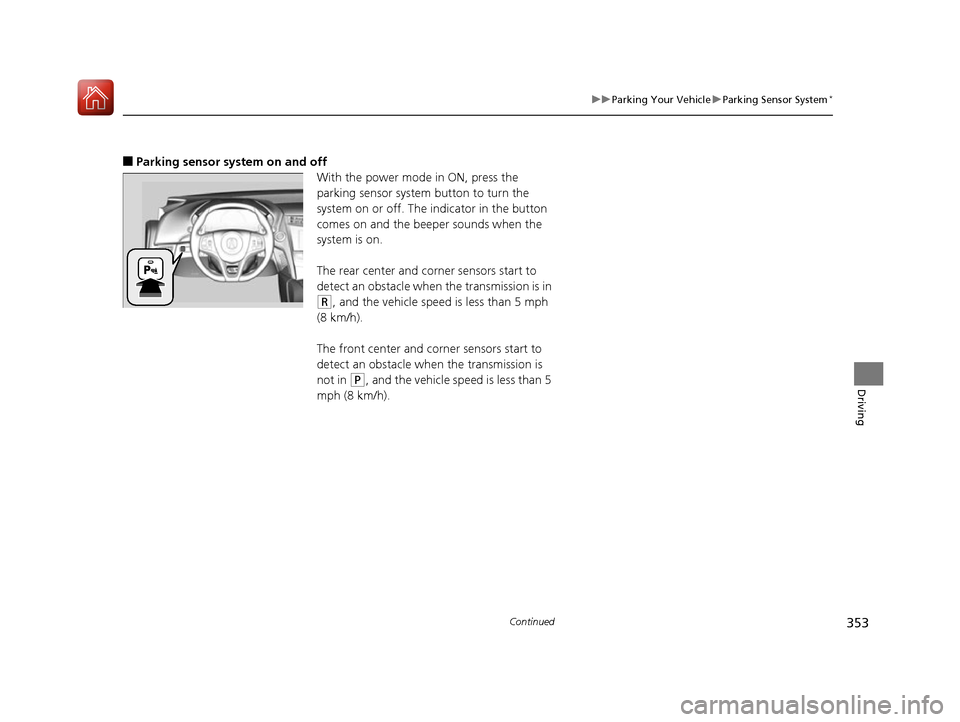
■Parking sensor system on and off
With the power mode in ON, press the
parking sensor system button to turn the
system on or off. The indicator in the button
comes on and the beeper sounds when the
system is on.
The rear center and corner sensors start to
detect an obstacle when the transmission is in
(R, and the vehicle speed is less than 5 mph
(8 km/h).
The front center and corner sensors start to
detect an obstacle when the transmission is
not in
(P, and the vehicle spee d is less than 5
mph (8 km/h).
17 NSX-31T6N6000.book 353 ページ 2016年4月22日 金曜日 午後3時44分
Page 356 of 473

355
uuParking Your Vehicle uParking Sensor System*
Driving
1. Make sure that the parking sensor system is not activated. Set the power mode to
VEHICLE OFF (LOCK).
2. Press and hold the parking sensor system button, and set the power mode to ON.
3. Keep pressing the button for ten seconds. Release the button when the indicator
in the button blinks.
4. Press the button again. The indi cator in the button goes off.
u The beeper sounds twice. The rear sensors are now turned off.
To turn the rear sensors on again, follo w the above procedure. The beeper sounds
three times when the rear sensors come back on.
■Turning Off All Rear Sensors1 Turning Off All Rear Sensors
When you select
(R, the indicator in the parking
sensor system button blinks as a reminder that the
rear sensors have been turned off.
17 NSX-31T6N6000.book 355 ページ 2016年4月22日 金曜日 午後3時44分
Page 359 of 473

358
uuRefueling uHow to Refuel
Driving
How to Refuel
Your fuel tank is not equipped with a fuel fill cap. You can insert the filler nozzle
directly into the filler neck. The tank seal s itself again when you pull out the filler
nozzle.
1.Stop your vehicle with the service station
pump on the left side of the vehicle in the
rear.
2. Turn off the power system.
3. Press the fuel fill door release button.
u The fuel fill door opens.
4. Place the end of the filler nozzle on the
lower part of filler opening, then insert it
slowly and fully.
u Make sure that the end of the filler
nozzle goes down along with the filler
pipe.
u Keep the filler nozzle level.
u When the tank is full, the filler nozzle will
click off automatically.
u After filling, wait about five seconds
before removing th e filler nozzle.
5. Shut the fuel fill door by hand.1How to Refuel
The fuel filler opening is designed to accept only
service station filler nozzles for refueling. Use of
smaller diameter tubes (e.g ., to siphon fuel for other
uses) or other non-service station devices can
damage the area in and around the filler opening.
The filler nozzle automatically stops to leave space in
the fuel tank so that fuel does not overflow as a result
of changes in air temperature.
If the fuel nozzle keeps turning off when the tank is not
full, there may be a problem with the pump’s fuel vapor
recovery system. Try filling at another pump. If this does not
fix the problem, consult an authorized Acura NSX dealer.
Do not continue to add fuel after the nozzle has
automatically stopped. Addi tional fuel can exceed
the full tank capacity.
If you have to refuel y our vehicle from a portable
container, use the funnel pr ovided with your vehicle.
2Refueling from a Portable Fuel Container P. 451
3WARNING
Gasoline is highly flammable and explosive.
You can be burned or seriously injured
when handling fuel.
•Turn the power sy stem off, and keep
heat, sparks, and flame away.
• Handle fuel only outdoors.
• Wipe up spills immediately.
Press
17 NSX-31T6N6000.book 358 ページ 2016年4月22日 金曜日 午後3時44分
Page 362 of 473

361
Maintenance
This chapter discusses basic maintenance.
Before Performing MaintenanceInspection and Maintenance ............ 362
Safety When Performing Maintenance .... 363Parts and Fluids Used in Maintenance Service ........................................... 364
Maintenance Minder
TM..................... 365
Maintenance Under the Hood and Hatch Maintenance Items Under the Hood and Hatch ............................................. 371
Opening the Hatch .......................... 373
Opening the Hood ........................... 374
Engine Compartment Cover ............. 375
Recommended Engine Oil ................ 376
Oil Check ......................................... 377
Adding Engine Oil ............................ 380 Cooling System ................................ 382
Inverter Coolant ............................... 384
Transmission Fluids .......................... 385
Brake Fluid ....................................... 386
Refilling Window Wa
sher Fluid......... 386
Replacing Light Bulbs ....................... 387Checking and Maintaining Wiper Blades.... 390Checking and Maintaining Tires
Checking Tires ................................. 393
Tire and Loading Information Label ..... 394Tire Labeling .................................... 394DOT Tire Quality Grading (U.S. Vehicles) ...... 396Wear Indicators................................ 398
Tire Service Life ................................ 398
Tire and Wheel Replacement............ 399 Tire Rotation .................................... 400
Winter Tires ..................................... 401
Cold Weather Driving ...................... 402
12-Volt Battery ................................. 403
Remote Transmitter Care Replacing the Button Battery ........... 404
Climate Control System Maintenance.... 405CleaningInterior Care .................................... 406
Exterior Care.................................... 408
Accessories and Modifications Accessories ...................................... 412
Modifications................................... 413
Storage .............................................. 414
17 NSX-31T6N6000.book 361 ページ 2016年4月22日 金曜日 午後3時44分