2017 Acura NSX airbag
[x] Cancel search: airbagPage 36 of 116
66 || 67
VEHICLE CONTROLSVEHICLE CONTROLS
Sitting improperly or out of position can result in serious injury or death in a
crash. Always sit upright, well back in the seat, with your feet on the floor.
WARNING
Sitting too close to a front airbag can result in serious injury or death if the front
airbags inflate.
Always sit as far back from the front airbags as possible while maintaining
control of the vehicle.
WARNING
Reclining the seat-back too far can result in serious injury or death in a crash.
Adjust the seat-back to an upright position, and sit well back in the seat.
WARNING
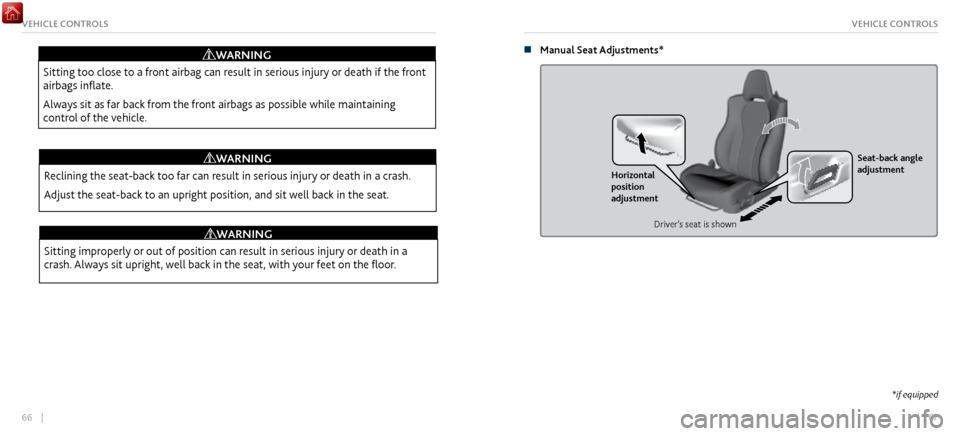
n Manual Seat Adjustments*
Horizontal
position
adjustment Seat-back angle
adjustment
Driver’s seat is shown
*if equipped
Page 59 of 116
112 || 113
Subscription Features
A subscription-based service that provides convenient features, such as collision notification,
emergency assistance, online security, and important messages about your vehicle.
To subscribe or get more information, contact a dealer or visit owners.acura.com (U.S.) or
www.myacura.ca (Canada). Requires enrollment and privacy agreement.
n
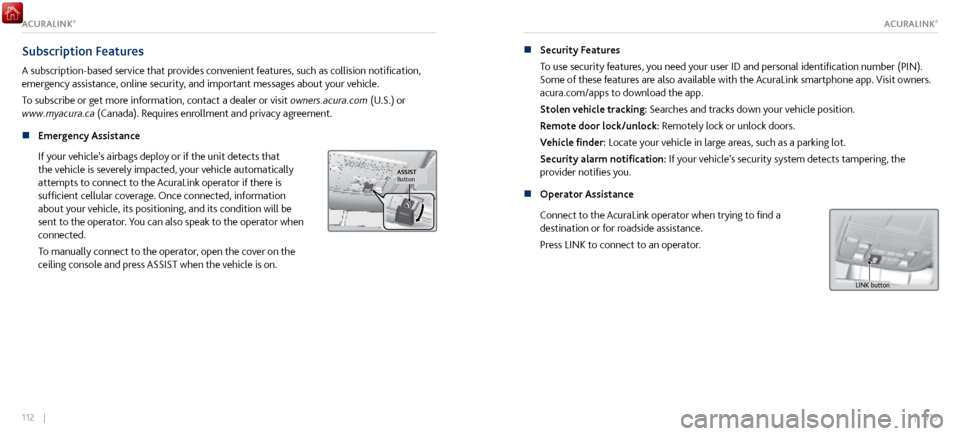
Emergency Assistance
If your v
ehicle’s airbags deploy or if the unit detects that
the vehicle is severely impacted, your vehicle automatically
attempts to connect to the AcuraLink operator if there is
sufficient cellular coverage. Once connected, information
about your vehicle, its positioning, and its condition will be
sent to the operator. You can also speak to the operator when
connected.
To manually connect to the operator, open the cover on the
ceiling console and press ASSIST when the vehicle is on.
ButtonASSIST
n Security Features
To use security
features, you need your user ID and personal identification number (PIN).
Some of these features are also available with the AcuraLink smartphone app. Visit owners.
acura.com/apps to download the app.
Stolen vehicle tracking: Searches and tracks down your vehicle position.
Remote door lock/unlock: Remotely lock or unlock doors.
Vehicle finder: Locate your vehicle in large areas, such as a parking lot.
Security alarm notification: If your vehicle’s security system detects tampering, the
provider notifies you.
n
Operator Assistance
Connect to the AcuraLink operator
when trying to find a
destination or for roadside assistance.
Press LINK to connect to an operator.
L INK button
ACURALINK®ACURALINK®
Page 111 of 116

216 || 217
CLIENT INFORMATIONCLIENT INFORMATION
Disclosures
n Devices That Emit Radio Waves
The following products and systems
on your vehicle emit radio waves when in operation:
AcuraLink
Audio system
Bluetooth Audio
Bluetooth
HandsFreeLink
HomeLink Universal Transceiver
Immobilizer system Remote transmitter
Remote engine starter
Keyless Access System
Tire Pressure Monitoring System
Charging cable
Interactive remote control
Each of the above complies with the appropriate requirements or the required standards of
FCC (Federal Communications Commission) and Industry Canada, described below:
As required by the FCC:
This device complies with Part 15 of the FCC rules. Operation is subject to the following two
conditions: (1) This device may not cause harmful interference, and (2) this device must accept
any interference received, including interference that may cause undesired operation.
Changes or modifications not expressly approved by the party responsible for compliance
could void the user’s authority to operate the equipment.
As required by Industry Canada:
This device complies with Industry Canada licence-exempt RSS standard(s). Operation is
subject to the following two conditions: (1) this device may not cause interference, and (2)
this device must accept any interference, including interference that may cause undesired
operation of the device. n
California Perchlorate C
ontamination Prevention Act
The airbags, seat belt tensioners, and CR-type batteries in this vehicle may contain
perchlorate materials—special handling may apply. See www.dtsc.ca.gov/hazardouswaste/
perchlorate/ for more information.
n
California Proposition 65 Warning
W
ARNING: This product contains or emits chemicals known to the state of California to
cause cancer and birth defects or other reproductive harm.
n
Event Data Recorders
This
vehicle is equipped with an event data recorder (EDR). The main purpose of an EDR
is to record, in certain crash or near crash-like situations, such as an air bag deployment
or hitting a road obstacle, data that will assist in understanding how a vehicle’s systems
performed. The EDR is designed to record data related to vehicle dynamics and safety
systems for a short period of time, typically 30 seconds or less. The EDR in this vehicle
is designed to record such data as:
How various systems in your vehicle were operating;
Whether or not the driver and passenger safety belts were buckled/fastened;
How far (if at all) the driver was depressing the accelerator and/or brake pedal; and,
How fast the vehicle was traveling.
These data can help provide a better understanding of the circumstances in which crashes
and injuries occur.
NOTE: EDR data are recorded by your vehicle only if a non-trivial crash situation occurs;
no data are recorded by the EDR under normal driving conditions and no personal data
(e.g., name, gender, age, and crash location) are recorded. However, other parties, such as
Page 114 of 116

222 || 223
VOICE COMMAND INDEXVOICE COMMAND INDEX
n Song by Voice Commands*
Available for tracks
stored on an iPod or USB device.
Music search
List album (specify album)
List artist (specify artist)
List composer (specify composer)
List genre (specify genre)
List playlist (specify playlist)
Play album (specify album)
Play artist (specify artist)
Play composer (specify composer) Play genre (specify genre)
Play playlist (specify playlist)
Play song (specify song)
What/Who am I listening to?
Who is this?
What’s playing?
Who’s playing?
What album is this?
*models with navigation
INDEX
AcuraLink ........................................................................\
.
110
AcuraLink messages ................................................. 110
Emergency assistance .............................................. 112
Operator assistance ................................................. 113
Roadside assistance .................................................. 214
Security Features
....................................................... 113
Subscription Features
............................................... 112
Airbags ........................................................................\
....... 24
Airbag care.................................................................... 32
Airbag system components
..................................... 30
Airbag system indicators ........................................... 28
Driver’
s knee airbag
.................................................... 26
Front airbags ................................................................ 24
Passenger Airbag Off
Indicator
................................ 29
Side airbags .................................................................. 25
Side-curtain airbags .................................................... 25
Android Auto™ ............................................................... 90
Apple® CarPlay® ............................................................. 88
Audio operation Accessory P
ower Socket
............................................ 81
Adjusting the Sound ................................................... 83
Android Auto™ ........................................................... 90
Apple® CarPlay® ........................................................ 88
Bluetooth audio .......................................................... 99
Display Audio .............................................................. 84
FM Radio ....................................................................... 92
iPod ........................................................................\
....... 94
Pandora ........................................................................\
. 97
SiriusXM Radio ............................................................ 93SOURCE
.................................................................
92–99
Steering-wheel controls ............................................ 82
USB flash drive ............................................................. 96
USB port....................................................................... 80
Bluetooth® Audio
Commands
.................................... 221
Braking Anti-Lock Brake System (ABS)
............................... 139
Automatic Brake Hold ............................................. 141
Brake Assist S
ystem
.................................................. 139
Foot brake ................................................................... 139
Parking brake.............................................................
140
Break In
........................................................................\
.... 125
Carbon Monoxide Gas .................................................... 16
Car Wash Mode ............................................................. 135
Child safety ....................................................................... 33
Child seat Child seat with tether
............................................. 40
Installing a child seat ............................................... 38
Selecting a child seat ............................................... 37
Protecting Infants ....................................................... 35
Protecting Lar
ger Children
........................................ 41
Protecting Smaller Children ...................................... 36
Climate control ................................................................ 76
Heated seats ................................................................ 77
Climate Control C
ommands
...................................... 220
Clock ........................................................................\
.......... 79
Cold Weather
Driving
................................................... 155
Contact us ....................................................................... 213