2017 Acura MDX radio
[x] Cancel search: radioPage 260 of 581

259
uuAudio System Basic Operation uPlaying SiriusXM ® Radio
Features
Sample each channel on the selected mode for 10 seconds.
1. Press the MENU button.
2. Rotate to select Scan, then press .
3. Rotate to select Scan Channels or Scan Songs in Presets , then press .
To turn off scan, press to select Stop Scan, or press the BACK button.
1. Select More.
2. Select Scan.
3. Select Scan Channels or Scan Songs in Presets .
To turn off scan, select Stop Scan.
■Scan1Scan
You can select desired channel by songs using Scan
Songs in presets.
The “Scan Songs in Preset s” function is based on
TuneScan
TM technology of SiriusXM ®.
The “Featured Channels ” function is based on
Featured Favorites
TM technology of SiriusXM ®.
TuneScan
TM and Featured FavoritesTM are registered
trademarks of SiriusXM ® Radio, Inc.
Scan Mode Menu Items
Scan Channels: Scans for channels with a strong
signal in the selected mode.
Scan Songs in Presets: Scans for desired preset
channel by songs. Select Skip Up or Skip Down to
skip to the next/previ ous stored selection.
Interface Dial
On Demand Multi-Use DisplayTM
17 ACURA MDX-31TZ56300.book 259 ページ 2016年5月13日 金曜日 午後7時46分
Page 268 of 581
267
uuAudio System Basic Operation uPlaying Internet Radio
Continued
Features
Playing Internet Radio
Connect a compatible phone through Bluetooth®.
You can also connect the phone using your USB connector to the USB port.
Select Source to select Pandora or Aha mode.
Compatible phones only
iPhone
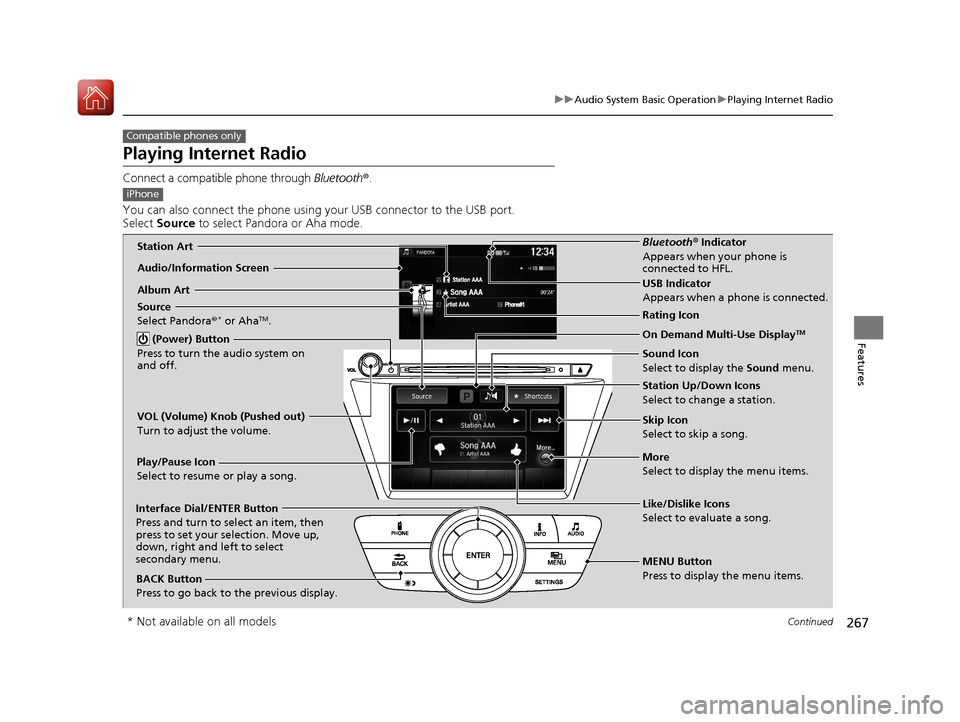
Audio/Information Screen
Album ArtUSB Indicator
Appears when a phone is connected.
Rating Icon
BACK Button
Press to go back to the previous display.
Skip Icon
Select to skip a song.
More
Select to display the menu items. Station Up/Down Icons
Select to change a station.
Source
Select Pandora
®
* or AhaTM.
Play/Pause Icon
Select to resume or play a song.
Like/Dislike Icons
Select to evaluate a song.
(Power) Button
Press to turn the audio system on
and off.Interface Dial/ENTER Button
Press and turn to select an item, then
press to set your selection. Move up,
down, right and left to select
secondary menu.
On Demand Multi-Use DisplayTM
VOL (Volume) Knob (Pushed out)
Turn to adjust the volume.
Bluetooth ® Indicator
Appears when your phone is
connected to HFL.
MENU Button
Press to display the menu items. Sound Icon
Select to display the Sound menu.Station Art
* Not available on all models
17 ACURA MDX-31TZ56300.book 267 ページ 2016年5月13日 金曜日 午後7時46分
Page 269 of 581
uuAudio System Basic Operation uPlaying Internet Radio
268
Features
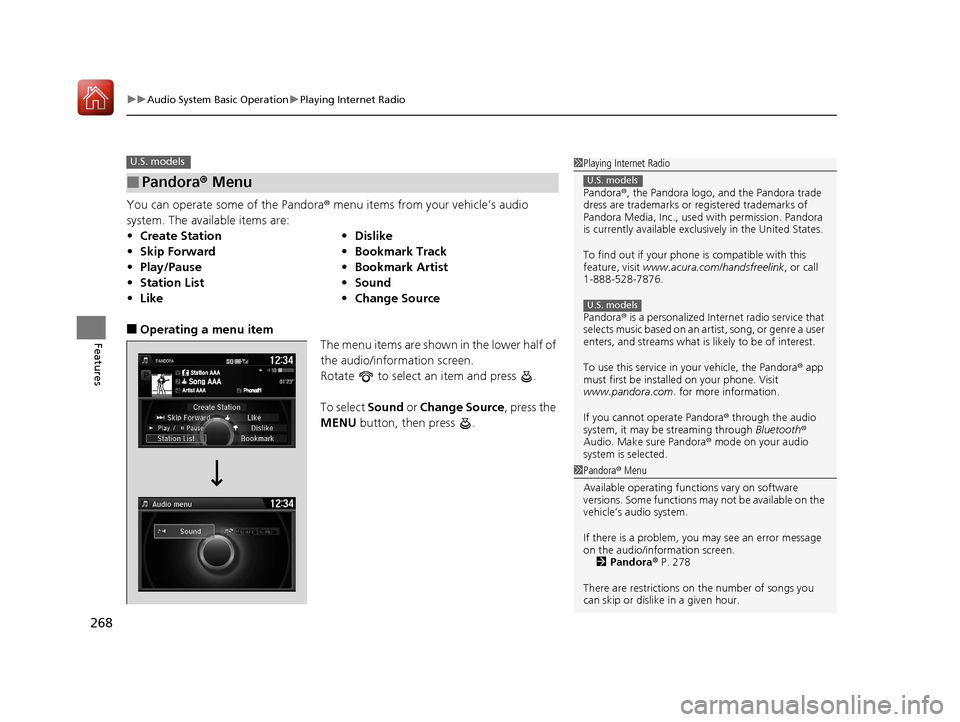
You can operate some of the Pandora® menu items from your vehicle’s audio
system. The available items are:
■Operating a menu item The menu items are shown in the lower half of
the audio/information screen.
Rotate to select an item and press .
To select Sound or Change Source , press the
MENU button, then press .
■Pandora® Menu
•Create Station •Dislike
• Skip Forward •Bookmark Track
• Play/Pause •Bookmark Artist
• Station List •Sound
• Like •Change Source
U.S. models1Playing Internet Radio
Pandora ®, the Pandora logo, and the Pandora trade
dress are trademarks or registered trademarks of
Pandora Media, Inc., used with permission. Pandora
is currently available exclusively in the United States.
To find out if your phone is compatible with this
feature, visit www.acura.com/handsfreelink , or call
1-888-528-7876.
Pandora ® is a personalized Internet radio service that
selects music based on an artist, song, or genre a user
enters, and streams what is likely to be of interest.
To use this service in your vehicle, the Pandora ® app
must first be installed on your phone. Visit
www.pandora.com . for more information.
If you cannot operate Pandora ® through the audio
system, it may be streaming through Bluetooth®
Audio. Make sure Pandora ® mode on your audio
system is selected.
U.S. models
U.S. models
1 Pandora ® Menu
Available operating functi ons vary on software
versions. Some functions ma y not be available on the
vehicle’s audio system.
If there is a problem, you may see an error message
on the audio/information screen. 2 Pandora ® P. 278
There are restrictions on the number of songs you
can skip or dislike in a given hour.
17 ACURA MDX-31TZ56300.book 268 ページ 2016年5月13日 金曜日 午後7時46分
Page 270 of 581
269
uuAudio System Basic Operation uPlaying Internet Radio
Features
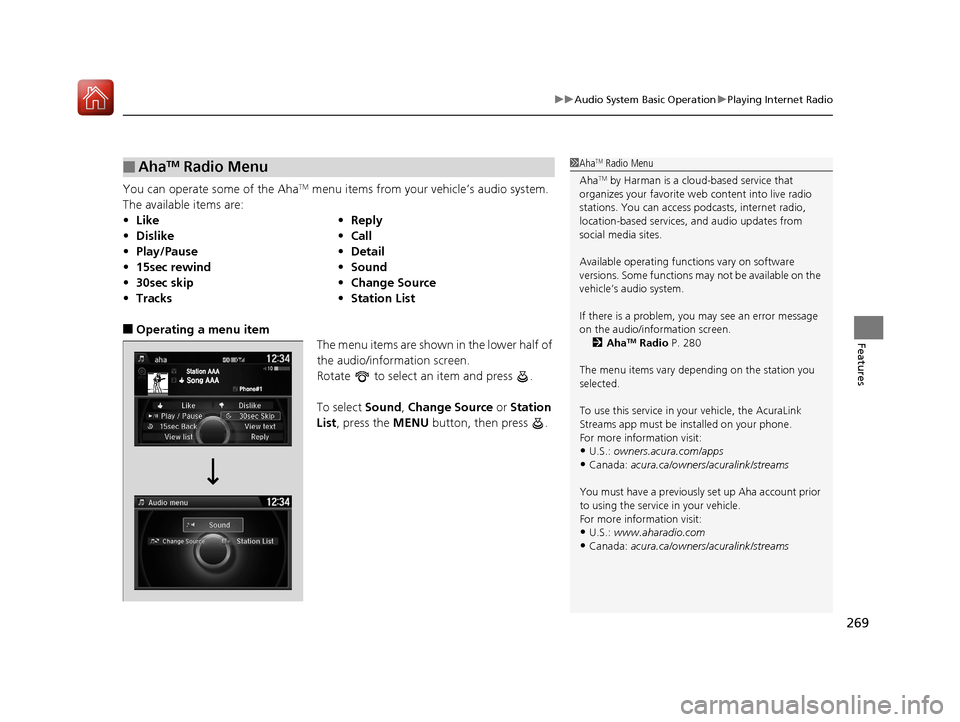
You can operate some of the AhaTM menu items from your vehicle’s audio system.
The available items are:
■Operating a menu item The menu items are shown in the lower half of
the audio/information screen.
Rotate to select an item and press .
To select Sound, Change Source or Station
List , press the MENU button, then press .
■AhaTM Radio Menu
•Like •Reply
• Dislike •Call
• Play/Pause •Detail
• 15sec rewind •Sound
• 30sec skip •Change Source
• Tracks •Station List
1AhaTM Radio Menu
Aha
TM by Harman is a clou d-based service that
organizes your favorite we b content into live radio
stations. You can access podcasts, internet radio,
location-based services , and audio updates from
social media sites.
Available operating functi ons vary on software
versions. Some functions ma y not be available on the
vehicle’s audio system.
If there is a problem, you may see an error message
on the audio/information screen. 2 Aha
TM Radio P. 280
The menu items vary depending on the station you
selected.
To use this service in y our vehicle, the AcuraLink
Streams app must be installed on your phone.
For more information visit:
•U.S.: owners.acura.com/apps
•Canada: acura.ca/owners/acuralink/streams
You must have a previously set up Aha account prior
to using the service in your vehicle.
For more information visit:
•U.S.: www.aharadio.com
•Canada: acura.ca/owners/acuralink/streams
17 ACURA MDX-31TZ56300.book 269 ページ 2016年5月13日 金曜日 午後7時46分
Page 281 of 581

280
uuAudio Error Messages uAhaTM Radio
Features
AhaTM Radio
If an error occurs while playing AhaTM Radio, you may see the following error
messages.
If you cannot clear the error message, contact a dealer.
Error MessageSolution
Incompatible USB Device
Please Check Owner’s ManualAppears when an incompatible device is connected. Disconnect
the device. Then turn the audio syst em off, and turn it on again.
Do not reconnect the device that caused the error.
17 ACURA MDX-31TZ56300.book 280 ページ 2016年5月13日 金曜日 午後7時46分
Page 282 of 581
281
Features
General Information on the Audio System
SiriusXM® Radio Service
1.You need your radio ID ready before regist ering for subscription. To see the ID in
the display: Turn the interface dial until 0 appears.
2. Have your radio ID and credit card numb er ready, and either call or visit the
SiriusXM ® website to subscribe.
Switch to the SiriusXM® mode by using the SOURCE button on the steering wheel,
or through the On Demand Multi-Use Display
TM, and stay in this mode for about 30
minutes until the service is activated. Make su re your vehicle is in an open area with
good reception.
Loading:
SiriusXM ® is loading the audio or program information.
Channel off air:
The channel is not currently broadcasting.
Channel unsubscribed:
You are not subscribed to the channel selected.
No signal:
The signal is too weak in the current location.
Channel unavailable:
No such channel exists.
Check antenna, Antenna disconnected, Antenna shorted:
There is a problem with the SiriusXM ® antenna. Contact a dealer.
■Subscribing to SiriusXM® Radio
■Receiving SiriusXM ® Radio
■SiriusXM ® Radio Display Messages
1 Subscribing to SiriusXM ® Radio
Contact Information for SiriusXM ® Radio:
•US: SiriusXM ® Radio at www.siriusxm.com or 1-
800-852-9696
•Canada: SiriusXM ® Canada at www.siriusxm.ca , or
1-877-438-9677
1 Receiving SiriusXM ® Radio
The SiriusXM ® satellites are in orbit over the equator;
therefore, objects south of the vehicle may cause
satellite reception interruptions. Sa tellite signals are
more likely to be blocked by tall buildings and
mountains the farther north you travel from the
equator.
You may experience rece ption problems under the
following circumstances:
•In a location with an obstruction to the south of
your vehicle.
•In tunnels
•On the lower level of a multi-tiered road
•Large items carried on the roof rack
17 ACURA MDX-31TZ56300.book 281 ページ 2016年5月13日 金曜日 午後7時46分
Page 368 of 581

367Continued
Driving
When Driving
Starting the Engine
1.Make sure the parkin g brake is applied.
u The electric parking brake indicator
comes on for 15 seconds when you press
the electric parking brake switch.
2. Depress the brake pedal.
u Make sure the transmission is in
(P.
3. Press the ENGINE START/STOP button
without depressing the accelerator pedal.
The engine will crank until it starts.
1 Starting the Engine
Keep your foot firmly on the brake pedal when
starting the engine.
The engine is harder to st art in cold weather and in
thinner air found at altitudes above 8,000 feet (2,400
meters).
When starting the engine in cold weather, turn off all
electrical accessories such as the lights, climate control
system, and rear defogger in order to reduce battery drain.
If you live in a region where winter is extremely cold,
an engine block heater and transmission clutch
actuator heater will impr ove starting and warming of
the engine. Consult a dealer for details.
If the exhaust system sounds abnormal or you can
smell exhaust gas inside the vehicle, have your vehicle
checked by a dealer. There may be a problem with
the engine or exhaust system.
Bring the keyless access remote close to the ENGINE
START/STOP button if the batte ry in the keyless
access remote is weak.
2 If the Keyless Access Remote Battery is
Weak P. 535
The engine may not start if the keyless access remote
is subjected to strong radio waves.
Do not hold the ENGINE START/STOP button to
start the engine.
If the engine does not start, wait at least 30 seconds
before trying again.
Brake Pedal
17 ACURA MDX-31TZ56300.book 367 ページ 2016年5月13日 金曜日 午後7時46分
Page 423 of 581

uuWhen Driving uBlind spot information (BSI) System*
422
Driving
■When the system detects a vehicle1Blind spot inform ation (BSI) System*
You can change the setting for BSI.
2 Customizable Features P. 126, 294
Turn the system off when towing a trailer.
The system may not work properly for the following
reasons:
•The added mass tilts the vehicle and changes the
radar coverage.
•The trailer itself can be detected by the radar
sensors, causing the BSI al ert indicators to come on.
BSI may be adversel y affected when:
•Objects (guard rails, poles, trees, etc,.) are
detected.
•An object that does not re flect radio waves well,
such as a motorcycle, is in the alert zone.
•Driving on a curved road.
•A vehicle is moving from a far lane to the adjacent
lane.
•The system picks up external electrical interference.•The rear bumper or the sens ors have been improperly
repaired or the rear bu mper has been deformed.
•The orientation of the sensors has been changed.•In bad weather (Heavy rain, snow, and fog).
For proper BSI use:
•Always keep the rear bumper corner area clean.
•Do not cover the rear bumper corner area with
labels or sticke rs of any kind.
•Take your vehicle to a dealer if you need the rear
bumper corner area or the radar sensors to be repaired,
or the rear bumper corner area is strongly impacted.
■Comes on when●A vehicle enters the ale rt zone from behind
to overtake you with a speed difference of
no more than 31 mph (50 km/h) from your
vehicle.
●You pass a vehicle with a speed difference
of no more than 12 mph (20 km/h).
BSI Alert Indicator: Located near the outside
rearview mirror on both sides.
■Blinks and the beeper sounds when
You move the turn signal lever in the direction
of the detected vehicle. The beeper sounds
three times. Comes On
Blinks
* Not available on all models
17 ACURA MDX-31TZ56300.book 422 ページ 2016年5月13日 金曜日 午後7時46分