Page 54 of 170
| 47
V
EHICLE CONTROLS
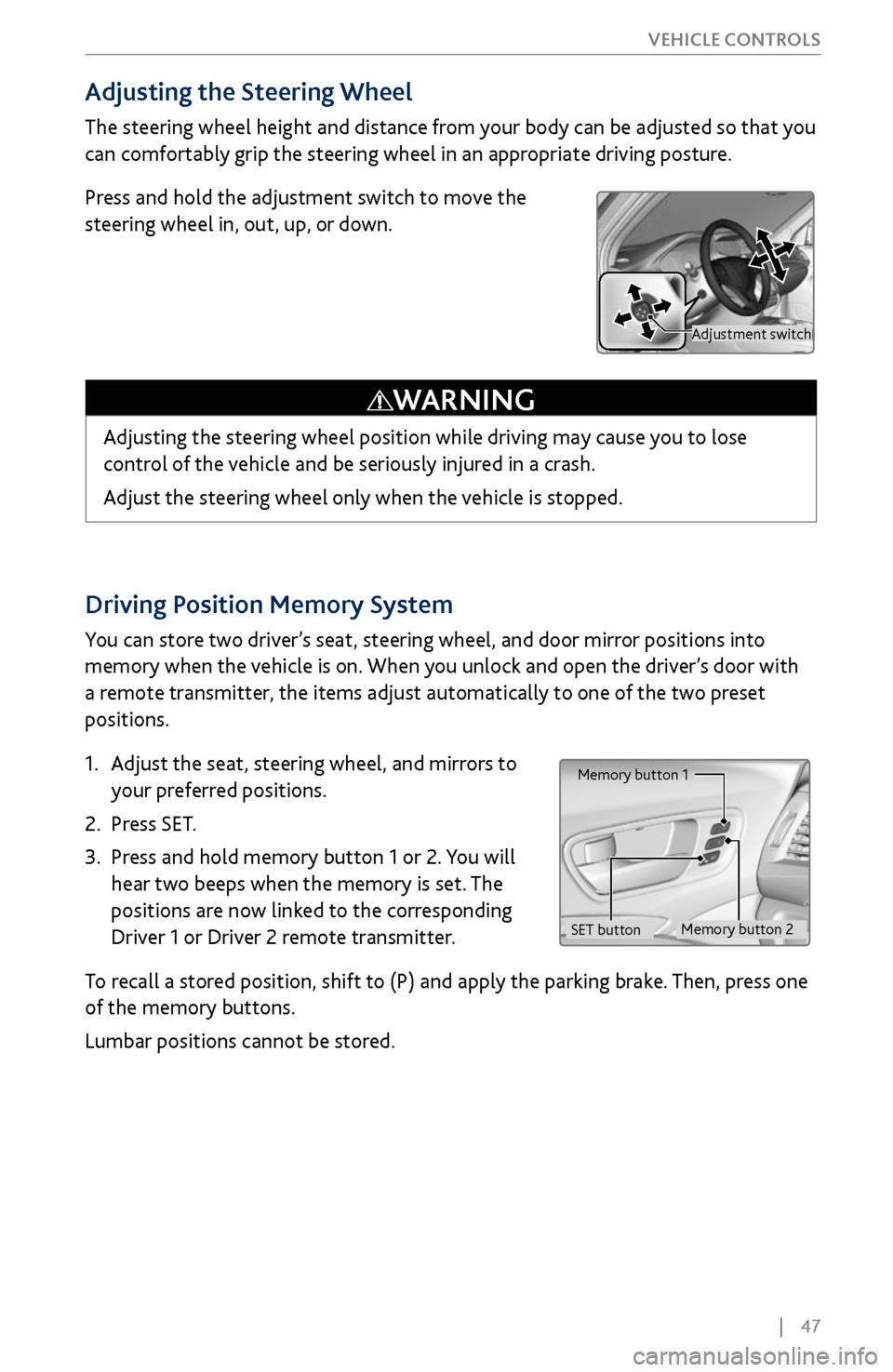
Driving Position Memory System
You can store two driver’s seat, steering wheel, and door mirror positions into
memory when the vehicle is on. When you unlock and open the driver’s door with
a remote transmitter, the items adjust automatically to one of the two preset
positions.
1.
Adjust the seat
, steering wheel, and mirrors to
your preferred positions.
2.
Press SET.
3.
Press and hold memory button 1 or 2.
You will
hear two beeps when the memory is set. The
positions are now linked to the corresponding
Driver 1 or Driver 2 remote transmitter.
To recall a stored position, shift to (P) and apply the parking brake. Then, press one
of the memory buttons.
Lumbar positions cannot be stored.
Memory button 1
Memory button 2
SET button
Adjusting the Steering Wheel
The steering wheel height and distance from your body can be adjusted so that you
can comfortably grip the steering wheel in an appropriate driving posture.
Press and hold the adjustment switch to move the
steering wheel in, out, up, or down.
Adjusting the steering wheel position while driving may cause you to lose
control of the vehicle and be seriously injured in a crash.
Adjust the steering wheel only when the vehicle is stopped.
WARNING
Adjustment switch
Page 58 of 170
| 51
V
EHICLE CONTROLS
Climate Control System
Set your preferred interior temperature by selecting the proper mix of heated or
cooled air and fan speed.
Front Operation
Use the On-Demand Multi-Use Display (ODMD) touchscreen or the buttons
below the screen to operate the system.
Recirculation/
fresh air mode
Driver’s side
temperature
On-Demand Multi-Use Display (ODMD)
When you select a climate control icon, a new screen appears where you can make
adjustments or change settings.
Airflow
control mode
AC: Turn the air conditioning on or off.
SYNC: Set the passenger’s side temperature
to the same as the driver’s side.
Fan
speedRear temperature
Passenger’s side
temperature
Windshield
defroster
button
Driver’s side
temperature switch
Climate control buttons
ON/OFF
buttonAUTO button: Press, then
adjust the temperature to
your preferred setting.
Rear window
defogger/heated
mirror buttonPassenger’s side
temperature switch
Page 62 of 170
| 55
V
EHICLE CONTROLS
*if equipped
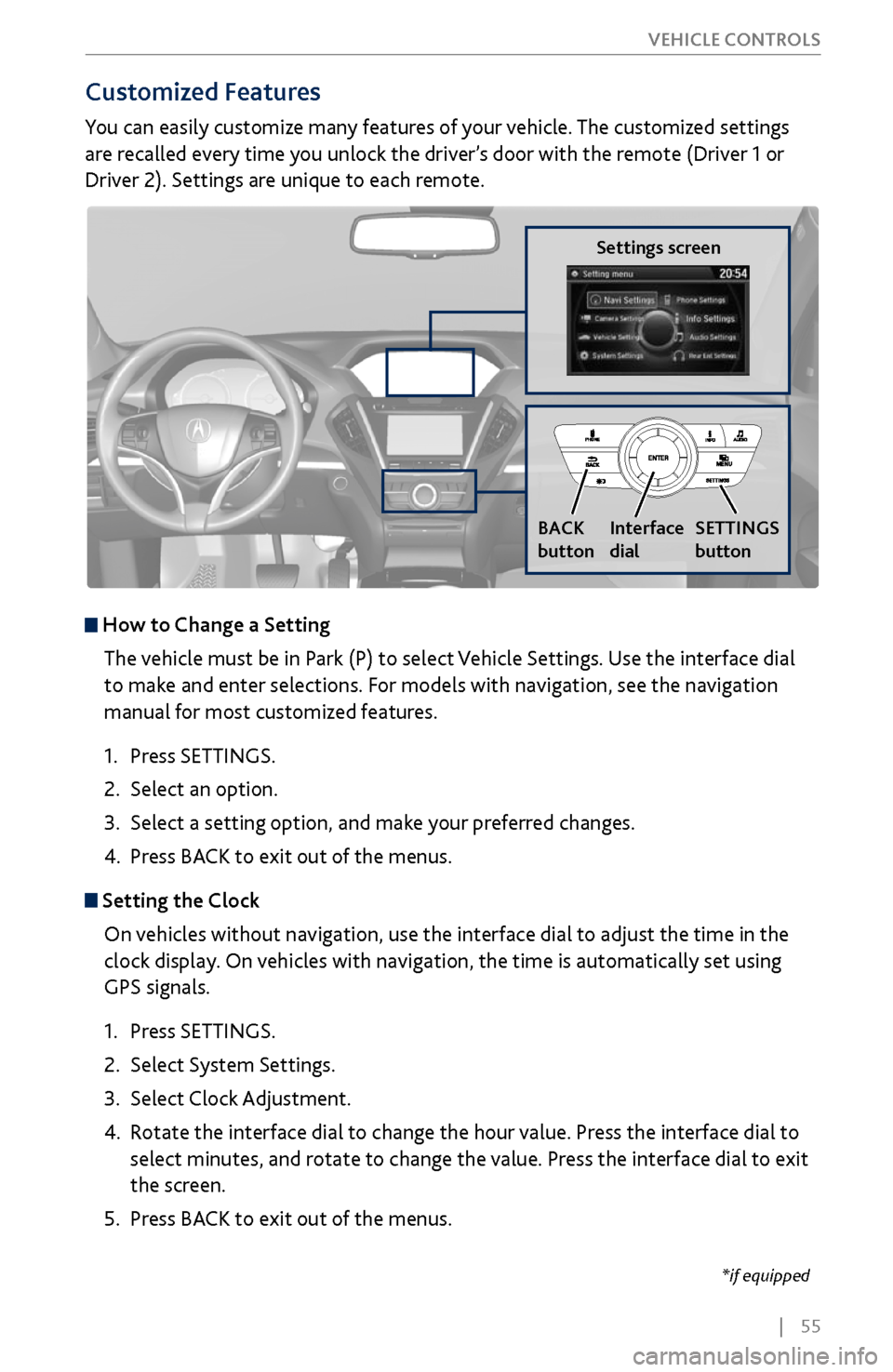
Customized Features
You can easily customize many features of your vehicle. The customized settings
are recalled every time you unlock the driver’s door with the remote (Driver 1 or
Driver 2). Settings are unique to each remote.
How to
Change a Setting
The vehicle must be in Park (P) to select Vehicle Settings. Use the interface dial
to make and enter selections. For models with navigation, see the navigation
manual for most customized features.
1.
Press SETTINGS.
2.
Select an option.
3.
Select a setting option, and make
your preferred changes.
4.
Press BA
CK to exit out of the menus.
Setting the Clock
On vehicles without navigation, use the interface dial to adjust the time in the
clock display. On vehicles with navigation, the time is automatically set using
GPS signals.
1.
Press SETTINGS.
2.
Select System Settings.
3.
Select Clock Adjustment
.
4.
Rotate the interface dial to
change the hour value. Press the interface dial to
select minutes, and rotate to change the value. Press the interface dial to exit
the screen.
5.
Press BA
CK to exit out of the menus.
Settings screen
BACK
button
Interface
dial SETTINGS
button
Page 78 of 170

| 71
Learn how to operate the vehicle’s hands-free calling system.
Basic HFL Operation
Make and receive phone calls using the vehicle’s audio system, without handling
your phone. Visit www.acura.com/handsfreelink (U.S.) or www.handsfreelink.ca
(Canada) to check phone compatibility.
To reduce the potential for driver distraction, certain manual functions may
be inoperable or grayed out while the vehicle is moving. Voice commands are
always available.
HFL Displays and Controls
Use the controls to enter information and make selections.
BLUETOOTH® HANDSFREELINK®
HFL display
PHONE button: Go to
the phone screen.
BACK button: Go back
to the previous display.
Interface dial (from the Phone
screen): Move up, down, left, and
right. Rotate and press to make
selections in the upper display.
Pick-Up button: Answer an incoming call, or display
speed dial and call history in the MID.
Selector wheel: Scroll through speed dial and call
history in the MID. Press to make a selection. Adjust
volume during a call.
Hang-Up/Back button: End or decline a call, or clear
HFL information in the MID.
Talk button: Make a call using a stored voice tag,
phonebook name, or phone number.
MENU button: Choose
phone options.
SETTINGS button:
Choose Phone Settings.
BLUETOOTH® HANDSFREELINK®
Page 88 of 170
| 81
NAVIGATION
Learn how to enter a destination and operate the navigation system.
Basic Navigation Operation
A real-time navigation system uses GPS and a map database to show your current
location and help guide you to a desired destination. You can operate the system
using voice commands or the system controls.
To reduce the potential for driver distraction, certain manual functions may
be inoperable or grayed out while the vehicle is moving. Voice commands are
always available.
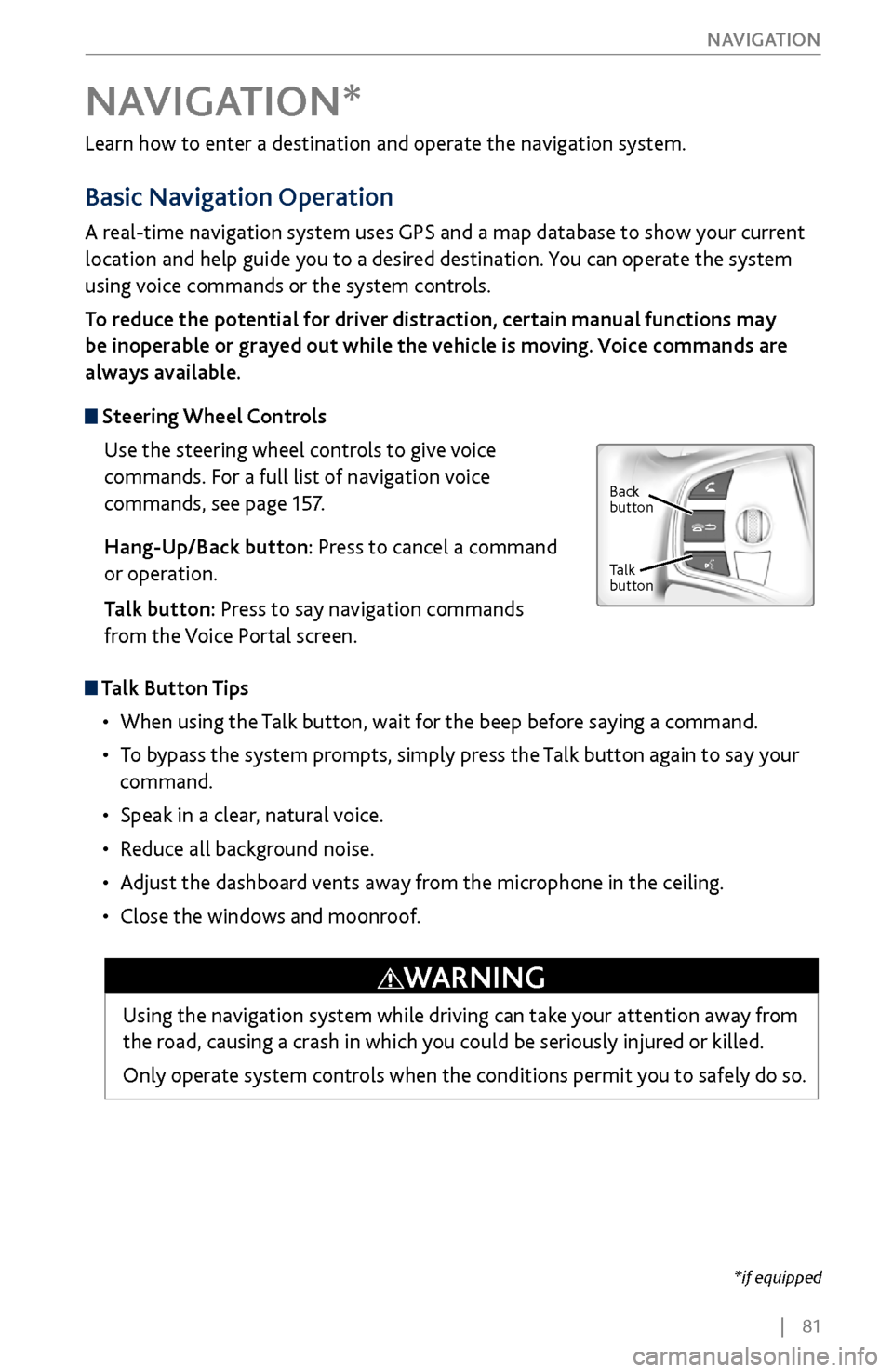
Steering Wheel Controls
Use the steering wheel controls to give voice
commands. For a full list of navigation voice
commands, see page 157.
Hang-Up/Back button: Press to cancel a command
or operation.
Talk button: Press to say navigation commands
from the Voice Portal screen.
Talk Button Tips
•
When using the T
alk button, wait for the beep before saying a command.
•
To bypass
the system prompts, simply press the Talk button again to say your
command.
•
Speak in a clear, natural v
oice.
•
Reduce all background noise.
•
Adjust the dashboard
vents away from the microphone in the ceiling.
•
Close the windows and moonr
oof.
NAVIGATION*
Using the navigation system while driving can take your attention away from
the road, causing a crash in which you could be seriously injured or killed.
Only operate system controls when the conditions permit you to safely do so.
WARNING
*if equipped
Back
button
Talk
button
Page 97 of 170

90 |
DRIVING
Maximum Load Limit
Carrying too much cargo or improperly storing it can affect your vehicle’s handling,
stability, stopping distance, and tires, and make it unsafe. See the Tire and Loading
Information label on the driver’s doorjamb.
Maximum load for a vehicle with with second-row bench seats: 1,173 lbs (532 kg).
Maximum load for a vehicle with with second-rowcaptain seats: 1,005 lbs (456 kg).
Label Example
This figure includes the total weight of all occupants, cargo, and
accessories, and the tongue load if you are towing a trailer. Below are the
steps for determining the correct load limit:
1.
Locate the statement “The combined
weight of occupants and cargo
should never exceed XXX kg or XXX lbs.” on your vehicle’s placard.
2.
Determine the combined weight of the driv
er and passengers that will
be riding in your vehicle.
3.
Subtract the combined weight of the driv
er and passengers from XXX kg
or XXX lbs.
4.
The resulting figur
e equals the available amount of cargo and luggage
load capacity. For example, if the “XXX” amount equals 1,400 lbs. and
there will be five 150 lb. passengers in your vehicle, the amount of
available cargo and luggage load capacity is 650 lbs. (1,400 - 750 (5 x
150) = 650 lbs.)
5.
Determine the combined weight
of luggage and cargo being loaded on
the vehicle. That weight may not safely exceed the available cargo and
luggage load capacity calculated in step 4.
6.
If your v
ehicle will be towing a trailer, load from your trailer will be
transferred to your vehicle. Consult the Owner’s Manual on the Owner
Information CD or at owners.acura.com to determine how this reduces
the available cargo and luggage load capacity of your vehicle.
In addition, the total weight of the vehicle, all occupants, accessories,
cargo, and trailer tongue load must not exceed the Gross Vehicle Weight
Rating (GVWR) or the Gross Axle Weight Rating (GAWR). Both are on a
label on the driver’s doorjamb.
Page 105 of 170

98 |
DRIVING
When you change from D to R and vice versa, press the brake pedal and come
to a complete stop, then select the intended gear position while maintaining
brake pressure.
NOTICE
Shifting
Change your vehicle’s gears to begin driving.
Electronic Gear Selector
Select the vehicle’s gear using a simple button interface.
Park (P): Used for parking or starting or turning off
the vehicle. Press P with the brake pedal pressed. A
red indicator appears.
Reverse (R): Used for reversing. Pull back R. A green
indicator appears.
Neutral (N): Used for idling. Press N. A red
indicator appears
Drive (D/S): Used for normal driving (D) or driving in sequential mode (S) (see
page 99). Press D/S once for normal driving. Press D/S twice for sequential
mode driving. A green indicator appears. Make sure the parking brake is released
(see page 102).
Auto park mode
For your convenience, Park (P) is automatically selected when all of the following
conditions are met:
•
The vehicle is stopped.
•
The driver
’s seatbelt is unbuckled.
•
The driver’
s door is opened.
The vehicle can roll away if left unattended without confirming that Park is
engaged. Always keep your foot on the brake pedal until you have confirmed
that P is shown on the gear position indicator.
WARNING
Page 107 of 170
100 |
DRIVING
Auto Idle Stop*
Automatically stops and restarts the engine to help maximize your fuel economy,
depending on environmental and vehicle conditions.
Activating Auto Idle Stop
When the vehicle stops with the gear position
in Drive (D) and the brake pedal is pressed, the
engine turns off and the auto idle stop indicator
appears if conditions permit.
When you release the brake pedal, turn the
steering wheel, or press the accelerator pedal, the
engine restarts and the vehicle begins to move.
Auto idle stop does not activate (or the engine may automatically restart)
when the driver’s seat belt is unfastened, the vehicle is stopped on a steep hill,
the windshield defroster is on, and other conditions.
Turning the System On or Off
Press the Auto Idle Stop Off button to turn the
system off. Press the button again to turn it on.
The system defaults to On every time you start
the engine.
*if equipped

