Page 23 of 170

16 |
S
AFETY
Protecting Infants
An infant must be properly restrained in a rear-facing, reclining child seat until
the infant reaches the seat manufacturer’s weight or height limit for the seat, and
the infant is at least one year old. Many experts recommend use of a rear-facing
seat for a child up to two years old if the child’s height and weight are appropriate
for a rear-facing seat.
Child seats must be placed and secured in a rear
seating position. Rear-facing child seats should never
be installed in a forward-facing position.
When properly installed, a rear-facing child seat may
prevent the driver or a front passenger from moving
their seat all the way back, or from locking their
seat-back in the desired position. If this occurs, we
recommend that you install the child seat directly behind the front passenger’s
seat, move the seat as far forward as needed, and leave it unoccupied. Or, you
may wish to get a smaller rear-facing child seat.
Allowing a child to play with a seat belt or wrap one around their neck can
result in serious injury or death.
Instruct children not to play with any seat belt and make sure any unused
seat belt a child can reach is buckled, fully retracted, and locked.
WARNING
Placing a rear-facing child seat in the front seat can result in serious injury or
death during a crash.
Always place a rear-facing child seat in the rear seat, not the front.
WARNING
Page 38 of 170

| 31
V
EHICLE CONTROLS
Learn about the various controls necessary for operating and driving the vehicle.
Using the
Remote Transmitter
Lock or unlock the doors and tailgate.
Unlock button: Press once
to unlock the driver’s door.
Press again to unlock all
doors and the tailgate.
Release knob (front or back
of key): Slide the knob to
release the built-in key for
valet use.
Power tailgate button:
Press and hold to unlock and
open the power tailgate.
Press again to close it. Lock button: Press to lock
the doors and tailgate. Press
again for verification. LED indicators*: Check door
lock or engine status (see
page 96).
Panic button: Press and
hold to sound the alarm for
30 seconds. Press again to
cancel.
VEHICLE CONTROLS
ENGINE HOLD button*:
After pressing the Lock
button once, press and hold
to remotely start the engine.
*if equipped
Leaving the remote transmitter in the vehicle can result in theft or accidental
movement of the vehicle. Always take it with you whenever you leave the vehicle
unattended.
NOTICE
Page 39 of 170

32 |
V
EHICLE CONTROLS
Unlocking the
Tailgate
Press and hold the tailgate release button under
the tailgate handle to unlock and open the tailgate.
The vehicle can be on or off.
If there is not enough clearance for the tailgate
to fully open, press and hold the tailgate release
button until you hear two beeps. The tailgate
unlatches, and you can open it manually.
Tailgate Outer Handl e
Tailgate release
button
Keyless Access System
When you carry the remote transmitter (for example, in a pocket or purse) and it
is outside the vehicle and within range (about 32 inches or 80 cm), you can lock or
unlock the doors and tailgate without handling the transmitter.
Unlocking/Locking the Doors
To unlock: Grab the driver’s door handle when the
vehicle is off to unlock the driver’s door. Grab the
front passenger’s (or rear*) door handle to unlock
all doors and the tailgate.
To lock: Press the door lock button on any front
(or rear*) door handle when the vehicle is off. If the
remote transmitter is inside the vehicle, the doors
will not lock.
Tailgate Outer Handl e
Door Lock Button
*Some models include rear door keyless access.
Walk Away Auto Lock
When you walk away from the vehicle while carrying the remote transmitter, the
doors and trunk can automatically lock if the following conditions are met:
The remote transmitter is within a range of 6 feet (2 m).
All doors and the hatch are closed.
There is not an additional remote transmitter inside the vehicle.
When you are within the range, the system is activated and a beep sounds.
When you go outside the range, the lights flash and a beep sounds again.
The doors and trunk automatically lock.
To turn on this feature, follow the steps below:
1.
Press the SETTINGS
button.
2.
Select Vehicle
Settings, then Keyless Access Setup, then Walk Away Auto Lock.
3.
Select On.
Page 40 of 170
| 33
V
EHICLE CONTROLS
Power Tailgate Operation
Use these methods to operate the power tailgate.
Power Tailgate Release Button
The vehicle must be in Park (P).
Press and hold the power tailgate button on the
inside of the driver’s door to open the tailgate.
Press it again at any time to close it.
Power Tailgate Close ButtonPress the power tailgate close button to
automatically close the tailgate. Press it again at
any time to reverse the tailgate direction.
Power tailgate
close button
Closing or opening the power tailgate while anyone is in the path of the
tailgate can cause serious injury.
Make sure everyone is clear before operating the tailgate.
WARNING
Power tailgate button
Page 41 of 170

34 |
V
EHICLE CONTROLS
Door Operation from Inside the Vehicle
Use these methods to lock or unlock and open or close the doors.
Using the
Lock Tab
To unlock: Pull the lock tab rearward. When you
unlock either front door using the lock tab, the
specific door (driver’s or passenger’s) unlocks.
To lock: Push the lock tab forward. When you lock
the door using the lock tab on the driver’s door, all
the other doors and tailgate lock at the same time.
Using the Master Door Lock Switch
To unlock: Press the unlock side of the switch to
unlock all doors and the tailgate.
To lock: Press the lock side of the switch to lock all
doors and the tailgate.
Using the Front Door Inner Handle
Pull the front door inner handle. The door unlocks
and opens in one motion. Unlocking and opening
the driver’s door from the inner handle unlocks all
other doors.
Do not pull a front door inner handle while the
vehicle is moving.
Childproof Door Locks The childproof door locks prevent the rear doors
from being opened from the inside regardless of the
position of the lock tab.
Slide the lever in the rear door to the lock position,
and close the door.
Open the door using the outer door handle.
Unlock
Lock
Inner handle
To lock
To unlock
Lock tab
To lock
To unlock
Master door lock switch
Page 42 of 170

| 35
V
EHICLE CONTROLS
Power
Window Operation
The power windows can be opened and closed by using the switches on the doors
when the vehicle is on. The switches on the driver’s side can be used to open and
close all the windows.
Automatic Operation
To open: Push the switch down firmly.
To close: Pull the switch up firmly.
The window opens or closes completely. To stop
the window at any time, push or pull the switch
again briefly.
Manual OperationTo open: Push the switch down lightly.
To close: Pull the switch up lightly.
Release the switch when the windows reach the
desired position.
Power Window LockPush in the power window lock button so only the driver’s window can be
operated.
Remote OperationTo open the windows and moonroof: Press and
release the unlock button, then press and hold it
down.
Closing a power window on someone’s hands or fingers can cause serious
injury.
Make sure your passengers are away from the windows before closing them.
WARNING
Close
On
Off
Power window
lock button
Open
Unlock
Page 47 of 170
40 |
V
EHICLE CONTROLS
Interior Lights
Change the interior light settings using the switches on the ceiling.
Front lights
On position: Interior lights remain on.
Door-activated position: Interior lights come on
when any of the doors are opened, the driver’s door
is unlocked, or the vehicle is turned off.
Off position: Interior lights remain off.
Press the map light button to turn lights on or off.
Cargo lights
Located on the inside of the tailgate door.
On position: The light comes on when the tailgate
is open and goes off when it is closed.
Off position: The light stays off.
Door-activated position
On
Off
On Off
One-Touch Turn Signal
Use this quick and convenient method to signal a lane change.
Lightly push the turn signal lever up or down for a
three-blink sequence.
For a continuous signal, push the lever up or down
until it locks into place.
Right
Left
Page 50 of 170
| 43
V
EHICLE CONTROLS
Adjusting the
Seats
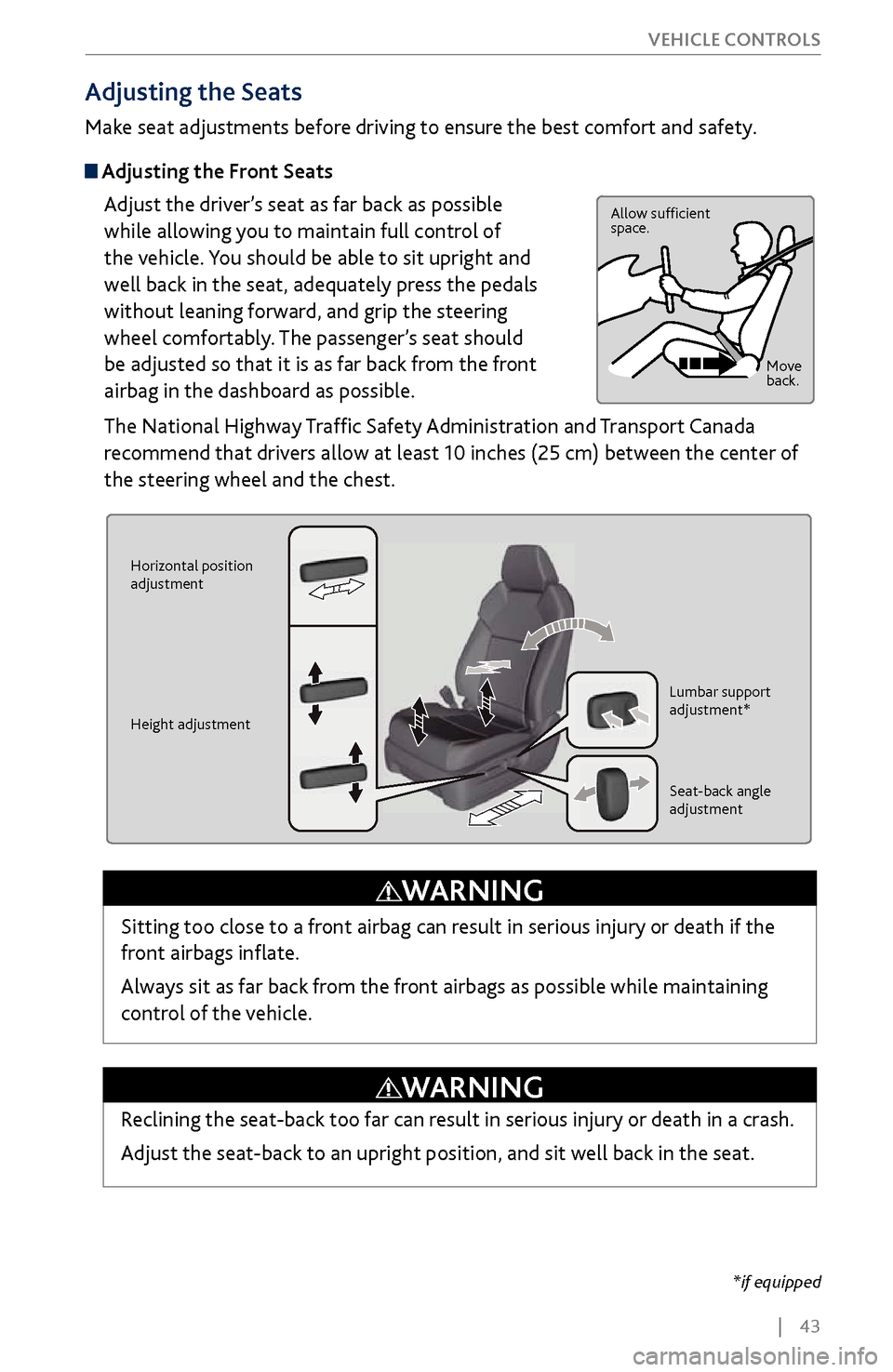
Make seat adjustments before driving to ensure the best comfort and safety.
Adjusting the Front Seats
Adjust the driver’s seat as far back as possible
while allowing you to maintain full control of
the vehicle. You should be able to sit upright and
well back in the seat, adequately press the pedals
without leaning forward, and grip the steering
wheel comfortably. The passenger’s seat should
be adjusted so that it is as far back from the front
airbag in the dashboard as possible.
The National Highway Traffic Safety Administration and Transport Canada
recommend that drivers allow at least 10 inches (25 cm) between the center of
the steering wheel and the chest.
Allow sufficient
space.
Move
back.
Horizontal position
adjustment
Height adjustment Lumbar support
adjustment*
Seat-back angle
adjustment
Sitting too close to a front airbag can result in serious injury or death if the
front airbags inflate.
Always sit as far back from the front airbags as possible while maintaining
control of the vehicle.
WARNING
*if equipped
Reclining the seat-back too far can result in serious injury or death in a crash.
Adjust the seat-back to an upright position, and sit well back in the seat.
WARNING

