Page 251 of 369
250
Bluetooth® HandsFreeLink®Making a Call
Bluetooth
® HandsFreeLink
®
HMENU button (on Phone screen) Call History
Call history is stored by All, Dialed , Received , and Missed .
1. Move w or y to select All,
Dialed , Received , and Missed .
2. Rotate i to select a number.
Press u.
Dialing starts automatically.
1. Press the h button.
2. Move the left selector wheel right
to select Call History .
3. Roll the left selector wheel to select
a number.
4. Push the left selector wheel or the
h button.
Dialing starts automatically.
■Using Call History1 Using Call History
The call history displa ys the last 20 dialed,
received, or missed calls.
(Appears only when a phone is connected to
HFL.)
These icons next to the number indicate the
following: : Dialed calls
: Received calls
: Missed calls
The call history displa ys the last 12 dialed,
received, or missed calls.
Multi-information DisplayMulti-information Display
Page 254 of 369
253
Bluetooth® HandsFreeLink®Receiving a Call
Bluetooth
® HandsFreeLink
®
The available options are shown on the Phone screen.
Rotate i to select the option. Press
u .
The mute icon appears when Mute
is selected. Select Mute again to
turn it off.
The following options are available during a call:
• Mute : Mute your voice.
• Transfer: Transfer a call fro m HFL to your phone.
• Touch Tones : Send numbers during a call. This is useful when you call a menu-
driven phone system.
■ Options During a Call1 Options During a Call
Touch Tones: Available on some phones.
You can select the icons on the On Demand
Multi-Use Display
TM.
Page 257 of 369
256
Text/E-mail MessageReceiving a Text/E-mail Message
Bluetooth
® HandsFreeLink
®
Receiving a Text/E-mail Message
HFL can display newly received text and E-mail messages as well as 20 of the most
recently received messages on a linked cell phone. Each received message can be
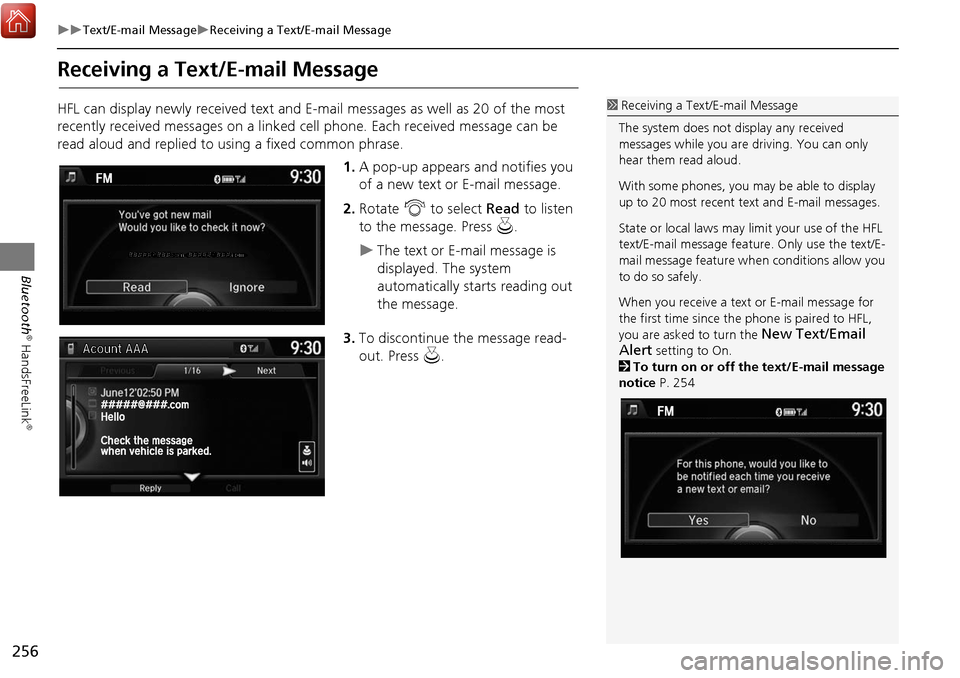
read aloud and replied to using a fixed common phrase.1.A pop-up appears and notifies you
of a new text or E-mail message.
2. Rotate i to select Read to listen
to the message. Press u.
The text or E-mail message is
displayed. The system
automatically starts reading out
the message.
3. To discontinue the message read-
out. Press u.
1Receiving a Text/E-mail Message
The system does not display any received
messages while you are driving. You can only
hear them read aloud.
With some phones, you ma y be able to display
up to 20 most recent text and E-mail messages.
State or local laws may limit your use of the HFL
text/E-mail message feature. Only use the text/E-
mail message feature wh en conditions allow you
to do so safely.
When you receive a text or E-mail message for
the first time since the phone is paired to HFL,
you are asked to turn the
New Text/Email
Alert
setting to On.
2 To turn on or off the text/E-mail message
notice P. 254
Page 263 of 369
262
Text/E-mail MessageHFL Menus
Bluetooth
® HandsFreeLink
®
HFL Menus
The power mode must be in ACCESSORY or ON to use HFL.
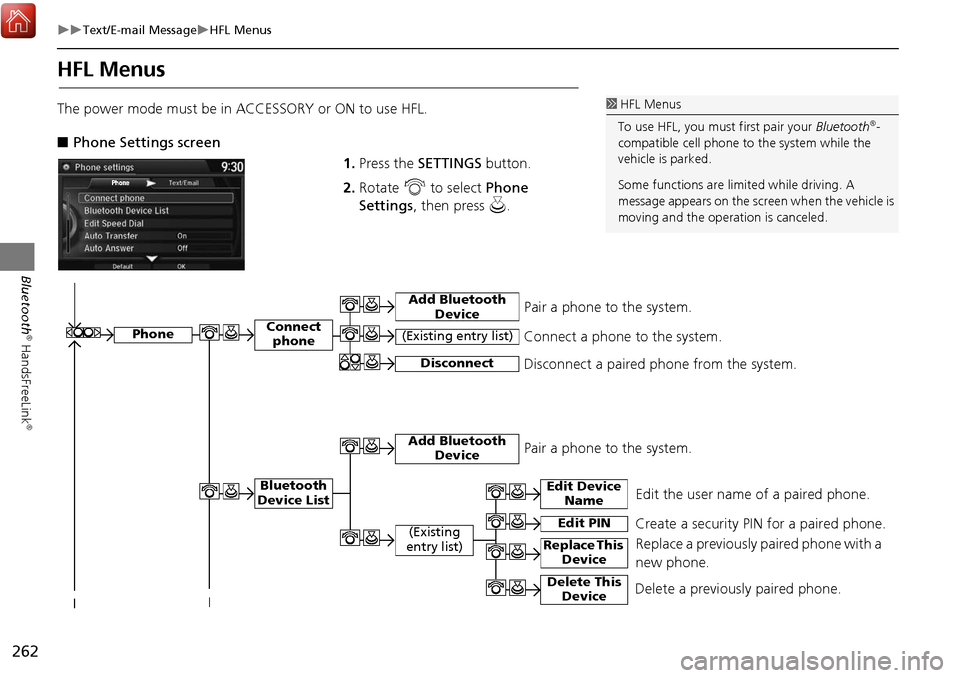
■ Phone Settings screen
1.Press the SETTINGS button.
2. Rotate i to select Phone
Settings , then press u.1HFL Menus
To use HFL, you must first pair your Bluetooth
®-
compatible cell phone to the system while the
vehicle is parked.
Some functions are limited while driving. A
message appears on the screen when the vehicle is
moving and the operation is canceled.
Edit the user name of a paired phone.
Phone
Edit Device Name
Connect phone
Bluetooth
Device List
(Existing
entry list)
Replace This Device
Add Bluetooth Device
Disconnect a paired phone from the system.Connect a phone to the system.Disconnect
(Existing entry list)
Pair a phone to the system.
Edit PIN Create a security PIN for a paired phone.
Replace a previously paired phone with a
new phone.
Delete This DeviceDelete a previously paired phone.
Add Bluetooth DevicePair a phone to the system.
Page 264 of 369
263
Text/E-mail MessageHFL Menus
Bluetooth
® HandsFreeLink
®
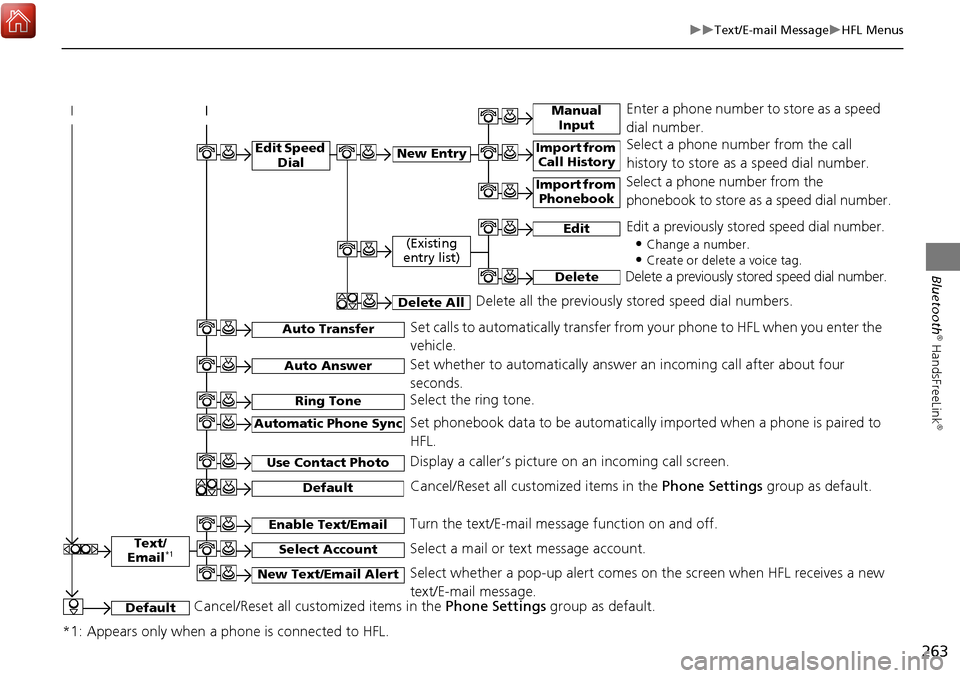
Text/
Email*1
Manual Input
Edit Speed DialNew Entry
Import from Call History
*1: Appears only when a phone is connected to HFL.
Import from Phonebook
Select a phone number from the call
history to store as a speed dial number.
Select a phone number from the
phonebook to store as a speed dial number.
Enter a phone number to store as a speed
dial number.
Edit
Delete
(Existing
entry list)
Edit a previously stored speed dial number.
•
Change a number.
•Create or delete a voice tag.
Delete a previously st ored speed dial number.
Set calls to automatically transfer from your phone to HFL when you enter the
vehicle.Auto Transfer
Auto Answer
Ring Tone
Set whether to automatically answer an incoming call after about four
seconds.
Select the ring tone.
Use Contact Photo
Set phonebook data to be automatically imported when a phone is paired to
HFL.
Display a caller’s picture on an incoming call screen.Automatic Phone Sync
Select AccountSelect a mail or text message account.
Enable Text/EmailTurn the text/E-mail message function on and off.
New Text/Email AlertSelect whether a pop-up alert comes on the screen when HFL receives a new
text/E-mail message.
Cancel/Reset all customized items in the Phone Settings group as default.Default
Delete AllDelete all the previously stored speed dial numbers.
DefaultCancel/Reset all customized items in the Phone Settings group as default.
Page 265 of 369
264
Text/E-mail MessageHFL Menus
Bluetooth
® HandsFreeLink
®
■Phone screen
1.Press the PHONE button.
2. Press the MENU button to display
the menu items.
Select a phone number from the call history to store as a
speed dial number.
Manual Input
New Entry Import from Call History
Import from PhonebookSelect a phone number from th e phonebook to store as a
speed dial number. Enter a phone number to store as a speed dial number.
More Speed DialsDisplay another paired phone’s speed dial list.
*1: Appears only when a phone is connected to HFL.
(Existing entry list)Dial the selected number in the speed dial list.
Phonebook*1
Dial*1
Display the paired phone’s phonebook.
Enter a phone number to dial.
Speed Dial*1
Page 266 of 369
265
Text/E-mail MessageHFL Menus
Bluetooth
® HandsFreeLink
®Text/Email*1,3
Message is
read aloud.
*2: Not available on all models
See the previous message.
(Read/Stop)
Previous
NextSee the next message. System reads received message aloud, or stop message
from being read.
Reply
Call
Reply to a received message using one of six fixed phrases.
Make a call to the sender.
Select
Account
Select a message
and press .
Select a mail or text message account.
Redial*1Redial the last number dialed in the phone’s history.
Display the last 20 outgoing, incoming and missed calls.
Call History*1All
Dialed
Received
Display the last 20 outgoing calls.
Display the last 20 incoming calls.
MissedDisplay the last 20 missed calls.
Roadside Assistance*1,2Makes a call to the number for the Roadside Assistance service.
*1: Appears only when a phone is connected to HFL.
*3: This function is not available if your phone is not supported.
Page 275 of 369
274
AcuraLink®AcuraLink® Message
AcuraLink
®
While a message is displayed, you can
use options to take immediate action
to the message.
Available options are:
• Voice : Reads the message aloud. Select Stop to cancel it.
• Find Acura Dlr. : Searches for the nearest Acura dealer.
• Delete : Deletes the displayed message.
• Call Your Dealer: Calls your Acura dealer using HFL.
• Schedule Dealer Appointment: Automatically sets an appointment date at your
dealer.
• Phone number : Dials a number displayed in the message via HFL.
• Diagnostic Info : Updates the current diagnostic message by connecting to the
Acura server using HFL.
■ Message Options1 Message Options
The available options va ry by message category.
You can delete all mess ages in a category at
once.


