Page 26 of 521

25
uuFor Safe Driving uImportant Safety Precautions
Safe Driving
■Pay appropriate attention to the task of driving safely
Engaging in cell phone conversation or other activities that keep you from paying
close attention to the road, other vehicles , and pedestrians could lead to a crash.
Remember, situations can change quickly, and only you can decide when it is safe to
divert some attention away from driving.
■Control your speed
Excessive speed is a major factor in crash injuries and deaths. Generally, the higher
the speed, the greater the risk, but serious injuries can also occur at lower speeds.
Never drive faster than is safe for current conditions, regardless of the maximum
speed posted.
■Keep your vehicle in safe condition
Having a tire blowout or a mechanical failure can be extremely hazardous.
To reduce the possibility of such problems, check your tire pressures and condition
frequently, and perform all re gularly scheduled maintenance.
17 ACURA ILX-31TX66400.book 25 ページ 2016年3月15日 火曜日 午後5時0分
Page 72 of 521

71
uuIndicators u
Continued
Instrument Panel
*1:On the left: Models wi thout full color display
On the right: Models with full color display
*2:Models without full color display
IndicatorNameOn/BlinkingExplanationMessage*1
Door and
Trunk Open
Indicator
●Comes on for a few seconds if
you set the power mode to
ON, then goes off.
●Comes on if any door or the
trunk is not completely closed.
●Comes on if any door is
opened while driving. The
beeper sounds.
●Goes off when all doors and the trunk
are closed.
—
Low Tire
Pressure/
TPMS
Indicator
●Comes on for a few seconds
when you set the power mode
to ON.
●Comes on if the tire pressure
of any of the tires becomes
significantly low.
●Blinks for about one minute,
and then stays on if there is a
problem with the TPMS, or
when a compact spare tire is
temporarily installed.
●Comes on while driving - Stop in a
safe place, check tire pressures, and
inflate the tire(s) if necessary.
●Blinks and remains on - Have your
vehicle checked by a dealer. If the
vehicle is fitted with a compact spare,
get your regular tire repaired or
replaced and put back on your vehicle
as soon as you can.
*2
17 ACURA ILX-31TX66400.book 71 ページ 2016年3月15日 火曜日 午後5時0分
Page 91 of 521
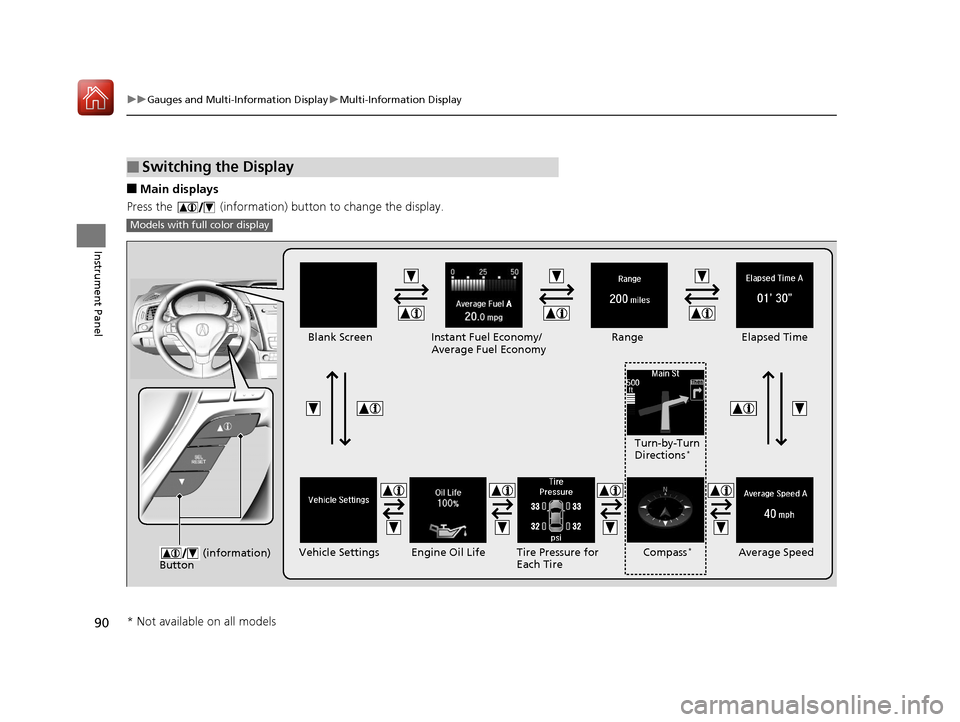
90
uuGauges and Multi-Information Display uMulti-Information Display
Instrument Panel
■Main displays
Press the (information) button to change the display.
■Switching the Display
Models with full color display
�Q�P �Q�Q
�Q�P
�Q�Q
(information)
ButtonEngine Oil Life
Vehicle Settings Elapsed Time
Blank Screen
Average Speed
Range
Instant Fuel Economy/
Average Fuel Economy
Compass*Tire Pressure for
Each TireTurn-by-Turn
Directions
*
* Not available on all models
17 ACURA ILX-31TX66400.book 90 ページ 2016年3月15日 火曜日 午後5時0分
Page 92 of 521
91
uuGauges and Multi-Information Display uMulti-Information Display
Continued
Instrument Panel
Models without fu ll color display
Engine Oil Life
Vehicle Settings Elapsed Time
Blank Screen
Average Speed
Range
Instant Fuel Economy/
Average Fuel Economy
Tire Pressure for
Each Tire
(information)
Button
17 ACURA ILX-31TX66400.book 91 ページ 2016年3月15日 火曜日 午後5時0分
Page 97 of 521
96
uuGauges and Multi-Information Display uMulti-Information Display
Instrument Panel
Shows each tire’s pressure.
2 Tire Pressure Monitor P. 386
Shows the remaining oil life and Maintenance MinderTM.
2Maintenance MinderTM P. 415
■Tire Pressure Monitor
■Engine Oil Life
17 ACURA ILX-31TX66400.book 96 ページ 2016年3月15日 火曜日 午後5時0分
Page 273 of 521
272
uuBluetooth ® HandsFreeLink ®u HFL Menus
Features
*1: Appears only when a phone is connected to HFL.
Redial*1
Text MessageRead/Stop readingMessage is read aloud
Reply
Call
Display Message
System reads received message aloud, or
stop message from being read.
Select message and .
Reply to a received message using one of
six fixed phrases.
Make a call to the sender.
See an entire received message
(if more than three lines of text).
Redial the last number dialed in the phone’s history.
17 ACURA ILX-31TX66400.book 272 ページ 2016年3月15日 火曜日 午後5時0分
Page 294 of 521

Continued293
uuBluetooth ® HandsFreeLink ®u HFL Menus
Features
HFL can display newly received text messages as well as 20 of the most recently
received messages on a compatible linked cell phone. Each received message can be
read aloud and replied to using a fixed common phrase. 1.A pop-up appears and notifies you of a new
text message.
2. Rotate to select Yes to listen to the
message, then press .
u The text message is displayed. The
system automatically starts reading out
the message.
3. To discontinue the message read-out, press
the BACK button.
■Receiving a Text Message1Receiving a Text Message
The system does not display any received messages
while you are driving. You can only hear them read
aloud.
With some phones, you may be able to display up to
20 most recent text messages.
Only the first three lines of the received message are
displayed with this option.
2 Displaying an entire message P. 297
State or local laws may limit your use of the HFL text
message feature. Only use the text message feature
when conditions allow you to do so safely.
17 ACURA ILX-31TX66400.book 293 ページ 2016年3月15日 火曜日 午後5時0分
Page 295 of 521
uuBluetooth ® HandsFreeLink ®u HFL Menus
294
Features
1. Press the PHONE button or the button.
2. Rotate to select Text Message, then
press .
3. Rotate to select a message, then press
.
u The text message is displayed. The
system automatically starts reading the
message aloud.
■Displaying Messages1Displaying Messages
The icon appears next to an unread message.
Only the first three lines of the received message are
displayed with this option.
2 Displaying an entire message P. 297
If you delete a message on the phone, the message is
also deleted in the system. If you send a message
from the system, the message goes to your phone’s
outbox.
17 ACURA ILX-31TX66400.book 294 ページ 2016年3月15日 火曜日 午後5時0分