Page 105 of 259

Instruments and controls103● average speed
● distance before service 3 90
● clock 3 85
● cruise control and speed limiter stored speed 3 157
● fault and information messages
● odometer 3 88, trip odometer
3 88
Fuel used Displays the amount of fuel
consumed since the last reset.
The measurement can be restarted at
any time by pressing and holding the
button on the end of the wiper lever.
Average consumption
The value is displayed after driving a
distance of 0.25 miles.
Average consumption is displayed,
taking into consideration the distance travelled and the fuel used since the
last reset.
The measurement can be restarted at
any time.Instantaneous consumption
The value is displayed after reaching
a speed of 20 mph.
Range
The value is displayed after driving a distance of 0.25 miles.
The range is calculated from the
current contents of the fuel tank and
the average consumption since the
last reset.
The range will not display if control
indicator Y is illuminated in the
instrument cluster 3 98.
The measurement can be restarted at
any time.
Distance travelled
Displays the distance driven since the
last reset.
The measurement can be restarted at
any time.
Average speed The value is displayed after driving adistance of 0.25 miles.The average speed since the last
reset is displayed.
The measurement can be restarted at
any time.
Interruptions in the journey with the
ignition off are not included in the
calculations.
Reset trip computer information
To reset the trip computer, select one
of its functions then press and hold
button on end of wiper lever.
The following trip computer
information can be reset:
● fuel used
● average consumption
● distance travelled
● average speed
The trip computer will reset
automatically when the maximum
value of any of the parameters is
exceeded.
Page 106 of 259
104Instruments and controlsFuel economy rating (ecoScoring)
If equipped, a rating of 0 to 100 is shown in the Infotainment system
display screen, to help evaluate fuel
efficiency, based on your driving
style.
Higher ratings indicate better fuel
economy.
Tips to improve fuel economy are also given in the display. Journeys can be
saved in the system memory,
enabling you to compare
performances. Refer to Infotainment
manual for further information.
Vehicle messages 3 101.
Journey record
When the engine is switched off, a record of the last journey may be
shown in the Infotainment system
display screen.
The following information is
displayed:
● average fuel consumption
● trip odometer
● fuel saved in milesRefer to Infotainment manual for
further information.
Interruption of power supply
If the power supply has been
interrupted or if the vehicle battery
voltage has dropped too low, the
values stored in the trip computer will
be lost.Tachograph
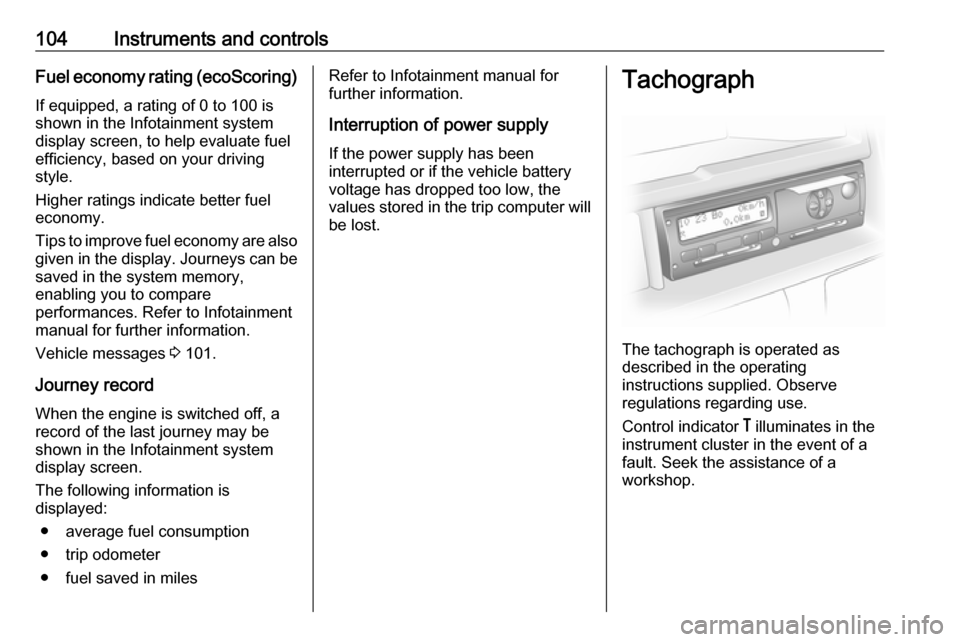
The tachograph is operated as
described in the operating
instructions supplied. Observe
regulations regarding use.
Control indicator & illuminates in the
instrument cluster in the event of a
fault. Seek the assistance of a
workshop.
Page 107 of 259
Instruments and controls105Notice
When a tachograph is fitted, the total
distance travelled may be shown
only on the tachograph and not in the odometer within the instrument
display.
Odometer 3 88.
Page 119 of 259

Climate control117Automatic modeBasic setting for maximum comfort: ● Press AUTO ("AUTO" appears in
the display).
● Set desired temperature (the temperature appears in the
display).
● Open all air vents.
During automatic mode, the settings for fan speed, air distribution, air
conditioning and air recirculation are
automatically regulated by the system
and are not shown on the display.
Temperature preselection Temperatures can be set to the
desired value with the two buttons
below the display.
For reasons of comfort, change
temperature only in small increments.red:warmblue:cold
Heating will not be fully effective until
the engine has reached normal
operating temperature.
If the minimum temperature of 15 ℃
is set, the electronic climate control
system runs at maximum cooling.
If the maximum temperature of 27 ℃
is set, the electronic climate control
system runs at maximum heating.
Notice
If the temperature is to be reduced
for climate comfort reasons, an
Autostop can be inhibited or the
engine will restart automatically
when cooling is switched on.
Stop-start system 3 134.
Fan speed
Fan speed can be increased or
decreased with the x buttons.
The selected fan speed is indicated
with x in the display.
If the fan is switched off, the air
conditioning is also deactivated.
To return to automatic mode: Press
AUTO .
Demisting and defrosting the
windows
Press V; LED illuminates.Temperature and air distribution are
set automatically, air conditioning is
switched on and the fan runs at a high
speed.
Heated rear window, heated exterior
mirrors are also switched on
automatically. Press Ü to switch off
without deactivating demisting/
defrosting of the windows. The fan speed can also be decreased.
To return to automatic mode: press
V or AUTO .
Notice
If V is pressed while the engine is
running, an Autostop will be inhibited
until V is pressed again.
If V is pressed while the engine is
in an Autostop, the engine will restart automatically.
Stop-start system 3 134.
Air distribution
Press ï or î repeatedly.
Page 120 of 259

118Climate controlArrows shown in the display indicate
the distribution settings:ï:to windscreen and front door
windows™:to windscreen, front door
windows and foot well²:to head area³:to head area and foot wellî:to foot well
To return to automatic mode: Press
AUTO .
Cooling
The air conditioning system cools and
dehumidifies (dries) when outside
temperature is above a specific level. Therefore condensation may form
and drip from under the vehicle.
If no cooling or drying is required,
press A/C OFF to switch the cooling
system off, thus saving fuel.
" A/C OFF " appears in the display.
Manual air recirculation mode
Press u to switch on air recirculation;
u appears in the display.
9
Warning
The exchange of fresh air is
reduced in air recirculation mode.
In operation without cooling the air humidity increases, so the
windows may mist up. The quality
of the passenger compartment air
deteriorates, which may cause the vehicle occupants to feel drowsy.
To return to automatic mode: press
u or AUTO .
Rear heating system
If the engine is switched off, the rear
compartment can be heated by the
additional heating, through low level
vents.
By programming values using the
control panel, the user can adjust the
time, day and temperature settings.
Heating will cease to operate if the
vehicle fuel level drops too low.
During operation, power from the
vehicle battery is used. For short
journey times, check the vehicle
battery regularly and recharge if
necessary.
Notice
If the rear heating system is
activated while the engine is
running, an Autostop will be
inhibited.
To ensure efficient performance, the low level air vents in the rear
passenger compartment must not be obstructed.
Page 121 of 259
Climate control1199Warning
Do not operate the system when
refuelling, when dust or
combustible vapours are present
or in enclosed spaces (e.g.
garage).
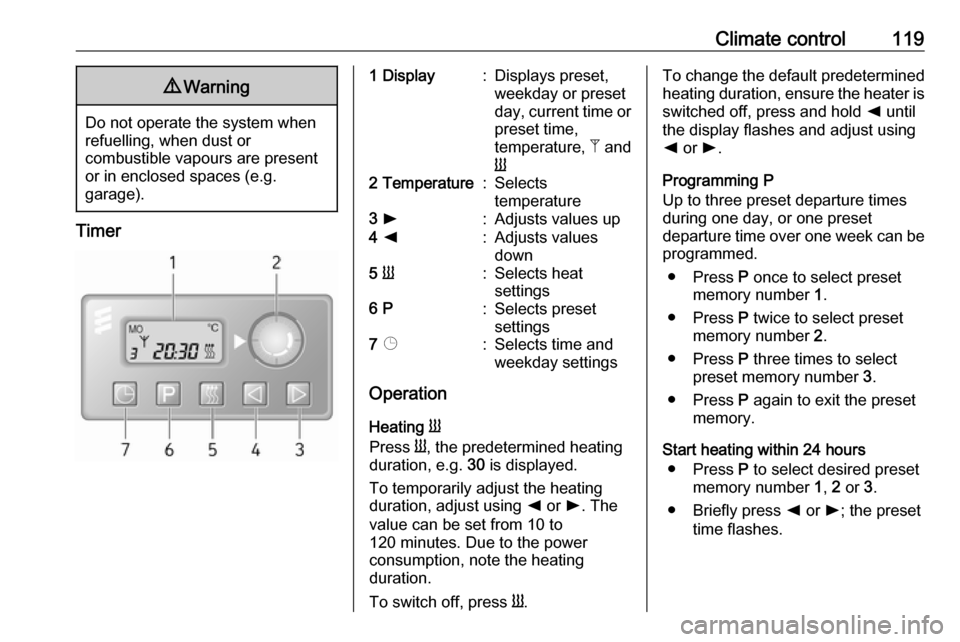
Timer
1 Display:Displays preset,
weekday or preset
day, current time or preset time,
temperature, Z and
Y2 Temperature:Selects
temperature3 l:Adjusts values up4 k:Adjusts values
down5 Y:Selects heat
settings6 P:Selects preset
settings7 Þ:Selects time and
weekday settings
Operation
Heating Y
Press Y, the predetermined heating
duration, e.g. 30 is displayed.
To temporarily adjust the heating
duration, adjust using k or l. The
value can be set from 10 to
120 minutes. Due to the power
consumption, note the heating
duration.
To switch off, press Y.
To change the default predetermined
heating duration, ensure the heater is switched off, press and hold k until
the display flashes and adjust using
k or l.
Programming P
Up to three preset departure times during one day, or one preset
departure time over one week can be programmed.
● Press P once to select preset
memory number 1.
● Press P twice to select preset
memory number 2.
● Press P three times to select
preset memory number 3.
● Press P again to exit the preset
memory.
Start heating within 24 hours ● Press P to select desired preset
memory number 1, 2 or 3.
● Briefly press k or l; the preset
time flashes.
Page 122 of 259

120Climate control●Adjust the preset time using k or
l .
● Press P to confirm and exit the
preset memory.
Start heating up to seven days ● Press P to select desired preset
memory number 1, 2 or 3.
● Briefly press k or l; the preset
time flashes.
● Adjust the preset time using k or
l .
● After five seconds the preset day
flashes.
● Adjust the preset day using k or
l .
● The preset time and day are set once the display changes to the
current time.
Set time and weekday Þ
If the vehicle battery is disconnected
or its voltage is too low, the unit will
need to be reset.
● Press Þ until the time flashes.
● Press k or l to change the
current time.● Time is stored when the display stops flashing.
● Wait for weekday to flash.
● Press k or l to change the
weekday.
● Weekday is stored when the display stops flashing.
Heating level
The preferred heating level for
programmed departure times can be
set between 10 to 30℃.
To adjust the temperature of the
heating, turn the rotary knob located
on the control panel.turn clockwise:increase
temperatureturn anti-clock‐
wise:decrease
temperature
Rear air conditioning
system
The rear air conditioning system is
activated in conjunction with the front
passenger compartment air
conditioning system.
Bus
Rear air vents
Additional air conditioning is supplied
to the rear passenger compartment
via the overhead air vents.
Page 124 of 259
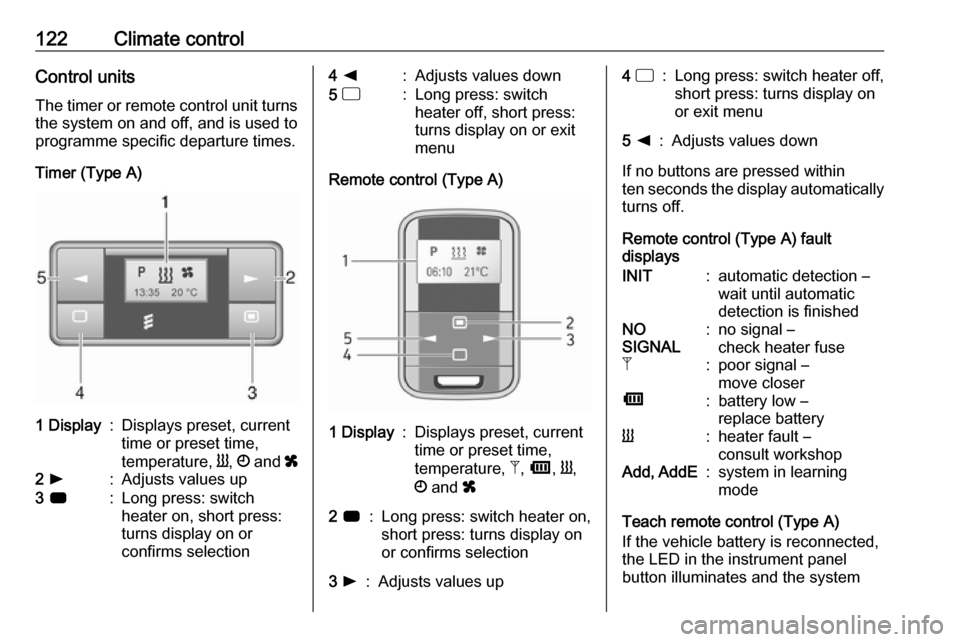
122Climate controlControl unitsThe timer or remote control unit turns
the system on and off, and is used to
programme specific departure times.
Timer (Type A)1 Display:Displays preset, current
time or preset time,
temperature, Y, Ö and x2 l:Adjusts values up3 7:Long press: switch
heater on, short press:
turns display on or
confirms selection4 k:Adjusts values down5 d:Long press: switch
heater off, short press:
turns display on or exit
menu
Remote control (Type A)
1 Display:Displays preset, current
time or preset time,
temperature, Z, Ü , Y ,
Ö and x2 7:Long press: switch heater on,
short press: turns display on
or confirms selection3 l:Adjusts values up4 d:Long press: switch heater off,
short press: turns display on
or exit menu5 k:Adjusts values down
If no buttons are pressed within
ten seconds the display automatically
turns off.
Remote control (Type A) fault
displays
INIT:automatic detection –
wait until automatic
detection is finishedNO
SIGNAL:no signal –
check heater fuseZ:poor signal –
move closerÜ:battery low –
replace batteryY:heater fault –
consult workshopAdd, AddE:system in learning
mode
Teach remote control (Type A)
If the vehicle battery is reconnected,
the LED in the instrument panel
button illuminates and the system