2016 YAMAHA YZF-R125 warning
[x] Cancel search: warningPage 19 of 98

Instrument and control functions
3-5
3 Tachometer
The tachometer allows the rider to
monitor the engine speed and keep it
within the ideal power range.
When the key is turned to “ON”, the ta-
chometer will sweep across the r/min
range and then return to zero r/min in
order to test the electrical circuit.
NOTICE
ECAM1150
Do not operate the engine in the ta-
chometer high-rpm zone.
High-rpm zone: 10000 r/min and
above
Clock
The clock displays when the key is
turned to “ON”. To set the clock
1. Turn the key to “ON”.
2. Push the “SELECT” button for at
least two seconds.
3. When the hour digits start flash-
ing, use the “RESET” button to set
the hours.
4. Push the “SELECT” button , and
the minute digits will start flashing.
5. Use the “RESET” button to set the
minutes.
6. Push the “SELECT” button and
then release it to start the clock.
TIP
When setting the hours and minutes,
crease the increment value one by one,
or push and hold the button to increase
the increment value continuously.
Fuel meter
The fuel meter indicates the amount of
fuel in the fuel tank. The display seg-
ments of the fuel meter disappear to-
wards “E” (Empty) as the fuel level
decreases. When the fuel level be-
comes low, the last segment will flash,
(“LOW FUEL” message will also ap-
1. Tachometer
2. High-rpm zone
1. Clock
x1000r/min
ZAUM1301
km/h
1
2
1/2
ZAUM1302
ODOTRIP1
1
1. Fuel meter
2. Fuel level warning light Ž
3. Fuel reserve tripmeter
4. Information display
Lo
Hi
1/2
x1000r/min
ZAUM1303
km/h
FTRIP
21
34
U5D7E6E0.book Page 5 Wednesday, June 17, 2015 10:25 AM
Page 20 of 98
Instrument and control functions
3-6
3pear) and the fuel level warning
light “ ” will come on. Refuel as soon
as possible.
TIP
This fuel meter is equipped with a self-
diagnosis system. If a problem is de-
tected in the fuel meter electrical cir-
cuit, the display segments of the fuel
meter will flash eight times, and then
go off for 3 seconds repeatedly. If this
occurs, have a Yamaha dealer check
the electrical circuit.
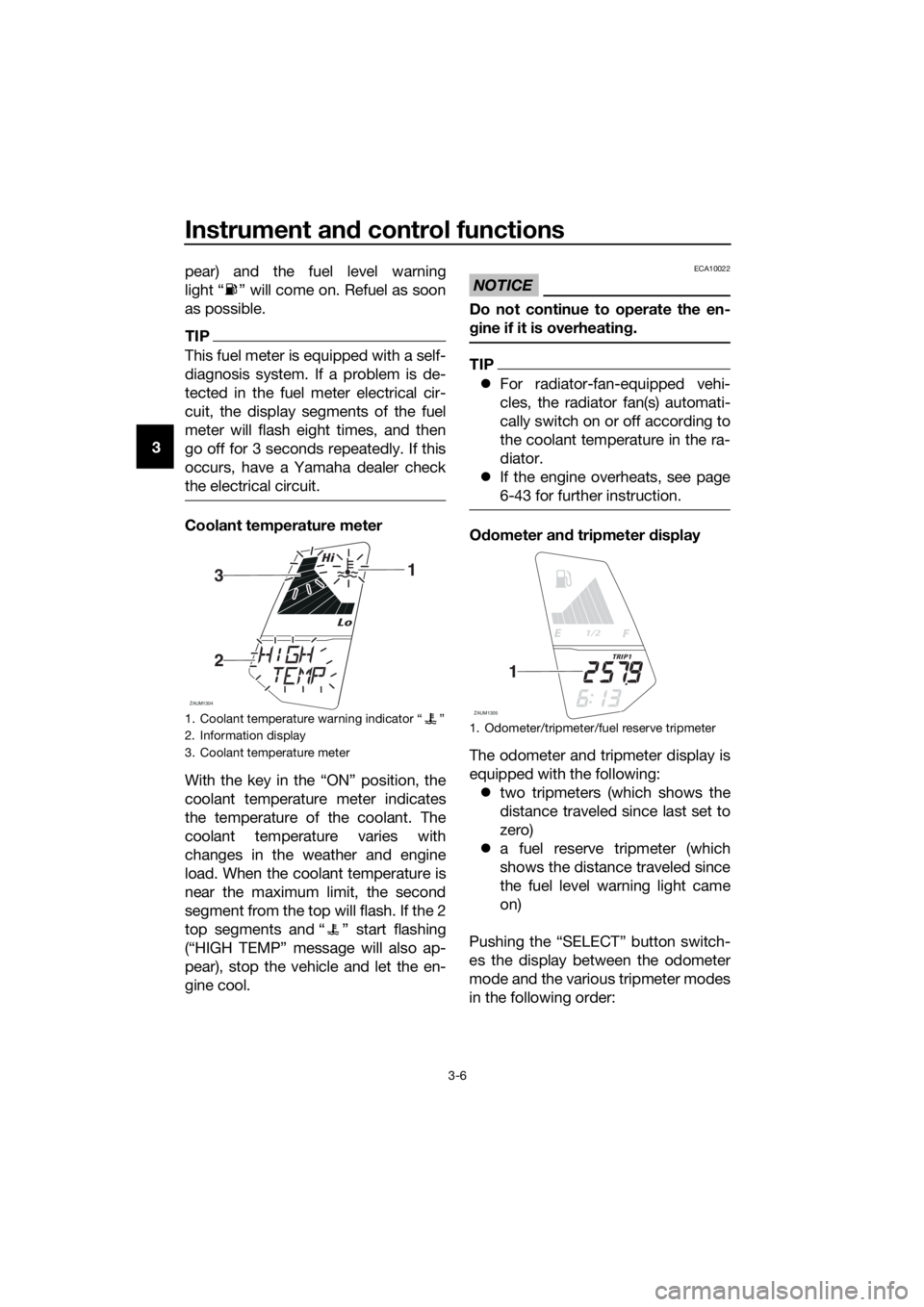
Coolant temperature meter
With the key in the “ON” position, the
coolant temperature meter indicates
the temperature of the coolant. The
coolant temperature varies with
changes in the weather and engine
load. When the coolant temperature is
near the maximum limit, the second
segment from the top will flash. If the 2
top segments and “ ” start flashing
(“HIGH TEMP” message will also ap-
pear), stop the vehicle and let the en-
gine cool.
NOTICE
ECA10022
Do not continue to operate the en-
gine if it is overheating.
TIP
For radiator-fan-equipped vehi-
cles, the radiator fan(s) automati-
cally switch on or off according to
the coolant temperature in the ra-
diator.
If the engine overheats, see page
6-43 for further instruction.
Odometer and tripmeter display
The odometer and tripmeter display is
equipped with the following:
two tripmeters (which shows the
distance traveled since last set to
zero)
a fuel reserve tripmeter (which
shows the distance traveled since
the fuel level warning light came
on)
Pushing the “SELECT” button switch-
es the display between the odometer
mode and the various tripmeter modes
in the following order:
1. Coolant temperature warning indicator “ ”
2. Information display
3. Coolant temperature meter
Lo
Hi
ZAUM1304
31
2
1. Odometer/tripmeter/fuel reserve tripmeter
1/2
ZAUM1305
TRIP1
1
U5D7E6E0.book Page 6 Wednesday, June 17, 2015 10:25 AM
Page 21 of 98

Instrument and control functions
3-7
3 ODO (odometer) → TRIP 1 (tripmeter)
→ TRIP 2 (tripmeter) → ODO (odome-
ter)
When approximately 3.0 L (0.79 US
gal, 0.66 Imp.gal) of fuel remains in the
fuel tank, the display will automatically
change to the fuel reserve tripmeter
mode “F TRIP” and start counting the
distance traveled from that point. In
that case, pushing the “SELECT” but-
ton switches the display between the
various tripmeter and odometer modes
in the following order:
ODO → TRIP 1 → TRIP 2 → F TRIP (fu-
el reserve tripmeter) → ODO
To reset a tripmeter, select it by push-
ing the “SELECT” button until “TRIP 1,
TRIP 2, F TRIP” is displayed. While
“TRIP 1, TRIP 2, F TRIP” is displayed,
push the “RESET” button for two sec-
onds. The fuel reserve tripmeter will re-
set automatically and disappear after
you have refueled and turned the key
to “OFF”.Multi-function display
The multi-function display is equipped
with the following:
a fuel consumption display (aver-
age and instantaneous consump-
tion functions)
an average speed display (which
shows the average speed since
last set to zero)
a time tripmeter (which shows the
elapsed riding time since last set
to zero)
an oil change indicator with an oil
service reminder (which shows the
riding distance since last set to ze-
ro)
a low battery voltage warning indi-
cator
a warning message function
a self-diagnosis device
Push the “INFO” button to switch the
display between the average fuel con-
sumption mode “C Ave__._km/L” or “C
Ave __._ L/100 km”, the instantaneous
fuel consumption mode “C
INS__._km/L” or “C INS__._L/100
km” , the trip time mode “TRIP TIME _h
__min”, the average speed “AVE
1. Odometer/tripmeter/fuel reserve tripmeter
1/2
ZAUM1306
F TRIP
1
1. Multi-function display
Lo
Hi
ZAUM1307km/L
OIL
1
U5D7E6E0.book Page 7 Wednesday, June 17, 2015 10:25 AM
Page 24 of 98
Instrument and control functions
3-10
3come on at the initial 1000 km (600 mi)
service interval, 2000 km (1200 mi) af-
ter that, and every 3000 km thereafter.
After changing the engine oil, reset the
oil change indicator.
To reset the oil change indicator dis-
play (mode “ODO” should be select-
ed), push the “RESET” button for two
seconds until “OIL SERV” message
flashes and then push and hold the
“RESET” button for at least 15 sec-
onds. “DIST SERV” mode (oil service
reminder which shows the riding dis-
tance since last reset) will also be reset.
TIP
If the engine oil is changed before the
oil change indicator comes on (i.e. be-
fore the set oil service interval has been
reached), the indicator must be reset
for the next oil change to be indicated
at the correct time. To reset the oil
change indicator before the periodic oil
change interval has been reached, fol-
low the below procedure.
To reset the oil change indicator (mode
SERVŽ mode flashes and then push
sage will also be reset.
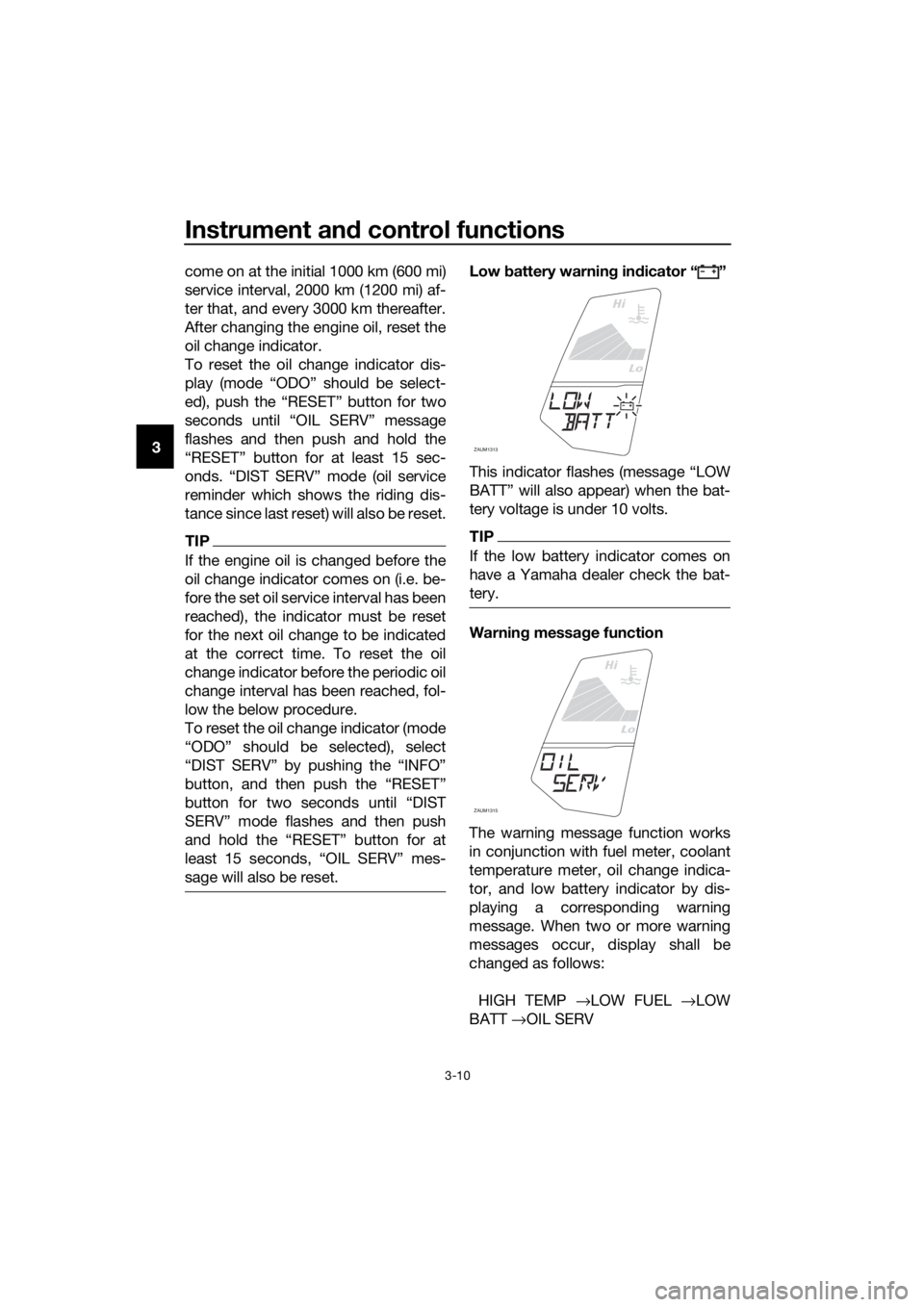
Low battery warning indicator “ ”
This indicator flashes (message “LOW
BATT” will also appear) when the bat-
tery voltage is under 10 volts.
TIP
If the low battery indicator comes on
have a Yamaha dealer check the bat-
tery.
Warning message function
The warning message function works
in conjunction with fuel meter, coolant
temperature meter, oil change indica-
tor, and low battery indicator by dis-
playing a corresponding warning
message. When two or more warning
messages occur, display shall be
changed as follows:
HIGH TEMP →LOW FUEL →LOW
BATT →OIL SERV
Lo
Hi
ZAUM1313
Lo
Hi
ZAUM1315
U5D7E6E0.book Page 10 Wednesday, June 17, 2015 10:25 AM
Page 25 of 98

Instrument and control functions
3-11
3
TIP
Push the “INFO” button to switch be-
tween these display warning messag-
es.
Self-diagnosis device
This model is equipped with a self-di-
agnosis device for various electrical
circuits.
If a problem is detected in any of those
circuits, the engine trouble warning
light will come on and the display will
indicate an error code.
If the display indicates any error codes,
note the code number, and then have a
Yamaha dealer check the vehicle.
NOTICE
ECA11591
If the display indicates an error
code, the vehicle should be checked
as soon as possible in order to avoid
engine damage.
EAU1234H
Handlebar switches
Left
Right
EAU12381Pass switch “ ”
Press this switch to flash the head-
lights.
EAU12401Dimmer switch “ / ”
Set this switch to “ ” for the high
beam and to “ ” for the low beam.
1. Error code display
1/21/2
ZAUM1314
F TRIP
1
1. Pass switch Ž
2. Dimmer switch / Ž
3. Turn signal switch / Ž
4. Horn switch Ž
1. Engine stop switch / Ž
2. Start switch Ž
3.
ZAUM1162
ZAUM1163
13
2I
NFO
U5D7E6E0.book Page 11 Wednesday, June 17, 2015 10:25 AM
Page 26 of 98

Instrument and control functions
3-12
3
EAU12461Turn signal switch “ / ”
To signal a right-hand turn, push this
switch to “ ”. To signal a left-hand
turn, push this switch to “ ”. When
released, the switch returns to the cen-
ter position. To cancel the turn signal
lights, push the switch in after it has re-
turned to the center position.
EAU12501Horn switch “ ”
Press this switch to sound the horn.
EAU12661Engine stop switch “ / ”
Set this switch to “ ” before starting
the engine. Set this switch to “ ” to
stop the engine in case of an emergen-
cy, such as when the vehicle overturns
or when the throttle cable is stuck.
EAU12713Start switch “ ”
Push this switch to crank the engine
with the starter. See page 5-2 for start-
ing instructions prior to starting the en-
gine.
EAU44712The engine trouble warning light and
ABS warning light (ABS model only)
may come on when the key is turned to
“ON” and the start switch is pushed,
but this does not indicate a malfunc-
tion.
EAUM3451Info switch “INFO”
This switch is used to perform selec-
tions in the function display of the
multi-function meter unit and to acti-
vate or deactive the high-rpm warning
light. (See page 3-4 for information onthe multi-function meter unit and page
3-3 for information on the tachometer
high-rpm warning light.)
U5D7E6E0.book Page 12 Wednesday, June 17, 2015 10:57 AM
Page 29 of 98

Instrument and control functions
3-15
3
EAU60021
ABS (for ABS models)
The Yamaha ABS (Anti-lock Brake
System) features a dual electronic con-
trol system, which acts on the front and
rear brakes independently.
Operate the brakes with ABS as you
would conventional brakes. If the ABS
is activated, a pulsating sensation may
be felt at the brake lever or brake ped-
al. In this situation, continue to apply
the brakes and let the ABS work; do
not “pump” the brakes as this will re-
duce braking effectiveness.
WARNING
EWA16051
Always keep a sufficient distance
from the vehicle ahead to match the
riding speed even with ABS.
The ABS performs best with
long braking distances.
On certain surfaces, such as
rough or gravel roads, the brak-
ing distance may be longer with
the ABS than without.
The ABS is monitored by an ECU,
which will revert the system to conven-
tional braking if a malfunction occurs.
TIP
The ABS performs a self-diagno-
sis test each time the vehicle first
starts off after the key is turned to
“ON” and the vehicle has traveled
at a speed of 10 km/h (6 mi/h) or
higher. During this test, a “click-
ing” noise can be heard from the
hydraulic control unit, and if the
brake lever or brake pedal is even
slightly applied, a vibration can be
felt at the lever and pedal, but
these do not indicate a malfunc-
tion.This ABS has a test mode which
allows the owner to experience
the pulsation at the brake lever or
brake pedal when the ABS is op-
erating. However, special tools are
required, so please consult your
Yamaha dealer.
NOTICE
ECA20100
Be careful not to damage the wheel
sensor or wheel sensor rotor; other-
wise, improper performance of the
ABS will result.
1. Front wheel sensor rotor
2. Front wheel sensor
1. Rear wheel sensor rotor
2. Rear wheel sensor
ZAUM1227
1
2
ZAUM1228
1
2
U5D7E6E0.book Page 15 Wednesday, June 17, 2015 10:25 AM
Page 30 of 98

Instrument and control functions
3-16
3
EAUM2082
Fuel tank cap
To remove the fuel tank cap
1. Open the fuel tank cap lock cover.
2. Insert the key into the lock and
turn it 1/4 turn counterclockwise.
The lock will be released and the
fuel tank cap can be removed.
To install the fuel tank cap
1. Push the fuel tank cap into posi-
tion with the key inserted in the
lock.
2. Turn the key clockwise to the orig-
inal position, and then remove it.
3. Close the lock cover.
TIP
The fuel tank cap cannot be installed
unless the key is in the lock. In addi-
tion, the key cannot be removed if the
cap is not properly installed and
locked.
WARNING
EWA11142
Make sure that the fuel tank cap is
properly installed before riding.
Leaking fuel is a fire hazard.
EAU13213
Fuel
Make sure there is sufficient gasoline in
the tank.
WARNING
EWA10882
Gasoline and gasoline vapors are
extremely flammable. To avoid fires
and explosions and to reduce the
risk of injury when refueling, follow
these instructions.
1. Before refueling, turn off the en-
gine and be sure that no one is sit-
ting on the vehicle. Never refuel
while smoking, or while in the vi-
cinity of sparks, open flames, or
other sources of ignition such as
the pilot lights of water heaters
and clothes dryers.
2. Do not overfill the fuel tank. Stop
filling when the fuel reaches the
bottom of the filler tube. Because
fuel expands when it heats up,
heat from the engine or the sun
can cause fuel to spill out of the
fuel tank.
3. Wipe up any spilled fuel immedi-
ately. NOTICE: Immediately
wipe off spilled fuel with a clean,1. Fuel tank cap lock cover
2. Unlock.
1. Fuel tank filler tube
2. Maximum fuel level
U5D7E6E0.book Page 16 Wednesday, June 17, 2015 10:25 AM