2016 VOLVO XC90 T8 sport mode
[x] Cancel search: sport modePage 9 of 546

7
Electronic Stability Control (ESC) sport mode324
Electronic Stability Control (ESC)symbols and messages 325
Roll stability control (RSC) 327
Driver Alert Control (DAC) 327
Driver Alert Control limitations 328
Using Driver Alert Control (DAC) 328
Distance Alert *
329
Using Distance Alert *
329
Distance Alert * limitations
330
Blind Spot Information (BLIS) *
330
Blind Spot Information (BLIS) * On/Off
332
Blind Spot Information (BLIS) * limitations
332
Cross Traffic Alert (CTA) *
333
Activating/deactivating Cross Traffic Alert (CTA) * 334
Cross Traffic Alert (CTA) * limitations
335
Blind Spot Information (BLIS) * with
Cross Traffic Alert (CTA) * symbols
and messages 337
Driving lane assistance 338
Activating/deactivating Lane Departure Warning (LDW) 340
Activating/deactivating Lane Keeping Aid (LKA) * 340
Driving lane assistance symbols and messages
342
STARTING AND DRIVING
Starting and driving
346
Brakes 346
Brake functions 348
Auto-hold brake function 349
Brake assist system 349
Braking effect after a collision 350
Emergency brake lights 350
Hill Descent Control (HDC) 350
Hill Start Assist 351
Parking brake 352
Using the parking brake 352
Parking brake malfunctions 354
Before a long distance trip 355
Driving economically 355
Driving through standing water 357
Overheating the engine and transmission 357
Winter driving 358
Towing eyelet 359
Towing recommendations 360
Fuel 361
Octane rating 362
Opening/closing the fuel filler door 363
Emission controls 364
Jump starting 365
Page 128 of 546

||
INSTRUMENTS AND CONTROLS
126
SymbolExplanation
Left/right turn signals Both turn signal indicators will flash when the hazard warningflashers are being used.
Forward lights
Active Bending Lights (ABL) This symbol will illuminate if there is a fault in the ABL system.
Automatic/active high beams on The symbol will be blue when the automatic high beams are on.
Automatic/active high beams offThe symbol will be white when
the automatic high beams are off.
High beam indicator The symbol will illuminate when the high beams are on or whenhigh beam flash is being used.
SymbolExplanation
Automatic/active high beams on The symbol will be blue when the automatic high beams are on. Theparking lights will also be on.
Automatic/active high beams off The symbol will be white when the automatic high beams are off. Theparking lights will be on.
High beams on The high beams and parking lights will be on.
Not in use
Rear fog lights The symbol illuminates when the rear fog lights are on.
Rain sensor The symbol illuminates when the rain sensor is on.
SymbolExplanation
Preconditioning C
The symbol illuminates when the engine/cabin heater/air condition-ing are preconditioning the vehi-cle.
Stability system This symbol flashes when the sta- bility system is actively working tostabilize the vehicle. If the symbolglows steadily, there is a fault inthe system.
Stability system, sport mode This symbol illuminates when Sport mode is on. Sport modeoffers more active driving charac-teristics by monitoring movementof the accelerator pedal, steeringwheel and cornering by allowingmore lateral movement of the rearwheels before the stability systemis activated.
Page 238 of 546
||
LOCKS AND ALARM
* Option/accessory, for more information, see Introduction.
236
NOTE
Avoid placing the remote key closer than approx. (4-6 in.) (10-15 cm) to any metallicobjects or electronic devices such as cellphones, tablets, laptops or chargers.
If interference persists, unlock the vehicle with the detachable key blade and place the remotekey in the backup key reader in the tunnel con-sole cup holder to disarm the alarm.
WARNING
Always remove the remote key from the pas- senger compartment when leaving the vehicle and ensure that the ignition in mode 0, espe-
cially if there are children in the vehicle.
Ordering new keysTwo remote keys are provided with the vehicle (a Key Tag 6
is also included for vehicles equipped
with the optional Passive Entry system). Addi- tional keys (a total of 12) can be ordered andused with the vehicle.
Loss of a remote keyIf a remote key is lost, the others should be takenwith the vehicle to a Volvo retailer. As an anti-theft measure, the code of the lost remote keymust be erased from the system. The number of registered keys for the vehicle can be found inthe center display's Top view.
NOTE
Additional or duplicate remote control keys can be obtained from any authorized Volvoretailer. You can also obtain additional or duplicate remote control keys from certain independentrepair facilities and locksmiths that are quali-fied to make remote control keys. Each keymust be programmed to work with your vehi-cle. A list of independent repair facilities and/or locksmiths known to Volvo that can cut andcode replacement keys can be found: •
on the Volvo website, www.volvocars.com/us
• by calling Volvo Customer Care at1-800-458-1552.
Key TagIn addition to the two remote keys provided, a smaller third key, called a Key Tag, is also provi-ded for vehicles equipped with the optionalPassive Entry system. This key functions in the same way as a standard remote key but does not have a detachable key blade and its battery cannot be replaced; a newKey Tag has to be ordered.
The remote key's buttons
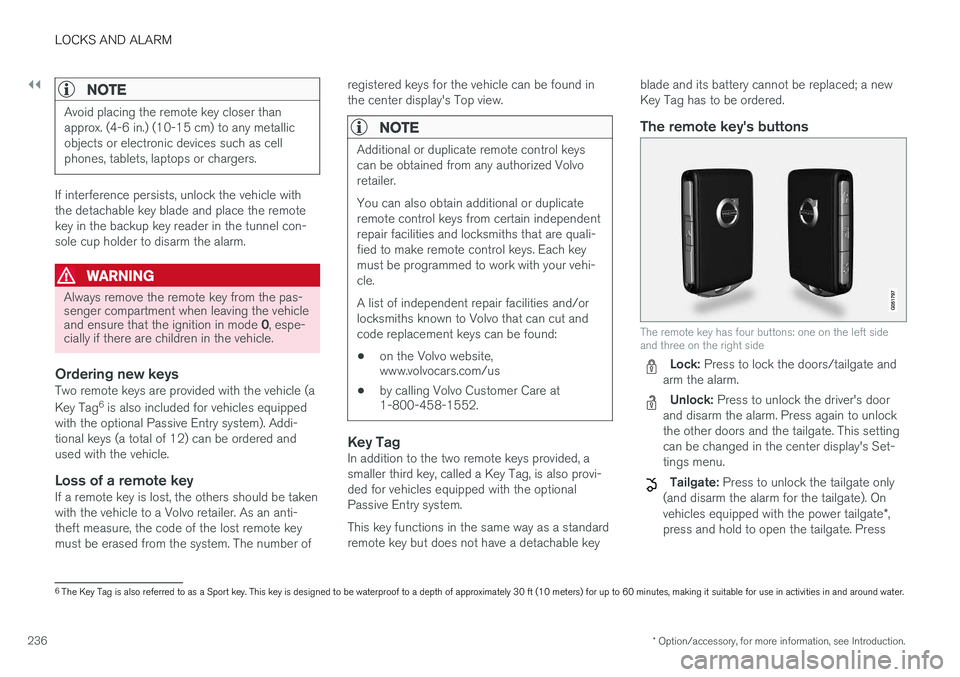
The remote key has four buttons: one on the left side and three on the right side
Lock: Press to lock the doors/tailgate and
arm the alarm.
Unlock: Press to unlock the driver's door
and disarm the alarm. Press again to unlock the other doors and the tailgate. This settingcan be changed in the center display's Set-tings menu.
Tailgate: Press to unlock the tailgate only
(and disarm the alarm for the tailgate). On vehicles equipped with the power tailgate *,
press and hold to open the tailgate. Press
6 The Key Tag is also referred to as a Sport key. This key is designed to be waterproof to a depth of approximately 30 ft (10 meters) for up to 60 minutes, making it suitable for use in activities in and around water.
Page 272 of 546

||
DRIVER SUPPORT
* Option/accessory, for more information, see Introduction.
270 To temporarily deactivate and put Adaptive Cruise Control in standby mode:
Function buttons and symbols
–Press the button (2).
> The
symbol in the instrument panel
will change colors from WHITE to GRAY and the set speed in the center of thespeedometer will change from BEIGE toGRAY.
Standby mode due to action by the driver
ACC is temporarily deactivated and put in standby mode if:
• the brakes are applied
• The gear selector is moved to
N
• the vehicle is driven faster than the set speed for more than 1 minute. In these cases, the driver will have to regulate the vehicle's speed. A temporary increase in speed, such as when passing another vehicle, does not affect the ACCset speed. The vehicle will return to the set speedwhen the accelerator pedal is released.
Automatic standby mode
ACC interacts with other systems, such as Electronic Stability Control. If any of these othersystems are not functioning properly, ACC willturn off automatically.
WARNING
If this happens, the driver will be alerted by an audible signal and a message in the instru-ment panel. The driver will have to adapt thevehicle's speed, apply the brakes when nec-essary and keep a safe distance to the vehicleahead.
ACC switches automatically to standby mode if: • the vehicle's speed goes below approx. 3 mph (5 km/h) and ACC cannot determineif the vehicle ahead is stationary or is anobject such as a speed bump, etc
• the vehicle's speed goes below approx.3 mph (5 km/h) and the vehicle aheadchanges lanes or turns so that ACC nolonger has a target vehicle to follow
• the driver opens the door
• the driver unbuckles the seat belt •
engine speed (rpm) is too high/low
• the wheels lose traction
• the parking brake is applied
• the stability system's
ESC Sport Mode is
activated
• the
Off Road drive mode is selected
• The radar sensor is covered by e.g., wet snow or if heavy rain interferes with radar waves
Reactivating ACC from standby modeTo reactivate ACC after it has temporarily been put in standby mode:
–Press the button (1).
> The vehicle will then return to the most
recently set speed .
WARNING
There may be a significant increase in speed after the
button has been pressed.
Related information
•Adaptive Cruise Control (ACC)
* (p. 266)
• Starting and activating Adaptive Cruise Control (ACC) (p. 268)
• Setting an Adaptive Cruise Control timeinterval (p. 272)
Page 325 of 546
DRIVER SUPPORT
}}
* Option/accessory, for more information, see Introduction.323
Adjustable steering force*
Steering force increases with the speed of the vehicle to give the driver an enhanced sense ofcontrol and stability. At low speed the vehicle iseasier to steer in order to facilitate parking, etc.
Changing the steering force levelTo change the level of steering force, see theinformation under the heading "individual" in arti-cle "Drive modes" for additional information.
NOTE
•This steering force level menu function cannot be accessed when the vehicle isin motion.
• In certain situations, the power steeringfunction may become too hot and mustbe temporarily cooled. During cooling,power steering effect will be reduced andmore force may be necessary to turn thesteering wheel and a message will bedisplayed in the instrument panel.
Related information
• Driver support systems (p. 252)
• Drive modes (p. 390)
Electronic Stability Control (ESC)
Electronic Stability Control (ESC) helps reduce wheel spin, counteract skidding and to generallyhelp improve directional stability.
A pulsating sound will be audi- ble when the system is activelyoperating and is normal. Accel-eration may also be slightlyslower than normal.
WARNING
ESC is a supplementary aid and cannot deal with all situations or road conditions. The driver is always responsible for operating the vehicle in a safe manner in accordancewith current traffic regulations.
ESC consists of the following functions: • Traction control
• Spin control
• Active Yaw Control
• Engine Drag Control
• Trailer Stability Assist
Traction controlThis function is designed to help reduce wheel spin by transferring power from a drive wheel that begins to lose traction to the wheel on the oppo-site side of the vehicle (on the same axle).
Spin controlThis function is designed to help prevent thedrive wheels from spinning while the vehicle isaccelerating.
Active Yaw ControlAt low speeds, this function helps maintain direc-tional stability by braking one or more of thewheels if the vehicle shows a tendency to skid orslide laterally.
Engine Drag Control EDCEDC helps keep the engine running if the wheelsshow a tendency to lock, e.g., when shifting downin the manual shifting mode or while using theengine's braking function on a slippery surface. Ifthe wheels were to lock, the vehicle wouldbecome more difficult to steer.
Trailer Stability Assist
*4TSA helps stabilize a vehicle that is towing atrailer when the vehicle and trailer have begun tosway. This system is automatically deactivated if the driver selects
Sport mode.
Related information
•Detachable trailer hitch (p. 368)
• Driving with a trailer (p. 367)
4
This function is included if the vehicle is equipped with a Volvo original trailer hitch.
Page 326 of 546
DRIVER SUPPORT
324•
Trailer Stability Assist (TSA) (p. 369)
• Electronic Stability Control (ESC) sport mode (p. 324)
• Electronic Stability Control (ESC) symbolsand messages (p. 325)
Electronic Stability Control (ESC) sport mode
ESC is always activated and cannot be switched off.
However, the driver can select Sport mode,
which offers more active driving characteristics. In Sport mode, the engine management system
monitors movement of the accelerator pedal and steering wheel for sportier driving and allowsmore lateral movement of the rear wheels beforeESC is triggered. Under certain circumstances, such as when driv- ing with snow chains, or driving in deep snow orloose sand, it may be advisable to temporarily use Sport mode for maximum tractive force.
If the driver releases pressure on the accelerator pedal, ETC will also activate to help stabilize thevehicle.
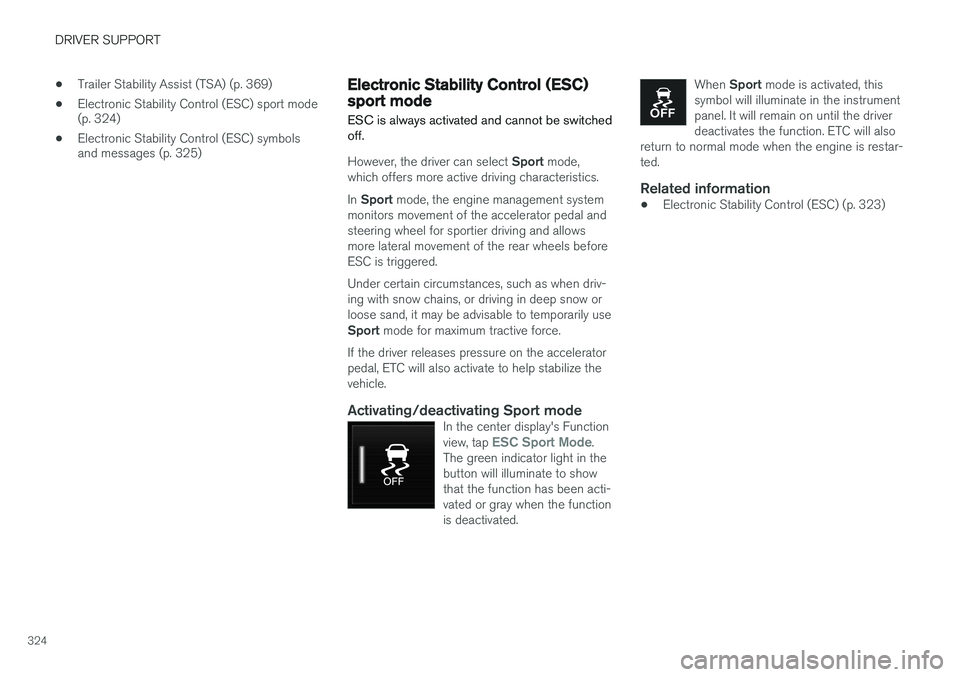
Activating/deactivating Sport modeIn the center display's Function view, tap ESC Sport Mode.
The green indicator light in the button will illuminate to showthat the function has been acti-vated or gray when the functionis deactivated.
When Sport mode is activated, this
symbol will illuminate in the instrument panel. It will remain on until the driverdeactivates the function. ETC will also
return to normal mode when the engine is restar-ted.
Related information
• Electronic Stability Control (ESC) (p. 323)
Page 327 of 546
DRIVER SUPPORT
}}
325
Electronic Stability Control (ESC) symbols and messages
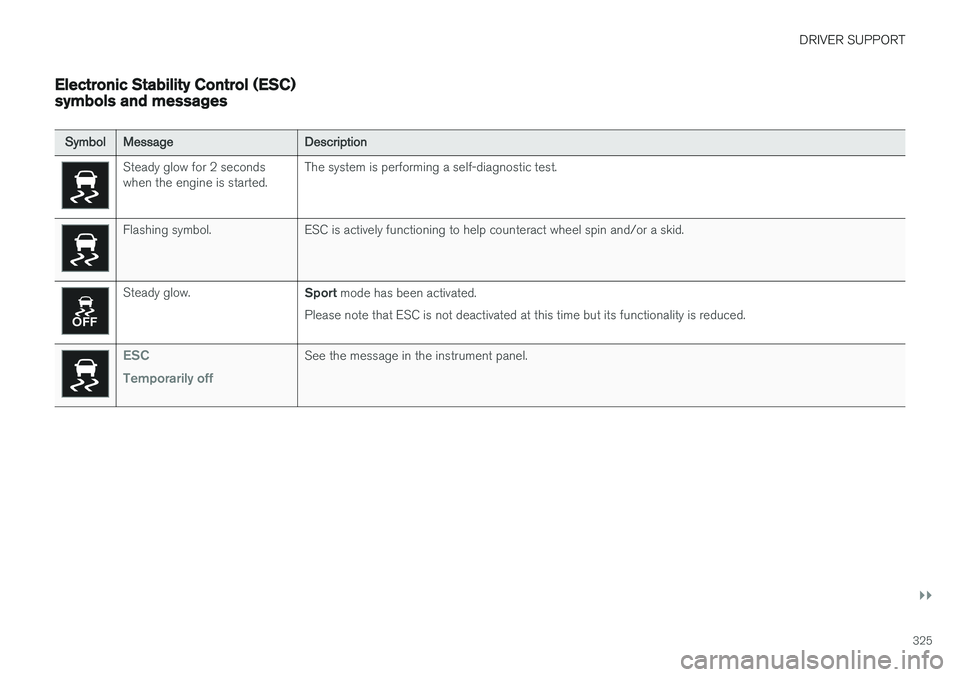
SymbolMessageDescription
Steady glow for 2 seconds when the engine is started.The system is performing a self-diagnostic test.
Flashing symbol.ESC is actively functioning to help counteract wheel spin and/or a skid.
Steady glow.Sport mode has been activated.
Please note that ESC is not deactivated at this time but its functionality is reduced.
ESC Temporarily offSee the message in the instrument panel.
Page 359 of 546

STARTING AND DRIVING
}}
357
Driving through standing water
The vehicle should be driven with extreme cau- tion if it is necessary to drive through standingwater.
The vehicle can be driven through water up to a depth approximately level with the floor at walk-ing speed to help prevent water from enteringthe differential and/or the transmission or dam-aging electrical components. • If possible, check the depth of the water before driving through it. Take particular carewhen driving through flowing water.
• Before driving through water, always select the
Off Road drive mode to ensure that the
gasoline engine is running and to maximize ground clearance.
• After driving through water, apply the brakesand check that they are functioning correctly.
• Clean the electrical connections for trailerwiring after driving in mud or water.
• When driving through water, maintain lowspeed and do not stop in the water.
CAUTION
• Damage may occur to the engine, trans- mission, electrical components, etc. if thevehicle is driven through water higherthan its floor level. Be aware that wavescreated by other vehicles could cause thelevel to temporarily be above the vehicle'sfloor level.
• Damage to any components due to waterabove the floor level, vapor lock or insuffi-cient oil is not covered under warranty.
• If the engine has been stopped while thevehicle is in water, do not attempt torestart it. Have the vehicle towed out ofthe water and inspected by a trained andqualified Volvo service technician.
WARNING
• Avoid driving through standing or rushing water. Doing so can be dangerous and itmay also be difficult to determine theactual depth of the water.
• If water cannot be avoided, after drivingthrough the water, press lightly on thebrake pedal to ensure that the brakes arefunctioning normally. Water or mud canmake the brake linings slippery, resultingin delayed braking effect.
Related information
•
Towing recommendations (p. 360)
Overheating the engine and transmission
In demanding driving conditions, such as when transporting heavy loads, driving in mountainousareas or in very hot weather there is a risk ofoverheating the engine or transmission.
• The engine's output may be slightly limited if there is a risk of overheating.
• Remove e.g., auxiliary lights mounted in frontof the grille in hot weather.
• If the temperature of the engine coolantbecomes too high, the warning symbol will illuminate and the message
Engine
temperature/Stop safely will be displayed.
Stop the vehicle as soon as possible in a safe place and let the engine idle for severalminutes.
• If the message
Engine temperature/High
temperature Turn off engine or Engine
coolant/Stop safely is displayed, stop
safely and turn off the engine.
• If the transmission begins to overheat, an alternative gear shifting program will beselected. An integrated protective functionwill also by activated, the warning symbol will illuminate and the message
Transmission
warmHigh temperature Reduce speed
or Transmission warmStop safely, wait
for cooling will be displayed in the instru-
ment panel.