2016 VOLVO XC90 T8 maintenance
[x] Cancel search: maintenancePage 476 of 546

MAINTENANCE AND SERVICING
474
System updatesUpdates are available for infotainment-related services and Internet connections. If system soft-ware updates are available, they can be to bedownloaded all at once or separately.
System (software) updates are handled through the Remote
update service app in the
center display's App view. Tap once to start a download app inHome view's lower sub-view. Ifno search for updates has
been performed since the last time the infotain-ment system was started, a search will be initi-ated. No search will begin if a software download is underway. An icon in the
System updates button indicates
the number of updates that are currently availa- ble. Tap the button to display a list of updatesthat can be installed in the vehicle. For additional information and answers to com- monly asked questions pertaining to the functionand downloading system updates, go to sup-port.volvocars.com. Background searches for software updates is activated by default when the vehicle isdelivered from the factory.
NOTE
Downloading data may affect other system features that share the Internet connection. Adownload can be cancelled at any time or theother features can be temporarily turned offwhile the software download is underway.
NOTE
An update may be interrupted when the igni- tion is switched off. However, an update does not have to be completed when the ignition is switched off; itwill resume automatically when the ignition isswitched on again.
Updating all system software
–Select Install all at the bottom of the list.
To avoid displaying a list, select
Install all by theSystem updates button.
Updating individual programs
–Select Install to choose the software to be
downloaded.
Cancelling a download
–Tap the activity indicator that replaced theInstall button on the screen when the down-
load began. Keep in mind that a download can be cancelled but an installation that has already begun cannotbe interrupted.
Allowing background searches or
software updates
This function can be deactivated from the centerdisplay:
1. Go to the Settings in the center display's Top view and select
Remote Update Service.
2. Tap
SystemRemote Update Service.
3. Tap to deselect
Auto Software Update.
If an update is available,
New software updates
available will appear in the center display's sta-
tus bar. Tap the message to start a download app in Home view's lower sub-view. As soon as the download app has started, an icon in the
System
updates button will indicate the number of
downloads available.
Related information
• Center display overview (p. 32)
• Navigating in the center display's views (p. 42)
Page 477 of 546

MAINTENANCE AND SERVICING
}}
475
Remote updates With the vehicle connected to the Internet, updates for a number of the vehicle's systemscan be downloaded from the center display.
The Remote updates app is
started from the center dis- play's App view and makes itpossible to:
• search for and update system software
• update the Sensus Navigation maps
• download, update and uninstall apps
Related information
•Downloading, updating and uninstalling apps (p. 434)
• System updates (p. 474)
Vehicle status
The vehicle's general status can be displayed in the center display along with the possibility to book service 1
The Car status app is started
in the center display's App view and has three tabs:
•Messages: stored messages
•
Status: tire pressure and engine oil level
•
Appointments: booking service or repairs 1
Related information
•
Using the center display (p. 49)
• Booking service and repairs (p. 475)
• Checking inflation pressure (p. 458)
• Checking and refilling engine oil (p. 507)
Booking service and repairs Connected Service Booking (CSB) makes it possible to use the vehicle's Internet connectionto set up a time for service, maintenance and/orrepairs.
The information is handled through the Car
status app, which can be opened from the cen-
ter display's App view. Information about your vehicle is sent to your retailer and you can book your workshop appoint-ment directly in your retailer's workshop planningsystem using the Volvo On-Line Service Schedu-ler with your smart phone. The system will alsosend a reminder as the appointment approachesand the Sensus Navigation system will providedirections to the workshop if necessary. This feature makes it convenient to book a work- shop appointment directly from your vehicle.Vehicle-related information is sent to yourretailer, who prepares your visit to the workshop.The retailer will send an email to you're my Volvowebsite including a link enabling you to connectto the Volvo On-Line Service Scheduler whereyou can book a workshop appointment at a con-venient time. Information about your retailer isalso available in the vehicle so that you can con-tact the retailer/workshop at any time using the
Call my retailer menu option.
1 Certain markets only.
Page 478 of 546

||
MAINTENANCE AND SERVICING
476
NOTE
My Volvo can be found by going to www.vol- vocars.com and selecting the United States orCanada.
Before the service can be used
Volvo ID
•The owner (primary driver) must create or have a Volvo ID (see the article "Volvo ID").
• Register your Volvo ID in the vehicle asexplained in the article "Volvo ID". If you havealready registered a Volvo ID, use the sameemail address that you used to create theVolvo ID.
Changing a
Volvo ID email address
If you would like to register a different email address, open the Volvo ID app and tap Change
Volvo ID. Follow the instructions provided. See
also the article "Volvo ID" for additional informa- tion.
Selecting a Volvo retailer on the My Volvo
website
By default, the retailer where you purchased your vehicle will be your preferred retailer/Volvoauthorized workshop who will perform serviceand repairs on your vehicle. To confirm or changethe preferred retailer, go to your personalized MyVolvo website.
Prerequisites for booking service from the vehicle
In order to book an appointment from the vehicle:
• The engine must be running
• The vehicle must be connected to the Inter- net (see the article "Internet connected vehi-cle")
Using the serviceWhen it is time for service or in certain cases if repairs are necessary, a message will appear inthe instrument panel and in the center display.This message is triggered by: • the amount of time that has elapsed since the last service
• the number of hours the engine has runsince the last service
• mileage since the last service.
• Specific warnings or fault codes in the vehi-cle
Booking service or repairs
Submit a booking request whenever you need a workshop appointment or when a messageregarding the need for service or repairs hasbeen displayed in the instrument panel and in thecenter display.
Sending an appointment request
1.
Open the Car status app in the center dis-
play's App view.
2. Tap
Appointments.
3. Under
Appointments, tap Request
appoint..
4. Check that your
Volvo ID is correct.
5. Check that the correct preferred retailer is listed. If you prefer, simply tap the button to initiate a call to the retailer.
6. Tap
Send appointment request. Your
request and vehicle data will be sent to your retailer through the vehicle's Internet con-nection.
> Volvo will send a booking invitation to your email address.
7. Open the email and click the link to select an appointment slot at your workshop. Enter your Volvo ID to log in to My Volvo and pro-ceed to book your workshop appointment ata convenient time with your preferred serviceadvisor. Add any additional preferences andfree text to your booking.
Page 479 of 546

MAINTENANCE AND SERVICING
477
8. When you have submitted your workshop
booking, your appointment will be confirmed online directly by email and by a message inthe center display after a short delay.
9. One day prior to your appointment, you will receive a reminder via email and a messagewill appear on the center display. You can setthe interval for other reminders (e.g., twodays, three days) at your My Volvo website.
10. On the day of your appointment, a reminder will appear again on the center display.
Sending vehicle-related information
Information about the vehicle can be sent at any time using its Internet connection. Using this function does not send a workshop
appointment request to your retailer ; only
vehicle data will be transmitted to Volvo. This vehicle data can be accessed by any retailer ifyou call the retailer and provide your VehicleIdentification Number (VIN).
1. Open the Car status app in the center dis-
play's App view.
2. Tap
Appointments. 3.
Under
Appointments, tap Send vehicle
data.
> A message confirming that vehicle infor- mation has been sent via the Internet connection will appear on the center dis-play. Transmission of the vehicle informa-tion can be cancelled at any time by tap-ping the X in the activity indicator.
Viewing workshop information
1. Open the Car status app in the center dis-
play's App view.
2. Tap
Appointments.
3. Under
Appointments, tap Workshop
information.
> A window with retailer information will appear.
4. If you prefer, call the retailer, or select an address or GPS coordinates to activate the navigation system.
Booking and vehicle informationWhen you make an appointment or send vehicleinformation from you vehicle, this information will be sent using the Internet connection. Informa-tion about the vehicle includes:
• service requirements
• time since service was last performed
• function status
• fluid levels
• mileage (odometer reading)
• VIN (Vehicle Identification Number)
• The vehicle's software version
• Diagnostic information
Related information
•Internet connected vehicle (p. 431)
• Volvo ID (p. 31)
Page 480 of 546

MAINTENANCE AND SERVICING
478
Wi-Fi connection to a workshop The time a vehicle is in a workshop for service or repairs can be reduced by transmitting trouble-shooting information as soon as the car reachesthe workshop. This is done most conveniently by selecting
Automatically connect when I arrive in the
center display's Settings menu.
Each time the vehicle slows down to a sufficiently low speed, it begins searching for a Wi-Fi net-work. If an authorized Volvo network (at a retaileror workshop) is found, a message will be dis-played or a pop-up window will open in the cen-ter display (this applies to manual connections,see the section "Manually connecting to a work-shop" below).
Automatically connecting to a
workshop
Without driver confirmation
This is the most convenient way to transmit trou- ble-shooting data. The driver does not need toconfirm that the vehicle will establish a connec-tion. If the vehicle stops at a workshop and the engine is switched off using the start knob, a messagewill appear above the status bar in the center dis-play. The vehicle will be automatically connectedwhen the driver's door is opened if the driver does not tap the
Cancel button in the message. To help prevent the driver from being disturbed by unwanted requests to connect (e.g., if thevehicle is often parked near a workshop with anauthorized Volvo network), the vehicle will switchto manual connection if the driver cancels a con-nection request twice within 5 days.
With driver confirmation
With this alternative, the driver must confirm a connection. If the vehicle stops at a workshop and the engine is switched off using the start knob, a pop-upwindow will open in the center display. The vehi-cle will be automatically connected when the driv- er's door is opened if the driver taps
Connect in
the pop-up window. If the driver does nothing or taps the pop-up window's
Abort button, no
attempt will be made to establish a connection.
NOTE
To help prevent the driver from being distur- bed by unwanted requests to connect (e.g., ifthe vehicle is often parked near a workshopwith an authorized Volvo network), the vehiclewill switch to manual connection if the drivercancels a connection request twice within5 days.
Manually connecting to a workshopManual connections are handled by the service technician.
Changing the way a connection is madeThe type of connection (manual or automatic)can be changed in the center display's Settingsmenu.
1. Pull down the center display's Top view and
tap
Settings.
2. Tap
CommunicationVolvo Service
Networks.
3. Select
Automatically connect when I
arrive, Ask before connecting or Never
connect and never ask (manual connec-
tions).
Related information
• Internet connected vehicle (p. 431)
• Settings view (p. 111)
Page 481 of 546
MAINTENANCE AND SERVICING
}}
479
Climate system serviceService and repairs on the air conditioning sys- tem should only be done by a trained and quali-fied Volvo service technician.
Troubleshooting and repairsThe air conditioning system contains a floures- cent tracer substance. Ultraviolet light is used tosearch for leaks in the system.
Refrigerant R134a
WARNING
The air conditioning system contains the refrigerant R134a under pressure. Serviceand repairs on the system should only bedone by a trained and qualified Volvo servicetechnician.
Related information
• Climate control system (p. 178)
Start battery
The vehicle's electrical system is single pole and uses the body and engine block as conductors. The start (main) battery is used to power electri- cal components and systems. However, thehybrid battery is used to start the gasolineengine. The start battery should only be replaced by a trained and qualified Volvo service technician.
The start battery is an Absorbed Glass Mat (AGM) 12-volt battery that is dimensioned foruse in vehicles to support electrical systems andfunctions. The service life of a battery is affected by factors such as driving conditions/style, the number ofstarts, climate, etc. Extreme cold may also furtherdecrease the battery
Page 482 of 546
||
MAINTENANCE AND SERVICING
480
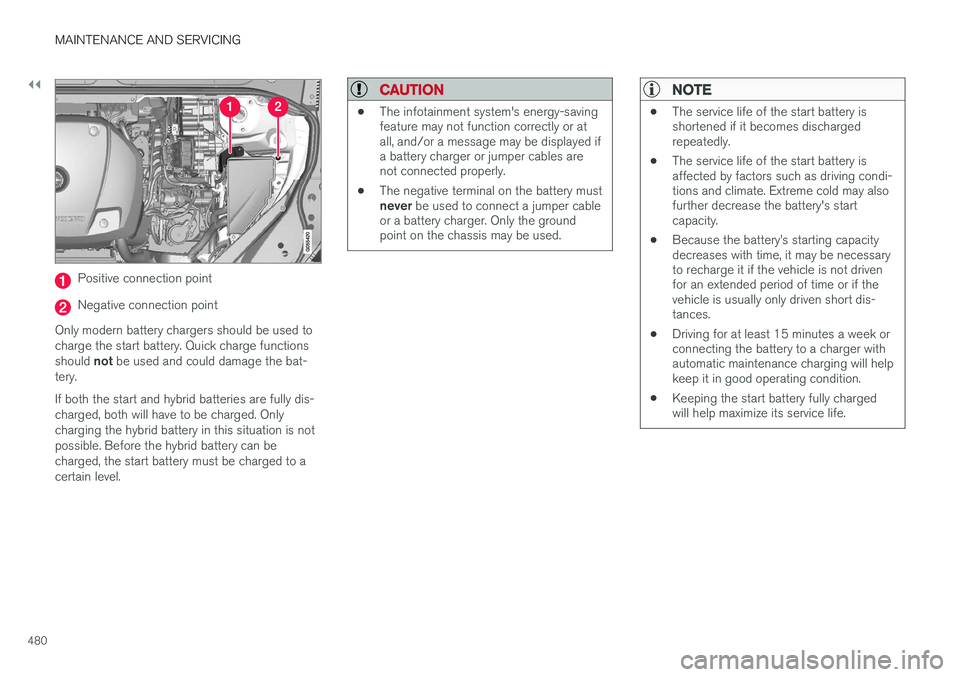
Positive connection point
Negative connection point
Only modern battery chargers should be used to charge the start battery. Quick charge functions should not be used and could damage the bat-
tery. If both the start and hybrid batteries are fully dis- charged, both will have to be charged. Onlycharging the hybrid battery in this situation is notpossible. Before the hybrid battery can becharged, the start battery must be charged to acertain level.
CAUTION
• The infotainment system's energy-saving feature may not function correctly or atall, and/or a message may be displayed ifa battery charger or jumper cables arenot connected properly.
• The negative terminal on the battery must never
be used to connect a jumper cable
or a battery charger. Only the ground point on the chassis may be used.
NOTE
• The service life of the start battery is shortened if it becomes dischargedrepeatedly.
• The service life of the start battery isaffected by factors such as driving condi-tions and climate. Extreme cold may alsofurther decrease the battery's startcapacity.
• Because the battery
Page 483 of 546
MAINTENANCE AND SERVICING
}}
481
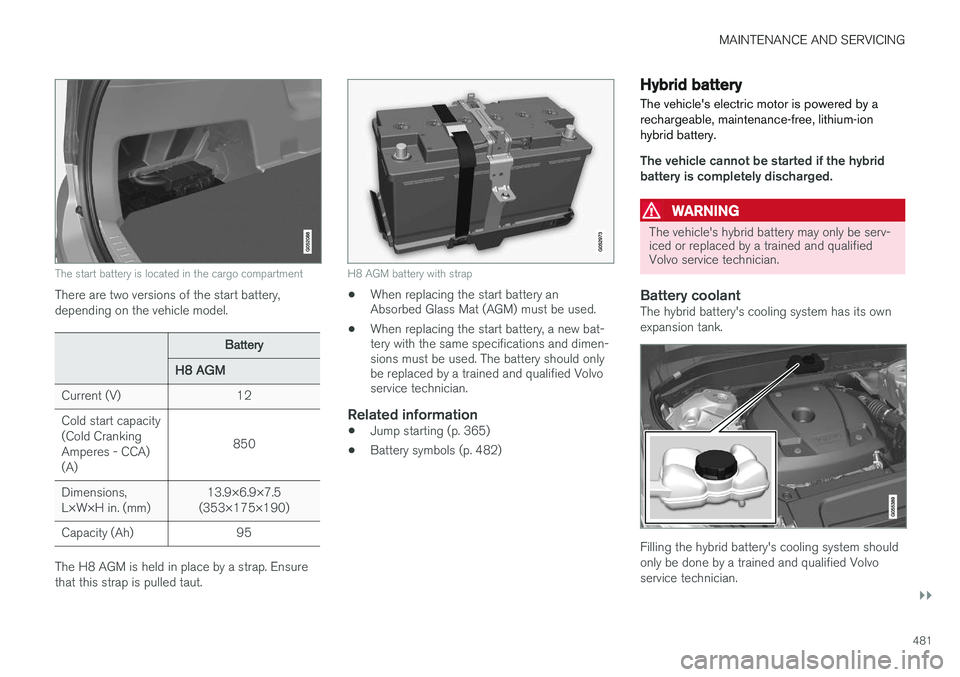
The start battery is located in the cargo compartment
There are two versions of the start battery, depending on the vehicle model.
Battery
H8 AGM
Current (V)12
Cold start capacity (Cold CrankingAmperes - CCA)(A)
850
Dimensions, L×W×H in. (mm)13.9×6.9×7.5
(353×175×190)
Capacity (Ah)95
The H8 AGM is held in place by a strap. Ensure that this strap is pulled taut.
H8 AGM battery with strap
• When replacing the start battery an Absorbed Glass Mat (AGM) must be used.
• When replacing the start battery, a new bat-tery with the same specifications and dimen-sions must be used. The battery should onlybe replaced by a trained and qualified Volvoservice technician.
Related information
• Jump starting (p. 365)
• Battery symbols (p. 482)
Hybrid battery
The vehicle's electric motor is powered by a rechargeable, maintenance-free, lithium-ionhybrid battery.
The vehicle cannot be started if the hybrid battery is completely discharged.
WARNING
The vehicle's hybrid battery may only be serv- iced or replaced by a trained and qualifiedVolvo service technician.
Battery coolantThe hybrid battery's cooling system has its own expansion tank.
Filling the hybrid battery's cooling system should only be done by a trained and qualified Volvoservice technician.