Page 511 of 546

MAINTENANCE AND SERVICING
}}
509
Via Function view
–From Function view, tap the Wiper Service
Position button. The indicator light in the
button will go out when the service position is deactivated.
Via Settings
1. Tap Settings in the center display's Top
view.
2.
My CarWipers
3. Tap the Wiper Service Position to deselect
the box.
The wipers will also leave the service position if:
• The wipers are activated.
• The windshield/headlight washers are acti- vated.
• The rain sensor is activated.
CAUTION
If the wiper arms have been folded out from the windshield while in the service position,fold them back against the windshield beforereturning the wipers to the normal position tohelp avoid scratching the paint on the hood.
Related information
•
Replacing wiper blades (p. 509)
• Using the windshield wipers (p. 156)
Replacing wiper blades
The wiper blades should be replaced regularly for best effect. The windshield wiper blades must be in the verti- cal (service) position for replacement, washingor to lift them away from the windshield whene.g., removing ice or snow.
Replacing the windshield wiper blades
Page 512 of 546
||
MAINTENANCE AND SERVICING
510
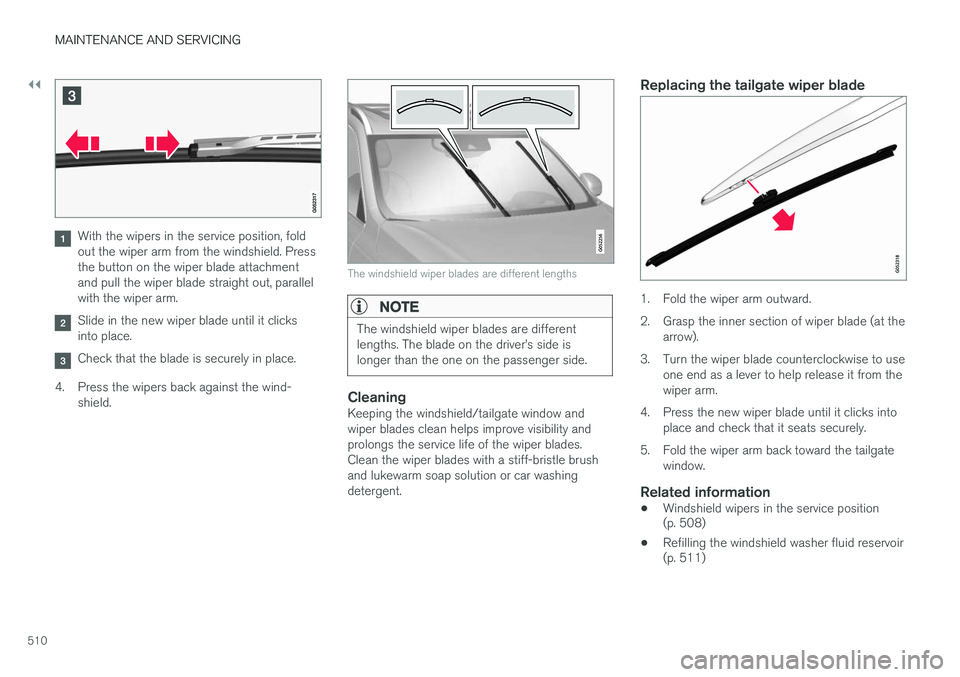
With the wipers in the service position, fold out the wiper arm from the windshield. Pressthe button on the wiper blade attachmentand pull the wiper blade straight out, parallelwith the wiper arm.
Slide in the new wiper blade until it clicks into place.
Check that the blade is securely in place.
4. Press the wipers back against the wind- shield.
The windshield wiper blades are different lengths
NOTE
The windshield wiper blades are different lengths. The blade on the driver
Page 515 of 546

MAINTENANCE AND SERVICING
}}
513
CAUTION
•Before driving into an automatic car wash, turn off the optional rain sensor toavoid damaging the windshield wipers.
• Make sure that side view mirrors, auxiliarylamps, etc, are secure, and that anyantenna(s) are retracted or removed. Oth-erwise there is risk of the machine dis-lodging them.
• Chromed wheels:
Clean chrome-plated
wheels using the same detergents usedfor the body of the vehicle. Aggressivewheel-cleaning agents can permanentlystain chrome-plated wheels.
WARNING
• When the vehicle is driven immediately after being washed, apply the brakes,including the parking brake, several timesin order to remove any moisture from thebrake linings.
• Engine cleaning agents should not beused when the engine is warm. This con-stitutes a fire risk.
Exterior componentsVolvo recommends the use of special cleaning products, available at your Volvo retailer, forcleaning colored plastic, rubber, or ornamentalcomponents such as chromed strips on the exte- rior of your vehicle. The instructions for usingthese products should be followed carefully. Sol-vents or stain removers should not be used.
CAUTION
•
Avoid waxing or polishing plastic or rub- ber components
• Polishing chromed strips can wear awayor damage the surface
• Polishes containing abrasive substancesshould not be used
Related information
•Paint damage (p. 516)
• Corrosion protection (p. 516)
• Polishing and waxing (p. 518)
• Windshield wipers in the service position (p. 508)
Cleaning the interior
Only use cleaning agents and car care products recommended by Volvo. Clean regularly and fol-low the instructions included with the car careproduct.
CAUTION
• Under no circumstances should gasoline, naphtha or similar cleaning agents beused on the plastic or the leather sincethese can cause damage.
• Take extra care when removing stainssuch as ink or lipstick since the coloringcan spread.
• Use solvents sparingly. Too much solventcan damage the seat padding.
• Start from the outside of the stain andwork toward the center.
• Sharp objects (e.g. pencils or pens in apocket) or Velcro fasteners on clothingmay damage the textile upholstery.
• Clothing that is not colorfast, such asnew jeans or suede garments, may stainthe upholstery.
Fabric upholstery and ceiling linerClean with soapy water or a detergent. For more difficult spots caused by oil, ice cream, shoe pol-ish, grease, etc., use a clothing/fabric stainremover. Consult your Volvo retailer.
Page 544 of 546

INDEX
542Turn signals 151
changing bulbs 500
U
Uniform Tire Quality Grading 450
Unlocking the tailgate 244
Unlocking the vehicle 242, 243
USB/AUX connection 420, 427
V
Vehicle Event Data 30
Vehicle information 14
Vehicle loading 215, 449
Vehicle maintenance 472performed by the owner 472
Vehicle status 475
Vehicle weights 525Voice control cell phones 122
giving commands 121
introduction 120
multimedia devices 122
radio 122
settings 125
Volvo and the environment 20
Volvo ID 31
Volvo maintenance 472
Volvo On Call Roadside Assistance 14
Volvo programs 14
W
Warning flashers, hazard 147
Warning lights 137
Warning system, collision 288
Warranties 472
Washer fluid 511Washers headlight 158
windshield 156
Water, driving through 357
Waxing 518Weights trailer 367
Wheels changing 453, 454
storing 445
Whiplash Protection System 63
Wi-Fi 435, 436
Windows laminated glass 57
power 109
sun shade 109
Windshield rain sensor 157
washers 158
wipers/washers 156
Windshield washer fluid reservoir 511
Windshield wiper blades 509Windshield wipers service position 508
Wiper blades replacing 508, 509
replacing tailgate wiper 509
WMA files 429 Workshop Wi-Fi connection 478
Page:
< prev 1-8 9-16 17-24