2016 VOLVO XC90 T8 USB
[x] Cancel search: USBPage 432 of 546
||
INFOTAINMENT
* Option/accessory, for more information, see Introduction.
430
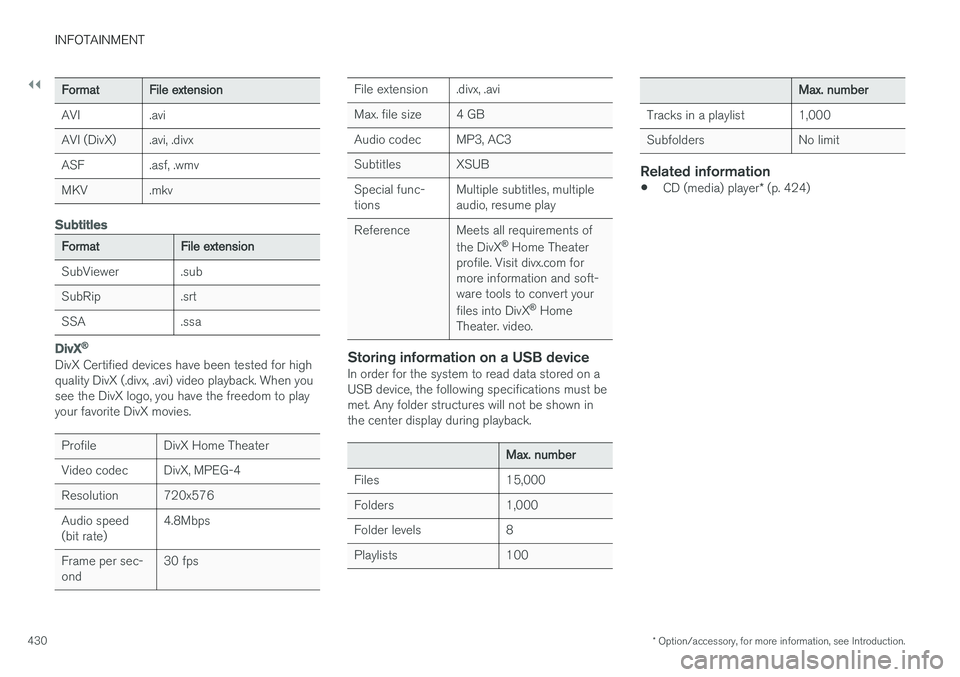
FormatFile extension
AVI.avi
AVI (DivX).avi, .divx
ASF.asf, .wmv
MKV.mkv
Subtitles
FormatFile extension
SubViewer.sub
SubRip.srt
SSA.ssa
DivX ®
DivX Certified devices have been tested for high quality DivX (.divx, .avi) video playback. When yousee the DivX logo, you have the freedom to playyour favorite DivX movies.
ProfileDivX Home Theater
Video codecDivX, MPEG-4
Resolution720x576
Audio speed (bit rate)4.8Mbps
Frame per sec- ond30 fps
File extension.divx, .avi
Max. file size4 GB
Audio codecMP3, AC3
SubtitlesXSUB
Special func- tionsMultiple subtitles, multiple audio, resume play
ReferenceMeets all requirements of the DivX ®
Home Theater
profile. Visit divx.com for more information and soft-ware tools to convert your files into DivX ®
Home
Theater. video.
Storing information on a USB deviceIn order for the system to read data stored on a USB device, the following specifications must bemet. Any folder structures will not be shown inthe center display during playback.
Max. number
Files15,000
Folders1,000
Folder levels8
Playlists100
Max. number
Tracks in a playlist1,000
SubfoldersNo limit
Related information
• CD (media) player
* (p. 424)
Page 433 of 546

INFOTAINMENT
}}
431
Internet connected vehicle
Connecting to the Internet makes it possible to e.g., use certain navigation services, listen toweb radio, stream music using apps, contact aretailer and download software.
The vehicle can connect to the Internet using Bluetooth, Wi-Fi, a cell phone connected by acable to the USB socket or via the integratedmodem. When connected, it is possible to share (tether) a Wi-Fi-hotspot to allow other devices to use the connection 5
.
Connection status is shown in the center dis- play's status bar.
Related information
• Connecting to the Internet (p. 431)
• Apps (applications) (p. 433)
• Booking service and repairs (p. 475)
• System updates (p. 474)
• Volvo ID (p. 31)
• Symbols in the center display status bar (p. 47)
• Tethering (Wi-Fi sharing) (p. 435)
Connecting to the Internet
Connect the vehicle to the Internet using
Bluetooth, Wi-Fi, by connecting a phone through a cable to the USB socket or via the vehicle'sintegrated modem.
The cell phone and the network service provider must support Internet sharing (tethering) and thesubscription must included data transfer. See the terms and confidentiality information at support.volvocars.com before connecting to theInternet.
NOTE
When using Apple CarPlay, an Internet con- nection can only be established by usingWi-Fi or the vehicle's integrated modem.
Connect using BluetoothSee the article "Pairing a cell phone."
Connect using Wi-Fi
5 This does not apply to Wi-Fi connections.
Page 434 of 546
||
INFOTAINMENT
4321. Activate tethering/personal hotspot in the
cell phone.
2. Tap
Settings in the center display's Top
view.
3. Tap
CommunicationWi-Fi.
4. Tap Wi-Fi to activate/deactivate.
5. Tap the name of the network to be used.
6. Enter the network password.
7. If a different connection was used previously, confirm the connection change.
> The vehicle will connect to the network.
Please be aware that certain cell phones disable tethering when the connection to the vehicle hasbeen broken, e.g., when the phone has beenremoved from the vehicle. In such cases, thephone's tethering function will have to be reacti-vated the next time the phone is used to connectto the Internet. When a phone is connected to the vehicle, it is saved for future use. When a max. number of 50have been saved, the first one connected will bedeleted. To show the list of saved networks or to manually delete a network, tap
SettingsWi-Fi
Saved networks.
See the article "Wi-Fi technology and security" for network connection requirements.
Connect using a cable connected to the USB socket
1. Connect the phone via a cable to the USB socket in the tunnel console storage com- partment.
2. Activate USB tethering in the cell phone.
3. If a different connection was used previously, confirm the connection change.
> The vehicle will connect to the network.
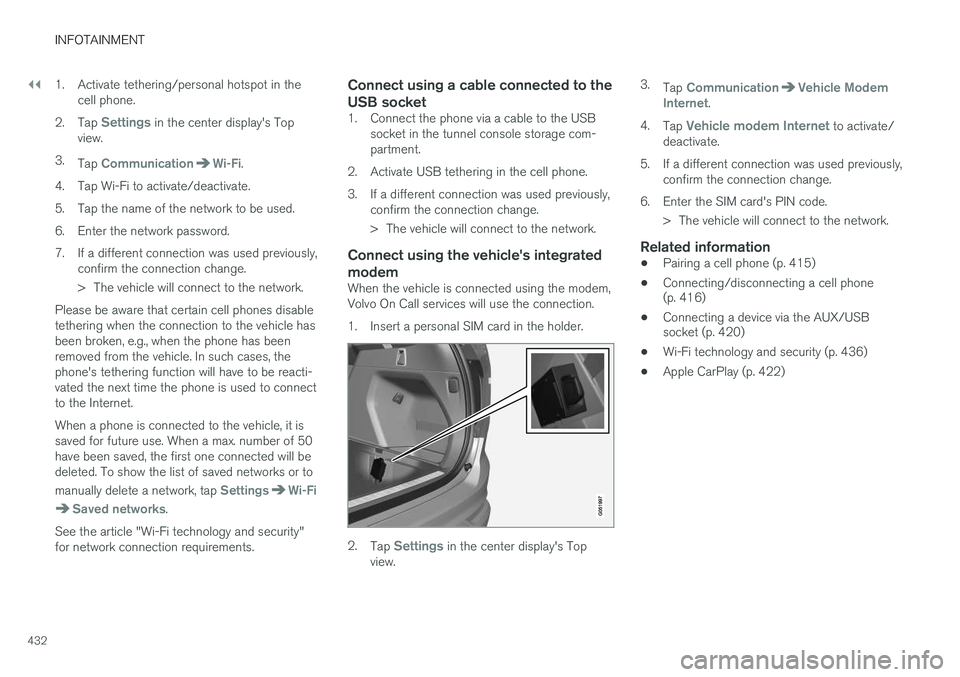
Connect using the vehicle's integrated modem
When the vehicle is connected using the modem, Volvo On Call services will use the connection.
1. Insert a personal SIM card in the holder.
2.Tap Settings in the center display's Top
view. 3.
Tap
CommunicationVehicle Modem
Internet.
4. Tap
Vehicle modem Internet to activate/
deactivate.
5. If a different connection was used previously, confirm the connection change.
6. Enter the SIM card's PIN code. > The vehicle will connect to the network.
Related information
• Pairing a cell phone (p. 415)
• Connecting/disconnecting a cell phone (p. 416)
• Connecting a device via the AUX/USBsocket (p. 420)
• Wi-Fi technology and security (p. 436)
• Apple CarPlay (p. 422)
Page 488 of 546
||
MAINTENANCE AND SERVICING
* Option/accessory, for more information, see Introduction.
486 •
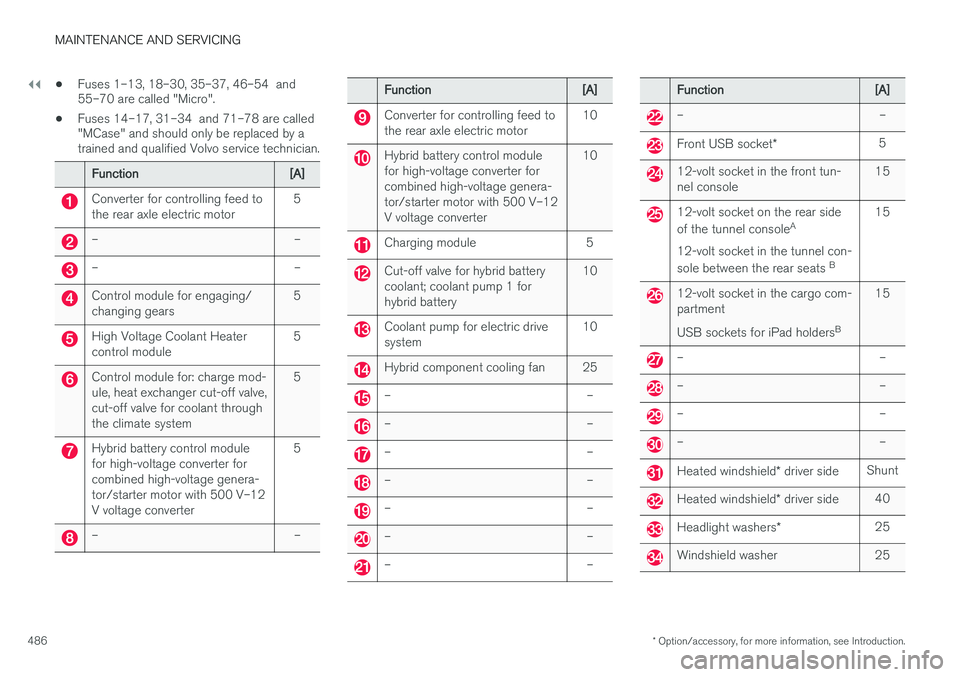
Fuses 1–13, 18–30, 35–37, 46–54 and 55–70 are called "Micro".
• Fuses 14–17, 31–34 and 71–78 are called"MCase" and should only be replaced by atrained and qualified Volvo service technician.
Function[A]
Converter for controlling feed to the rear axle electric motor5
––
––
Control module for engaging/ changing gears5
High Voltage Coolant Heater control module5
Control module for: charge mod- ule, heat exchanger cut-off valve,cut-off valve for coolant throughthe climate system5
Hybrid battery control module for high-voltage converter forcombined high-voltage genera-tor/starter motor with 500 V–12V voltage converter5
––
Function[A]
Converter for controlling feed to the rear axle electric motor10
Hybrid battery control module for high-voltage converter forcombined high-voltage genera-tor/starter motor with 500 V–12V voltage converter10
Charging module5
Cut-off valve for hybrid battery coolant; coolant pump 1 forhybrid battery10
Coolant pump for electric drive system10
Hybrid component cooling fan25
––
––
––
––
––
––
––
Function[A]
––
Front USB socket
*5
12-volt socket in the front tun- nel console15
12-volt socket on the rear side of the tunnel console A
12-volt socket in the tunnel con-sole between the rear seats B15
12-volt socket in the cargo com- partment USB sockets for iPad holders B15
––
––
––
––
Heated windshield
* driver sideShunt
Heated windshield * driver side40
Headlight washers *25
Windshield washer25
Page 536 of 546

INDEX
534Brake system
Brake pad inspection 347
fluid 528
general information 346, 348, 350
Bulbs 500 replacing 496
specifications 501
C
Cameradriver support systems 252
limitations 254
Camera, Park Assist 311, 313, 315, 316
Capacity weight 449, 525
Cargo area, steel grid 219
Cargo area cover 221Cargo compartment fuses 493
raising/lowering the level 215
Cargo net 217
Cargo space 208
Car wash 511
Catalytic converter 364CD, USB, iPod, AUX, Bluetooth, Recents, Library, Shuffle, Similar, Change device, Pri-
mary Audio Default Language, Subtitle, Pri- mary Subtitle Default Language, Video, DivX ® VOD 424
CD player 424 Cell phone hands-free 414
Pairing 415
Cell phone voice control 122 Center display changing settings 34
cleaning 515
keyboard 35
navigating in 42
overview 32
screen in the center console 49
symbols in the status bar 47
Chains 451
Changing a wheel 453Charging cable hybrid battery 375
Child restraints recalls and registration 70
Child restraint systems 70 booster cushions 77
convertible seats 74
infant seats 72
ISOFIX/LATCH anchors 78
top tether anchors 80Child safety 68booster cushions 77
child restraint systems 70, 79
convertible seats 74
infant seats 72
Child safety locks 228 Child seats lower attachment points 79
City safety 287, 293City Safety crossing traffic 291
detecting objects 290
limitations 293
rear collision warning 292
symbols and messages 297
troubleshooting 295
City Safety, On/Off 289 Cleaning exterior 511
interior 513
Clean Zone Interior Package 186
Climate system 188 air distribution 201, 202, 204
air filter 187
air vents 202
auto mode 187
blower 191
center display controls 189
Page 544 of 546

INDEX
542Turn signals 151
changing bulbs 500
U
Uniform Tire Quality Grading 450
Unlocking the tailgate 244
Unlocking the vehicle 242, 243
USB/AUX connection 420, 427
V
Vehicle Event Data 30
Vehicle information 14
Vehicle loading 215, 449
Vehicle maintenance 472performed by the owner 472
Vehicle status 475
Vehicle weights 525Voice control cell phones 122
giving commands 121
introduction 120
multimedia devices 122
radio 122
settings 125
Volvo and the environment 20
Volvo ID 31
Volvo maintenance 472
Volvo On Call Roadside Assistance 14
Volvo programs 14
W
Warning flashers, hazard 147
Warning lights 137
Warning system, collision 288
Warranties 472
Washer fluid 511Washers headlight 158
windshield 156
Water, driving through 357
Waxing 518Weights trailer 367
Wheels changing 453, 454
storing 445
Whiplash Protection System 63
Wi-Fi 435, 436
Windows laminated glass 57
power 109
sun shade 109
Windshield rain sensor 157
washers 158
wipers/washers 156
Windshield washer fluid reservoir 511
Windshield wiper blades 509Windshield wipers service position 508
Wiper blades replacing 508, 509
replacing tailgate wiper 509
WMA files 429 Workshop Wi-Fi connection 478