2016 VOLVO XC90 T8 heating
[x] Cancel search: heatingPage 162 of 546
INSTRUMENTS AND CONTROLS
* Option/accessory, for more information, see Introduction.
160
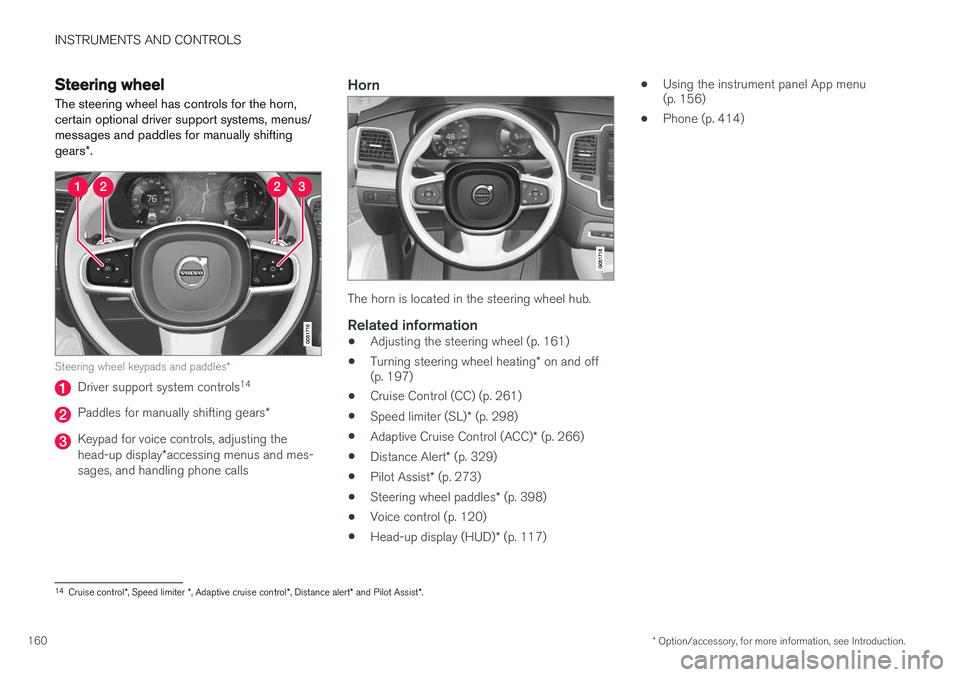
Steering wheel The steering wheel has controls for the horn, certain optional driver support systems, menus/messages and paddles for manually shifting gears *.
Steering wheel keypads and paddles *
Driver support system controls14
Paddles for manually shifting gears
*
Keypad for voice controls, adjusting the head-up display*accessing menus and mes-
sages, and handling phone calls
Horn
The horn is located in the steering wheel hub.
Related information
• Adjusting the steering wheel (p. 161)
• Turning steering wheel heating
* on and off
(p. 197)
• Cruise Control (CC) (p. 261)
• Speed limiter (SL)
* (p. 298)
• Adaptive Cruise Control (ACC)
* (p. 266)
• Distance Alert
* (p. 329)
• Pilot Assist
* (p. 273)
• Steering wheel paddles
* (p. 398)
• Voice control (p. 120)
• Head-up display (HUD)
* (p. 117) •
Using the instrument panel App menu (p. 156)
• Phone (p. 414)
14
Cruise control *, Speed limiter *, Adaptive cruise control *, Distance alert * and Pilot Assist *.
Page 164 of 546
INSTRUMENTS AND CONTROLS
* Option/accessory, for more information, see Introduction.
162 •
Moving the second row seats forward/rear- ward (p. 174)
• Adjusting the second row backrest tilt(p. 171)
Manually operated front seats
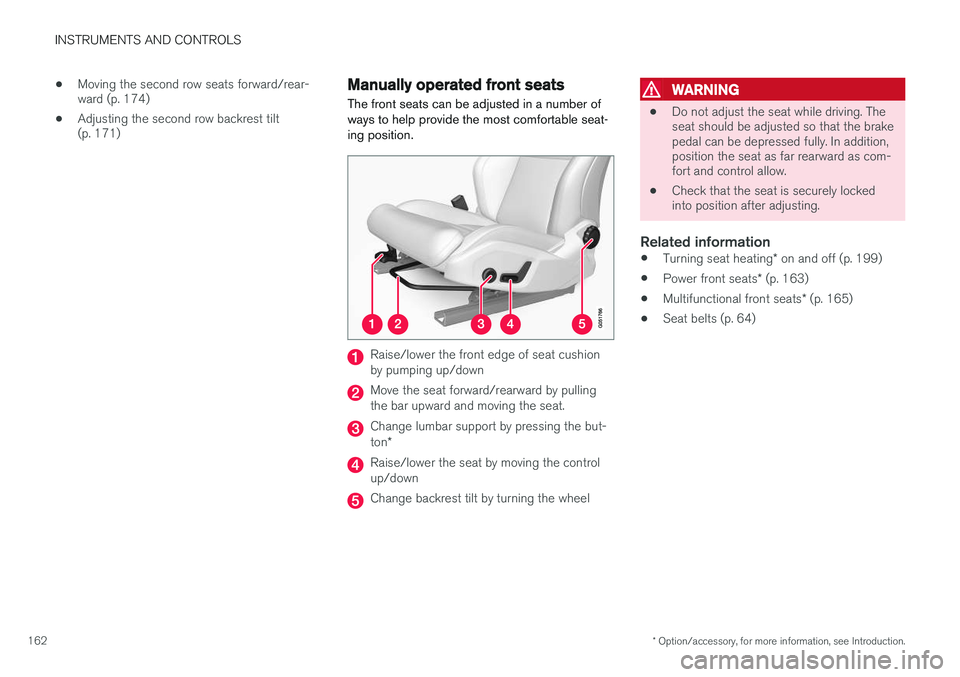
The front seats can be adjusted in a number of ways to help provide the most comfortable seat-ing position.
Raise/lower the front edge of seat cushion by pumping up/down
Move the seat forward/rearward by pulling the bar upward and moving the seat.
Change lumbar support by pressing the but- ton *
Raise/lower the seat by moving the control up/down
Change backrest tilt by turning the wheel
WARNING
• Do not adjust the seat while driving. The seat should be adjusted so that the brakepedal can be depressed fully. In addition,position the seat as far rearward as com-fort and control allow.
• Check that the seat is securely lockedinto position after adjusting.
Related information
•
Turning seat heating
* on and off (p. 199)
• Power front seats
* (p. 163)
• Multifunctional front seats
* (p. 165)
• Seat belts (p. 64)
Page 165 of 546
INSTRUMENTS AND CONTROLS
* Option/accessory, for more information, see Introduction.163
Power front seats*
The power front seats offer a number of adjust- ment possibilities to help maximize comfort andergonomics.
The power seats have an overload protector that
activates if a seat is blocked by any object. If this occurs, put the ignition in mode I or 0 and wait
for a short period before operating the seat again. The power seat(s) can be adjusted for a short period after unlocking the door with the remotekey without switching the ignition on. Seat adjust-ment can always be made when the engine isrunning.
Related information
• Multifunctional front seats
* (p. 165)
• Adjusting power front seats
* (p. 163)
• Using the power seat memory function
*
(p. 164)
• Manually operated front seats (p. 162)
• Turning seat heating
* on and off (p. 199)
• Turning front seat ventilation
* on and off
(p. 200)
• Easy access to and from the driver seat (p. 169)
Adjusting power front seats
*
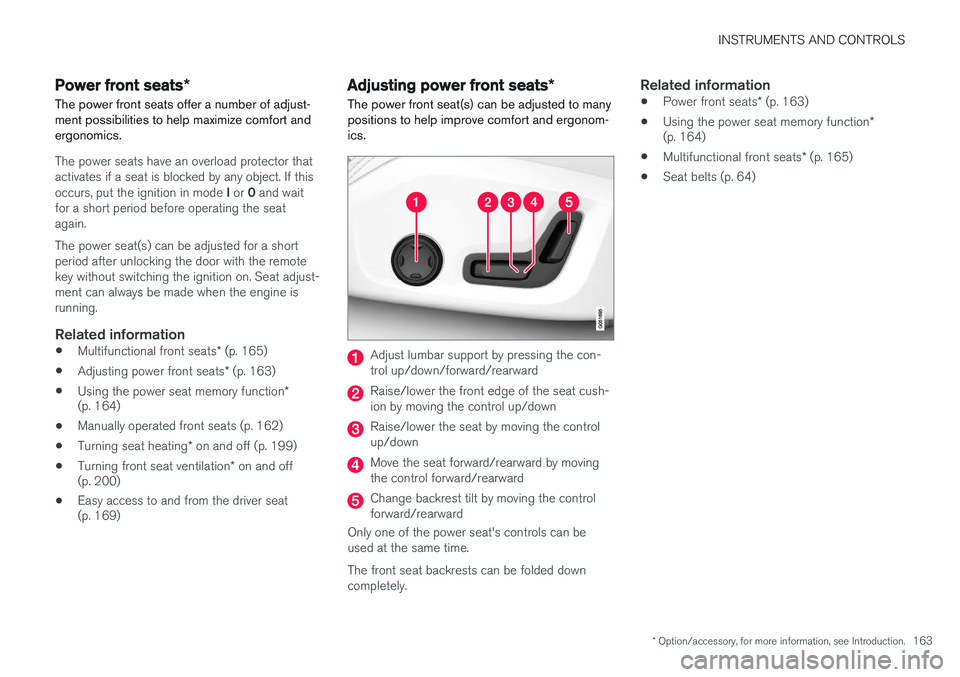
The power front seat(s) can be adjusted to many positions to help improve comfort and ergonom-ics.
Adjust lumbar support by pressing the con- trol up/down/forward/rearward
Raise/lower the front edge of the seat cush- ion by moving the control up/down
Raise/lower the seat by moving the control up/down
Move the seat forward/rearward by moving the control forward/rearward
Change backrest tilt by moving the control forward/rearward
Only one of the power seat's controls can beused at the same time. The front seat backrests can be folded down completely.
Related information
• Power front seats
* (p. 163)
• Using the power seat memory function
*
(p. 164)
• Multifunctional front seats
* (p. 165)
• Seat belts (p. 64)
Page 168 of 546
||
INSTRUMENTS AND CONTROLS
* Option/accessory, for more information, see Introduction.
166 center of the display. If both seats are adjusted, the settings for the driver seat are shown on theupper half of the screen and the ones made forthe passenger seat are on the lower half. Press the Home button on the center console to exit the seat adjustment setting view.
Related information
•
Power front seats
* (p. 163)
• Adjusting function settings in the multifunc- tional front seats
* (p. 166)
• Turning seat heating
* on and off (p. 199)
Adjusting function settings in the multifunctional front seats *
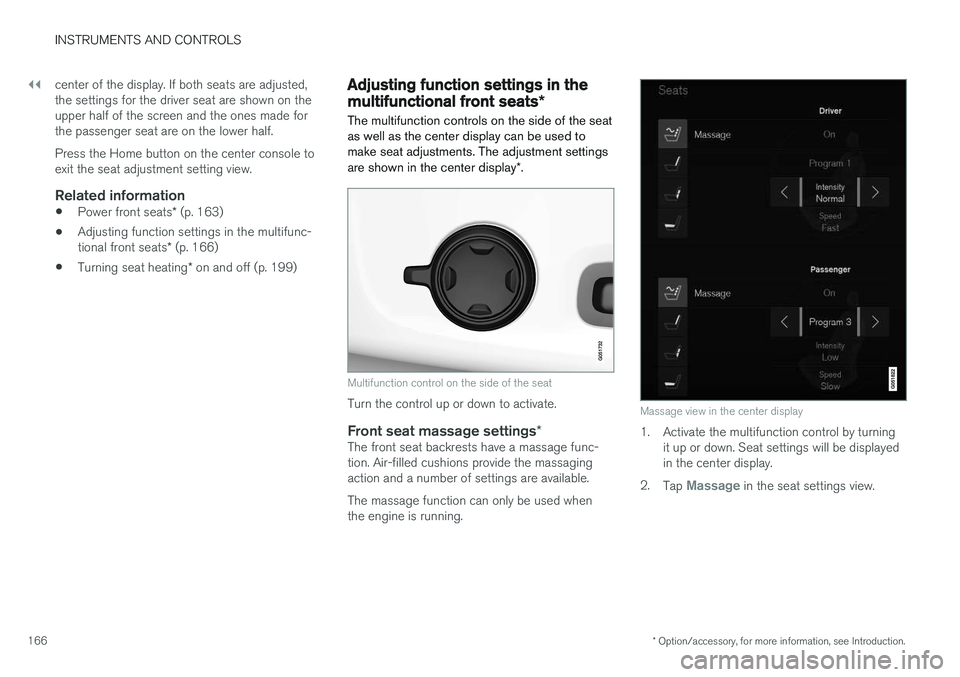
The multifunction controls on the side of the seat as well as the center display can be used tomake seat adjustments. The adjustment settings are shown in the center display *.
Multifunction control on the side of the seat
Turn the control up or down to activate.
Front seat massage settings *The front seat backrests have a massage func- tion. Air-filled cushions provide the massagingaction and a number of settings are available. The massage function can only be used when the engine is running.
Massage view in the center display
1. Activate the multifunction control by turning
it up or down. Seat settings will be displayed in the center display.
2. Tap
Massage in the seat settings view.
Page 171 of 546
INSTRUMENTS AND CONTROLS
}}
* Option/accessory, for more information, see Introduction.169
Related information
•Multifunctional front seats
* (p. 165)
Rear seats
Your vehicle has three rows of seats. The sec- ond row of seats has three individual seatingpositions and the optional third row of seats hastwo individual seating positions.
Related information
• Adjusting the second row backrest tilt (p. 171)
• Adjusting the second row head restraints(p. 170)
• Folding the second row backrests (p. 172)
• Folding the third row backrests (p. 175)
• Getting into and out of the third row of seats(p. 174)
• Moving the second row seats forward/rear-ward (p. 174)
• Turning seat heating
* on and off (p. 199)
Easy access to and from the driver seat
The
Easy Ingress & Egress function can be
used to make getting into and out of the driver's seat easier.
Easy egressTo make getting out of the driver's seat easier, the seat is lowered, the side bolsters deflate andthe seat cushion retracts at the same time. The easy egress function must be activated in the center display. 1. Move the gear selector to the P position.
2. Switch off the engine.
3. Unbuckle the seat belt.
4. Open the driver's door. > The seat, side bolsters and seat cushionall move at the same time to a position that makes it easier to leave the seat.
Easy ingressThe seat remains in the easy egress positionwhen the driver leaves the vehicle. When thedriver returns to the vehicle, the seat is in a posi-tion to make sitting down easier. When the driveris seated, has buckled the seat belt and has put the ignition in at least mode 1, the seat will return
to the driver's preferred position.
Page 182 of 546

||
CLIMATE
* Option/accessory, for more information, see Introduction.
180
PreconditioningPreconditioning the vehicle before driving can help reduce wear and reduce energy consump-tion during a trip.
NOTE
Full preconditioning is only possible when the vehicle's charging cable is connected. In other cases, the passenger compartment can be cooled for 3 minutes in warm weather. This function is started from the
Parking
climate tab in the center display's Climate
view.
With the charging cable connected, precondition- ing can be started immediately or a timer functioncan start this procedure at a later time. This feature utilizes several of the vehicle's sys- tems:
• The High Voltage Coolant Heater (HVCH) warms the hybrid battery and passengercompartment in cold weather.
• In warm weather, the ventilation system willattempt to cool the passenger compartmentto the current ambient temperature.
• In warm weather, the air conditioning systemwill cool the passenger compartment to acomfortable temperature.
• The electrically heated steering wheel andseats can be activated. •
Heating for the windshield, tailgate windowand door mirrors can be activated.
If preconditioning is used in warm weather, a cer- tain amount of water may condense under thevehicle, which is normal. When preconditioning is used, this system will attempt to establish a comfortable temperature in the passenger compartment but not necessarily
the temperature currently set in the climate system .
Maintaining a comfortable passenger compartment climate
The climate in the passenger compartment can be maintained even when the vehicle is parkedand the engine is turned off (e.g., if anyoneintends to remain in the vehicle). This function can only be direct-started.This function utilizes several of the vehicle's sys- tems:
• Residual heat from the engine is used help keep the passenger compartment warm incool temperatures.
• In warm weather, the ventilation system willattempt to cool the passenger compartmentto the current ambient temperature.
This function will not be activated if the vehicle is locked from the outside in order to avoid usingresidual engine heat unnecessarily. This functionis primarily intended for use when the engine isnot running but someone remains in the vehicle.
Related information
• Starting and stopping preconditioning (p. 184)
• Activating/deactivating the climate comfort retaining function
* (p. 181)
• Activating/deactivating the parking climate timer (p. 181)
• Charging the hybrid battery (p. 383)
• Hybrid battery charging cable (p. 375)
Page 186 of 546

CLIMATE
* Option/accessory, for more information, see Introduction.
184
Starting and stopping preconditioning
Preconditioning heats/cools the passenger com- partment prior to driving. Please note that thecharging cable must be connected.
Starting/stopping from the centerdisplay
The preconditioning button in the Parking climate tab
in Climate view.
1. Open Climate view in the center display. 2. Tap
Parking climate .
The window for seat/steering wheel heating in Climate view's Parking climate tab
3. Tap the boxes to select if seat/steering
wheel heating is to be activated/deactivated when preconditioning starts.
4. Tap
Preconditioning.
> Preconditioning starts/stops and the indi- cator lights in the buttons will be on/off.
NOTE
Full preconditioning is only possible when the vehicle's charging cable is connected. In other cases, the passenger compartment can be cooled for 3 minutes in warm weather. This function is started from the
Parking
climate tab in the center display's Climate
view.
The vehicle's doors and windows should be closed during preconditioning.
Starting from a cell phone *Starting preconditioning and checking the cur-rent settings can be done from a cell phone withthe Volvo On Call mobile app. Preconditioningheats the passenger compartment to a comforta-ble temperature or cools the compartment to thecurrent ambient temperature. If the vehicle is equipped with the optional Engine Remote Start (ERS), the air conditioningcan be used to pre-cool the passenger compart-ment to a comfortable temperature.
Related information
•Setting the parking climate (preconditioning) timer (p. 182)
• Activating/deactivating the parking climatetimer (p. 181)
• Hybrid battery charging cable (p. 375)
Page 192 of 546
||
CLIMATE
* Option/accessory, for more information, see Introduction.
190
Rear climate
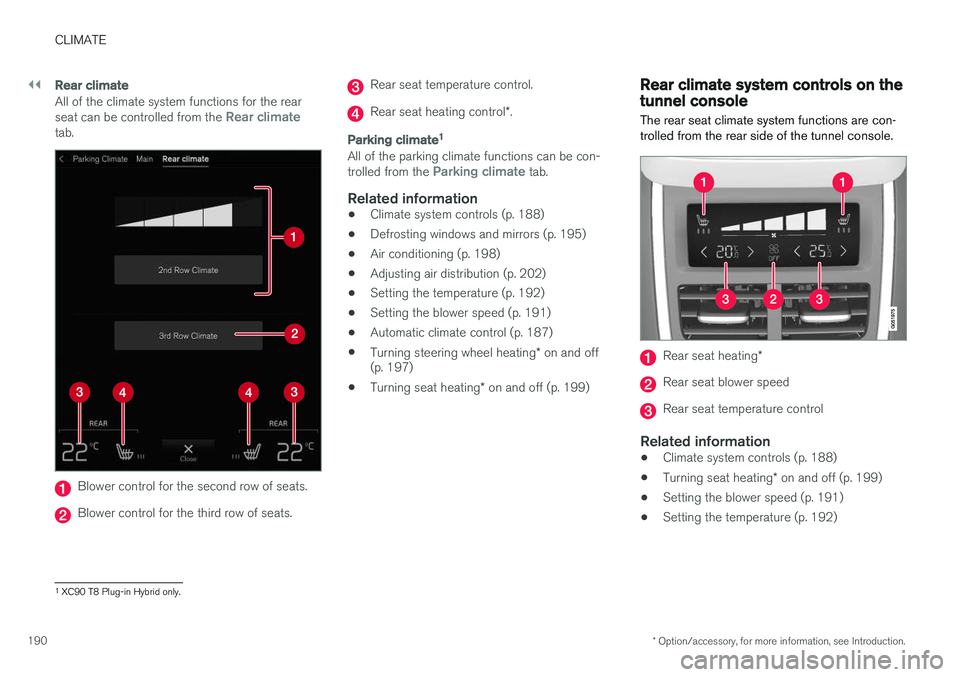
All of the climate system functions for the rear seat can be controlled from the Rear climatetab.
Blower control for the second row of seats.
Blower control for the third row of seats.
Rear seat temperature control.
Rear seat heating control *.
Parking climate 1
All of the parking climate functions can be con- trolled from the Parking climate tab.
Related information
•
Climate system controls (p. 188)
• Defrosting windows and mirrors (p. 195)
• Air conditioning (p. 198)
• Adjusting air distribution (p. 202)
• Setting the temperature (p. 192)
• Setting the blower speed (p. 191)
• Automatic climate control (p. 187)
• Turning steering wheel heating
* on and off
(p. 197)
• Turning seat heating
* on and off (p. 199)
Rear climate system controls on the tunnel console
The rear seat climate system functions are con- trolled from the rear side of the tunnel console.
Rear seat heating *
Rear seat blower speed
Rear seat temperature control
Related information
•Climate system controls (p. 188)
• Turning seat heating
* on and off (p. 199)
• Setting the blower speed (p. 191)
• Setting the temperature (p. 192)
1
XC90 T8 Plug-in Hybrid only.