2016 VOLVO XC60 tow
[x] Cancel search: towPage 99 of 398

03 Instruments and controls
03
97
Rear interior lighting
The lights are switched on or off by pressing each respective button.
Rear reading lights
Cargo area lightingThe cargo area lighting comes on automati- cally when the tailgate is opened.
Related information
•Front interior lighting (p. 96)
Home safe lighting
When you leave your vehicle at night, you can make use of the home safe lighting functionto illuminate the area in front of the vehicle. This function illuminates the headlights, park- ing lights, lights in the door mirrors, licenseplate lights, front ceiling lighting and footwell lighting. These lights will remain on for 30 18
,
60 or 90 seconds. The time interval can be set in MY CAR under
SettingsCar
settings
Light settingsHome safe
light duration. See My Car – introduction
(p. 76) for a description of the menu system.
1. Remove the key from the ignition slot to put the ignition in mode 0 (see Ignition
modes (p. 79) for information about the ignition modes).
2. Pull the turn signal lever as far as possible towards the steering wheel and release it.
3. Exit the vehicle and lock the doors.
Related information
• Approach lighting (p. 97)
Approach lighting
Approach lighting activates the parking lights, door mirror lights, license plate lighting, domelighting and door step lighting when youapproach the vehicle. This function is activated by pressing the approach light button on the remote key (see
the illustration in Remote key – functions(p. 153)). The time interval for this lighting can be set by pressing
MY CAR and going to
Car
settings
Light settingsApproach light
duration. See My Car – introduction (p. 76)
for a description of the menu system.
Related information
• Home safe lighting (p. 97)
18
Factory setting
Page 100 of 398
03 Instruments and controls
03
98* Option/accessory, for more information, see Introduction.
Windshield wipers
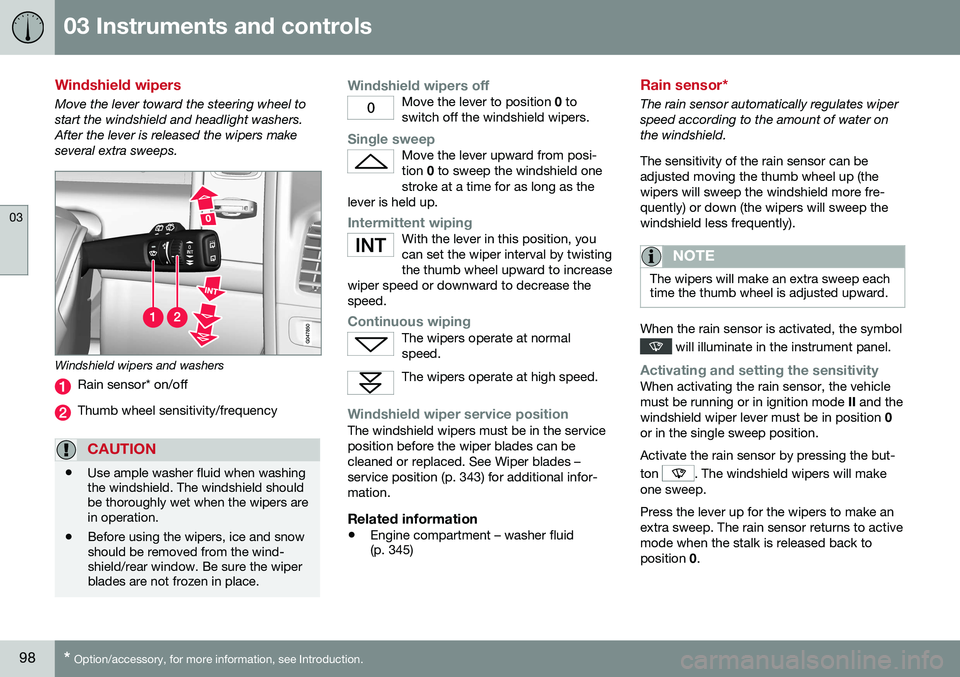
Move the lever toward the steering wheel to start the windshield and headlight washers.After the lever is released the wipers makeseveral extra sweeps.
Windshield wipers and washers
Rain sensor* on/off
Thumb wheel sensitivity/frequency
CAUTION
• Use ample washer fluid when washing the windshield. The windshield shouldbe thoroughly wet when the wipers arein operation.
• Before using the wipers, ice and snowshould be removed from the wind-shield/rear window. Be sure the wiperblades are not frozen in place.
Windshield wipers offMove the lever to position
0 to
switch off the windshield wipers.
Single sweepMove the lever upward from posi- tion 0 to sweep the windshield one
stroke at a time for as long as the
lever is held up.
Intermittent wipingWith the lever in this position, you can set the wiper interval by twistingthe thumb wheel upward to increase
wiper speed or downward to decrease thespeed.
Continuous wipingThe wipers operate at normal speed.
The wipers operate at high speed.
Windshield wiper service positionThe windshield wipers must be in the service position before the wiper blades can becleaned or replaced. See Wiper blades –service position (p. 343) for additional infor-mation.
Related information
• Engine compartment – washer fluid (p. 345)
Rain sensor*
The rain sensor automatically regulates wiper speed according to the amount of water onthe windshield. The sensitivity of the rain sensor can be adjusted moving the thumb wheel up (thewipers will sweep the windshield more fre-quently) or down (the wipers will sweep thewindshield less frequently).
NOTE
The wipers will make an extra sweep each time the thumb wheel is adjusted upward.
When the rain sensor is activated, the symbol
will illuminate in the instrument panel.
Activating and setting the sensitivityWhen activating the rain sensor, the vehicle must be running or in ignition mode
II and the
windshield wiper lever must be in position 0
or in the single sweep position. Activate the rain sensor by pressing the but- ton
. The windshield wipers will make
one sweep. Press the lever up for the wipers to make an extra sweep. The rain sensor returns to activemode when the stalk is released back toposition 0.
Page 101 of 398

03 Instruments and controls
03
* Option/accessory, for more information, see Introduction.99
DeactivatingDeactivate the rain sensor by pressing the button
or press the lever down to
another wiper position. The rain sensor is automatically deactivated when the key is removed from the ignitionslot or five minutes after the ignition has beenswitched off.
CAUTION
The rain sensor should be deactivated when washing the car in an automatic carwash, etc. If the rain sensor function is lefton, the wipers will start inadvertently in thecar wash and could be damaged.
Windshield washer
Move the lever toward the steering wheel to start the windshield and headlight washers.After the lever is released the wipers makeseveral extra sweeps.
Washing function
Heated washer nozzles*The washer nozzles are heated automatically in cold weather to help prevent the washerfluid from freezing.
High-pressure headlight washing*High-pressure headlight washing consumes alarge quantity of washer fluid. To save fluid,the headlights are washed using two alterna-tives:
• Low/high beam headlights on.
The
headlights will be washed the first time the windshield is washed. Thereafter, theheadlights will only be washed once for every five times the windshield is washedwithin a 10-minute period.
• Parking lights on.
Optional Active Bend-
ing Lights will be washed once for everyfive times the windshield is washed. Nor-mal halogen headlights will not bewashed.
CAUTION
• Use ample washer fluid when washing the windshield. The windshield shouldbe thoroughly wet when the wipers arein operation.
• When approx. 1 US quart (1 liter) ofwasher fluid remains in the reservoir,the headlights will no longer bewashed. A text message will also bedisplayed to remind the driver to fill thewasher fluid reservoir.
Related information
•
Engine compartment – washer fluid (p. 345)
Page 109 of 398

03 Instruments and controls
03
}}
* Option/accessory, for more information, see Introduction.107
Panoramic roof* – operation
The laminated panoramic roof is divided into two sections. The rear glass section is fixed inplace and cannot be moved but the frontglass section can be slid horizontally to theopen or closed positions or its rear edge canbe raised and lowered to allow ventilation.
Operation
Auto open (arrow points toward the rear of the vehicle)
Manual open
Manual close
Auto close
WARNING
• During manual closing, if the laminated panoramic roof is obstructed, immedi-ately open it again.
• Never open or close the laminatedpanoramic roof if it is obstructed inany way.
• Never allow a child to operate thelaminated panoramic roof.
• Never leave a child alone in a vehicle.
• When leaving the vehicle, ensure thatthe ignition is in mode
0 (see Ignition
modes (p. 79) for information about thevarious ignition modes) to disable thelaminated panoramic roof. Never leavethe remote key/PCC* in the vehicle.
• Never extend any object or body partthough the open laminated panoramicroof, even if the vehicle's ignition iscompletely switched off.
Automatic operation1. To open the sun shade completely, pull
the control as far back as possible (to the auto open position) and release it.
2. To fully open the laminated panoramic roof, pull the control as far back as possi-ble a second time (to the auto open posi-
tion) and release it.
Quick open/closeThe laminated panoramic roof and the sun shade can be opened/closed at the sametime: • Open
- pull the control back (to the auto
open position) twice in quick succession and release it.
• Close
- push the control forward (to the
auto close position) twice in quick suc-cession and release it.
Page 130 of 398

||
04 Climate
04
128* Option/accessory, for more information, see Introduction.
Air vents in the dashboard
Open
Closed
Horizontal airflow
Vertical airflow
Direct the outer air vents toward the side win- dows to defrost.
Air vents in the door pillars
Closed
Open
Horizontal airflow
Vertical airflow
Direct the outer air vents toward the side win- dows to defrost. Direct the vents into the passenger compart- ment to help maintain the desired tempera-ture in the rear seat.
Related information
• Climate – general information (p. 125)
• Air distribution – table (p. 135)
• Air distribution – recirculation (p. 134)
• Max. defroster and electrically heated windshield* (p. 132)
Page 147 of 398

05 Loading and storage
05
}}
145
Cargo net – mounting/removing
Mounting the cargo net (version 1)The cargo net is easiest to put in place through one of the rear doors.
1. Fold out the cargo net and be sure thatthe upper hinged rod is straight and locked in position.
2. Insert one end of the rod into the front or rear bracket (near the ceiling). Be surethat the lock on the lower strap is facingtoward you.
3. Insert the other end of the rod in the opposite bracket. – Be sure to press the end hooks on the rod as far forward as possible in thebrackets.
Cargo net in rear position 4.
Mounting in the rear position: With the
net's rod attached to the rear upper brackets, hook the lower straps in thefloor eyelets in the cargo area. Pull the netstrap taut.
Cargo net in front position
Mounting in the front position: With the
net's rod attached to the front upper brackets, hook the lower straps in theeyelets in the front seat rails. Attachingthe net is easier if the front seat backrestsare upright and the seats are movedslightly forward. If the front seats are moved rearward, they should not press hard against thenet.
CAUTION
Pressure from the front seats against the cargo net could damage the net and/or itsbrackets.
5. Pull the net strap taut.
Mounting the cargo net (version 2)The easiest way to mount the cargo net is through one of the rear doors.
Cargo net in rear position
1. Fold out the cargo net.
2. Insert one of the net's upper attachments into the front or rear bracket near the roof liner with the net's storage pockets facingrearward.
Page 149 of 398

05 Loading and storage
05
}}
147
Cargo area cover
The cargo area cover can be used to conceal objects in the cargo area.
G031977
Use
•Pull the cover over the cargo and hook it into the holes in the rear cargo area pil-lars.
• To retract (roll up) the cover, release itfrom the holes and guide it toward therear seat backrest.
Installing the cover1. Press the end piece on one side of the
cargo area cover into the retaining bracket in the side panel of the cargo area
.
2. Do the same on the opposite side
. 3. Press both sides of the cover until they
click into place
. The red mark will no
longer be visible.
4. Check that both ends of the cover are securely locked in place.
Removing the cover1. Press one of the end pieces of the coverinward.
2. Pull the cover carefully upward and out- ward. The other end will release automati- cally from its retaining bracket.
Folding down the cargo area cover's rear flap
The cargo area cover's rear flap points hori- zontally when the cover is retracted (rolledup). To fold it down:
–Pull the flap slightly rearward past its sup- ports and fold it down.
NOTE
On models equipped with this cover, it should be removed before a child seat isattached to the child restraint anchors.
Related information
• Loading – general (p. 142)
Steel cargo grid
Your vehicle can be equipped with a steel grid that helps prevent objects in the cargo areafrom moving forward into the passenger com-partment.
G031978
Folding the grid up/downGrasp the lowering edge of the grid and pull it rearward/upward, or push it downward/forward.
NOTE
If the steel grid is to be used with the optional cargo area cover, the grid mustbe folded down before the cargo areacover is put in place.
Page 152 of 398

06 Locks and alarm
06
150
Remote key and key blade
Two remote keys are provided with your vehi- cle. They enable you to unlock the doors andtailgate, and also function as ignition keys tostart the vehicle or operate electrical compo-nents. The remote keys contain detachablemetal key blades for manually locking orunlocking the driver's door and the glovecompartment. The visible ends of these keyblades are unique to make it easier to identify"your" remote key. Up to six remotes can beprogrammed for use on the same vehicle.
WARNING
Never leave the remote key in the ignition slot if children are to remain in the vehicle.
For more information on the various ignition modes, see Ignition modes (p. 79).
Related information
•Remote key – functions (p. 153)
• Remote key – functions (p. 153)
• Remote key – range (p. 154)
Remote key – loss
If either of the remote keys (p. 150) is lost, the other should be taken with the vehicle to aVolvo retailer. As an anti-theft measure, thecode of the lost remote key must be erasedfrom the system.
NOTE
Additional or duplicate remote control keys can be obtained from any authorized Volvoretailer. You can also obtain additional or duplicate remote control keys from certain inde-pendent repair facilities and locksmithsthat are qualified to make remote controlkeys. Each key must be programmed towork with your vehicle. California Only: A list of independent repair facilities and/or locksmiths known to Volvo that can cutand code replacement keys can be found:
• on the Volvo website at http://www.volvocars.com/us/keys
• by calling Volvo Customer Care at1-800-458-1552
The number of registered keys for the vehicle can be found by pressing
MY CAR and going
into
SettingsInformationNumber of
keys. For a description of the menu system,
see My Car – introduction (p. 76). USA-5WK49264 FCC ID:KR55WK49264 + Siemens VDO 5WK49236 FCC ID:KR55WK49236, 5WK49266FCC ID:KR55WK49266 + Siemens VDO 5WK49233 FCC ID:KR55WK49233This device complies with part 15 of the FCC rules and RSS-210. Operation is subject tothe following conditions: (1) This device maynot cause harmful interference, and (2) thisdevice must accept any interferencereceived, including interference that maycause undesired operation. Canada-5WK49264IC:267T-5WK49264 + Siemens VDO 5WK49236 IC:267T-5WK49236, 5WK49266IC:267T-5WK49266 + Siemens VDO 5WK49233 IC:267T-5WK49233Operation is subject to the following condi- tions: (1) this device may not cause interfer-ence, and (2) this device must accept anyinterference, including interference that maycause undesired operation of the device.Related information
•
Remote key – functions (p. 153)