Page 222 of 398

07 Driver support
07
220
Collision warning – symbols and messages
The table lists possible causes for collision warning-related messages being displayed,and suitable actions.A text message can be erased by pressingbriefly on the
OK button on the turn signal
lever.
SymbolMessageDescription
Collis'n warning OFFPedestrian and Cyclist Detection with Full Auto Brake is switched off. This message is displayed when the engine is started and will disappear after approx. 5 seconds. It can also be erased by pressing the OK but-
ton.
Collision Warning UnavailablePedestrian and Cyclist Detection with Full Auto Brake cannot be activated. This message is displayed when the driver attempts to activate the function. It will disappear after approx. 5 seconds or can be erased bypressing the OK button.
Auto braking was activatedAuto-braking has been active. This message can be erased by pressing the OK button.
Windscreen Sen- sors blockedThe camera is temporarily not functioning. This message is displayed if the camera is obstructed by snow, ice, dirt, etc., on the windshield. Clean the area of the windshield in front of the camera, see The camera’slimitations (p. 217) for more information on the camera’s limitations.
Radar blocked See manualPedestrian and Cyclist Detection with Full Auto Brake is temporarily not functioning. The radar sensor is blocked, for example by heavy rain or snow that has accumulated in front of the sensor, and cannot detectother vehicles, see Adaptive Cruise Control – limitations (p. 193) for more information on the radar sensor’slimitations.
Collision warn. Service requiredPedestrian and Cyclist Detection with Full Auto Brake is partially or completely not functioning. Contact a trained and qualified Volvo service technician if the message remains in the display.
Page 224 of 398

07 Driver support
07
222
Driver Alert System
The Driver Alert System is designed to help a driver who may be becoming fatigued or whois inadvertently leaving the lane.
IntroductionThe Driver Alert System consists of two differ-ent functions that can be switched ontogether or separately.• Driver Alert Control (DAC)
, see Driver
Alert Control (DAC) – introduction (p. 222)
• Lane Departure Warning (LDW)
, see
Lane Departure Warning (LDW) – intro-duction (p. 227)
When one or both of the functions has been switched on, it is in standby mode and is acti-vated when the vehicle exceeds a speed of40 mph (65 km/h). The function deactivates if the vehicle's speed goes under 37 mph (60 km/h). Both functions use a camera that is depend- ent on the road/lane being clearly marked bypainted lines on each side.
WARNING
The Driver Alert System does not function in all situations and is designed to be asupplementary aid. It is not, however,intended to replace the driver’s attentionand judgement.
Driver Alert Control (DAC) – introduction
DAC is intended to alert the driver if his/her driving becomes erratic, such as if the driveris distracted or fatigued. DAC is designed to help detect a slowly changing driving pattern. It is primarilyintended to be used on main roads and is notmeant for use in city traffic.
A camera monitors the painted lines marking the lane in which the vehicle is traveling andcompares the direction of the road with thedriver’s movements of the steering wheel.The driver is alerted if the vehicle does notfollow the lane smoothly.
NOTE
The camera has certain limitations, see Adaptive Cruise Control – limitations(p. 193).
WARNING
• DAC is not intended to extend the duration of driving. Always plan breaksat regular intervals to help remain alert.
• A warning from DAC should not beignored. A driver may not be aware ofhow fatigued he/she has become.
• In certain cases, fatigue may not affectthe driver’s behavior. In situations ofthis type, no warning will be provided.Therefore, it is important to takebreaks at regular intervals, regardlessof whether or not DAC has given awarning.
Related information
•
Driver Alert Control (DAC) – function (p. 223)
• Driver Alert Control (DAC) – operation(p. 223)
• Driver Alert Control (DAC) – limitations(p. 224)
• Driver Alert Control (DAC) – symbols andmessages (p. 225)
Page 227 of 398
07 Driver support
07
}}
225
Driver Alert Control (DAC) – symbols and messages
Depending on the situation, DAC may display certain symbols and text messages in theinstrument panel or center console screen.
Symbols and messages
Instrument panel
SymbolMessageDescription
Driver Alert Time for a breakThe vehicle has been driven erratically. The driver receives an audible signal and a text message.
Windscreen Sensors blockedThe camera is temporarily not functioning, due to snow, ice, or dirt on the windshield. Clean the area of the windshield in front of the camera. See The camera’s limitations (p. 217) for information on the cam-era’s limitations.
Driver Alert Sys Service requiredThe system is not functioning. Contact a trained and qualified Volvo service technician if the message remains in the display.
Page 228 of 398
||
07 Driver support
07
226
Center console display
SymbolMessageDescription
-Driver Alert OFFThe function is not switched on.
-Driver Alert AvailableThe function is active.
-Driver Alert Standby <65 km/hThe function has gone into standby mode because the vehicle's speed is below 40 mph (65 km/h).
-Driver Alert UnavailableThe camera is temporarily not functioning, due to snow, ice, or dirt on the windshield. Clean the area of the windshield in front of the camera. See The camera’s limitations (p. 217) for information on thecamera’s limitations.
Related information
•Driver Alert Control (DAC) – introduction (p. 222)
• Driver Alert Control (DAC) – function(p. 223)
• Driver Alert Control (DAC) – operation(p. 223)
• Driver Alert Control (DAC) – limitations(p. 224)
• Driver Alert System (p. 222)
• Lane Departure Warning (LDW) – intro-duction (p. 227)
Page 229 of 398

07 Driver support
07
}}
227
Lane Departure Warning (LDW) – introduction
The LDW function is designed to help reduce the risk of accidents in situations where thevehicle unintentionally leaves its lane andthere is a risk of driving off the road or into theopposite lane.
Lane Departure Warning (LDW)
The illustration is genericLDW uses the camera located at the center, upper edge of the windshield to monitor theroad's/lane’s side marker lines. If the vehiclecrosses a side marker line or the road’s cen-ter dividing line, the driver will be alerted byan audible signal.
WARNING
This feature is only intended to assist the driver and does not function in all driving,weather, traffic or road conditions. As the driver, you have full responsibility for operating the vehicle in a safe manner.
Related information
• Driver Alert System (p. 222)
• Lane Departure Warning (LDW) – symbols and messages (p. 230)
• Lane Departure Warning (LDW) – opera-tion (p. 227)
• Lane Departure Warning (LDW) - limita-tions (p. 229)
Lane Departure Warning (LDW) – operation
Operation and function
LDW can be switched on or off by pressing the button on the center console. A light inthe button illuminates when the function ison. This is supplemented by graphic displaysin the instrument panel, for example:
Page 231 of 398
07 Driver support
07
229
Lane Departure Warning (LDW) - limitations
LimitationsThe camera used by LDW has the same limi- tations as the human eye. See The camera’slimitations (p. 217) for more information aboutthe camera's limitations.
NOTE
No warning signal will be given in the cer-
tain situations, such as:
• If the turn signal is being used
• The driver’s foot is on the brake pedal 8
• The accelerator pedal is pressed quickly 8
• If the steering wheel is moved quickly 8
• In sharp turns that cause the vehicle’s body to sway
Related information
•
Driver Alert System (p. 222)
• Lane Departure Warning (LDW) – symbols and messages (p. 230)
• Lane Departure Warning (LDW) – opera-tion (p. 227)
• Lane Departure Warning (LDW) – intro-duction (p. 227)
8
When Increased sensitivity has been selected, a warning will be issued if a side marker line is crossed in this situation.
Page 232 of 398

07 Driver support
07
230
Lane Departure Warning (LDW) – symbols and messages
Symbols and messagesA text message can be erased by pressing briefly on the OK button on the turn signal
lever.
SymbolMessageDescription
Lane departure warning ON/Lane departure warning OFFThe function is switched on or off. The text disappears after 5 seconds.
-Lane Depart Warn AvailableThe function is monitoring the road’s marker lines.
-Lane Depart. Warning Unavailable at this speedThe function has gone into standby mode because the vehicle's speed is below 40 mph (65 km/h).
-Lane Depart Warn Unavaila- bleThe road lacks clear marker lines or the camera is not functioning properly. See The camera’s limitations (p. 217) for information on the camera’s limitations.
Windscreen Sensors blockedThe camera is temporarily not functioning, due to snow, ice, or dirt on the windshield. Clean the area of the windshield in front of the camera. See The camera’s limitations (p. 217) for informationon the camera’s limitations.
Driver Alert Sys Service requiredThe system is not functioning. Contact a trained and qualified Volvo service technician if the mes- sage remains in the display.
Page 234 of 398
07 Driver support
07
232
Park assist – introduction
The park assist system is designed to assist you when driving into parking spaces,garages, etc. An audible signal and symbolsin the audio system’s display indicate the dis-tance to the object. The park assist system utilizes ultrasound sensors in the front bumper and rearbumper(s) to measure the distance to a vehi-cle or an object that may be close to the frontor rear of your vehicle.
NOTE
A trailer hitch whose wiring is integrated with the vehicle's electrical system will beincluded in the measurement of the availa-ble space behind the vehicle.
WARNING
Park Assist is an information system, NOT a safety system. This system is designedto be a supplementary aid when parkingthe vehicle. It is not, however, intended toreplace the driver's attention and judge-ment.
Related information
•Park assist – limitations (p. 235)
• Park assist – function (p. 232)
• Park assist – operation (p. 234)
• Park assist – troubleshooting (p. 236) •
Rear Park Assist Camera (PAC) – function (p. 237)
Park assist – function
Signals from the park assist system
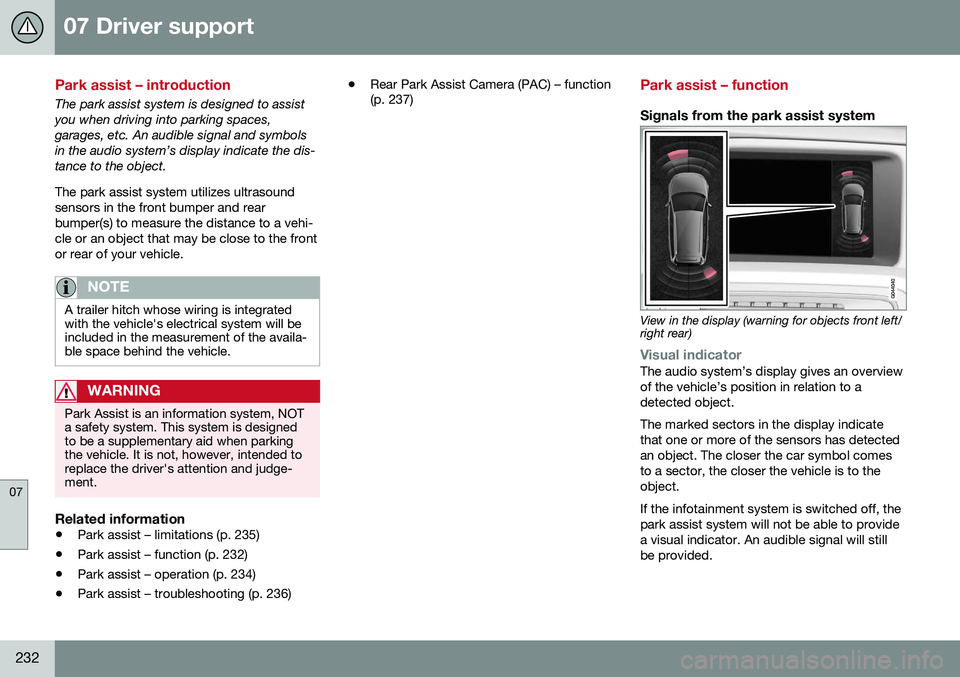
View in the display (warning for objects front left/ right rear)
Visual indicatorThe audio system’s display gives an overview of the vehicle’s position in relation to adetected object. The marked sectors in the display indicate that one or more of the sensors has detectedan object. The closer the car symbol comesto a sector, the closer the vehicle is to theobject. If the infotainment system is switched off, the park assist system will not be able to providea visual indicator. An audible signal will stillbe provided.