2016 VOLVO S80 warning
[x] Cancel search: warningPage 77 of 380
03 Instruments and controls
03
}}
* Option/accessory, for more information, see Introduction.75
Front seats – folding backrest*
The front passenger's seat backrest can be folded down to make it easier to transportlong objects.
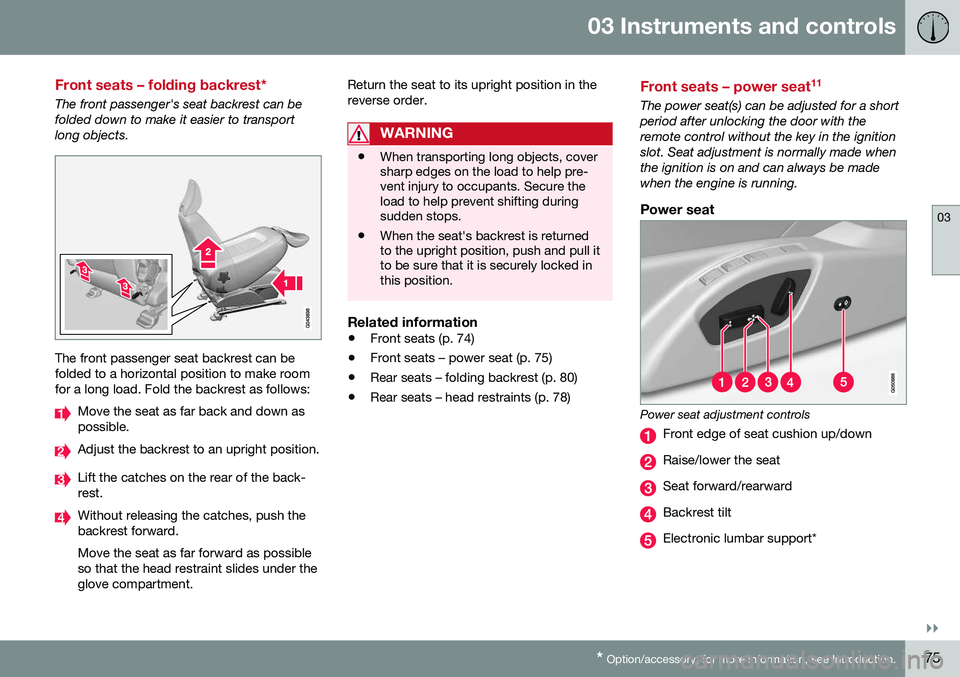
The front passenger seat backrest can be folded to a horizontal position to make roomfor a long load. Fold the backrest as follows:
Move the seat as far back and down as possible.
Adjust the backrest to an upright position.
Lift the catches on the rear of the back- rest.
Without releasing the catches, push the backrest forward. Move the seat as far forward as possible so that the head restraint slides under theglove compartment. Return the seat to its upright position in thereverse order.
WARNING
•
When transporting long objects, cover sharp edges on the load to help pre-vent injury to occupants. Secure theload to help prevent shifting duringsudden stops.
• When the seat's backrest is returnedto the upright position, push and pull itto be sure that it is securely locked inthis position.
Related information
•
Front seats (p. 74)
• Front seats – power seat (p. 75)
• Rear seats – folding backrest (p. 80)
• Rear seats – head restraints (p. 78)
Front seats – power seat 11
The power seat(s) can be adjusted for a short period after unlocking the door with theremote control without the key in the ignitionslot. Seat adjustment is normally made whenthe ignition is on and can always be madewhen the engine is running.
Power seat
Power seat adjustment controls
Front edge of seat cushion up/down
Raise/lower the seat
Seat forward/rearward
Backrest tilt
Electronic lumbar support*
Page 80 of 380
||
03 Instruments and controls
03
78
Returning the seat/mirrors to the storedpositions
To move the seat and door mirrors to the position stored in the remote key:
1. Unlock the driver's door with the same
remote key (the one used to lock the doors). For models equipped with theoptional keyless drive, you must have thesame remote key in your possession.
2. Open the driver's door within 2 minutes. The driver's seat and door mirrors will auto- matically move to the position in which youleft them (if the vehicle has been unlockedwith one of the other keys and new seat/mirror adjustments have been made).
NOTE
• The seat will move to this position even if someone else has moved it to adifferent position and locked the vehi-cle with a
different remote key.
• This feature will work in the same waywith all of the remote keys that youuse with your vehicle.
Emergency stop
WARNING
•
Because the driver's seat can be adjusted with the ignition off, childrenshould never be left unattended in thevehicle.
• Movement of the seat can be STOP-PED at any time by pressing any but-ton on the power seat control panel.
• Do not adjust the seat while driving.The seat should be adjusted so thatthe brake pedal can be depressedfully. In addition, position the seat asfar rearward as comfort and controlallow.
• The seat rails on the floor must not beobstructed in any way when the seat isin motion.
Related information
•
Remote key – functions (p. 143)
Rear seats – head restraints
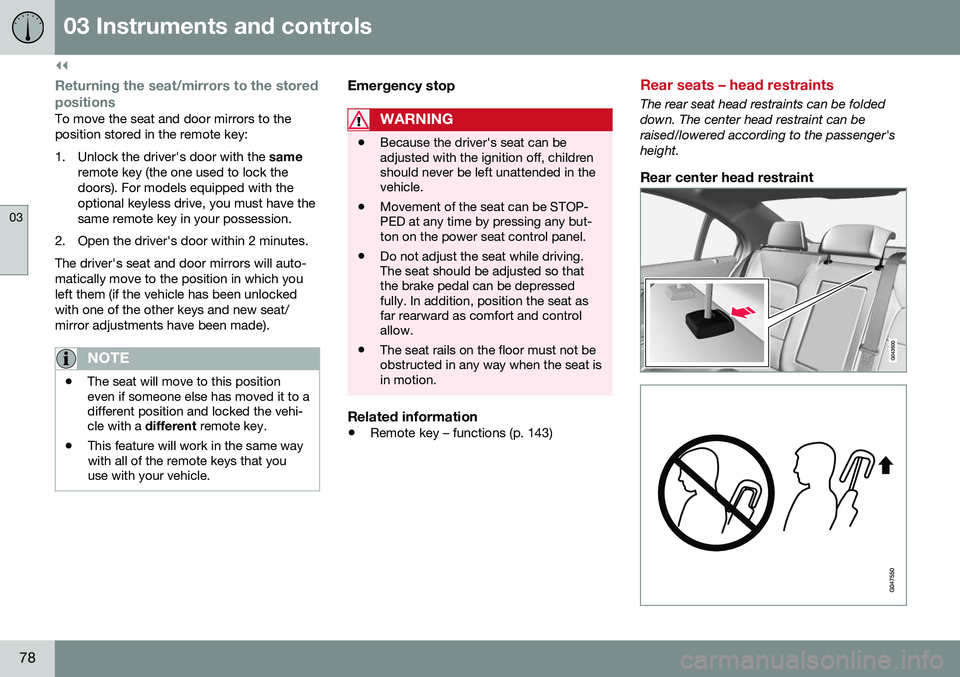
The rear seat head restraints can be folded down. The center head restraint can beraised/lowered according to the passenger'sheight.
Rear center head restraint
Page 81 of 380
03 Instruments and controls
03
79
The center head restraint should be adjusted according to the passenger's height. Therestraint should be carefully adjusted to sup-port the occupant's head.
• Pull the head restraint up as required.
• To lower, press the button at the base of the head restraint’s left support whilepressing the head restrain down carefully.
WARNING
The center rear seat head restraint should only be in its lowest position when thisseat is NOT occupied. When the centerposition is occupied, the head restraintshould be correctly adjusted to the pas-senger’s height. The upper edge of thehead restraint should be at least on a levelwith the upper-most point of the seatoccupant's ear.
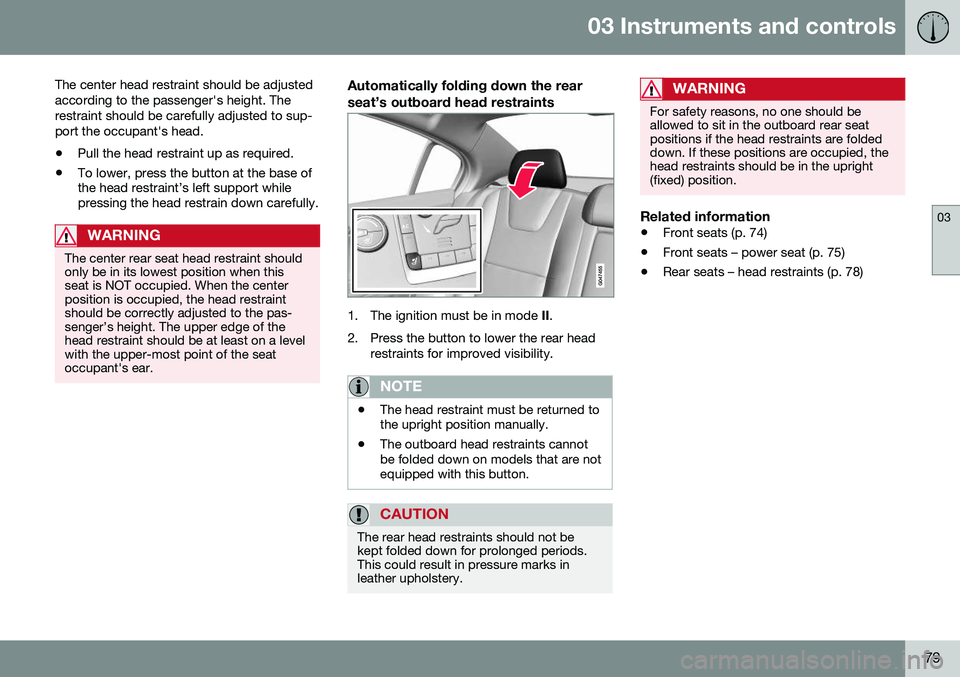
Automatically folding down the rear seat’s outboard head restraints
1. The ignition must be in mode
II.
2. Press the button to lower the rear head restraints for improved visibility.
NOTE
•The head restraint must be returned to the upright position manually.
• The outboard head restraints cannotbe folded down on models that are notequipped with this button.
CAUTION
The rear head restraints should not be kept folded down for prolonged periods.This could result in pressure marks inleather upholstery.
WARNING
For safety reasons, no one should be allowed to sit in the outboard rear seatpositions if the head restraints are foldeddown. If these positions are occupied, thehead restraints should be in the upright(fixed) position.
Related information
•
Front seats (p. 74)
• Front seats – power seat (p. 75)
• Rear seats – head restraints (p. 78)
Page 82 of 380

03 Instruments and controls
03
80
Rear seats – folding backrest
The rear seat head restraints and backrests can be folded down. The center headrestraint can be raised/lowered according tothe passenger's height.
Folding down the rear seat backrests
The rear seat backrests are split and can be folded down together or separately1. Pull the release control handle(s).
2. Fold the backrest forward. Adjust the center seat head restraint if necessary.
NOTE
When the backrests are folded down, move the outboard head restraints forwardslightly so that they do not catch on theseat cushion.
CAUTION
To help avoid damage to the upholstery, there should be no objects on the rear seatand the seat belt should not be buckledwhen the backrest is folded down.
WARNING
•Keep vehicle doors and trunk locked and keep keys out of a child’s reach.Unsupervised children could lockthemselves in an open trunk and riskinjury. Children should be taught not toplay in vehicles.
• On hot days, the temperature in thetrunk or vehicle interior can rise veryquickly. Exposure of people to thesehigh temperatures for even a shortperiod of time can cause heat-relatedinjury or death. Small children are par-ticularly at risk.
WARNING
•
When one or more sections of the backrest is returned to the uprightposition, check that it is properlylocked in place by pushing and pullingit.
• Return the outboard head restraints tothe upright position.
• Long loads should always be securelyanchored to help avoid injury in theevent of a sudden stop.
• Always turn the engine off and applythe parking brake when loading/unloading the vehicle.
• Place the transmission in the Park (
P)
position to help prevent inadvertentmovement of the gear selector.
• On hot days, the temperature in thevehicle interior can rise very quickly.Exposure of people to these high tem-peratures for even a short period oftime can cause heat-related injury ordeath. Small children are particularly atrisk.
Related information
•
Front seats (p. 74)
• Front seats – power seat (p. 75)
• Rear seats – head restraints (p. 78)
Page 83 of 380
03 Instruments and controls
03
* Option/accessory, for more information, see Introduction.81
Steering wheel
The steering wheel can be adjusted to various positions and has controls for the horn, cruisecontrol*, menus, the infotainment system and Bluetooth
®-connected cell phone.
Adjusting
G021138
Adjusting the steering wheel
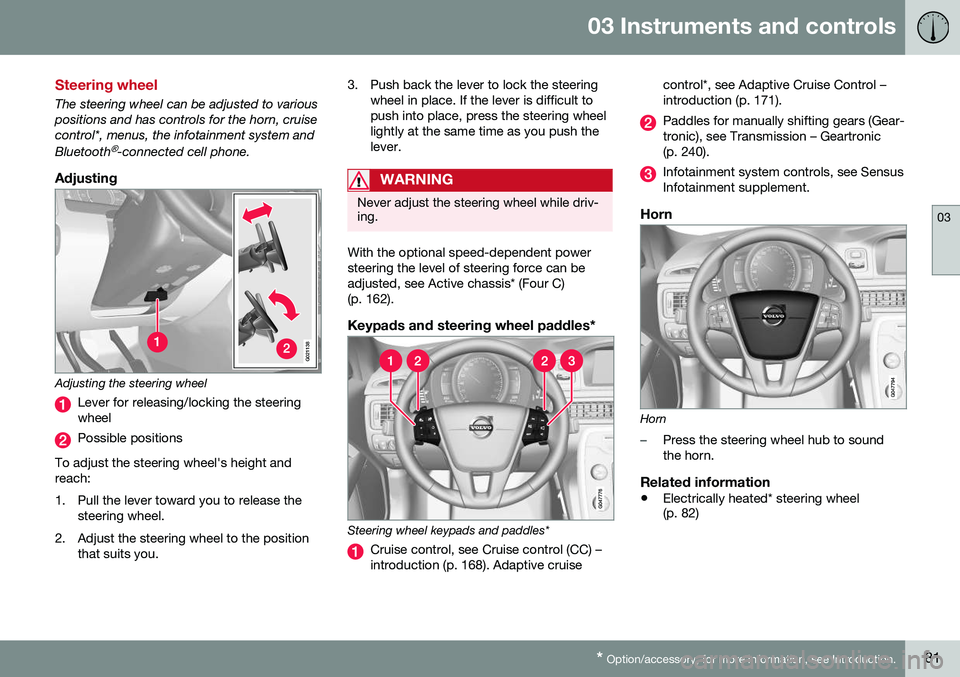
Lever for releasing/locking the steering wheel
Possible positions
To adjust the steering wheel's height and reach:
1. Pull the lever toward you to release the steering wheel.
2. Adjust the steering wheel to the position that suits you. 3. Push back the lever to lock the steering
wheel in place. If the lever is difficult to push into place, press the steering wheellightly at the same time as you push thelever.
WARNING
Never adjust the steering wheel while driv- ing.
With the optional speed-dependent power steering the level of steering force can beadjusted, see Active chassis* (Four C)(p. 162).
Keypads and steering wheel paddles*
Steering wheel keypads and paddles*
Cruise control, see Cruise control (CC) – introduction (p. 168). Adaptive cruise control*, see Adaptive Cruise Control –introduction (p. 171).
Paddles for manually shifting gears (Gear- tronic), see Transmission – Geartronic(p. 240).
Infotainment system controls, see Sensus Infotainment supplement.
Horn
Horn
–Press the steering wheel hub to sound the horn.
Related information
•
Electrically heated* steering wheel (p. 82)
Page 90 of 380
03 Instruments and controls
03
88
Hazard warning flashers
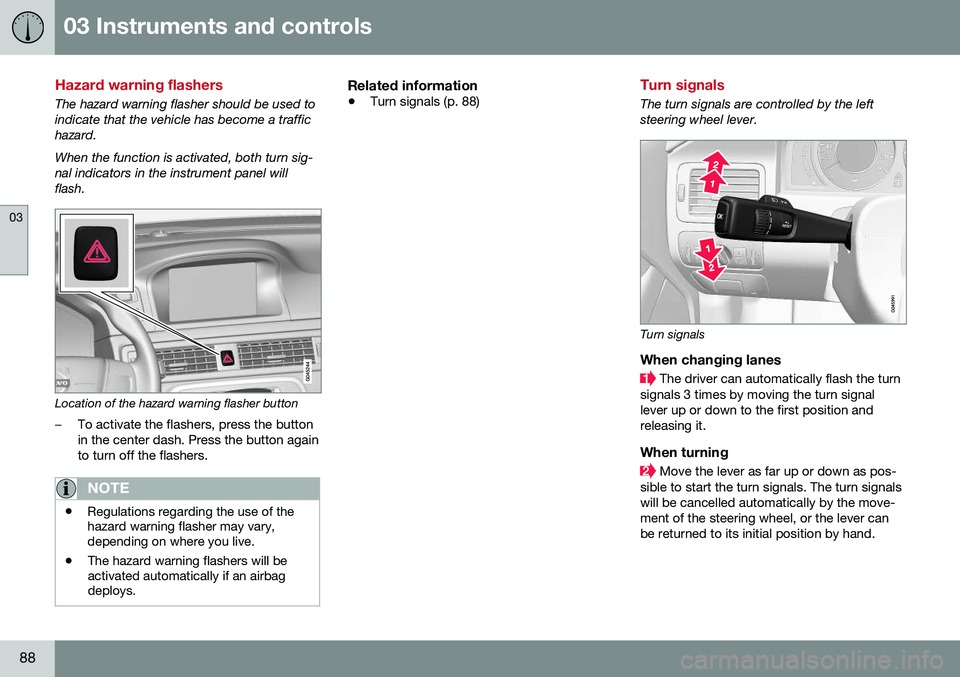
The hazard warning flasher should be used to indicate that the vehicle has become a traffichazard. When the function is activated, both turn sig- nal indicators in the instrument panel willflash.
Location of the hazard warning flasher button
–To activate the flashers, press the button in the center dash. Press the button againto turn off the flashers.
NOTE
•Regulations regarding the use of the hazard warning flasher may vary,depending on where you live.
• The hazard warning flashers will beactivated automatically if an airbagdeploys.
Related information
•
Turn signals (p. 88)
Turn signals
The turn signals are controlled by the left steering wheel lever.
Turn signals
When changing lanes
The driver can automatically flash the turn
signals 3 times by moving the turn signal lever up or down to the first position andreleasing it.
When turning
Move the lever as far up or down as pos-
sible to start the turn signals. The turn signals will be cancelled automatically by the move-ment of the steering wheel, or the lever canbe returned to its initial position by hand.
Page 91 of 380

03 Instruments and controls
03
}}
* Option/accessory, for more information, see Introduction.89
NOTE
• This automatic flashing sequence can be interrupted by immediately movingthe lever in the opposite direction.
• If the turn signal indicator flashesfaster than normal, check for aburned-out turn signal bulb.
Related information
•
Hazard warning flashers (p. 88)
Front interior lighting
The lighting in the front part of the passenger compartment is controlled with the buttons inthe ceiling console.
G021149
Light switches, front roof lighting
Drivers side front reading light, on/off
Passenger's side front reading light, on/off
Overhead courtesy lighting.
Switch (3) has three positions for all passen- ger compartment lighting:
• Off
: right side depressed, automatic light-
ing off.
• Neutral position
: automatic lighting is
on.
• On
– left side depressed, passenger
compartment lighting on.
Overhead courtesy lightingThe passenger compartment lighting is switched on and off automatically when but-ton (3) is in the neutral position. The lighting comes on and remains on for 30 seconds if:
• the vehicle is unlocked from the outside with the key or remote control
• the engine is switched off and the ignitionis in mode
0.
The lighting switches off when:
• the engine is started
• the vehicle is locked from the outside.
The lighting comes on and remains on for two minutes if one of the doors is open. The passenger compartment lighting can be switched on and off manually within30 minutes after the vehicle has beenunlocked. If the lighting is switched on manually and the vehicle is locked, the courtesy lighting willswitch off automatically after one minute.
Courtesy lights/door step lighting*The courtesy lights/door step lighting switch on/off automatically when one of the frontdoors is opened/closed.
Glove compartment lightingThe glove compartment lighting switches on/off automatically when the lid is opened/closed.
Page 96 of 380
03 Instruments and controls
03
94
Power windows
All power windows can be operated using the control panel in the driver's door. The controlpanels in the other doors only operate thewindow in the respective doors.
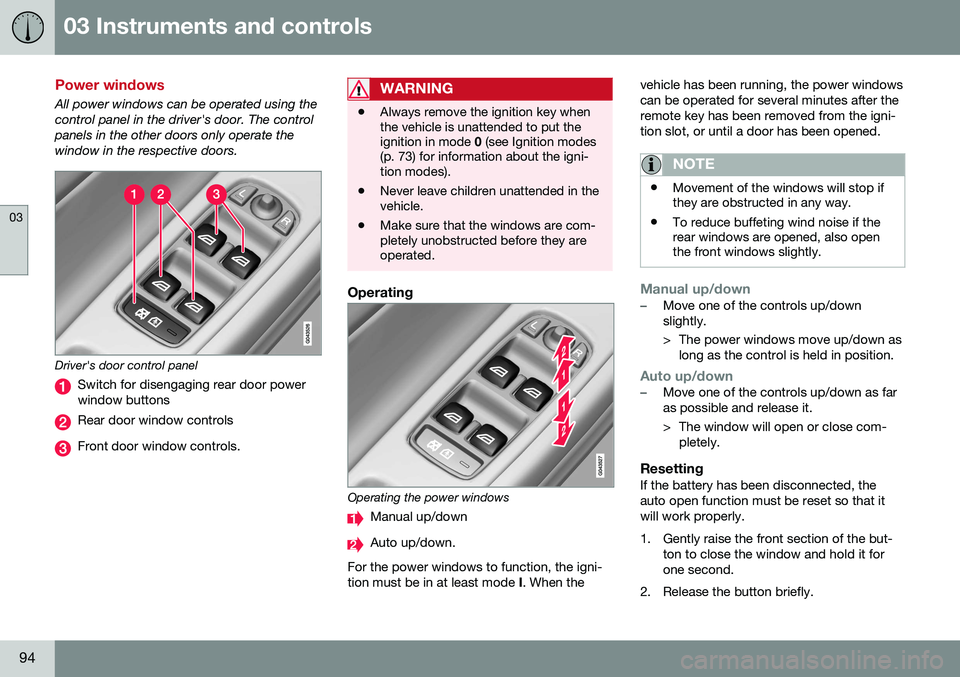
Driver's door control panel
Switch for disengaging rear door power window buttons
Rear door window controls
Front door window controls.
WARNING
•Always remove the ignition key when the vehicle is unattended to put theignition in mode
0 (see Ignition modes
(p. 73) for information about the igni-tion modes).
• Never leave children unattended in thevehicle.
• Make sure that the windows are com-pletely unobstructed before they areoperated.
Operating
Operating the power windows
Manual up/down
Auto up/down.
For the power windows to function, the igni- tion must be in at least mode I. When the vehicle has been running, the power windowscan be operated for several minutes after theremote key has been removed from the igni-tion slot, or until a door has been opened.
NOTE
•
Movement of the windows will stop if they are obstructed in any way.
• To reduce buffeting wind noise if therear windows are opened, also openthe front windows slightly.
Manual up/down–Move one of the controls up/down slightly.
> The power windows move up/down as
long as the control is held in position.
Auto up/down–Move one of the controls up/down as far as possible and release it.
> The window will open or close com-pletely.
ResettingIf the battery has been disconnected, the auto open function must be reset so that itwill work properly.
1. Gently raise the front section of the but- ton to close the window and hold it for one second.
2. Release the button briefly.