Page 113 of 233

Climate control111Open the cover using a coin and
replace the battery (CR 2430 or
equivalent), ensuring the new battery
is correctly installed with the positive
( < ) side facing the positive terminals.
Replace the cover securely.
Dispose of old batteries in
accordance with environmental
regulations.
Batteries do not belong in household
waste. They must be disposed of at
an appropriate recycling collection
point.
Remote control fault displays
cobA:poor signal –
adjust positionconP:no signal – move closerbALo:battery low –
change batteryErr:system error –
consult workshopAdd,
AddE:system in learning mode
Teach remote control
If the vehicle battery is reconnected,
the LED in the instrument panel
button illuminates and the system
configures the remote control menu
automatically. If the LED flashes,
press OK on remote control, select
Add or AddE and confirm.
Additional remote control units may
also be configured. Press the button
until LED flashes, switch on the
remote control, select Add and
confirm.
AddE teaches the current remote
control unit exclusively and blocks all
previously configured units. Add
teaches up to 4 remote control units,
but only one unit can operate the
system at any one time.
Operation
Heating Y
Select Y in the menu bar and confirm.
The predetermined heating duration,
e.g. L 30, flashes in the display. The
factory setting is 30 minutes.
To temporarily adjust the heating
duration, adjust with q or r and
confirm. The value can be set from 10 to 120 minutes. Due to the power
consumption, note the heating
duration.
To switch off, select Y in the menu bar
again and confirm.
Ventilation x
Select x in the menu bar and confirm.
The ventilation duration can be
accepted or adjusted. The duration
shown is accepted without
confirmation.
To switch off, select x in the menu bar
again and confirm.
Programming P
Up to 3 preset departure times can be programmed, either during one day or
over one week.
Page 114 of 233

112Climate control● Select P in the menu bar and
confirm.
● Select desired preset memory number 1, 2 or 3 and confirm.
● Select day and confirm.
● Select hour and confirm.
● Select minutes and confirm.
● Select Y or x and confirm.
● If necessary, adjust the runtime duration prior to departure and
confirm.
The next preset memory number to
be activated is underlined and the
weekday is displayed. Repeat the
procedure to programme the other
preset memory numbers.
Pressing X during the procedure will
exit without storing programme
adjustments.
To delete a preset departure time,
follow the steps for programming until
heating symbol Y flashes. Press q
or r until oFF appears in the display
and confirm.
Heating stops automatically
5 minutes after the programmed departure time.Notice
The remote control system features
a temperature sensor which
calculates the runtime according to
the ambient temperature and the desired heating level (ECO or
HIGH). The system starts
automatically between 5 and
60 minutes prior to the programmed
departure time.
Set weekday, time and heating
duration Ö
If the vehicle battery is disconnected or its voltage is too low, the unit will
need to be reset.
● Select Ö and confirm.
● Select weekday and confirm.
● Change hours and confirm.
● Change minutes and confirm. ● Change the default heating duration and confirm.
Heating level Y
The preferred heating level for
programmed departure times can be set to either ECO or HIGH.Select Y and confirm. ECO or HIGH
flashes in the display. Adjust using
q or r and confirm.
Page 143 of 233
Driving and operating141Automatic deactivation:● vehicle speed drops below 20 mph
● the brake pedal is depressed
● the clutch pedal is depressed
● selector lever in N
The speed is stored and a
corresponding message appears in
the DIC.
Reactivation Press R at a speed above 20 mph.
If the stored speed is much higher
than the current speed, the vehicle
will accelerate powerfully until the
stored speed is obtained.
Pressing < will also reactivate the
cruise control function, but at the
current vehicle speed only, not the stored speed.
Deleting the stored speedPress m: Green control indicators
U and m extinguish in the instrument
cluster.Cruise control speed limiter
The speed limiter prevents the
vehicle exceeding a preset maximum speed above 20 mph.
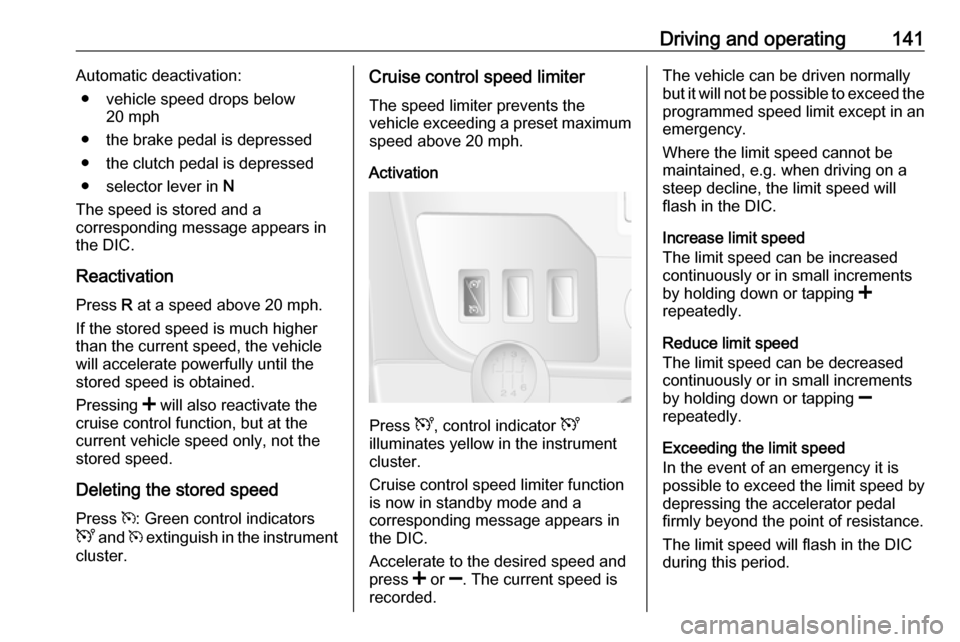
Activation
Press U, control indicator U
illuminates yellow in the instrument
cluster.
Cruise control speed limiter function
is now in standby mode and a
corresponding message appears in
the DIC.
Accelerate to the desired speed and
press < or ]. The current speed is
recorded.
The vehicle can be driven normally
but it will not be possible to exceed the programmed speed limit except in an
emergency.
Where the limit speed cannot be
maintained, e.g. when driving on a
steep decline, the limit speed will
flash in the DIC.
Increase limit speed
The limit speed can be increased
continuously or in small increments
by holding down or tapping <
repeatedly.
Reduce limit speed
The limit speed can be decreased
continuously or in small increments
by holding down or tapping ]
repeatedly.
Exceeding the limit speed
In the event of an emergency it is possible to exceed the limit speed by
depressing the accelerator pedal
firmly beyond the point of resistance.
The limit speed will flash in the DIC
during this period.