2016 VAUXHALL MOVANO_B engine
[x] Cancel search: enginePage 45 of 233
Seats, restraints43Swivel seat adjustmentSeat positioning
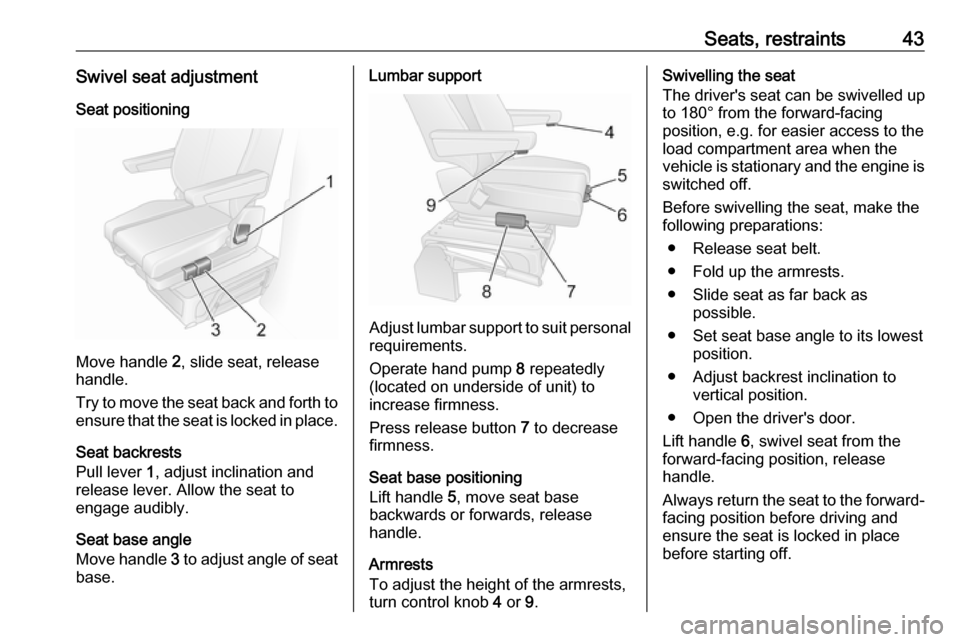
Move handle 2, slide seat, release
handle.
Try to move the seat back and forth to ensure that the seat is locked in place.
Seat backrests
Pull lever 1, adjust inclination and
release lever. Allow the seat to
engage audibly.
Seat base angle
Move handle 3 to adjust angle of seat
base.
Lumbar support
Adjust lumbar support to suit personal requirements.
Operate hand pump 8 repeatedly
(located on underside of unit) to
increase firmness.
Press release button 7 to decrease
firmness.
Seat base positioning
Lift handle 5, move seat base
backwards or forwards, release handle.
Armrests
To adjust the height of the armrests, turn control knob 4 or 9.
Swivelling the seat
The driver's seat can be swivelled up
to 180° from the forward-facing
position, e.g. for easier access to the load compartment area when the
vehicle is stationary and the engine is
switched off.
Before swivelling the seat, make the
following preparations:
● Release seat belt.
● Fold up the armrests.
● Slide seat as far back as possible.
● Set seat base angle to its lowest position.
● Adjust backrest inclination to vertical position.
● Open the driver's door.
Lift handle 6, swivel seat from the
forward-facing position, release
handle.
Always return the seat to the forward- facing position before driving and
ensure the seat is locked in place
before starting off.
Page 46 of 233
44Seats, restraintsArmrest
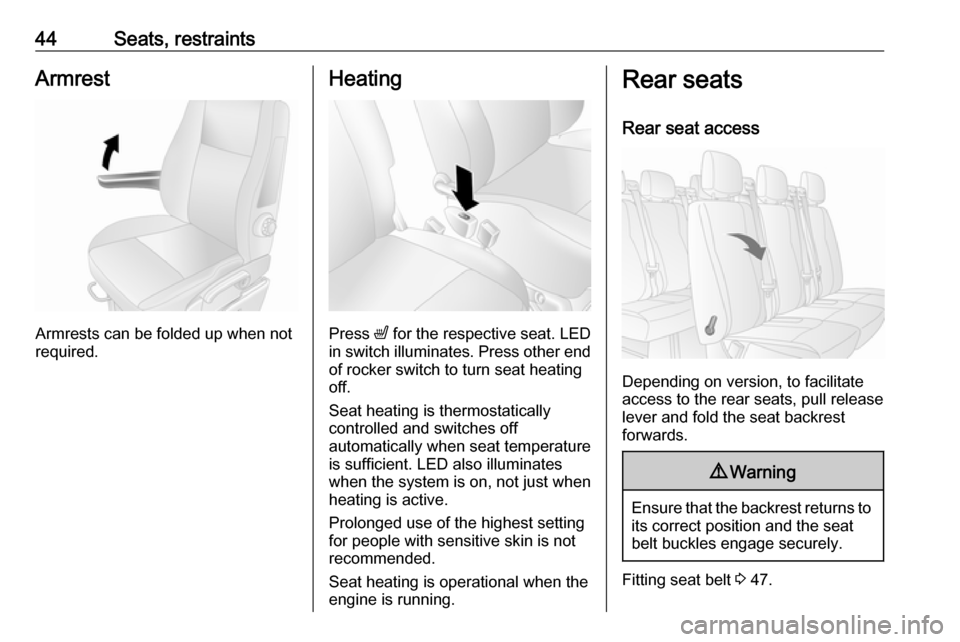
Armrests can be folded up when not
required.
Heating
Press ß for the respective seat. LED
in switch illuminates. Press other end of rocker switch to turn seat heating
off.
Seat heating is thermostatically
controlled and switches off
automatically when seat temperature
is sufficient. LED also illuminates
when the system is on, not just when
heating is active.
Prolonged use of the highest setting
for people with sensitive skin is not
recommended.
Seat heating is operational when the
engine is running.
Rear seats
Rear seat access
Depending on version, to facilitate
access to the rear seats, pull release lever and fold the seat backrest
forwards.
9 Warning
Ensure that the backrest returns to
its correct position and the seat
belt buckles engage securely.
Fitting seat belt 3 47.
Page 74 of 233

72Instruments and controlsInstruments and
controlsControls ....................................... 73
Steering wheel adjustment ........73
Steering wheel controls .............73
Horn ........................................... 73
Steering column controls ...........73
Windscreen wiper/washer .........74
Outside temperature ..................75
Clock ......................................... 75
Power outlets ............................. 76
Cigarette lighter ......................... 77
Ashtrays .................................... 77
Warning lights, gauges and indi‐ cators ........................................... 77
Instrument cluster ......................77
Speedometer ............................. 77
Odometer .................................. 78
Trip odometer ............................ 78
Tachometer ............................... 78
Fuel gauge ................................ 79
Engine coolant temperature gauge ....................................... 79
Engine oil level monitor .............80
Service display .......................... 80
Transmission display .................81Control indicators ......................81
Turn signal ................................. 83
Seat belt reminder .....................84
Airbag and belt tensioners .........84
Airbag deactivation ....................84
Charging system .......................84
Malfunction indicator light ..........84
Service vehicle soon .................85
Stop engine ............................... 85
Brake system ............................. 85
Antilock brake system (ABS) .....86
Upshift ....................................... 86
Lane departure warning ............86
Electronic Stability Program ......86
Electronic Stability Program off ............................................. 86
Engine coolant temperature ......87
Preheating ................................. 87
AdBlue ....................................... 87
Tyre pressure monitoring system ...................................... 87
Engine oil pressure ....................87
Low fuel ..................................... 88
Stop-start system ......................88
Exterior light .............................. 88
High beam ................................. 88
High beam assist .......................89
Fog light ..................................... 89
Rear fog light ............................. 89
Cruise control ............................ 89Tachograph............................... 89
Door open .................................. 89
Information displays .....................89
Driver Information Centre ..........89
Triple-Info-Display .....................90
Vehicle messages ........................90
Warning chimes .........................91
Trip computer ............................... 92
Tachograph .................................. 94
Page 78 of 233
76Instruments and controlsSet time in DIC
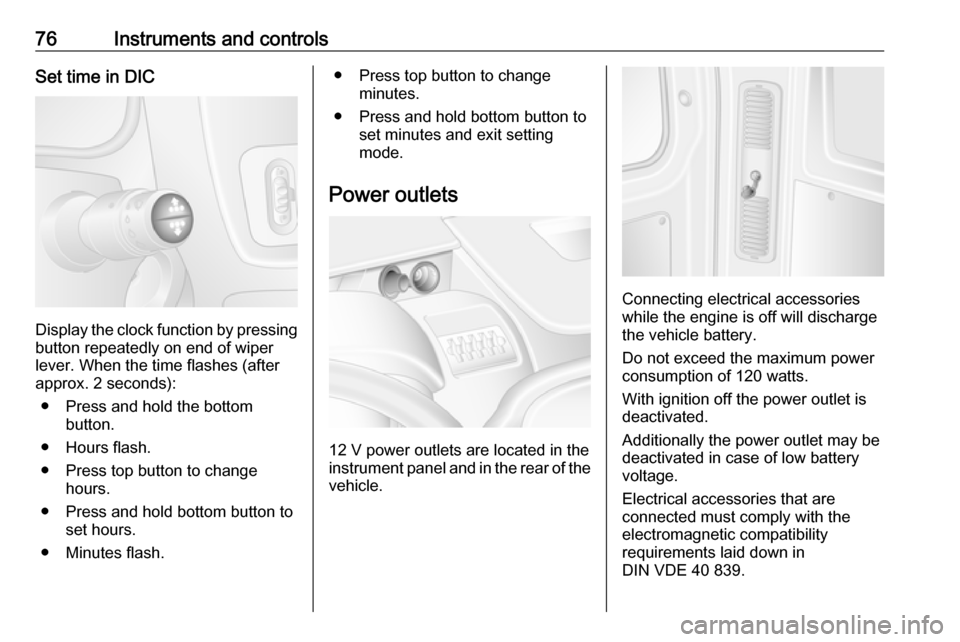
Display the clock function by pressingbutton repeatedly on end of wiper
lever. When the time flashes (after
approx. 2 seconds):
● Press and hold the bottom button.
● Hours flash.
● Press top button to change hours.
● Press and hold bottom button to set hours.
● Minutes flash.
● Press top button to change minutes.
● Press and hold bottom button to set minutes and exit setting
mode.
Power outlets
12 V power outlets are located in the instrument panel and in the rear of the
vehicle.
Connecting electrical accessories
while the engine is off will discharge
the vehicle battery.
Do not exceed the maximum power consumption of 120 watts.
With ignition off the power outlet is deactivated.
Additionally the power outlet may be
deactivated in case of low battery
voltage.
Electrical accessories that are
connected must comply with the
electromagnetic compatibility
requirements laid down in
DIN VDE 40 839.
Page 80 of 233

78Instruments and controlsSpeed limiterMaximum speed may be restricted by
a speed limiter. As a visible indication
of this, a warning label is located on
the instrument panel.
A warning buzzer will sound for
10 seconds if the vehicle briefly
exceeds the set limit.
Notice
Under certain conditions (e.g. steep
inclines) the vehicle speed may
exceed the set limit.
Speed limiter 3 142, cruise control
speed limiter 3 139.Odometer
Displays the recorded distance in
miles.
Trip odometer
The trip odometer displays the
distance travelled since the last reset.
Press button once on end of
windscreen wiper lever to display the
trip odometer.
To reset, with the trip odometer
displayed, press and hold button for a few seconds with the ignition on. The display will flash and the value will
reset to zero.
Tachograph 3 94.
Tachometer
Displays the engine speed.
Drive in a low engine speed range for each gear as much as possible.
Caution
If the needle is in the red warning
zone, the maximum permitted
engine speed is exceeded. Engine at risk.
Page 81 of 233

Instruments and controls79Fuel gauge
Displays fuel level in the tank.
Control indicator Y illuminates if the
level in the tank is low. Refuel
immediately 3 148.
Never run the tank dry. Diesel fuel
system, bleeding 3 161.
Because of the fuel remaining in the
tank, the top-up quantity may be less
than the specified tank capacity.
Adblue gauge
Displays Adblue level in the tank.
Control indicator Y 3 87 illuminates
if the level in the tank is low. Refill
Adblue as soon as possible to avoid
prevention of engine starts 3 125.
Engine coolant temperature
gauge
Displays the coolant temperature.
left area:engine operating
temperature not yet
reachedcentral
area:normal operating
temperatureright area:temperature too high
Control indicator W illuminates if the
temperature is too high 3 85,
3 87.
Page 82 of 233

80Instruments and controlsCaution
If engine coolant temperature is
too high, stop vehicle, switch off
engine. Danger to engine. Check
coolant level.
For physical reasons, the coolant temperature gauge shows the coolant temperature only if the coolant level is adequate.
Engine oil level monitor
The engine oil level monitor is correct
only if the vehicle is parked on a level
surface with a cold engine.
If the engine oil level is correct when
the ignition is switched on OIL LEVEL
CORRECT appears briefly in the
Driver Information Centre (DIC).
If the engine oil is above the minimum level, press the trip computer button
on the end of the wiper lever within
30 seconds of switching on the
ignition. The message OIL LEVEL is
displayed in combination with the
squares that correspond to the oil
level.
As the oil level diminishes, the
squares in the display are replaced
with dashes.▢▢▢▢▢▢:maximum level▢▢▢- - -:intermediate level- - - - - -:minimum level
If the minimum engine oil level is
reached TOP-UP OIL LEVEL is
displayed in combination with control
indicator A after the ignition is
switched on for 30 seconds. Check
and top up engine oil 3 156.
To exit the oil level monitor display,
press either trip computer button.
Trip computer 3 92.
Service display When the ignition is switched on, the
remaining distance before the next
service is due may be shown briefly in the Driver Information Centre (DIC).
Based on driving conditions, the
interval at which a service will be
indicated can vary considerably.
When the remaining distance before
the next service is less than
1800 miles or 2 months, SERVICE
IN appears in the DIC.
When the distance reaches 0 miles or
the service date is due, control
indicators o and A illuminate in the
instrument cluster and SERVICE
DUE appears in the DIC.
The vehicle needs a service. Seek the assistance of a workshop.
Resetting the service display After a service, the service display
must be reset: if available, select the
distance before service display in the
DIC, then press and hold button on
end of wiper lever for approx.
10 seconds until the distance before
service is displayed continuously.
Trip computer 3 92.
Driver Information Centre (DIC)
3 89.
Service information 3 195.
Page 85 of 233

Instruments and controls83Control indicators in the roof
console or instrument panel
Overview
OTurn signal 3 83XSeat belt reminder 3 84vAirbag and belt tensioners
3 84WAirbag deactivation 3 84pCharging system 3 84ZMalfunction indicator light
3 84AService vehicle soon 3 85oService display 3 85CStop engine 3 85RBrake system 3 85uAntilock brake system (ABS)
3 86kjUpshift, downshift 3 86ìLane departure warning 3 86RElectronic Stability Program
3 86ØElectronic Stability Program off
3 86WEngine coolant temperature
3 87!Preheating 3 87YAdBlue 3 87wTyre pressure monitoring
system 3 87IEngine oil pressure 3 87YLow fuel 3 88DAutostop 3 119\Autostop inhibited 3 1199Exterior light 3 88CHigh beam 3 88íHigh beam assist 3 89>Fog light 3 89rRear fog light 3 89mCruise control 3 89UCruise control speed limiter
3 89&Tachograph 3 89yDoor open 3 89
Turn signal
O flashes green.
Flashes if a turn signal or the hazard
warning flashers are activated.
Rapid flashing: failure of a turn signal
light or associated fuse.
An audible warning can be heard
when the turn signals are on. When
towing a trailer, the pitch of the
audible warning changes.