Page 414 of 688
4143-2. Using the audio system (Entune Audio)
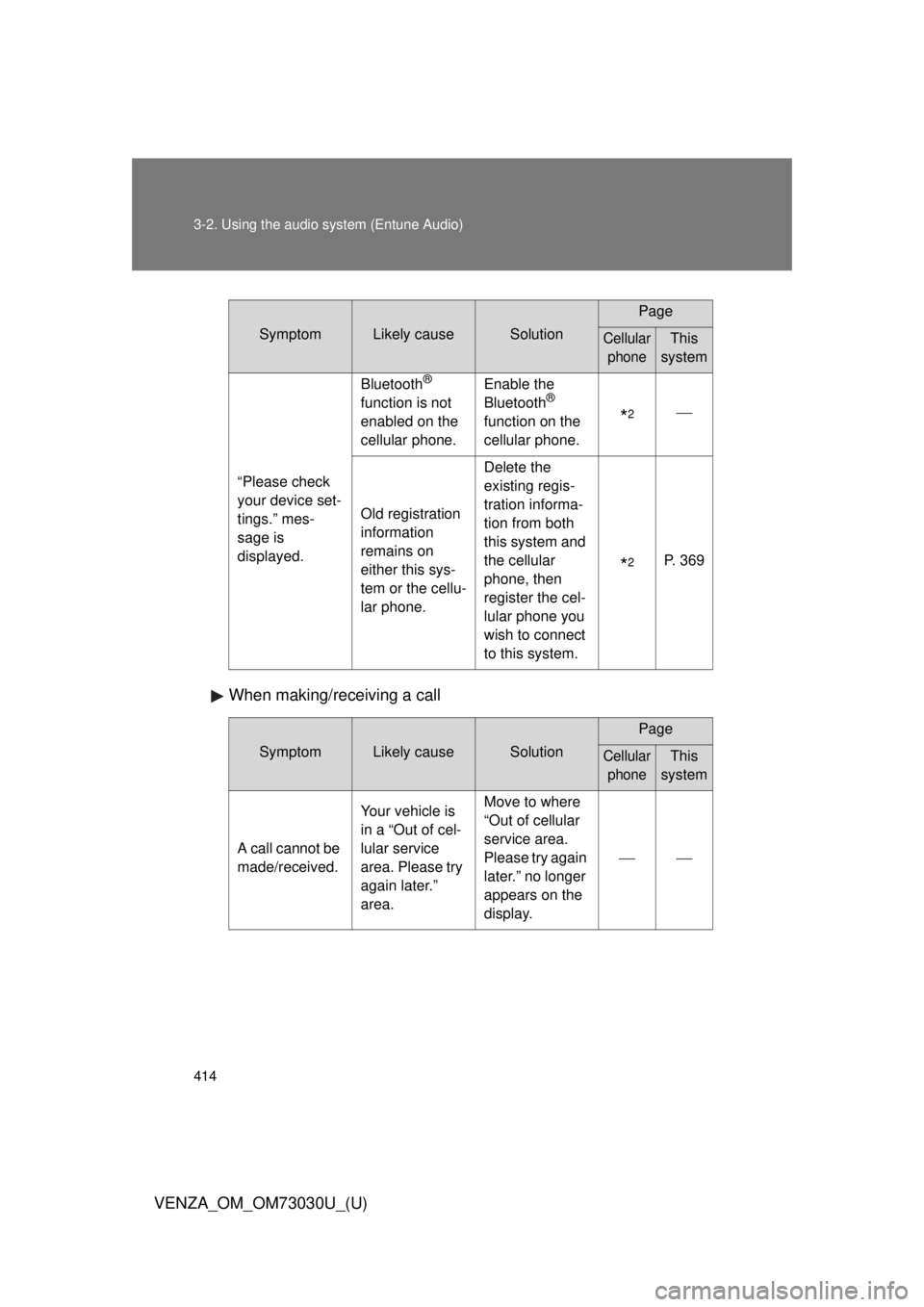
VENZA_OM_OM73030U_(U) When making/receiving a call Symptom Likely cause Solution Page
Cellular
phone This
system
“Please check
your device set-
tings.” mes-
sage is
displayed. Bluetooth ®
function is not
enabled on the
cellular phone. Enable the
Bluetooth ®
function on the
cellular phone.
* 2
Old registration
information
remains on
either this sys-
tem or the cellu-
lar phone. Delete the
existing regis-
tration informa-
tion from both
this system and
the cellular
phone, then
register the cel-
lular phone you
wish to connect
to this system.
* 2
P. 369
Symptom Likely cause Solution Page
Cellular
phone This
system
A call cannot be
made/received. Your vehicle is
in a “Out of cel-
lular service
area. Please try
again later.”
area. Move to where
“Out of cellular
service area.
Please try again
later.” no longer
appears on the
display.
Page 416 of 688
4163-2. Using the audio system (Entune Audio)
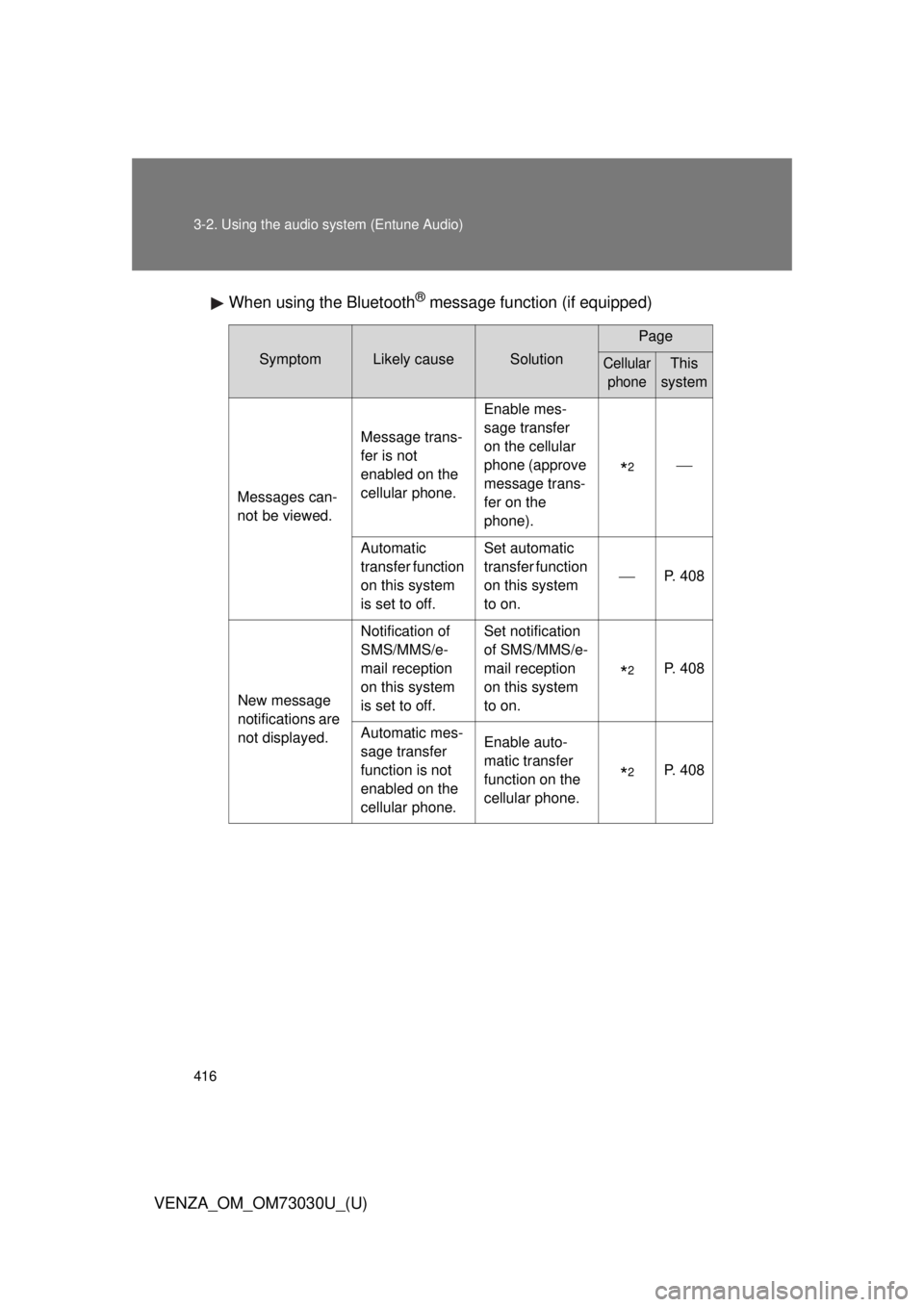
VENZA_OM_OM73030U_(U) When using the Bluetooth ®
message function (if equipped)Symptom Likely cause Solution Page
Cellular
phone This
system
Messages can-
not be viewed. Message trans-
fer is not
enabled on the
cellular phone. Enable mes-
sage transfer
on the cellular
phone (approve
message trans-
fer on the
phone).
* 2
Automatic
transfer function
on this system
is set to off. Set automatic
transfer function
on this system
to on. P. 408
New message
notifications are
not displayed. Notification of
SMS/MMS/e-
mail reception
on this system
is set to off. Set notification
of SMS/MMS/e-
mail reception
on this system
to on.
* 2
P. 408
Automatic mes-
sage transfer
function is not
enabled on the
cellular phone. Enable auto-
matic transfer
function on the
cellular phone.
* 2
P. 408
Page 417 of 688
4173-2. Using the audio system (Entune Audio)
VENZA_OM_OM73030U_(U) 3
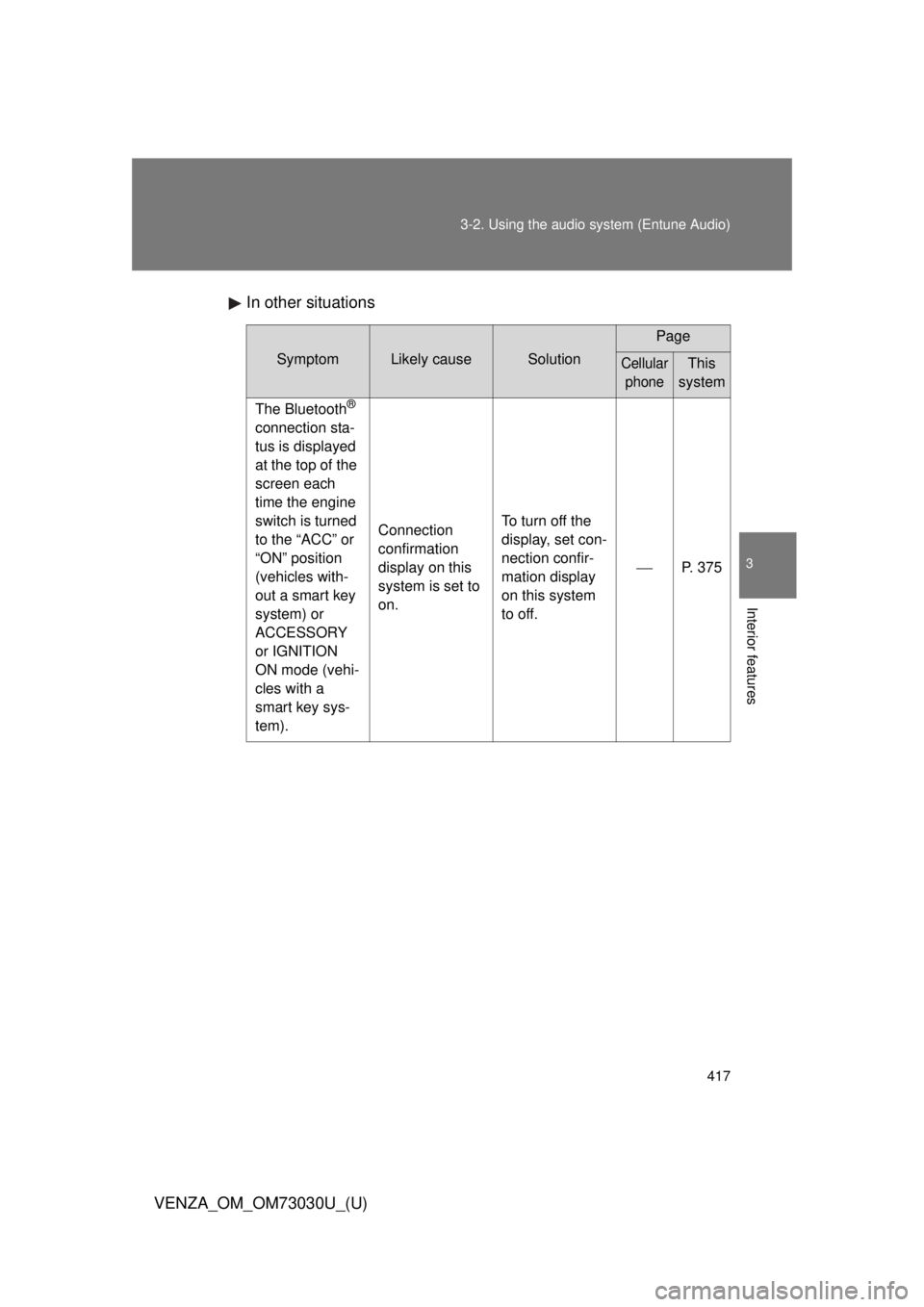
Interior features In other situations Symptom Likely cause Solution Page
Cellular
phone This
system
The Bluetooth ®
connection sta-
tus is displayed
at the top of the
screen each
time the engine
switch is turned
to the “ACC” or
“ON” position
(vehicles with-
out a smart key
system) or
ACCESSORY
or IGNITION
ON mode (vehi-
cles with a
smart key sys-
tem). Connection
confirmation
display on this
system is set to
on. To turn off the
display, set con-
nection confir-
mation display
on this system
to off. P. 375
Page 418 of 688
4183-2. Using the audio system (Entune Audio)
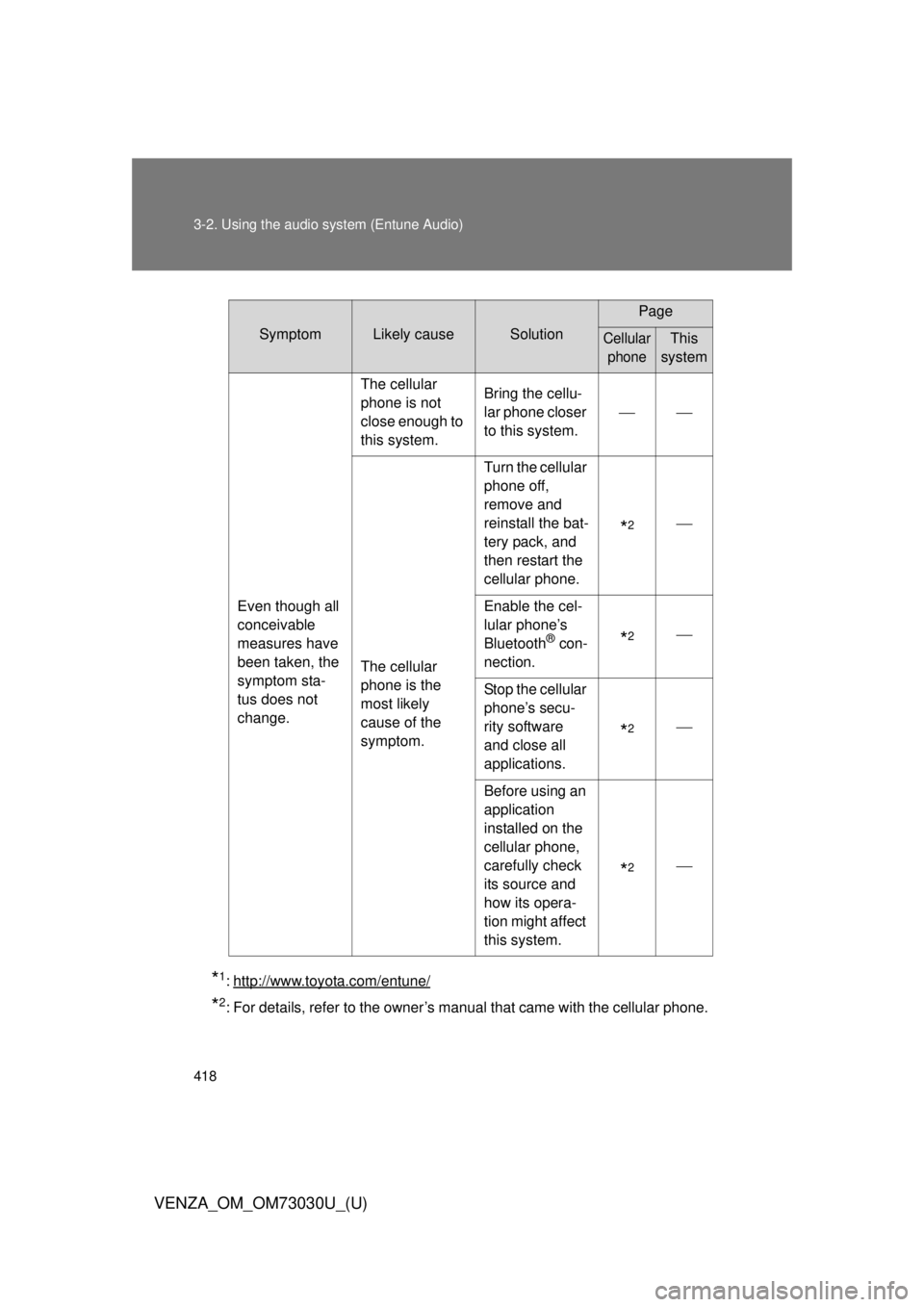
VENZA_OM_OM73030U_(U) * 1
: http://www.toyota.com/entune/
* 2
: For details, refer to the owner’s manual that came with the cellular phone. Symptom Likely cause Solution Page
Cellular
phone This
system
Even though all
conceivable
measures have
been taken, the
symptom sta-
tus does not
change. The cellular
phone is not
close enough to
this system. Bring the cellu-
lar phone closer
to this system.
The cellular
phone is the
most likely
cause of the
symptom. Turn the cellular
phone off,
remove and
reinstall the bat-
tery pack, and
then restart the
cellular phone.
* 2
Enable the cel-
lular phone’s
Bluetooth ®
con-
nection.
* 2
Stop the cellular
phone’s secu-
rity software
and close all
applications.
* 2
Before using an
application
installed on the
cellular phone,
carefully check
its source and
how its opera-
tion might affect
this system.
* 2
Page 419 of 688
4193-2. Using the audio system (Entune Audio)
VENZA_OM_OM73030U_(U) 3
Interior features
Bluetooth ®■ When using the Bluetooth ®
audio system
● In the following conditions, the system may not function.
• If the portable audio player is turned off
• If the portable audio player is not connected
• If the portable audio player’s battery is low
● There may be a delay if a cellular phone connection is made during
Bluetooth ®
audio play.
● Depending on the type of portable audio player that is connected to the
system, operation may differ slightly and certain functions may not be
available.
■ When using the hands-free system
● The audio system is muted when making a call.
● If both parties speak at the same time, it may be difficult to hear.
● If the received call volume is overly loud, an echo may be heard.
If the Bluetooth ®
phone is too close to the system, quality of the sound
may deteriorate and connection status may deteriorate.
● In the following circumstances, it may be difficult to hear the other party:
• When driving on unpaved roads
• When driving at high speeds
• If a roof or window is open
• If the air conditioning is blowing directly on the microphone
• If there is interference from the network of the cellular phone
Page 420 of 688
4203-2. Using the audio system (Entune Audio)
VENZA_OM_OM73030U_(U) ■ Conditions under which th e system will not operate
● If using a cellular phone that does not support Bluetooth ®
● If the cellular phone is turned off
● If you are outside of cellular phone service coverage
● If the cellular phone is not connected
● If the cellular phone’s battery is low
● When outgoing calls are controlled, due to heavy traffic on telephone
lines, etc.
● When the cellular phone itself cannot be used
● When transferring contact data from the cellular phone
■ Bluetooth ®
antenna
The antenna is built into the display.
If the portable audio player is behind the seat or in the glove box or console
box, or is touching or covered by metal objects, the connection status may
deteriorate.
If the cellular phone is behind the seat or in the console box, or touching or
covered by metal objects, the connection status may deteriorate.
■ Battery charge/signal status
● This display may not correspond exactly with the portable audio player or
cellular phone itself.
● This system does not have a charging function.
● The portable audio player or cellular phone battery will be depleted
quickly when the device is connected to Bluetooth ®
.
Page 421 of 688
4213-2. Using the audio system (Entune Audio)
VENZA_OM_OM73030U_(U) 3
Interior features ■ When using the Bluetooth ®
audio and hands-free system at the same
time
The following problems may occur.
● The Bluetooth ®
audio connection may be interrupted.
● Noise may be heard during Bluetooth ®
audio playback.
■ About the contact in this system
The following data is stored for every registered cellular phone. When
another phone is connecting, you cannot read the registered data.
● Contact data
● Call history
● Favorite
When removing a Bluetooth ®
phone from the system, the above-mentioned
data is also deleted.
■ About Bluetooth ®
Bluetooth is a registered trademark of
Bluetooth SIG, Inc.
The Bluetooth word mark and logos are
owned by the Bluetooth SIG, Inc. and any
use of such marks by Panasonic Corpo-
ration is under license.
Other trademarks and trade names are
those of their respective owners.
Page 422 of 688
4223-2. Using the audio system (Entune Audio)
VENZA_OM_OM73030U_(U) ■ Compatible models
The Bluetooth ®
audio system supports portable audio players with the fol-
lowing specifications
● Bluetooth ®
specifications:
Ver. 1.1, or higher (Recommended: Ver. 3.0+EDR or higher)
● Profiles:
• A2DP (Advanced Audio Distribution Profile) Ver. 1.0, or higher
(Recommended: Ver. 1.2 or higher)
This is a profile to transmit stereo audio to the audio system.
• AVRCP (Audio/Video Remote Control Profile) Ver. 1.0 or higher
(Recommended: Ver. 1.4 or higher)
This is a profile to allow remote control the A/V equipment.
However, please note that some functions may be limited depending on the
type of portable audio player connected.
The hands-free system supports cellular phones with the following specifica-
tions.
● Bluetooth ®
specification:
Ver. 1.1 or higher (Recommended: Ver. 3.0+EDR or higher)
● Profiles:
• HFP (Hands Free Profile) Ver. 1.0 or higher (Recommended: Ver. 1.6
or higher)
This is a profile to allow hands-free phone calls using a cellular phone
or head set. It has outgoing and incoming call functions.
• OPP (Object Push Profile) Ver. 1. 1 or higher (Recommended: Ver. 1.2)
This is a profile to transfer contact data. When a Bluetooth ®
compatible
cellular phone has both PBAP and OPP, OPP cannot be used.
• PBAP (Phone Book Access Profile) Ver. 1.0 or higher (Recommended:
Ver. 1.1)
This is a profile to transfer contact data.
• MAP (Message Access Profile) Ver. 1.0 or higher
If the cellular phone does not support HFP, you cannot register it with the
hands-free system.