Page 359 of 668
359
SIENNA_OM_OM08013U_(U)
5-7. Connecting Bluetooth®
5
Audio system
Registering a Bluetooth® device
Display the “Bluetooth* Setup” screen. (P. 356)
*: Bluetooth is a registered trademark of Bluetooth SIG, Inc.
Select “Add”.
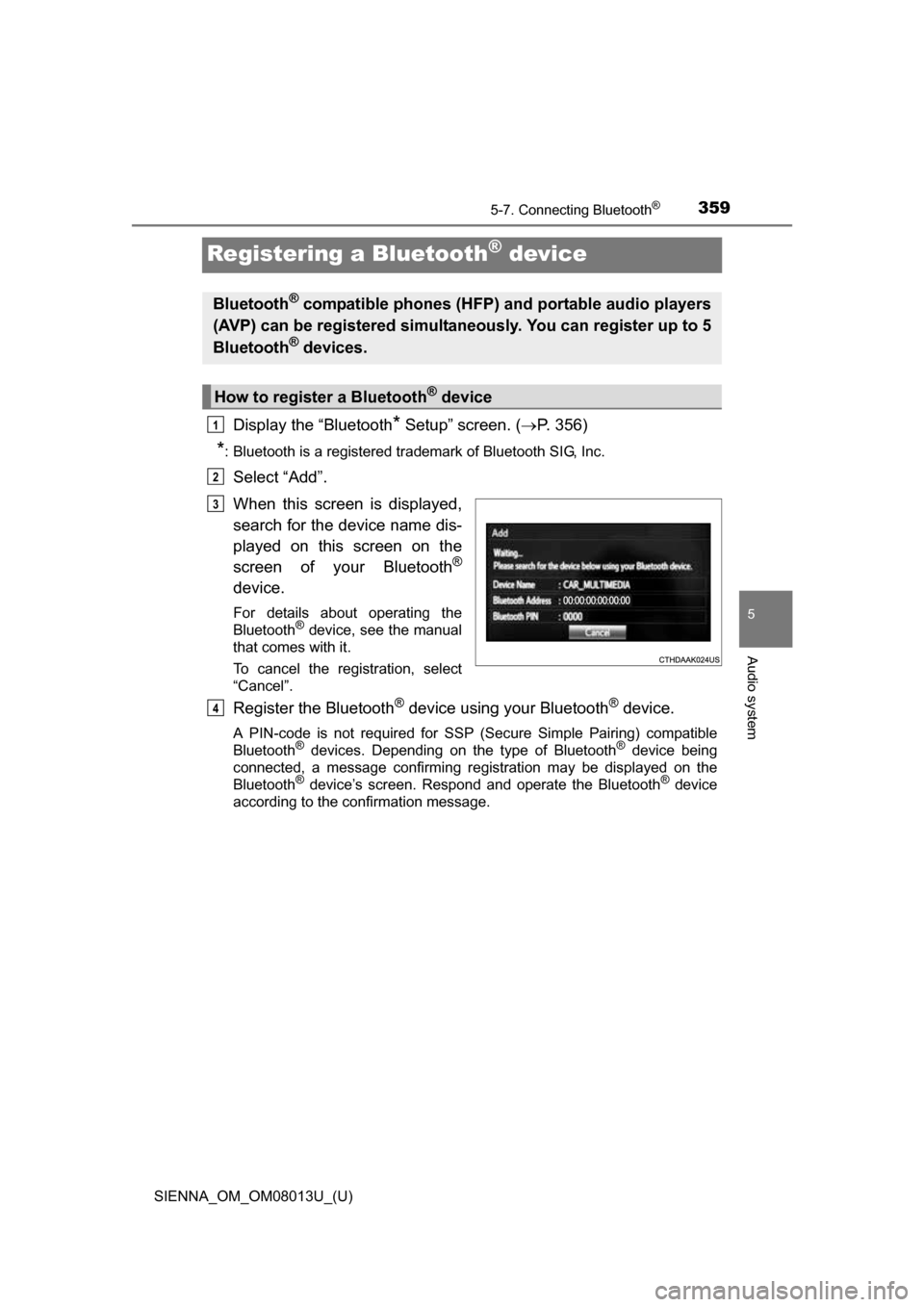
When this screen is displayed,
search for the device name dis-
played on this screen on the
screen of your Bluetooth
®
device.
For details about operating the
Bluetooth® device, see the manual
that comes with it.
To cancel the registration, select
“Cancel”.
Register the Bluetooth® device using your Bluetooth® device.
A PIN-code is not required for SSP (S ecure Simple Pairing) compatible
Bluetooth® devices. Depending on the type of Bluetooth® device being
connected, a message confirming registration may be displayed on the
Bluetooth
® device’s screen. Respond and operate the Bluetooth® device
according to the confirmation message.
Bluetooth® compatible phones (HFP) and portable audio players
(AVP) can be registered simultaneously. You can register up to 5
Bluetooth
® devices.
How to register a Bluetooth® device
1
2
3
4
Page 360 of 668
3605-7. Connecting Bluetooth®
SIENNA_OM_OM08013U_(U)
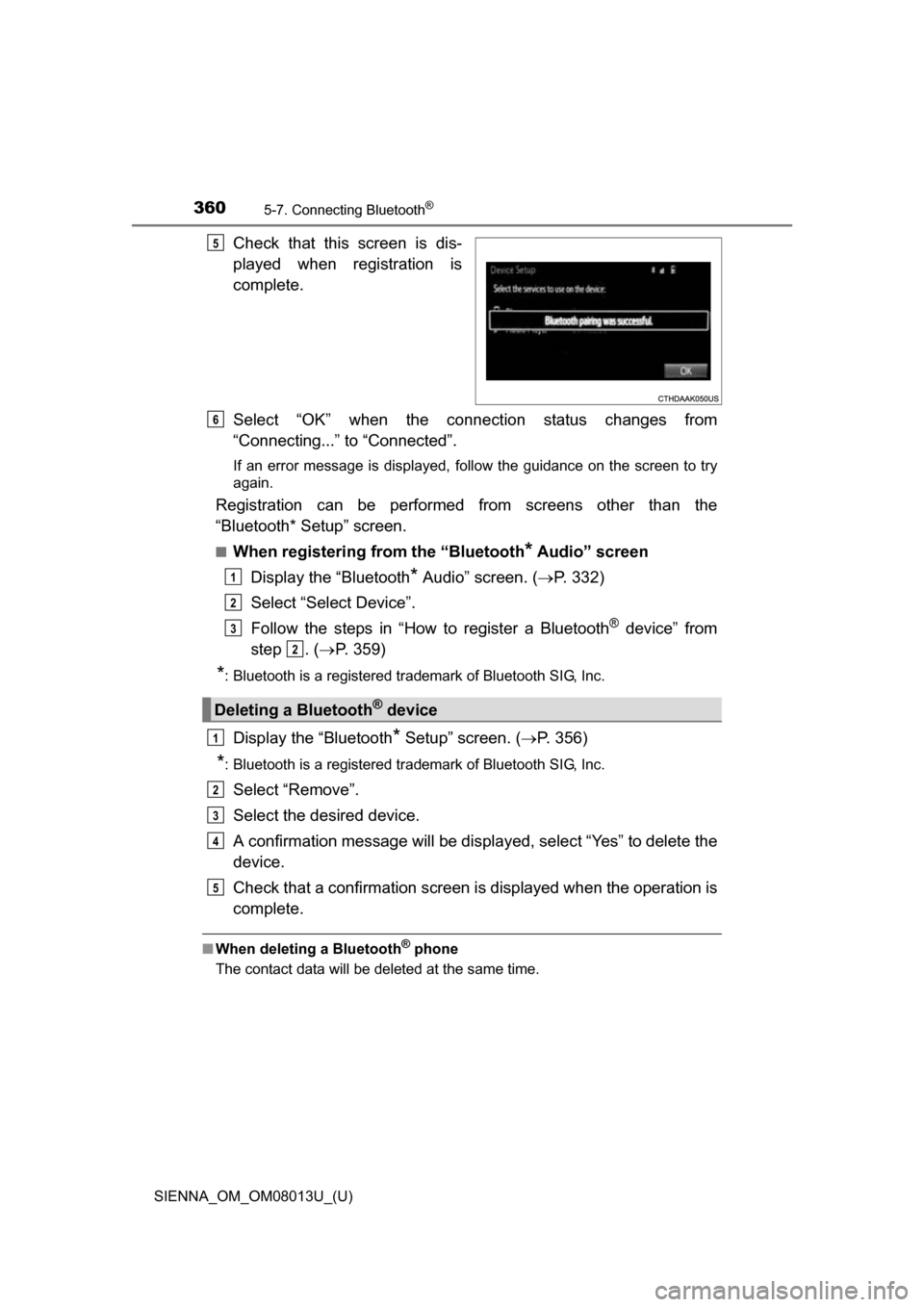
Check that this screen is dis-
played when registration is
complete.
Select “OK” when the connection status changes from
“Connecting...” to “Connected”.
If an error message is displayed, follow the guidance on the screen to try
again.
Registration can be performed from screens other than the
“Bluetooth* Setup” screen.
■When registering from the “Bluetooth* Audio” screen
Display the “Bluetooth
* Audio” screen. ( P. 332)
Select “Select Device”.
Follow the steps in “How to register a Bluetooth
® device” from
step . ( P. 359)
*: Bluetooth is a registered trademark of Bluetooth SIG, Inc.
Display the “Bluetooth* Setup” screen. ( P. 356)
*: Bluetooth is a registered trademark of Bluetooth SIG, Inc.
Select “Remove”.
Select the desired device.
A confirmation message will be displa yed, select “Yes” to delete the
device.
Check that a confirmation screen is displayed when the operation is
complete.
■ When deleting a Bluetooth® phone
The contact data will be deleted at the same time.
5
Deleting a Bluetooth® device
6
1
2
3
2
1
2
3
4
5
Page 361 of 668
361
SIENNA_OM_OM08013U_(U)
5-7. Connecting Bluetooth®
5
Audio system
Connecting a Bluetooth® device
Press the “SETUP” button.
Select “Bluetooth
*”.
*: Bluetooth is a registered trademark of Bluetooth SIG, Inc.
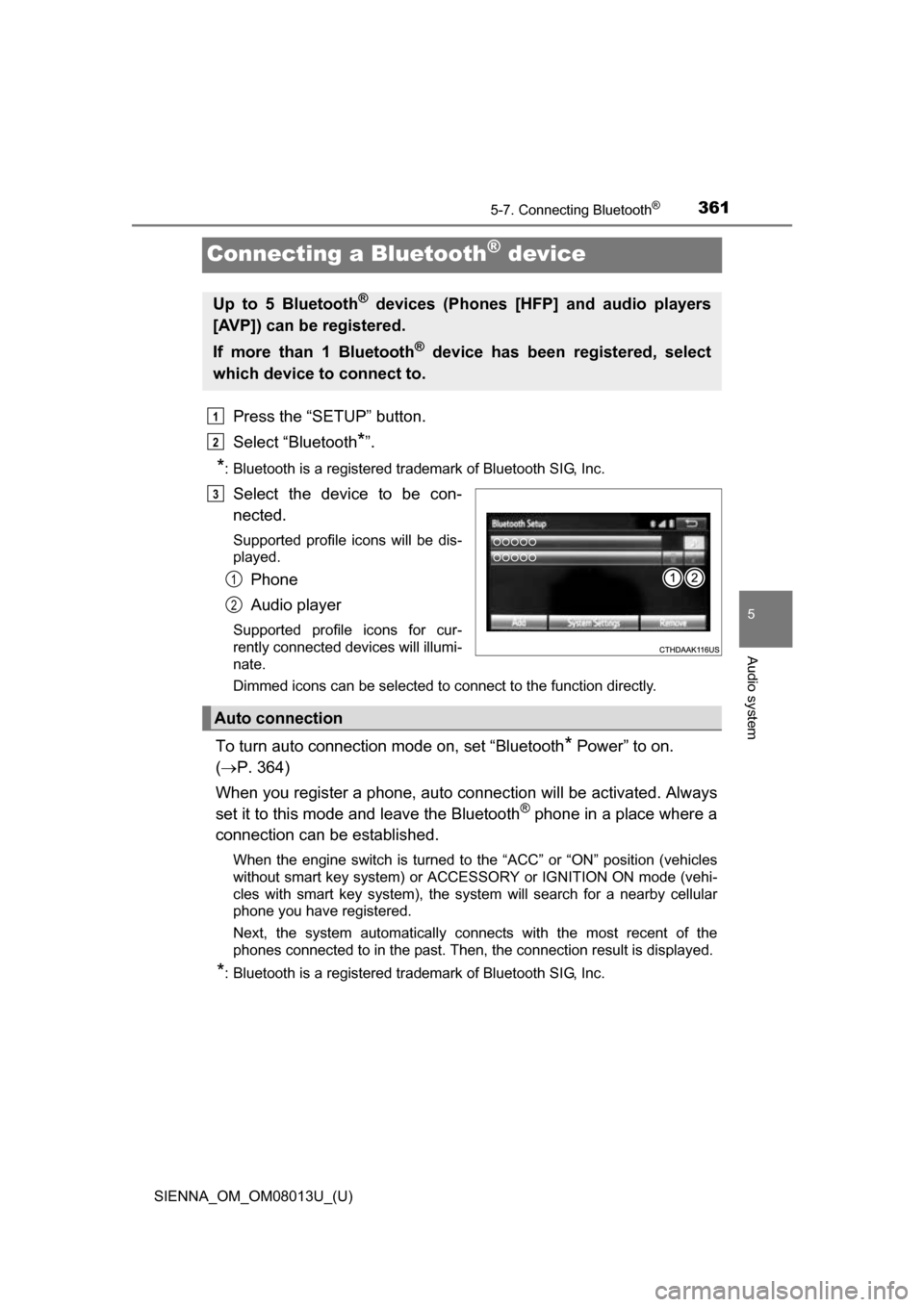
Select the device to be con-
nected.
Supported profile icons will be dis-
played.
Phone
Audio player
Supported profile icons for cur-
rently connected devices will illumi-
nate.
Dimmed icons can be selected to connect to the function directly.
To turn auto connection mode on, set “Bluetooth* Power” to on.
( P. 364)
When you register a phone, auto co nnection will be activated. Always
set it to this mode and leave the Bluetooth
® phone in a place where a
connection can be established.
When the engine switch is turned to the “ACC” or “ON” position (vehicles
without smart key system) or ACCESSORY or IGNITION ON mode (vehi-
cles with smart key system), the system will search for a nearby cellular
phone you have registered.
Next, the system automatically connects with the most recent of the
phones connected to in the past. Then, the connection result is displayed.
*: Bluetooth is a registered trademark of Bluetooth SIG, Inc.
Up to 5 Bluetooth® devices (Phones [HFP] and audio players
[AVP]) can be registered.
If more than 1 Bluetooth
® device has been registered, select
which device to connect to.
1
2
3
1
2
Auto connection
Page 362 of 668
3625-7. Connecting Bluetooth®
SIENNA_OM_OM08013U_(U)
When auto connection has failed or “Bluetooth* Power” is turned off,
you must connec t the Bluetooth® device manually.
*: Bluetooth is a registered trademark of Bluetooth SIG, Inc.
Follow the steps in “Connecting a Bluetooth® device” from step .
( P. 361)
Registering an additional device
Select “Select Device” on the Bluetooth
® audio control screen.
For more information: P. 3 5 9
Selecting a registered device
Select “Select Device” on the Bluetooth
® audio control screen.
For more information: P. 3 6 1
■Reconnecting a Bluetooth® phone
If the system cannot connect due to poor signal strength with the engine
switch in the “ACC” or “ON” position (vehicles without smart key system) or
ACCESSORY or IGNITION ON mode (vehicles with smart key system), the
system will automatically attempt to reconnect.
If the system is attempting to connect to a Bluetooth
® phone and the
Bluetooth® phone is turned off and then back on, the system will attempt to
reconnect.
Manual connection
Connecting a Bluetooth® audio player
11
1
2
1
2
Page 363 of 668
363
SIENNA_OM_OM08013U_(U)
5-7. Connecting Bluetooth®
5
Audio system
Displaying a Bluetooth® device details
Display the “Bluetooth* Setup” screen. (P. 356)
*: Bluetooth is a registered trademark of Bluetooth SIG, Inc.
Select the device.
Select “Device Info”.
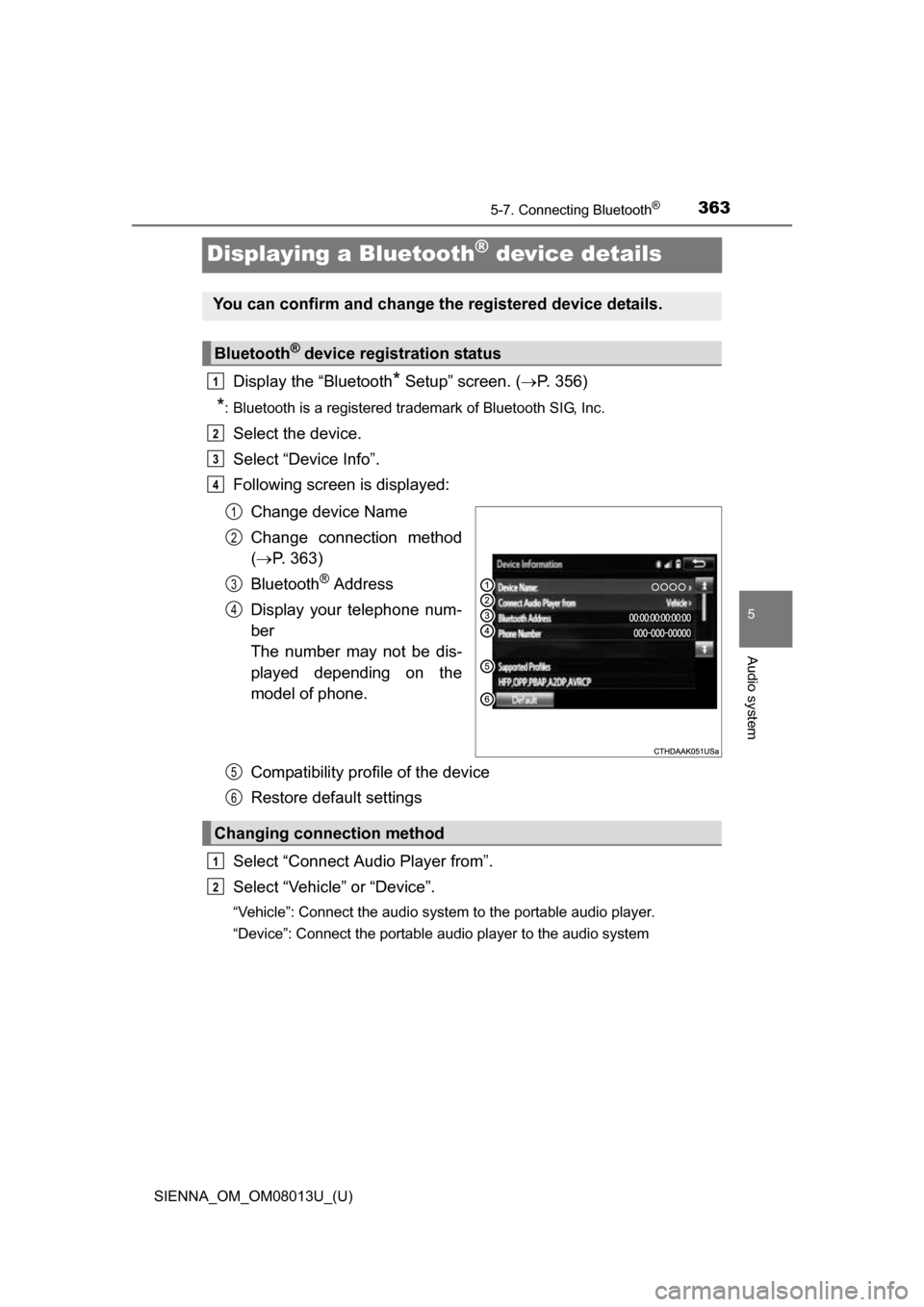
Following screen is displayed:
Change device Name
Change connection method
( P. 363)
Bluetooth
® Address
Display your telephone num-
ber
The number may not be dis-
played depending on the
model of phone.
Compatibility profile of the device
Restore default settings
Select “Connect Audio Player from”.
Select “Vehicle ” or “Device”.
“Vehicle”: Connect the audio system to the portable audio player.
“Device”: Connect the portable audio player to the audio system
You can confirm and change the registered device details.
Bluetooth® device registration status
1
2
3
4
1
2
3
4
Changing connection method
5
6
1
2
Page 364 of 668
364
SIENNA_OM_OM08013U_(U)
5-7. Connecting Bluetooth®
Detailed Bluetooth® system settings
Display the “Bluetooth* Setup” screen. (P. 356)
Select “System Settings”.
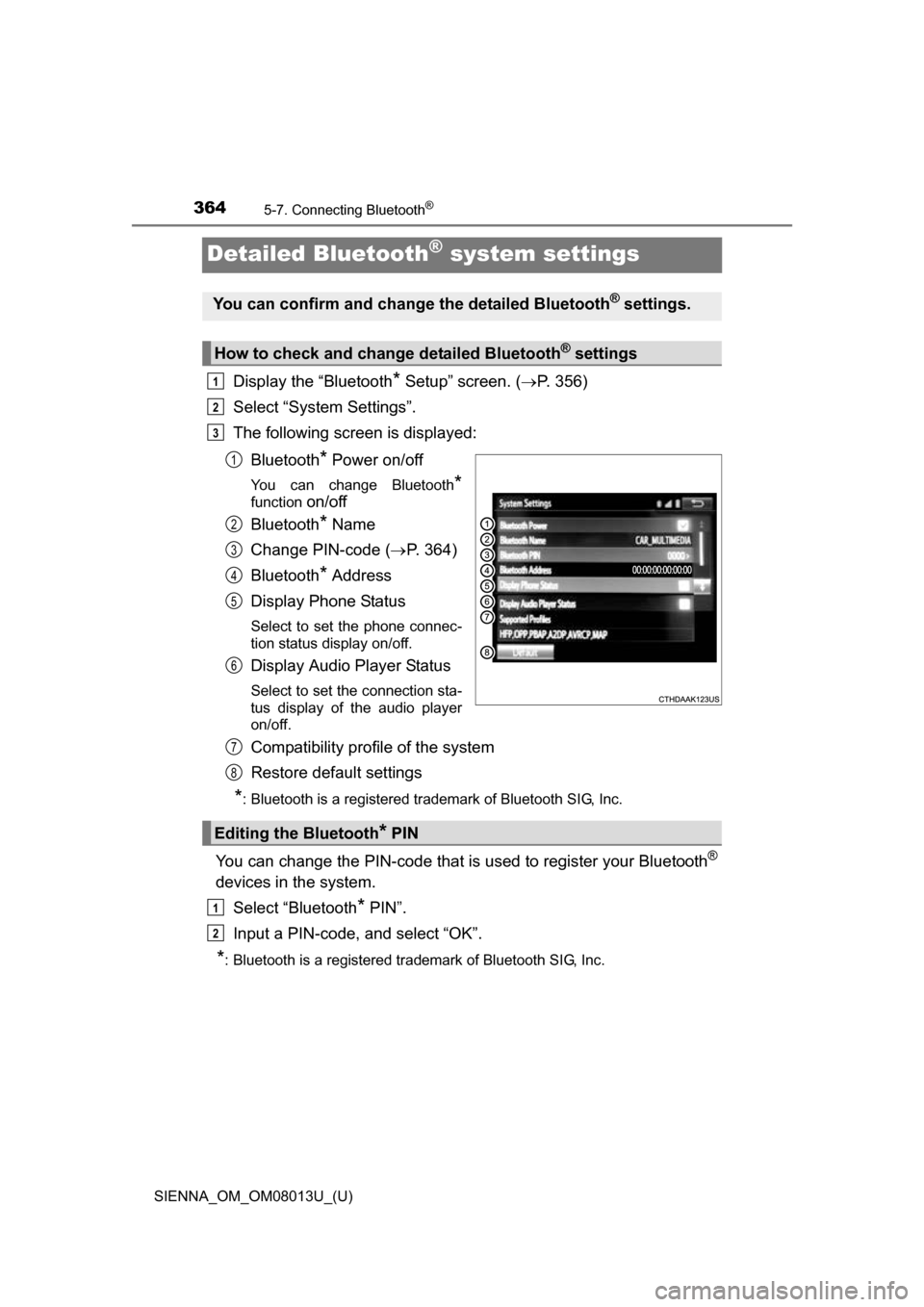
The following screen is displayed:
Bluetooth
* Power on/off
You can change Bluetooth*
function on/off
Bluetooth
* Name
Change PIN-code ( P. 364)
Bluetooth
* Address
Display Phone Status
Select to set the phone connec-
tion status display on/off.
Display Audio Player Status
Select to set the connection sta-
tus display of the audio player
on/off.
Compatibility profile of the system
Restore default settings
*: Bluetooth is a registered trademark of Bluetooth SIG, Inc.
You can change the PIN-code that is used to register your Bluetooth®
devices in the system.
Select “Bluetooth
* PIN”.
Input a PIN-code, and select “OK”.
*: Bluetooth is a registered trademark of Bluetooth SIG, Inc.
You can confirm and change the detailed Bluetooth® settings.
How to check and change detailed Bluetooth® settings
1
2
3
1
2
3
4
5
6
Editing the Bluetooth* PIN
7
8
1
2
Page 365 of 668
365
SIENNA_OM_OM08013U_(U)
5-8. Bluetooth® Audio
5
Audio system
Listening to Bluetooth® Audio
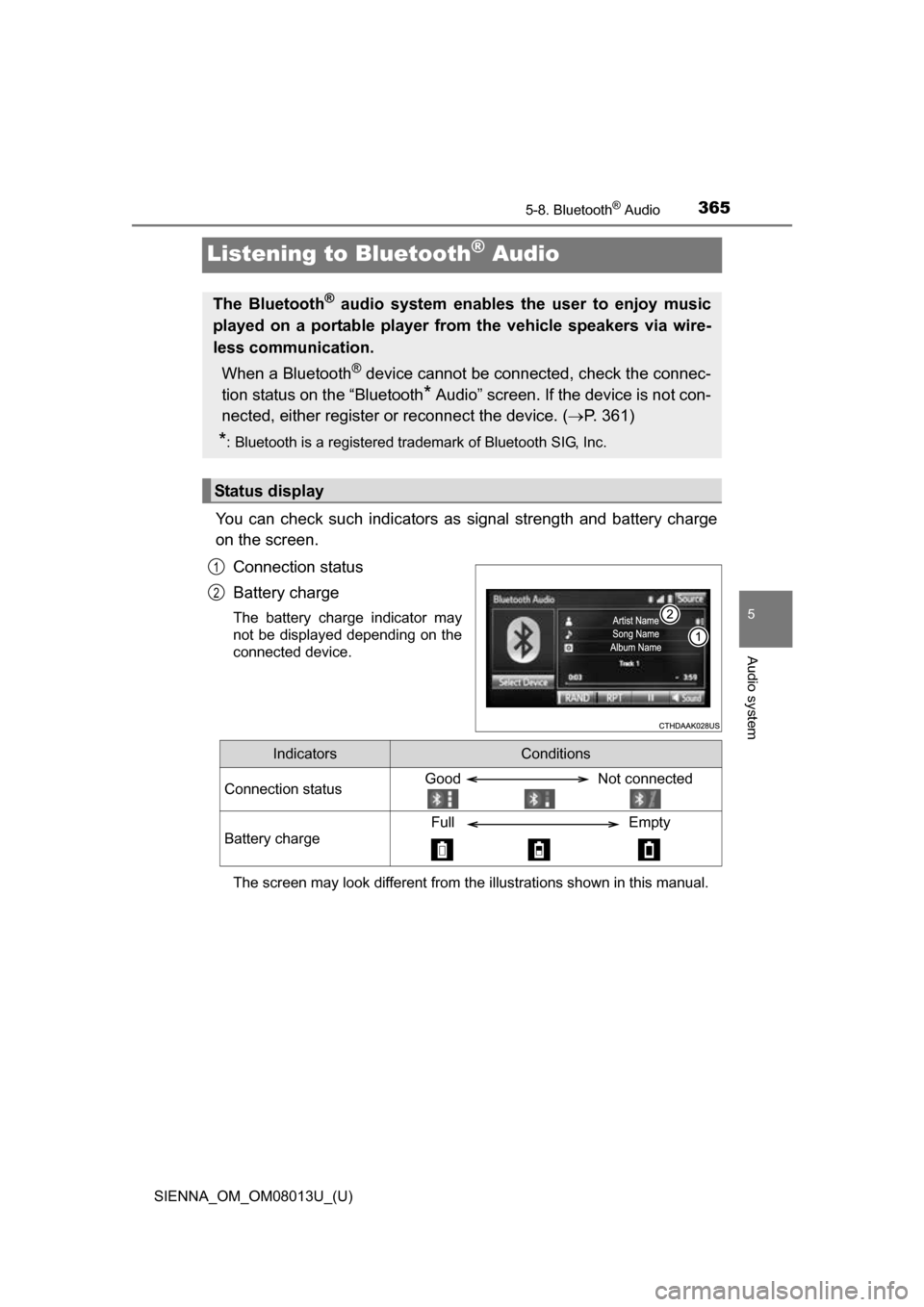
You can check such indicators as signal strength and battery charge
on the screen.
Connection status
Battery charge
The battery charge indicator may
not be displayed depending on the
connected device.
The screen may look different from the illustrations shown in this manual.
The Bluetooth® audio system enables the user to enjoy music
played on a portable player from the vehicle speakers via wire-
less communication.
When a Bluetooth
® device cannot be connected, check the connec-
tion status on the “Bluetooth
* Audio” screen. If the device is not con-
nected, either register or reconnect the device. ( P. 361)
*: Bluetooth is a registered trademark of Bluetooth SIG, Inc.
Status display
1
2
IndicatorsConditions
Connection statusGood Not connected
Battery charge
Full Empty
Page 366 of 668
3665-8. Bluetooth® Audio
SIENNA_OM_OM08013U_(U)
Select or to Play/Pause.
For details on “Bluetooth
* Audio” screen operation methods, refer to
Basic Audio Operations. ( P. 324)
For details on how to select a track or album, refer to selecting, fast-
forwarding and reversing tracks/files/songs. ( P. 334)
*: Bluetooth is a registered trademark of Bluetooth SIG, Inc.
Playing Bluetooth® audio