2016 TOYOTA SIENNA park assist
[x] Cancel search: park assistPage 276 of 668
276
SIENNA_OM_OM08013U_(U)
4-5. Using the driving support systems
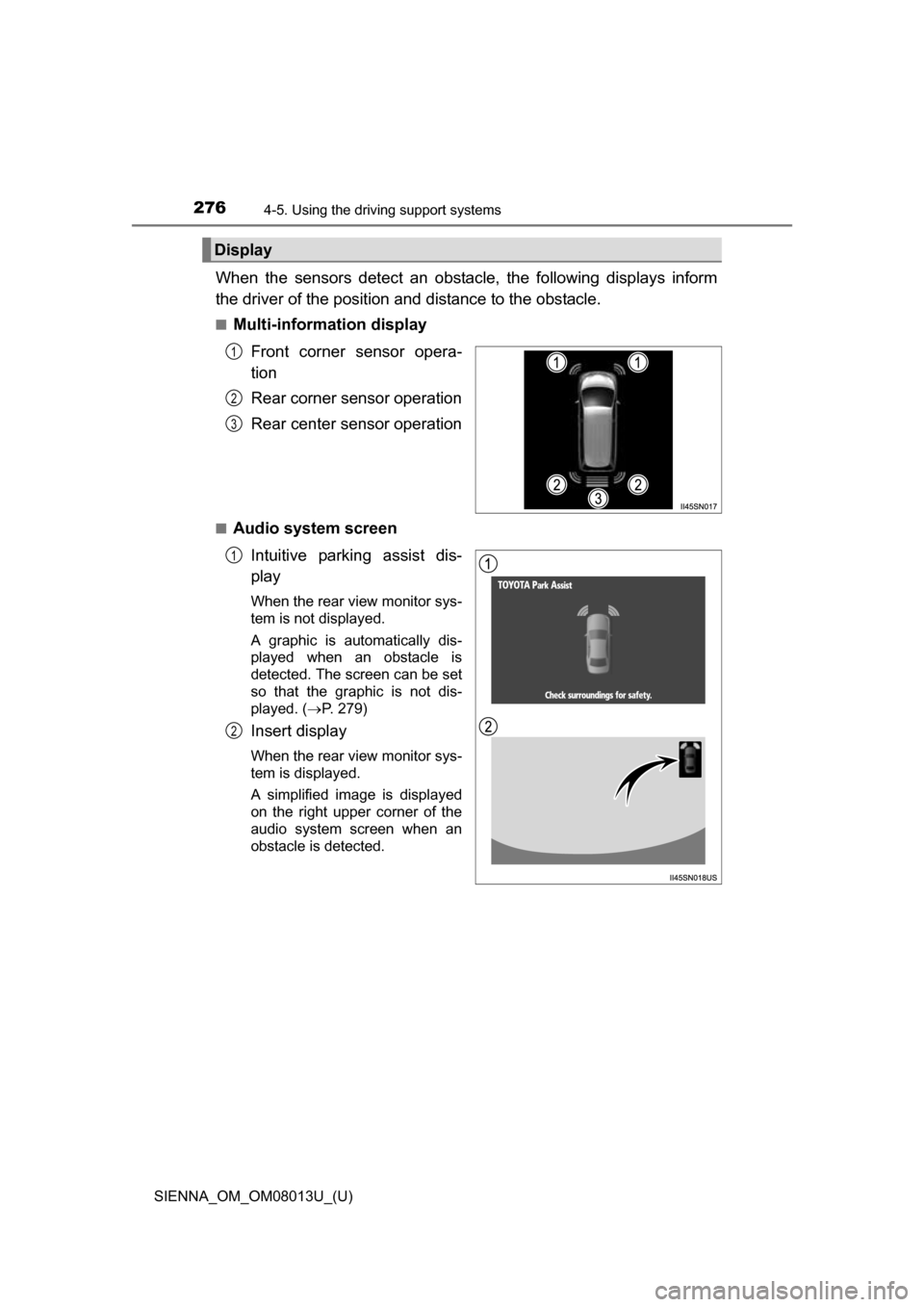
When the sensors detect an obstacle, the following displays inform
the driver of the position an d distance to the obstacle.
■Multi-information display
Front corner sensor opera-
tion
Rear corner sensor operation
Rear center sensor operation
■Audio system screenIntuitive parking assist dis-
play
When the rear view monitor sys-
tem is not displayed.
A graphic is automatically dis-
played when an obstacle is
detected. The screen can be set
so that the graphic is not dis-
played. ( P. 279)
Insert display
When the rear view monitor sys-
tem is displayed.
A simplified image is displayed
on the right upper corner of the
audio system screen when an
obstacle is detected.
Display
1
2
3
1
2
Page 279 of 668
SIENNA_OM_OM08013U_(U)
2794-5. Using the driving support systems
4
Driving
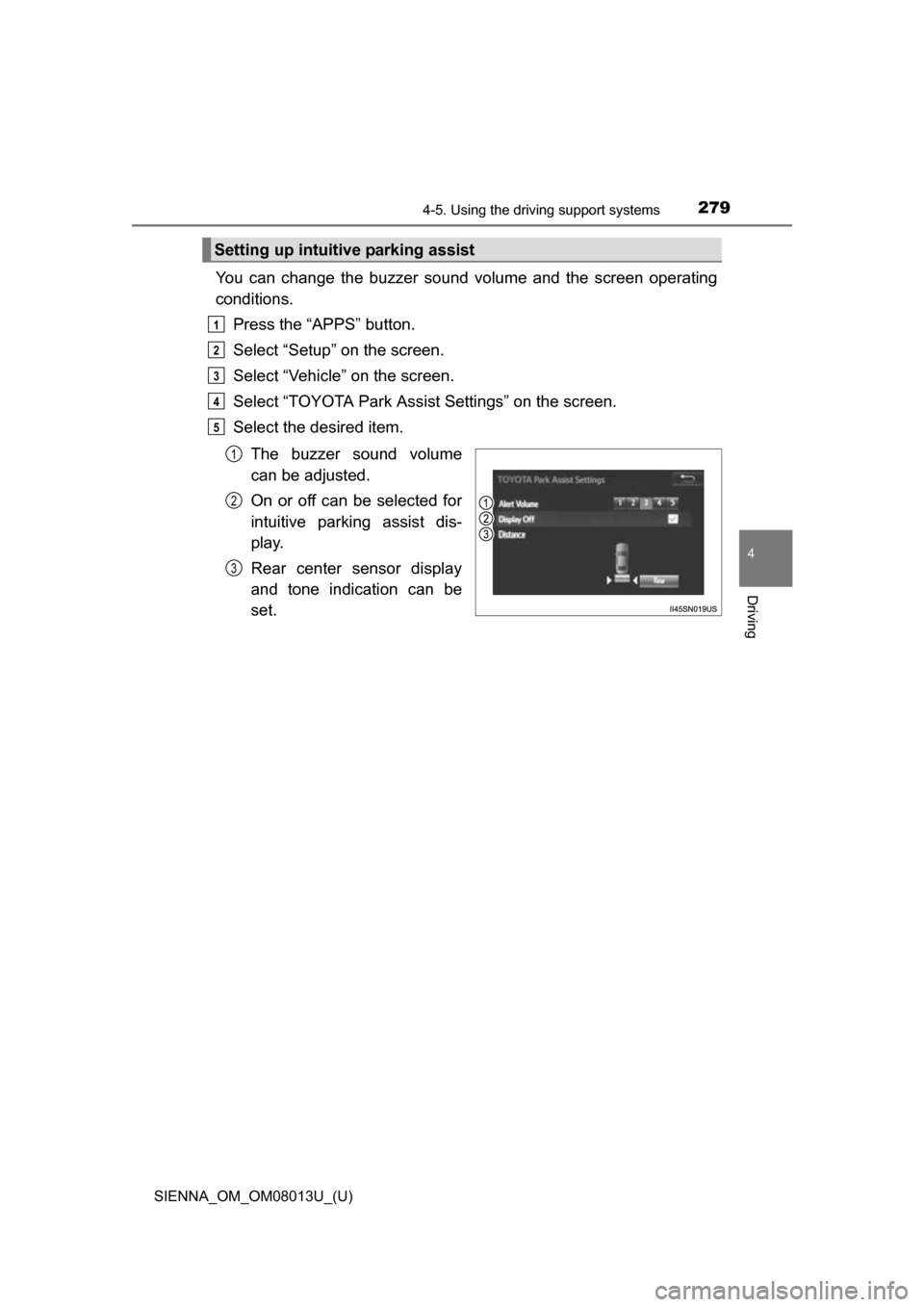
You can change the buzzer sound volume and the screen operating
conditions.
Press the “APPS” button.
Select “Setup” on the screen.
Select “Vehicle” on the screen.
Select “TOYOTA Park Assist Settings” on the screen.
Select the desired item.
The buzzer sound volume
can be adjusted.
On or off can be selected for
intuitive parking assist dis-
play.
Rear center sensor display
and tone indication can be
set.
Setting up intuitive parking assist
1
2
3
4
5
1
2
3
Page 280 of 668
280
SIENNA_OM_OM08013U_(U)
4-5. Using the driving support systems
■The intuitive parking assist can be operated when
●The engine switch is in the “ON” position (vehicles without a smart key sys-
tem) or IGNITION ON mode (vehicles with a smart key system).
● Front corner sensors:
• The shift lever is not in P.
• The vehicle speed is approximately 6 mph (10 km/h) or less.
● Rear corner and rear center sensors:
The shift lever is in R.
■ Intuitive parking assist display
When an obstacle is detected while the rear view monitor system is in use,
the warning indicator will appear in the upper corner of the screen even if the
display setting has been set to off.
■ Sensor detection information
●The sensor’s detection areas are limited to the areas around the vehicle’s
bumper.
● Certain vehicle conditions and the surrounding environment may affect the
ability of the sensor to correctly detect obstacles. Particular instances where
this may occur are listed below.
• There is dirt, snow or ice on the sensor. (Wiping the sensors will resolve
this problem.)
• The sensor is frozen. (Thawing the area will resolve this problem.)
In especially cold weather, if a sensor is frozen the screen may show an
abnormal display, or obstacles may not be detected.
• The sensor is covered in any way.
• The vehicle is leaning considerably to one side.
• On an extremely bumpy road, on an incline, on gravel, or on grass
• The vicinity of the vehicle is noisy due to vehicle horns, motorcycle
engines, air brakes of large vehicles, or other loud noises producing ultra-
sonic waves.
• There is another vehicle equipped with parking assist sensors in the
vicinity.
• The sensor is coated with a sheet of spray or heavy rain.
• The vehicle is equipped with a fender pole or wireless antenna.
• The bumper or sensor receives a strong impact.
• The vehicle is approaching a tall or curved curb.
• In harsh sunlight or intense cold weather
• The area directly under the bumpers is not detected.
• If obstacles draw too close to the sensor.
• A non-genuine Toyota suspension (lowered suspension etc.) is installed.
• People may not be detected if they are wearing certain types of clothing.
In addition to the examples above, there are instances in which, because of
their shapes, signs and other objects may be judged by the sensor to be
closer than they are.
Page 281 of 668
SIENNA_OM_OM08013U_(U)
2814-5. Using the driving support systems
4
Driving
●The shape of the obstacle may prevent the sensor from detecting it. Pay
particular attention to the following obstacles:
• Wires, fences, ropes, etc.
• Cotton, snow and other materials that absorb sound waves
• Sharply-angled objects
• Low obstacles
• Tall obstacles with upper sections projecting outwards in the direction of
your vehicle
● The following situations may occur during use.
• Depending on the shape of the obstacle and other factors, the detection
distance may shorten, or detection may be impossible.
• Obstacles may not be detected if they are too close to the sensor.
• There will be a short delay between obstacle detection and display. Even at slow speeds, there is a possibility that the obstacle will come within the
sensor’s detection areas before the display is shown and the beep
sounds.
• Thin posts or objects lower than the sensor may not be detected when
approached, even if they have been detected once.
• It might be difficult to hear beeps due to the volume of audio system or air flow noise of the air conditioning system.
■ If the display flashes and a message is displayed
P. 552
■ Certification (Canada only)
This ISM device complies with Canadian ICES-001.
WARNING
■When using the Intuitive parking assist-sensor
Observe the following precautions.
Failure to do so may result in the vehicle being unable to be driven safely
and possibly cause an accident.
●Do not use the sensor at speeds in excess of 6 mph (10 km/h).
● The sensors’ detection areas and reaction times are limited. When moving
forward or reversing, check the areas surrounding the vehicle (especially
the sides of the vehicle) for safety, and drive slowly, using the brake to
control the vehicle’s speed.
● Do not install accessories within the sensors’ detection areas.
Page 282 of 668
282
SIENNA_OM_OM08013U_(U)
4-5. Using the driving support systems
NOTICE
■When using intuitive parking assist
In the following situations, the system may not function correctly due to a
sensor malfunction etc. Have the vehicle checked by your Toyota dealer.
●The intuitive parking assist operation display flashes, and a beep sounds
when no obstacles are detected.
● If the area around a sensor collides with something, or is subjected to
strong impact.
● If the bumper collides with something.
● If the display shows continuously without a beep.
● If a display error occurs, first check the sensor.
● If the error occurs even when there is no ice, snow or mud on the sensor, it
is likely that the sensor is malfunctioning.
■ Notes when washing the vehicle
Do not apply intensive bursts of water or steam to the sensor area.
Doing so may result in the sensor malfunctioning.
Page 283 of 668
283
SIENNA_OM_OM08013U_(U)
4-5. Using the driving support systems
4
Driving
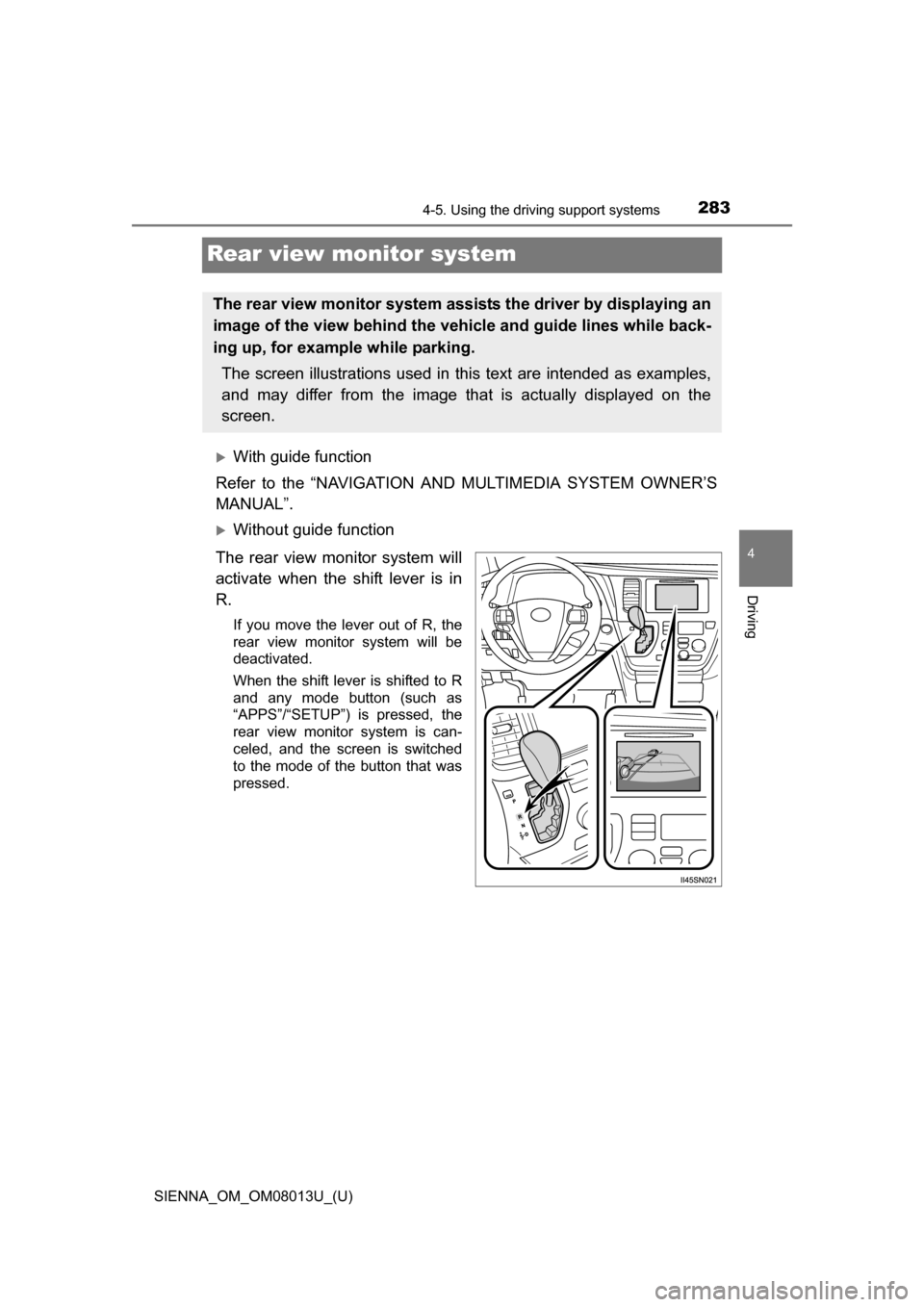
Rear view monitor system
With guide function
Refer to the “NAVIGATION AND MULTIMEDIA SYSTEM OWNER’S
MANUAL”.
Without guide function
The rear view monitor system will
activate when the shift lever is in
R.
If you move the lever out of R, the
rear view monitor system will be
deactivated.
When the shift lever is shifted to R
and any mode button (such as
“APPS”/“SETUP”) is pressed, the
rear view monitor system is can-
celed, and the screen is switched
to the mode of the button that was
pressed.
The rear view monitor system assists the driver by displaying an
image of the view behind the ve hicle and guide lines while back-
ing up, for example while parking.
The screen illustrations used in this text are intended as examples,
and may differ from the image that is actually displayed on the
screen.
Page 291 of 668
SIENNA_OM_OM08013U_(U)
2914-5. Using the driving support systems
4
Driving
The fixed guide lines are very far out of alignment
The camera position is out of align-
ment.Have the vehicle inspected by your
Toyota dealer.
• The vehicle is tilted (there is a
heavy load on the vehicle, tire
pressure is low due to a tire punc-
ture, etc.)
• The vehicle is used on an incline.If this happens due to these causes,
it does not indicate a malfunction.
Back up while visually checking the
vehicle’s surroundings.
WARNING
■ When using the rear view monitor system
The rear view monitor system is a supplemental device intended to assist
the driver when backing up. When backing up, be sure to check visually
behind and all around the vehicle before proceeding.
Observe the following precautions to avoid an accident that could result in
death or serious injuries.
● Never depend on the rear view monitor system entirely when backing up.
The image and the position of the guide lines displayed on the screen may
differ from the actual state.
Use caution, just as you would when backing up any vehicle.
● Be sure to back up slowly, depressing the brake pedal to control vehicle
speed.
● The instructions given are only guide lines.
When and how much to turn the steering wheel will vary according to traf-
fic conditions, road surface conditions, vehicle condition, etc. when park-
ing. It is necessary to be fully aware of this before using the rear view
monitor system.
● When parking, be sure to check that the parking space will accommodate
your vehicle before maneuvering into it.
● Do not use the rear view monitor system in the following cases:
• On icy or slick road surfaces, or in snow
• When using tire chains or the compact spare tire (if equipped)
• When the back door is not closed completely
• On roads that are not flat or straight, such as curves or slopes.
Likely causeSolution
Page 296 of 668
296
SIENNA_OM_OM08013U_(U)
4-5. Using the driving support systems
■Reduced effectiveness of the EPS system
The effectiveness of the EPS system is reduced to prevent the system from
overheating when there is frequent steering input over an extended period of
time. The steering wheel may feel heavy as a result. Should this occur, refrain
from excessive steering input or stop the vehicle and turn the engine off. The
EPS system should return to normal within 10 minutes.
■ Operating conditions of hill-start assist control (vehicles with a hill-start
assist control system)
When the following four conditions are met, the hill-start assist control will
operate:
●The shift lever is in a position other than P or N (when starting off forward/
backward on an upward incline).
● The vehicle is stopped.
● The accelerator pedal is not depressed.
● The parking brake is not applied.
■ Automatic system cancelation of hill-sta rt assist control (vehicles with a
hill-start assist control system)
The hill-start assist control will turn off in any of the following situations:
● The shift lever is shifted to P or N.
● The accelerator pedal is depressed.
● The parking brake is applied.
● Approximately 2 seconds elapse after the brake pedal is released.
WARNING
■ The ABS does not operate effectively when
●The limits of tire gripping performance have been exceeded (such as
excessively worn tires on a snow covered road).
● The vehicle hydroplanes while driving at high speed on wet or slick roads.
■ Stopping distance when the ABS is operating may exceed that of nor-
mal conditions
The ABS is not designed to shorten the vehicle’s stopping distance. Always
maintain a safe distance from the vehicle in front of you, especially in the
following situations:
● When driving on dirt, gravel or snow-covered roads
● When driving with tire chains
● When driving over bumps in the road
● When driving over roads with potholes or uneven surfaces