Page 582 of 668
582
SIENNA_OM_OM08013U_(U)
8-2. Steps to take in an emergency
If the engine will not start
One of the following may be the cause of the problem:
●There may not be sufficient fuel in the vehicle’s tank.
Refuel the vehicle.
● The engine may be flooded.
Try to restart the engine again following correct starting procedures.
( P. 225, 228)
● There may be a malfunction in the engine immobilizer system.
( P. 75)
One of the following may be the cause of the problem:
● The battery may be discharged. ( P. 587)
● The battery terminal connections may be loose or corroded.
The engine starting system may be malfunctioning due to an electrical
problem such as an electronic key battery depletion or a blown fuse.
However, an interim measure is available to start the engine.
( P. 583)
If the engine will not start even though correct starting proce-
dures are being followed ( P. 225, 228), consider each of the fol-
lowing points:
The engine will not start even though the starter motor operates
normally.
The starter motor turns over slowly, the interior lights and head-
lights are dim, or the horn does not sound or sounds at a low
volume.
The starter motor does not turn over (vehicles with a smart key
system)
Page 583 of 668
5838-2. Steps to take in an emergency
SIENNA_OM_OM08013U_(U)
8
When trouble arises
One of the following may be the cause of the problem:
●One or both of the battery terminals may be disconnected.
● The battery may be discharged. ( P. 587)
● There may be a malfunction in the steering lock system (vehicle
with a smart key system).
Contact your Toyota dealer if the problem cannot be repaired, or if repair
procedures are unknown.
When the engine does not start, the following steps can be used as an
interim measure to start the engine if the engine switch is functioning
normally:
Set the parking brake.
Shift the shift lever to P.
Turn the engine switch to ACCESSORY mode.
Press and hold the engine switch for about 15 seconds while
depressing the brake pedal firmly.
Even if the engine can be started using the above steps, the system
may be malfunctioning. Have the v ehicle inspected by your Toyota
dealer.
The starter motor does not turn ov er, the interior lights and head-
lights do not turn on, or the horn does not sound.
Emergency start function (vehicles with a smart key system)
1
2
3
4
Page 584 of 668
584
SIENNA_OM_OM08013U_(U)
8-2. Steps to take in an emergency
If the shift lever cannot be shifted from P
Set the parking brake.
Turn the engine switch to the “ACC” position (vehicles without a
smart key system) or ACCESSORY mode (vehicles with a smart
key system).
Depress the brake pedal.
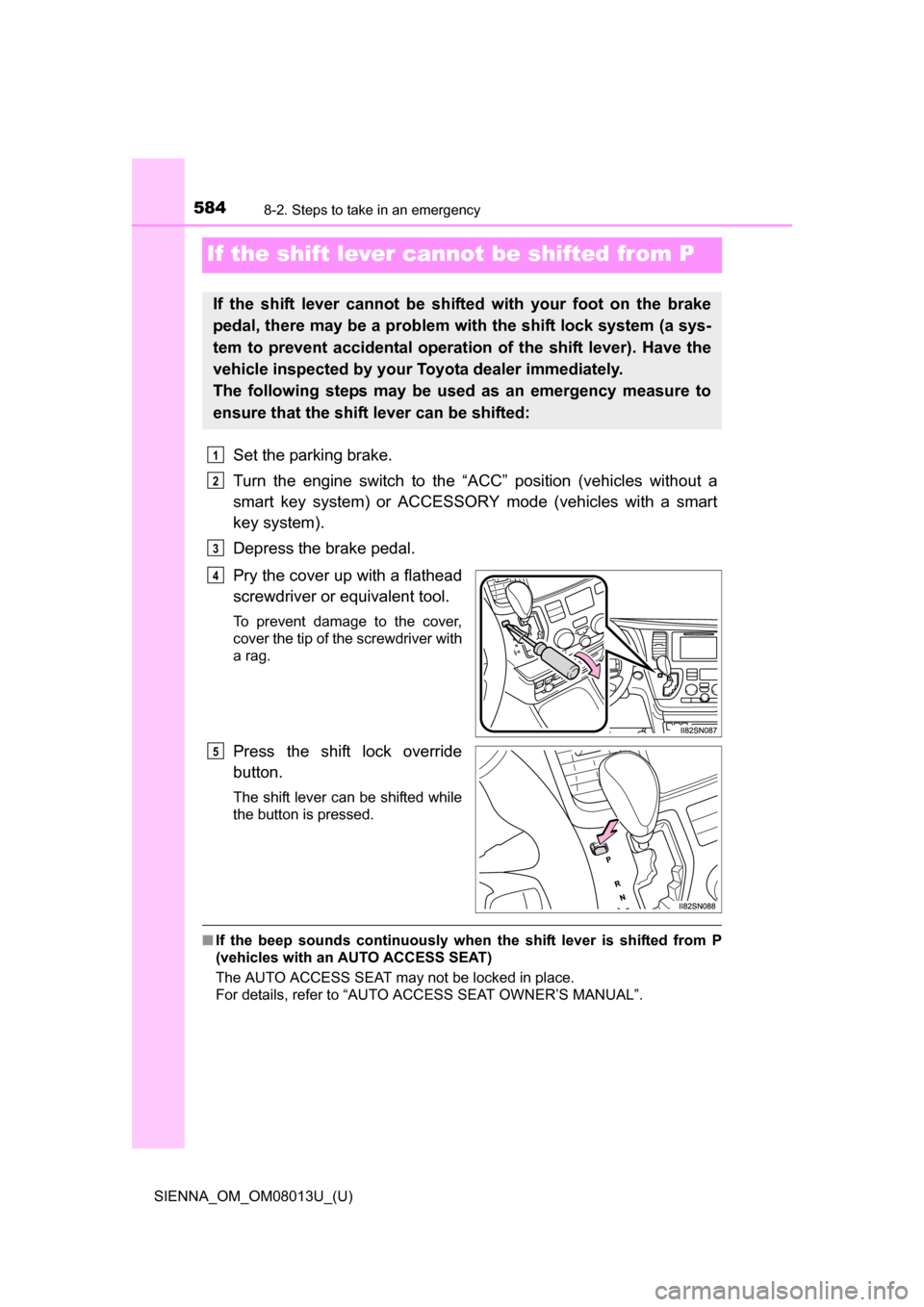
Pry the cover up with a flathead
screwdriver or equivalent tool.
To prevent damage to the cover,
cover the tip of the screwdriver with
a rag.
Press the shift lock override
button.
The shift lever can be shifted while
the button is pressed.
■ If the beep sounds continuously when the shift lever is shifted from P
(vehicles with an AUTO ACCESS SEAT)
The AUTO ACCESS SEAT may not be locked in place.
For details, refer to “AUTO ACCESS SEAT OWNER’S MANUAL”.
If the shift lever cannot be sh ifted with your foot on the brake
pedal, there may be a problem with the shift lock system (a sys-
tem to prevent accidental operation of the shift lever). Have the
vehicle inspected by your Toyota dealer immediately.
The following steps may be used as an emergency measure to
ensure that the shift lever can be shifted:
1
2
3
4
5
Page 585 of 668
585
SIENNA_OM_OM08013U_(U)
8
When trouble arises
8-2. Steps to take in an emergency
If the electronic key does not operate
properly (vehicles with a smar t key system)
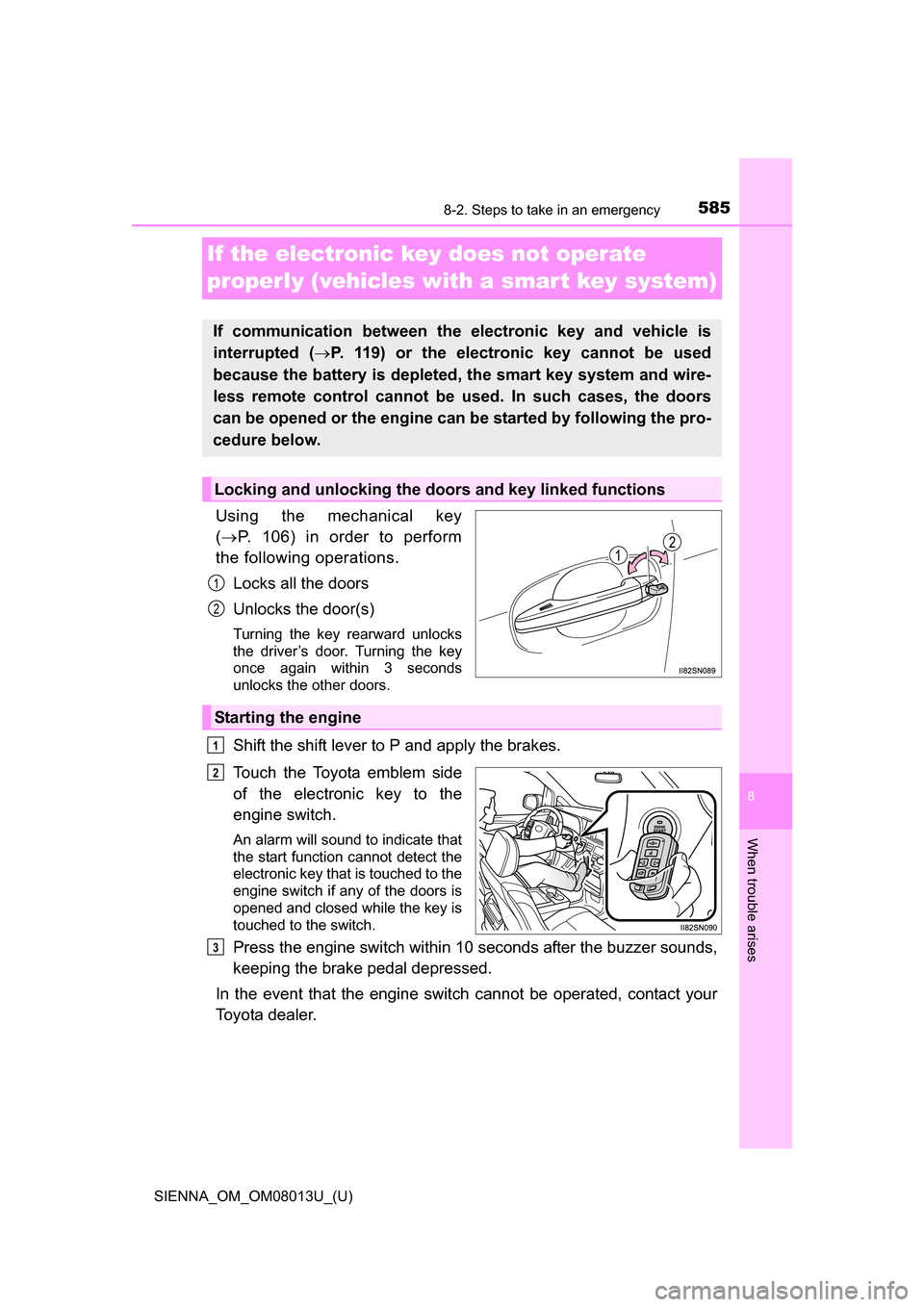
Using the mechanical key
( P. 106) in order to perform
the following operations.
Locks all the doors
Unlocks the door(s)
Turning the key rearward unlocks
the driver’s door. Turning the key
once again within 3 seconds
unlocks the other doors.
Shift the shift lever to P and apply the brakes.
Touch the Toyota emblem side
of the electronic key to the
engine switch.
An alarm will sound to indicate that
the start function cannot detect the
electronic key that is touched to the
engine switch if any of the doors is
opened and closed while the key is
touched to the switch.
Press the engine switch within 10 seconds after the buzzer sounds,
keeping the brake pedal depressed.
In the event that the engine switch cannot be operated, contact your
Toyota dealer.
If communication between the electronic key and vehicle is
interrupted ( P. 119) or the electronic key cannot be used
because the battery is depleted, the smart key system and wire-
less remote control cannot be used. In such cases, the doors
can be opened or the engine can be started by following the pro-
cedure below.
Locking and unlocking the doors and key linked functions
1
2
Starting the engine
1
2
3
Page 586 of 668
5868-2. Steps to take in an emergency
SIENNA_OM_OM08013U_(U)
■Stopping the engine
Shift the shift lever to P and press the engine switch as you normally do when
stopping the engine.
■ Replacing the key battery
As this above procedure is a temporary measure, it is recommended that the
electronic key battery be replaced immediately when the battery depletes.
( P. 507)
■ Alarm (if equipped)
Using the mechanical key to lock the doors will not set the alarm system.
If a door is unlocked using the mechanical key when the alarm system is set,
the alarm may be triggered. ( P. 77)
■ Changing engine switch modes
Within 10 seconds of the buzzer sounding, release the brake pedal and press
the engine switch.
The engine does not start and modes will be changed each time the switch is
pressed. ( P. 229)
■ When the electronic key does not work properly
●Check if the battery-saving mode is set. If it is set, cancel the function.
(P. 145)
● Make sure that the smart key system has not been deactivated in the cus-
tomization setting. If it is off, turn the function on.
(Customizable features P. 627)
Page 587 of 668
587
SIENNA_OM_OM08013U_(U)
8
When trouble arises
8-2. Steps to take in an emergency
If the batter y is discharged
If you have a set of jumper (or booster) cables and a second vehicle
with a 12-volt battery, you can jump start your vehicle by following the
steps below.
Vehicles with an alarm system:
Confirm that the electronic key
is being carried.
When connecting the jumper
(or booster cables, depending
on the situation, the alarm may
activate and doors locked.
( P. 79)
Open the hood. ( P. 479)
Remove the engine cover.
Lift the edge of the cover to fixed
pins, and then pull the cover
towards you to remove.
The following procedures may be used to start the engine if the
vehicle’s battery is discharged.
You can call your Toyota dealer or qualified repair shop.
1
2
3
Page 588 of 668
5888-2. Steps to take in an emergency
SIENNA_OM_OM08013U_(U)
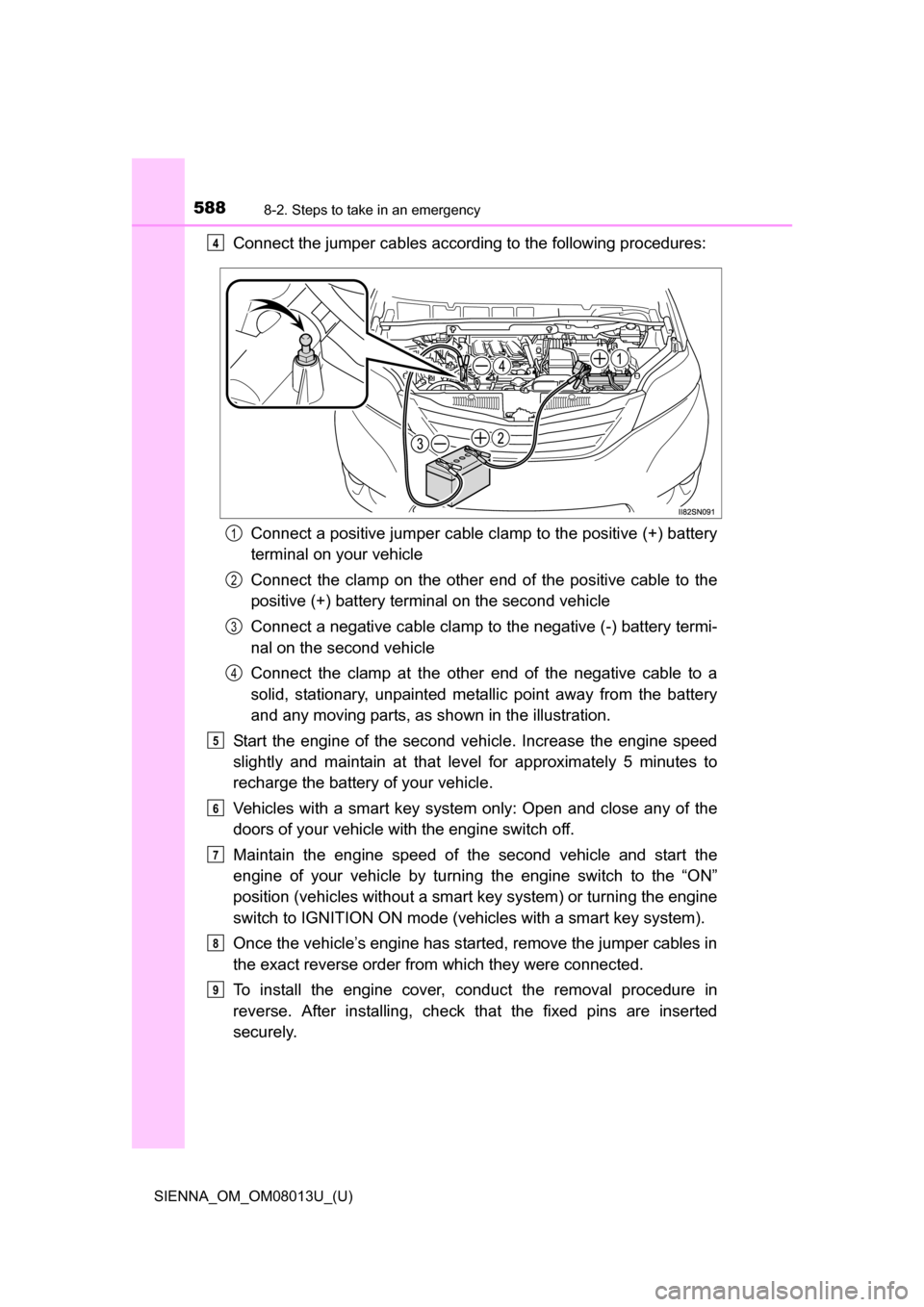
Connect the jumper cables according to the following procedures:Connect a positive jumper cable clamp to the positive (+) battery
terminal on your vehicle
Connect the clamp on the other e nd of the positive cable to the
positive (+) battery terminal on the second vehicle
Connect a negative cable clamp to the negative (-) battery termi-
nal on the second vehicle
Connect the clamp at the other end of the negative cable to a
solid, stationary, unpainted metallic point away from the battery
and any moving parts, as shown in the illustration.
Start the engine of the second vehicle. Increase the engine speed
slightly and maintain at that le vel for approximately 5 minutes to
recharge the batter y of your vehicle.
Vehicles with a smart key system only: Open and close any of the
doors of your vehicle with the engine switch off.
Maintain the engine speed of t he second vehicle and start the
engine of your vehicle by turni ng the engine switch to the “ON”
position (vehicles without a smart key system) or turning the engine
switch to IGNITION ON mode (v ehicles with a smart key system).
Once the vehicle’s engine has started, remove the jumper cables in
the exact reverse order from which they were connected.
To install the engine cover, conduct the removal procedure in
reverse. After installing, check that the fixed pins are inserted
securely.4
1
2
3
4
5
6
7
8
9
Page 626 of 668
626
SIENNA_OM_OM08013U_(U)
9-2. Customization
■Door lock (P. 110, 585)
■Smart key system* and wireless remote control ( P. 105, 143)
*: If equipped
FunctionDefault settingCustomized
setting
Unlocking using a key Driver’s door
unlocked in
one step, all
doors unlocked in two steps All doors
unlocked in
one step ––O
Automatic door lock
Shifting the
shift lever to
position other than P
Off
O—O
Vehicle speed
is approxi-
mately 12 mph (20 km/h) or
higher
Automatic door unlockShifting the
shift lever to POff
O—ODriver’s door is opened
123
FunctionDefault settingCustomized setting
Operation signal (buzzer
volume) Level 7Off
O–O
Level 1 to 6
Operation signal
(Emergency flashers) On Off O – O
Time elapsed before the
automatic door lock func-
tion is activated if door is
not opened after being
unlocked 60 seconds
Off
O–O
30 seconds
120 seconds
Open door warning buzzer On Off – – O
123