Page 98 of 741

98
RAV4_OM_OM42A41U_(U)
2. Instrument cluster
Fuel consumption information
Vehicles with Entune Audio
Press the “CAR” button.
Vehicles with Entune Premium Audio with Navigation and Entune
Audio Plus
Press the “APPS” button, and t hen select “Eco” on the screen.
If the “Trip Information” screen does not appear, select “Trip Informa-
tion”. Reset the trip information data
Previous fuel consumption per
minute
Current fuel consumption
“Past Record” screen appears
Cruising range
Elapsed time
Average vehicle speed
Average fuel consumption for the past 15 minutes is divided by color
into past averages and averages at tained since the engine switch was
last turned to the “ON” position (vehicles without smart key system) or
IGNITION ON mode (vehicles with smart key system). Use the dis-
played average fuel consumption as a reference.
These images are examples only, an d may vary slightly from actual
conditions.
The fuel consumption informat ion can be displayed on Entune
Premium Audio with Navigation and Entune Audio screen.
Display the trip information or past record screen
Trip information
1
2
3
4
5
6
7
Page 99 of 741

RAV4_OM_OM42A41U_(U)
992. Instrument cluster
2
Instrument cluster
If the “Past Record” screen does not appear, select “Past Record”.
Reset the past record data
Best recorded fuel consumption
Average fuel consumption (if
equipped)
Previous fuel consumption
record
Current fuel consumption
Update the past record data
“Trip Information” screen appears
These images are examples only, an d may vary slightly from actual
conditions.
■ Resetting the data
●Selecting “Clear” on the “Trip Information” screen will reset the trip informa-
tion data.
● Selecting “Clear” on the “Past Record” screen will reset the past record
data.
■ Updating the past record data
Selecting “Update” on the “Past Record” screen will update the past record
data.
Also, the average fuel consumption displa yed in the multi-information display
will be reset at the same time.
■ Cruising range
Displays the estimated maximum distance that can be driven with the quan-
tity of fuel remaining.
This distance is computed based on your average fuel consumption. As a
result, the actual distance that can be driven may differ from that displayed.
Past record
1
2
3
4
5
6
7
Page 115 of 741
RAV4_OM_OM42A41U_(U)
1153-2. Opening, closing and locking the doors
3
Operation of each component
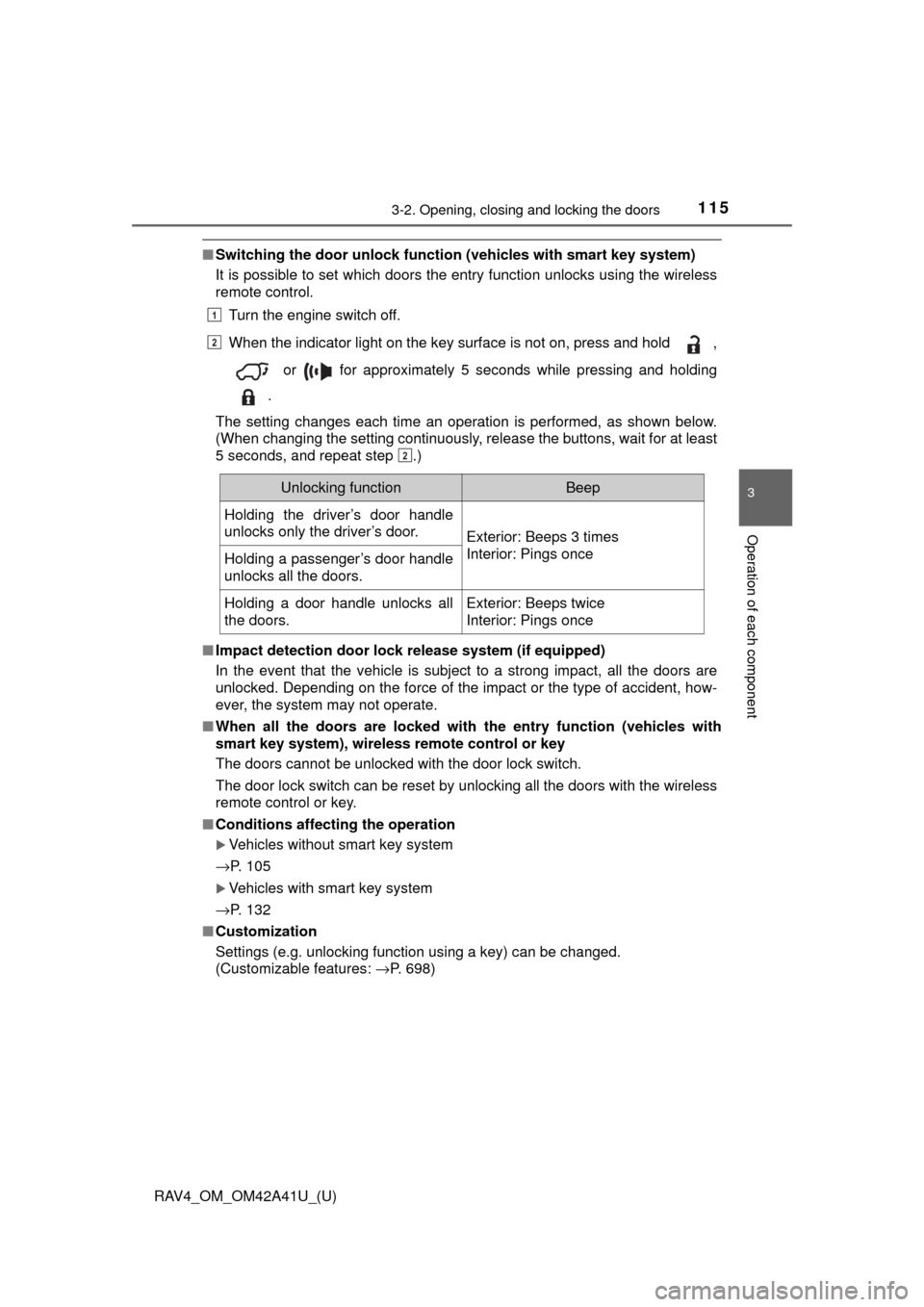
■Switching the door unlock functi on (vehicles with smart key system)
It is possible to set which doors the entry function unlocks using the wireless
remote control.
Turn the engine switch off.
When the indicator light on the key surface is not on, press and hold ,
or for approximately 5 seconds while pressing and holding
.
The setting changes each time an operation is performed, as shown below.
(When changing the setting continuously, release the buttons, wait for at least
5 seconds, and repeat step .)
■ Impact detection door lock release system (if equipped)
In the event that the vehicle is subject to a strong impact, all the doors are
unlocked. Depending on the force of the impact or the type of accident, how-
ever, the system may not operate.
■ When all the doors are locked with the entry function (vehicles with
smart key system), wireless remote control or key
The doors cannot be unlocked with the door lock switch.
The door lock switch can be reset by unlocking all the doors with the wireless
remote control or key.
■ Conditions affecting the operation
Vehicles without smart key system
→P. 105
Vehicles with smart key system
→P. 132
■ Customization
Settings (e.g. unlocking function using a key) can be changed.
(Customizable features: →P. 698)
1
2
2
Unlocking functionBeep
Holding the driver’s door handle
unlocks only the driver’s door.
Exterior: Beeps 3 times
Interior: Pings once
Holding a passenger’s door handle
unlocks all the doors.
Holding a door handle unlocks all
the doors.Exterior: Beeps twice
Interior: Pings once
Page 144 of 741
144
RAV4_OM_OM42A41U_(U)
3-3. Adjusting the seats
Driving position memory∗
Your preferred driving position (the position of the driver’s seat) can
be recorded and recalled by pressing a button.
Two different driving positions can be recorded into memory.
■Recording procedure
Check that the shift lever is in P.
Turn the engine switch to the “ON” position (vehicles without
smart key system) or IGNITION ON mode (vehicles with smart
key system).
Adjust the driver’s seat to the desired positions.
While pressing the “SET”
button, press button “1” or “2”
until the buzzer sounds.
If the selected button has
already been preset, the previ-
ously recorded position will be
overwritten.
∗: If equipped
This feature automatically adjusts the driver’s seat to suit your
preferences.
Driving position memory
1
2
3
4
Page 275 of 741

RAV4_OM_OM42A41U_(U)
2754-5. Using the driving support systems
4
Driving
■Cruise control can be set when
●The shift lever is in D or range 4 or higher of S has been selected.
● Range 4 or higher of D has been selected by using the paddle shift. (Vehi-
cles with paddle shift switch)
● Vehicle speed is above approximately 25 mph (40 km/h).
■ Accelerating after setting the vehicle speed
●The vehicle can be accelerated normally. After acceleration, the set speed
resumes.
● Even without canceling the cruise control, the set speed can be increased
by first accelerating the vehicle to the desired speed and then pushing the
lever down to set the new speed.
■ Automatic cruise co ntrol cancelation
Cruise control will stop maintaining the vehicle speed in any of the following
situations.
● Actual vehicle speed falls more than approximately 10 mph (16 km/h) below
the preset vehicle speed.
At this time, the memorized set speed is not retained.
● Actual vehicle speed is below approximately 25 mph (40 km/h).
● VSC is activated.
● TRAC is activated for a period of time.
● When the VSC or TRAC system is turned off by pressing the VSC OFF
switch.
■ If the cruise control indicator light comes on in yellow (vehicles with the
multi-information display [with monochrome display])
Press the “ON-OFF” button once to deactivate the system, and then press
the button again to reactivate the system.
If the cruise control speed cannot be set or if the cruise control cancels imme-
diately after being activated, there may be a malfunction in the cruise control
system. Have the vehicle inspected by your Toyota dealer.
■ If the warning message for the crui se control is shown on the multi-
information display (vehicles with the multi-information display [with
color display])
Press the “ON-OFF” button once to deactivate the system, and then press
the button again to reactivate the system.
If the cruise control speed cannot be set or if the cruise control cancels imme-
diately after being activated, there may be a malfunction in the cruise control
system. Have the vehicle inspected by your Toyota dealer.
Page 331 of 741
330
RAV4_OM_OM42A41U_(U)
5-1. Basic Operations
Press the “MODE” switch when the audio system is turned off.
Press the “MODE” switch when the audio system is turned on. The
audio source changes as follows each time the button is pressed. If a
mode cannot be used, it will be skipped.
AM→FM1→FM2 →CD mode →iPod or USB memory →
Bluetooth
® audio →AUX
Press the “+” switch to increase the volume and the “-” switch to
decrease the volume.
Hold down the switch to continue increasing or decreasing the volume.
Press and hold the “MODE” switch.
To cancel, press and hold the switch again.
Press the “MODE” switch to select the radio mode.
Press the “ ∧” or “ ∨” switch to select a preset station.
To scan for receivable stations, press and hold the switch until you hear a
beep.
Turning on the power
Changing the audio source
Adjusting the volume
Silencing a sound
Selecting a radio station
1
2
Page 337 of 741
336
RAV4_OM_OM42A41U_(U)
5-3. Using the radio
Radio operation∗
Search for the desired stations by turning the “TUNE•SCROLL”
knob or pressing “ ∧”
or “ ∨” on the “SEEK/TRACK” button.
Press and hold one of the station selectors ( ) to be set until you
hear a beep.
∗: If equipped
Power
Vo l u m e
Adjusting the frequency
Scanning for receivable sta-
tions AM/FM mode button
Station selectors
Seeking the frequency
Displaying text message
Setting station presets
1
2
3
4
5
6
7
8
1
2
Page 338 of 741

RAV4_OM_OM42A41U_(U)
3375-3. Using the radio
5
Audio system
■Scanning the preset radio stationsPress and hold the “SCAN” button until you hear a beep.
Preset stations will be played for 5 seconds each.
To cancel, press the button again.
When the desired station is reached, press the button again.
■Scanning all the radio stations within rangePress the “SCAN” button.
All the stations with reception will be played for 5 seconds each.
To cancel, press the button again.
When the desired station is reached, press the button again.
Press the “TEXT” button to display or hide the radio texts.
If there are continuing texts, is displayed.
Press the button to display the remaining texts.
■ When the battery is disconnected
Stations presets are erased.
■ Reception sensitivity
●Maintaining perfect radio reception at all times is difficult due to the continu-
ally changing position of the antenna, differences in signal strength and sur-
rounding objects, such as trains, transmitters, etc.
● The radio antenna is mounted on the roof.
Scanning radio stations
Switching the display
1
2
1
2


