Page 329 of 620
329
PRIUS v_OM_OM47B12U_(U)
5-9. Bluetooth® phone
5
Audio system
Receiving a call
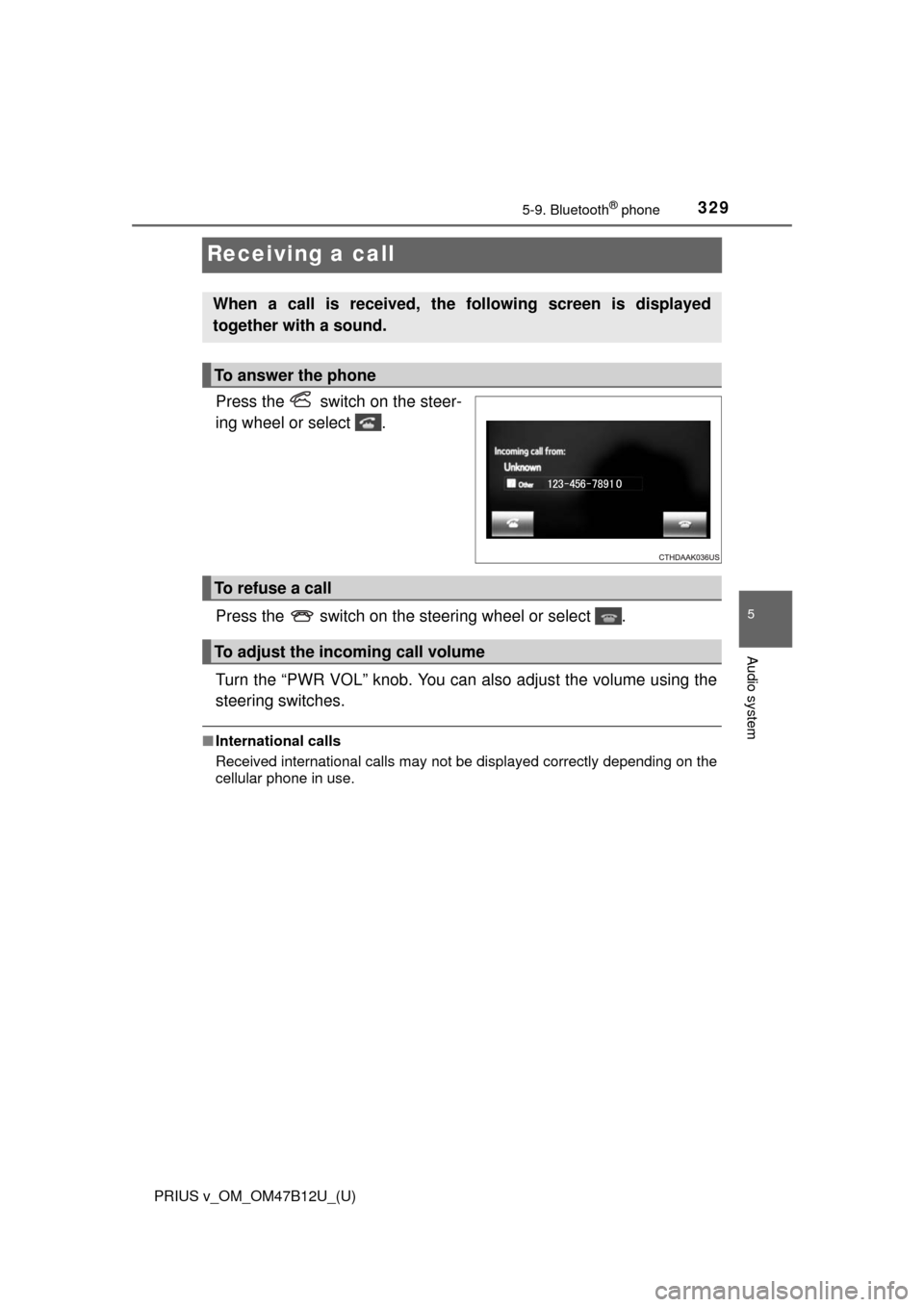
Press the switch on the steer-
ing wheel or select .
Press the switch on the steering wheel or select .
Turn the “PWR VOL” knob. You can also adjust the volume using the
steering switches.
■International calls
Received international calls may not be displayed correctly depending on the
cellular phone in use.
When a call is received, the following screen is displayed
together with a sound.
To answer the phone
To refuse a call
To adjust the incoming call volume
Page 330 of 620
330
PRIUS v_OM_OM47B12U_(U)
5-9. Bluetooth® phone
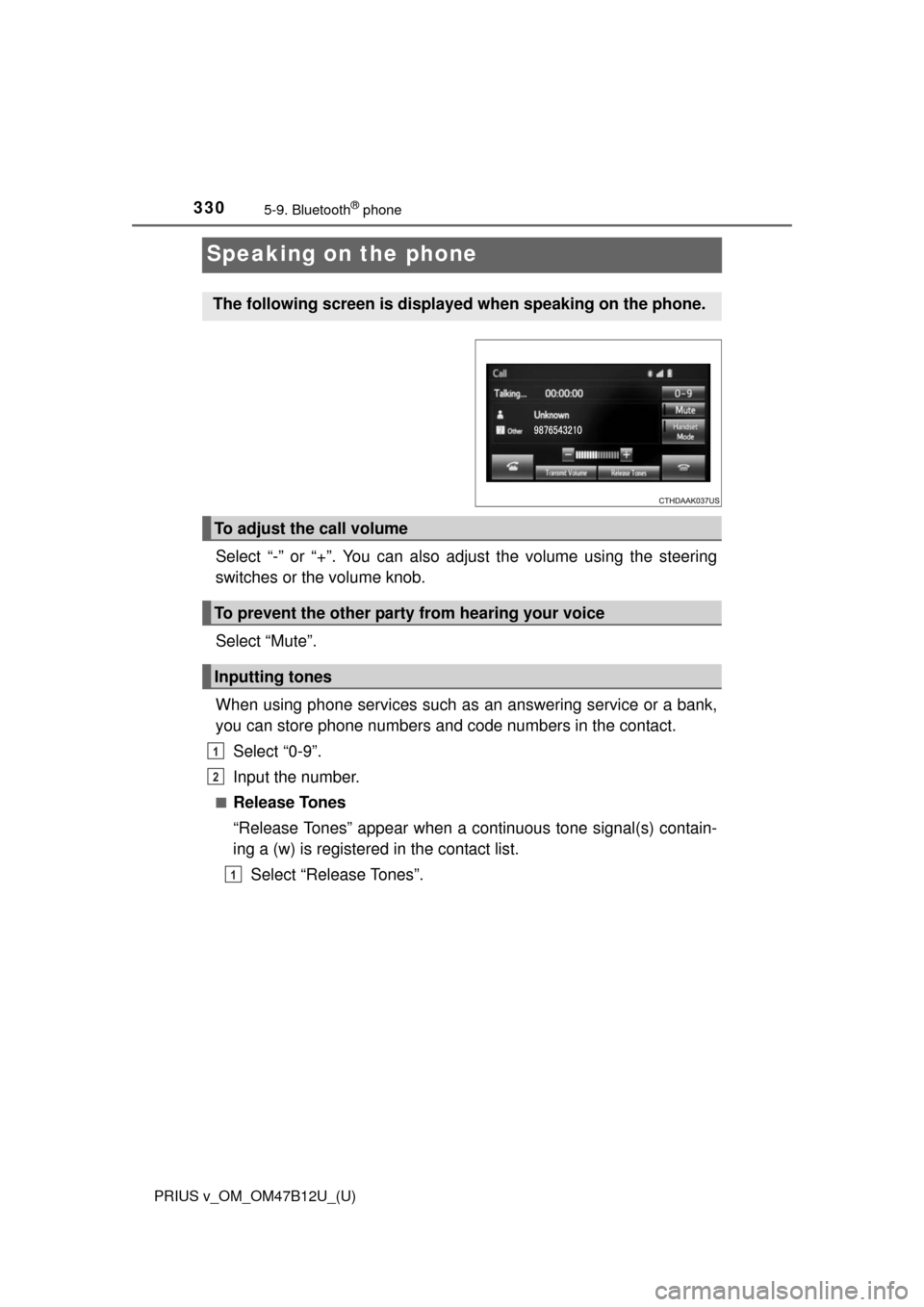
Speaking on the phone
Select “-” or “+”. You can also adjust the volume using the steering
switches or the volume knob.
Select “Mute”.
When using phone services such as an answering service or a bank,
you can store phone numbers and code numbers in the contact.
Select “0-9”.
Input the number.
■Release Tones
“Release Tones” appear when a continuous tone signal(s) contain-
ing a (w) is registered in the contact list.
Select “Release Tones”.
The following screen is displayed when speaking on the phone.
To adjust the call volume
To prevent the other party from hearing your voice
Inputting tones
1
2
1
Page 332 of 620
3325-9. Bluetooth® phone
PRIUS v_OM_OM47B12U_(U)
Select “Handset Mode” to on from a hands-free call to a cellular
phone call.
Select “Handset Mode” to off from a cellular phone call to a hands-free
call.
Select “Transmit Volume”.
Select the desired level for the transmit volume.
Select “OK”.
Press the switch on the steering wheel or select .
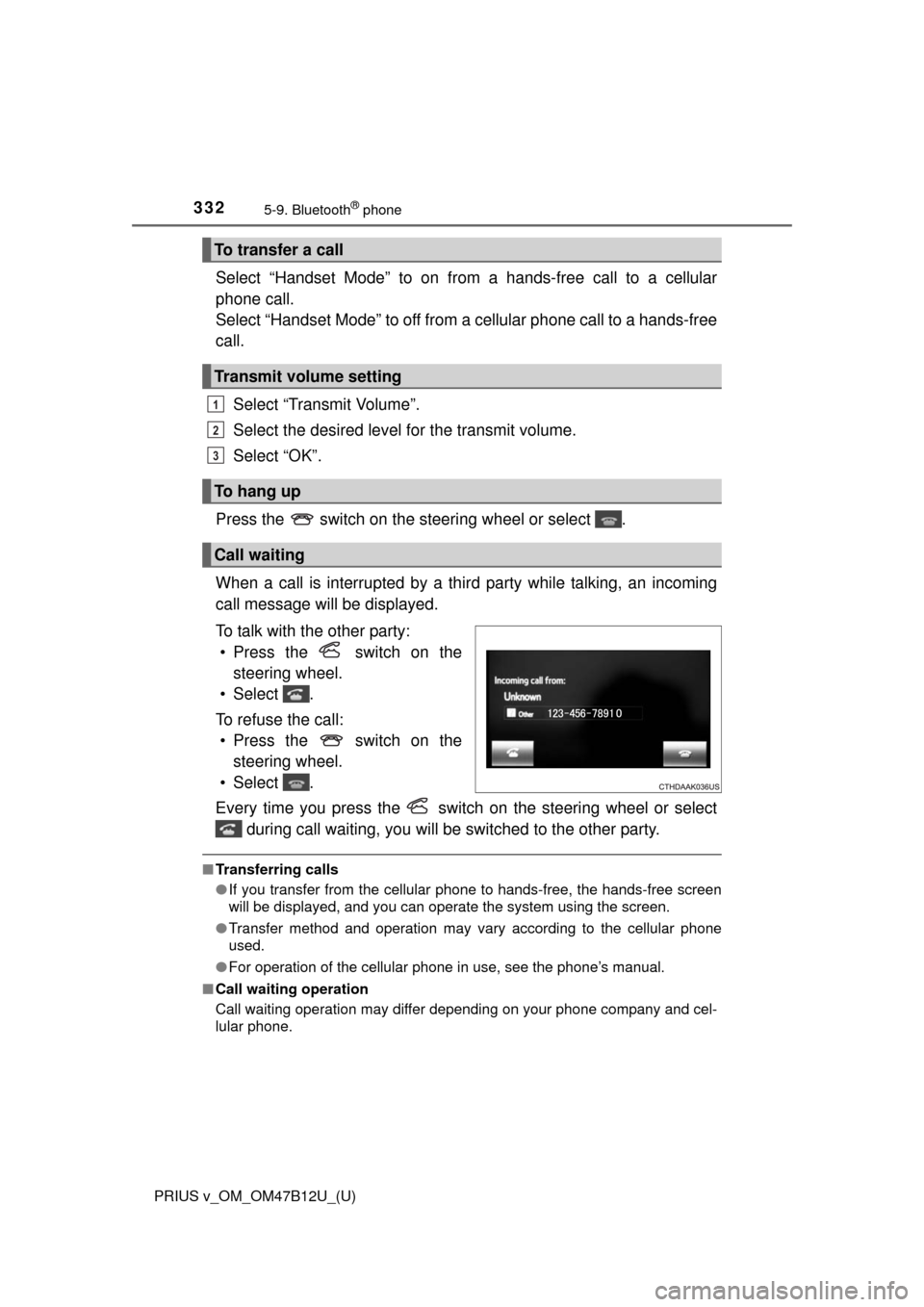
When a call is interrupted by a third party while talking, an incoming
call message will be displayed.
To talk with the other party:
• Press the switch on the
steering wheel.
• Select .
To refuse the call:
• Press the switch on the
steering wheel.
• Select .
Every time you press the switch on the steering wheel or select
during call waiting, you will be switched to the other party.
■Transferring calls
●If you transfer from the cellular phone to hands-free, the hands-free screen
will be displayed, and you can operate the system using the screen.
●Transfer method and operation may vary according to the cellular phone
used.
●For operation of the cellular phone in use, see the phone’s manual.
■Call waiting operation
Call waiting operation may differ depending on your phone company and cel-
lular phone.
To transfer a call
Transmit volume setting
To hang up
Call waiting
1
2
3
Page 335 of 620
PRIUS v_OM_OM47B12U_(U)
3355-9. Bluetooth® phone
5
Audio system
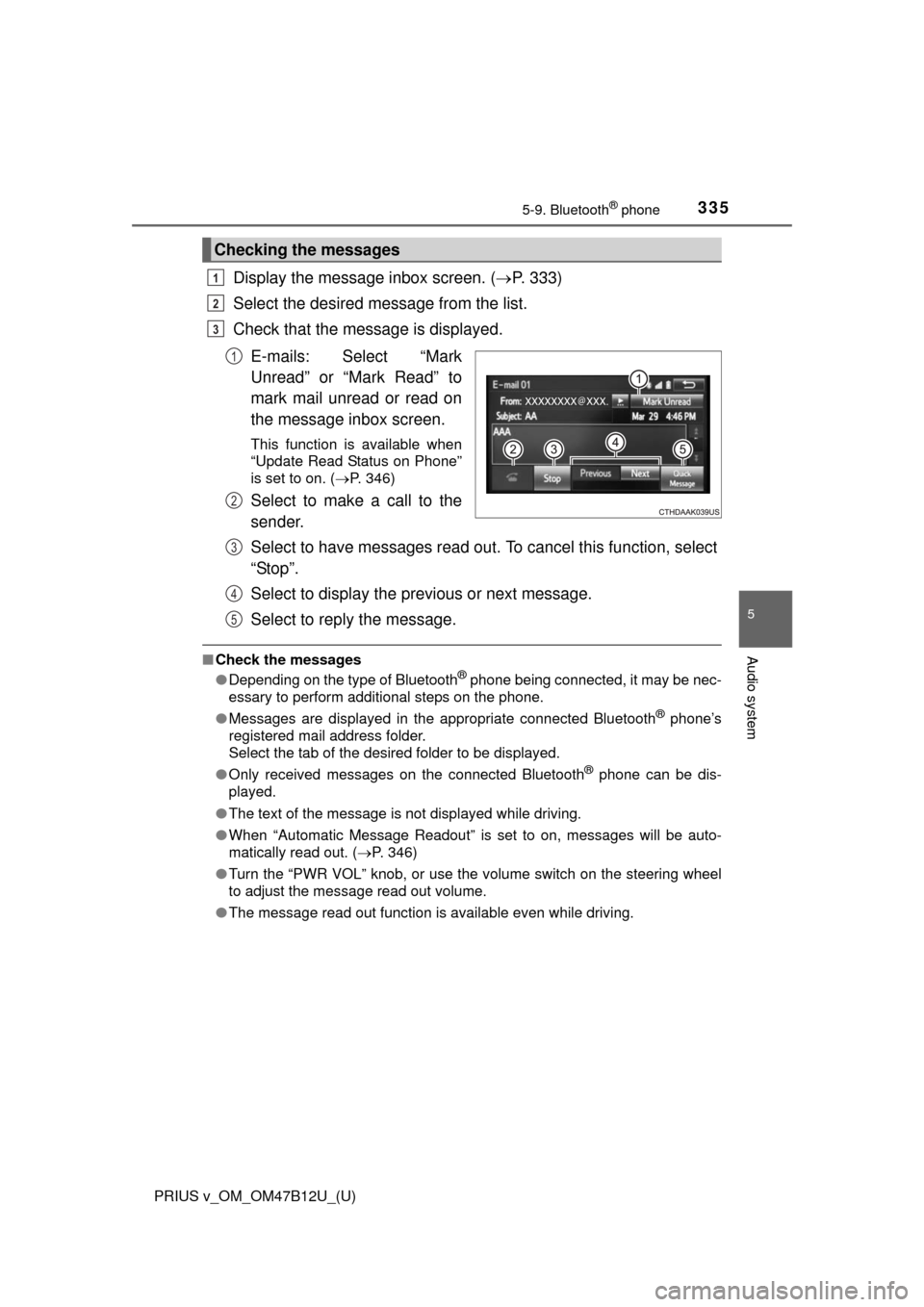
Display the message inbox screen. (P. 333)
Select the desired message from the list.
Check that the message is displayed.
E-mails: Select “Mark
Unread” or “Mark Read” to
mark mail unread or read on
the message inbox screen.
This function is available when
“Update Read Status on Phone”
is set to on. (P. 346)
Select to make a call to the
sender.
Select to have messages read out. To cancel this function, select
“Stop”.
Select to display the previous or next message.
Select to reply the message.
■Check the messages
●Depending on the type of Bluetooth® phone being connected, it may be nec-
essary to perform additional steps on the phone.
●Messages are displayed in the appropriate connected Bluetooth
® phone’s
registered mail address folder.
Select the tab of the desired folder to be displayed.
●Only received messages on the connected Bluetooth
® phone can be dis-
played.
●The text of the message is not displayed while driving.
●When “Automatic Message Readout” is set to on, messages will be auto-
matically read out. (P. 346)
●Turn the “PWR VOL” knob, or use the volume switch on the steering wheel
to adjust the message read out volume.
●The message read out function is available even while driving.
Checking the messages
1
2
3
1
2
3
4
5
Page 337 of 620
337
PRIUS v_OM_OM47B12U_(U)
5-9. Bluetooth® phone
5
Audio system
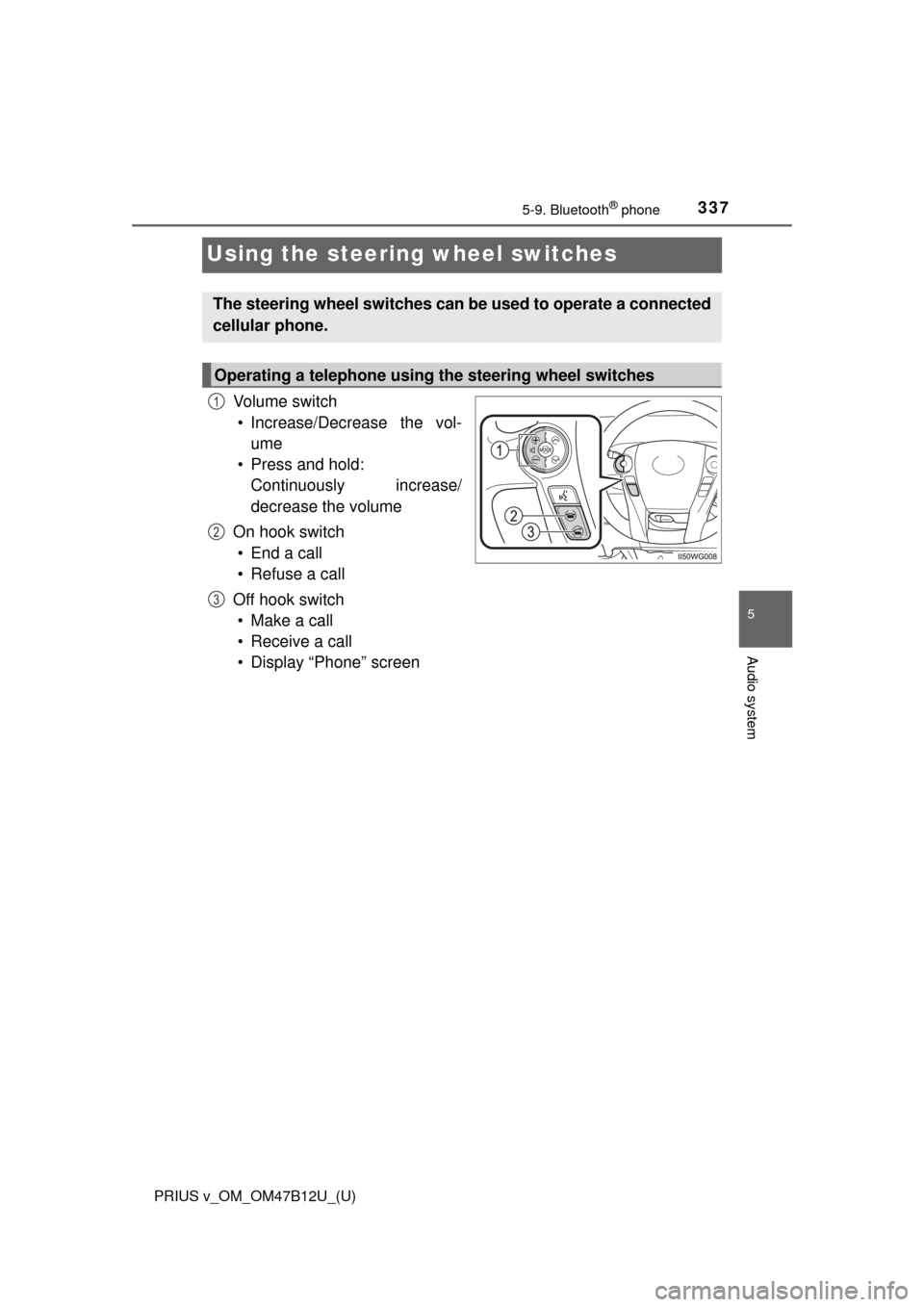
Using the steering wheel switches
Vo l u m e s w i t c h
• Increase/Decrease the vol-
ume
• Press and hold:
Continuously increase/
decrease the volume
On hook switch
• End a call
• Refuse a call
Off hook switch
• Make a call
• Receive a call
• Display “Phone” screen
The steering wheel switches can be used to operate a connected
cellular phone.
Operating a telephone using the steering wheel switches
1
2
3
Page 363 of 620

363
PRIUS v_OM_OM47B12U_(U)
6Interior features
6-1. Using the air conditioning
system and defogger
Automatic air conditioning
system............................. 364
Using the steering wheel
climate remote control
switches .......................... 371
Seat heaters ...................... 372
6-2. Using the interior lights
Interior lights list ................ 373
• Front interior light .......... 374
• Front personal lights ..... 374
• Rear interior light .......... 3756-3. Using the storage features
List of storage features ..... 376
• Glove boxes .................. 377
• Console box .................. 377
• Cup holders/
bottle holders/
door pockets ................. 378
• Auxiliary boxes.............. 380
• Card holder ................... 380
Luggage compartment
features ........................... 381
6-4. Using the other interior
features
Other interior features ....... 385
• Sun visors ..................... 385
• Vanity mirrors................ 385
• Clock ............................. 386
• Power outlet .................. 386
• Armrest ......................... 387
• Assist grips ................... 388
• Panoramic roof
shades .......................... 389
Garage door opener.......... 391
Safety Connect ................. 398
Page 371 of 620
371
PRIUS v_OM_OM47B12U_(U)
6-1. Using the air conditioning system and defogger
6
Interior features
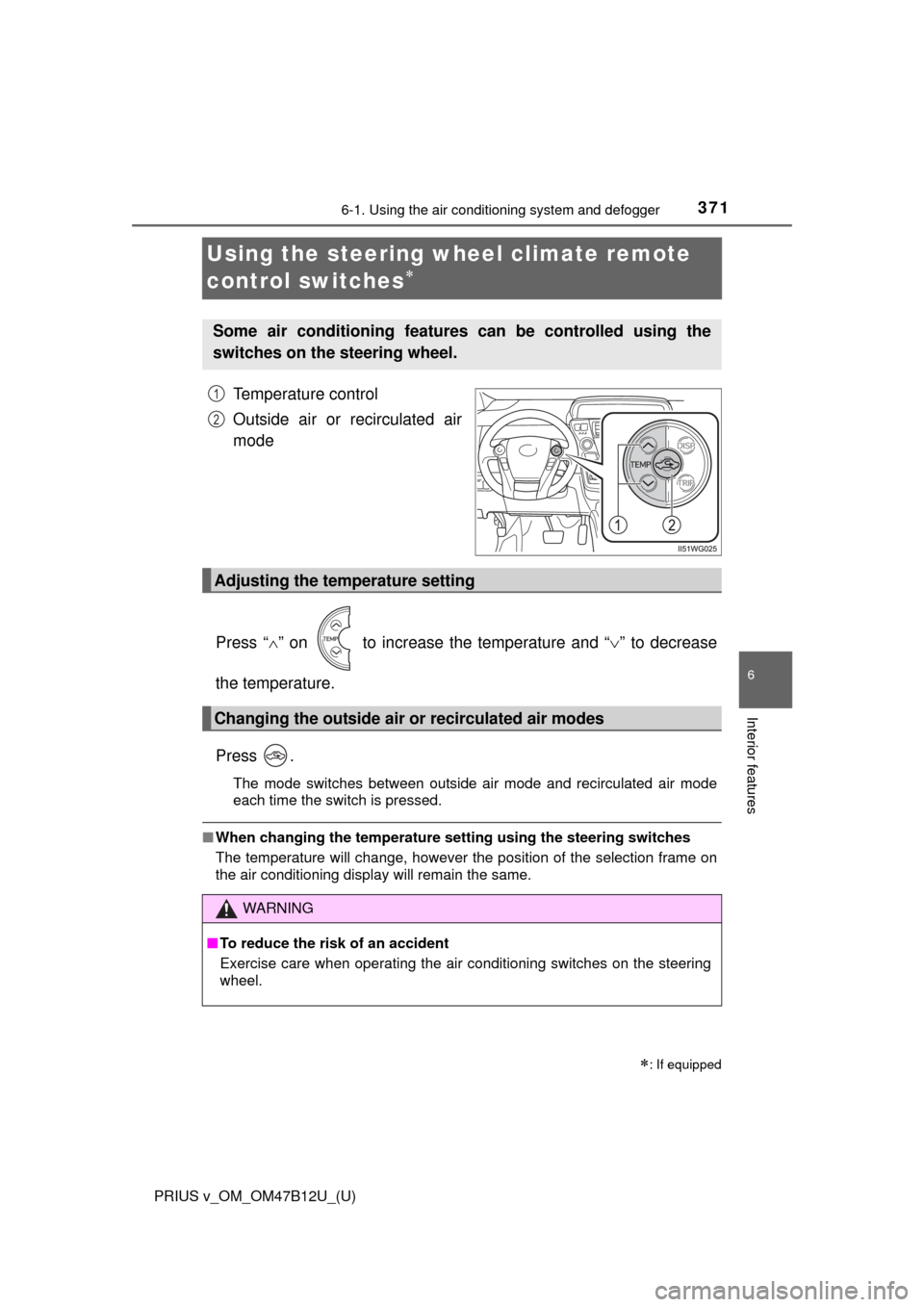
Using the steering wheel climate remote
control switches
Temperature control
Outside air or recirculated air
mode
Press “” on to increase the temperature and “” to decrease
the temperature.
Press .
The mode switches between outside air mode and recirculated air mode
each time the switch is pressed.
■When changing the temperature setting using the steering switches
The temperature will change, however the position of the selection frame on
the air conditioning display will remain the same.
: If equipped
Some air conditioning features can be controlled using the
switches on the steering wheel.
1
2
Adjusting the temperature setting
Changing the outside air or recirculated air modes
WARNING
■To reduce the risk of an accident
Exercise care when operating the air conditioning switches on the steering
wheel.
Page 409 of 620
PRIUS v_OM_OM47B12U_(U)
4097-1. Maintenance and care
7
Maintenance and care
NOTICE
■To prevent damage to the panoramic roof (if equipped)
Observe the following precautions. Otherwise, the surface of the panoramic
roof may be damaged, or the deterioration of the coating may be acceler-
ated.
●Before washing the vehicle, remove any dust, sand or other foreign matter
using water.
●Do not use harsh brushes, scrubbing brushes or sharp objects to wash the
roof. Use only soft cloths or sponges.
●Use a mild soap when removing dirt, and avoid the use of oil-based prod-
ucts (such as glass coating or car wax), alcohol-based products (such as
glass cleaner), or abrasive cleansers.
After cleaning, wash away any remaining soap with water.
●If there is iron oxide on the vehicle, wash it away with water while wiping
gently without scrubbing.
●Do not attach suction cups or sticky objects, such as stickers.
Promptly remove the information label attached to the panoramic roof after
confirming the content.
●If snow has accumulated on the roof, remove it while being careful to avoid
scratching the roof.
If there is frost or ice on the roof, avoid the use of scrapers or de-icer.
■When using a high pressure car wash
Do not bring the nozzle tip close to boots (rubber or resin manufactured
cover), connectors or the following parts. The parts may be damaged if they
come into contact with high-pressure water.
• Traction related parts
• Steering parts
• Suspension parts
• Brake parts