Page 331 of 620
PRIUS v_OM_OM47B12U_(U)
3315-9. Bluetooth® phone
5
Audio system
■Release Tones
●A continuous tone signal is a character string that consists of numbers and
the characters p or w. (e.g.056133w0123p#1)
●When the “p” pause tone is used, the tone data up until the next pause tone
will be automatically sent after 2 seconds have elapsed. When the “w”
pause tone is used, the tone data up until the next pause tone will be auto-
matically sent after a user operation is performed.
●Release tones can be used when automated operation of a phone based
service such as an answering machine or bank phone service is desired. A
phone number with continuous tone signals can be registered in the contact
list.
●Tone data after a “w” pause tone can be operated on voice command during
a call.
Page 333 of 620
333
PRIUS v_OM_OM47B12U_(U)
5-9. Bluetooth® phone
5
Audio system
Bluetooth® phone message function
Press button.
Select .
When an e-mail/SMS/MMS is received, the incoming message screen
pops up with sound and is ready to be operated on the screen.
Select to check the message.
Select to refuse the message.
Select to call the message
sender.
Received messages can be forwarded from the connected
Bluetooth® phone, enabling checking and replying using the
audio system.
Depending on the type of Bluetooth
® phone connected, received
messages may not be transferred to the message inbox.
If the phone does not support the message function, this func-
tion cannot be used.
Displaying message inbox screen
Receiving a message
1
2
1
2
3
Page 334 of 620
3345-9. Bluetooth® phone
PRIUS v_OM_OM47B12U_(U)
■Receiving a message
●Depending on the cellular phone used for receiving messages, or its regis-
tration status with the audio system, some information may not be dis-
played.
●The pop up screen is separately available for incoming e-mail and SMS/
MMS messages under the following conditions:
E-mail:
• “Incoming E-mail Display” is set to “Full Screen”. (P. 346)
• “E-mail Notification Popup” is set to on. (P. 346)
SMS/MMS:
• “Incoming SMS/MMS Display” is set to “Full Screen”. (P. 346)
• “SMS/MMS Notification Popup” is set to on. (P. 346)
Page 335 of 620
PRIUS v_OM_OM47B12U_(U)
3355-9. Bluetooth® phone
5
Audio system
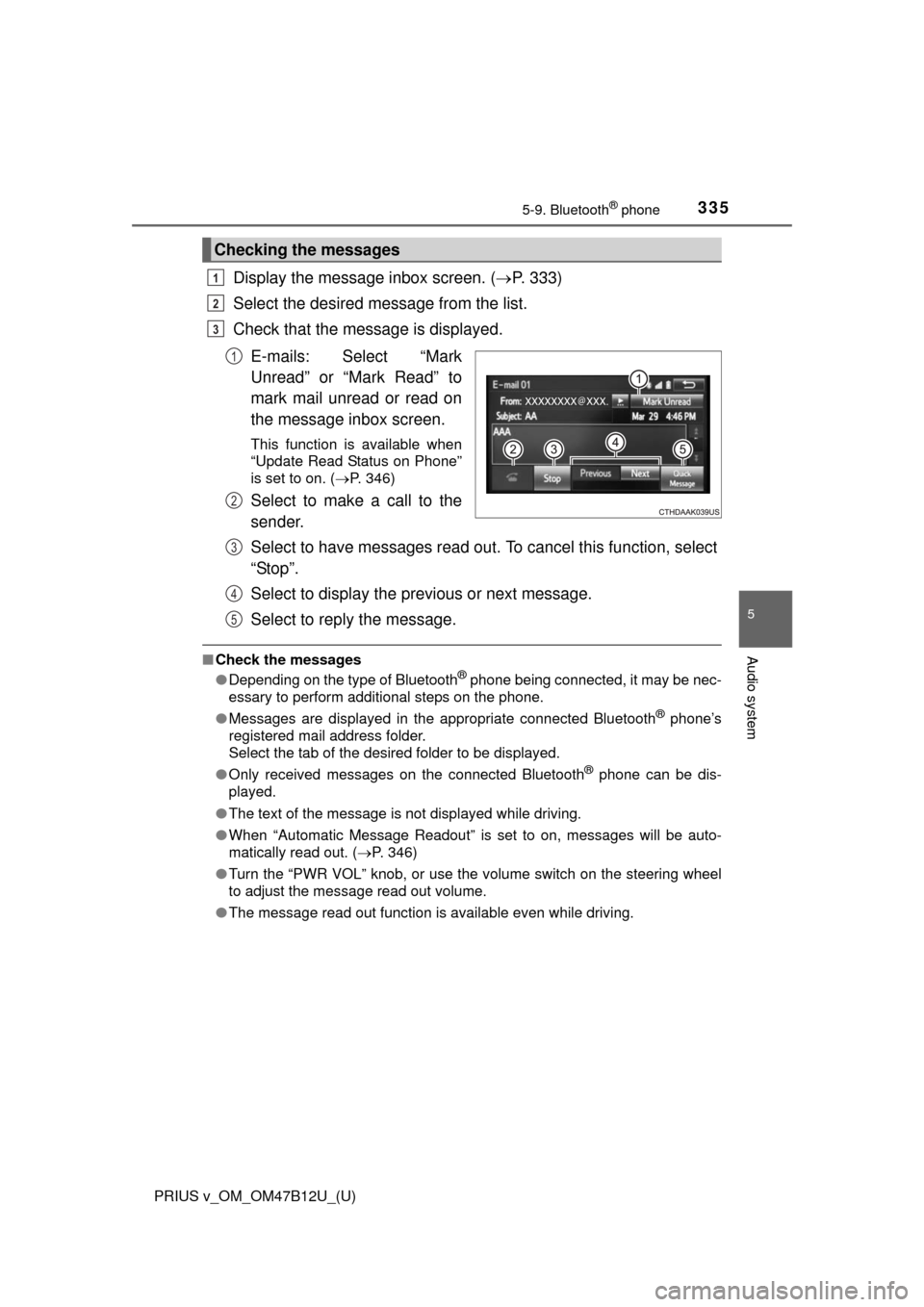
Display the message inbox screen. (P. 333)
Select the desired message from the list.
Check that the message is displayed.
E-mails: Select “Mark
Unread” or “Mark Read” to
mark mail unread or read on
the message inbox screen.
This function is available when
“Update Read Status on Phone”
is set to on. (P. 346)
Select to make a call to the
sender.
Select to have messages read out. To cancel this function, select
“Stop”.
Select to display the previous or next message.
Select to reply the message.
■Check the messages
●Depending on the type of Bluetooth® phone being connected, it may be nec-
essary to perform additional steps on the phone.
●Messages are displayed in the appropriate connected Bluetooth
® phone’s
registered mail address folder.
Select the tab of the desired folder to be displayed.
●Only received messages on the connected Bluetooth
® phone can be dis-
played.
●The text of the message is not displayed while driving.
●When “Automatic Message Readout” is set to on, messages will be auto-
matically read out. (P. 346)
●Turn the “PWR VOL” knob, or use the volume switch on the steering wheel
to adjust the message read out volume.
●The message read out function is available even while driving.
Checking the messages
1
2
3
1
2
3
4
5
Page 337 of 620
337
PRIUS v_OM_OM47B12U_(U)
5-9. Bluetooth® phone
5
Audio system
Using the steering wheel switches
Vo l u m e s w i t c h
• Increase/Decrease the vol-
ume
• Press and hold:
Continuously increase/
decrease the volume
On hook switch
• End a call
• Refuse a call
Off hook switch
• Make a call
• Receive a call
• Display “Phone” screen
The steering wheel switches can be used to operate a connected
cellular phone.
Operating a telephone using the steering wheel switches
1
2
3
Page 339 of 620
339
PRIUS v_OM_OM47B12U_(U)
5-9. Bluetooth® phone
5
Audio system
Contact/Call Histor y Settings
The contact can be transferred from a Bluetooth® phone to the sys-
tem. The contact also can be added, edited and deleted.
The call history can be deleted and contact and favorites can be
changed.
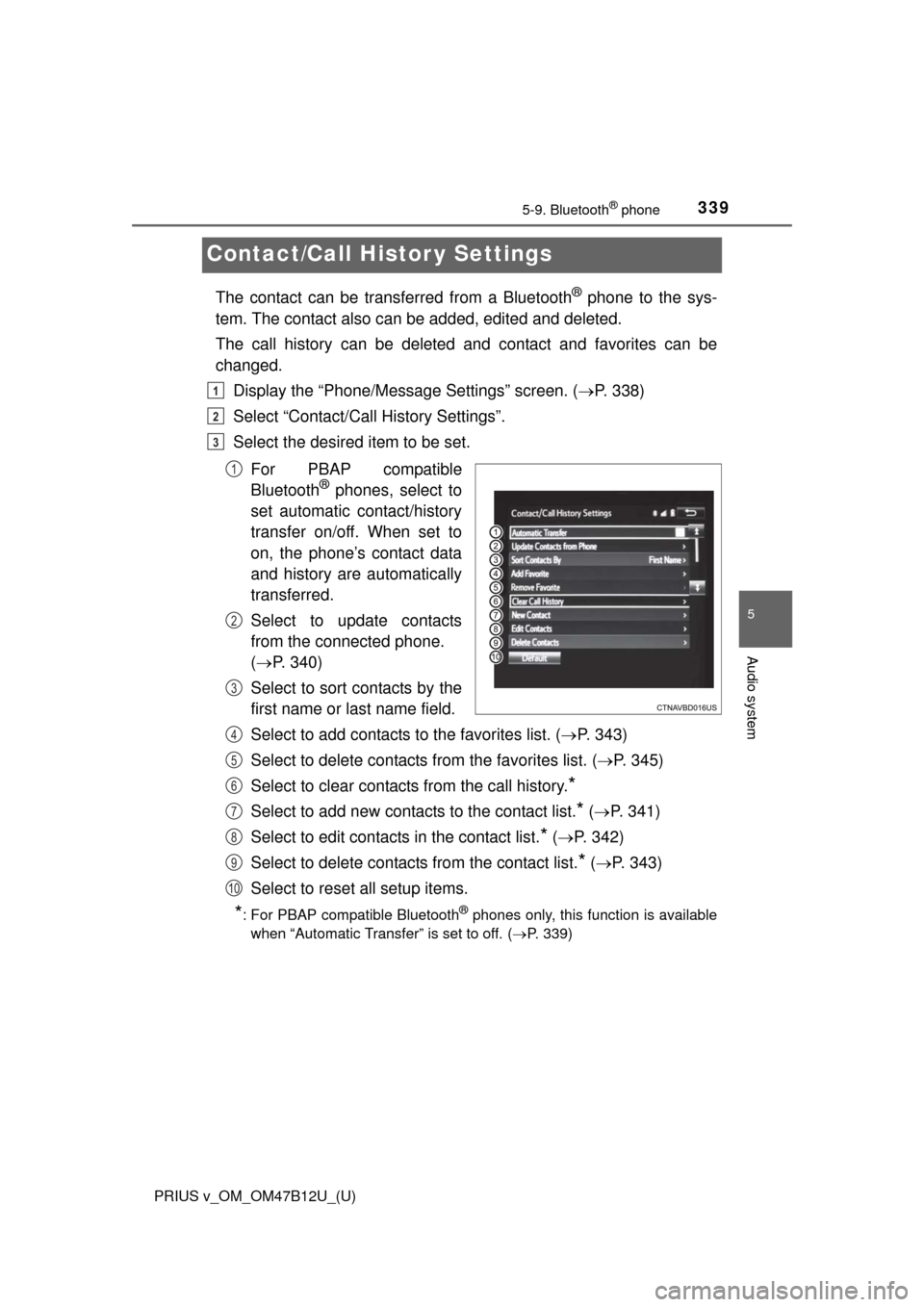
Display the “Phone/Message Settings” screen. (P. 338)
Select “Contact/Call History Settings”.
Select the desired item to be set.
For PBAP compatible
Bluetooth
® phones, select to
set automatic contact/history
transfer on/off. When set to
on, the phone’s contact data
and history are automatically
transferred.
Select to update contacts
from the connected phone.
(P. 340)
Select to sort contacts by the
first name or last name field.
Select to add contacts to the favorites list. (P. 343)
Select to delete contacts from the favorites list. (P. 345)
Select to clear contacts from the call history.
*
Select to add new contacts to the contact list.* (P. 341)
Select to edit contacts in the contact list.
* (P. 342)
Select to delete contacts from the contact list.
* (P. 343)
Select to reset all setup items.
*: For PBAP compatible Bluetooth® phones only, this function is available
when “Automatic Transfer” is set to off.
(P. 339)
1
2
3
1
2
3
4
5
6
7
8
9
10
Page 341 of 620
PRIUS v_OM_OM47B12U_(U)
3415-9. Bluetooth® phone
5
Audio system
■Updating the contacts in a different way (From the “Call
History” screen)
For PBAP compatible Bluetooth
® phones, this function is available
when “Automatic Transfer” is set to off. (P. 339)
Display the phone screen. (P. 323)
Select the “Call History” tab and select a contact not yet regis-
tered in the contact list.
Select “Update Contact”.
Select the desired contact.
Select a phone type for the phone number.
New contact data can be registered. Up to 4 numbers per person can
be registered. For PBAP compatible Bluetooth
® phones, this function
is available when “Automatic Transfer” is set to off. (P. 339)
Select “New Contact”.
Enter the name and select “OK”.
Enter the phone number and select “OK”.
Select the phone type for the phone number.
To add another number to this contact, select “Yes”.
■Registering a new contact in a different way (From the “Call
History” screen)
Display the phone screen. (P. 323)
Select the “Call History” tab and select a contact not yet regis-
tered in the contact list.
Select “Add to Contacts”.
Follow the steps in “Registering a new contact to the contact list”
from step . (P. 341)
Registering a new contact to the contact list
1
2
3
4
5
1
2
3
4
5
1
2
3
4
3
Page 343 of 620
PRIUS v_OM_OM47B12U_(U)
3435-9. Bluetooth® phone
5
Audio system
For PBAP compatible Bluetooth® phones, this function is available
when “Automatic Transfer” is set to off. (P. 339)
Select “Delete Contacts”.
Select the desired contact and select “Delete”.
Select “Yes” when the confirmation screen appears.
■Deleting the contact in a different way (From the “Contact
Details” screen)
Display the phone screen. (P. 323)
Select the “Contacts”, “Call History” tab or the “Favorites” tab and
select the desired contact.
Select “Edit Contacts”.
Select “Yes” when the confirmation screen appears.
Up to 15 contacts (maximum of 4 numbers per contact) can be regis-
tered in the favorites list.
■Registering the contacts in the favorites list
Select “Add Favorite”.
Select the desired contact to add to the favorites list.
Dimmed contacts are already stored as a favorite.
Check that a confirmation screen is displayed when the opera-
tion is complete.
Deleting the contact data
Favorites list setting
1
2
3
1
2
3
4
1
2
3