Page 247 of 464
2475-5. Using the driving support systems
5
Driving
MIRAI_OM_USA_OM62004U■
Certification for the B lind Spot Monitor system
FCC ID: OAYSRR2A
This device complies with part 15 of the FCC Rules. Operation is subject to
the following two conditions:
(1) This device may not cause harmful interference, and
(2) this device must accept any interference received, including interference that may cause undesired operation.
FCC Warning
Changes or modifications not expressly approved by the party responsible for
compliance could void the user’s authority to operate the equipment.
The Blind Spot Monitor function uses radar sensors to detect vehicles
that are traveling in an adjacent lane in the area that is not reflected in
the outside rear view mirror (the b lind spot), and advises the driver of
the vehicles existence via the BSM outside rear view mirror indicator.
WARNING
■Handling the radar sensor
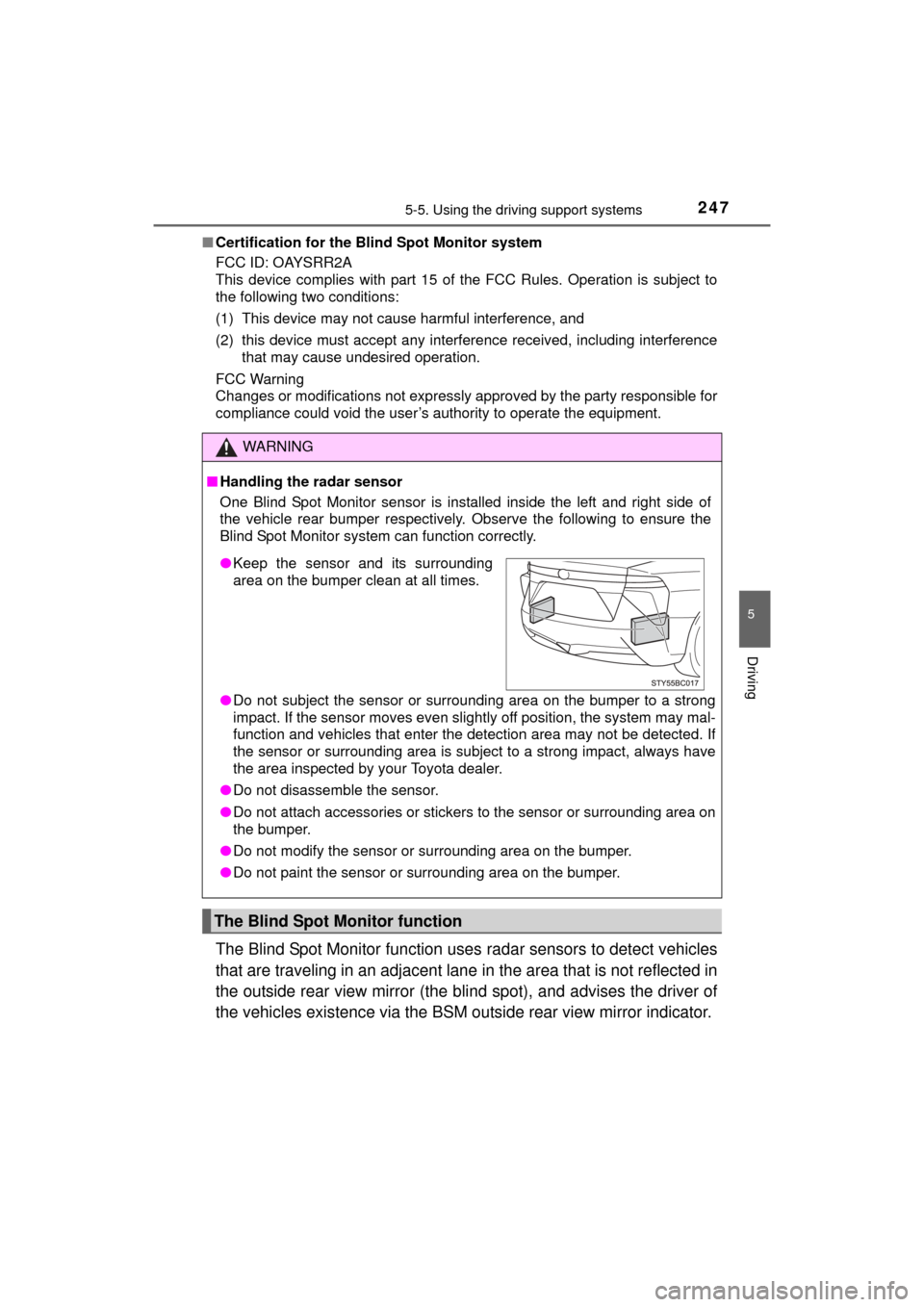
One Blind Spot Monitor sensor is installed inside the left and right side of
the vehicle rear bumper respectively. Observe the following to ensure the
Blind Spot Monitor system can function correctly.
●Do not subject the sensor or surrounding area on the bumper to a strong
impact. If the sensor moves even slightly off position, the system may mal-
function and vehicles that enter the detection area may not be detected.\
If
the sensor or surrounding area is subj ect to a strong impact, always have
the area inspected by your Toyota dealer.
● Do not disassemble the sensor.
● Do not attach accessories or stickers to the sensor or surrounding area on
the bumper.
● Do not modify the sensor or surrounding area on the bumper.
● Do not paint the sensor or surrounding area on the bumper.
The Blind Spot Monitor function
●Keep the sensor and its surrounding
area on the bumper clean at all times.
Page 258 of 464
2586-1. Using the air conditioning system and defogger
MIRAI_OM_USA_OM62004U
Automatic air conditioning system
■Adjusting the temperature setting
To adjust the temperature set-
ting, touch and slide your finger
up or down on the sensor.
The temperature setting can
also be adjusted by touching on
the sensor.
When the temperature setting is
changed, a buzzer sounds.
The temperature for the driver’s and front passenger’s can be
adjusted separately when:
• The front passenger’s side temperature setting is touched.
• The air conditioning system switches between individual and synchronized modes each time is touched.
Air outlets and fan speed are automatically adjusted according
to the temperature setting.
Air conditioning controls
Page 259 of 464
2596-1. Using the air conditioning system and defogger
6
Interior features
MIRAI_OM_USA_OM62004U■
Fan speed setting
Touch (increase) to increase the fan speed and
(decrease) to decrease the fan speed.
Touch to turn the fan off.
■
Change the airflow mode
To change the airflow mode,
touch .
The air outlets used are
switched each time the button is
touched.
Air flows to the upper body
Air flows to the upper body
and feet
Air flows to the feet
Air flows to the feet and the
windshield defogger oper-
ates
■Other functions
● Switching between outside air and recirculated air modes
( P. 260)
● Defogging the windshield ( P. 261)
● Defogging the rear window and outside rear view mirrors
( P. 261)
1
2
3
4
Page 264 of 464

2646-1. Using the air conditioning system and defogger
MIRAI_OM_USA_OM62004U■
When the outside temperature is low
The dehumidification function may not operate even when is pressed.
■ Ventilation and air conditioning odors
●To let fresh air in, set the air conditioning system to the outside air mode.
● During use, various odors from inside and outside the vehicle may enter into
and accumulate in the air conditioning system. This may then cause odor to
be emitted from the vents.
● To reduce potential odors from occurring:
• It is recommended that the air conditioning system be set to outside air
mode prior to turning the vehicle off.
• The start timing of the blower may be delayed for a short period of time
immediately after the air conditioning system is started in automatic
mode.
■ Air conditioning filter
P. 351
■ Changing the response of the switch for the air conditioning operation
panel
The reaction time, from when the switch is touched, can be changed by the
following operations.
The air conditioning cannot be operated during following operation.
Touch (decrease) and for about 3 seconds.
“01” ~ “05” is displayed in the monitor of the passenger side tempera-
ture.
Each time is touched, the reaction time switches over as follows.
01 (about 0.06 sec.) 02 (about 0.08 sec.) 03 (about 0.10 sec.)
04 (about 0.12 sec.) 05 (about 0.14 sec.)
With the desired setting displayed, without switching over the screen by
performing touch operations for about 5 seconds, when the power
switch is turned off the configuration is complete.
1
2
Page 265 of 464

2656-1. Using the air conditioning system and defogger
6
Interior features
MIRAI_OM_USA_OM62004U■
Turning ON/OFF the switch operat ion sound for the air conditioning
operation panel
The operation sounds, when the switch is touched, can be turned ON/OFF by
the following operations.
The air conditioning cannot be operated during following operation.
Touch and for about 3 seconds.
“ON” or “OFF” is displayed in the monitor of the passenger side temper-
ature.
Each time is touched, the monitor switches over between ON/
OFF.
With “ON” or “OFF” displayed, without switching over the screen by per-
forming touch operations for about 5 seconds, when the power switch is
turned off the configuration is complete.
■ Turning ON/OFF the pop-up display wh en operating the switch for air
conditioning operation panel
The pop-up displays, when the switch is touched, can be turned ON/OFF by
the following operations.
The air conditioning cannot be operated during following operation. Touch and for about 3 seconds.
“ON” or “OFF” is displayed in the monitor of the passenger side temper-
ature.
Each time is touched, the monitor switches over between ON/
OFF.
With “ON” or “OFF” displayed, without switching over the screen by per-
forming touch operations for about 5 seconds, when the power switch is
turned off the configuration is complete.
■ Customization
Settings (e.g. A/C automatic mode switch operation) can be changed.
(Customizable features P. 439)
1
2
1
2
Page 268 of 464
2686-1. Using the air conditioning system and defogger
MIRAI_OM_USA_OM62004U
■Operation condition
The heated steering wheel can be used when the power switch is in ON
mode.
■ Timer
The heated steering wheel will automatically turn off after about 30 minutes.
Front seats
Each time the switch is touched,
the intensity of the seat heater
changes:
Hi (strong) Lo (weak) Off
During operations, the operation
conditions are displayed.
Rear seats
HI: Strong
The indicator light comes on.
Low: Weak
The indicator light comes on.
■Operating condition
The seat heaters can be used when the power switch is in ON mode.
■ When not in use (rear seats)
Turn the seat heater off by returning the switch to its level position.
The indicator light turns off.
Seat heaters
1
2
Page 271 of 464
2716-2. Using the interior lights
6
Interior features
MIRAI_OM_USA_OM62004U
■Illuminated entry system
The lights automatically turn on/off according to power switch mode, the pres-
ence of the electronic key, whether the doors are locked/unlocked, and
whether the doors are opened/closed.
■ To prevent 12-volt battery discharge
If the following lights remain on when the power switch is turned off, the lights
will go off automatically after 20 minutes:
●Front interior lights
● Rear interior lights
● Personal lights
● Door courtesy lights
● Vanity lights
● Trunk light
■ Customization
Setting (e.g. the time elapsed before lights turn off) can be changed.
(Customizable features: P. 438)
NOTICE
■To prevent 12-volt battery discharge
Do not leave the lights on longer than necessary when the fuel cell system
is off.
Page 287 of 464

2876-4. Other interior features
6
Interior features
MIRAI_OM_USA_OM62004U
■The wireless charger can be operated when
The power switch is in ACCESSORY or ON mode.
■ Usable portable devices
Qi standard wireless charge standard can be used on compatible devices.
However, not all Qi standard devices and compatibility are guaranteed.
Starting with mobile phones and smart phones, it is aimed for low power elec-
trically supplied portable devices of no more than 5 W.
■ When covers and accessories are attached to portable devices
Do not charge in situations where cover and accessories not able to handle
Qi are attached to the portable device. Depending on the type of cover and
accessory, it may not be possible to charge. When charging is not performed
even with the portable device placed on the charge area, remove the cover
and accessories.
■ While charging, noise enters the AM radio
Turn off the wireless charger and confirm that the noise has decreased. If the
noise decreases, continuously pushing the power supply switch of the wire-
less charger for 2 seconds, the frequency of the charger can be changed and
the noise can be reduced.
Also, on that occasion, the operation indicator light will flash orange 2 times.
■ Important points of the wireless charger
●If the electronic key cannot be detected within the vehicle interior, charging
cannot be done. When the door is opened and closed, charging may be
temporarily suspended.
● When charging, the wireless charging device and portable device will get
warmer, however this is not a malfunction.
When a portable device gets warm while charging, charging may stop due
to the protection function on the portable device side. In this case, when the
temperature of the portable device drops significantly, charge again.
■ Operation sounds
When the power supply is turned on, while searching for the portable device a
sound will be produced, however this is not a malfunction.
■ Cleaning
P. 3 1 1