Page 19 of 716
19Pictorial index
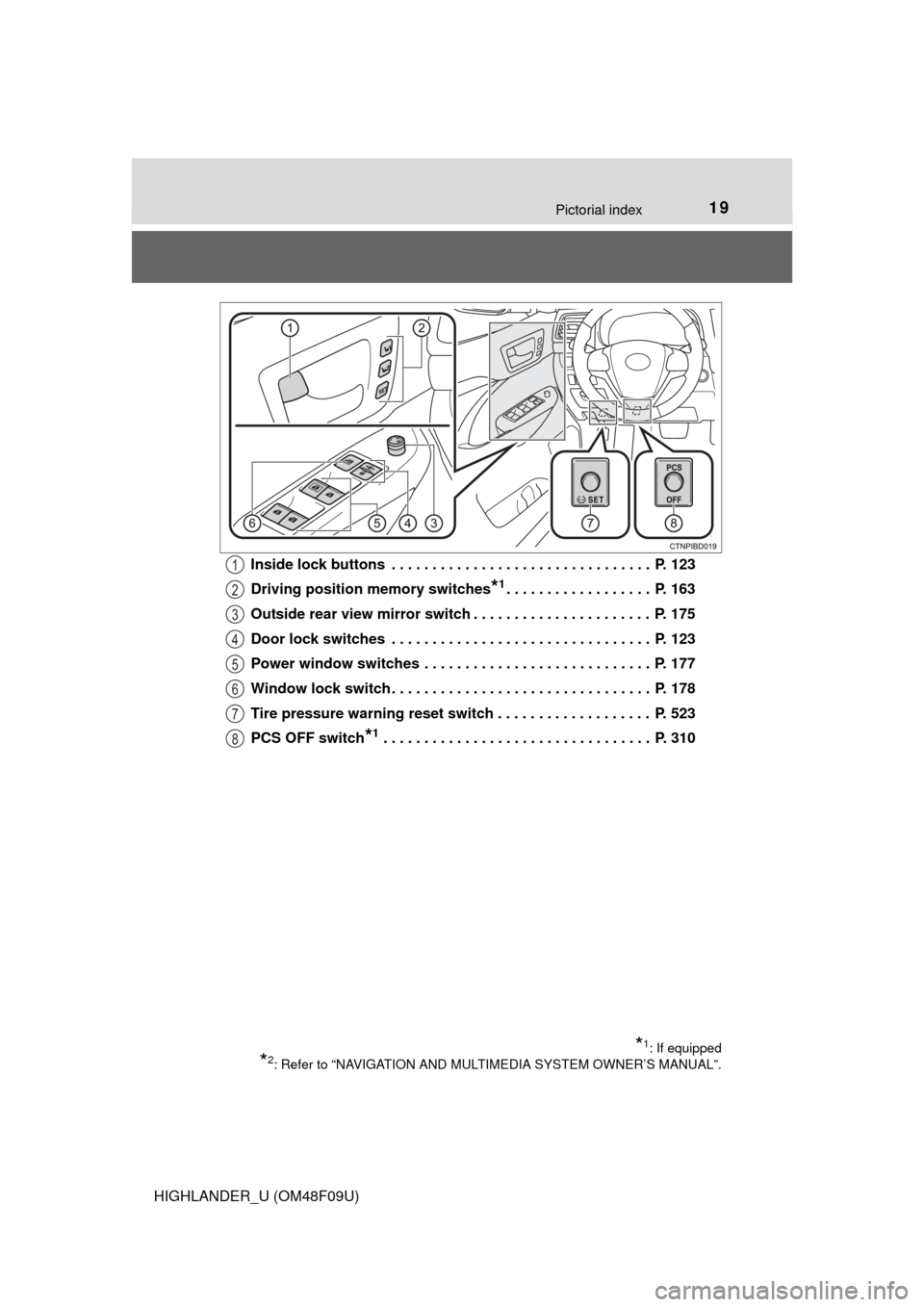
HIGHLANDER_U (OM48F09U)Inside lock buttons . . . . . . . . . . . . . . . . . . . . . . . . . . . . . . . . P. 123
Driving position memory switches
*1. . . . . . . . . . . . . . . . . . P. 163
Outside rear view mirror switch . . . . . . . . . . . . . . . . . . . . . . P. 175
Door lock switches . . . . . . . . . . . . . . . . . . . . . . . . . . . . . . . . P. 123
Power window switches . . . . . . . . . . . . . . . . . . . . . . . . . . . . P. 177
Window lock switch . . . . . . . . . . . . . . . . . . . . . . . . . . . . . . . . P. 178
Tire pressure warning reset switch . . . . . . . . . . . . . . . . . . . P. 523
PCS OFF switch
*1 . . . . . . . . . . . . . . . . . . . . . . . . . . . . . . . . . P. 310
*1: If equipped
*2: Refer to “NAVIGATION AND MULTIMEDIA SYSTEM OWNER’S MANUAL”.
1
2
3
4
5
6
7
8
Page 93 of 716
932. Instrument cluster
2
Instrument cluster
HIGHLANDER_U (OM48F09U)
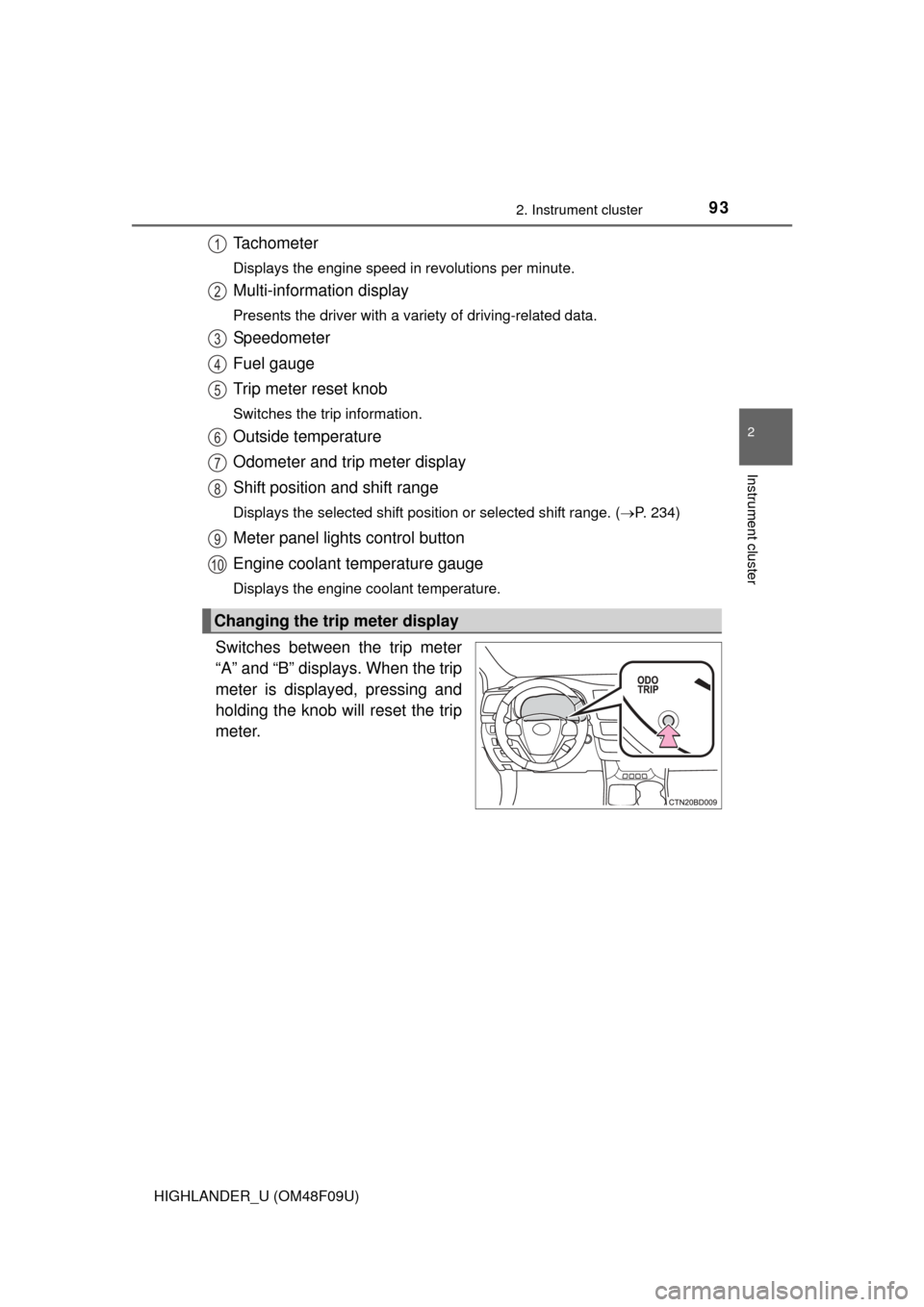
Tachometer
Displays the engine speed in revolutions per minute.
Multi-information display
Presents the driver with a variety of driving-related data.
Speedometer
Fuel gauge
Trip meter reset knob
Switches the trip information.
Outside temperature
Odometer and trip meter display
Shift position and shift range
Displays the selected shift position or selected shift range. (P. 234)
Meter panel lights control button
Engine coolant temperature gauge
Displays the engine coolant temperature.
Switches between the trip meter
“A” and “B” displays. When the trip
meter is displayed, pressing and
holding the knob will reset the trip
meter.
Changing the trip meter display
1
2
3
4
5
6
7
8
9
10
Page 96 of 716

962. Instrument cluster
HIGHLANDER_U (OM48F09U)
●Current fuel consumption
Displays the current rate of fuel consumption.
Average fuel economy (after reset
*)
Displays the average fuel economy since the function was reset
respectively
Use the displayed average fuel economy as a reference.
● Distance (driving range)
Displays the estimated maximum distance that can be driven with
the quantity of fuel remaining and t he distance driven after the func-
tion was reset respectively
• This distance is computed based on your average fuel consumption. As a result, the actual distance that can be driven may differ from that dis-
played.
• When only a small amount of fuel is added to the tank, the display may not be updated.
When refueling, turn the engine switch off. If the vehicle is refueled with-
out turning the engine switch off, the display may not be updated.
Average fuel economy (after refuel)
Displays the average fuel economy since the vehicle was refueled
respectively
Use the displayed average fuel economy as a reference.
● Distance (after reset*)
Displays the estimated maximum di stance driven after the function
was reset respectively
Average vehicle speed (after reset
*)
Displays the average vehicle spe ed since the function was reset
● Customization
Eco Driving Indicator Light, La nguage and Units settings can be
changed. ( P. 9 8 )
● Eco Driving Indicator Zone Display
P. 1 0 5
*: Press and hold the “DISP” switch to reset.
Page 100 of 716
1002. Instrument cluster
HIGHLANDER_U (OM48F09U)
Warning message display
Select to display warning messages and measures to be taken if a
malfunction is detected. (P. 578)
Settings display
Select to change the meter display settings. ( P. 102)
■
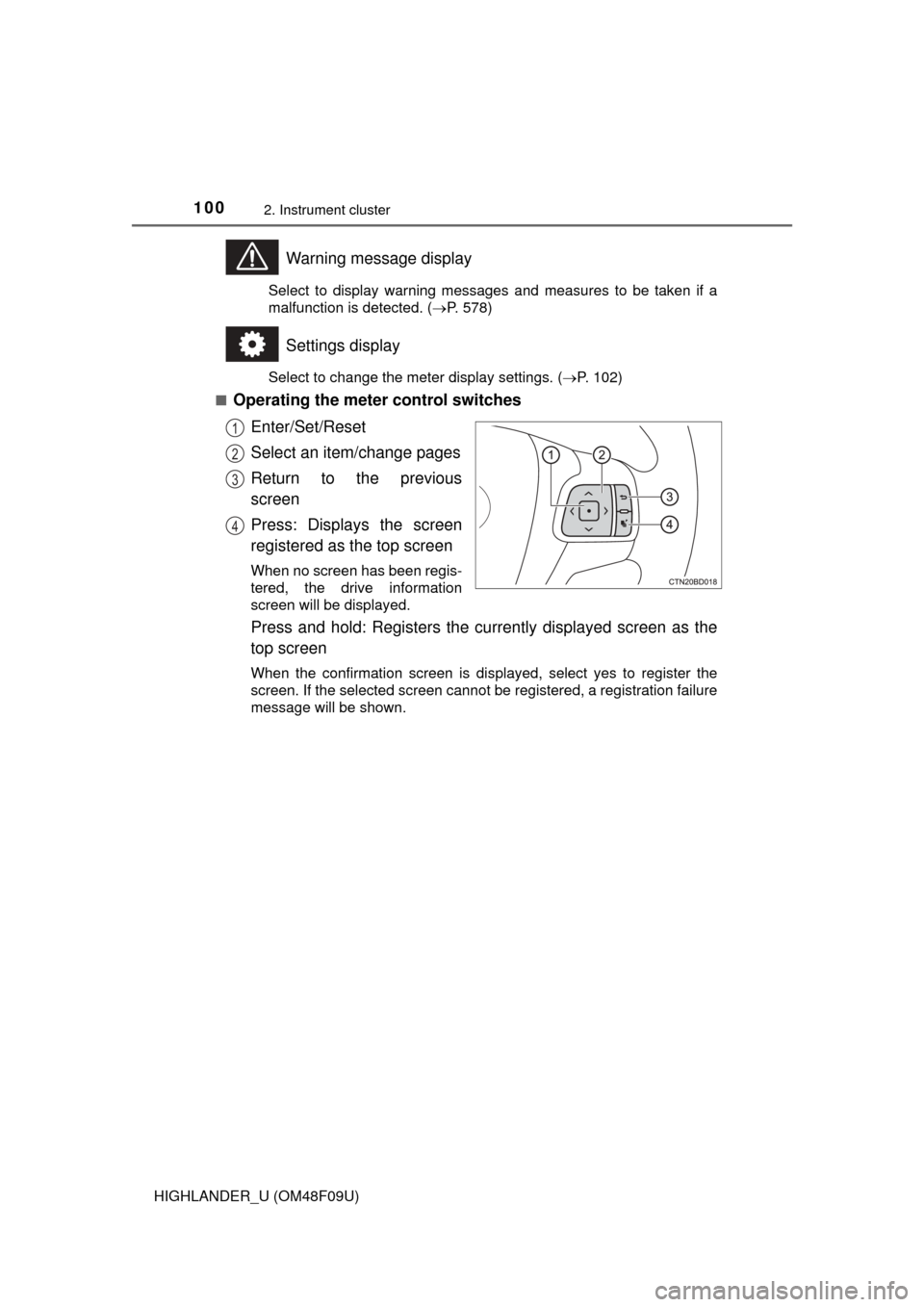
Operating the meter control switches
Enter/Set/Reset
Select an item/change pages
Return to the previous
screen
Press: Displays the screen
registered as the top screen
When no screen has been regis-
tered, the drive information
screen will be displayed.
Press and hold: Registers the currently displayed screen as the
top screen
When the confirmation screen is displayed, select yes to register the
screen. If the selected screen cannot be registered, a registration failure
message will be shown.
1
2
3
4
Page 101 of 716

1012. Instrument cluster
2
Instrument cluster
HIGHLANDER_U (OM48F09U)
●Current fuel consumption*1
Displays the current rate of fuel consumption
● Average fuel economy (after reset
*2/after start/after refuel)*1
Displays the average fuel economy since the function was reset,
the engine was started, and the ve hicle was refueled, respectively
Use the displayed average fuel economy as a reference.
●Average vehicle speed (after reset*2/after start)*1
Displays the average vehicle speed since the function was reset
and the engine was started, respectively
● Elapsed time (after reset
*2/after start)*1
Displays the elapsed time since the function was reset and the
engine was started, respectively
● Distance (driving range/after start/after reset
*2)*1
Displays the estimated maximum distance that can be driven with
the quantity of fuel remaining an d the distance driven after the
engine was started, respectively.
• This distance is computed based on your average fuel consumption. As a result, the actual distance that can be driven may differ from that dis-
played.
• When only a small amount of fuel is added to the tank, the display may
not be updated.
When refueling, turn the engine switch off. If the vehicle is refueled with-
out turning the engine switch off, the display may not be updated.
● Eco Driving Indicator
P. 1 0 5
● AWD control (if equipped)
Displays the torque distribution between the front and rear axles of
the AWD control system
*1: Can be registered to Drive information 1 through 3. ( P. 102)
*2: Resetting procedures:
• Select a function to be reset using the meter control switches and then press and hold to reset.
• If there is more than one function that can be reset, check boxes will be
displayed next to those functions.
Drive information
Page 102 of 716

1022. Instrument cluster
HIGHLANDER_U (OM48F09U)■
Changing the settings
Select using the meter control switches.
Select an item and then set it with the center button.
■Customizable items
●Language
Select to change the language on the display.
● Units
Select to change the unit of measure for fuel consumption.
● Maintenance system (for U.S.A.)
Select to reset the maintenance data after the required mainte-
nance is performed. (
P. 496)
● Eco Driving Indicator Light
Select to activate/deactivate th e Eco Driving Indicator Light.
(
P. 105)
● switch settings
You can register 1 screen as the top screen. To register, press
and hold while the desired screen is displayed.
● Drive information 1 through 3
Select to select up to 2 items t hat will be displayed on a Drive
information screen, up to 3 Drive information screens can be set.
● Pop-up display
Select to set the following pop-up displays, which may appear in
some situations, on/off.
• Route guidance display of t he navigation system-linked sys-
tem (if equipped)
• Incoming call display of the hands-free phone system
• Cruise control operation display
• Instrument panel brightness adjustment display
● Accent color
Select to change the accent colors on the screen, such as the
cursor color.
Settings display
1
2
Page 108 of 716
1082. Instrument cluster
HIGHLANDER_U (OM48F09U)■
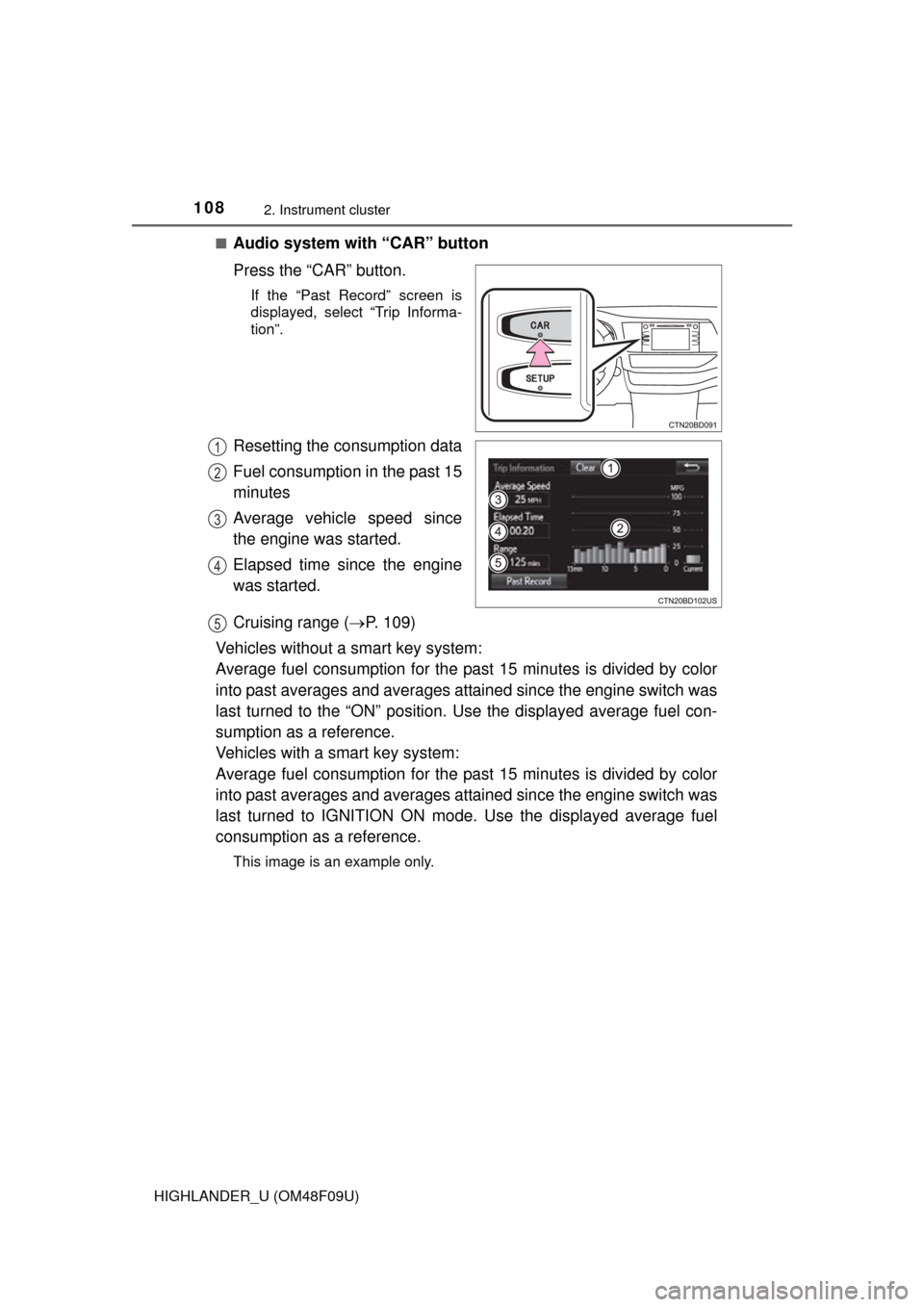
Audio system with “CAR” button
Press the “CAR” button.
If the “Past Record” screen is
displayed, select “Trip Informa-
tion”.
Resetting the consumption data
Fuel consumption in the past 15
minutes
Average vehicle speed since
the engine was started.
Elapsed time since the engine
was started.
Cruising range (
P. 109)
Vehicles without a smart key system:
Average fuel consumption for the past 15 minutes is divided by color
into past averages and averages attained since the engine switch was
last turned to the “ON” position. Use the displayed average fuel con-
sumption as a reference.
Vehicles with a smart key system:
Average fuel consumption for the past 15 minutes is divided by color
into past averages and averages attained since the engine switch was
last turned to IGNITION ON mode. Use the displayed average fuel
consumption as a reference.
This image is an example only.
1
2
3
4
5
Page 109 of 716
1092. Instrument cluster
2
Instrument cluster
HIGHLANDER_U (OM48F09U)■
Audio system with “APPS” button
Press the “APPS” button.
Touch “ECO” on the “Apps” screen.
If the “Trip Information” screen is displayed, select “Past Record”.
■
Audio system with “CAR” button
Press the “CAR” button.
If the “Trip Information” screen is displayed, select “Past Record”.
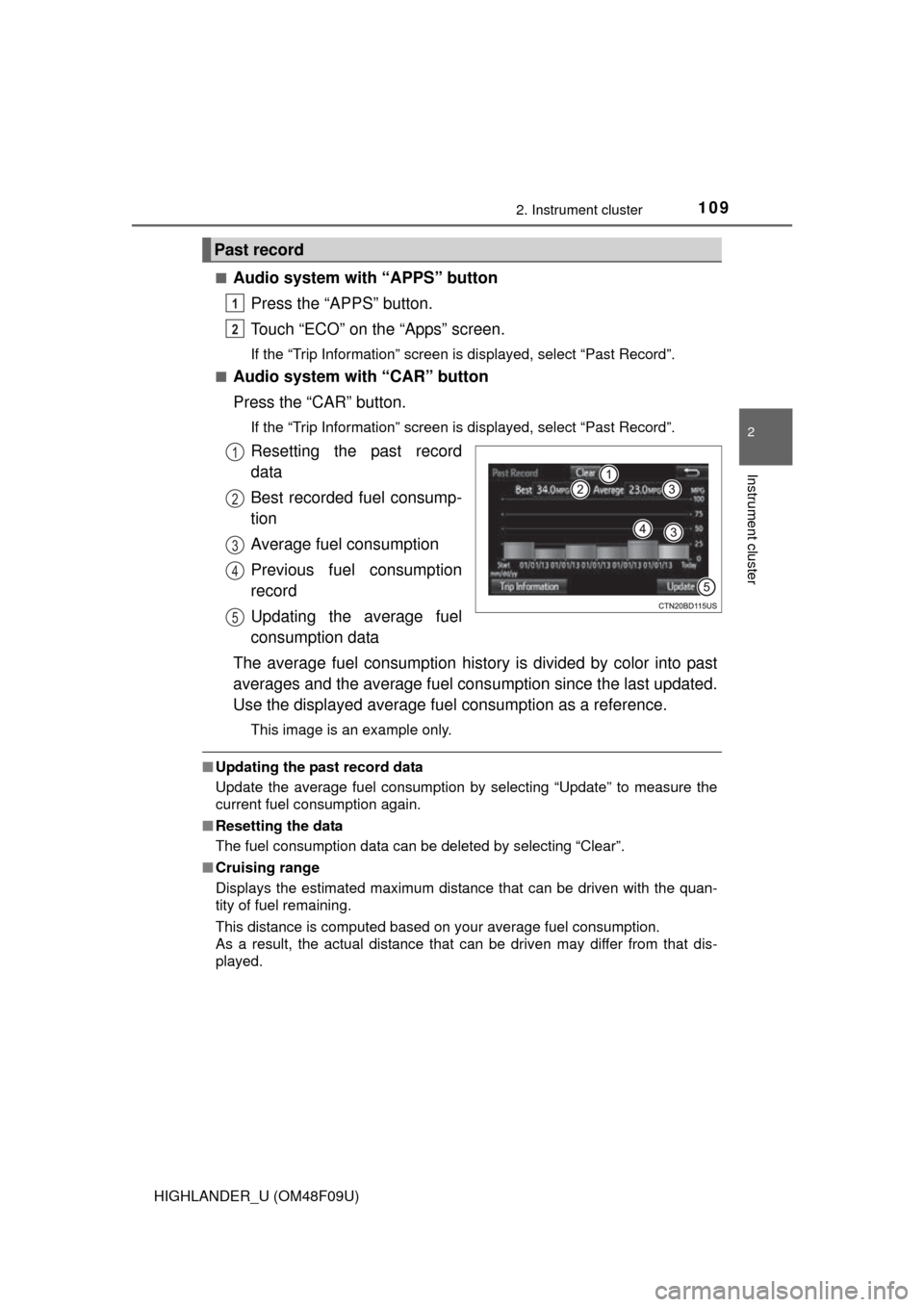
Resetting the past record
data
Best recorded fuel consump-
tion
Average fuel consumption
Previous fuel consumption
record
Updating the average fuel
consumption data
The average fuel consumption history is divided by color into past
averages and the average fuel cons umption since the last updated.
Use the displayed average fuel consumption as a reference.
This image is an example only.
■Updating the past record data
Update the average fuel consumption by selecting “Update” to measure the
current fuel consumption again.
■ Resetting the data
The fuel consumption data can be deleted by selecting “Clear”.
■ Cruising range
Displays the estimated maximum distance that can be driven with the quan-
tity of fuel remaining.
This distance is computed based on your average fuel consumption.
As a result, the actual distance that can be driven may differ from that dis-
played.
Past record
1
2
1
2
3
4
5