Page 252 of 716
2524-3. Operating the lights and wipers
HIGHLANDER_U (OM48F09U)
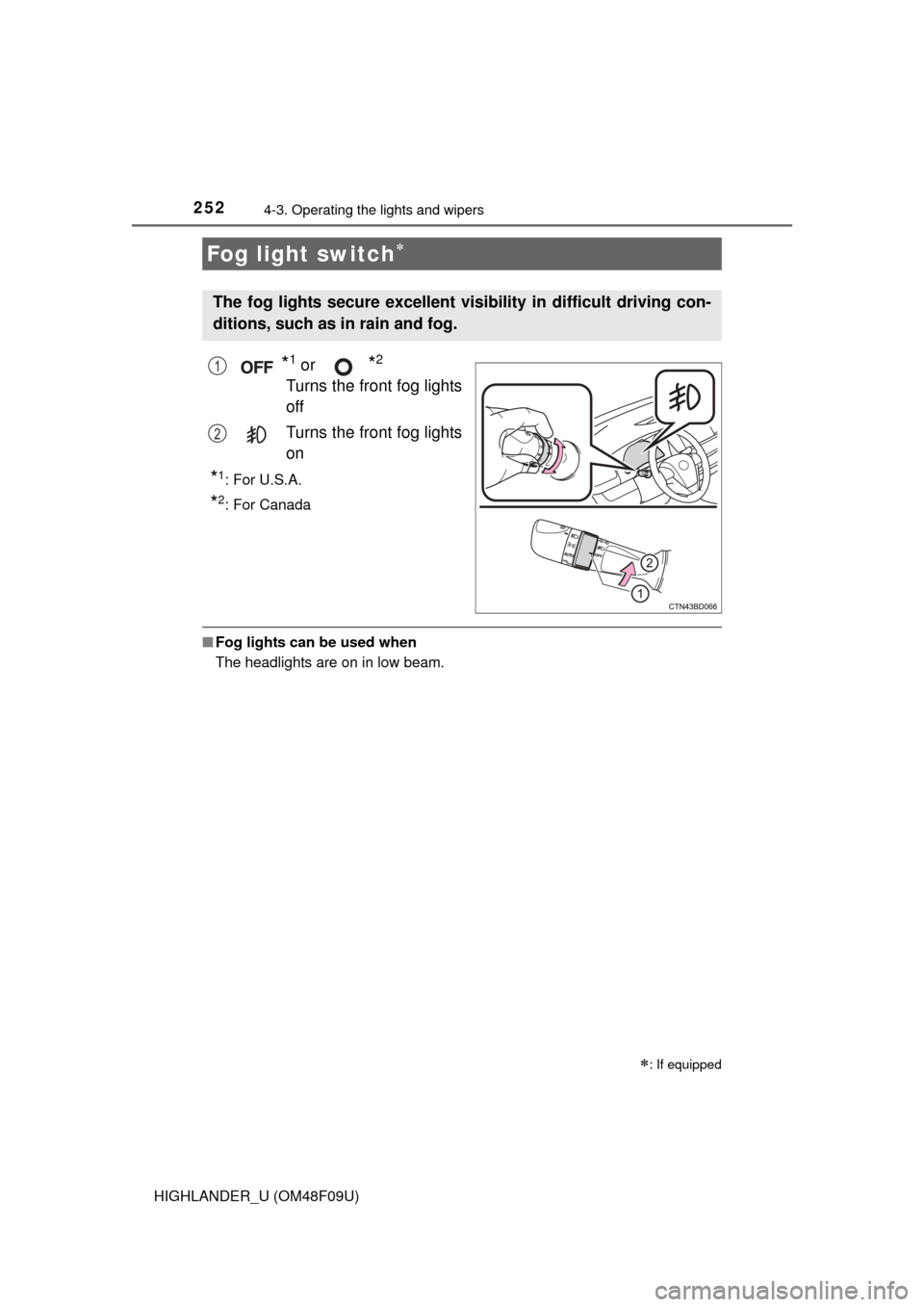
*1 or *2
Turns the front fog lights
off
Turns the front fog lights
on
*1:For U.S.A.
*2: For Canada
■Fog lights can be used when
The headlights are on in low beam.
Fog light switch
: If equipped
The fog lights secure excellent visi bility in difficult driving con-
ditions, such as in rain and fog.
1
2
Page 260 of 716
2604-4. Refueling
HIGHLANDER_U (OM48F09U)
WARNING
■When refueling the vehicle
Observe the following precautions while refueling the vehicle. Failure to do
so may result in death or serious injury.
●After exiting the vehicle and before opening the fuel door, touch an
unpainted metal surface to discharge any static electricity. It is important to
discharge static electricity before refueling because sparks resulting from
static electricity can cause fuel vapors to ignite while refueling.
● Always hold the grips on the fuel tank cap and turn it slowly to remove it.
A whooshing sound may be heard when the fuel tank cap is loosened.
Wait until the sound cannot be heard before fully removing the cap. In hot
weather, pressurized fuel may spray out the filler neck and cause injury.
● Do not allow anyone that has not discharged static electricity from their
body to come close to an open fuel tank.
● Do not inhale vaporized fuel.
Fuel contains substances that are harmful if inhaled.
● Do not smoke while refueling the vehicle.
Doing so may cause the fuel to ignite and cause a fire.
● Do not return to the vehicle or touch any person or object that is statically
charged.
This may cause static electricity to build up, resulting in a possible ignition
hazard.
■ When refueling
Observe the following precautions to prevent fuel overflowing from the fuel
tank:
●Securely insert the fuel nozzle into the fuel filler neck.
● Stop filling the tank after the fuel nozzle automatically clicks off.
● Do not top off the fuel tank.
NOTICE
■Refueling
Do not spill fuel during refueling.
Doing so may damage the vehicle, such as causing the emission control
system to operate abnormally or damaging fuel system components or the
vehicle’s painted surface.
Page 322 of 716

3224-5. Using the driving support systems
HIGHLANDER_U (OM48F09U)■
Conditions under which the Blind Spot Monitor function may not func-
tion correctly
●The Blind Spot Monitor function may not detect vehicles correctly in the fol-
lowing conditions:
• During bad weather such as heavy rain, fog, snow etc.
• When ice or mud etc. is attached to the rear bumper
• When driving on a road surface that is wet due to rain, standing water etc.
• When there is a significant difference in speed between your vehicle and
the vehicle that enters the detection area
• When a vehicle is in the detection area from a stop and remains in the detection area as your vehicle accelerates
• When driving up or down consecutive steep inclines, such as hills, a dip
in the road etc.
• When multiple vehicles approach with only a small gap between each vehicle
• When vehicle lanes are wide, and the vehicle in the next lane is too far away from your vehicle
• When the vehicle that enters the detection area is traveling at about the
same speed as your vehicle
• When there is a significant difference in height between your vehicle and the vehicle that enters the detection area
• Directly after the BSM main switch is set to on
• When towing a trailer
● Instances of the Blind Spot Monitor function unnecessarily detecting a vehi-
cle and/or object may increase under the following conditions:
• When there is only a short distance between your vehicle and a guardrail,
wall etc.
• When there is only a short distance between your vehicle and a following vehicle
• When vehicle lanes are narrow and a vehicle driving 2 lanes across from
your vehicle enters the detection area
• When items such as a bicycle carrier ar e installed on the rear of the vehi-
cle
Page 379 of 716
3795-7. Connecting Bluetooth®
5
Audio system
HIGHLANDER_U (OM48F09U)
Display the “Bluetooth* Setup” screen. (P. 376)
Select “Add”.
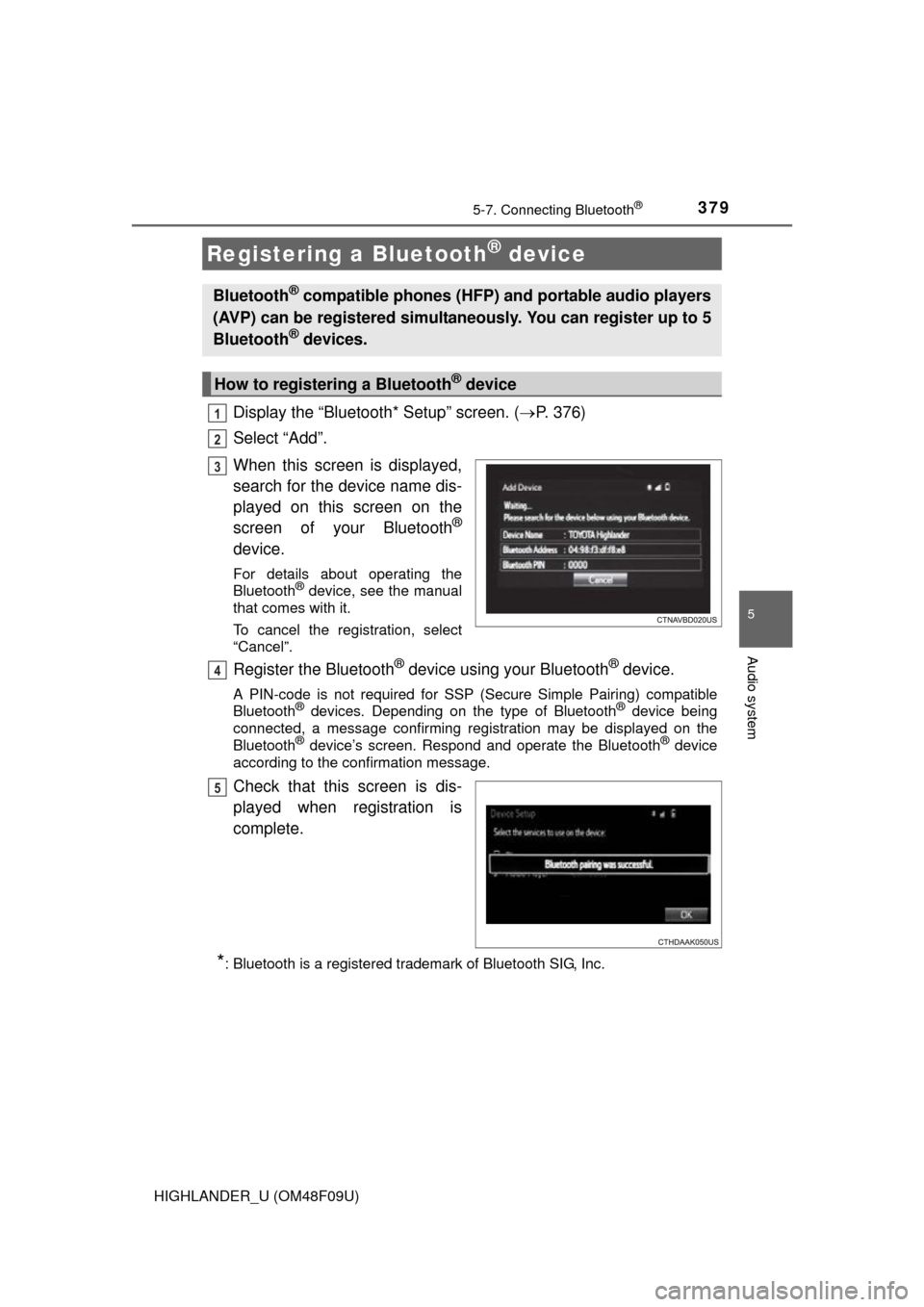
When this screen is displayed,
search for the device name dis-
played on this screen on the
screen of your Bluetooth
®
device.
For details about operating the
Bluetooth® device, see the manual
that comes with it.
To cancel the registration, select
“Cancel”.
Register the Bluetooth® device using your Bluetooth® device.
A PIN-code is not required for SSP (S ecure Simple Pairing) compatible
Bluetooth® devices. Depending on the type of Bluetooth® device being
connected, a message confirming registration may be displayed on the
Bluetooth
® device’s screen. Respond and operate the Bluetooth® device
according to the confirmation message.
Check that this screen is dis-
played when registration is
complete.
*: Bluetooth is a registered trademark of Bluetooth SIG, Inc.
Registering a Bluetooth® device
Bluetooth® compatible phones (HFP) and portable audio players
(AVP) can be registered simultaneously. You can register up to 5
Bluetooth
® devices.
How to registering a Bluetooth® device
1
2
3
4
5
Page 413 of 716
4135-9. Bluetooth® phone
5
Audio system
HIGHLANDER_U (OM48F09U)
In other situations
Even though all conceivable measures have been taken, the symptom sta-
tus does not change.
The cellular phone is not close enough to this system.
Bring the cellular phone closer to this system.
The cellular phone is the most likely cause of the symptom.
Turn the cellular phone off, remo ve and reinstall the battery pack,
and then restart the cellular phone.
Enable the cellular phone’s Bluetooth
® connection.
Stop the cellular phone’s security software and close all applica-
tions.
Before using an application installed on the cellular phone, care-
fully check its source and how its operation might affect this sys-
tem.
Page 457 of 716
4576-3. Using the storage features
6
Interior features
HIGHLANDER_U (OM48F09U)
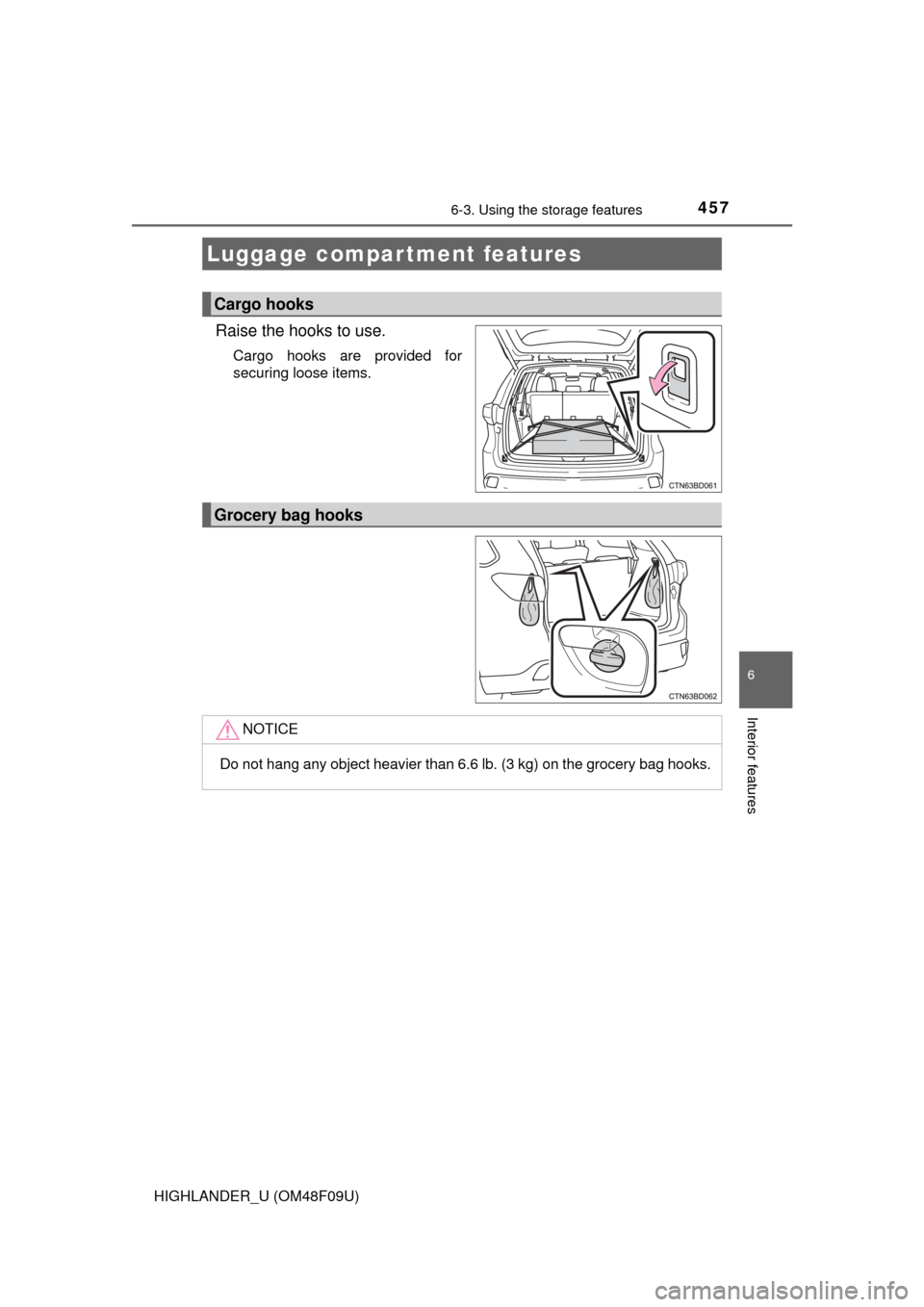
Raise the hooks to use.
Cargo hooks are provided for
securing loose items.
Luggage compartment features
Cargo hooks
Grocery bag hooks
NOTICE
Do not hang any object heavier than 6.6 lb. (3 kg) on the grocery bag hooks.
Page 458 of 716
4586-3. Using the storage features
HIGHLANDER_U (OM48F09U)■
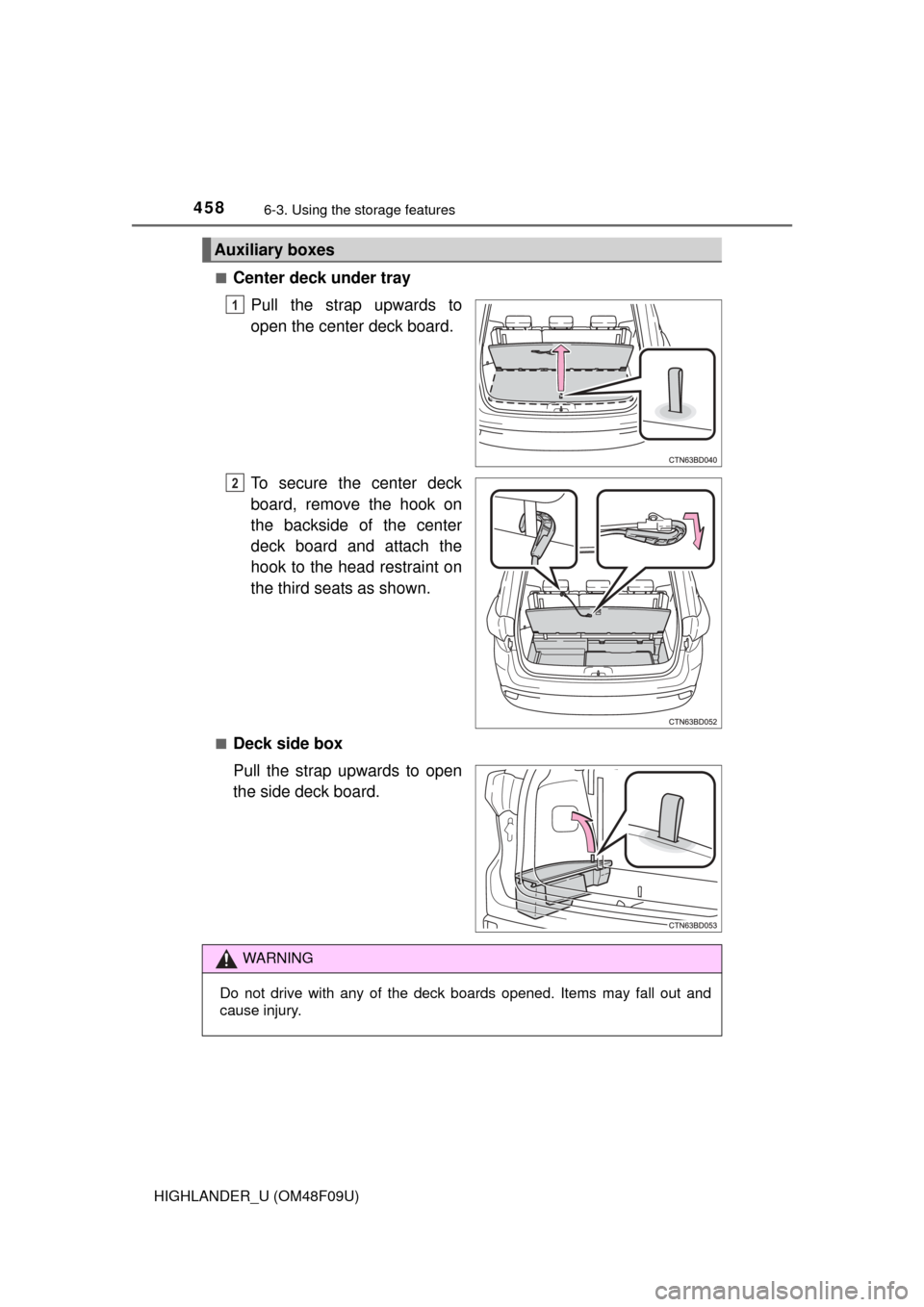
Center deck under tray
Pull the strap upwards to
open the center deck board.
To secure the center deck
board, remove the hook on
the backside of the center
deck board and attach the
hook to the head restraint on
the third seats as shown.
■Deck side box
Pull the strap upwards to open
the side deck board.
Auxiliary boxes
1
2
WARNING
Do not drive with any of the deck boards opened. Items may fall out and
cause injury.
Page 470 of 716
4706-4. Using the other interior features
HIGHLANDER_U (OM48F09U)
The garage door opener (HomeLink Universal Transceiver) is manu-
factured under license from HomeLink.
The HomeLink
® compatible transceiver in your vehicle has 3 buttons
which can be programmed to operate 3 different devices. Refer to the
programming method below appropriate for the device.
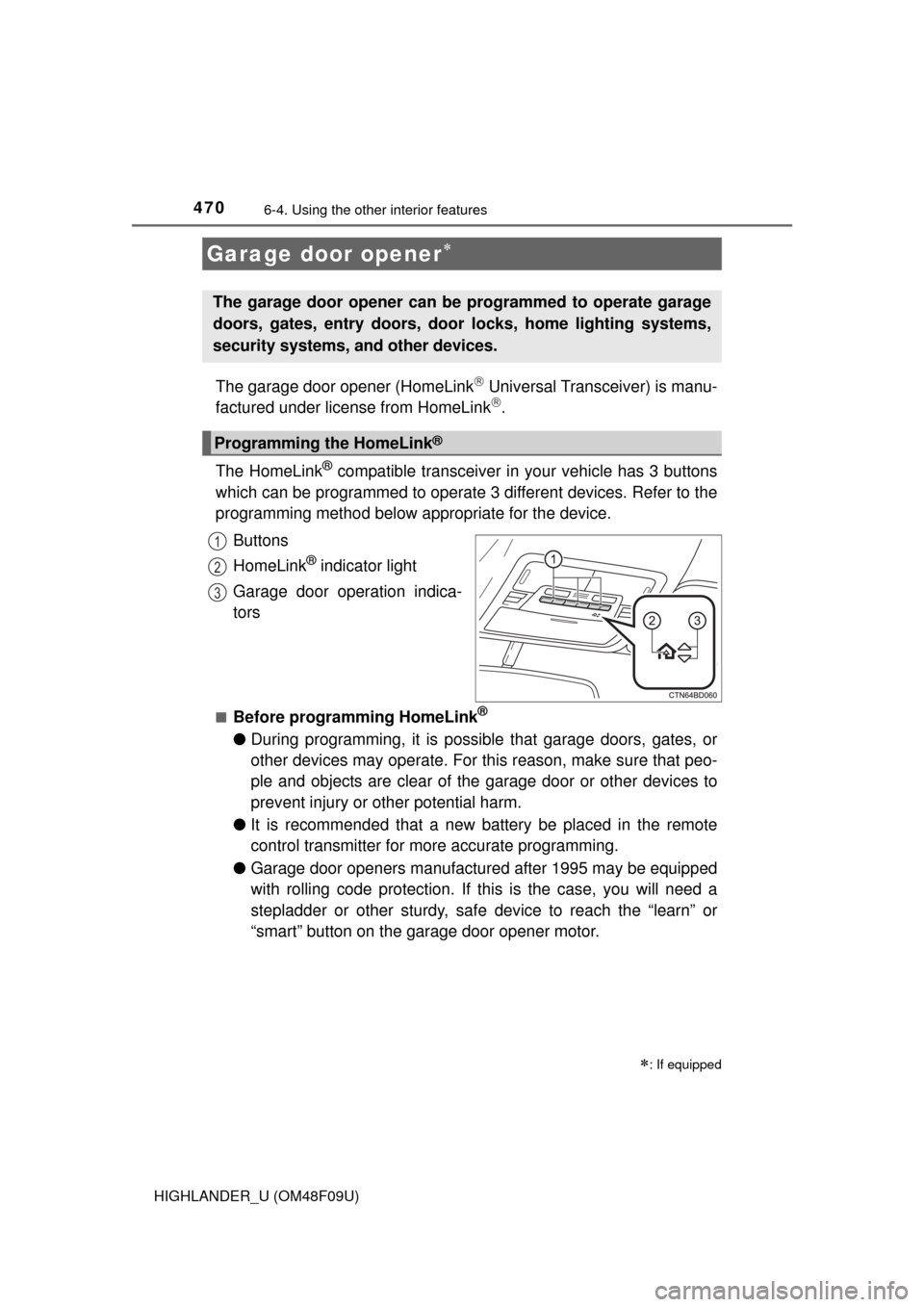
Buttons
HomeLink
® indicator light
Garage door operation indica-
tors
■Before programming HomeLink®
● During programming, it is possible that garage doors, gates, or
other devices may operate. For this reason, make sure that peo-
ple and objects are clear of the garage door or other devices to
prevent injury or other potential harm.
● It is recommended that a new battery be placed in the remote
control transmitter for more accurate programming.
● Garage door openers manufactured after 1995 may be equipped
with rolling code protection. If this is the case, you will need a
stepladder or other sturdy, safe device to reach the “learn” or
“smart” button on the garage door opener motor.
Garage door opener
: If equipped
The garage door opener can be programmed to operate garage
doors, gates, entry doors, door locks, home lighting systems,
security systems, and other devices.
Programming the HomeLink®
1
2
3