2016 TOYOTA HIGHLANDER warning
[x] Cancel search: warningPage 298 of 716
2984-5. Using the driving support systems
HIGHLANDER_U (OM48F09U)
The fixed guide lines are very far out of alignment
• The vehicle is tilted (there is a
heavy load on the vehicle, tire
pressure is low due to a tire punc-
ture, etc.)
• The vehicle is used on an incline.If this happens due to these causes,
it does not indicate a malfunction.
Back up while visually checking the
vehicle's surroundings.
The camera position is out of align-
ment.Have the vehicle inspected by your
Toyota dealer.
WARNING
■ When using the rear view monitor system
The rear view monitor system is a supplemental device intended to assist
the driver when backing up. When backing up, be sure to check visually
behind and all around the vehicle before proceeding.
Observe the following precautions to avoid an accident that could result in
death or serious injuries.
● Never depend on the rear view monitor system entirely when backing up.
The image and the position of the guide lines displayed on the screen may
differ from the actual state.
Use caution, just as you would when backing up any vehicle.
● Be sure to back up slowly, depressing the brake pedal to control vehicle
speed.
● The instructions given are only guidelines.
When and how much to turn the steering wheel will vary according to traf-
fic conditions, road surface conditions, vehicle condition, etc. when park-
ing. It is necessary to be fully aware of this before using the rear view
monitor system.
● When parking, be sure to check that the parking space will accommodate
your vehicle before maneuvering into it.
● Do not use the rear view monitor system in the following cases:
• On icy or slick road surfaces, or in snow
• When using tire chains or the compact spare tire
• When the back door is not closed completely
• On roads that are not flat or straight, such as curves or slopes.
Likely causeSolution
Page 299 of 716

2994-5. Using the driving support systems
4
Driving
HIGHLANDER_U (OM48F09U)
WARNING
●In low temperatures, the screen may darken or the image may become
faint. The image could distort when the vehicle is moving, or you may
become unable to see the image on the screen. Be sure to check direct
visually and with the mirrors all around the vehicle before proceeding.
● If the tire sizes are changed, the position of the fixed guide lines displayed
on the screen may change.
● The camera uses a special lens. The distances between objects and
pedestrians that appear in the image displayed on the screen will differ
from the actual distances. ( P. 294)
NOTICE
■How to use the camera
●The rear view monitor system may not operate properly in the following
cases.
• If the back of the vehicle is hit, the position and mounting angle of the
camera may change.
• As the camera has a water proof construction, do not detach, disassem- ble or modify it. This may cause incorrect operation.
• Do not strongly rub the camera lens. If the camera lens is scratched, it
cannot transmit a clear image.
• Do not allow organic solvent, car wax, window cleaner or glass coat to adhere to the camera. If this happens, wipe it off as soon as possible.
• If the temperature changes rapidly, such as when hot water is poured on the vehicle in cold weather, the system may not operate normally.
• When washing the vehicle, do not apply intensive bursts of water to the
camera or camera area. Doing so may result in the camera malfunc-
tioning.
• When the camera is used under fluorescent lights, sodium light or mer-
cury light etc., the lights and the illuminated areas may appear to flicker.
● Do not expose the camera to strong impact as this could cause a malfunc-
tion. If this happens, have the vehicle inspected by your Toyota dealer as
soon as possible.
Page 304 of 716
3044-5. Using the driving support systems
HIGHLANDER_U (OM48F09U)
■Turning off both TRAC and VSC systems
To turn the TRAC and VSC systems off, press and hold for more than 3
seconds while the vehicle is stopped.
The VSC OFF indicator light will come on and the “TRAC OFF” will be shown
on the multi-information display.
*
Press again to turn the systems back on.
*: On vehicles with pre-collision system, pre-collision brake assist and pre-
collision braking will also be disabled. The pre-collision system warning
light will come on and the message will be shown on the multi-information
display. ( P. 309)
■ When the message is displayed on th e multi-information display show-
ing that TRAC has been disabled even if switch has not been
pressed
TRAC, hill-start assist control and downhill assist control cannot be operated.
Contact your Toyota dealer.
■ Sounds and vibrations caused by th e ABS, brake assist, TRAC, VSC and
hill-start assist control systems
● A sound may be heard from the engine compartment when the brake pedal
is depressed repeatedly, when the engine is started or just after the vehicle
begins to move. This sound does not indicate that a malfunction has
occurred in any of these systems.
● Any of the following conditions may occur when the above systems are
operating. None of these indicates that a malfunction has occurred.
• Vibrations may be felt through the vehicle body and steering.
• A motor sound may be heard after the vehicle comes to a stop.
• The brake pedal may pulsate slightly after the ABS is activated.
• The brake pedal may move down slightly after the ABS is activated.
■ EPS operation sound
When the steering wheel is operated, a motor sound (whirring sound) may be
heard. This does not indicate a malfunction.
■ Automatic reactivation of TRAC and VSC systems
After turning the TRAC and VSC systems off, the systems will be automati-
cally re-enabled in the following situations:
● Vehicles without a smart key system: When the engine switch is turned to
the “LOCK” position
Vehicles with a smart key system: When the engine switch is turned off
● If only the TRAC system is turned off, the TRAC will turn on when vehicle
speed increases
If both the TRAC and VSC systems are turned off, automatic re-enabling will
not occur when vehicle speed increases.
Page 305 of 716
3054-5. Using the driving support systems
4
Driving
HIGHLANDER_U (OM48F09U)■
Reduced effectiveness of the EPS system
The effectiveness of the EPS system is reduced to prevent the system from
overheating when there is frequent steering input over an extended period of
time. The steering wheel may feel heavy as a result. Should this occur, refrain
from excessive steering input or stop the vehicle and turn the engine off. The
EPS system should return to normal within 10 minutes.
■ Operating conditions of hill-start assist control
When the following four conditions are met, the hill-start assist control will
operate:
●The shift lever is in a position other than P or N (when starting off forward/
backward on an upward incline).
● The vehicle is stopped.
● The accelerator pedal is not depressed.
● The parking brake is not engaged.
■ Automatic system cancelation of hill-start assist control
The hill-start assist control will turn off in any of the following situations:
● The shift lever is moved to P or N.
● The accelerator pedal is depressed.
● The parking brake is engaged.
● Approximately 2 seconds elapse after the brake pedal is released.
WARNING
■ The ABS does not operate effectively when
●The limits of tire gripping performance have been exceeded (such as
excessively worn tires on a snow covered road).
● The vehicle hydroplanes while driving at high speed on wet or slick roads.
■ Stopping distance when the ABS is operating may exceed that of nor-
mal conditions
The ABS is not designed to shorten the vehicle’s stopping distance. Always
maintain a safe distance from the vehicle in front of you, especially in the
following situations:
● When driving on dirt, gravel or snow-covered roads
● When driving with tire chains
● When driving over bumps in the road
● When driving over roads with potholes or uneven surfaces
Page 306 of 716

3064-5. Using the driving support systems
HIGHLANDER_U (OM48F09U)
WARNING
■TRAC may not operat e effectively when
Directional control and power may not be achievable while driving on slip-
pery road surfaces, even if the TRAC system is operating.
Drive the vehicle carefully in conditions where stability and power may be
lost.
■ Hill- start assist control
●Do not overly rely on hill-start assist control. Hill-start assist control may
not operate effectively on steep inclines and roads covered with ice.
● Unlike the parking brake, hill-start assist control is not intended to hold the
vehicle stationary for an extended period of time. Do not attempt to use
hill-start assist control to hold the vehicle on an incline, as doing so may
lead to an accident.
■ When the VSC is activated
The slip indicator light flashes. Always drive carefully. Reckless driving may
cause an accident. Exercise particular care when the indicator light flashes.
■ When the TRAC/VSC syst ems are turned off
Be especially careful and drive at a speed appropriate to the road condi-
tions. As these are the systems to help ensure vehicle stability and driving
force, do not turn the TRAC/VSC systems off unless necessary.
■ Replacing tires
Make sure that all tires are of the specified size, brand, tread pattern and
total load capacity. In addition, make sure that the tires are inflated to the
recommended tire inflation pressure level.
The ABS, TRAC and VSC systems will not function correctly if different tires
are installed on the vehicle.
Contact your Toyota dealer for further information when replacing tires or
wheels.
■ Handling of tires and the suspension
Using tires with any kind of problem or modifying the suspension will affect
the driving assist systems, and may cause a system to malfunction.
Page 308 of 716

3084-5. Using the driving support systems
HIGHLANDER_U (OM48F09U)■
If the “DAC” switch is turned off during operation of the downhill assist
control system
The downhill assist control system gradually ceases operation. The downhill
assist control system indicator will flash during the canceling operation, and
then go off when the system is fully off.
■ Downhill assist control system operation sound
● A sound may be heard from the engine compartment during operation of the
downhill assist control system. This sound does not indicate a malfunction.
● If the accelerator or brake pedal is depressed during operation of the down-
hill assist control system, a sound caused by the release of system opera-
tion may be heard, or you may feel the brake pedal push-back. This does
not indicate a malfunction.
■ When the downhill assist cont rol system operates continuously
The brake actuator may overheat. In that case, the downhill assist control
system will stop operating, a buzzer will sound and the downhill assist control
system indicator will start flashing. Refrain from using the system until the
downhill assist control system indicator stays on. (There is no problem with
continuing to drive normally.)
■ If the slip indicator comes on
It may indicate a malfunction in the system. Contact your Toyota dealer.
WARNING
■Conditions which may affect the downhill assist control system opera-
tion
●Do not rely too heavily on the downhill assist control system. On extremely
steep inclines, icy surfaces or muddy roads, the vehicle may slip and the
system may not be able to maintain the constant low vehicle speed of
about 3 mph (5 km/h), leading to an accident causing death or serious
injury.
● Do not shift the shift lever to R while driving forward, or to D while driving
backward. Doing so may cause the wheels to lock up, leading to an acci-
dent causing death or serious injury. In addition, excessive stress will be
applied to the automatic transmission, possibly resulting in damage.
Page 309 of 716
3094-5. Using the driving support systems
4
Driving
HIGHLANDER_U (OM48F09U)
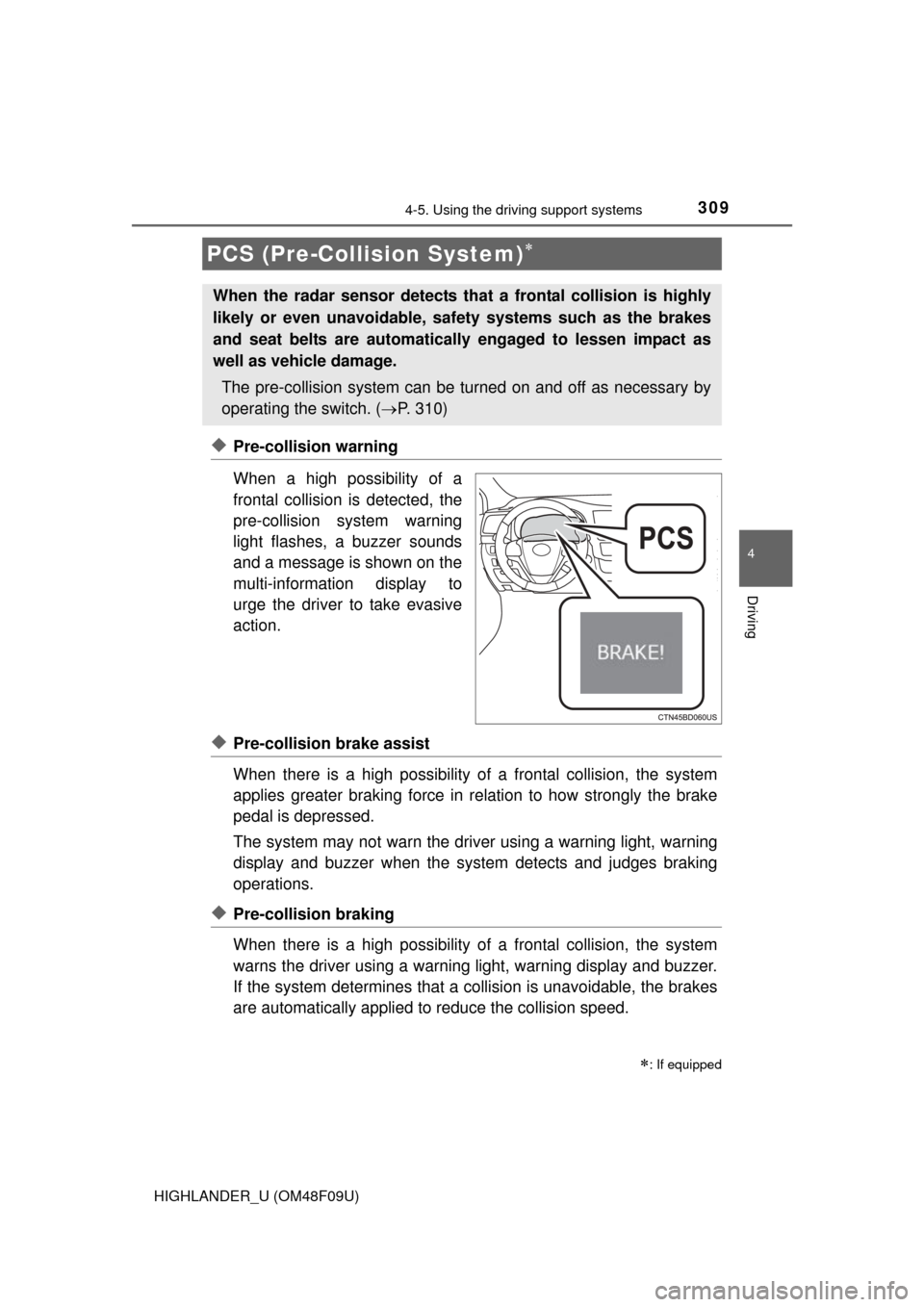
◆Pre-collision warning
When a high possibility of a
frontal collision is detected, the
pre-collision system warning
light flashes, a buzzer sounds
and a message is shown on the
multi-information display to
urge the driver to take evasive
action.
◆Pre-collision brake assist
When there is a high possibility of a frontal collision, the system
applies greater braking force in relation to how strongly the brake
pedal is depressed.
The system may not warn the driver using a warning light, warning
display and buzzer when the system detects and judges braking
operations.
◆Pre-collision braking
When there is a high po ssibility of a frontal collision, the system
warns the driver using a warning light, warning display and buzzer.
If the system determines that a collision is unavoidable, the brakes
are automatically applied to reduce the collision speed.
PCS (Pre-Collision System)
: If equipped
When the radar sensor detects th at a frontal collision is highly
likely or even unavoidable, safety systems such as the brakes
and seat belts are automatically engaged to lessen impact as
well as vehicle damage.
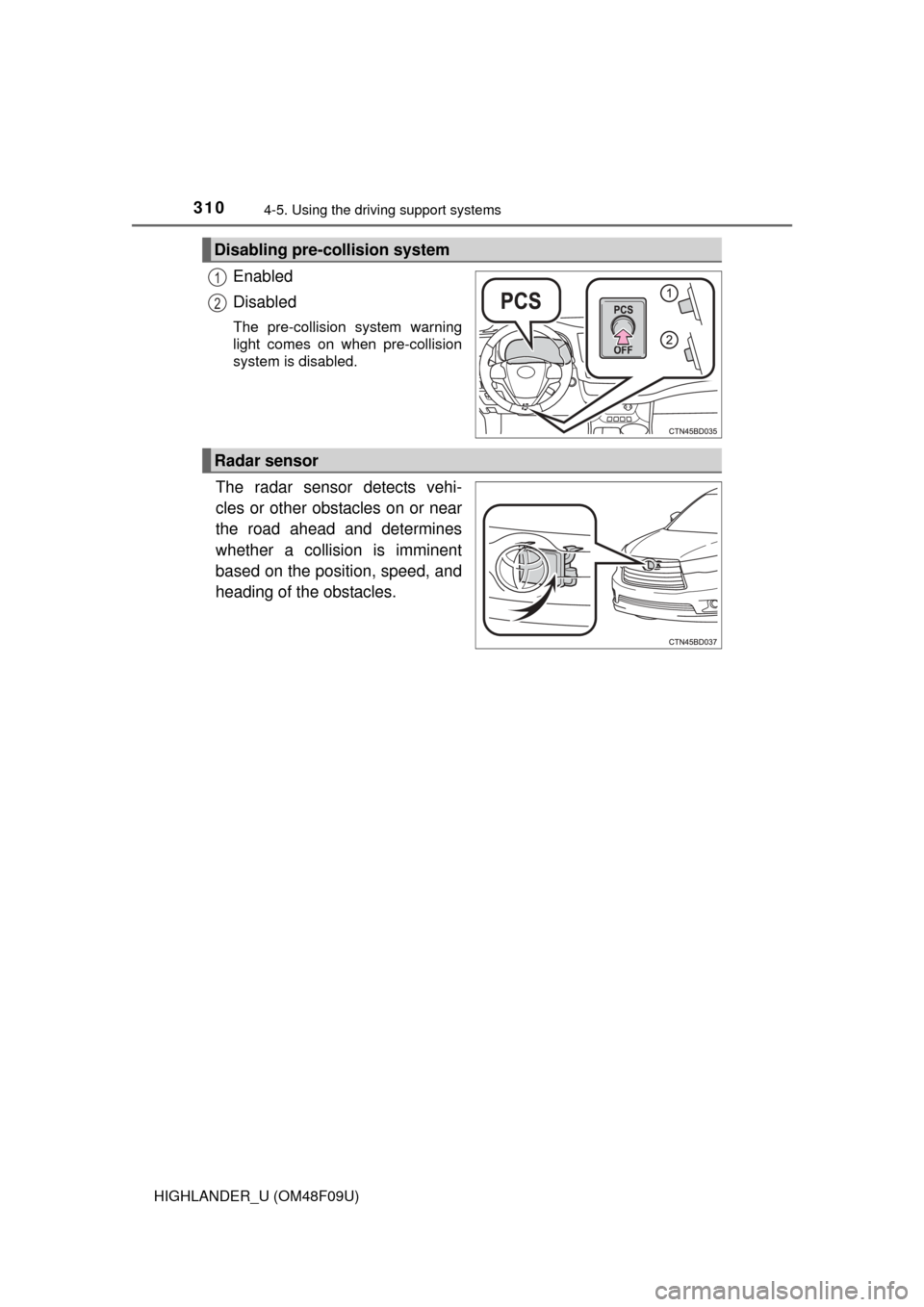
The pre-collision system can be tu rned on and off as necessary by
operating the switch. ( P. 310)
Page 310 of 716
3104-5. Using the driving support systems
HIGHLANDER_U (OM48F09U)
Enabled
Disabled
The pre-collision system warning
light comes on when pre-collision
system is disabled.
The radar sensor detects vehi-
cles or other obstacles on or near
the road ahead and determines
whether a collision is imminent
based on the position, speed, and
heading of the obstacles.
Disabling pre-collision system
1
2
Radar sensor