Page 335 of 620
3355-17. Connecting Bluetooth® (Multimedia system)
5
Audio system
COROLLA_TMMMS_TMMC_U (OM12J84U)
To turn auto connection mode on, set “Bluetooth* Power” to on.
( P. 339)
When you register a phone, auto co nnection will be activated. Always
set it to this mode and leave the Bluetooth
® phone in a place where a
connection can be established.
When the engine switch is turned to ACCESSORY or ON (IGNITION ON)
mode, the system will search for a nearby cellular phone you have regis-
tered.
Next, the system automatically connects with the most recent of the
phones connected to in the past. Then, the connection result is displayed.
*: Bluetooth is a registered trademark of Bluetooth SIG, Inc.
When auto connection has failed or “Bluetooth* Power” is turned off,
you must connec t the Bluetooth® device manually.
Follow the steps in “Connecting a Bluetooth
® device” from step .
( P. 334)
*: Bluetooth is a registered trademark of Bluetooth SIG, Inc.
Registering an additional device
Select “Select Device” on the Bluetooth
® audio control screen.
For more information: P. 3 3 1
Selecting a registered device
Select “Select Device” on the Bluetooth
® audio control screen.
For more information: P. 3 3 4
Auto connection
Manual connection
Connecting a Bluetooth® audio player
11
1
2
1
2
Page 336 of 620
3365-17. Connecting Bluetooth® (Multimedia system)
COROLLA_TMMMS_TMMC_U (OM12J84U)
nReconnecting a Bluetooth® phone
If the system cannot connect due to poor signal strength with the engine
switch in ACCESSORY or ON (IGNITION ON) mode, the system will auto-
matically attempt to reconnect.
If the system is attempting to connect to a Bluetooth
® phone and the
Bluetooth® phone is turned off and then back on, the system will attempt to
reconnect.
Page 379 of 620

3795-20. Bluetooth® (Multimedia system)
5
Audio system
COROLLA_TMMMS_TMMC_U (OM12J84U)n
Certification
NOTE:
This device complies with part 15 of the FCC Rules. Operation is subject to
the following two conditions: (1) This device may not cause harmful interfer-
ence, and (2) this device must accept any interference received, including
interference that may cause undesired operation.
FCC WARNING:
Changes or modifications not expressly approved by the party responsible for
compliance could void the user's authority to operate the equipment.
CAUTION:
Radio Frequency Radiation Exposure
This equipment complies with FCC radiation exposure limits set forth for
uncontrolled equipment and meets the FCC radio frequency (RF) Exposure
Guidelines. This equipment has very lo w levels of RF energy that it deemed
to comply without maximum permissive exposure evaluation (MPE). But it is
desirable that it should be installed and operated with at least 20 cm and
more between the radiator and person’s body in normal use position.
Co-location:
This transmitter must not be co-located or operated in conjunction with any
other antenna or transmitter.
n Reconnecting the portable audio player
If the portable audio player is disconnected due to poor reception when the
engine switch is in ACCESSORY or IGNITION ON mode, the system auto-
matically reconnects the portable audio player.
If you have switched off the portable audio player yourself, follow the instruc-
tions below to reconnect:
lSelect the portable audio player again
l Enter the portable audio player
n When you sell your car
Be sure to delete your personal data. ( P. 298)
Page 399 of 620

3996-1. Using the air conditioning system and defogger
6
Interior features
COROLLA_TMMMS_TMMC_U (OM12J84U)n
When the outside temperature exceeds 75°F (24°C) and the air condition-
ing system is on
lIn order to reduce the air conditioning power consumption, the air condition-
ing system may switch to recirculated air mode automatically. This may also
reduce fuel consumption.
Vehicles without a smart key system
l Recirculated air mode is selected as a default mode when the engine switch
is turned to the “ON” position.
Vehicles with a smart key system
l Recirculated air mode is selected as a default mode when the engine switch
is turned to IGNITION ON mode.
l It is possible to switch to outside air mode at any time by pressing .
n When the outside temperature is low
The dehumidification function may not operate even when is pressed.
n Ventilation and air conditioning odors
lTo let fresh air in, set the air conditioning system to the outside air mode.
l During use, various odors from inside and outside the vehicle may enter into
and accumulate in the air conditioning system. This may then cause odor to
be emitted from the vents.
l To reduce potential odors from occurring:
• It is recommended that the air conditioning system be set to outside air
mode prior to turning the vehicle off.
• The start timing of the blower may be delayed for a short period of time immediately after the air conditioning system is started in automatic
mode.
n Air conditioning filter
P. 467
n Customization that can be co nfigured at Toyota dealer
Settings (e.g. air conditioning setting) can be changed.
(Customizable features P. 576)
Page 410 of 620
4106-4. Other interior features
COROLLA_TMMMS_TMMC_U (OM12J84U)
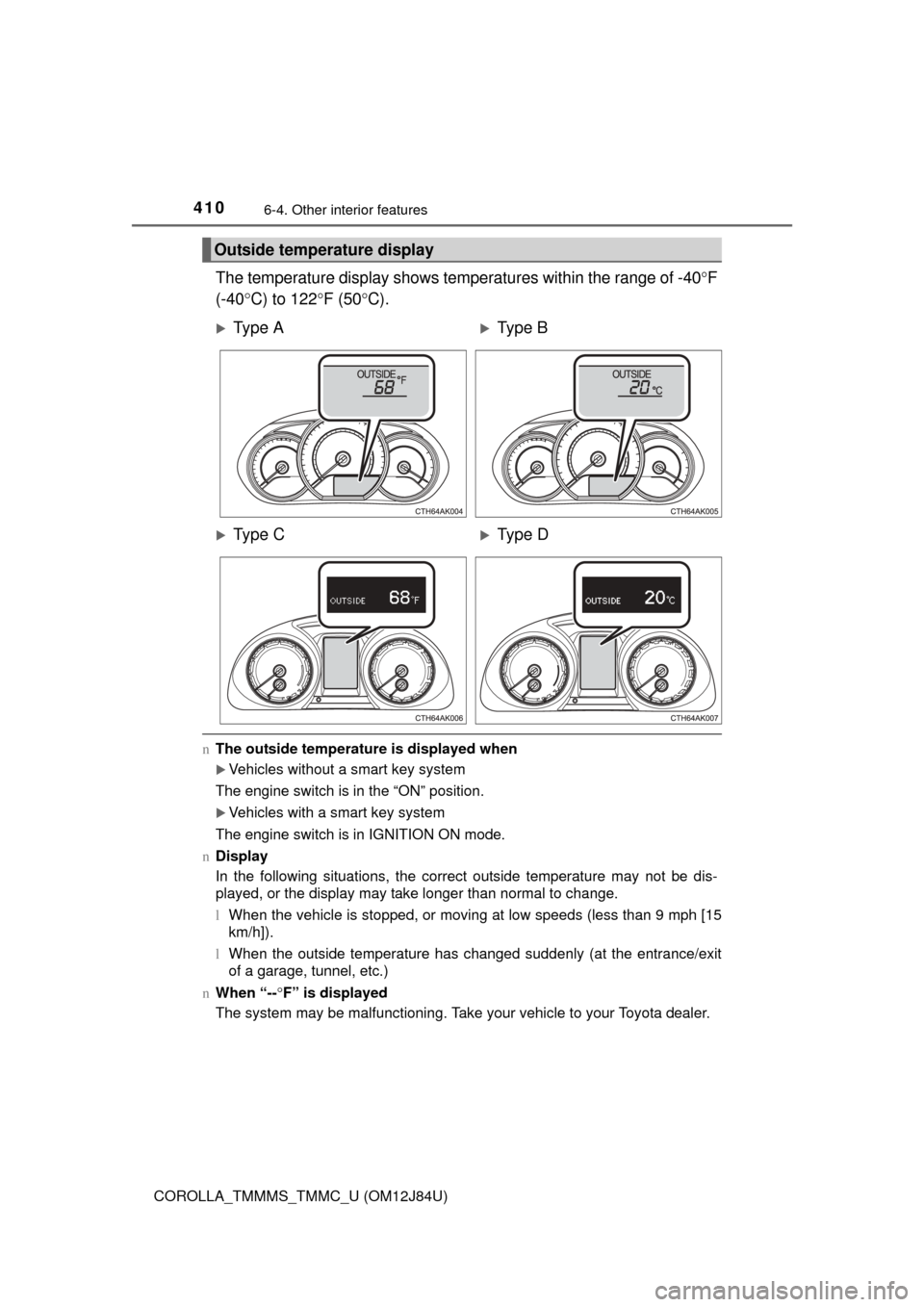
The temperature display shows temperatures within the range of -40F
(-40 C) to 122 F (50C).
n The outside temperature is displayed when
Vehicles without a smart key system
The engine switch is in the “ON” position.
Vehicles with a smart key system
The engine switch is in IGNITION ON mode.
n Display
In the following situations, the correct outside temperature may not be dis-
played, or the display may take longer than normal to change.
lWhen the vehicle is stopped, or moving at low speeds (less than 9 mph [15
km/h]).
l When the outside temperature has changed suddenly (at the entrance/exit
of a garage, tunnel, etc.)
n When “-- F” is displayed
The system may be malfunctioning. Take your vehicle to your Toyota dealer.
Outside temperature display
Ty p e AType B
Ty p e CType D
Page 411 of 620
4116-4. Other interior features
6
Interior features
COROLLA_TMMMS_TMMC_U (OM12J84U)
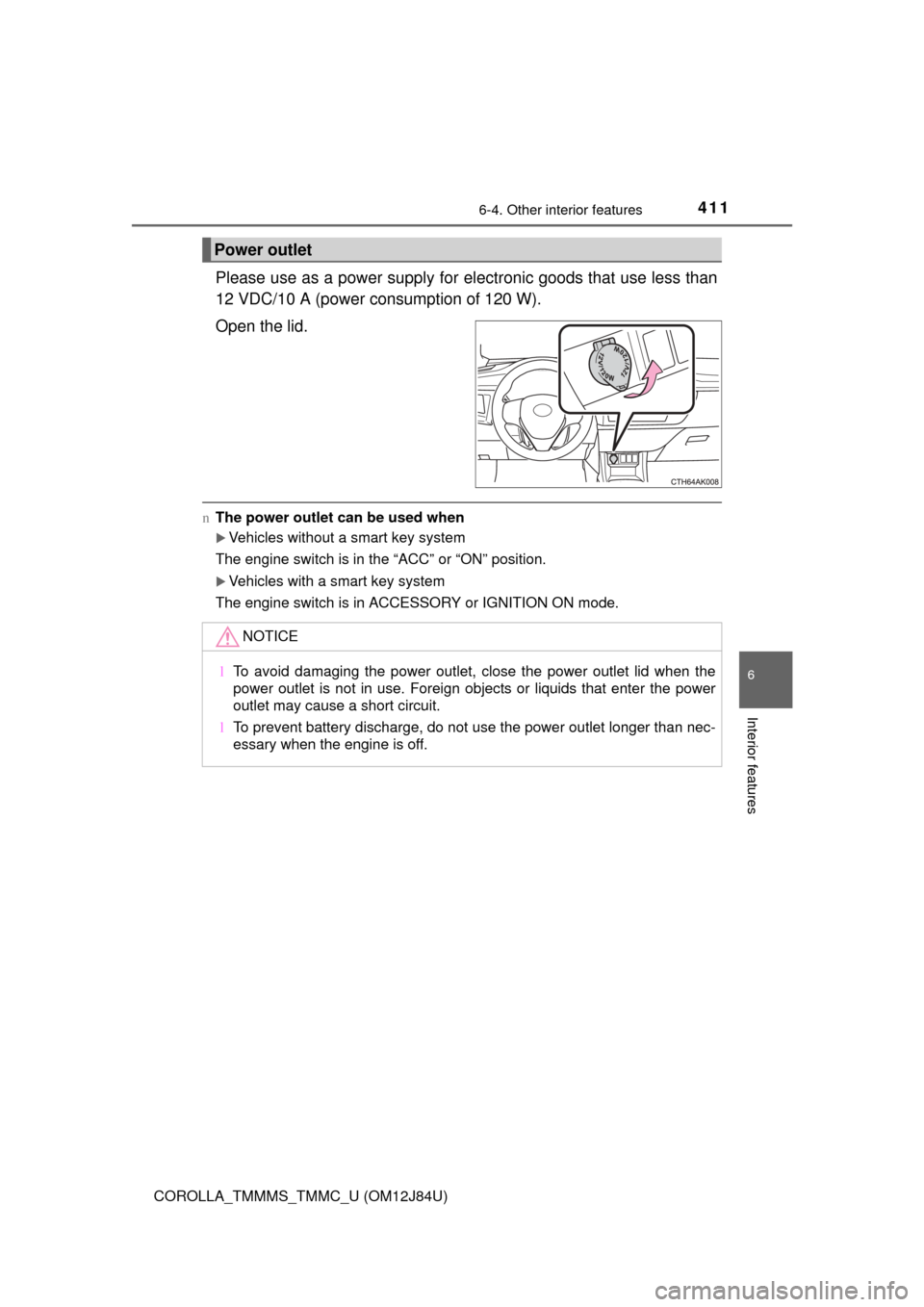
Please use as a power supply for electronic goods that use less than
12 VDC/10 A (power consumption of 120 W).
Open the lid.
n The power outlet can be used when
Vehicles without a smart key system
The engine switch is in the “ACC” or “ON” position.
Vehicles with a smart key system
The engine switch is in ACCESSORY or IGNITION ON mode.
Power outlet
NOTICE
l To avoid damaging the power outlet, close the power outlet lid when the
power outlet is not in use. Foreign objects or liquids that enter the power
outlet may cause a short circuit.
l To prevent battery discharge, do not use the power outlet longer than nec-
essary when the engine is off.
Page 417 of 620
4176-4. Other interior features
6
Interior features
COROLLA_TMMMS_TMMC_U (OM12J84U)
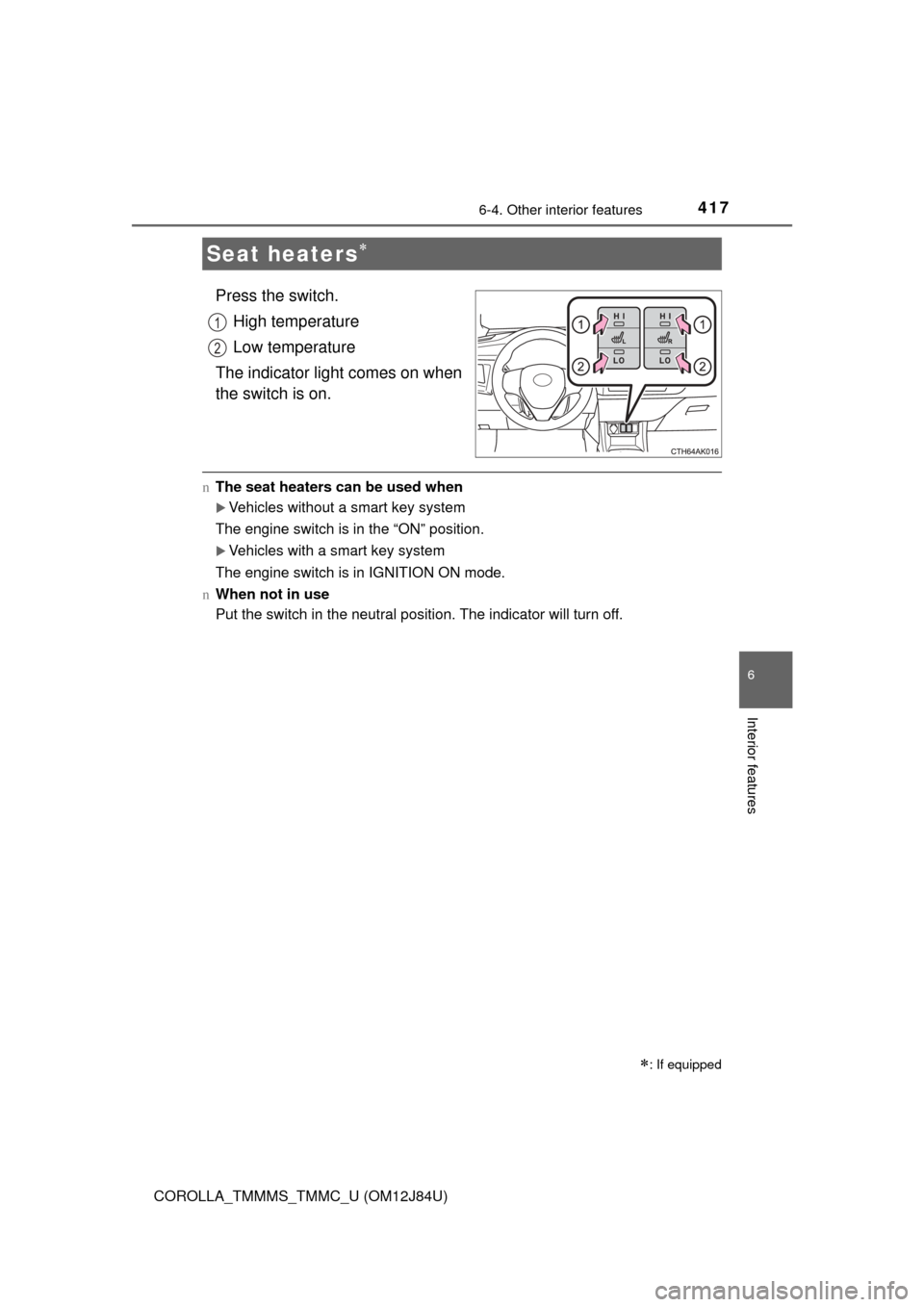
Press the switch.High temperature
Low temperature
The indicator light comes on when
the switch is on.
n The seat heaters can be used when
Vehicles without a smart key system
The engine switch is in the “ON” position.
Vehicles with a smart key system
The engine switch is in IGNITION ON mode.
n When not in use
Put the switch in the neutral position. The indicator will turn off.
Seat heaters
: If equipped
1
2
Page 427 of 620

4277-2. Maintenance
7
Maintenance and care
COROLLA_TMMMS_TMMC_U (OM12J84U)
nRepair and replacement
It is recommended that genuine Toyota parts be used for repairs to ensure
performance of each system. If non-Toyota parts are used in replacement or if
a repair shop other than a Toyota dealer performs repairs, confirm the war-
ranty coverage.
n Resetting the reminder light (vehicl es with a drive monitor display) or
the message (vehicles with a multi-in formation display) indicating main-
tenance is required (U.S.A. only)
After the required maintenance is performed according to the maintenance
schedule, please reset the reminder light (vehicles with a drive monitor dis-
play) or the message (vehicles with a multi-information display).
To reset the reminder light (vehicles with a drive monitor display) or the mes-
sage (vehicles with a multi-information display), follow the procedure
described below:
Vehicles without a smart key system: Turn the engine switch to the “LOCK”
position with the trip meter A reading shown. ( P. 77, 82)
Vehicles with a smart key system: Turn the engine switch off with the trip
meter A reading shown. ( P. 77, 82)
Vehicles without a smart key system:
While pressing the “DISP” switch
*1 ( P. 77) or display change button*2
(P. 82), turn the engine switch to the “ON” position (do not start the
engine because reset mode will be canceled).
Vehicles with a smart key system:
While pressing the “DISP” switch
*1 ( P. 77) or display change button*2
(P. 82), turn the engine switch to the IGNITION ON mode (do not start the
engine because otherwise the reset mode will be canceled).
*1: Vehicles with a drive monitor display
*2: Vehicles with a multi-information display
Continue to press and hold the button until the trip meter displays “000000”.
n Allow inspection and repairs to be performed by a Toyota dealer
lToyota technicians are well-trained specialists and are kept up to date with
the latest service information. They are well informed about the operations
of all systems on your vehicle.
l Keep a copy of the repair order. It proves that the maintenance that has
been performed is under warranty cove rage. If any problem should arise
while your vehicle is under warranty, your Toyota dealer will promptly take
care of it.
1
2
3