Page 145 of 620

145
4Driving
COROLLA_TMMMS_TMMC_U (OM12J84U)4-1. Before driving
Driving the vehicle ............. 146
Cargo and luggage ........... 157
Vehicle load limits ............. 160
Trailer towing..................... 161
Dinghy towing (except vehicles with a manual
transmission)................... 162
Dinghy towing (vehicles with a manual
transmission)................... 163
4-2. Driving procedures Engine (ignition) switch (vehicles without a
smart key system) ........... 165
Engine (ignition) switch (vehicles with a smart
key system) ..................... 168
Automatic transmission ..... 176
Continuously variable transmission
(vehicles without paddle
shift switches) ................. 178
Continuously variable transmission
(vehicles with paddle
shift switches) ................. 180
Manual transmission ......... 184
Turn signal lever................ 186
Parking brake .................... 187 4-3. Operating the lights and
wipers
Headlight switch ................ 188
Fog light switch ................. 195
Windshield wipers and washer ............................ 196
4-4. Refueling Opening the fuel tank cap .................................. 198
4-5. Using the driving support systems
Cruise control .................... 201
Rear view monitor system ............................ 205
Driving assist systems ...... 215
4-6. Driving tips Winter driving tips ............. 221
Page 186 of 620
1864-2. Driving procedures
COROLLA_TMMMS_TMMC_U (OM12J84U)
Right turn
Lane change to the right (move
the lever partway and release
it)
The right hand signals will flash 3
times.
Lane change to the left (move
the lever partway and release
it)
The left hand signals will flash 3
times.
Left turn
nTurn signals can be operated when
Vehicles without a smart key system
The engine switch is in the “ON” position.
Vehicles with a smart key system
The engine switch is in IGNITION ON mode.
n If the indicator flashes faster than usual
Check that a light bulb in the front or rear turn signal lights has not burned
out.
n Customization
The number of times the turn signals flash during a lane change can be
changed. (Customizable feature P. 576)
Turn signal lever
Operating instructions
1
2
3
4
Page 188 of 620
188
COROLLA_TMMMS_TMMC_U (OM12J84U)
4-3. Operating the lights and wipers
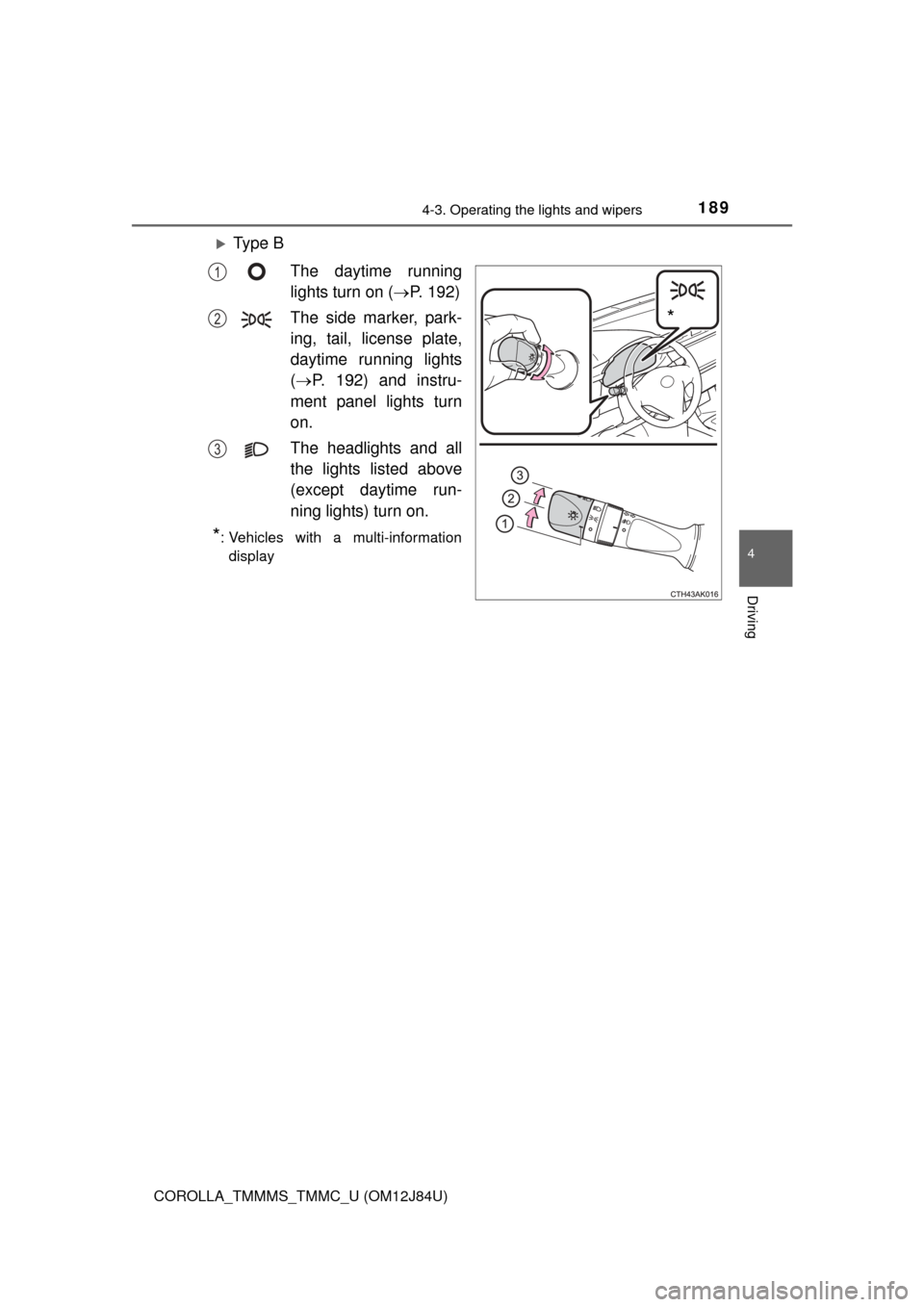
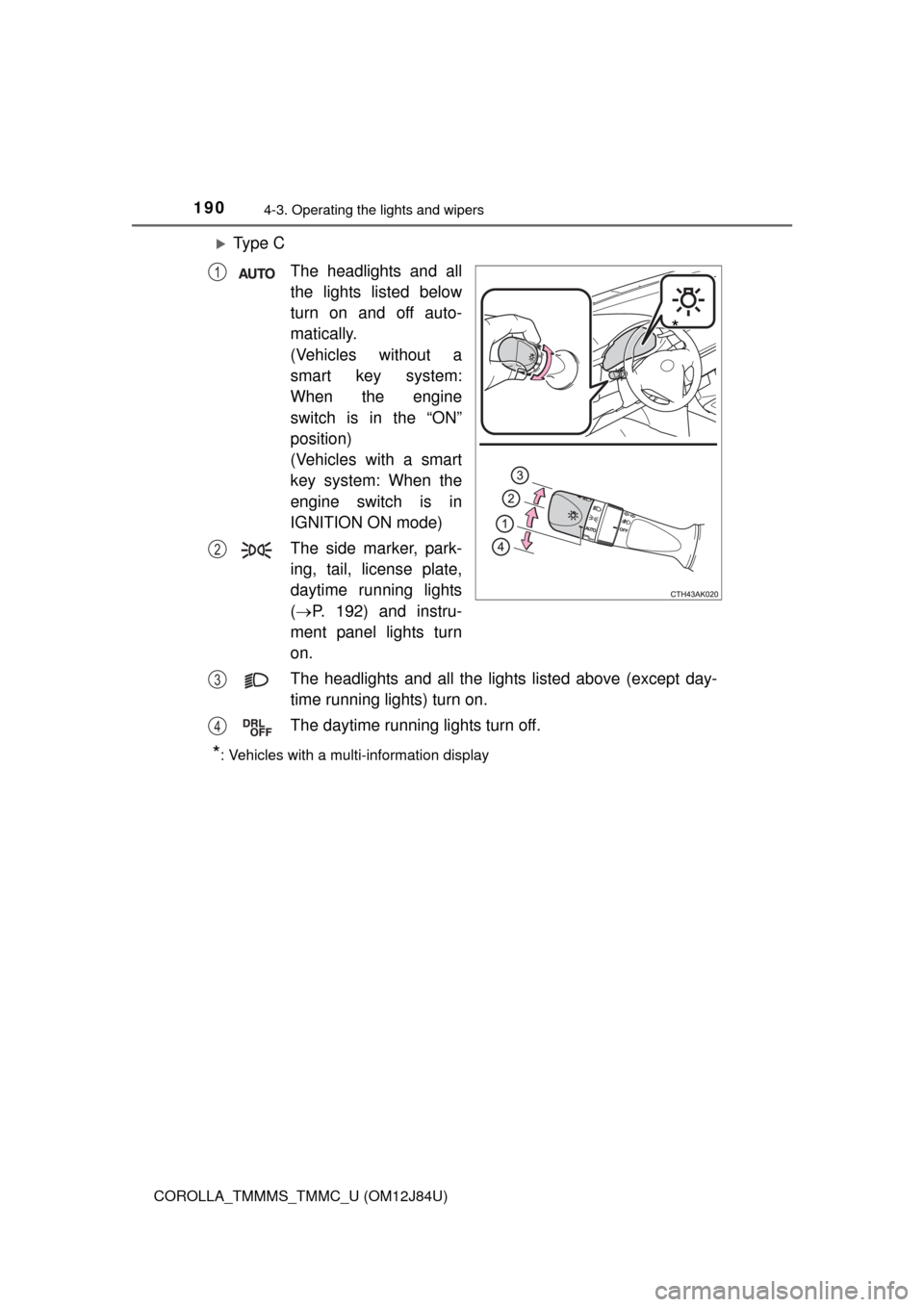
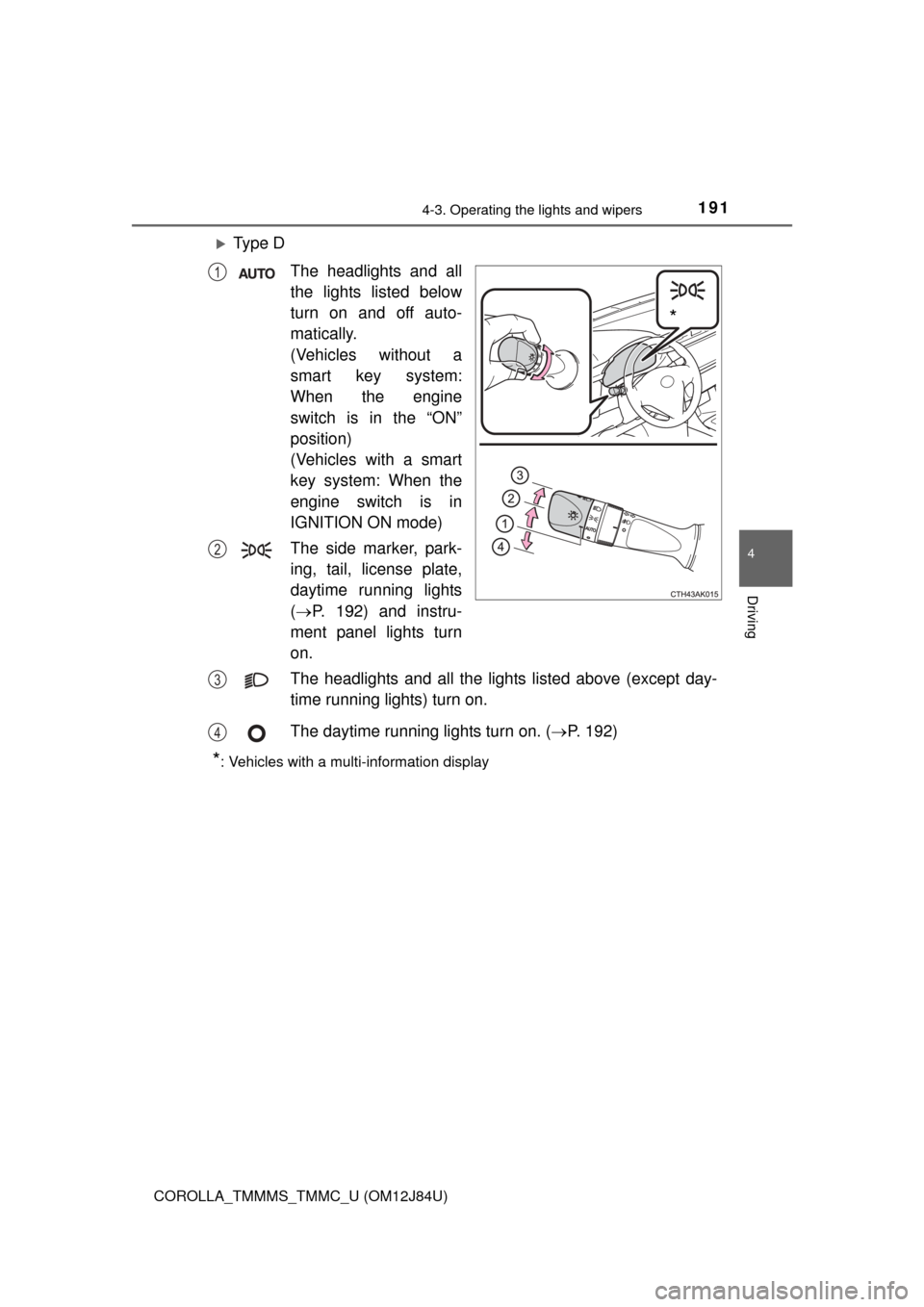
Turning the end of the lever turns on the lights as follows:
Ty p e AThe daytime running
lights turn on.
( P. 192)
The side marker, park-
ing, tail, license plate,
daytime running lights
( P. 192) and instru-
ment panel lights turn
on.
The headlights and all
the lights listed above
(except daytime run-
ning lights) turn on.
The daytime running
lights turn off.
*: Vehicles with a multi-information display
Headlight switch
The headlights can be operated manually or automatically.
Operating instructions
*
1
2
3
4
Page 189 of 620
1894-3. Operating the lights and wipers
4
Driving
COROLLA_TMMMS_TMMC_U (OM12J84U)
Ty p e BThe daytime running
lights turn on ( P. 192)
The side marker, park-
ing, tail, license plate,
daytime running lights
( P. 192) and instru-
ment panel lights turn
on.
The headlights and all
the lights listed above
(except daytime run-
ning lights) turn on.
*: Vehicles with a multi-information display
*
1
2
3
Page 190 of 620
1904-3. Operating the lights and wipers
COROLLA_TMMMS_TMMC_U (OM12J84U)
Ty p e CThe headlights and all
the lights listed below
turn on and off auto-
matically.
(Vehicles without a
smart key system:
When the engine
switch is in the “ON”
position)
(Vehicles with a smart
key system: When the
engine switch is in
IGNITION ON mode)
The side marker, park-
ing, tail, license plate,
daytime running lights
( P. 192) and instru-
ment panel lights turn
on.
The headlights and all the lights listed above (except day-
time running lights) turn on.
The daytime running lights turn off.
*: Vehicles with a multi-information display
*
1
2
3
4
Page 191 of 620
1914-3. Operating the lights and wipers
4
Driving
COROLLA_TMMMS_TMMC_U (OM12J84U)
Ty p e DThe headlights and all
the lights listed below
turn on and off auto-
matically.
(Vehicles without a
smart key system:
When the engine
switch is in the “ON”
position)
(Vehicles with a smart
key system: When the
engine switch is in
IGNITION ON mode)
The side marker, park-
ing, tail, license plate,
daytime running lights
( P. 192) and instru-
ment panel lights turn
on.
The headlights and all the lights listed above (except day-
time running lights) turn on.
The daytime running lights turn on. ( P. 192)
*: Vehicles with a multi-information display
*
1
2
3
4
Page 192 of 620

1924-3. Operating the lights and wipers
COROLLA_TMMMS_TMMC_U (OM12J84U)
With the headlights on, push
the lever away from you to turn
on the high beams.
Pull the lever toward you to the
center position to turn the high
beams off.
Pull the lever toward you and
release it to flash the high
beams once.
You can flash the high beams with the headlights on or off.
nDaytime running light system
lTo make your vehicle more visible to other drivers during daytime driving,
the daytime running lights turn on automatically whenever the engine is
started and the parking brake is released with the headlight switch in the
“DRL”, “ ”, “ ”, or “AUTO” position. (Illuminate darker than head-
light low beams.) Daytime running lights are not designed for use at night.
For the U.S.A.: Daytime running lights can be turned off by operating the
switch.
l Compared to turning on the headlights, the daytime running light system
offers greater durability and consumes less electricity, so it can help improve
fuel economy.
n Headlight control sensor (if equipped)
Turning on the high beam headlights
1
2
The sensor may not function properly if an
object is placed on the sensor, or anything
that blocks the sensor is affixed to the
windshield.
Doing so interferes with the sensor
detecting the level of ambient light and
may cause the automatic headlight sys-
tem to malfunction.
Page 193 of 620
1934-3. Operating the lights and wipers
4
Driving
COROLLA_TMMMS_TMMC_U (OM12J84U)n
Automatic light off system
Vehicles without a smart key system
l When the headlights are on: The headlights and tail lights turn off 30 sec-
onds after the engine switch is turned to the “ACC” or “LOCK” position and a
door is opened and closed. (Vehicles with a wireless remote control: The
lights turn off immediately if on the key is pressed after all the doors
are locked.)
l When only the tail lights are on: The tail lights turn off automatically if the
engine switch is turned to the “ACC” or “LOCK” position and the driver’s
door is opened.
To turn the lights on again, turn the engine switch to “ON” position, or turn the
light switch off once and then back to or .
If any of the doors or trunk lid is kept open, the lights automatically turn off
after 20 minutes.
Vehicles with a smart key system
l When the headlights are on: The headlights and tail lights turn off 30 sec-
onds after the engine switch is turned to ACCESSORY mode or turned off
and a door is opened and closed. (The lights turn off immediately if on
the key is pressed after all the doors are locked.)
l When only the tail lights are on: The tail lights turn off automatically if the
engine switch is turned to ACCESSORY mode or turned off and the driver’s
door is opened.
To turn the lights on again, turn the engine switch to IGNITION ON mode, or
turn the light switch off once and then back to or .
If any of the doors or trunk lid is kept open, the lights automatically turn off
after 20 minutes.
n Light reminder buzzer
Vehicles without a smart key system
A buzzer sounds when the engine switch is turned to “LOCK” position and the
driver's door is opened while the lights are turned on.
Vehicles with a smart key system
A buzzer sounds when the engine switch is turned off or turned to ACCES-
SORY mode and the driver's door is opened while the lights are turned on.