Page 14 of 568

14
CAMRY_U (OM33D37U)
Pictorial index
Pictorial index
■
Exterior
Doors . . . . . . . . . . . . . . . . . . . . . . . . . . . . . . . . . . . . . . . . . . . . P. 99
Locking/unlocking . . . . . . . . . . . . . . . . . . . . . . . . . . . . . . . . . . . P. 99
Opening/closing the door windows . . . . . . . . . . . . . . . . . . . . . P. 131
Locking/unlocking by using the mechanical key
* . . . . . . . . . . P. 485
Warning message . . . . . . . . . . . . . . . . . . . . . . . . . . . . . . . . . . P. 455
Trunk . . . . . . . . . . . . . . . . . . . . . . . . . . . . . . . . . . . . . . . . . . . . P. 107
Opening from inside. . . . . . . . . . . . . . . . . . . . . . . . . . . . . . . . . P. 107
Opening from outside . . . . . . . . . . . . . . . . . . . . . . . . . . . . . . . P. 107
Warning message . . . . . . . . . . . . . . . . . . . . . . . . . . . . . . . . . . P. 455
Outside rear view mirrors . . . . . . . . . . . . . . . . . . . . . . . . . . . P. 129
Adjusting the mirror angle . . . . . . . . . . . . . . . . . . . . . . . . . . . . P. 129
Folding the mirrors . . . . . . . . . . . . . . . . . . . . . . . . . . . . . . . . . . P. 129
Defogging the mirrors . . . . . . . . . . . . . . . . . . . . . . . . . . . P. 327, 333
1
2
3
Page 121 of 568
1213-3. Adjusting the seats
3
Operation of each component
CAMRY_U (OM33D37U)
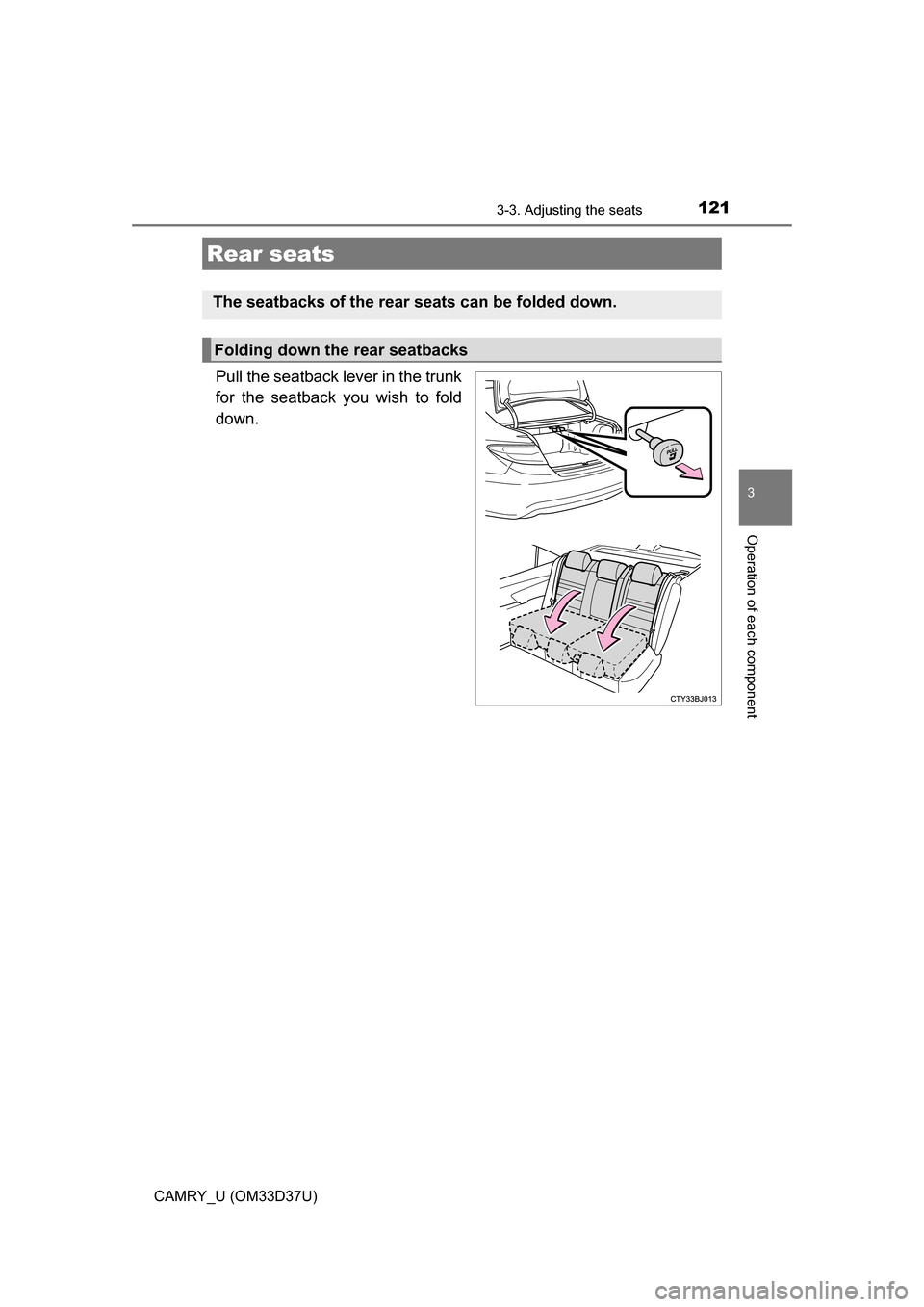
Pull the seatback lever in the trunk
for the seatback you wish to fold
down.
Rear seats
The seatbacks of the rear seats can be folded down.
Folding down the rear seatbacks
Page 122 of 568

1223-3. Adjusting the seats
CAMRY_U (OM33D37U)
WARNING
■When folding the rear seatbacks down
Observe the following precautions. Failure to do so may result in death or
serious injury.
● Do not fold the seatbacks down while driving.
● Stop the vehicle on level ground, set the parking brake and shift the shift
lever to P.
● Do not allow anyone to sit on a folded seatback or in the trunk while driv-
ing.
● Do not allow children to enter the trunk.
■ When returning the seat to its original position
● Ensure that the seat belt does not get caught between or behind the seats.
● If the seat belt has been released from its guide, pass the seat belt through
its guide. ( P. 30)
■ Seat adjustment
Be careful not to get hands or feet pinched between the rear console box
and the rear seat when folding down the rear seatback.
■ After returning the seatback to the upright position
Observe the following precautions. Failure to do so may result in death or
serious injury.
● Make sure the seatback is securely locked by pressing it forward and rear-
ward on the top.
● Check that the seat belts are not twisted or caught in the seatback.
● Make sure that the seat belt is passing through its guide.
NOTICE
■ When the left seatback is folded down
Make sure the luggage loaded in the enlarged trunk will not damage the
webbing of the rear center seat belt.
Page 129 of 568
1293-4. Adjusting the steering wheel and mirrors
3
Operation of each component
CAMRY_U (OM33D37U)
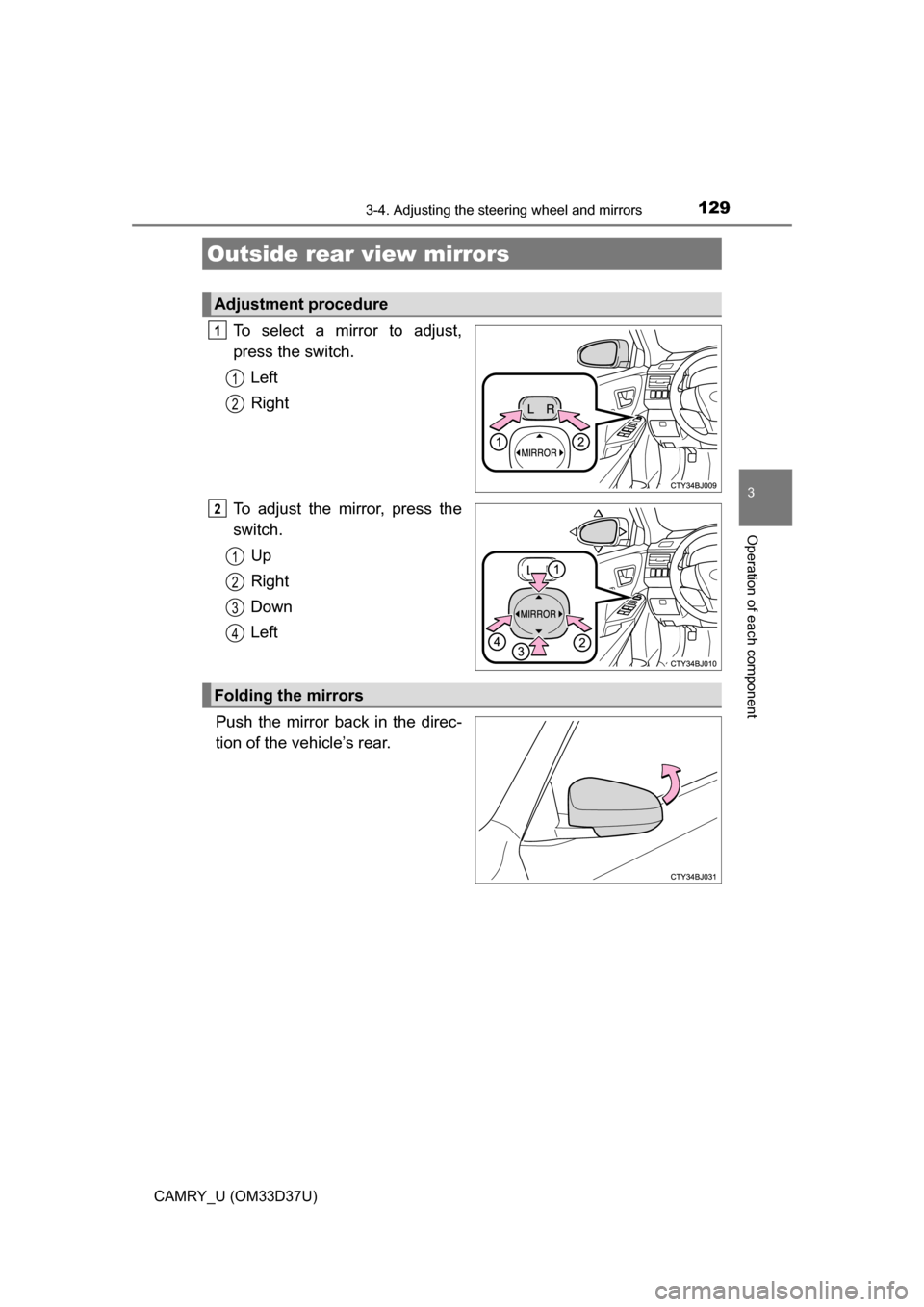
To select a mirror to adjust,
press the switch.Left
Right
To adjust the mirror, press the
switch. Up
Right
Down
Left
Push the mirror back in the direc-
tion of the vehicle’s rear.
Outside rear view mirrors
Adjustment procedure
1
1
2
2
1
2
3
4
Folding the mirrors
Page 130 of 568

1303-4. Adjusting the steering wheel and mirrors
CAMRY_U (OM33D37U)
■Mirror angle can be adjusted when
Vehicles without a smart key system
The engine switch is in the “ACC” or “ON” position.
Vehicles with a smart key system
The engine switch is in ACCESSORY or IGNITION ON mode.
■ When the mirrors are fogged up
The outside rear view mirrors can be cleared using the mirror defoggers. Turn
on the rear window defogger to turn on the outside rear view mirror defog-
gers. ( P. 327, 333)
WARNING
■ Important points while driving
Observe the following precautions while driving.
Failure to do so may result in loss of control of the vehicle and cause an
accident, resulting in death or serious injury.
● Do not adjust the mirrors while driving.
● Do not drive with the mirrors folded.
● Both the driver and passenger side mirrors must be extended and properly
adjusted before driving.
■ When a mirror is moving
To avoid personal injury and mirror malfunction, be careful not to get your
hand caught by the moving mirror.
■ When the mirror defoggers are operating
Do not touch the rear view mirror surfaces, as they can become very hot
and burn you.
Page 149 of 568

1494-1. Before driving
4
Driving
CAMRY_U (OM33D37U)
WARNING
■Things that must not be carried in the trunk
The following things may cause a fire if loaded in the trunk:
●Receptacles containing gasoline
●Aerosol cans
■Storage precautions
Observe the following precautions.
Failure to do so may prevent the pedals from being depressed properly,
may block the driver’s vision, or may result in items hitting the driver or
passengers, possibly causing an accident.
●Stow cargo and luggage in the trunk whenever possible.
●To prevent cargo and luggage from sliding forward during braking, do
not stack anything in the enlarged trunk. Keep cargo and luggage low,
as close to the floor as possible.
●Do not place cargo or luggage in or on the following locations.
• At the feet of the driver
• On the front passenger or rear seats (when stacking items)
• On the package tray
• On the instrument panel
• On the dashboard
• Tray that has no lid
●Secure all items in the occupant compartment.
●When you fold down the rear seats, long items should not be placed
directly behind the front seats.
●Never allow anyone to ride in the enlarged trunk. It is not designed for
passengers. They should ride in their seats with their seat belts prop-
erly fastened.
■Capacity and distribution
●Do not exceed the maximum axle weight rating or the total vehicle
weight rating.
●Even if the total load of occupant's weight and the cargo load is less
than the total load capacity, do not apply the load unevenly. Improper
loading may cause deterioration of steering or braking control which
may cause death or serious injury.
Page 257 of 568
2575-3. Using the Multimedia system
5
Audio system
CAMRY_U (OM33D37U)■
Selecting a track/file/song
from the track/file/song list
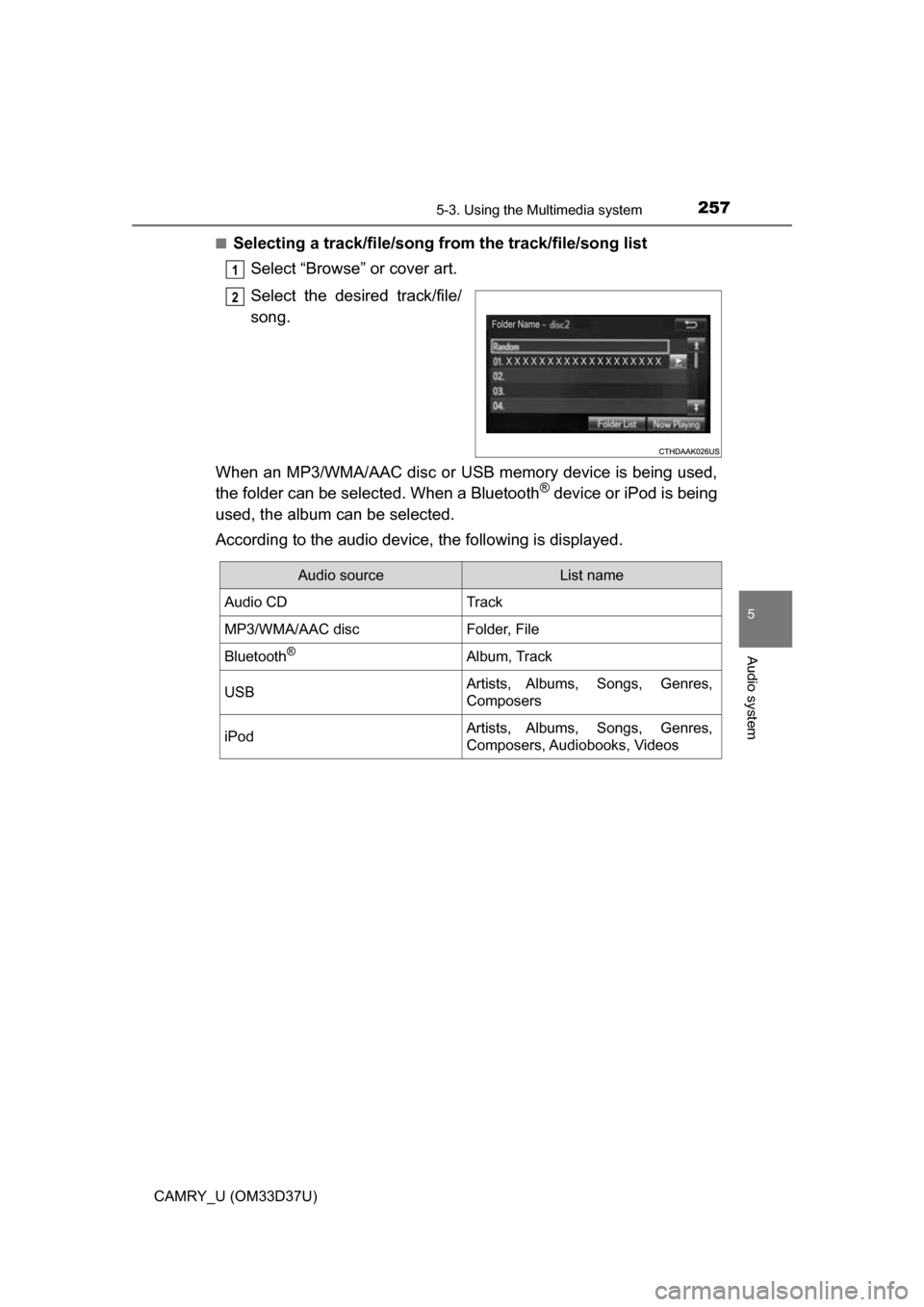
Select “Browse” or cover art.
Select the desired track/file/
song.
When an MP3/WMA/AAC disc or USB memory device is being used,
the folder can be selected. When a Bluetooth
® device or iPod is being
used, the album can be selected.
According to the audio device, the following is displayed.
1
2
Audio sourceList name
Audio CDTrack
MP3/WMA/AAC discFolder, File
Bluetooth®Album, Track
USBArtists, Albums, Songs, Genres,
Composers
iPodArtists, Albums, Songs, Genres,
Composers, Audiobooks, Videos
Page 261 of 568
261
5
Audio system
CAMRY_U (OM33D37U)
5-5.Playing an audio CD and MP3/WMA/AAC discs
Pressing the “AUDIO” button displays the audio control screen from
any screens of the selected source.
Audio source selection screen
appears
Displaying the track/file list
MP3/WMA/AAC
Displaying the folder list
Random playback (P. 247)
Repeat play (
P. 247)
Pause Select to resume play
Setting the sound (
P. 258)
CD player operation
Insert disc or select “CD” on the audio source selection screen
with a disc inserted to begin listening to a CD.
Audio control screen
1
2
3
4
5
6