Page 343 of 568
3436-3. Using the storage features
6
Interior features
CAMRY_U (OM33D37U)
Open (press the button)
Lock with the master key (vehi-
cles without a smart key sys-
tem) or mechanical key
(vehicles with a smart key sys-
tem)
Unlock with the master key
(vehicles without a smart key
system) or mechanical key
(vehicles with a smart key sys-
tem)
Lift the lid while pulling up the
lever to release the lock.
Glove box
1
2
3
Console box
● When using the console box lid as an
armrest, slide the console box lid for-
ward as needed. Slide the lid forward
while pulling up the lever.
● The lid can also be opened from the for-
wardmost position.
Page 345 of 568
3456-3. Using the storage features
6
Interior features
CAMRY_U (OM33D37U)
NOTICE
Put the cap on before stowing a bottle. Do not place open bottles in the bot-
tle holders, or glass or paper cups containing liquid. The contents may spill
and glass cups may break.
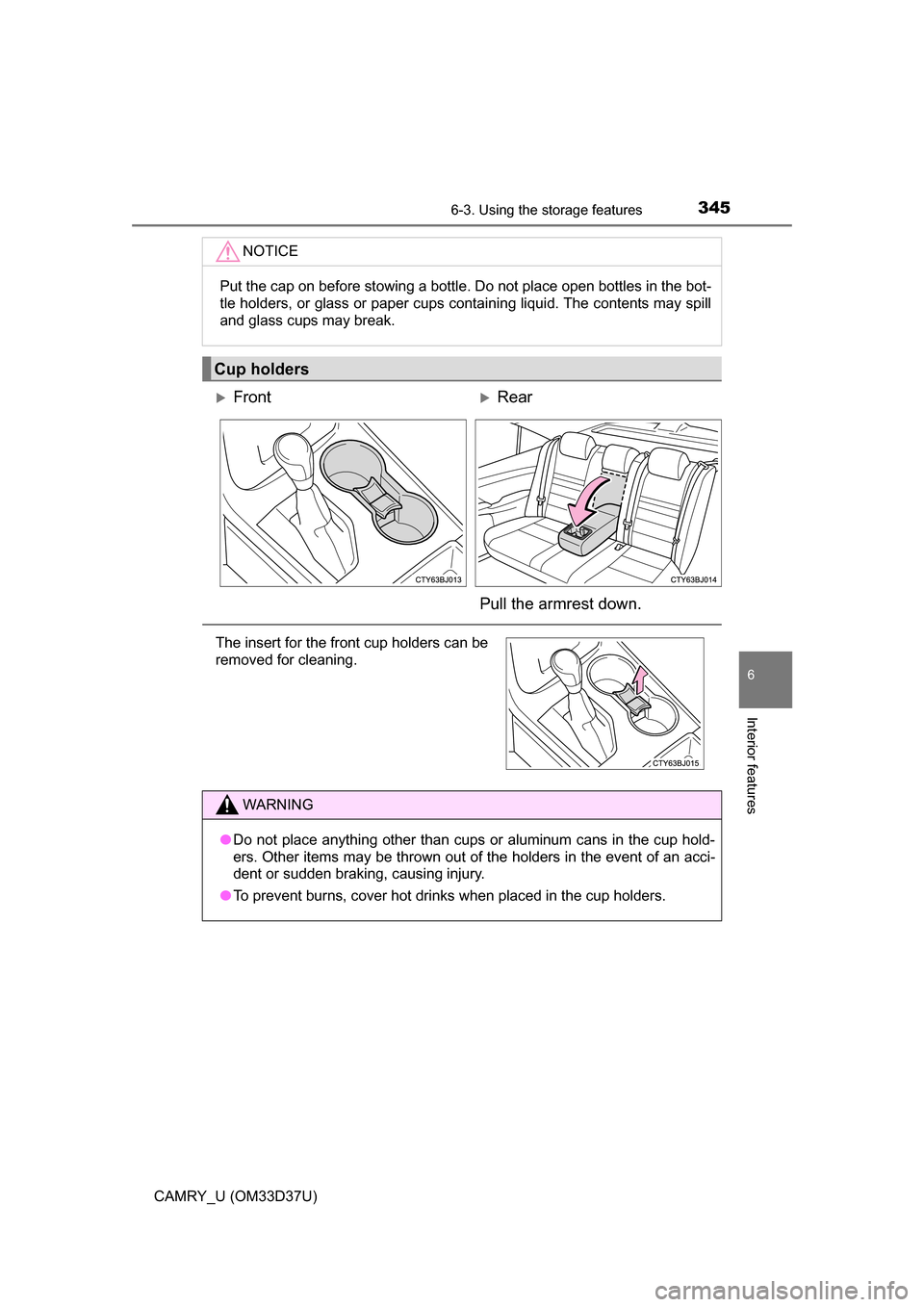
Cup holders
FrontRear
Pull the armrest down.
The insert for the front cup holders can be
removed for cleaning.
WARNING
● Do not place anything other than cups or aluminum cans in the cup hold-
ers. Other items may be thrown out of the holders in the event of an acci-
dent or sudden braking, causing injury.
● To prevent burns, cover hot drinks when placed in the cup holders.
Page 347 of 568
3476-3. Using the storage features
6
Interior features
CAMRY_U (OM33D37U)■
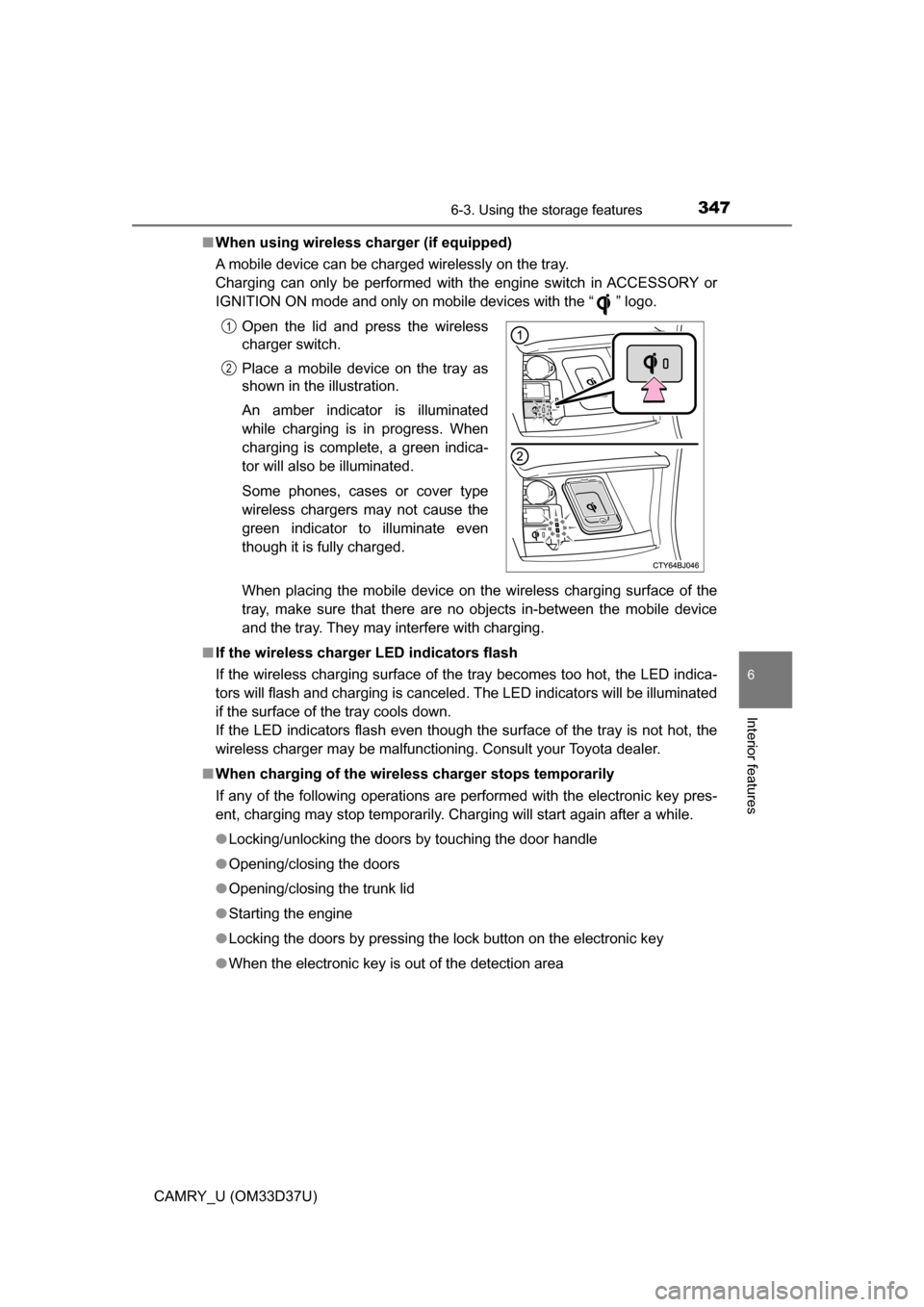
When using wireless charger (if equipped)
A mobile device can be charged wirelessly on the tray.
Charging can only be performed with the engine switch in ACCESSORY or
IGNITION ON mode and only on mobile devices with the “ ” logo.
When placing the mobile device on the wireless charging surface of the
tray, make sure that there are no objects in-between the mobile device
and the tray. They may interfere with charging.
■ If the wireless charger LED indicators flash
If the wireless charging surface of the tray becomes too hot, the LED indica-
tors will flash and charging is canceled. The LED indicators will be illuminated
if the surface of the tray cools down.
If the LED indicators flash even though the surface of the tray is not hot, the
wireless charger may be malfunctioning. Consult your Toyota dealer.
■ When charging of the wirel ess charger stops temporarily
If any of the following operations are performed with the electronic key pres-
ent, charging may stop temporarily. Charging will start again after a while.
● Locking/unlocking the doors by touching the door handle
● Opening/closing the doors
● Opening/closing the trunk lid
● Starting the engine
● Locking the doors by pressing the lock button on the electronic key
● When the electronic key is out of the detection areaOpen the lid and press the wireless
charger switch.
Place a mobile device on the tray as
shown in the illustration.
An amber indicator is illuminated
while charging is in progress. When
charging is complete, a green indica-
tor will also be illuminated.
Some phones, cases or cover type
wireless chargers may not cause the
green indicator to illuminate even
though it is fully charged.
1
2
Page 349 of 568
3496-3. Using the storage features
6
Interior features
CAMRY_U (OM33D37U)
WARNING
●Do not attempt to charge portable devices which are not compatible with
the Qi wireless charging standard.
● Do not bring magnetized objects close to the wireless charger.
● Do not perform charging if the charging area is dusty.
● Keep foreign objects away from the wireless charger, and do not spill liquid
on the wireless charger.
● Do not cover the wireless charger with a cloth or other object while
charging.
● Do not attach metallic objects, such as aluminum stickers, to the charging
area.
NOTICE
■ Conditions in which the wireless ch arger may not operate correctly
(vehicles with a wireless charger)
In the following situations, the wireless charger may not operate correctly:
● When a portable device is fully charged
● When there is a foreign object between the charging area and portable
device
● When a portable device becomes hot while charging
● When a portable device is placed on the wireless area with its charging
surface facing up
● When a portable device is not centered on the charging area
● When the vehicle is near a TV tower, electric power plant, gas station,
radio station, large display, airport or other facility that generates strong
radio waves or electrical noise
● When the portable device is in contact with, or is covered by any of the fol-
lowing metallic objects
• Cards to which aluminum foil is attached
• Cigarette boxes that have aluminum foil inside
• Metallic wallets or bags
• Coins
• Metal hand warmers
• Media such as CDs and DVDs
● When wireless keys (that emit radio waves) other than those of your vehi-
cle are being used nearby.
If in situations other than above the wireless charger does not operate prop-
erly or the operation indicator light is blinking, the wireless charger may be
malfunctioning. Contact your Toyota dealer.
Page 351 of 568
3516-3. Using the storage features
6
Interior features
CAMRY_U (OM33D37U)
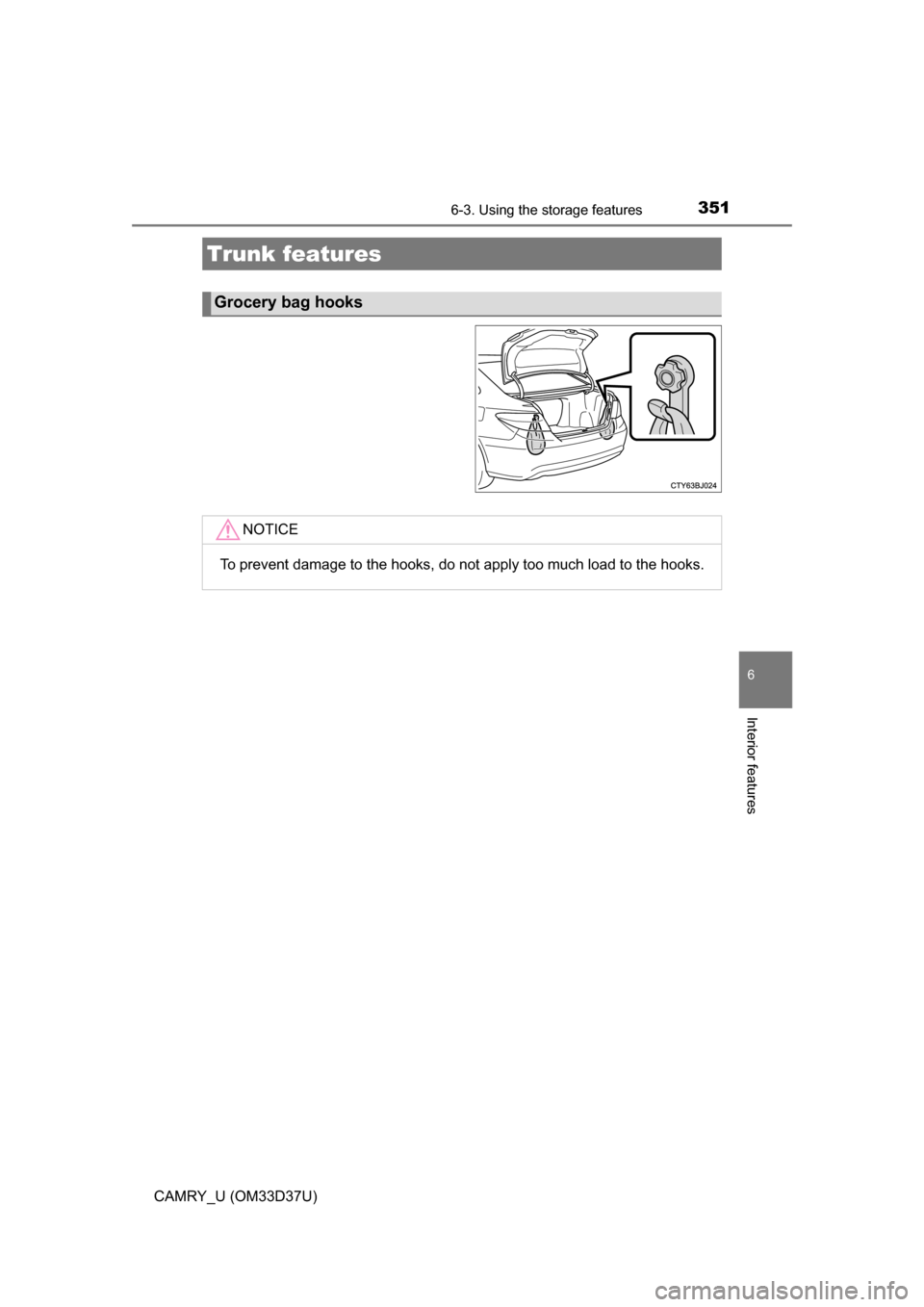
Trunk features
Grocery bag hooks
NOTICE
To prevent damage to the hooks, do not apply too much load to the hooks.
Page 352 of 568
352
CAMRY_U (OM33D37U)
6-4. Other interior features
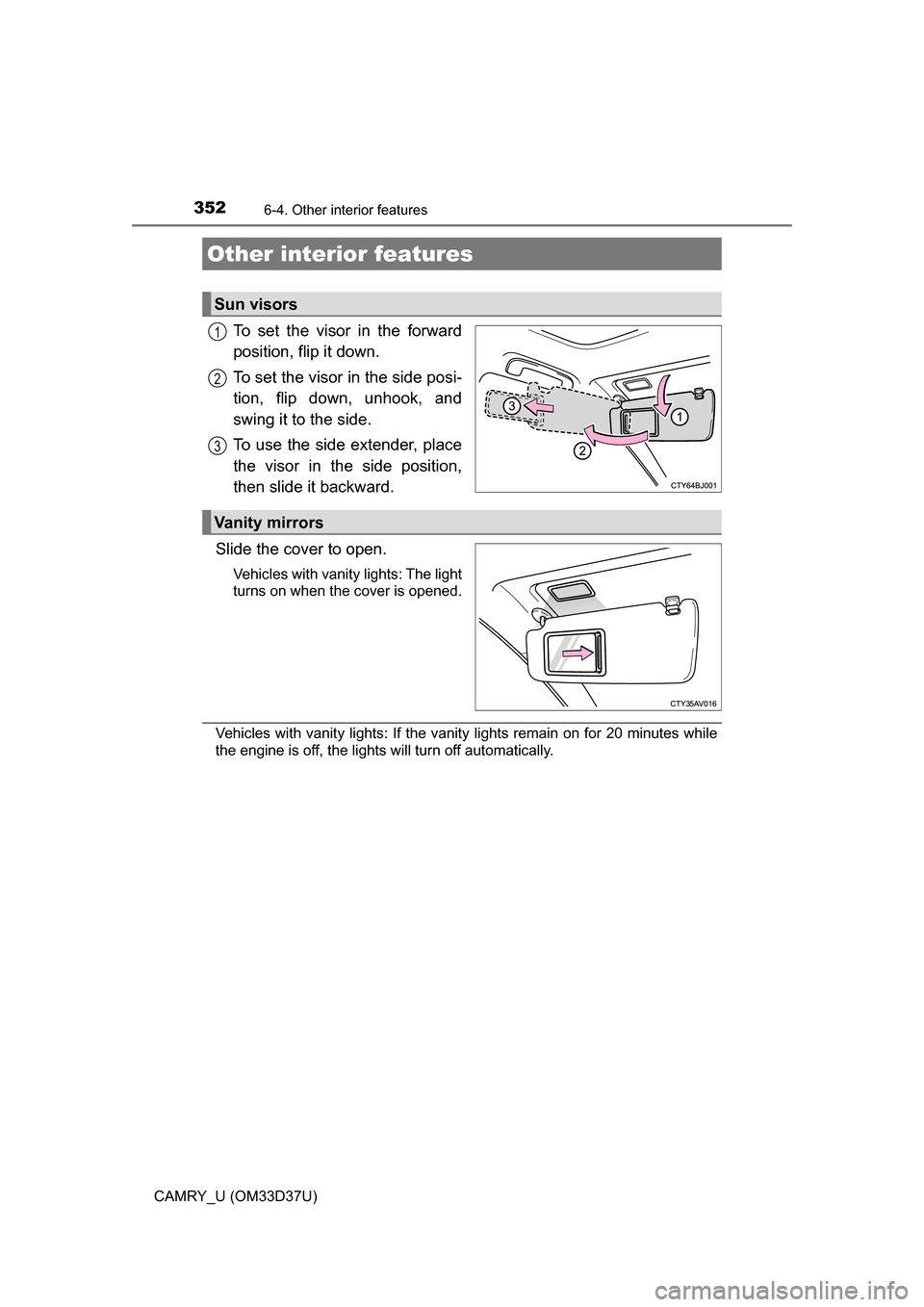
To set the visor in the forward
position, flip it down.
To set the visor in the side posi-
tion, flip down, unhook, and
swing it to the side.
To use the side extender, place
the visor in the side position,
then slide it backward.
Slide the cover to open.
Vehicles with vanity lights: The light
turns on when the cover is opened.
Vehicles with vanity lights: If the vanity lights remain on for 20 minutes while
the engine is off, the lights will turn off automatically.
Other interior features
Sun visors
1
2
3
Vanity mirrors
Page 353 of 568
3536-4. Other interior features
6
Interior features
CAMRY_U (OM33D37U)
The clock on the Entune Audio can be adjusted by the following pro-
cedure.
For vehicles with a navigation system or Entune Audio Plus, refer to
the “NAVIGATION AND MULTIMEDIA SYSTEM OWNER’S MAN-
UAL”.
Press the “SETUP” button and select “General” and then select
“Clock”.
Adjust hour/minute
Switch AM/PM
Rounds to the nearest hour
*
Displays in the 24-hour/12-hour
format
*e.g.: 1:00 to 1:29 1:00
1:30 to 2:00
2:00
● Vehicles without a smart key system:
The clock is displayed when the engine switch is in the “ACC” or “ON” posi-
tion.
Vehicles with a smart key system:
The clock is displayed when the engine switch is in ACCESSORY or IGNI-
TION ON mode.
● When disconnecting and reconnecting battery terminals, the clock will auto-
matically be set to --:--.
Clock
1
2
3
4
Page 354 of 568
3546-4. Other interior features
CAMRY_U (OM33D37U)
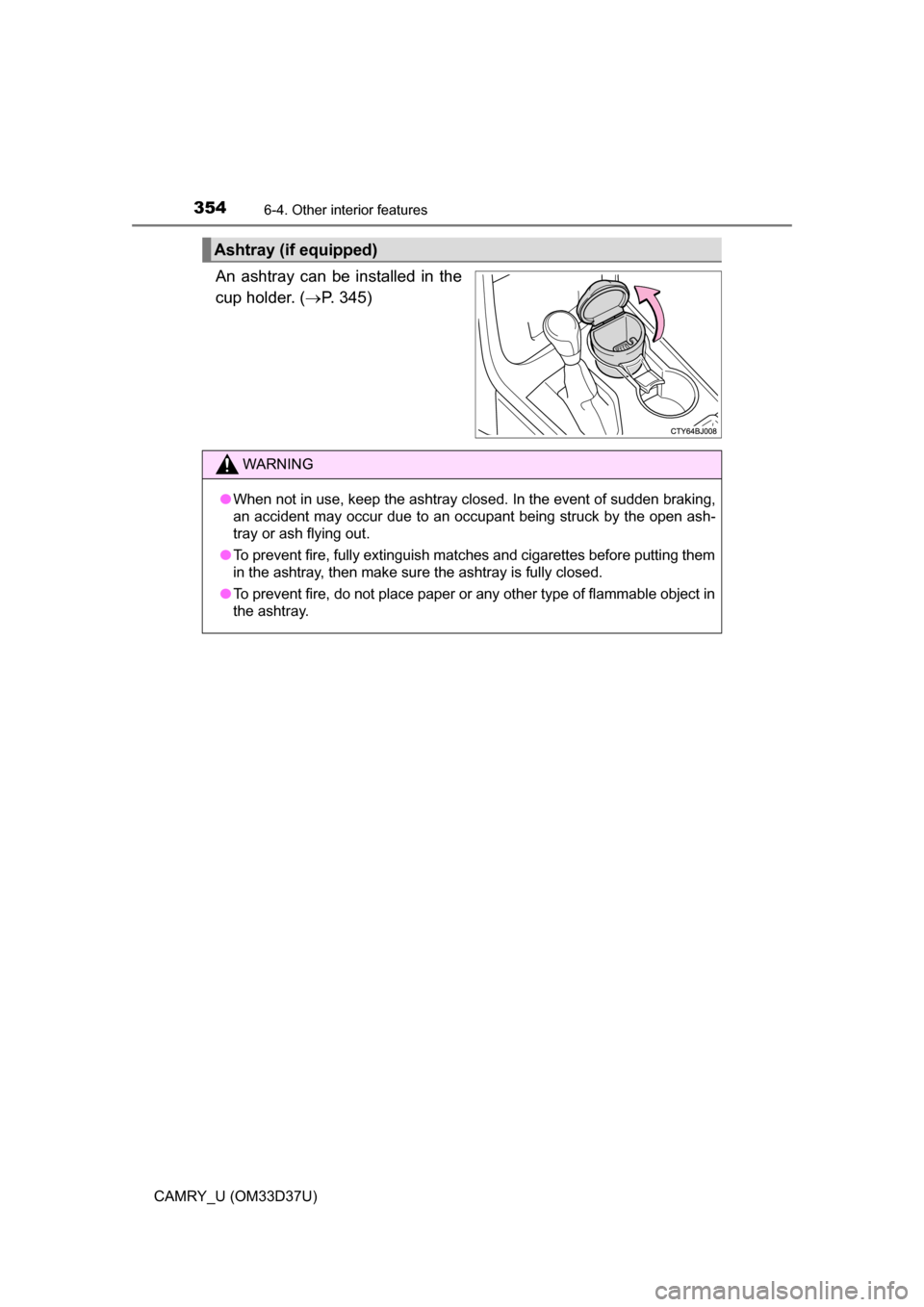
An ashtray can be installed in the
cup holder. (P. 345)
Ashtray (if equipped)
WARNING
●When not in use, keep the ashtray closed. In the event of sudden braking,
an accident may occur due to an occupant being struck by the open ash-
tray or ash flying out.
● To prevent fire, fully extinguish matches and cigarettes before putting them
in the ashtray, then make sure the ashtray is fully closed.
● To prevent fire, do not place paper or any other type of flammable object in
the ashtray.