Page 83 of 568
832. Instrument cluster
2
Instrument cluster
CAMRY_U (OM33D37U)
●Average fuel economy*1, 2/Tank average fuel economy*1/Trip aver-
age fuel economy
*1
Displays the average fuel consum ption since the function was
reset, the vehicle was refueled, an d the engine was started, respec-
tively
Use the displayed average fuel consumption as a reference.
● Current fuel economy*1
Displays the current rate of fuel consumption
● Distance to empty
*1/Trip distance*1/Distance*1, 2
Displays the estimated maximum distance that can be driven with
the quantity of fuel remaining, t he distance driven after the engine
was started and the distance since the function was reset, respec-
tively.
• This distance is computed based on your average fuel consumption. As a result, the actual distance that can be driven may differ from that dis-
played.
• When only a small amount of fuel is added to the tank, the display may
not be updated.
When refueling, turn the engine switch off. If the vehicle is refueled with-
out turning the engine switch off, the display may not be updated.
● Trip elapse time*1/Elapse time*1, 2
Displays the engine was started and the elapsed time since the
function was reset, respectively
● Trip average speed
*1/Average speed*1, 2
Displays the engine was started and the average vehicle speed
since the function wa s reset, respectively
● Digital speedometer
*1
●Tire inflation pressure*3
P. 4 0 4
*1: Can be registered to Drive information 1 through 3. ( P. 84)
*2: Resetting procedures:
• Select a function to be reset using the meter control switch and then press and hold to reset.
• If there is more than one function that can be reset, check boxes will be displayed next to those functions.
*3: Vehicles with a tire inflation pressure display function
Drive information
Page 84 of 568

842. Instrument cluster
CAMRY_U (OM33D37U)■
Changing the settings
Select using the meter control switch.
Select an item and then set it with the center button.
■Customizable items
●Language
Select to change the language displayed on the multi-information
display.
● Units
Select to change the unit of measure displayed on the multi-infor-
mation display.
● Drive information 1 through 3
Select to select up to 2 items t hat will be displayed on a Drive
information screen, up to 3 Drive information screens can be set.
● Eco driving indicator light
Select to activate/deactivate th e Eco Driving Indicator Light.
(
P. 7 9 )
● Pop-up display
Select to set the following pop-up displays, which may appear in
some situations, on/off.
• Instrument panel brightness adjustment display
• Route guidance display of t he navigation system-linked sys-
tem (if equipped)
• Cruise control operation display (vehicles with dynamic radar cruise control)
• Incoming call display of the hands-free phone system
• Shift position and range display
● Accent color
Select to change the accent colors on the screen, such as the
cursor color.
● Speed limit display
*
Select to set the display of speed limit information stored in the
navigation system (if equipped) to on with the speed limit caution
indicator (yellow) enabled, on with the speed limit caution not
enabled, or off. If enabled, the sp eed limit caution indicator will
come on if the vehicle speed ex ceeds the displayed speed limit.
Settings display
1
2
Page 87 of 568
872. Instrument cluster
2
Instrument cluster
CAMRY_U (OM33D37U)
Entune Audio system or naviga-
tion system
Entune Audio system with “CAR” button
Press the “CAR” button.
If the “Past Record” screen is dis-
played, select “Trip Information”.
Entune Audio system or navigat ion system with “APPS” button
Press the “APPS” button.
Touch “Eco” on the “Apps”
screen.
If the “Past Record” screen is dis-
played, select “Trip Information”.
Fuel consumption information
Fuel consumption information ca n be displayed on the Entune
Audio system and/or th e navigation system.
CTY20BJ045
Trip information
1
2
Page 89 of 568
892. Instrument cluster
2
Instrument cluster
CAMRY_U (OM33D37U)
Entune Audio system with “CAR” button
Press the “CAR” button.
If the “Trip Information” screen is displayed, select “Past Record”.
Entune Audio system or navigat ion system with “APPS” button
Press the “APPS” button.
Touch “Eco” on the “Apps” screen.
If the “Trip Information” screen is displayed, select “Past Record”.
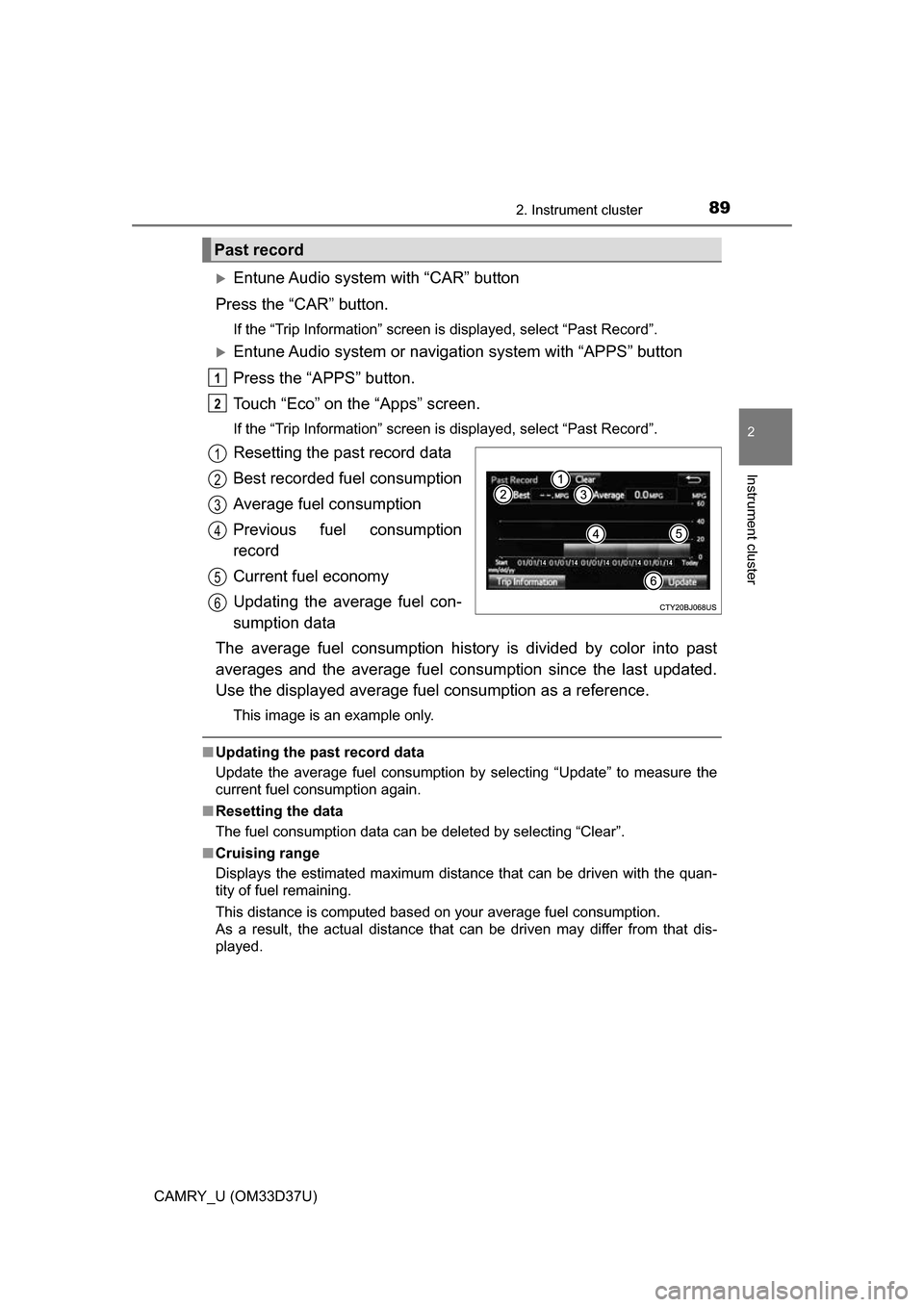
Resetting the past record data
Best recorded fuel consumption
Average fuel consumption
Previous fuel consumption
record
Current fuel economy
Updating the average fuel con-
sumption data
The average fuel consumption history is divided by color into past
averages and the average fuel cons umption since the last updated.
Use the displayed average fuel consumption as a reference.
This image is an example only.
■Updating the past record data
Update the average fuel consumption by selecting “Update” to measure the
current fuel consumption again.
■ Resetting the data
The fuel consumption data can be deleted by selecting “Clear”.
■ Cruising range
Displays the estimated maximum distance that can be driven with the quan-
tity of fuel remaining.
This distance is computed based on your average fuel consumption.
As a result, the actual distance that can be driven may differ from that dis-
played.
Past record
1
2
1
2
3
4
5
6
Page 93 of 568
933-1. Key information
3
Operation of each component
CAMRY_U (OM33D37U)
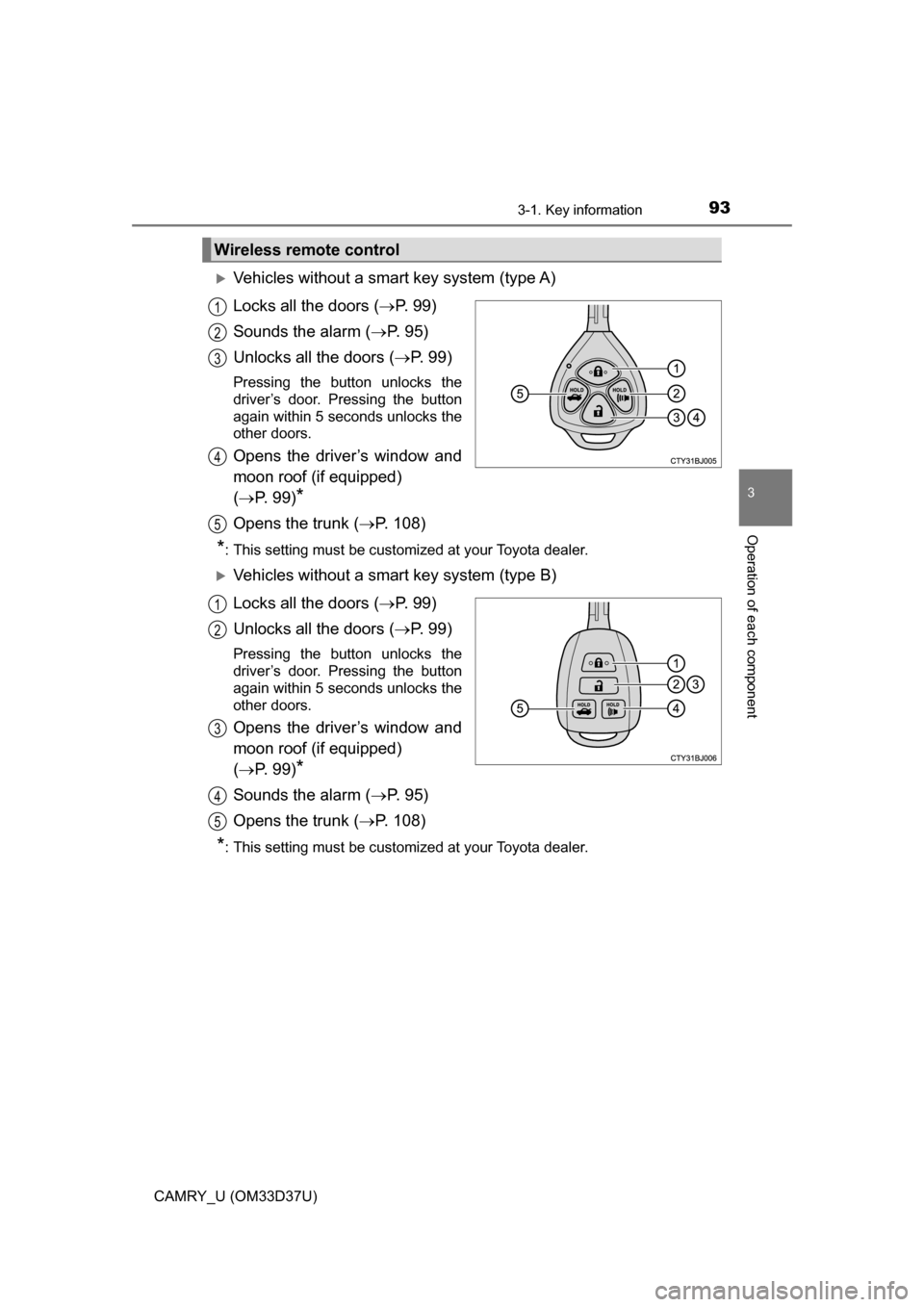
Vehicles without a smart key system (type A)
Locks all the doors (P. 9 9 )
Sounds the alarm ( P. 9 5 )
Unlocks all the doors ( P. 9 9 )
Pressing the button unlocks the
driver’s door. Pressing the button
again within 5 seconds unlocks the
other doors.
Opens the driver’s window and
moon roof (if equipped)
( P. 99)
*
Opens the trunk ( P. 108)
*: This setting must be customized at your Toyota dealer.
Vehicles without a smart key system (type B)
Locks all the doors ( P. 9 9 )
Unlocks all the doors ( P. 9 9 )
Pressing the button unlocks the
driver’s door. Pressing the button
again within 5 seconds unlocks the
other doors.
Opens the driver’s window and
moon roof (if equipped)
( P. 99)
*
Sounds the alarm ( P. 9 5 )
Opens the trunk ( P. 108)
*: This setting must be customized at your Toyota dealer.
Wireless remote control
1
2
3
4
5
1
2
3
4
5
Page 94 of 568

943-1. Key information
CAMRY_U (OM33D37U)
Vehicles with a smart key system
Locks all the doors (P. 9 9 )
Unlocks all the doors ( P. 9 9 )
Pressing the button unlocks the
driver’s door. Pressing the button
again within 5 seconds unlocks the
other doors.
Opens the driver’s window and
moon roof (if equipped)
( P. 99)
*
Opens the trunk ( P. 108)
Sounds the alarm ( P. 9 5 )
*: This setting must be customized at your Toyota dealer.
To take out the mechanical key,
push the release button and take
the key out.
The mechanical key can only be
inserted in one direction, as the
key only has grooves on one side.
If the key cannot be inserted in a
lock cylinder, turn it over and re-
attempt to insert it.
After using the mechanical key, store it in the electronic key. Carry the
mechanical key together with the electronic key. If the electronic key bat-
tery is depleted or the entry function does not operate properly, you will
need the mechanical key. ( P. 485)
1
2
3
4
Using the mechanical key (vehic les with a smart key system)
5
Page 95 of 568

953-1. Key information
3
Operation of each component
CAMRY_U (OM33D37U)
■Panic mode
Vehicles without a smart key system
Vehicles with a smart key system
■ When required to leave the vehicle’s key with a parking attendant
Lock the glove box as circumstances demand. ( P. 343)
Vehicles without a smart key system: Carry the master key for your own use
and provide the attendant with the valet key.
Vehicles with a smart key system: Remove the mechanical key for your own
use and provide the attendant with the electronic key only.
■ If you lose your keys
New genuine keys can be made by your Toyota dealer using the other key
(vehicles without a smart key system) or the other mechanical key (vehicles
with a smart key system) and the key number stamped on your key number
plate. Keep the plate in a safe place such as your wallet, not in the vehicle.
■ When riding in an aircraft
When bringing a key with wireless remote control function onto an aircraft,
make sure you do not press any button on the key while inside the aircra\
ft
cabin. If you are carrying the key in your bag etc., ensure that the buttons are
not likely to be pressed accidentally. Pressing a button may cause the key to
emit radio waves that could interfere with the operation of the aircraft. When is pressed for longer than
about one second, an alarm will sound
intermittently and the vehicle lights will
flash to deter any person from trying to
break into or damage your vehicle.
To stop the alarm, press any button on the
wireless remote control.
When is pressed for longer than
about one second, an alarm will sound
intermittently and the vehicle lights will
flash to deter any person from trying to
break into or damage your vehicle.
To stop the alarm, press any button on the
electronic key.
Page 96 of 568

963-1. Key information
CAMRY_U (OM33D37U)■
Conditions affecting operation
Vehicles without a smart key system
The wireless remote control function may not operate normally in the follow-
ing situations:
● When the wireless key battery is depleted
● Near a TV tower, electric power plant, gas station, radio station, large dis-
play, airport or other facility that generates strong radio waves or electrical
noise
● When carrying a portable radio, cellul ar phone or other wireless communi-
cation devices
● When the wireless key is in contact with, or is covered by a metallic object
● When other wireless key (that emit radio waves) is being used nearby
● If window tint with a metallic content or metallic objects are attached to the
rear window
Vehicles with a smart key system
P. 1 1 5
■ Key battery depletion
Vehicles without a smart key system
If the wireless remote control function does not operate, the battery may be
depleted. Replace the battery when necessary. ( P. 420)
Vehicles with a smart key system
● The standard battery life is 1 to 2 years.
● If the battery becomes low, an alarm will sound in the cabin when the engine
stops. ( P. 466)
● As the electronic key always receives radio waves, the battery will become
depleted even if the electronic key is not used. The following symptoms indi-
cate that the electronic key battery may be depleted. Replace the battery
when necessary. ( P. 420)
• The smart key system or the wireless remote control does not operate.
• The detection area becomes smaller.
• The LED indicator on the key surface does not turn on.
● To avoid serious deterioration, do not leave the electronic key within 3 ft. (1
m) of the following electrical appl iances that produce a magnetic field:
•TVs
• Personal computers
• Cellular phones, cordless phones and battery chargers
• Recharging cellular phones or cordless phones
• Table lamps
• Induction cookers
■ Replacing the battery
P. 420