Page 129 of 492

1293-2. Opening, closing and locking the doors and trunk
3
Operation of each component
AVALON_HV_U (01999-07002)■
When the vehicle is not driven for extended periods
●To prevent theft of the vehicle, do not leave the electronic key within 6 ft. (2
m) of the vehicle.
● The smart key system can be deactivated in advance. ( P. 461)
■ To operate the system properly
●Make sure to carry the electronic key when operating the system. Do not get
the electronic key too close to the vehicle when operating the system from
the outside of the vehicle.
Depending on the position and holding condition of the electronic key, the
key may not be detected correctly and the system may not operate prop-
erly. (The alarm may go off accidentally, or the door lock prevention function
may not operate.)
● Do not leave the electronic key inside the luggage compartment.
The key confinement prevention function may not operate, depending on
the location of the key (close to a spare tire, the inside edge of the luggage
compartment), conditions (inside a metal bag, close to metallic objects) and
the radio waves in the surrounding area. ( P. 118)
■ If the smart key system do es not operate properly
● Locking and unlocking the doors: Use the mechanical key. ( P. 421)
● Unlocking the trunk: P. 1 1 9
● Starting the hybrid system: P. 422
■ When the electronic key battery is fully depleted
P. 372
■ Customization
Settings (e. g. operation signal) can be changed.
(Customizable features: P. 461)
■ If the smart key system has been deactivated in a customized setting
●Locking and unlocking the doors: P. 110, 421
● Unlocking the trunk: P. 1 1 9
● Starting the hybrid system and changing power switch modes: P. 4 2 2
● Stopping the hybrid system: P. 173
■ Certification for the smart key system
FCC ID: NI4TMLF10-51
FCC ID: NI4TMLF10-54
NOTE:
This device complies with part 15 of the FCC Rules. Operation is subject to
the following two conditions: (1) This device may not cause harmful interfer-
ence, and (2) this device must accept any interference received, including
interference that may cause undesired operation.
FCC WARNING:
Changes or modifications not expressly approved by the party responsible for
compliance could void the user’s authority to operate the equipment.
Page 174 of 492

1744-2. Driving procedures
AVALON_HV_U (01999-07002)
If the hybrid system is stopped with the shift lever in a position other
than P, a message indicating to shift the shift lever to P will be dis-
played on the multi-information display. At this time, the power switch
will not be turned off but instead be turned to ACCESSORY mode.
Perform the following procedure to turn the switch off:
Check that the parking brake is set.
Shift the shift lever to P.
Check that “Turn Power OFF” is displayed on the multi-information
display and then press the power switch once.
Check that “Turn Power OFF” on the multi-information display is
turned off.
■Auto power off function
If the vehicle is left in ACCESSORY mode for more than 20 minutes or ON
mode (the hybrid system is not operating) for more than an hour with the shift
lever in P, the power switch will automatically turn off. However, this function
cannot entirely prevent 12-volt battery discharge. Do not leave the vehicle
with the power switch in ACCESSORY or ON mode for long periods of time
when the hybrid system is not operating.
■ Sounds and vibrations specific to a hybrid vehicle
P. 7 3
■ Electronic key battery depletion
P. 108
■ When the ambient temperature is low, such as during winter driving con-
ditions
When starting the hybrid system, the flashing time of the “READY” indicator
may be long. Leave the vehicle as it is until the “READY” indicator is steady
on, as steady means the vehicle is able to move.
■ Conditions affecting operation
P. 126
■ Notes for the entry function
P. 127
When stopping the hybrid system with the shift lever in a posi-
tion other than P
1
2
3
4
Page 175 of 492
1754-2. Driving procedures
4
Driving
AVALON_HV_U (01999-07002)■
If the hybrid system does not start
●The immobilizer system may not have been deactivated. ( P. 79)
Contact your Toyota dealer.
● Check that the shift lever is securely set in P. The hybrid system may not
start if the shift lever is displaced out of P.
■ Steering lock
After turning the power switch off and opening and closing the doors, the
steering wheel will be locked due to the steering lock function. Operating the
power switch again automatically cancels the steering lock.
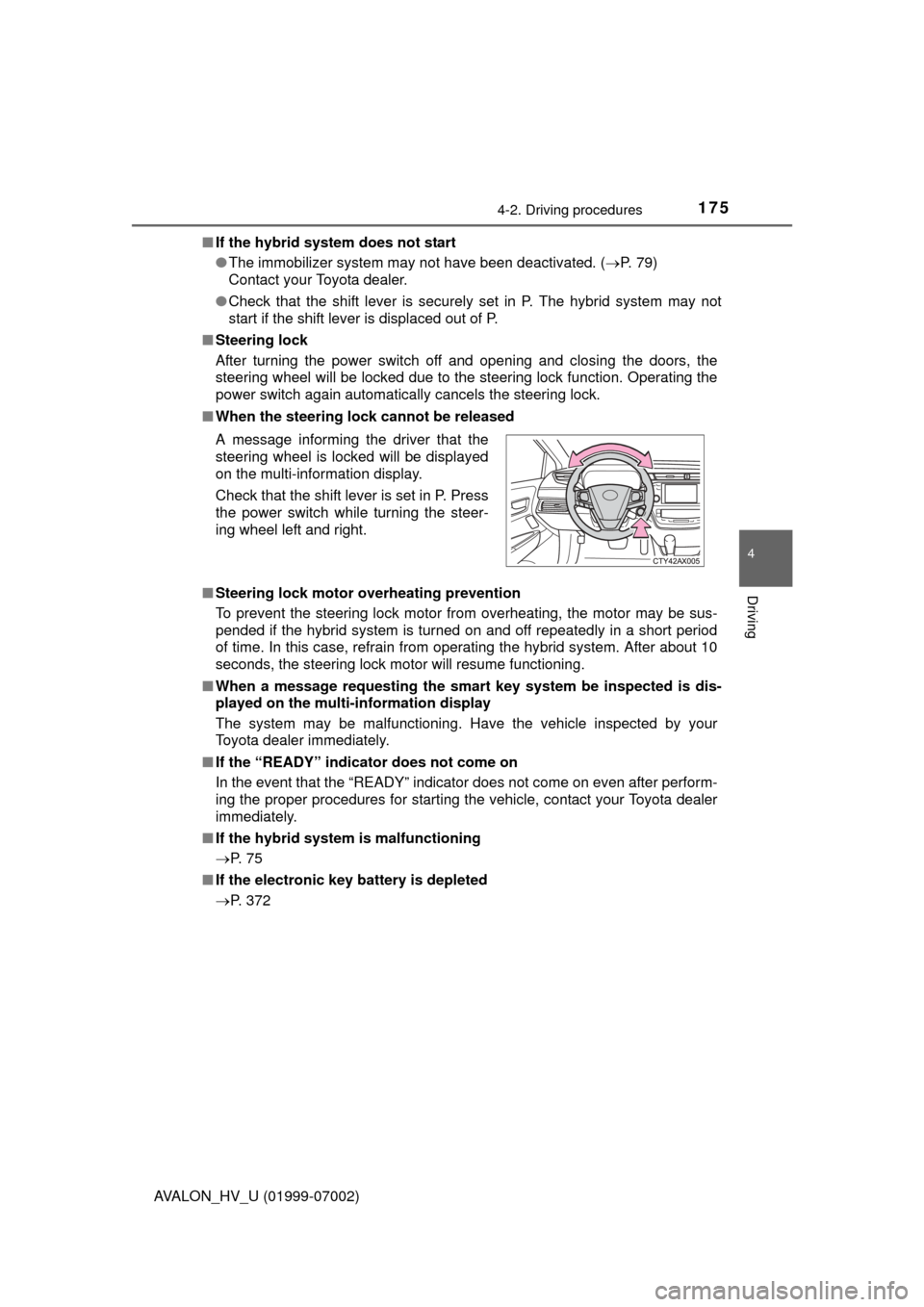
■ When the steering lock cannot be released
■ Steering lock motor overheating prevention
To prevent the steering lock motor from overheating, the motor may be sus-
pended if the hybrid system is turned on and off repeatedly in a short period
of time. In this case, refrain from operating the hybrid system. After about 10
seconds, the steering lock motor will resume functioning.
■ When a message requesting the smart key system be inspected is dis-
played on the multi-information display
The system may be malfunctioning. Have the vehicle inspected by your
Toyota dealer immediately.
■ If the “READY” indicator does not come on
In the event that the “READY” indicator does not come on even after perform-
ing the proper procedures for starting the vehicle, contact your Toyota dealer
immediately.
■ If the hybrid system is malfunctioning
P. 7 5
■ If the electronic key battery is depleted
P. 372 A message informing the driver that the
steering wheel is locked will be displayed
on the multi-information display.
Check that the shift lever is set in P. Press
the power switch while turning the steer-
ing wheel left and right.
Page 286 of 492
2865-2. Using the interior lights
AVALON_HV_U (01999-07002)
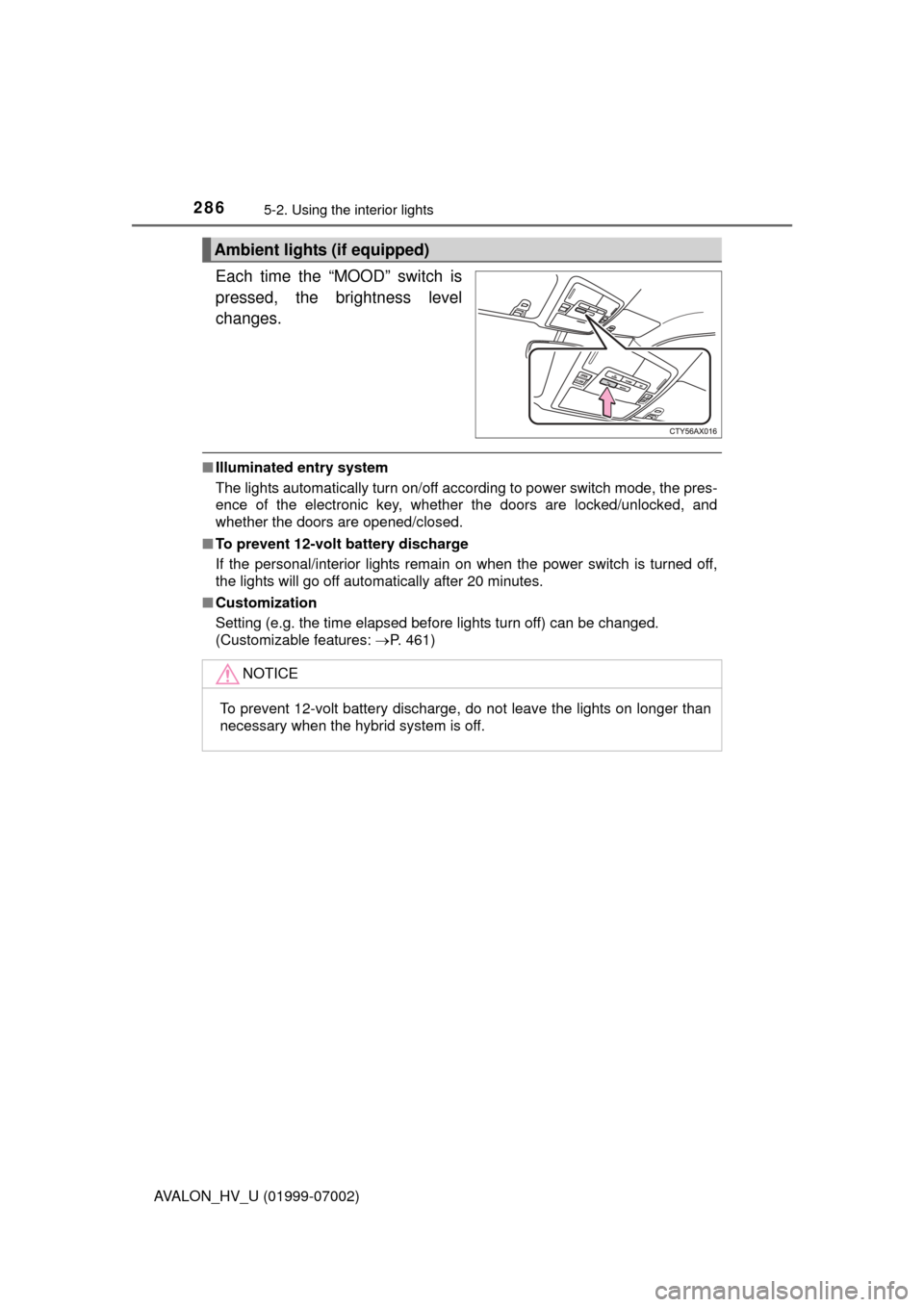
Each time the “MOOD” switch is
pressed, the brightness level
changes.
■Illuminated entry system
The lights automatically turn on/off according to power switch mode, the pres-
ence of the electronic key, whether the doors are locked/unlocked, and
whether the doors are opened/closed.
■ To prevent 12-volt battery discharge
If the personal/interior lights remain on when the power switch is turned off,
the lights will go off automatically after 20 minutes.
■ Customization
Setting (e.g. the time elapsed before lights turn off) can be changed.
(Customizable features: P. 461)
Ambient lights (if equipped)
NOTICE
To prevent 12-volt battery discharge, do not leave the lights on longer than
necessary when the hybrid system is off.
Page 323 of 492
323
Maintenance and care6
AVALON_HV_U (01999-07002)6-1. Maintenance and care
Cleaning and protecting the vehicle exterior .......... 324
Cleaning and protecting the vehicle interior ........... 327
6-2. Maintenance Maintenance requirements ................... 330
General maintenance........ 332
Emission inspection and maintenance (I/M)
programs ......................... 336
6-3. Do-it-yourself maintenance
Do-it-yourself service precautions ..................... 337
Hood ................................. 339
Positioning a floor jack ...... 340
Engine compartment ......... 341
12-volt battery ................... 350
Tires .................................. 354
Tire inflation pressure ....... 364
Wheels .............................. 367
Air conditioning filter.......... 370
Electronic key battery........ 372
Checking and replacing fuses ............................... 374
Light bulbs......................... 377
Page 324 of 492
324
AVALON_HV_U (01999-07002)
6-1. Maintenance and care
●Working from top to bottom, liber ally apply water to the vehicle
body, wheel wells and underside of the vehicle to remove any dirt
and dust.
● Wash the vehicle body using a sponge or soft cloth, such as a
chamois.
● For hard-to-remove marks, use car wash soap and rinse thoroughly
with water.
● Wipe away any water.
● Wax the vehicle when the wate rproof coating deteriorates.
If water does not bead on a clean surface, apply wax when the vehicle
body is cool.
■Automatic car washes
●Fold the mirrors before washing the vehi cle. Start washing from the front of
the vehicle. Make sure to extend the mirrors before driving.
● Brushes used in automatic car washes may scratch the vehicle surface and
harm your vehicle’s paint.
■ High pressure car washes
●Do not allow the nozzles of the car wash to come within close proximity of
the windows.
● Before using the car wash, check that the fuel filler door on your vehicle is
closed properly.
■ When using a car wash
If the door handle becomes wet while the electronic key is within the ef\
fective
range, the door may lock and unlock repeatedly. In that case, follow the fol-
lowing correction procedures to wash the vehicle:
●Place the key in a position 6 ft. (2 m) or more separate from the vehicle
while the vehicle is being washed. (Take care to ensure that the key is not
stolen.)
● Set the electronic key to battery-saving mode to disable the smart key sys-
tem. ( P. 125)
Cleaning and prot ecting the vehicle
exterior
Perform the following to protect the vehicle and maintain it in
prime condition:
Page 351 of 492

3516-3. Do-it-yourself maintenance
6
Maintenance and care
AVALON_HV_U (01999-07002)
■Before recharging
When recharging, the 12-volt battery produces hydrogen gas which is flam-
mable and explosive. Therefore, observe the following precautions before
recharging:
●If recharging with the 12-volt battery installed on the vehicle, be sure to dis-
connect the ground cable.
● Make sure the power switch on the charger is off when connecting and dis-
connecting the charger cables to the 12-volt battery.
■ After recharging/reconnecting the 12-volt battery
●The hybrid system may not start. Follow the procedure below to initialize the
system.
Shift the shift lever to P.
Open and close any of the doors.
Restart the hybrid system.
● Unlocking the doors using the smart key system may not be possible imme-
diately after reconnecting the 12-volt battery. If this happens, use the wire-
less remote control or the mechanical key to lock/unlock the doors.
● Start the hybrid system with the power switch in ACCESSORY mode. The
hybrid system may not start when the power switch turned from off. How-
ever, the hybrid system will operat e normally from the second attempt.
● The power switch mode is recorded by the vehicle. If the 12-volt battery is
reconnected, the vehicle will return the power switch mode to the status it
was in before the 12-volt battery was disconnected. Make sure to turn off
the power switch before disconnect the 12-volt battery. Take extra care
when connecting the 12-volt battery if the power switch mode prior to dis-
charge is unknown.
If the system will not start even after multiple attempts at all methods above,
contact your Toyota dealer.
1
2
3
Page 372 of 492
3726-3. Do-it-yourself maintenance
AVALON_HV_U (01999-07002)
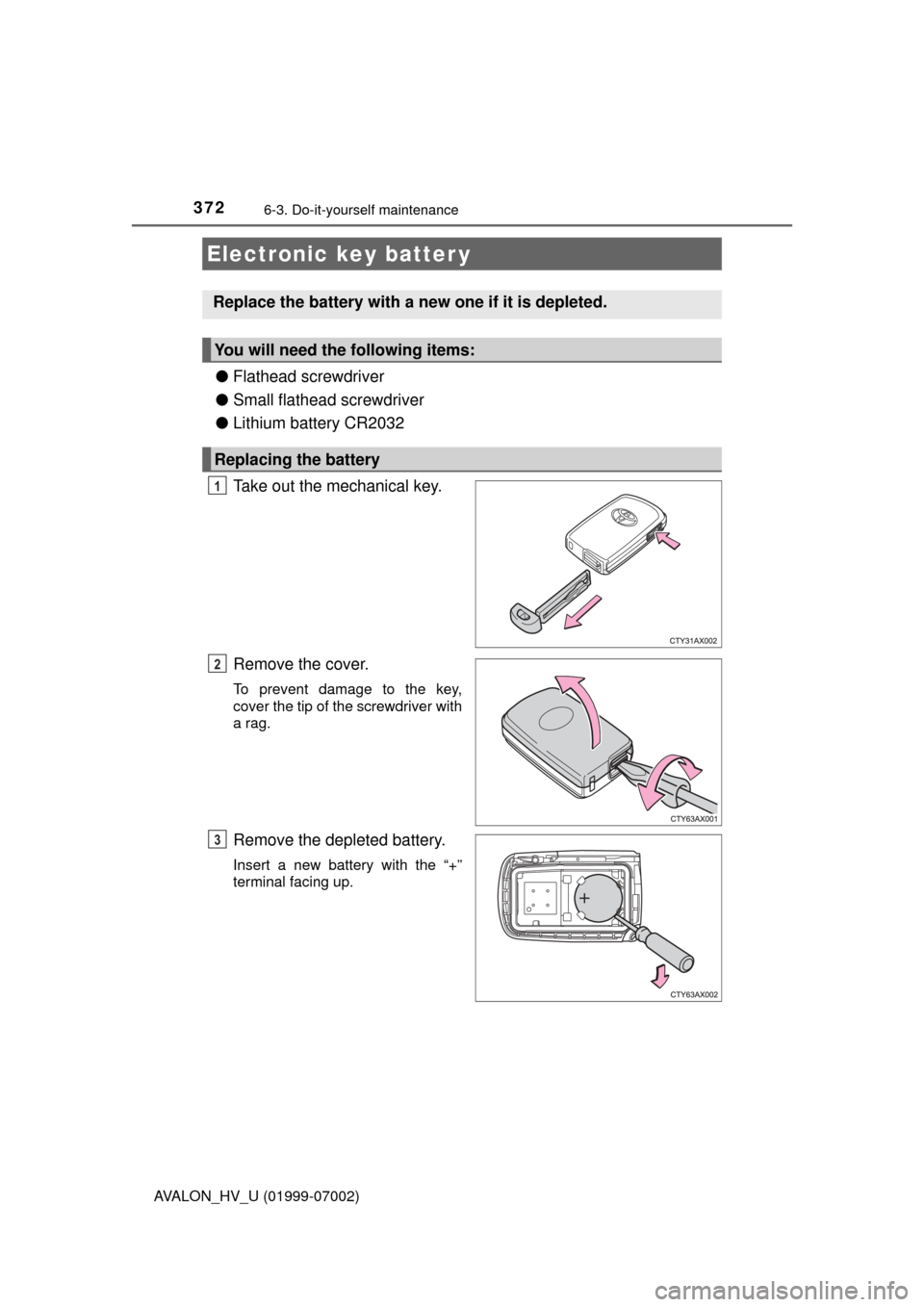
●Flathead screwdriver
● Small flathead screwdriver
● Lithium battery CR2032
Take out the mechanical key.
Remove the cover.
To prevent damage to the key,
cover the tip of the screwdriver with
a rag.
Remove the depleted battery.
Insert a new battery with the “+”
terminal facing up.
Electronic key batter y
Replace the battery with a new one if it is depleted.
You will need the following items:
Replacing the battery
1
2
3