2016 TOYOTA AVALON HYBRID detection area
[x] Cancel search: detection areaPage 3 of 492

3
1
8 7
6
5
4
3
2
9
AVALON_HV_U (01999-07002)4-1. Before driving
Driving the vehicle ............. 156
Cargo and luggage............ 166
Vehicle load limits ............. 169
Trailer towing..................... 170
Dinghy towing.................... 171
4-2. Driving procedures Power (ignition) switch ...... 172
EV drive mode................... 178
Hybrid transmission........... 180
Turn signal lever................ 183
Parking brake .................... 184
4-3. Operating the lights and wipers
Headlight switch ................ 185
Automatic High Beam ....... 188
Windshield wipers and washer ............................ 192 4-4. Refueling
Opening the fuel tank cap................................... 197
4-5. Using the driving support systems
Toyota Safety Sense P ...... 201
PCS (Pre-Collision System) ........................... 208
LDA (Lane Departure Alert with steering
control) ............................ 221
Dynamic radar cruise control.............................. 232
Cruise control .................... 245
BSM (Blind Spot Monitor)......... 249
• The Blind Spot Monitor
function.......................... 251
• The Rear Cross Traffic Alert function detection
areas ............................. 256
Driving mode select switch .............................. 258
Driving assist systems ....... 260
4-6. Driving tips Hybrid vehicle driving tips ................................... 265
Winter driving tips .............. 268
4Driving
Page 108 of 492

1083-1. Key information
AVALON_HV_U (01999-07002)■
Electronic key battery depletion
●The standard battery life is 1 to 2 years.
● If the battery becomes low, an alarm will sound in the cabin when the hybrid
system stops.
● As the electronic key always receives radio waves, the battery will become
depleted even if the electronic key is not used. The following symptoms indi-
cate that the electronic key battery may be depleted. Replace the battery
when necessary. ( P. 372)
• The smart key system or the wireless remote control does not operate.
• The detection area becomes smaller.
• The LED indicator on the key surface does not turn on.
● To avoid serious deterioration, do not leave the electronic key within 3 ft. (1
m) of the following electrical appl iances that produce a magnetic field:
•TVs
• Personal computers
• Cellular phones, cordless phones and battery chargers
• Recharging cellular phones or cordless phones
• Table lamps
• Induction cookers
■ Replacing the battery
P. 423
■ Confirmation of the registered key number
The number of keys already registered to the vehicle can be confirmed. Ask
your Toyota dealer for details.
■ If a wrong key is used
The key cylinder rotates freely to isolate inside mechanism.
■ Customization
Settings (e.g. wireless remote control system) can be changed.
(Customizable features: P. 461)
■ Certification for wireless remote control
FCC ID: HYQ23AAP
FCC ID: HYQ14FBA
NOTE:
This device complies with part 15 of the FCC Rules. Operation is subject to
the following two conditions: (1) This device may not cause harmful interfer-
ence, and (2) this device must accept any interference received, including
interference that may cause undesired operation.
FCC WARNING:
Changes or modifications not expressly approved by the party responsible for
compliance could void the user’s authority to operate the equipment.
Page 124 of 492
1243-2. Opening, closing and locking the doors and trunk
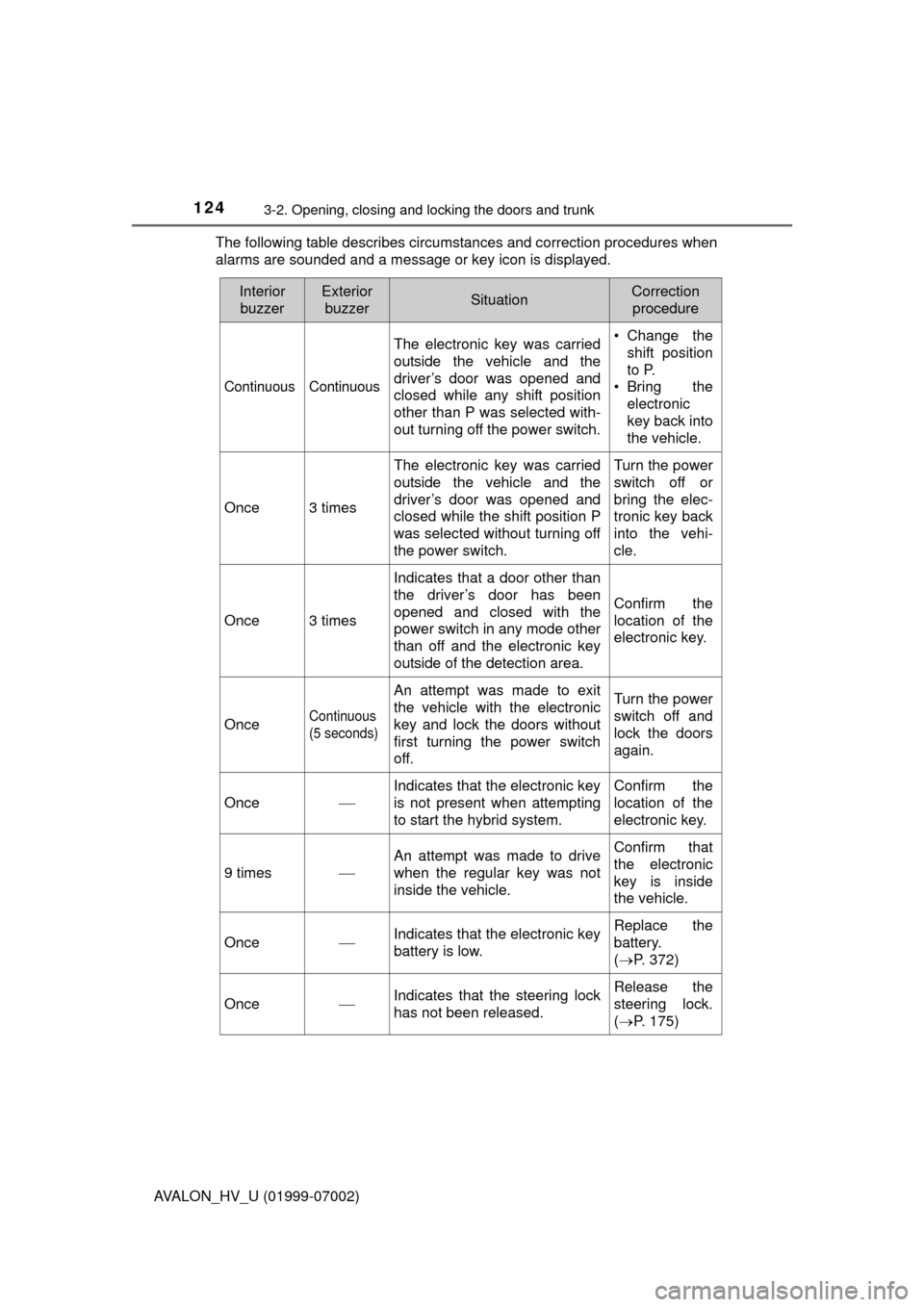
AVALON_HV_U (01999-07002)The following table describes circumstances and correction procedures when
alarms are sounded and a message or key icon is displayed.
Interior
buzzerExterior buzzerSituationCorrection procedure
Continuous Continuous
The electronic key was carried
outside the vehicle and the
driver’s door was opened and
closed while any shift position
other than P was selected with-
out turning off the power switch. • Change the
shift position
to P.
• Bring the
electronic
key back into
the vehicle.
Once3 times
The electronic key was carried
outside the vehicle and the
driver’s door was opened and
closed while the shift position P
was selected without turning off
the power switch.Turn the power
switch off or
bring the elec-
tronic key back
into the vehi-
cle.
Once3 times
Indicates that a door other than
the driver’s door has been
opened and closed with the
power switch in any mode other
than off and the electronic key
outside of the detection area.
Confirm the
location of the
electronic key.
OnceContinuous
(5 seconds)
An attempt was made to exit
the vehicle with the electronic
key and lock the doors without
first turning the power switch
off.Turn the power
switch off and
lock the doors
again.
Once
Indicates that the electronic key
is not present when attempting
to start the hybrid system. Confirm the
location of the
electronic key.
9 times
An attempt was made to drive
when the regular key was not
inside the vehicle.Confirm that
the electronic
key is inside
the vehicle.
OnceIndicates that the electronic key
battery is low.Replace the
battery.
(
P. 372)
OnceIndicates that the steering lock
has not been released.Release the
steering lock.
(P. 175)
Page 127 of 492

1273-2. Opening, closing and locking the doors and trunk
3
Operation of each component
AVALON_HV_U (01999-07002)■
Note for the entry function
●Even when the electronic key is within the effective range (detection areas),
the system may not operate properly in the following cases:
• The electronic key is too close to the window or outside door handle, near
the ground, or in a high place when the doors are locked or unlocked.
• The electronic key is near the ground or in a high place, or too close to
the rear bumper center when the trunk is opened.
• The electronic key is on the instrument panel, rear package tray or floor, or in the door pockets or glove box when the hybrid system is started or
power switch modes are changed.
● Do not leave the electronic key on top of the instrument panel or near the
door pockets when exiting the vehicle. Depending on the radio wave recep-
tion conditions, it may be detected by the antenna outside the cabin and the
door will become lockable from the outside, possibly trapping the electronic
key inside the vehicle.
● As long as the electronic key is within the effective range, the doors may be
locked or unlocked by anyone. However, only the doors detecting the elec-
tronic key can be used to unlock the vehicle.
● Even if the electronic key is not inside the vehicle, it may be possible to start
the hybrid system if the electronic key is near the window.
● The doors may unlock or lock if a large amount of water splashes on the
door handle, such as in the rain or in a car wash when the electronic key is
within the effective range. (The doors will automatically be locked after
approximately 60 seconds if the doors are not opened and closed.)
● If the wireless remote control is used to lock the doors when the electronic
key is near the vehicle, there is a possibility that the door may not be
unlocked by the entry function. (Use the wireless remote control to unlock
the doors.)
Page 128 of 492

1283-2. Opening, closing and locking the doors and trunk
AVALON_HV_U (01999-07002)■
Note for locking the doors
●Touching the door lock sensor while wearing gloves may delay or prevent
lock operation. Remove the gloves and touch the lock sensor again.
● If the door handle becomes wet while the electronic key is within the effec-
tive range, the door may lock and unlock repeatedly. In that case, follow the
following correction procedures to wash the vehicle:
• Place the electronic key in a location 6 ft. (2 m) or more away from the
vehicle. (Take care to ensure that the key is not stolen.)
• Set the electronic key to battery-saving mode to disable the smart key
system. ( P. 125)
● If the electronic key is inside the vehicle and a door handle becomes wet
during a car wash, a message may be shown on the multi-information dis-
play and a buzzer will sound outside the vehicle. To turn off the alarm, lock
all the doors.
● The lock sensor may not work properly if it comes into contact with ice,
snow, mud, etc. Clean the lock sensor and attempt to operate it again, or
use the lock sensor on the lower part of the door handle.
● Fingernails may scrape against the door during operation of the door han-
dle. Be careful not to injure fingernails or damage the surface of the door.
■ Note for the unlocking function
●A sudden approach to the effective range or door handle may prevent the
doors from being unlocked. In this case, return the door handle to the origi-
nal position and check that the doors unlock before pulling the door handle
again.
● Gripping the door handle when wearing a glove may not unlock the door.
● If the door handle becomes wet while the electronic key is within the effec-
tive range, the door may lock and unlock repeatedly. In that case, follow the
following correction procedures to wash the vehicle:
• Place the electronic key in a location 6 ft. (2 m) or more away from the
vehicle. (Take care to ensure that the key is not stolen.)
• Set the electronic key to battery-saving mode to disable the smart key system. ( P. 125)
● If there is another electronic key in the detection area, it may take slightly
longer to unlock the doors after the door handle is gripped.
● Fingernails may scrape against the door during operation of the door han-
dle. Be careful not to injure fingernails or damage the surface of the door.
Page 155 of 492

155
Driving4
AVALON_HV_U (01999-07002)4-1. Before driving
Driving the vehicle ............. 156
Cargo and luggage ........... 166
Vehicle load limits ............. 169
Trailer towing..................... 170
Dinghy towing ................... 171
4-2. Driving procedures Power (ignition) switch ...... 172
EV drive mode .................. 178
Hybrid transmission........... 180
Turn signal lever................ 183
Parking brake .................... 184 4-3. Operating the lights and
wipers
Headlight switch ................ 185
Automatic High Beam ....... 188
Windshield wipers and washer ............................ 192
4-4. Refueling Opening the fuel tank cap .................................. 197
4-5. Using the driving support systems
Toyota Safety Sense P ..... 201
PCS (Pre-Collision System) ........................... 208
LDA (Lane Departure Alert with steering
control) ............................ 221
Dynamic radar cruise control ............................. 232
Cruise control .................... 245
BSM (Blind Spot Monitor) ........ 249
• The Blind Spot Monitor function ......................... 251
• The Rear Cross Traffic Alert function detection
areas ............................. 256
Driving mode select switch .............................. 258
Driving assist systems ...... 260
4-6. Driving tips Hybrid vehicle driving tips .................................. 265
Winter driving tips ............. 268
Page 190 of 492

1904-3. Operating the lights and wipers
AVALON_HV_U (01999-07002)
■High beam automatic turning on or off conditions
●When all of the following conditions are fulfilled, the high beam will be auto-
matically turned on (after approximately 1 second):
• Vehicle speed is above approximately 25 mph (40 km/h).
• The area ahead of the vehicle is dark.
• There are no vehicles ahead with headlights or tail lights turned on.
• There are few streetlights on the road ahead.
● If any of the following conditions are fulfilled, the high beam will be automat-
ically turned off:
• Vehicle speed drops below approximately 19 mph (30 km/h).
• The area ahead of the vehicle is not dark.
• Vehicles ahead have headlights or tail lights turned on.
• There are many streetlights on the road ahead.
■ Camera sensor detection information
●The high beam may not be automatically turned off in the following situa-
tions:
• When oncoming vehicles suddenly appear from a curve
• When the vehicle is cut in front of by another vehicle
• When vehicles ahead are hidden from sight due to repeated curves, road
dividers or roadside trees
• When vehicles ahead appear from the faraway lane on wide road
• When vehicles ahead have no lights
● The high beam may be turned off if a vehicle ahead that is using fog lights
without using the headlights is detected.
● House lights, street lights, traffic signals, and illuminated billboards or signs
may cause the high beam to switch to the low beams, or the low beams to
remain on.
● The following factors may affect the amount of time taken to turn the high
beam on or off:
• The brightness of headlights, fog lights, and tail lights of vehicles ahead
• The movement and direction of vehicles ahead
• When a vehicle ahead only has operational lights on one side
• When a vehicle ahead is a two-wheeled vehicle
• The condition of the road (gradient, curve, condition of the road surface
etc.)
• The number of passengers and amount of luggage
● The high beam may be turned on or off when the driver does not expect it.
● Bicycles or similar objects may not be detected.
Page 217 of 492

2174-5. Using the driving support systems
4
Driving
AVALON_HV_U (01999-07002)• When rapidly closing on an electric toll gate barrier, parking area barrier,
or other barrier that opens and closes
• When using an automatic car wash
• When the vehicle is hit by water, snow, dust, etc. from a vehicle ahead
• When driving through steam or smoke
• When there are patterns or paint on the road or a wall that may be mis- taken for a vehicle or pedestrian
*5
• When driving near an object that reflects radio waves, such as a large
truck or guardrail
• When driving near a TV tower, broadcasting station, electric power plant, or other location where strong radio waves or electrical noise may be
present
*5: Depending on the region in which the vehicle was sold, the pedestrian
detection function may not be available.
■ Situations in which the system may not operate properly
●In some situations such as the following, a vehicle may not be detected by
the radar sensor and camera sensor, preventing the system from operating
properly:
• If an oncoming vehicle is approaching your vehicle
• If a vehicle ahead is a motorcycle or bicycle
• When approaching the side of a vehicle
• If a preceding vehicle has a small rear end, such as an unloaded truck • When passing under an object (bill-
board, etc.) at the top of an uphill road
• When driving through or under objects that may contact the vehicle,
such as thick grass, tree branches, or
a banner
• If a preceding vehicle has a low rear end, such as a low bed trailer