2016 TOYOTA AURIS HYBRID change time
[x] Cancel search: change timePage 8 of 592

8
UK AURIS_HV_HB_EE (OM12K47E)Please note that this manual applies to all models and explains all equipment,
including options. Therefore, you may find some explanations for equipment
not installed on your vehicle.
All specifications provided in this manual are current at the time of printing.
However, because of the Toyota policy of continual product improvement, we
reserve the right to make changes at any time without notice.
Depending on specifications, the vehicle shown in the illustrations may differ
from your vehicle in terms of equipment.
Both genuine Toyota and a wide variety of other spare parts and accessories
for Toyota vehicles are currently available on the market. Should it be deter-
mined that any of the genuine Toyota parts or accessories supplied with the
vehicle need to be replaced, Toyota recommends that genuine Toyota parts
or accessories, be used to replace them. Other parts or accessories of
matching quality can also be used. Toyota cannot accept any liability or guar-
antee spare parts and accessories which are not genuine Toyota products,
nor for replacement or installation in
volving such parts. In addition, damage
or performance problems resulting from the use of non-genuine Toyota spare
parts or accessories may not be covered under warranty.
For your infor mation
Main Owner’s Manual
Accessories, spare parts and modification of your Toyota
Page 104 of 592

1042. Instrument cluster
UK AURIS_HV_HB_EE (OM12K47E)
■The meters and display illuminate when
The power switch is in ON mode.
■ Outside temperature display
●In the following situations, the correct outside temperature may not be dis-
played, or the display may take longer than normal to change.
• When stopped, or driving at low speeds (less than 15 km/h [9 mph])
• When the outside temperature has changed suddenly (at the entrance/
exit of a garage, tunnel, etc.)
● If “ − − ” is displayed continuously, the system may be malfunctioning. Take
your vehicle to any authorized Toyota dealer or repairer, or another duly
qualified and equipped professional.
■ Hybrid System Indicator
●By keeping the indicator needle within Eco area, more Eco-friendly driving
can be achieved.
● Charge area indicates regeneration
* status. Regenerated energy will be
used to charge the hybrid battery (traction battery).
*: When used in this manual, “regeneration” refers to the conversion of
energy created by the movement of the vehicle into electrical energy.
■ Engine speed
On hybrid vehicles, engine speed is precisely controlled in order to help
improve fuel efficiency and reduce exhaust emissions etc.
There are times when the engine speed that is displayed may differ even
when vehicle operation and driving conditions are the same. Charge area
Shows regenerative charging.
Hybrid Eco area
Shows that gasoline engine power is
not being used very often.
The gasoline engine will automatically
stop and restart under various condi-
tions.
Eco area
Shows that the vehicle is being driven in
an Eco-friendly manner.
Power area
Shows that an Eco-friendly driving
range is being exceeded (during full
power driving etc.)
1
2
3
4
Page 108 of 592

1082. Instrument cluster
UK AURIS_HV_HB_EE (OM12K47E)
◆Changing the display
To change the displayed item,
press the “TRIP” switch.
Each time the switch is pressed,
the displayed item will be
changed.
◆Display items
■Odometer
Displays the total distance the vehicle has been driven.
■Trip meter A/trip meter B
Displays the distance the vehicle has been driven since the meter
was last reset. Trip meters A and B can be used to record and dis-
play different distances independently.
To reset, display the desired trip meter and press and hold the “TRIP”
switch.
Trip information
Page 110 of 592
1102. Instrument cluster
UK AURIS_HV_HB_EE (OM12K47E)
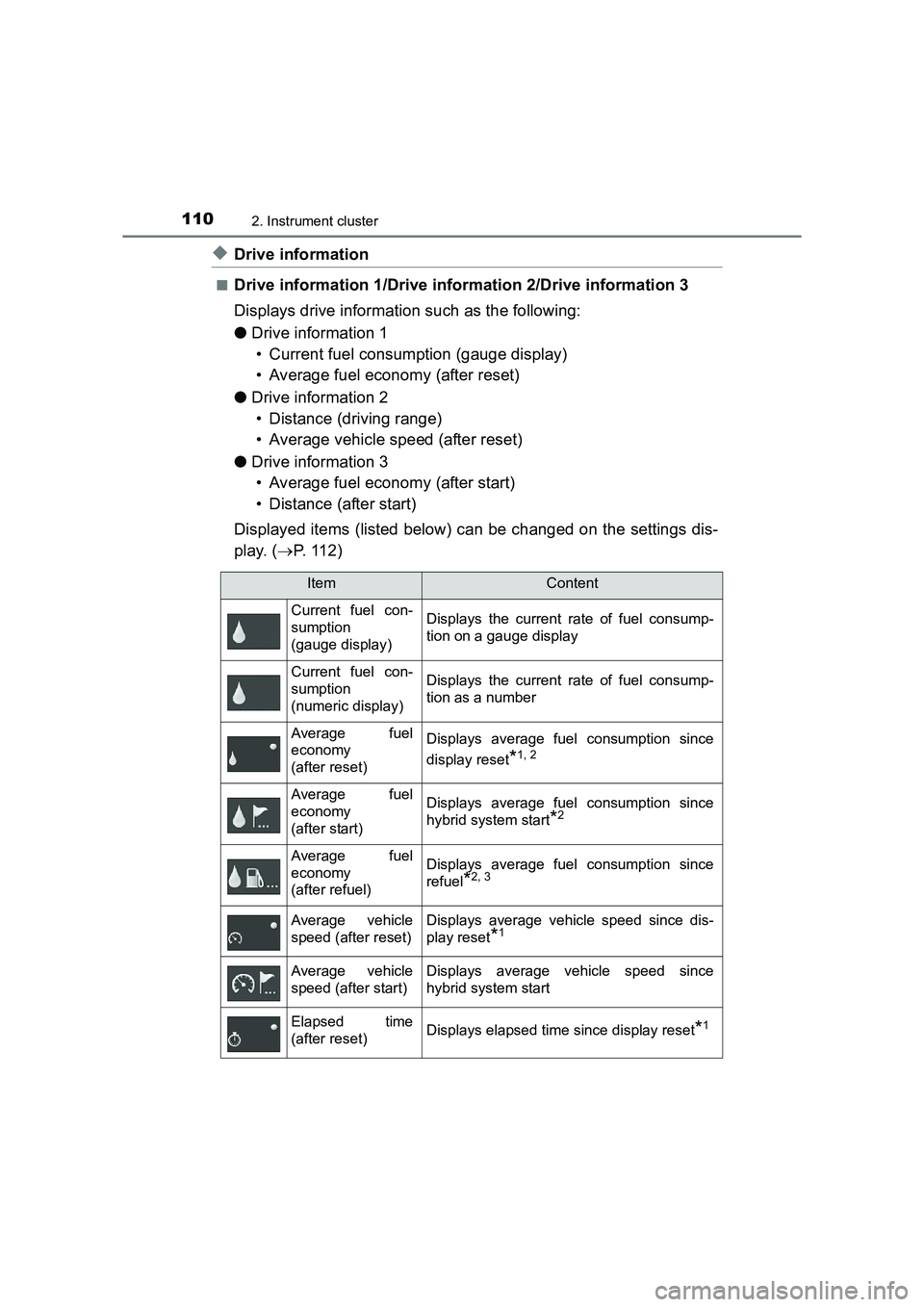
◆Drive information
■Drive information 1/Drive information 2/Drive information 3
Displays drive information such as the following:
●Drive information 1
• Current fuel consumption (gauge display)
• Average fuel economy (after reset)
● Drive information 2
• Distance (driving range)
• Average vehicle speed (after reset)
● Drive information 3
• Average fuel economy (after start)
• Distance (after start)
Displayed items (listed below) can be changed on the settings dis-
play. ( →P. 112)
ItemContent
Current fuel con-
sumption
(gauge display) Displays the current rate of fuel consump-
tion on a gauge display
Current fuel con-
sumption
(numeric display)Displays the current rate of fuel consump-
tion as a number
Average fuel
economy
(after reset)Displays average fuel consumption since
display reset
*1, 2
Average fuel
economy
(after start)Displays average fuel consumption since
hybrid system start
*2
Average fuel
economy
(after refuel)Displays average fuel consumption since
refuel
*2, 3
Average vehicle
speed (after reset)Displays average vehicle speed since dis-
play reset
*1
Average vehicle
speed (after start)Displays average vehicle speed since
hybrid system start
Elapsed time
(after reset)Displays elapsed time since display reset*1
Page 114 of 592

1142. Instrument cluster
UK AURIS_HV_HB_EE (OM12K47E)■
When disconnecting and reconnect ing 12-volt battery terminals
The drive information data will be reset.
■ Liquid crystal display
Small spots or light spots may appear on the display. This phenomenon is
characteristic of liquid crystal displays, and there is no problem continuing to
use the display.
■ Ending display
When the power switch is turned off, the following information about the cur-
rent trip will be temporarily displa yed on the multi-information display.
● Elapsed time (after start)
● Distance (after start)
● Average fuel economy (after start)
WARNING
■ Caution for use while driving
●When operating the multi-information display while driving, pay extra
attention to the safety of the area around the vehicle.
● Do not look continuously at the multi-information display while driving as
you may fail to see pedestrians, objects on the road, etc. ahead of the
vehicle.
■ Cautions during setting up the display
As the hybrid system needs to be operating during setting up the display,
ensure that the vehicle is parked in a place with adequate ventilation. In a
closed area such as a garage, exhaust gases including harmful carbon
monoxide (CO) may collect and enter the vehicle. This may lead to death or
a serious health hazard.
NOTICE
■The multi-information disp lay at low temperatures
Allow the interior of the vehicle to warm up before using the liquid crystal
information display. At extremely low temperatures, the information display
monitor may respond slowly, and display changes may be delayed.
■ While setting up the display
To prevent 12-volt battery discharge, ens ure that the hybrid system is oper-
ating while setting up the display features.
Page 138 of 592

1383-2. Opening, closing and locking the doors
UK AURIS_HV_HB_EE (OM12K47E)■
Note for the entry function
●Even when the electronic key is within the effective range (detection areas),
the system may not operate properly in the following cases:
• The electronic key is too close to the window or outside door handle, near
the ground, or in a high place w hen the doors are locked or unlocked.
• The electronic key is near the ground or in a high place, or too close to the rear bumper center when the back door is opened.
• The electronic key is on the instrument panel, luggage cover or floor, or in
the door pockets or glove box when the hybrid system is started or power
switch modes are changed.
● Do not leave the electronic key on top of the instrument panel or near the
door pockets when exiting the vehicle. Depending on the radio wave recep-
tion conditions, it may be detected by the antenna outside the cabin and the
door will become lockable from the outside, possibly trapping the electronic
key inside the vehicle.
● As long as the electronic key is within the effective range, the doors may be
locked or unlocked by anyone. However, only the doors detecting the elec-
tronic key can be used to unlock the vehicle.
● Even if the electronic key is not inside the vehicle, it may be possible to start
the hybrid system if the electronic key is near the window.
● The doors may unlock or lock if a large amount of water splashes on the
door handle, such as in the rain or in a car wash when the electronic key is
within the effective range. (The doors will automatically be locked after
approximately 30 seconds if the doors are not opened and closed.)
● If the wireless remote control is used to lock the doors when the electronic
key is near the vehicle, there is a possibility that the door may not be
unlocked by the entry function. (Use the wireless remote control to unlock
the doors.)
● Touching the door lock or unlock sens or while wearing gloves may prevent
lock or unlock operation.
● When the lock operation is performed using the lock sensor, recognition sig-
nals will be shown up to two consecutive times. After this, no recognition
signals will be given.
● If the door handle becomes wet while the electronic key is within the effec-
tive range, the door may lock and unlock repeatedly. In that case, follow the
following correction procedures to wash the vehicle:
• Place the electronic key in a location 2 m (6 ft.) or more away from the
vehicle. (Take care to ensure that the key is not stolen.)
• Set the electronic key to battery-saving mode to disable the smart entry &
start system. ( →P. 136)
Page 213 of 592

2134-2. Driving procedures
UK AURIS_HV_HB_EE (OM12K47E)
4
Driving
Modes can be changed by pressing the power switch with brake pedal
released. (The mode changes each time the switch is pressed.)
Off
The emergency flashers can be
used.
ACCESSORY mode
Some electrical components such
as the audio system can be used.
“Power ON.” will be displayed on
the multi-information display.
ON mode
All electrical components can be
used.
“Power ON.” will be displayed on
the multi-information display.
Changing power switch modes
Page 223 of 592

2234-2. Driving procedures
UK AURIS_HV_HB_EE (OM12K47E)
4
Driving
■Using engine braking
To use engine braking, select the B position.
●During high speed driving, you may feel that deceleration by engine braking
is less than that of a conventional vehicle.
● Do not continue normal driving with the transmission in B for a long time.
This may cause decreased fuel economy. To prevent this, use D for normal
driving.
■ Reverse warning buzzer
When shifting into R, a buzzer will sound to inform the driver that the shift
position is in R.
■ When the accelerator pedal is depressed while the shift position is in N
A buzzer will sound to inform the driver that the shift position is in N.
■ Eco drive mode
When the accelerator pedal is depressed in Eco drive mode, it may take more
time to accelerate than usual. This is normal operation.
■ For the shift positions
●When the power switch is off, the shift position cannot be changed.
● When the power switch is in ON mode (the hybrid system is not operating),
the shift position can only be changed to N. The shift position will be
changed to N even if the shift position is shifted to D or R and held in that
position.
● When the “READY” indicator is on, the shift position can be changed from P
to D, N or R.
● When the “READY” indicator is flashing, the shift position cannot be
changed from P to other position even if the shift lever is operated.
Wait until the “READY” indicator changes from a flashing to a solid light, and
then operate the shift lever again.
● The shift position can only be changed to B directly from D.