2016 SUBARU WRX light
[x] Cancel search: lightPage 93 of 594

Keys and doors/Immobilizer
“ Ignition switch (models without push-
button start system) ” F 3-4.
CAUTION. Do not place the key under direct
sunlight or anywhere it may
become hot.
. Do not get the key wet. If the key
gets wet, wipe it dry with a cloth
immediately.
. Donotmodifyorremovethe
system. If modified or removed,
the proper operation of the sys-
tem cannot be guaranteed.
NOTE . To protect your vehicle from theft,
please pay close attention to the fol-
lowing security precautions:
– Never leave your vehicle unat-
tended with its keys inside.
– Before leaving your vehicle,
close all windows and the moon-
roof, and lock the doors.
– Do not leave spare keys or any
record of your key number in the
vehicle.
. The vehicle has a maintenance-free
type immobilizer system. & Security indicator light Refer to “ Security indicator light ” F 3-33.
& Key replacement Your key number plate will be required if
you ever need a replacement key made.
Any new key must be registered for use
with your vehicle ’ s immobilizer system
before it can be used. The maximum
number of keys that can be registered
for use with one vehicle is as follows.
. Four (models without “ keyless access
with push-button start system ” )
. Seven (models with “ keyless access
with push-button start system ” )
One key that has already been registered
is required in order to register a new key.
If you lose a key, the lost key ’ s ID code still
remains in the memory of the vehicle ’ s
immobilizer system. For security reasons,
the lost key ’ s ID code should be erased
from the memory. To erase the lost key ’ s
ID code, all keys that will be used are
required.
For details about new key registration and
erasing the lost key ’ s ID code, contact
your SUBARU dealer. & Certification for immobilizer
system For models with “ keyless access with
push-button start system ” :
Refer to “ Certification for keyless access
with push-button start system ” F 2-18.
For models without “ keyless access
with push-button start system ” :
! U.S.-spec. models
FCC ID: MOZRI-38BFH
CAUTIONFCC WARNING
Changes or modifications not ex-
pressly approved by the party re-
sponsible for compliance could void
the user ’ s authority to operate the
equipment.
This device complies with part 15 of the
FCC Rules. Operation is subject to the
following two conditions: (1) This device
may not cause harmful interference, and
(2) this device must accept any interfer-
ence received, including interference that
may cause undesired operation.2-4
Page 96 of 594
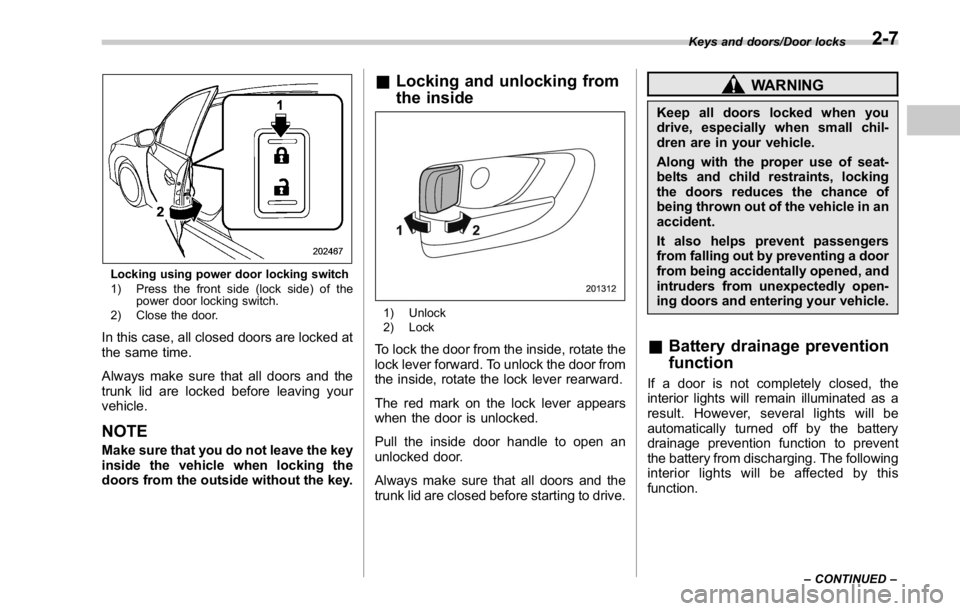
Locking using power door locking switch
1) Press the front side (lock side) of the
power door locking switch.
2) Close the door.
In this case, all closed doors are locked at
the same time.
Always make sure that all doors and the
trunk lid are locked before leaving your
vehicle.
NOTE Make sure that you do not leave the key
inside the vehicle when locking the
doors from the outside without the key. & Locking and unlocking from
the inside
1) Unlock
2) Lock
To lock the door from the inside, rotate the
lock lever forward. To unlock the door from
the inside, rotate the lock lever rearward.
The red mark on the lock lever appears
when the door is unlocked.
Pull the inside door handle to open an
unlocked door.
Always make sure that all doors and the
trunk lid are closed before starting to drive. WARNINGKeep all doors locked when you
drive, especially when small chil-
dren are in your vehicle.
Along with the proper use of seat-
belts and child restraints, locking
the doors reduces the chance of
being thrown out of the vehicle in an
accident.
It also helps prevent passengers
from falling out by preventing a door
from being accidentally opened, and
intruders from unexpectedly open-
ing doors and entering your vehicle.
& Battery drainage prevention
function If a door is not completely closed, the
interior lights will remain illuminated as a
result. However, several lights will be
automatically turned off by the battery
drainage prevention function to prevent
the battery from discharging. The following
interior lights will be affected by this
function. Keys and doors/Door locks
– CONTINUED –2-7
Page 97 of 594
Keys and doors/Power door locking switches
Item Switch
position Automatically turning
off
Map lights* OFF* Approximately 20
minutes later
Dome light DOOR Approximately 20
minutes later
Ignition
switch light — Approximately 20
minutes later
Trunk light — Approximately 20
minutes later
*: The battery drainage prevention function
affects only the map lights on models with the
moonroof, and only when the map light
switches are in the OFF position. The map
lights on models without the moonroof do not
turn off automatically, so push the light switches
manually to turn them off.
The operational/non-operational setting of
this function can be changed by a
SUBARU dealer. Contact your SUBARU
dealer to change the setting.
NOTE . The factory setting (default setting)
for this function is set as “ operational ” .
. When leaving the vehicle, make sure
that all doors and the trunk lid are
completely closed.
. The battery drainage prevention
function does not operate while the key is in the ignition switch.
Power door locking switches
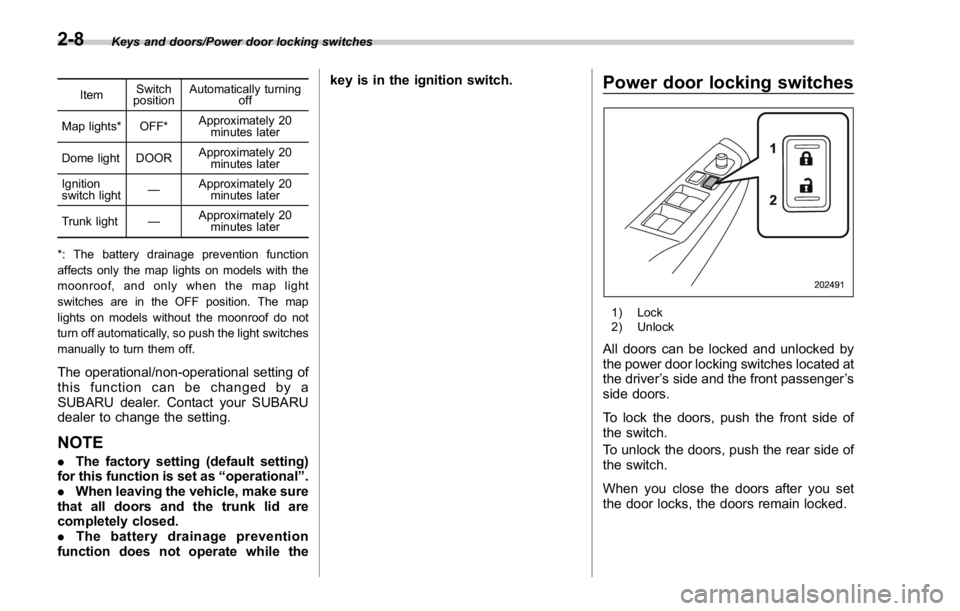
1) Lock
2) Unlock
All doors can be locked and unlocked by
the power door locking switches located at
the driver ’ s side and the front passenger ’ s
side doors.
To lock the doors, push the front side of
the switch.
To unlock the doors, push the rear side of
the switch.
When you close the doors after you set
the door locks, the doors remain locked.2-8
Page 100 of 594

1) Antenna
CAUTION
. Never leave or store the access
key inside the vehicle (e.g., on
the instrumental panel, inside the glove box, on the seat, in the
door pocket or on the rear shelf)
or within 6.6 ft (2 m) around the
vehicle (e.g., in the garage). The
access key may be locked inside
the vehicle, or the battery may
discharge rapidly. Note that the
push-button ignition switch may
not turn on in some cases de-
pending on the location of the
access key.
. The access key contains electro-
nic components. Observe the
following precautions to prevent
malfunctions.
– Although you can replace the
battery of the access key
yourself, it is recommended
that the battery be replaced by
a SUBARU dealer to avoid the
risk of damage at the time of
replacement.
– Do not get the access key wet.
If the access key gets wet,
wipe it off immediately and let
it dry completely.
– Do not apply strong impacts
to the access key.
– Keep the access key away
from magnetic sources.
– Never leave the access key in direct sunlight or anywhere
that may become hot, such
as on the dashboard. It may
damage the battery or cause
circuit malfunctions.
– Do not wash the access key in
an ultrasonic washer.
– Do not leave the access key in
humid or dusty locations.
Doing so may cause malfunc-
tions.
– Do not leave the access key
near personal computers or
home electric appliances.
Doing so may cause the ac-
cess key to malfunction, re-
sulting in battery discharge.
. If the access key is dropped, the
integrated mechanical key inside
may become loose. Be careful
not to lose the mechanical key.
. When you carry the access key
on an airplane, do not press the
button of the access key while in
the airplane. When any button of
the access key is pressed, radio
waves are sent and may affect
the operation of the airplane.
When you carry the access key
in a bag on an airplane, take
measures to prevent the buttonsKeys and doors/Keyless access with push – button start system
– CONTINUED –2-11
Page 112 of 594

NOTE If the interval between the first and
second presses of the unlock/disarm
button (for unlocking of all of the
doors) is extremely short, the system
may not respond.
& Opening the trunk lid The trunk lid opens when the “ ” button
is pressed continuously for at least 2
seconds. An electronic chirp will sound
twice and the turn signal lights will flash
twice.
& Vehicle finder function Use this function to find your vehicle
parked among many vehicles in a large
parking lot. Provided you are within 30 feet
(10 meters) of the vehicle, pressing the
lock/arm button three times in a 5-second
period will cause your vehicle ’ s horn to
sound once and its hazard warning
flashers to flash three times.
NOTE If the interval between presses is too
short when you press the lock/arm
button three times, the system may
not respond to the signals from the
access key/remote transmitter. & Sounding a panic alarm To activate the alarm, press the “ PANIC ”
button once.
The horn will sound and the hazard
warning flashers will flash.
To deactivate the panic alarm, press any
button on the access key/remote transmit-
ter. Unless a button on the access key/
remote transmitter is pressed, the alarm
will be deactivated after approximately 30
seconds.
& Selecting audible signal op-
eration (models without
“ keyless access with push-
button start system ” )Using an electronic chirp, the system will
give you an audible signal when the doors
lock and unlock. If desired, you may turn
the audible signal off.
Perform the following steps to deactivate
the audible signal. You can also use the
same steps to restore the function.
1. Sit in the driver ’ s seat and shut all
doors and the trunk. 2. Hold down the REAR (UNLOCK) side
of the power door locking switch.
3. While holding down the REAR (UN-
LOCK) side of the power door locking
switch, pull the key out and re-insert it into
the ignition switch at least 6 times within
10 seconds after Step 2.
4. Open and close the driver ’ s door once
within 10 seconds after Step 3.
5. The hazard warning flashers flash 3
times to indicate completion of the setting.
You may have the above settings done by
your SUBARU dealer. Also, the setting
can be changed using the multi function
display. For details, refer to “ Keyless
buzzer volume setting ” F 3-84.
You may also change the volume of the
audible signal by operating the multi Keys and doors/Remote keyless entry system
– CONTINUED –2-23
Page 113 of 594

Keys and doors/Remote keyless entry system
function display.
& Replacing the batteryRefer to “ Replacing battery ” F 11-50.
& Replacing lost transmittersIf you lose a transmitter or want to
purchase additional transmitters (up to
four can be programmed), your transmit-
ters should be reprogrammed for security
reasons. For details, contact your
SUBARU dealer and have the transmitters
programmed into the remote keyless entry
system.
& Welcome lighting (if
equipped)The welcome lighting turns on the head-
lights, interior lights, etc. for smooth
approaching to or exiting from the vehicle
at night or in a dark place.
NOTE . For the operation of the interior
lights, refer to “ Interior lights ” F 6-2.
. The factory setting (default setting)
of the operation duration of the head-
lights and the exterior lights is 30
seconds for both approaching and
exiting. This setting can be changed
to OFF (no operation), 30 seconds, 60
seconds, or 90 seconds, respectively for approaching and exiting at
SUBARU dealers. For more details,
contact a SUBARU dealer.
! Approaching
When it is dark and the light control switch
is in the “ AUTO ” position, if the doors are
unlocked using the unlock button on the
transmitter, the headlight low beams and
some exterior lights will illuminate. The
interior lights will also illuminate if the
dome light switch is in the “ DOOR ”
position.
The headlight low beams and the exterior
lights will illuminate for 30 seconds.
NOTE If the doors are locked using the lock
button on the transmitter or the lock
sensor on the door handle, the head-
lights and exterior lights will turn off.
! Exiting
When the light control switch is in the
“ AUTO ” position and the headlight indica-
tor light is on, if the ignition switch is turned
off or the key is removed from the ignition
switch, the headlight low beams and some
exterior lights will continue illuminating.
The headlights and exterior lights will turn
off under either of the following conditions. . 30 seconds have elapsed since the
driver ’ s door was opened and closed.
. The lock button on the transmitter or
the lock sensor on the door handle is
operated two times successively.
NOTE . If the light control switch is set to a
position other than “ AUTO ” position,
the headlights and the exterior lights
will turn off.
. When exiting from the vehicle, the
headlights and exterior lights will turn
off if the driver ’ s door is not opened
and closed within 3 minutes from turn-
ing on of the welcome lighting.
& Certification for Remote key-
less entry system ! U.S.-spec. models
FCC ID: CWTWB1U811
FCC ID: CWTWD1U781
CAUTION
FCC CAUTION
Changes or modifications not ex-
pressly approved by the party re-
sponsible for compliance could void
the user ’ s authority to operate the
equipment.2-24
Page 115 of 594

Keys and doors/Alarm system
& System operationThe alarm system will give the following
alarms when triggered.
. The vehicle ’ s horn will sound for 30
seconds.
. The hazard warning flashers will flash
for 30 seconds.
If any of the doors or the trunk lid remains
open after the 30-second period, the horn
will continue to sound for a maximum of 3
minutes. If the door or the trunk lid is
closed while the horn is sounding, the
horn will stop sounding with a delay of up
to 30 seconds.
The alarm is triggered by:
. Opening any of the doors or the trunk
lid
. Physical impact to the vehicle, such as
forced entry (only models with shock
sensors (dealer option))
NOTE The alarm system can be set to trigger
the illumination of the following interior
lights.
. Map lights (for models with moon-
roof)
. Dome light (illuminates only when
the dome light switch is in the “ DOOR ”
position) The notifications regarding the map
lights (for models with moonroof) and
dome light are deactivated as the
factory setting. A SUBARU dealer can
activate the system. Contact your
SUBARU dealer for details.
& Activating and deactivating
the alarm system To change the setting of your vehicle ’ s
alarm system for activation or deactiva-
tion, do the following.
1. Disarm the alarm system. Refer to
“ Disarming the system ” F 2-29.
2. Sit in the driver ’ s seat and shut all
doors and the trunk lid.
3. Turn the ignition switch to the “ ON ”
position.
4. Hold down the REAR (UNLOCK) side
of the driver ’ s power door locking switch,
open the driver ’ s door within the following
1 second, and wait 10 seconds without
releasing the switch. The setting will then
be changed as follows.
If the system was previously activated:
The odometer/trip meter screen displays
“ AL OF ” and the horn sounds twice,
indicating that the system is now deacti-
vated. If the system was previously deacti-
vated:
The odometer/trip meter screen displays
“ AL ON ” and the horn sounds once,
indicating that the system is now acti-
vated.
NOTE You may have the above setting
change done by your SUBARU dealer.
& If you have accidentally trig-
gered the alarm system ! To stop the alarm
Perform any of the following operations.
. Press any button on the access key/
remote transmitter.
. Turn the ignition switch to the “ ON ”
position (models without “ keyless access
with push-button start system ” ).
. Turn the push-button ignition to the
“ ACC ” position (models with “ keyless
access with push-button start system ” ).
NOTE Only registered keys will stop the
alarm. If the key is not registered, the
alarm will not stop.2-26
Page 116 of 594

& Arming the system
NOTE . The system can be armed even if the
engine hood, the windows and/or
moonroof are open. Always make sure
that they are fully closed before arming
the system.
. When arming the system, if any of
the doors or the trunk lid is not fully
closed, an electronic chirp sounds five
times, the hazard warning flashers
flash five times to alert you that the
doors (or the trunk lid) are not properly
closed. When you close the door, doors
will automatically lock and the system
will automatically arm in 30 seconds.
. The 30-second standby time can be
eliminated if you prefer. Have it per-
formed by your SUBARU dealer.
. If you open the trunk using the
remote transmitter ’ s “
” button in
the surveillance state (or the standby
state), the system will be temporarily
placed in a standby state. The system
will go back to the surveillance state in
30 seconds upon locking the trunk.
. The system is in the standby state
for a 30-second period before arming
the system. The security indicator light
will flash at short intervals during this
period.
. If any of the following actions is done during the standby period, the
system will not switch to the surveil-
lance state.
– Doors (including the trunk lid)
are unlocked using the access key/
remote transmitter.
– Doors (including the trunk lid)
are unlocked using the keyless
access function (models with “ key-
less access with push-button start
system ” ).
– Any door (including the trunk lid)
is opened.
– The ignition switch is turned to
the “ ON ” position (models without
“ keyless access with push-button
start system ” ).
– Push-button ignition switch is
turned to the “ ACC ” position (mod-
els with “ keyless access with push-
button start system ” ).
! To arm the system using the access
key/remote transmitter
1. Close all windows and the moonroof (if
equipped).
2. Remove the key from the ignition
switch (models without “ keyless access
with push-button start system ” )/turn the
push-button ignition switch to the “ OFF ”
position (models with “ keyless access with
push-button start system ” ). 3. Open the doors and get out of the
vehicle.
4. Make sure that the engine hood is
locked.
5. Close all doors and the trunk lid.
Access key
1) Arm button: Press to arm the system
2) Disarm button: Press to disarm the
systemKeys and doors/Alarm system
– CONTINUED –2-27