2016 SUBARU WRX fog light
[x] Cancel search: fog lightPage 143 of 594

Instruments and controls/Warning and indicator lights
: Vehicle Dynamics Control warning
light/Vehicle Dynamics Control opera-
tion indicator light
: Vehicle Dynamics Control OFF indica-
tor light
: LED headlight warning light
: Headlight indicator light
: Automatic headlight beam leveler
warning light (if equipped)
: Traction mode indicator light
: Steering responsive fog lights OFF
indicator light
If any lights fail to illuminate, it indicates a
burned-out bulb or a malfunction of the
corresponding system.
Consult your authorized SUBARU dealer
for repair.
& Seatbelt warning light
and chimeYour vehicle is equipped with a seatbelt
warning device at the driver ’ s and front
passenger ’ s seat, as required by current
safety standards.
With the ignition switch turned to the “ ON ”
position, this device reminds the driver
and front passenger to fasten their seat-
belts by illuminating the warning lights in the locations indicated in the following
illustration and sounding a chime.
Driver ’ s warning light
Front passenger ’ s warning light ! Operation
If the driver and/or front passenger have/
has not yet fastened the seatbelt(s) when
the ignition switch is turned to the “ ON ”
position, the seatbelt warning light(s) will
flash for 6 seconds, to warn that the
seatbelt(s) is/are unfastened. If the dri-
ver ’ s seatbelt is not fastened, a chime will
also sound simultaneously.
NOTE . If the driver ’ s and/or front passen-
ger ’ s seatbelt(s) are/is still not fastened
6 seconds later, the seatbelt warning
device operates as follows according
to the vehicle speed.
– At speeds lower than approxi-
mately 9 mph (15 km/h)
The warning light(s) for unfastened
seatbelt(s) will alternate between
steady illumination and flashing at
15-second intervals. The chime will
not sound.
– At speeds higher than approxi-
mately 9 mph (15 km/h)
The warning light(s) for unfastened
seatbelt(s) will alternate between
flashing and steady illumination at
15-second intervals and the chime
will sound while the warning light(s)
is/are flashing.
. It is possible to cancel the warning3-14
Page 164 of 594

& Turn signal indicator
lightsThese lights show the operation of the turn
signal or lane change signal.
If the indicator lights do not blink or blink
rapidly, the turn signal bulb may be burned
out. Replace the bulb as soon as possible.
Refer to “ Replacing bulbs ” F 11-44.
& High beam indicator
lightThis light shows that the headlights are in
the high beam mode.
This indicator light also illuminates when
the headlight flasher is operated.
& Cruise control indica-
torThis indicator appears when the cruise
control main button is pressed to activate
the cruise control function. For details,
refer to “ To set cruise control ” F 7-53.
CAUTION
If the CHECK ENGINE warning light/
malfunction indicator light illumi-
nates, the cruise control indicator
flashes at the same time. At this
time, avoid driving at high speed and have your vehicle inspected at a
SUBARU dealer as soon as possi-
ble.
& Cruise control set in-
dicator This indicator appears when vehicle
speed has been set to use the cruise
control function. Refer to “ To set cruise
control ” F 7-53.
& Automatic headlight
beam leveler warning
light (models with LED
headlights) This light illuminates when the automatic
headlight beam leveler does not operate
normally.
If this light illuminates while driving or does
not turn off approximately 3 seconds after
turning the ignition switch to the “ ON ”
position, have your vehicle inspected at
your SUBARU dealer.
& Front fog light indicator
light (if equipped)
This indicator light illuminates while the
front fog lights are illuminated. & Headlight indicator
light This indicator light illuminates under the
following conditions.
. when the light switch is turned to the
“
” or “ ” position
. when the light control switch is in the
“ AUTO ” position and the headlights illumi-
nate automatically
& Driver ’ s control center differ-
ential auto indicator (STI)
This indicator functions while the ignition
switch is “ ON ” . When it appears, it
indicates that the driver ’ s control center
differential is set to the auto mode. It
disappears when the driver ’ s control
center differential is set to the manualInstruments and controls/Warning and indicator lights
– CONTINUED –3-35
Page 166 of 594

& REV indicator light
(STI)This indicator light illuminates when the
engine speed reaches the level that was
previously set. This indicator light also
flashes when the tachometer needle en-
ters the red zone. For details, refer to
“ REV indicator light and buzzer (STI) ” F 3-
12.
& Steering responsive
fog lights warning indi-
cator/Steering respon-
sive fog lights OFF in-
dicator (if equipped)
NOTE For details about the steering respon-
sive fog lights system, refer to “ Steer-
ing responsive fog lights system (mod-
els with EyeSight system) ” F 3-99.
! Steering responsive fog lights
warning indicator
This indicator starts blinking when the
steering responsive fog lights system
malfunctions. When this indicator appears
while the system is activated, contact your
SUBARU dealer for an inspection. ! Steering responsive fog lights OFF
indicator
This indicator appears when the steering
responsive fog lights system is deacti-
vated. This indicator disappears when the
system is activated.
& BSD/RCTA warning in-
dicator (if equipped) This warning indicator appears when the
BSD/RCTA is malfunctioning. In this case
the BSD/RCTA warning indicator will be
shown on the multi information display of
the combination meter. When this indica-
tor appears, have your vehicle inspected
by your SUBARU dealer as soon as
possible.
& BSD/RCTA OFF indica-
tor (if equipped) The indicator appears when the BSD/
RCTA OFF switch is pressed to deactivate
the BSD/RCTA. In this case the BSD/
RCTA OFF indicator will be shown on the
multi information display of the combina-
tion meter. For details, refer to “ BSD/
RCTA ” F 7-56. Multi information display WARNINGAlways pay adequate attention to
safe driving when operating the
multi information display while the
vehicle is in motion. When operation
of the multi information display
interferes with your ability to con-
centrate on driving, stop the vehicle
before performing operations on the
screen. Also, do not concentrate on
the display while driving. Doing so
may cause you to look away from
the road and could result in an
accident.
Various information will be shown on the
multi information display. Also, a warning
message will appear on the display if a
malfunction, etc. is detected. In addition,
several settings for the displayed content
can be performed.Instruments and controls/Multi information display
– CONTINUED –3-37
Page 189 of 594

Instruments and controls/Multi function display
Top menu Menu option Description Initial setting Page
Mainte-
nance Engine Oil Set and adjust the oil maintenance notification date.
The default va-
lues for the main-
tenance settings
vary depending
on individual
countries. 3-79
Oil Filter Set and adjust the oil filter maintenance notification date. 3-80
Tires Set and adjust the tire maintenance notification date. 3-80
Maintenance Schedule Set and adjust the vehicle maintenance notification date. 3-80
On/Off Turn on or off the self-check screen that is
activated when the ignition switch is turned to
the “ ON ” position. On or Off Off 3-80
Clear All Settings Clear all items to the factory default settings. Yes or No — 3-81
Go Back Return to the top menu. ——
Driving
History Set Register and overwrite the driving record. — 3-82
Go Back Return to the top menu. ——
Car
Setting Keyless Buzzer Vo-
lume Set the audible signal volume. 0 (OFF) to 7 On 3-84
Hazard Warning
Flasher Set the hazard warning flasher. On or Off On 3-84
Defogger Set and customize the operation of the
defogger. 15 minutes or Continuous 15 minutes 3-85
Interior Light Set and customize the interior light off delay
timer. 10, 20, 30 seconds or Off 30 seconds 3-87
Auto Light Sensor (if
equipped) Set and customize the sensitivity of the auto
light sensor. Low, Mid, High or Max Mid 3-88
Keyless Access
Setting Driver ’ s Door
Unlock (if equipped) Set and customize the keyless access func-
tion. Driver ’ s Door Only, All Driver ’ s Door
Only 3-89
Welcome Lighting Set the leaving time and approaching time. 30, 60, 90 seconds or Off 30 seconds 3-90
Go Back Return to top menu. ——3-60
Page 228 of 594
Headlight beam leveler (if
equipped) & Automatic headlight beam
leveler (models with LED
headlights) The LED headlights generate more light
than conventional halogen headlights.
Therefore a driver of an oncoming vehicle
may experience too much glare if your
headlight beam height adjustment is high
when the vehicle is carrying a heavy load.
The automatic headlight beam leveler
adjusts the headlight beam height auto-
matically and optimally according to the
load being carried by the vehicle. Fog light switch (if equipped)
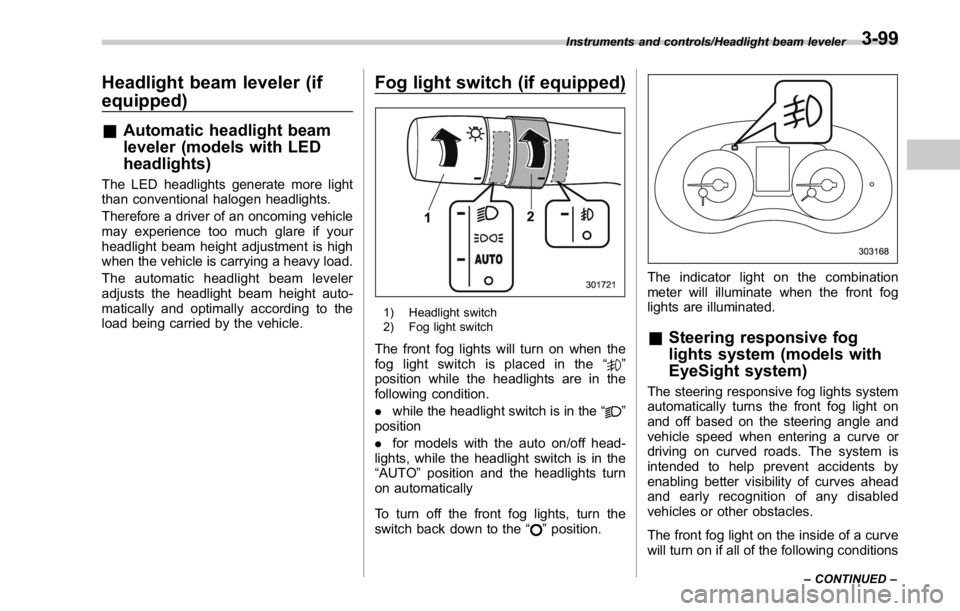
1) Headlight switch
2) Fog light switch
The front fog lights will turn on when the
fog light switch is placed in the “
”
position while the headlights are in the
following condition.
. while the headlight switch is in the “
”
position
. for models with the auto on/off head-
lights, while the headlight switch is in the
“ AUTO ” position and the headlights turn
on automatically
To turn off the front fog lights, turn the
switch back down to the “
” position. The indicator light on the combination
meter will illuminate when the front fog
lights are illuminated.
& Steering responsive fog
lights system (models with
EyeSight system) The steering responsive fog lights system
automatically turns the front fog light on
and off based on the steering angle and
vehicle speed when entering a curve or
driving on curved roads. The system is
intended to help prevent accidents by
enabling better visibility of curves ahead
and early recognition of any disabled
vehicles or other obstacles.
The front fog light on the inside of a curve
will turn on if all of the following conditionsInstruments and controls/Headlight beam leveler
– CONTINUED –3-99
Page 229 of 594
Instruments and controls/Fog light switch
are met.
. The light control switch is in the “
”
position
. The light control switch is in the
“ AUTO ” position and the low beam head-
lights turn on automatically
. The fog light switch is in the “
”
position
. The low beam mode is selected (the
turn signal lever is in the center position)
. The select lever is in a position other
than the “ R ” position
. The steering responsive fog lights
system has not been deactivated
. The operating conditions such as the
steering angle and vehicle speed are met
The front fog lights on both sides will turn
on as usual if all of the following conditions
are met.
. The light control switch is in the “
”
position
. The light control switch is in the
“ AUTO ” position and the low beam head-
lights turn on automatically
. The fog light switch is in the “
”
position
. The low beam mode is selected (the
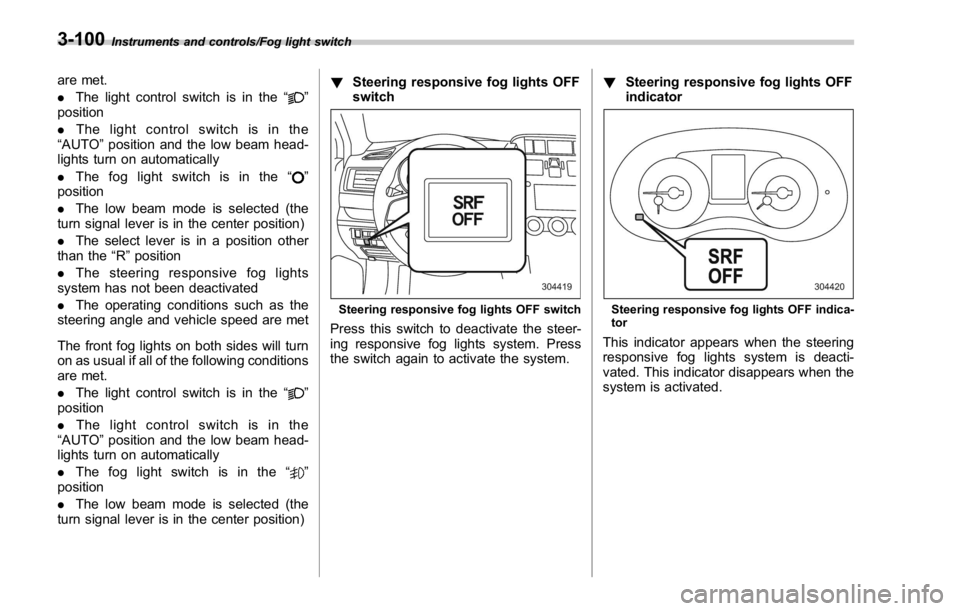
turn signal lever is in the center position) ! Steering responsive fog lights OFF
switch
Steering responsive fog lights OFF switch
Press this switch to deactivate the steer-
ing responsive fog lights system. Press
the switch again to activate the system. ! Steering responsive fog lights OFF
indicator
Steering responsive fog lights OFF indica-
tor
This indicator appears when the steering
responsive fog lights system is deacti-
vated. This indicator disappears when the
system is activated.3-100
Page 241 of 594

Instruments and controls/Defogger and deicer
Defogger and deicer
1) Rear window defogger
2) Outside mirror defogger (if equipped)
3) Windshield wiper deicer (if equipped)
The defogger and deicer system is acti- vated only when the ignition switch is in
the “ ON ” position.
To activate the defogger and deicer
system, press the control switch that is
located on the climate control panel. The
rear window defogger, outside mirror
defogger and windshield wiper deicer are
activated simultaneously. The indicator
light on the control switch illuminates while
the defogger and deicer system is acti-
vated.
To turn them off, press the control switch
again. They also turn off when the ignition
switch is turned to the “ ACC ” or “ LOCK ” /
“ OFF ” position.
The defogger and deicer system will
automatically shut off after approximately
15 minutes. If the rear window and the outside mirrors have been cleared and the
windshield wiper blades have been deiced
completely before that time, press the
control switch to turn them off. If defrost-
ing, defogging or deicing is not complete,
you have to press the control switch to
turn them on again.
It is possible for the defogger and deicer
system to be set to continuous operation
mode by a SUBARU dealer. Consult your
SUBARU dealer for details. Also, for
models with a multi function display, the
setting can be changed using the display.
For details, refer to “ Multi function display ”
F 3-48.
If the battery voltage drops below the
permissible level, continuous operation of
the defogger and deicer system is can-
celed and the system stops operating.
CAUTION
. To prevent the battery from being
discharged, do not operate the
defogger and deicer system con-
tinuously for any longer than
necessary.
. Do not use sharp instruments or
window cleaner containing abra-
sives to clean the inner surface
of the rear window. They may3-112
Page 251 of 594

Climate control/Manual climate control operation
. Turn the passenger ’ s side temperature
control dial
The “ DUAL ” mode can be canceled by
pressing the “ DUAL ” button.
When the “ DUAL ” mode is selected:
Turn the driver ’ ssidedialtosetthe
driver ’ s side temperature. Turn the front
passenger ’ ssidedialtosetthefront
passenger ’ s side temperature.
When the “ DUAL ” mode is canceled:
Set the desired temperature by turning the
driver ’ s side dial.
When the “ DUAL ” mode is canceled, only
the driver ’ s side temperature is displayed.
& Fan speed controlThe fan operates only when the ignition
switch is in the “ ON ” position. Select the
preferred fan speed by turning the fan
speed control dial.
& Air conditioner controlThe air conditioner operates only when
the engine is running.
Press the air conditioner button while the
fan is in operation to turn on the air
conditioner. When the air conditioner is
on, the “ A/C ” indicator light illuminates.
To turn off the air conditioner, press the button again.
NOTE For efficient defogging or dehumidify-
ing in cold weather, turn on the air
conditioner. However, if the ambient
temperature decreases to approxi-
mately 32 8 F(0 8 C), the air conditioner
compressor will stop operating.
& Air inlet selection Select the air inlet by pressing the air inlet
selection button.
ON position (recirculation): Interior air is
recirculated inside the vehicle. Press the
air inlet selection button to the ON position
for fast cooling with the air conditioner or
when driving on a dusty road.
OFF position (outside air): Outside air is
drawn into the passenger compartment.
Press the air inlet selection button to the
OFF position when the interior has cooled
to a comfortable temperature and the road
is no longer dusty.
WARNING
Continued operation in the ON posi-
tion may fog up the windows. Switch
to the OFF position as soon as the
outside conditions are no longer dusty.
NOTE When the battery is disconnected or
the battery voltage drops, the air inlet
selection operation indicator light may
blink. This does not indicate a malfunc-
tion. However, if the indicator light
blinks every time you start the engine,
a malfunction may occur in the elec-
trical circuit. Have the vehicle in-
spected at the nearest SUBARU dealer.4-8