Page 205 of 594
Instruments and controls/Multi function display
switch, and confirm the setting by pushing
the
button.
6. The system will notify you that the
setting is complete.
! Clock/calendar screen setting
1. Perform the preparation steps accord-
ing to “ Preparation for screen settings ”
F 3-71. 2. Operate the “ ” or “ ” switch to
select the “ Clock ” item. Then push the
button.
3. Push the button once more. 4. Select “ Type A clock ” , “ Type B clock ” ,
“ Calendar ” or “ OFF ” by operating the “
”
switch. Then push the
button.
5. Select “ Set ” by operating the “ ”
switch, and confirm the setting by pushing
the
button.3-76
Page 250 of 594

both side windows to prevent fogging.)
(Heat-def): Windshield defroster outlets,
foot outlets and both side outlets of the
instrument panel (Refer to “ Defrosting ”
F 4-9.)
(Defrost): Windshield defroster outlets and both side outlets of the instrument
panel (Refer to “ Defrosting ” F 4-9.)
NOTE When the “ ” or “ ” mode is se-
lected, the air conditioner compressor
operates automatically regardless of
the position of the air conditioner
button to defrost the windshield more
quickly. However the indicator on the
air conditioner button will not illumi-
nate. At the same time, the air inlet
selection is automatically set to the
outside air mode. After defrosting the
windshield by pressing the defroster
button “
” , pressing the button again
returns the system to the setting that
had been selected before the defroster
was activated.
& Temperature control Turn the temperature control dial to set the
preferred interior temperature. With the
dial set to your preferred temperature, the
system automatically adjusts the tempera-
ture of air supplied from the outlets so that
the preferred temperature is achieved and
maintained.
If the dial is turned fully counterclockwise,
the system provides maximum cooling
performance. If the dial is turned fully
clockwise, the system provides maximum heating performance.
NOTE The controllable temperature range
may vary depending on the regional
specifications of the vehicle.
! “ DUAL ” mode (type B)
a) Front passenger ’ s side temperature
b) Driver ’ s side temperature
You can change the setting of the driver ’ s
side and front passenger ’ s side tempera-
ture independently by selecting the
“ DUAL ” mode.
You can select the “ DUAL ” mode by
performing either of the following proce-
dures.
. Press the “ DUAL ” buttonClimate control/Manual climate control operation
– CONTINUED –4-7
Page 333 of 594
Audio/Media operation
No. Function
& 10
Turn clockwise to skip to the next track.
& 11
Select to skip to the next track/
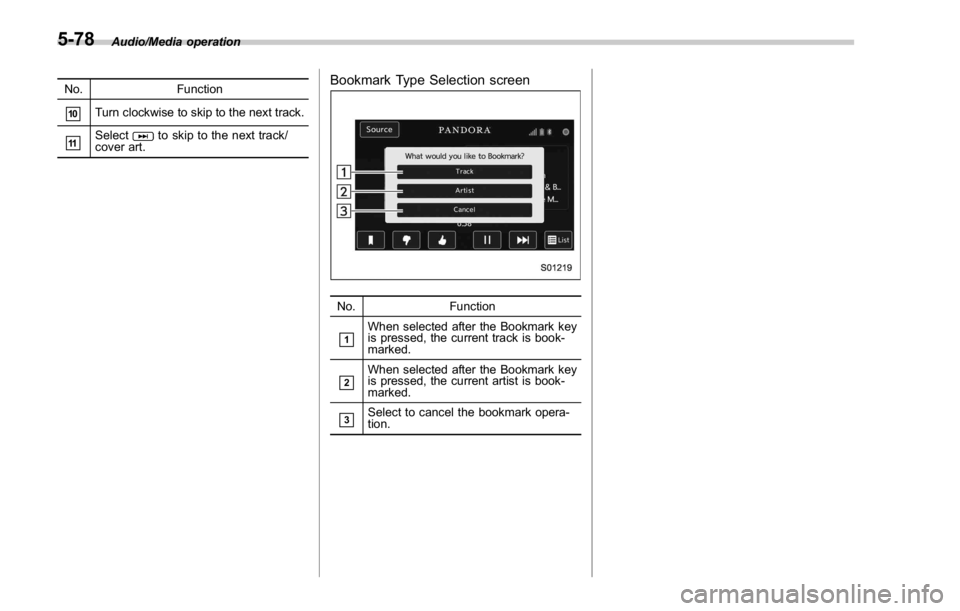
cover art. Bookmark Type Selection screen
No. Function
& 1
When selected after the Bookmark key
is pressed, the current track is book-
marked.
& 2
When selected after the Bookmark key
is pressed, the current artist is book-
marked.
& 3
Select to cancel the bookmark opera-
tion.5-78
Page 376 of 594
Storage compartment CAUTION. Always keep the storage com-
partment closed while driving to
reduce the risk of injury in the
event of a sudden stop or an
accident.
. Do not store spray cans, contain-
ers with flammable or corrosive
liquids or any other dangerous
items in the storage compart-
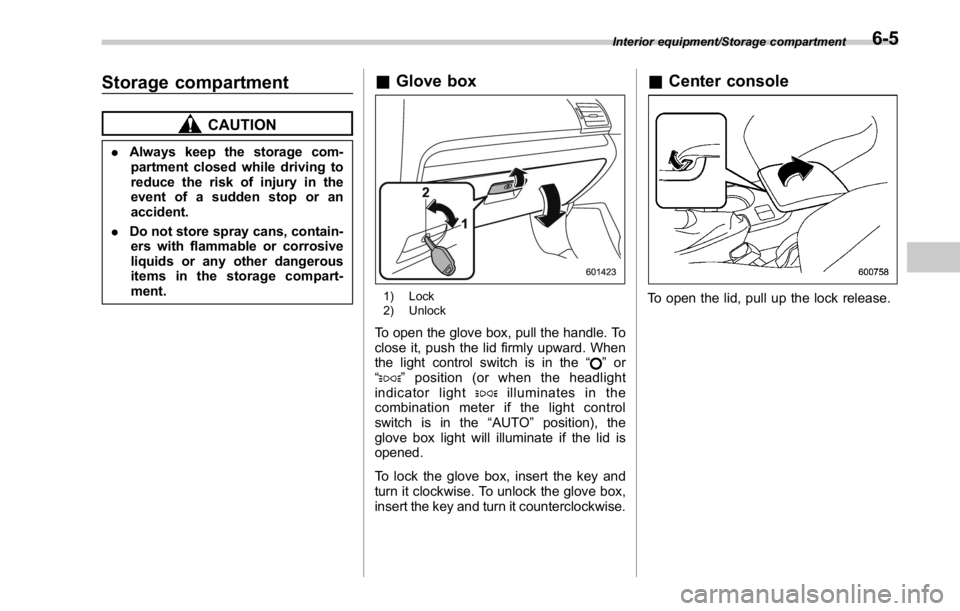
ment. & Glove box
1) Lock
2) Unlock
To open the glove box, pull the handle. To
close it, push the lid firmly upward. When
the light control switch is in the “
” or
“
” position (or when the headlight
indicator light
illuminates in the
combination meter if the light control
switch is in the “ AUTO ” position), the
glove box light will illuminate if the lid is
opened.
To lock the glove box, insert the key and
turn it clockwise. To unlock the glove box,
insert the key and turn it counterclockwise. & Center console
To open the lid, pull up the lock release. Interior equipment/Storage compartment
6-5
Page 394 of 594

& Fuel filler lid and cap ! Refueling
Only one person should be involved in
refueling. Do not allow others to approach
the area of the vehicle near the fuel filler
pipe while refueling is in progress.
Be sure to observe any other precautions
that are posted at the service station.
1. To open the fuel filler lid, pull the lid
release lever up. The lever is on the floor
at the left of the driver ’ s seat.
WARNINGBefore opening the fuel filler cap,
first touch the vehicle body or a
metal portion of the fuel pump or
similar object to discharge any
static electricity that may be present
on your body. If your body is carry-
ing an electrostatic charge, there is
a possibility that an electric spark
could ignite the fuel, which could
burn you. To avoid acquiring a new
static electric charge, do not get
back into the vehicle while refueling
is in progress. 1) Open
2) Close
2. Remove the fuel filler cap by turning it
slowly counterclockwise.
WARNING
. Gasoline vapor is highly flam-
mable. Before refueling, always
first stop the engine and close all
vehicle doors and windows.
Make sure that there are no
lighted cigarettes, open flames
or electrical sparks in the adja-
cent area. Only handle fuel out-
doors. Quickly wipe up any
spilled fuel.
. When opening the cap, grasp it
firmly and turn it slowly to the Starting and operating/Fuel
– CONTINUED –7-5
Page 395 of 594

Starting and operating/Fuel
left. Do not remove the cap
quickly. Fuel may be under pres-
sure and spray out of the fuel
filler neck, especially in hot
weather. If you hear a hissing
sound while you are removing
the cap, wait for the sound to
stop and then slowly open the
cap to prevent fuel from spraying
out and creating a fire hazard.
3. Set the fuel filler cap on the cap holder
inside the fuel filler lid.
WARNING
. When refueling, insert the fuel
nozzle securely into the fuel filler
pipe. If the nozzle is lifted or not
fully inserted, its automatic stop- ping mechanism may not func-
tion, causing fuel to overflow the
tank and creating a fire hazard.
. Stop refueling when the auto-
matic stop mechanism on the
fuel nozzle activates. If you con-
tinue to add fuel, temperature
changes or other conditions
may cause fuel to overflow from
the tank and create a fire hazard.
4. Stop filling the tank after the fuel filler
pump automatically stops. Do not add any
more fuel.
5. Put the cap back on, turn it clockwise
until you hear a clicking noise. Be certain
not to catch the tether under the cap while
tightening.
CAUTION
Make sure that the cap is tightened
until it clicks to prevent fuel spillage
in the event of an accident.
6. Close the fuel filler lid completely.
CAUTION
If you spill any fuel on the painted
surface, rinse it off immediately.
Otherwise, the painted surface could be damaged.
NOTE . You will see the “ ” sign in the fuel
gauge. This indicates that the fuel filler
door (lid) is located on the right side of
the vehicle.
. If the fuel filler cap is not tightened
until it clicks or if the tether is caught
under the cap, the CHECK ENGINE
warning light/malfunction indicator
light may illuminate. Refer to “ CHECK
ENGINE warning light/Malfunction in-
dicator light ” F 3-16.
CAUTION. Never add any cleaning agents to
the fuel tank. The addition of a
cleaning agent may cause da-
mage to the fuel system.
. After refueling, turn the cap
clockwise until it clicks to ensure
that it is fully tightened. If the cap
is not securely tightened, fuel
may leak out while the vehicle is
being driven or fuel spillage
could occur in the event of an
accident, creating a fire hazard.
. Do not let fuel spill on the exterior7-6
Page 470 of 594

. Always turn off the engine before
raising the flat tire off the ground
using the jack. Never swing or
push the vehicle supported with
the jack. The jack can come out
of the jacking point due to a jolt
and this can result in a severe
accident.
1. Park on a hard, level surface, when-
ever possible, then stop the engine.
2. Set the parking brake securely and
shift the shift lever in reverse (MT models)
or the select lever to the “ P ” (Park)
position (CVT models).
3. Turn on the hazard warning flasher
and have everyone get out of the vehicle.
4. Put wheel blocks at the front and rear
of the tire diagonally opposite the flat tire. 5. Take out the jack, jack handle and
wheel nut wrench.
The tools and the spare tire are stored
under the floor of the trunk. Refer to
“ Maintenance tools ” F 9-3.
NOTE Make sure that the jack is well lubri-
cated before using it.
6. Take out the tool bucket and turn the
attaching bolt counterclockwise, then take
the spare tire out.
NOTE If the spare tire provided in your vehicle
is a temporary spare tire, carefully read
“ Temporary spare tire ” F 9-2 and
strictly follow the instructions. 7. Loosen the wheel nuts using the wheel
nut wrench but do not remove the nuts.
Jack-up points
8. Place the jack under the side sill at the
front or rear jack-up point closest to the flat
tire. In case of emergency/Flat tires
– CONTINUED –9-5
Page 471 of 594
In case of emergency/Flat tires
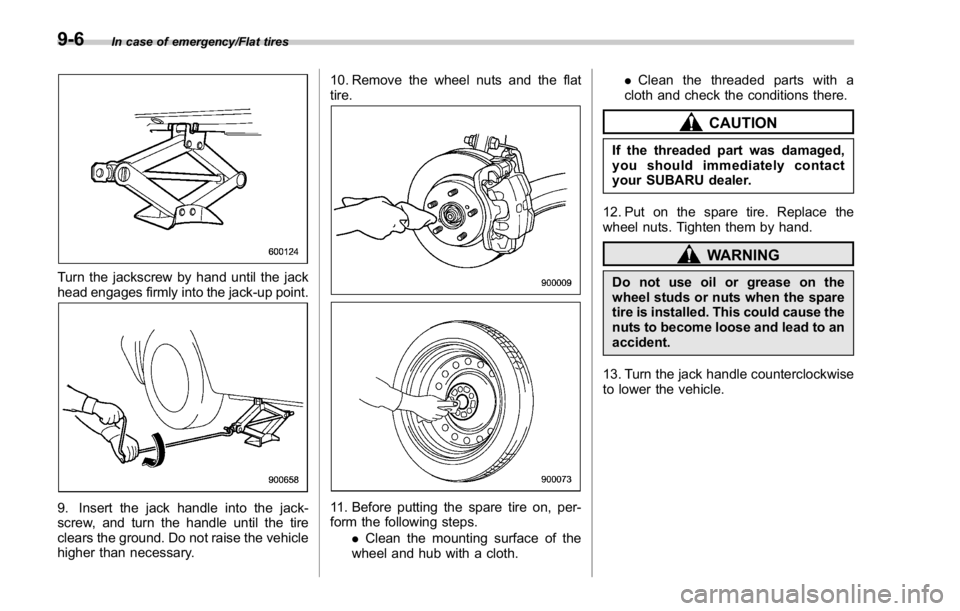
Turn the jackscrew by hand until the jack
head engages firmly into the jack-up point.
9. Insert the jack handle into the jack-
screw, and turn the handle until the tire
clears the ground. Do not raise the vehicle
higher than necessary. 10. Remove the wheel nuts and the flat
tire.
11. Before putting the spare tire on, per-
form the following steps.
. Clean the mounting surface of the
wheel and hub with a cloth. . Clean the threaded parts with a
cloth and check the conditions there.
CAUTIONIf the threaded part was damaged,
you should immediately contact
your SUBARU dealer.
12. Put on the spare tire. Replace the
wheel nuts. Tighten them by hand.
WARNINGDo not use oil or grease on the
wheel studs or nuts when the spare
tire is installed. This could cause the
nuts to become loose and lead to an
accident.
13. Turn the jack handle counterclockwise
to lower the vehicle.9-6