2016 SUBARU WRX light
[x] Cancel search: lightPage 156 of 594

and the CHECK ENGINE warning light/
malfunction indicator light is on.
The Vehicle Dynamics Control system is
probably malfunctioning under the follow-
ing condition. Have your vehicle checked
at a SUBARU dealer as soon as possible.
. The light does not turn off even after
the lapse of several minutes (the engine
has warmed up) after the engine has
started. & Vehicle Dynamics Control OFF indicator light/Traction mode
indicator light
/The indicator light shows the activated/deactivated conditions as follows. Activated/deactivated status for each function
Traction Control Vehicle
Dynamics
Control system ABS
Indicator light Turn off Activated Activated Activated
Deactivated Activated Activated
Deactivated Deactivated Activated
For details about the Traction Control and Vehicle Dynamics Control system, refer to
“ Vehicle Dynamics Control system ” F 7-38.Instruments and controls/Warning and indicator lights
– CONTINUED –3-27
Page 157 of 594

Instruments and controls/Warning and indicator lights
! Vehicle Dynamics Control OFF in-
dicator light
This light illuminates when the Vehicle
Dynamics Control OFF switch is operated
to select the traction mode or the Vehicle
Dynamic Control OFF mode. For details,
refer to “ Vehicle Dynamics Control sys-
tem ” F 7-38.
NOTE . The light may remain illuminated for
a while after the engine has been
started, especially in cold weather. This
does not indicate the existence of a
problem. The light should turn off as
soon as the engine has warmed up.
. The indicator light illuminates when
the engine has developed a problem
and the CHECK ENGINE warning light/
malfunction indicator light is on.
The Vehicle Dynamics Control system is
probably malfunctioning under the follow-
ing conditions. Have your vehicle checked
at a SUBARU dealer as soon as possible.
. The light does not illuminate when the
ignition switch is turned to the “ ON ”
position.
. The light does not turn off even after
the lapse of several minutes (the engine
has warmed up) after the engine has
started. ! Traction mode indicator light
The light illuminates when the Vehicle
Dynamics Control OFF switch is pressed
briefly to select the traction mode. For
details, refer to “ Traction mode ” F 7-41.
& Warning chimes and warning
indicator of the keyless ac-
cess with push-button start
system (if equipped)
Access key warning light
The keyless access with push-button start
system sounds a warning chime and the
access key warning indicator appears on
the combination meter in order to minimize
improper operations and help protect your
vehicle from theft.
When the warning chime sounds and/or
the warning indicator appears, take the appropriate action.
WARNINGNever drive the vehicle if the indi-
cator on the push-button ignition
switch is flashing in green when
starting the engine. This indicates
the status that the steering wheel is
not released and could result in an
accident involving serious injury or
death.
CAUTION. When starting the engine again
after the operation indicator on
the push-button ignition switch
flashes in green, if the operation
indicator is still flashing in green,
there could be a steering lock
malfunction. Contact your
SUBARU dealer as soon as pos-
sible.
. When the operation indicator on
the push-button ignition switch
flashes in orange, contact a
SUBARU dealer immediately.3-28
Page 158 of 594

NOTE . Even when the access key is within
the operating ranges inside the vehicle,
the access key warning for engine start
may be provided depending on the
status of the access key and the
environmental conditions.
. When the access key is taken out of
the vehicle through an open window,
the access key takeout warning or
passenger access key takeout warning
will not be provided.
! List of warnings
CAUTIONWhen any of the following warnings
occurs even if the access key warn-
ing indicator does not appear, take
the appropriate action. Instruments and controls/Warning and indicator lights
– CONTINUED –3-29
Page 159 of 594

Instruments and controls/Warning and indicator lights
Inside warning
chime Outside warning
chime Operation indicator
on push-button igni-
tion switch Status Action
Ding,
ding ...
(intermittent) —— The driver ’ s door was opened while the
push-button ignition switch is “ ACC ” (in
CVT models, when the select lever is in
the “ P ” position.) Switch the push-button ignition switch to
“ OFF ” , or close the driver ’ s door.
*When exiting the vehicle, be sure to
switch the push-button ignition switch to
“ OFF ” .
The push-button ignition switch was
switched to “ OFF ” while the driver ’ s door
is open. Close the driver ’ s door.
Ding Short beep
(2 seconds) — Lockout warning:
All doors were closed after the locking of
all doors was set by using the door lock
lever or power door locking switch while
the access key is inside the vehicle. Take out the access key from the
vehicle, and lock the doors.
*The doors cannot be locked while the
access key is inside the vehicle.
*A chirp sound will be heard, and all
doors will be unlocked.
— Short beep
(2 seconds) — Trunk lockout warning:
The trunk was closed with the access
key in it while all doors are locked (or
during the automatic lock time period). Take out the access key from the trunk,
and close the trunk.
*By pressing the trunk lid opener button
after this warning chime sounds, the
trunk can be unlocked.
Access key lock-in warning:
The door lock sensor was touched while
the push-button ignition switch is “ OFF ”
and the access key is inside the vehicle. Take out the access key from the
vehicle, and lock the doors.
*If the access key is inside the vehicle,
the doors cannot be locked.
— Beep, beep ...
(5 beeps) — Door ajar warning:
The door lock sensor is touched while
the push-button ignition switch is in the
“ OFF ” position and another door or the
trunk is opened. Close
the doors securely and lock them.
*If one of the doors is opened, the doors
cannot be locked.3-30
Page 160 of 594

Inside warning
chime Outside warning
chime Operation indicator
on push-button igni-
tion switch Status Action
Ding Long beep (60
seconds max.) — Power warning:
The door lock sensor was touched while
carrying the access key and the push-
button ignition switch is in a position
other than “ OFF ” and the select lever is
in the “ P ” position. Open the door and return the access key
inside the vehicle, or switch the push-
button ignition switch to “ OFF ” .
*If the push-button ignition switch is not
switched to “ OFF ” , the doors cannot be
locked.
Ding, ding ...
(7 seconds) —— Access key warning:
The vehicle was driven while the access
key is not inside the vehicle. Carry the access key, and drive the
vehicle.
Ding —— Access key warning for engine start:
The push-button ignition switch was
pressed while the access key is not
inside the vehicle. Carry the access key, and press the
push-button ignition switch.
Ding Beep, beep, beep
(3 beeps) — Access key takeout warning:
The driver exited the vehicle with the
access key and closed the driver ’ s door
while the push-button ignition switch is in
a position other than “ OFF ” and the
select lever is in the “ P ” position. Switch the push-button ignition switch to
“ OFF ” , and get out of the vehicle.
Ding Beep, beep, beep
(3 beeps) — Passenger access key takeout warn-
ing:
A fellow passenger exited the vehicle
with the access key and closed a door
other than the driver ’ s door while the
push-button ignition switch is in a posi-
tion other than “ OFF ” . Return the access key to inside the
vehicle, or switch the push-button igni-
tion switch to “ OFF ” .
Long
beep
(continuous) Long beep
(continuous) — The driver exited the vehicle with the
access key and closed the driver ’ s door
while the push-button ignition switch is in
a position other than “ OFF ” and the
select lever is in a position other than the
“ P ” position. Shift the select lever to the “ P ” position,
switch the push-button ignition switch to
“ OFF ” and exit the vehicle.Instruments and controls/Warning and indicator lights
– CONTINUED –3-31
Page 161 of 594

Instruments and controls/Warning and indicator lights
Inside warning
chime Outside warning
chime Operation indicator
on push-button igni-
tion switch Status Action
Long beep
(continuous) —— Select lever position warning:
The driver ’ s door was opened while the
push-button ignition switch is in a posi-
tion other than “ OFF ” and the select
lever is in a position other than the “ P ”
position. Shift the select lever to the “ P ” position,
switch the push-button ignition switch to
“ OFF ” and exit the vehicle.
Ding —— The battery of the access key is low. Replace the battery of the access key.
Ding — Flashes in green (15
seconds max.) Steering lock warning:
The engine start procedure was per-
formed, but the steering is still locked. While turning the steering wheel right
and left lightly, depress the brake pedal
and press the push-button ignition
switch.
Ding — Flashes in orange System malfunction warning:
A malfunction was detected in the power
system or steering lock. Contact a SUBARU dealer immediately
and have the vehicle inspected.
NOTE An electronic chirp will sound while the select lever is in the “ R ” position. In this case, the select lever position warning chime
will not sound.3-32
Page 162 of 594

& Security indicator lightThis indicator light shows the status of the
alarm system. It also indicates operation
of the immobilizer system.
! Alarm system
It blinks to show the driver the operational
status of the alarm system. For detailed
information, refer to “ Alarm system ” F 2-
25.
! Immobilizer system
The security indicator light starts blinking
in the following conditions.
For models with “ keyless access with
push-button start system ” :
. Immediately after the push-button igni-
tion switch is turned to the “ OFF ” position.
. Immediately after the driver ’ s door is
opened or closed when all of the following
conditions are met.
– The push-button ignition switch is in
the “ ON ” or “ ACC ” position.
– The access key is outside the
vehicle.
– The engine is not running.
– In the event that an unauthorized
key is used (for example, the key is
unregistered or the ID code does not
match), the power is not switched to
“ ON ” and the security indicator light continues blinking.
For models without “ keyless access
with push-button start system ” :
. Approximately 60 seconds after the
ignition switch is turned from the “ ON ”
position to the “ ACC ” or “ LOCK ” position.
. Immediately after the key is pulled out.
If the indicator light does not blink in the
above conditions, it may indicate that
immobilizer system may be malfunction-
ing. Contact your nearest SUBARU dealer
immediately.
In the event that an unauthorized key (for
example, an unauthorized duplicate) is
used, the security indicator light illumi-
nates. For details about the immobilizer
system, refer to “ Immobilizer ” F 2-3.
NOTE . The security indicator light remains
off in the following conditions. It means
that the matching of the ID code is
completed and the immobilizer system
is deactivated, and it does not indicate
a malfunction.
Models with “ keyless access with
push-button start system ” :
– while the engine is running
– the push-button ignition switch has been turned to the “ ON ” or
“ ACC ” position and the driver ’ s
door has not been opened or closed
Models without “ keyless access
with push-button start system ” :
– while the engine is running
– for approximately 60 seconds
after the ignition switch is turned
from the “ ON ” position to the
“ ACC ” or “ LOCK ” position
– when the ignition switch is in the
“ ON ” position.
. Even if a malfunction occurs, such
as the security indicator light flashes
irregularly, it will not affect the func-
tionality of the immobilizer system.Instruments and controls/Warning and indicator lights
– CONTINUED –3-33
Page 163 of 594
Instruments and controls/Warning and indicator lights
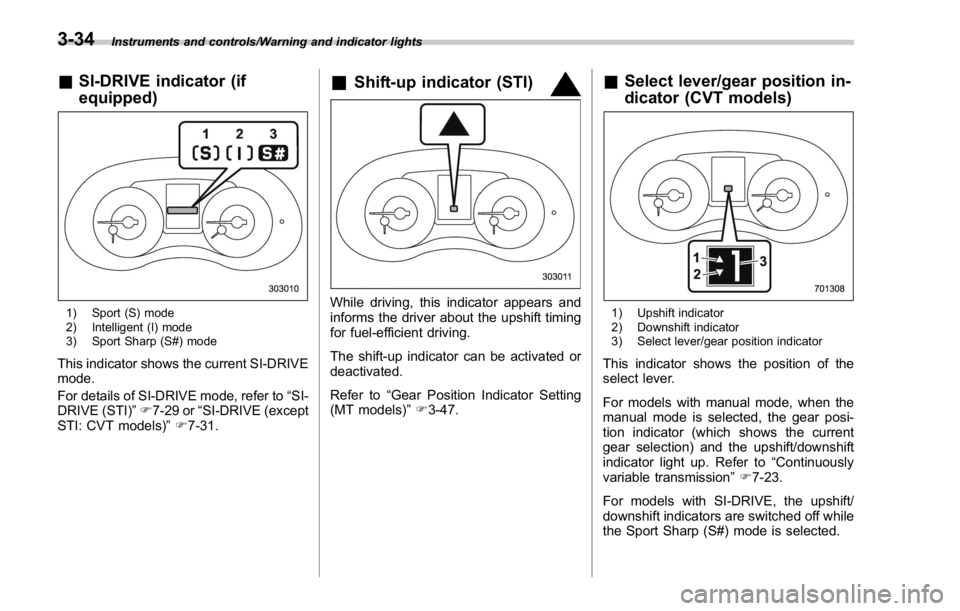
& SI-DRIVE indicator (if
equipped)
1) Sport (S) mode
2) Intelligent (I) mode
3) Sport Sharp (S#) mode
This indicator shows the current SI-DRIVE
mode.
For details of SI-DRIVE mode, refer to “ SI-
DRIVE (STI) ” F 7-29 or “ SI-DRIVE (except
STI: CVT models) ” F 7-31. & Shift-up indicator (STI)
While driving, this indicator appears and
informs the driver about the upshift timing
for fuel-efficient driving.
The shift-up indicator can be activated or
deactivated.
Refer to “ Gear Position Indicator Setting
(MT models) ” F 3-47. & Select lever/gear position in-
dicator (CVT models)
1) Upshift indicator
2) Downshift indicator
3) Select lever/gear position indicator
This indicator shows the position of the
select lever.
For models with manual mode, when the
manual mode is selected, the gear posi-
tion indicator (which shows the current
gear selection) and the upshift/downshift
indicator light up. Refer to “ Continuously
variable transmission ” F 7-23.
For models with SI-DRIVE, the upshift/
downshift indicators are switched off while
the Sport Sharp (S#) mode is selected.3-34