2016 SUBARU OUTBACK front
[x] Cancel search: frontPage 111 of 572
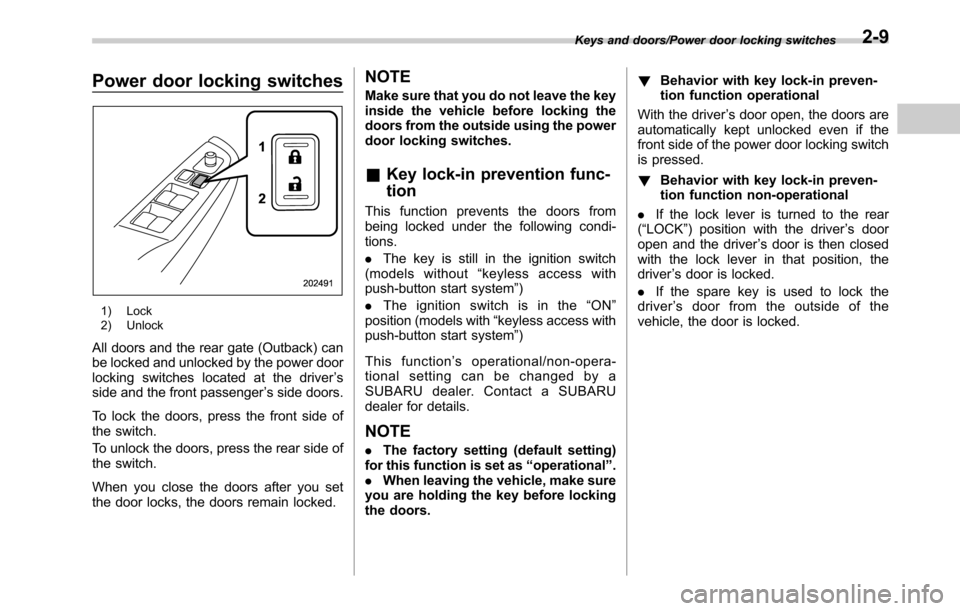
Power door locking switches
1) Lock
2) Unlock
All doors and the rear gate (Outback) can
be locked and unlocked by the power door
locking switches located at the driver’s
side and the front passenger’s side doors.
To lock the doors, press the front side of
the switch.
To unlock the doors, press the rear side of
the switch.
When you close the doors after you set
the door locks, the doors remain locked.
NOTE
Make sure that you do not leave the key
inside the vehicle before locking the
doors from the outside using the power
door locking switches.
&Key lock-in prevention func-
tion
This function prevents the doors from
being locked under the following condi-
tions.
.The key is still in the ignition switch
(models without“keyless access with
push-button start system”)
.Theignitionswitchisinthe“ON”
position (models with“keyless access with
push-button start system”)
This function’s operational/non-opera-
tional setting can be changed by a
SUBARU dealer. Contact a SUBARU
dealer for details.
NOTE
.The factory setting (default setting)
for this function is set as“operational”.
.When leaving the vehicle, make sure
you are holding the key before locking
the doors.!Behavior with key lock-in preven-
tion function operational
With the driver’s door open, the doors are
automatically kept unlocked even if the
front side of the power door locking switch
is pressed.
!Behavior with key lock-in preven-
tion function non-operational
.If the lock lever is turned to the rear
(“LOCK”) position with the driver’s door
open and the driver’s door is then closed
with the lock lever in that position, the
driver’s door is locked.
.If the spare key is used to lock the
driver’s door from the outside of the
vehicle, the door is locked.
Keys and doors/Power door locking switches2-9
Page 116 of 572

Keys and doors/Keyless access with push–button start system
Outback
1) Antenna
2) Operating range
.The operating range of the door lock-
ing/unlocking function is approximately 16
to 32 in (40 to 80 cm) from the respective
door handle.
.For Legacy,the operating range of the
trunk opening function is approximately 16
to 32 in (40 to 80 cm) from the trunk
opener button.
.For Outback,the operating range of
the rear gate locking/unlocking function is
approximately 16 to 32 in (40 to 80 cm)
from the rear gate ornament.
1) LED indicator
When the access key is within either of the
operating ranges of the front doors, the
LED indicator on the access key flashes.
When the keyless access functions are
disabled, the LED indicator does not flash
unless a button on the access key is
pressed.
!Operating range tips
.Locking by using the keyless access
function can be operated only by the door
lock sensor in the operating range in
which the access key is detected.
.Unlocking by using the keyless access
function can be operated only by the door
handle in the operating range in which the
access key is detected.
.If the access key is placed too close tothe vehicle body, the keyless access
functions may not operate properly. If they
do not operate properly, repeat the opera-
tion from further away.
.If the access key is placed near the
ground or in an elevated location from the
ground, even if it is in the indicated
operating range, the keyless access func-
tion may not operate properly.
.When the access key is within the
operating range, it is possible for anyone,
even someone who is not carrying the
access key, to operate the keyless access
function. Note that the keyless access
function can be operated only by the door
handle, door lock sensor, rear gate opener
button, trunk opener button or rear lock
button in the operating range in which the
access key is detected.
.It is not possible to lock the doors and
rear gate using the keyless access func-
tion when the access key is inside the
vehicle. However, depending on the status
of the access key and the environmental
conditions, the access key may be locked
inside the vehicle. Before locking, make
sure that you have the access key.
.When the battery of the access key is
discharged, or when operating it in a
location with strong radio waves or noise
(e.g., near a radio tower, power plant,
broadcast station or an area where wire-
2-14
Page 117 of 572

less equipment is used), or while talking
on a cell phone, the operating ranges may
be reduced, or the keyless access func-
tion may not operate.
In such a case, perform the procedure
described in“Locking and unlocking”F9-
18.
.When an access key is in the operating
range, if the door handle becomes wet
due to exposure to a significant amount of
water when the vehicle is washed or
during heavy rain, the doors may be
locked or unlocked.
.The keyless access function may not
operate properly depending on the status
of the access key and the radio wave
conditions around the vehicle. In such a
case, perform the procedure described in
“Locking and unlocking”F9-18.
!How to use keyless access func-
tions
!Keyless access function tips
.When you lock the doors and rear gate
using the keyless access function, turn the
push-button ignition switch off. It is not
possible to lock the doors and rear gate
using the keyless access function when
the push-button ignition switch is on the
“ACC”or“ON”position. Refer to“Switch-
ing power”F3-6.
.If the door handle is gripped with agloved hand, the door lock may not be
released.
.If the door lock sensor is touched three
times or more repeatedly, the system will
ignore the sensor operation.
.When performing the locking proce-
dure too quickly, locking may not have
been completed. After locking the doors, it
is recommended to pull the REAR door
handles to confirm that the doors have
been locked.
.It is possible to lock the doors even
when one of the doors is open. After
performing the locking procedure, close
the opened door or rear gate to lock it.
.Within 3 seconds after locking the
doors and the rear gate by using the
keyless access function, it is not possible
to unlock doors and/or the rear gate by
using the keyless access function.
.When locking, be sure to carry the
access key to prevent locking the access
key in the vehicle.!Unlocking
Carry the access key, and grip the door
handle.
.When the driver’s door handle is
gripped, only the driver’s door will be
unlocked.
.When the front passenger’s door han-
dle is gripped, all doors (for Outback,
including the rear gate) will be unlocked.
Also, an electronic chirp will sound twice
and the hazard warning flashers will flash
twice.
Keys and doors/Keyless access with push–button start system
–CONTINUED–2-15
Page 119 of 572

perform the unlocking operation once
first. You can then touch the door lock
sensor to lock the doors.
!Locking with the rear lock button
(Outback)
1) Rear lock button
Carry the access key, close all doors
including the rear gate and press the rear
lock button. The rear gate and all doors
will be locked. Also, an electronic chirp will
sound once and the hazard warning
flashers will flash once.
!Power saving function
To protect the access key battery and the
vehicle battery, the keyless access func-
tion will be disabled as follows.
.When the keyless access function andthe remote keyless entry system have not
been used:
(1) 5 days after the push-button igni-
tion switch has been turned off, com-
munication between the antennas and
the access key will be stopped.
(2) 9 days after step (1), the sensors
(both lock sensor and unlock sensor)
on the front passenger’s door will be
disabled.
.When the access key has been left in
the operating range for 10 minutes or
longer while all doors are locked, the
keyless access function will be disabled.
!Recovery from power saving
mode
When one of the following operations is
performed, the keyless access function
will be recovered.
.Unlock by gripping the door handle
(only when the sensors on the front
passenger’s door are not disabled) or
pressing the rear gate opener button on
the rear gate (Outback)/trunk opener
button on the trunk lid (Legacy)
.Lock or unlock by the remote keyless
entry system
.Open a door and then close it
.Turn the push-button ignition switch to
the“ON”position!Door unlock selection function
The door unlock selection function makes
the following operations possible.
.Unlocking the driver’s door without
unlocking any other doors (including the
rear gate) when gripping the driver’s door
handle
.For Outback, opening the rear gate
without unlocking any doors when press-
ing the rear gate opener button
The operational/non-operational setting
for this function can be changed by
operating the multi information display.
For details, refer to“Keyless Entry Sys-
tem”F3-42. The setting can also be
changed by a SUBARU dealer. Consult
your SUBARU dealer for details.
Operational:
.Only the driver’s door will be unlocked
when the driver’s door handle is gripped.
.For Outback, the rear gate will open,
but the other doors will remain locked
when the rear gate opener button is
pressed.
Non-operational:
.All doors and the rear gate will be
unlocked when the driver’s door handle is
gripped.
.For Outback, the rear gate will open
and all doors will be unlocked when the
Keys and doors/Keyless access with push–button start system
–CONTINUED–2-17
Page 133 of 572

5. Close the doors (and the rear gate
(Outback)) but leave only the driver’s door
or the front passenger’s door open.
6. Press the front side (“LOCK”side) of
the power door locking switch to set the
door locks.
7. Close the door. An electronic chirp will
sound once, the hazard warning flashers
will flash once and the security indicator
light will start flashing rapidly. After rapid
flashing for 30 seconds (standby time), the
security indicator light will then flash
slowly (twice approximately every 2 sec-
onds), indicating that the system has been
armed for surveillance.!To arm the system using the key-
less access function (if equipped)
1. Close all windows and the moonroof (if
equipped)
2. Turn the push-button ignition switch to
the“OFF”position.
3. Open the doors and get out of the
vehicle.
4. Make sure that the engine hood is
locked.
5. Close all doors and the rear gate/trunk
lid.
1) Door lock sensor
Security indicator light
6. Carry the access key and touch the
door lock sensor. All doors (for Outback,
including the rear gate) will lock, an
electronic chirp will sound once, the
hazard warning flashers will flash once,
and the security indicator light will start
flashing rapidly. After rapid flashing for 30
seconds (standby time), the security in-
dicator light will then flash slowly (twice
approximately every 2 seconds), indicat-
ing that the system has been armed for
surveillance.
If any of the doors or the rear gate is not
fully closed, an electronic chirp sounds
five times, the hazard warning flashers
flash five times to alert you that the doors
(or the rear gate/trunk lid) are not properly
closed. When you close the door, the
Keys and doors/Alarm system
–CONTINUED–2-31
Page 134 of 572

Keys and doors/Alarm system
system will automatically arm and doors
will automatically lock.
&Disarming the system
Perform either of the following procedures.
.Briefly press the disarm button (for less
than 2 seconds) on the access key/remote
transmitter.
.Carry the access key and perform
either of the following procedures (models
with“keyless access with push-button
start system”).
–Grip the front door handle.
–Press the rear gate opener button.
The flashing of the security indicator light
will then change slowly (once approxi-
mately every 3 seconds from twice ap-
proximately every 2 seconds), indicating
that the alarm system has been disarmed.
!Emergency disarming
If you cannot disarm the system using the
transmitter (i.e. the transmitter is lost,
broken or the transmitter battery is too
weak), you can disarm the system without
using the transmitter.
The system can be disarmed if you turn
the ignition switch from the“LOCK”/“OFF”
to the“ON”position with a registered key/
access key.
NOTE
For models with“keyless access with
push-button start system”, if the ac-
cess key battery is discharged, perform
the procedure described in“Switching
power”F9-18. In such a case, replace
the battery immediately. Refer to“Re-
placing battery of access key”F11-50.
&Valet mode
When you choose the valet mode, the
alarm system does not operate. In valet
mode, the access key/remote transmitter
is used only for locking and unlocking the
doors and rear gate (Outback) and panic
activation.
To enter the valet mode, change the
setting of your vehicle’s alarm system for
deactivation mode. Refer to“Activating
and deactivating the alarm system”F2-
28. The security indicator light will con-
tinue to flash once every 3 seconds
indicating that the system is in the valet
mode.
To exit valet mode, change the setting of
your vehicle’s alarm system for activation
mode. Refer to“Activating and deactivat-
ing the alarm system”F2-28.
&Tripped sensor identification
The security indicator light flashes when
the alarm system has been triggered.
Also, the number of flashes indicates the
location of unauthorized intrusion or the
severity of impact on the vehicle.
When the ignition switch is turned to the
“ON”position, the indicator light will
illuminate for 1 second and then flash as
follows:
.When a door or rear gate (Outback)
was opened: 5 times
.When the trunk (Legacy) was opened:
4 times
.When a strong impact or multiple
impacts were sensed: twice (only models
with shock sensors (dealer option))
.When a light impact was sensed: once
(only models with shock sensors (dealer
option))
&Shock sensors (dealer op-
tion)
The shock sensors trigger the alarm
system when they sense impacts applied
to the vehicle and when any of their
electric wires is cut. The alarm system
causes the horn to sound and the hazard
warning flashers to flash for a short time
when the sensed impact is weak, but it
warns of a strong impact or multiple
2-32
Page 136 of 572
Keys and doors/Windows
&Power window operation by
driver
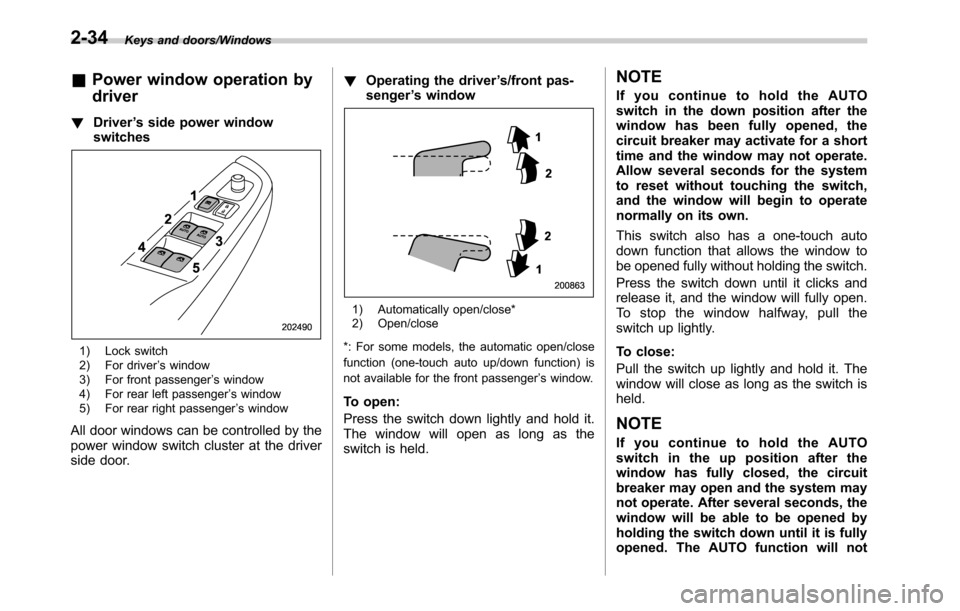
!Driver’s side power window
switches
1) Lock switch
2) For driver’s window
3) For front passenger’s window
4) For rear left passenger’s window
5) For rear right passenger’s window
All door windows can be controlled by the
power window switch cluster at the driver
side door.!Operating the driver’s/front pas-
senger’s window
1) Automatically open/close*
2) Open/close
*: For some models, the automatic open/close
function (one-touch auto up/down function) is
not available for the front passenger’s window.
To open:
Press the switch down lightly and hold it.
The window will open as long as the
switch is held.
NOTE
If you continue to hold the AUTO
switch in the down position after the
window has been fully opened, the
circuit breaker may activate for a short
time and the window may not operate.
Allow several seconds for the system
to reset without touching the switch,
and the window will begin to operate
normally on its own.
This switch also has a one-touch auto
down function that allows the window to
be opened fully without holding the switch.
Press the switch down until it clicks and
release it, and the window will fully open.
To stop the window halfway, pull the
switch up lightly.
To close:
Pull the switch up lightly and hold it. The
window will close as long as the switch is
held.
NOTE
If you continue to hold the AUTO
switch in the up position after the
window has fully closed, the circuit
breaker may open and the system may
not operate. After several seconds, the
window will be able to be opened by
holding the switch down until it is fully
opened. The AUTO function will not
2-34
Page 138 of 572
Keys and doors/Windows
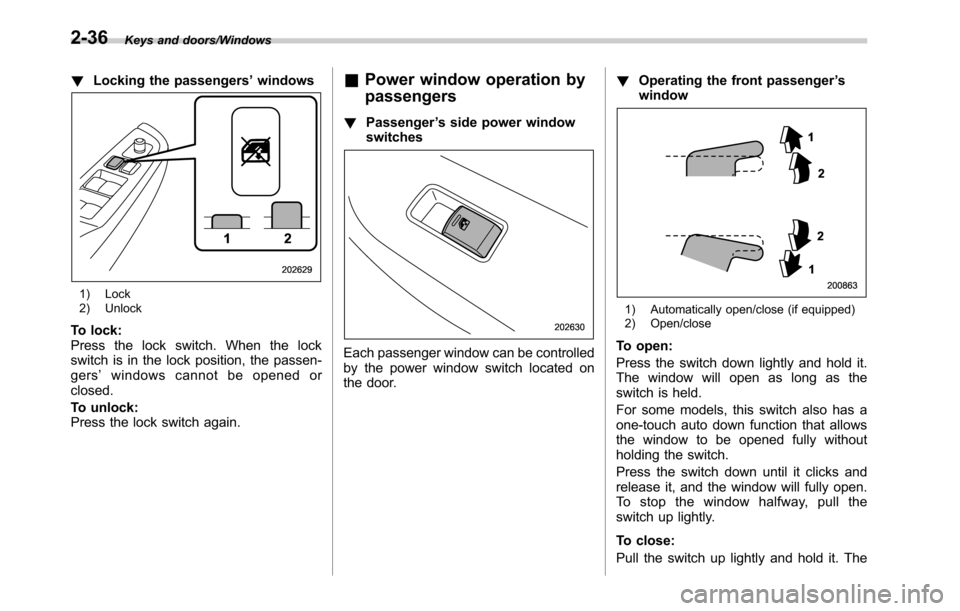
!Locking the passengers’windows
1) Lock
2) Unlock
To lock:
Press the lock switch. When the lock
switch is in the lock position, the passen-
gers’windows cannot be opened or
closed.
To unlock:
Press the lock switch again.
&Power window operation by
passengers
!Passenger’s side power window
switches
Each passenger window can be controlled
by the power window switch located on
the door.!Operating the front passenger’s
window
1) Automatically open/close (if equipped)
2) Open/close
To open:
Press the switch down lightly and hold it.
The window will open as long as the
switch is held.
For some models, this switch also has a
one-touch auto down function that allows
the window to be opened fully without
holding the switch.
Press the switch down until it clicks and
release it, and the window will fully open.
To stop the window halfway, pull the
switch up lightly.
To close:
Pull the switch up lightly and hold it. The
2-36