2016 SUBARU OUTBACK engine battery
[x] Cancel search: engine batteryPage 179 of 572

Inside warning
chimeOutside warning
chimeOperation indicator
on push-button
ignition switchStatus Action
Ding——Access key warning for engine start:
The push-button ignition switch was pressed
while the access key is not inside the
vehicle.Carry the access key, and press the push-
button ignition switch.
DingBeep, beep,
beep (3 times)—Access key takeout warning:
The driver exited the vehicle with the access
key and closed the driver’s door while the
push-button ignition switch is in a position
other than“OFF”and the select lever is in
the“P”position.Switch the push-button ignition switch to
“OFF”, and get out of the vehicle.
DingBeep, beep,
beep (3 times)—Passenger access key takeout warning:
A fellow passenger exited the vehicle with
the access key and closed a door other than
the driver’s door while the push-button
ignition switch is in a position other than
“OFF”.Return the access key to inside the vehicle,
or switch the push-button ignition switch to
“OFF”.
Long beep
(continuous)Long beep
(continuous)—The driver exited the vehicle with the access
key and closed the driver’s door while the
push-button ignition switch is in a position
other than“OFF”and the select lever is in a
position other than the“P”position.Shift the select lever to the“P”position,
switch the push-button ignition switch to
“OFF”and exit the vehicle.
Long beep
(continuous)——Select lever position warning:
The driver’s door was opened while the
push-button ignition switch is in a position
other than
“OFF”and the select lever is in a
position other than the“P”position.Shift the select lever to the“P”position,
switch the push-button ignition switch to
“OFF”and exit the vehicle.
Ding——The battery of the access key is low. Replace the battery of the access key.
Ding—Flashes in green
(15 seconds max.)Steering lock warning:
The engine start procedure was performed,
but the steering is still locked.While turning the steering wheel right and left
lightly, depress the brake pedal and press
the push-button ignition switch. Instruments and controls/Warning and indicator lights
–CONTINUED–
3-27
Page 195 of 572

to customize the operation period. Select
“Off”to deactivate the welcome lighting
function when approaching.
.Leaving Time Set:
The setting for the period of time in which
the low beam headlights remain on when
exiting the vehicle can be set or custo-
mized. Select the preferred seconds to
customize the operation period. Select
“Off”to deactivate the welcome lighting
function when exiting.
!Default Settings
Select“Ye s”to use the menu screen to
restore customized settings to the factory
default settings. Select“No”to return to
the previous screen without restoring to
the factory default settings.Light control switch
CAUTION
.Use of any lights for a long period
of time while the engine is not
running can cause the battery to
discharge.
.Before leaving the vehicle, make
sure that the light control switch
is turned to the off position. If the
vehicle is left unattended for a
long time with the light control
switch set to a position other
than the off position, the battery
may be discharged.
Models with“keyless access with
push-button start system”:
The light control switch operates when the
push-button ignition switch is in the“ACC”
or“ON”position.
Regardless of the position of the light
control switch, the illuminated lights are
turned off when the push-button ignition
switch is turned off.
Models without“keyless access with
push-button start system”:
The light control switch operates when the
key is inserted in the ignition switch.Regardless of the position of the light
control switch, the illuminated lights are
turned off when the key is removed from
the ignition switch.NOTE
The light control switch can be oper-
ated (except auto on/off headlights),
even under the following conditions.
.when the key is not inserted into the
ignition switch (models without“key-
less access with push-button start
system”)
.when the push-button ignition
switch is turned off (models with“key-
less access with push-button start
system”)
If the driver’s door is opened while the
headlights are illuminated under such
conditions, a chirp sound will inform
the driver that the lights are illumi-
nated.
Instruments and controls/Light control switch
–CONTINUED–3-43
Page 230 of 572
Audio/Antenna
Antenna
&Printed antenna
CAUTION
Do not use sharp instruments or
window cleaner containing abra-
sives to clean the inner surface of
the window on which the antenna is
printed. Doing so may damage the
antenna printed on the window.
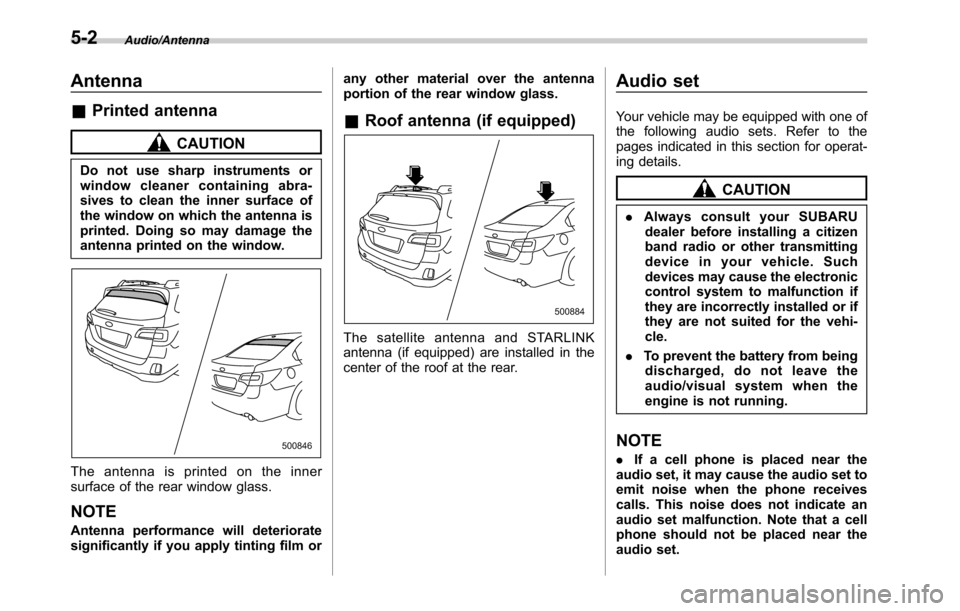
The antenna is printed on the inner
surface of the rear window glass.
NOTE
Antenna performance will deteriorate
significantly if you apply tinting film orany other material over the antenna
portion of the rear window glass.
&Roof antenna (if equipped)
The satellite antenna and STARLINK
antenna (if equipped) are installed in the
center of the roof at the rear.
Audio set
Your vehicle may be equipped with one of
the following audio sets. Refer to the
pages indicated in this section for operat-
ing details.
CAUTION
.Always consult your SUBARU
dealer before installing a citizen
band radio or other transmitting
device in your vehicle. Such
devices may cause the electronic
control system to malfunction if
they are incorrectly installed or if
they are not suited for the vehi-
cle.
.To prevent the battery from being
discharged, do not leave the
audio/visual system when the
engine is not running.
NOTE
.If a cell phone is placed near the
audio set, it may cause the audio set to
emit noise when the phone receives
calls. This noise does not indicate an
audio set malfunction. Note that a cell
phone should not be placed near the
audio set.
5-2
Page 246 of 572
Audio/Audio set
only the first two connected devices
will be recognized.
&Basic operation
This section describes some of the basic
features of the audio/visual system. Some
information may not pertain to your sys-
tem.
Your audio/visual system works when the
ignition switch is turned to the“ACC”or
“ON”position.
CAUTION
To prevent the battery from being
discharged, do not leave the audio/
visual system on longer than neces-
sary when the engine is not running.
NOTE
Some functions can also be operated
by using the voice command system.
For details, refer to“Voice command
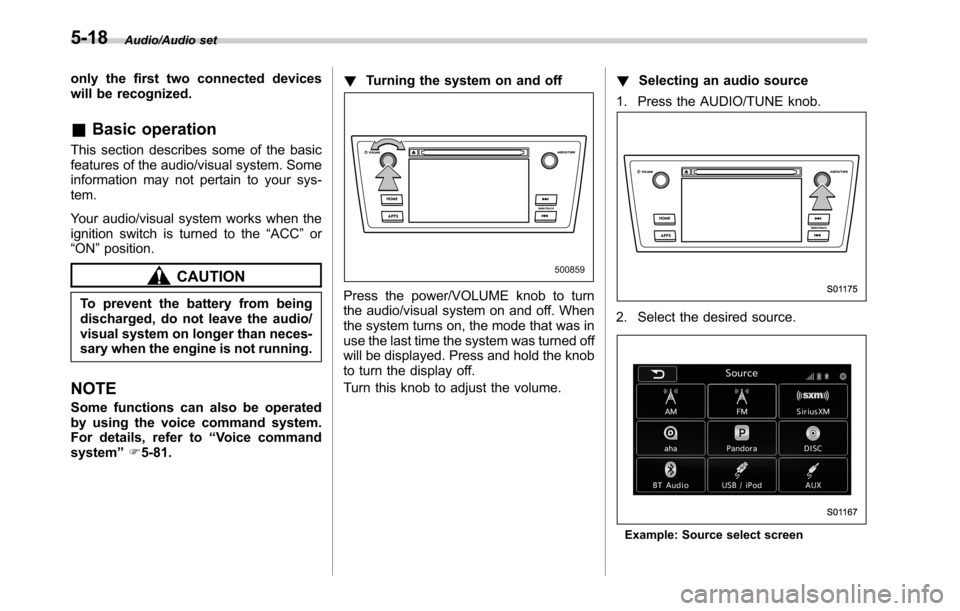
system”F5-81.!Turning the system on and off
Press the power/VOLUME knob to turn
the audio/visual system on and off. When
the system turns on, the mode that was in
use the last time the system was turned off
will be displayed. Press and hold the knob
to turn the display off.
Turn this knob to adjust the volume.!Selecting an audio source
1. Press the AUDIO/TUNE knob.
2. Select the desired source.
Example: Source select screen
5-18
Page 327 of 572
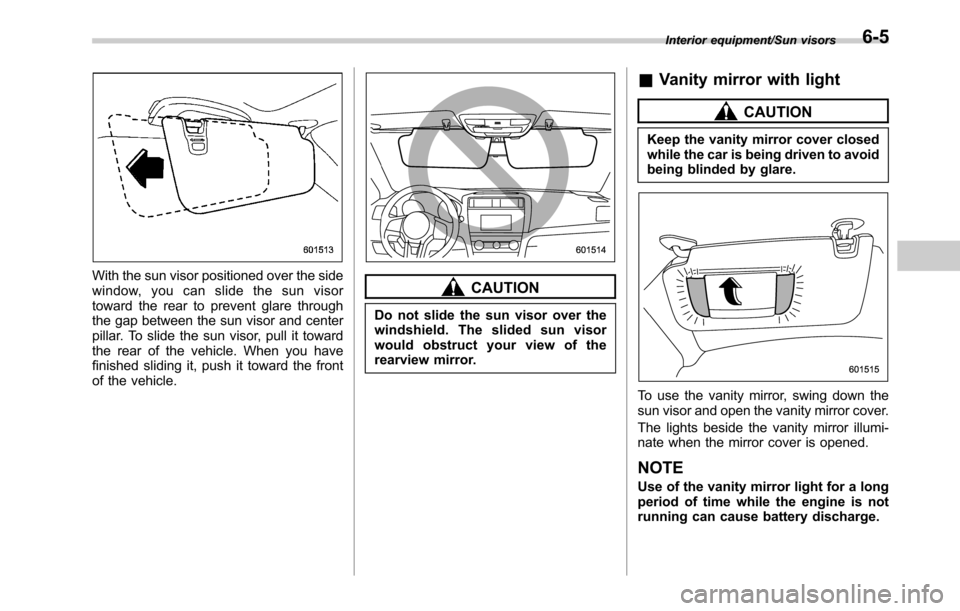
With the sun visor positioned over the side
window, you can slide the sun visor
toward the rear to prevent glare through
the gap between the sun visor and center
pillar. To slide the sun visor, pull it toward
the rear of the vehicle. When you have
finished sliding it, push it toward the front
of the vehicle.CAUTION
Do not slide the sun visor over the
windshield. The slided sun visor
would obstruct your view of the
rearview mirror.
&Vanity mirror with light
CAUTION
Keep the vanity mirror cover closed
while the car is being driven to avoid
being blinded by glare.
To use the vanity mirror, swing down the
sun visor and open the vanity mirror cover.
The lights beside the vanity mirror illumi-
nate when the mirror cover is opened.
NOTE
Use of the vanity mirror light for a long
period of time while the engine is not
running can cause battery discharge.
Interior equipment/Sun visors6-5
Page 333 of 572

CAUTION
.Do not attempt to use a cigarette
lighter in the accessory power
outlet.
.Do not place any foreign objects,
especially metal ones such as
coins or aluminum foil, into the
accessory power outlet. That
could cause a short circuit. Al-
ways put the cap on the acces-
sory power outlet when it is not
in use.
.Use only electrical appliances
which are designed for 12V DC.
The maximum power rating of an
appliance that can be connected
is 120W. Do not use an appliance
which exceeds the indicated wat-
tage for each outlet.
When using appliances con-
nected to two or more outlets
simultaneously, the total power
consumed by them must not
exceed 120W. Overloading the
accessory power outlet can
cause a short circuit. Do not use
double adapters or more than
one electrical appliance.
.If the plug on your electric appli-
ance is either too loose or tootight for the accessory power
outlet, this can result in a poor
contact or cause the plug to get
stuck. Only use plugs that fit
properly.
.Use of an electric appliance in the
accessory power outlet for a long
period of time while the engine is
not running can cause battery
discharge.
.Before driving your vehicle, make
sure that the plug and the cord
on your electrical appliance will
not interfere with your shifting
gears and operating the accel-
erator and brake pedals. If they
do, do not use the electrical
appliance while driving.
Upper compartment
Lower compartment
NOTE
When the lid of the center console is
closed, a gap remains between the
center console and the lid to allow the
Interior equipment/Accessory power outlets
–CONTINUED–6-11
Page 344 of 572

Interior equipment/Rear view camera
malfunction.
.If the rear view camera is used for
a long time while the engine is
not operated, the battery may
become completely discharged.
NOTE
.Do not wipe the camera with alcohol,
benzine or paint thinner. Otherwise,
discoloration may occur. To remove
contamination, wipe the camera with a
cloth moistened with a diluted neutral
detergent and then wipe it with a soft,
dry cloth.
.When waxing the vehicle, be careful
not to apply the wax to the camera. If it
comes in contact with the camera,
moisten a clean cloth with a diluted
neutral detergent to remove the wax.
.The camera lens has hard coating to
help prevent scratches. However, when
washing the vehicle or cleaning the
camera lens, be careful not to scratch
the camera lens. Do not use a washing
brush directly on the camera lens. The
monitor screen may be adversely af-
fected.
.Strong light shined on the camera
lens may develop white light stripes
around the light source. This is not a
malfunction..Under fluorescent lighting, the dis-
play may flicker. However, this is not a
malfunction.
.The image of the rear view camera
may be slightly different from the
actual color of the objects.&How to use the rear view
camera
When performing the following procedure,
the rear view camera automatically dis-
plays the rear view image from the
vehicle.
1. Set the ignition switch to“ON”.
2. Set the shift lever or select lever to“R”.
When any of the following conditions
occur, the image before setting to“R”will
be displayed.
.Several seconds have passed since
the shift lever is set to a position other than
“R”(MT models) (off delay function).
.Several seconds have passed since
the select lever is set to a position other
than“P”or“R”(CVT models) (off delay
function).
.The vehicle speed is more than 5 mph
(8 km/h).
.The select lever is set to“P”(CVT
models).
NOTE
.For models with the genuine
SUBARU navigation system, the image
of the rear view camera has priority
over other screen displays. To operate
other screens, set the shift lever (MT
models) or select lever (CVT models) to
a position other than“R”.
.The image of the rear view camera is
horizontally reversed as is the case
with the vehicle rear view mirror or the
side view mirror.
.It may be difficult to see the image of
the rear view camera in the following
cases. This is not a malfunction of the
camera.
–The vehicle is in a dark place (at
night, in a tunnel, etc.).
–The vehicle is in an extremely hot
or cold place.
–An object (such as raindrops,
snow, dirt, etc.) that disturbs the
view of the rear view camera sticks
to the lens of the camera.
–Strong light shined directly on
the camera lens (occasionally, there
are vertical lines on the screen).
6-22
Page 356 of 572

Starting and operating/Preparing to drive
.A vehiclefails the OBDII inspection if
the“CHECK ENGINE”warning light is not
properly operating (light is illuminated or is
not working due to a burned out bulb) or
there is one or more diagnostic trouble
codes stored in the vehicle’s computer.
.A state emission inspection may reject
(not pass or fail) a vehicle if the number of
OBDII system readiness monitors“NOT
READY”is greater than one. If the
vehicle’s battery has been recently re-
placed or disconnected, the OBDII system
inspection may indicate that the vehicle is
not ready for the emission test. Under this
condition, the vehicle driver should be
instructed to drive his/her vehicle for a few
days to reset the readiness monitors and
return for an emission re-inspection.
.Owners of rejected or failing vehicles
should contact their SUBARU Dealer for
service.
Some states still use dynamometers in
their emission inspection program. A
dynamometer is a treadmill or roller-like
testing device that allows your vehicle’s
wheels to turn while the vehicle remains in
one place. Prior to your vehicle being put
on a dynamometer, tell your emission
inspector
not to place your SUBARU
AWD vehicle on a two-wheel dynam-
ometer.Otherwise, serious transmis-
sion damage will result.The U.S. Environmental Protection
Agency (EPA) and states using two-wheel
dynamometers in their emission testing
program have EXEMPTED SUBARU
AWD vehicles from the portion of the
testing program that involves a two-wheel
dynamometer. There are some states that
use four-wheel dynamometers in their
testing program. When properly used, this
equipment should not damage a SUBARU
AWD vehicle.
Under no circumstances should the rear
wheels be jacked off the ground, nor
should the driveshaft be disconnected for
state emission testing.
Preparing to drive
You should perform the following checks
and adjustments every day before you
start driving.
1. Check that all windows, mirrors, and
lights are clean and unobstructed.
2. Check the appearance and condition
of the tires. Also check tires for proper
inflation.
3. Look under the vehicle for any sign of
leaks.
4. Check that the hood, trunk (Legacy)
and rear gate (Outback) are fully closed.
5. Check the adjustment of the seat.
6. Check the adjustment of the inside
and outside mirrors.
7. Fasten your seatbelt. Check that your
passengers have fastened their seatbelts.
8. Check the operation of the warning
and indicator lights when the ignition
switch is turned to the“ON”position.
9. Check the gauges, indicator and warn-
ing lights after starting the engine.
10. Check that no small animals enter the
engine compartment.
7-8