2016 SUBARU IMPREZA trunk
[x] Cancel search: trunkPage 114 of 594
.Carefully store the key number plate
supplied with the access key. It is
necessary for vehicle repair.
. Do not leave the access key in the
storage spaces inside the vehicle, such
as the door pocket, dashboard and the
corner of the cargo area. Vibrations
may damage the key or turn on the
switch, possibly resulting in a lockout.
. After the vehicle battery is dis-
charged or replaced, initialization of
the steering lock system may be re-
quired to start the engine. In this case,
perform the following procedure to
initialize the steering lock.
(1) Turn the push-button ignition
switch to the “OFF”position. For
details, refer to “Switching power ”
F 3-7.
(2) Open and close the driver ’s
door.
(3) Wait for approximately 10 sec-
onds.
When the steering is locked, the initi-
alization is completed.
. Do not leave the access key in the
following places.
–On the instrument panel
– On the floor
– Inside the glove box
– Inside the door trim pocket –
On the rear seat
– On the rear shelf (4-door)
– Inside the trunk (4-door)
– In the cargo area (5-door)
If you do, the following situations
may occur. – The access key is mistakenly
locked inside the vehicle.
– A false warning issues although
no malfunction actually occurs.
– No warning issues even when
any malfunction occurs.& Locking and unlocking with
“keyless access ”entry func-
tion
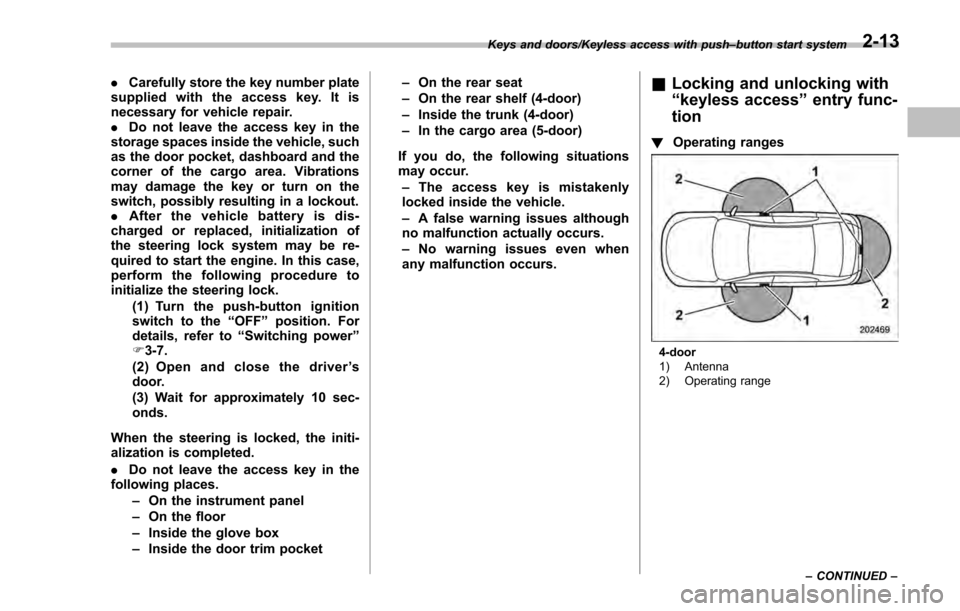
! Operating ranges
4-door
1) Antenna
2) Operating range
Keys and doors/Keyless access with push
–button start system
–CONTINUED –
2-13
Page 115 of 594
Keys and doors/Keyless access with push–button start system
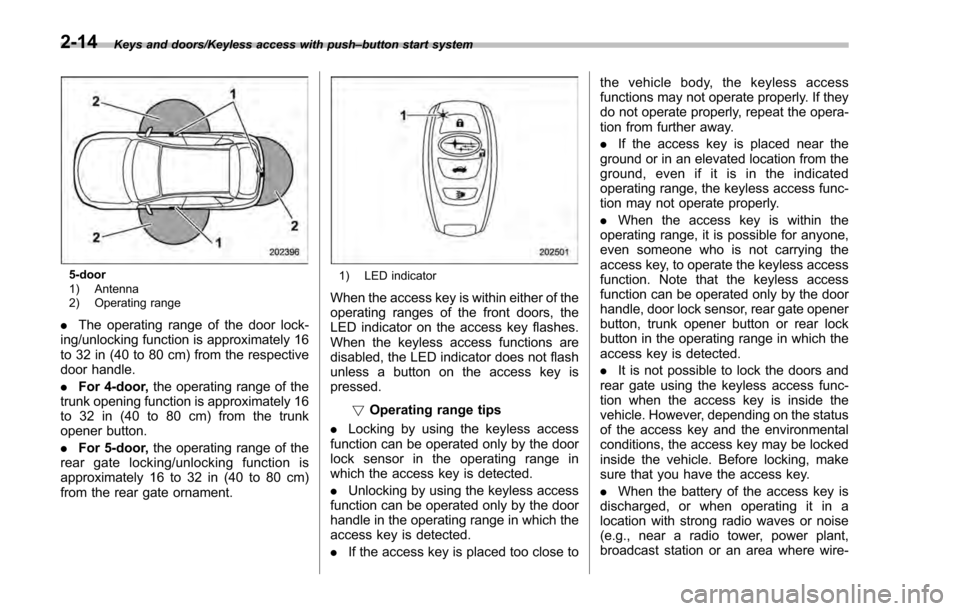
5-door
1) Antenna
2) Operating range
. The operating range of the door lock-
ing/unlocking function is approximately 16
to 32 in (40 to 80 cm) from the respective
door handle.
. For 4-door, the operating range of the
trunk opening function is approximately 16
to 32 in (40 to 80 cm) from the trunk
opener button.
. For 5-door, the operating range of the
rear gate locking/unlocking function is
approximately 16 to 32 in (40 to 80 cm)
from the rear gate ornament.
1) LED indicator
When the access key is within either of the
operating ranges of the front doors, the
LED indicator on the access key flashes.
When the keyless access functions are
disabled, the LED indicator does not flash
unless a button on the access key is
pressed.
!Operating range tips
. Locking by using the keyless access
function can be operated only by the door
lock sensor in the operating range in
which the access key is detected.
. Unlocking by using the keyless access
function can be operated only by the door
handle in the operating range in which the
access key is detected.
. If the access key is placed too close to the vehicle body, the keyless access
functions may not operate properly. If they
do not operate properly, repeat the opera-
tion from further away.
.
If the access key is placed near the
ground or in an elevated location from the
ground, even if it is in the indicated
operating range, the keyless access func-
tion may not operate properly.
. When the access key is within the
operating range, it is possible for anyone,
even someone who is not carrying the
access key, to operate the keyless access
function. Note that the keyless access
function can be operated only by the door
handle, door lock sensor, rear gate opener
button, trunk opener button or rear lock
button in the operating range in which the
access key is detected.
. It is not possible to lock the doors and
rear gate using the keyless access func-
tion when the access key is inside the
vehicle. However, depending on the status
of the access key and the environmental
conditions, the access key may be locked
inside the vehicle. Before locking, make
sure that you have the access key.
. When the battery of the access key is
discharged, or when operating it in a
location with strong radio waves or noise
(e.g., near a radio tower, power plant,
broadcast station or an area where wire-
2-14
Page 117 of 594
Keys and doors/Keyless access with push–button start system
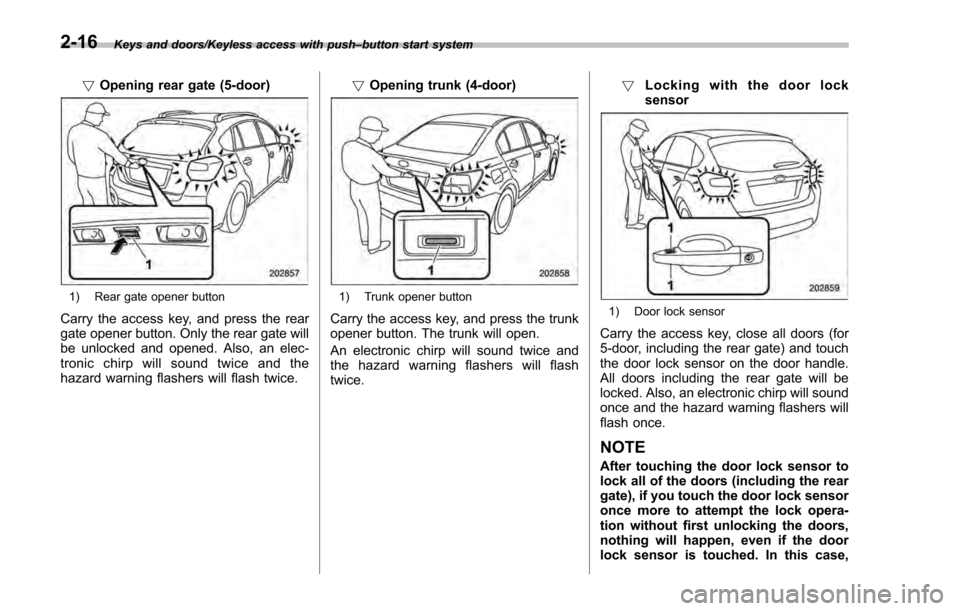
! Opening rear gate (5-door)
1) Rear gate opener button
Carry the access key, and press the rear
gate opener button. Only the rear gate will
be unlocked and opened. Also, an elec-
tronic chirp will sound twice and the
hazard warning flashers will flash twice. !
Opening trunk (4-door)
1) Trunk opener button
Carry the access key, and press the trunk
opener button. The trunk will open.
An electronic chirp will sound twice and
the hazard warning flashers will flash
twice. !
Locking with the door lock
sensor1) Door lock sensor
Carry the access key, close all doors (for
5-door, including the rear gate) and touch
the door lock sensor on the door handle.
All doors including the rear gate will be
locked. Also, an electronic chirp will sound
once and the hazard warning flashers will
flash once.
NOTE
After touching the door lock sensor to
lock all of the doors (including the rear
gate), if you touch the door lock sensor
once more to attempt the lock opera-
tion without first unlocking the doors,
nothing will happen, even if the door
lock sensor is touched. In this case,
2-16
Page 122 of 594
.Mexico-spec. models
IFT
RLVDE1413-2269
14AHC
DENSO
PIN Code Access (models
with “keyless access with
push-button start system ”)
1) Trunk opener button (4-door)
1) Rear lock button (5-door)
While all doors (for 5-door, including the
rear gate) are locked, you can unlock the
doors (including rear gate) without a key
by performing the following procedure.
. 4-door: press the trunk opener button
. 5-door: press the rear lock button
NOTE
PIN Code Access will be helpful if the
key is accidentally left in the vehicle. It
is recommended that a 5-digit security
code (PIN code) is registered.
Keys and doors/PIN Code Access (models with “keyless access with push –button start system ”)
– CONTINUED –2-21
Page 123 of 594

Keys and doors/PIN Code Access (models with“keyless access with push –button start system ”)
& Registering a PIN code
! Preparation
1. Turn off the ignition switch.
2. Close all doors (including trunk/rear
gate).
3. Press and hold the “
”button on the
access key. Then all doors (including rear
gate) will be locked.
4. Keep the “
”button pressed, and
press the following button within 5 sec-
onds after step 3.
.4-door: the trunk opener button
. 5-door: the rear lock button
5. Press and hold the above button for
more than 5 seconds. Then a chirp will
sound.
6. Release the “
”button and trunk
opener button/rear lock button.
7. Press the “
”button on the access key
while the chirp sounds.
Then the chirp will stop and the prepara-
tion is complete.
NOTE
If you do not press the “”button on
the access key, the chirp will sound for
30 seconds. In this case, the prepara-
tion for registering a PIN code does not
complete even if the chirp stops. !
Registration
For example, to register “32468 ”as the
PIN code, perform the following proce-
dure.
4-door:
1. Press the trunk opener button three
times.
2. After a buzzer (ding) sounds once,
press the trunk opener button twice.
3. After a buzzer (ding) sounds once,
press the trunk opener button four times.
4. After a buzzer (ding) sounds once,
press the trunk opener button six times.
5. After a buzzer (ding) sounds once,
press the trunk opener button eight times.
6. Perform steps 1 to 5 again within
approximately 30 seconds after the buz-
zer starts sounding intermittently.
7. All doors will be unlocked and locked.
Then the PIN code will be registered.
5-door:
1. Press the rear lock button three times.
2. After a buzzer (ding) sounds once,
press the rear lock button twice.
3. After a buzzer (ding) sounds once,
press the rear lock button four times.
4. After a buzzer (ding) sounds once,
press the rear lock button six times.
5. After a buzzer (ding) sounds once,
press the rear lock button eight times. 6. Perform steps 1 to 5 again within
approximately 30 seconds after the buz-
zer starts sounding intermittently.
7. All doors (including rear gate) will be
unlocked and locked. Then the PIN code
will be registered.
NOTE
.
Press the trunk opener button/rear
lock button ten times to enter “0”.
. Change the PIN code frequently to
protect your vehicle from theft.
. If you have lent your vehicle to
another person, confirm that the PIN
code has not been changed or deleted.
If the PIN code has been changed or
deleted, reregister a new PIN code.
. If you make an error during the
registration procedure, press the “
”
or “”button on the access key.
Then, start over from the procedure
described in “Preparation”.
. To protect your vehicle from theft,
you cannot register a string of the
same five numbers together, such as
“00000 ”, nor“12345 ”as a PIN code.
. Do not register your vehicle license
plate number or simple numbers such
as “11122 ”or “12121 ”as a PIN code.
Doing so will increase the risk of
vehicle theft.
. When you try to register “22222 ”,
2-22
Page 125 of 594
Keys and doors/Remote keyless entry system
key is used as the transmitter for the
remote keyless entry system. For models
without“keyless access with push-button
start system” , the transmitter for the
remote keyless entry system is located
inside the key head.
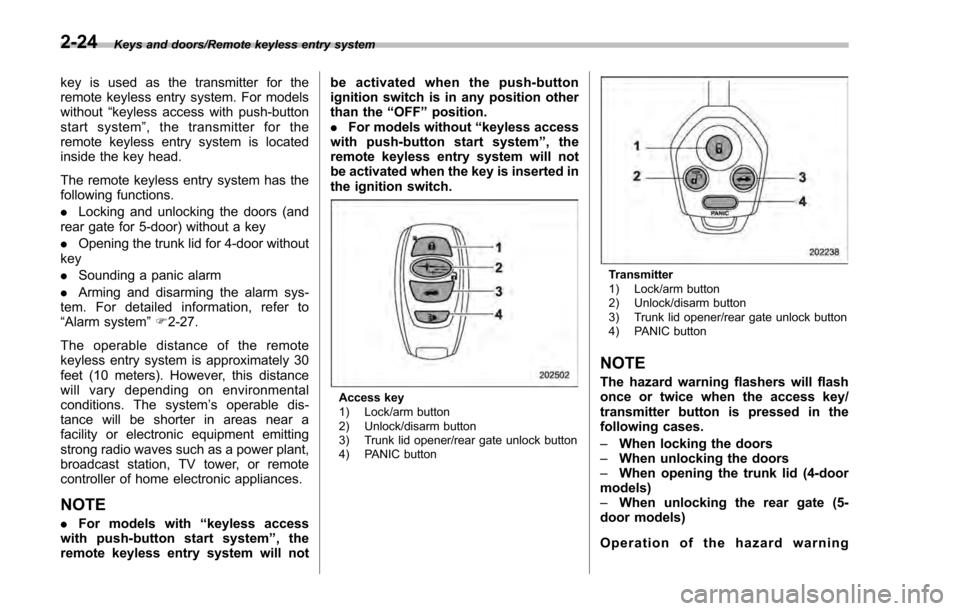
The remote keyless entry system has the
following functions.
. Locking and unlocking the doors (and
rear gate for 5-door) without a key
. Opening the trunk lid for 4-door without
key
. Sounding a panic alarm
. Arming and disarming the alarm sys-
tem. For detailed information, refer to
“Alarm system ”F 2-27.
The operable distance of the remote
keyless entry system is approximately 30
feet (10 meters). However, this distance
will vary depending on environmental
conditions. The system ’s operable dis-
tance will be shorter in areas near a
facility or electronic equipment emitting
strong radio waves such as a power plant,
broadcast station, TV tower, or remote
controller of home electronic appliances.
NOTE
. For models with “keyless access
with push-button start system ”,the
remote keyless entry system will not be activated when the push-button
ignition switch is in any position other
than the
“OFF”position.
. For models without “keyless access
with push-button start system ”,the
remote keyless entry system will not
be activated when the key is inserted in
the ignition switch.
Access key
1) Lock/arm button
2) Unlock/disarm button
3) Trunk lid opener/rear gate unlock button
4) PANIC button
Transmitter
1) Lock/arm button
2) Unlock/disarm button
3) Trunk lid opener/rear gate unlock button
4) PANIC button
NOTE
The hazard warning flashers will flash
once or twice when the access key/
transmitter button is pressed in the
following cases.
– When locking the doors
– When unlocking the doors
– When opening the trunk lid (4-door
models)
– When unlocking the rear gate (5-
door models)
Operation of the hazard warning
2-24
Page 126 of 594

flashers in the above cases can be set
to“On ”or “Off ”by a SUBARU dealer.
Consult your SUBARU dealer for de-
tails. Also, for models with a multi
function display, the setting can be
changed using the display. For details,
refer to “Hazard warning flasher
setting ”F 3-79.
& Locking the doors
Press the lock/arm button to lock all doors
and rear gate (5-door). An electronic chirp
will sound once and the hazard warning
flashers will flash once.
If any of the doors (or the rear gate/trunk
lid) is not fully closed, the following will
occur to alert you that the doors (or the
rear gate/trunk lid) are not properly closed.
. an electronic chirp sounds five times.
. the hazard warning flashers flash five
times.
When you close the door, it will automa-
tically lock and then the following will
occur.
. an electronic chirp sounds once.
. the hazard warning flashers flash once.
&Unlocking the doors
Press the unlock/disarm button to unlock
the driver ’s door. An electronic chirp will
sound twice and the hazard warning
flashers will flash twice. To unlock all
doors and the rear gate (5-door), briefly
press the unlock/disarm button a second
time within 5 seconds.
NOTE
If the interval between the first and
second presses of the unlock/disarm
button (for unlocking of all of the doors
and the rear gate) is extremely short,
the system may not respond.
& Opening the trunk lid
(4-door)
Press and hold the trunk lid opener button
to open the trunk lid. An electronic chirp
will sound twice and the hazard warning
flashers will flash twice.
&Unlocking the rear gate
(5-door)
Press the rear gate unlock button to
unlock the rear gate.
An electronic chirp will sound twice and
the hazard warning flashers will flash
twice.
&Vehicle finder function
Use this function to find your vehicle
parked among many vehicles in a large
parking lot. Provided you are within 30 feet
(10 meters) of the vehicle, pressing the
lock/arm button three times in a 5-second
period will cause your vehicle’ s horn to
sound once and its hazard warning
flashers to flash three times.
NOTE
If the interval between presses is too
short when you press the lock/arm
button three times, the system may
not respond to the signals from the
remote transmitter.
& Sounding a panic alarm
To activate the alarm, press the “PANIC ”
button once.
The horn will sound and the hazard
warning flashers will flash.
To deactivate the panic alarm, press any
button on the remote transmitter. Unless a
button on the remote transmitter is
pressed, the alarm will be deactivated
after approximately 30 seconds.
Keys and doors/Remote keyless entry system
–CONTINUED –2-25
Page 129 of 594

Keys and doors/Alarm system
&System operation
The alarm system will sound the following
alarms when triggered.
. The vehicle’ s horn will sound for 30
seconds.
. The hazard warning flashers will flash
for 30 seconds.
If any of the doors or the rear gate/trunk lid
remains open after the 30-second period,
the horn will continue to sound for a
maximum of 3 minutes. If the door or the
rear gate/trunk lid is closed while the horn
is sounding, the horn will stop sounding
with a delay of up to 30 seconds.
The alarm is triggered by:
. Opening any of the doors, the rear gate
or trunk lid
. Physical impact to the vehicle, such as
forced entry (only models with shock
sensors (dealer option))
NOTE
The alarm system can be set to trigger
the illumination of the following interior
lights.
. Map lights (models with moonroof)
. Dome light (illuminates only when
the dome light switch is in the “DOOR ”
position)
. Cargo area light (illuminates only when the cargo area light switch is in
the
“DOOR ”position)
The notifications regarding the map
lights, dome light and cargo area light
are deactivated as the factory setting. A
SUBARU dealer can activate the sys-
tem. Contact your SUBARU dealer for
details.
& Activating and deactivating
the alarm system
To change the setting of your vehicle’ s
alarm system for activation or deactiva-
tion, do the following.
1. Disarm the alarm system. Refer to
“Disarming the system” F2-32.
2. Sit in the driver ’s seat and shut all
doors (and the rear gate if your vehicle is a
5-door).
3. Turn the ignition switch to the “ON ”
position.
4. Hold down the REAR (UNLOCK) side
of the driver ’s power door locking switch,
open the driver ’s door within the following
1 second, and wait 10 seconds without
releasing the switch. The setting will then
be changed as follows.
If the system was previously activated:
The odometer/trip meter screen displays
as follows and the horn sounds twice, indicating that the system is now deacti-
vated.
.
“AL oF ”(models with type A combina-
tion meter)
. “ALOF” (models with type B combina-
tion meter)
If the system was previously deacti-
vated:
The odometer/trip meter screen displays
as follows and the horn sounds once,
indicating that the system is now acti-
vated.
. “AL on ”(models with type A combina-
tion meter)
. “ALON” (models with type B combina-
tion meter)
NOTE
You may have the above setting
change done by your SUBARU dealer.
& If you have accidentally trig-
gered the alarm system
! To stop the alarm
Do any of the following operations:
. Press any button on the access key/
remote transmitter.
. Turn the ignition switch to the “ON”
position (models without “keyless access
with push-button start system ”).
2-28