2016 SUBARU IMPREZA radio
[x] Cancel search: radioPage 125 of 594
Keys and doors/Remote keyless entry system
key is used as the transmitter for the
remote keyless entry system. For models
without“keyless access with push-button
start system” , the transmitter for the
remote keyless entry system is located
inside the key head.
The remote keyless entry system has the
following functions.
. Locking and unlocking the doors (and
rear gate for 5-door) without a key
. Opening the trunk lid for 4-door without
key
. Sounding a panic alarm
. Arming and disarming the alarm sys-
tem. For detailed information, refer to
“Alarm system ”F 2-27.
The operable distance of the remote
keyless entry system is approximately 30
feet (10 meters). However, this distance
will vary depending on environmental
conditions. The system ’s operable dis-
tance will be shorter in areas near a
facility or electronic equipment emitting
strong radio waves such as a power plant,
broadcast station, TV tower, or remote
controller of home electronic appliances.
NOTE
. For models with “keyless access
with push-button start system ”,the
remote keyless entry system will not be activated when the push-button
ignition switch is in any position other
than the
“OFF”position.
. For models without “keyless access
with push-button start system ”,the
remote keyless entry system will not
be activated when the key is inserted in
the ignition switch.
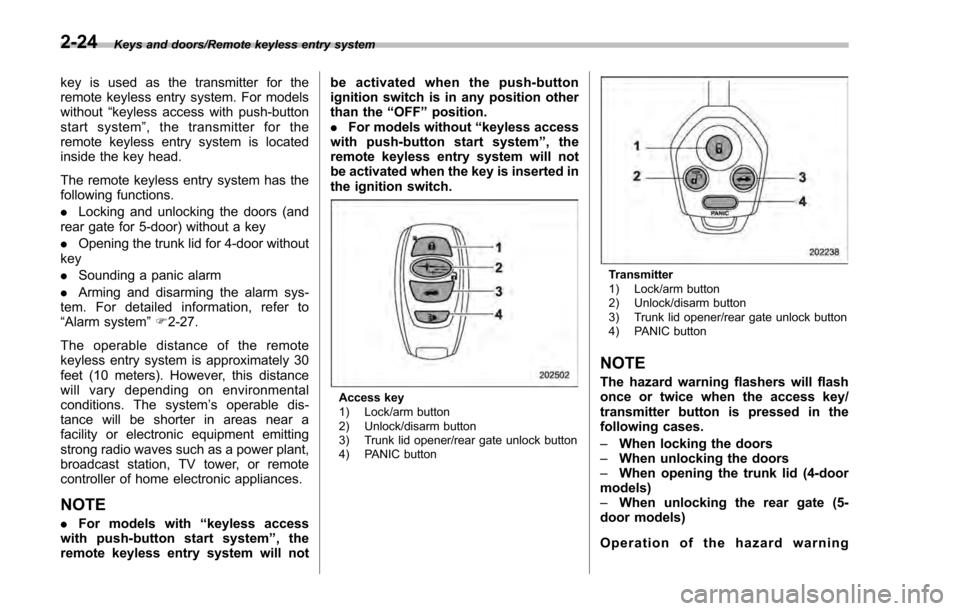
Access key
1) Lock/arm button
2) Unlock/disarm button
3) Trunk lid opener/rear gate unlock button
4) PANIC button
Transmitter
1) Lock/arm button
2) Unlock/disarm button
3) Trunk lid opener/rear gate unlock button
4) PANIC button
NOTE
The hazard warning flashers will flash
once or twice when the access key/
transmitter button is pressed in the
following cases.
– When locking the doors
– When unlocking the doors
– When opening the trunk lid (4-door
models)
– When unlocking the rear gate (5-
door models)
Operation of the hazard warning
2-24
Page 249 of 594
Instruments and controls/Mirrors
including interference that may cause
undesired operation of the device.
NOTE
Le présent appareil est conforme aux
CNR d’Industrie Canada applicables
aux appareils radio exempts de licence.
L ’exploitation est autorisée aux deux
conditions suivantes: (1) l ’appareil ne
doit pas produire de brouillage, et (2)
l ’utilisateur de l ’appareil doit accepter
tout brouillage radioélectrique subi,
même si le brouillage est susceptible
d ’en compromettre le fonctionnement.
HomeLink
®and the HomeLink®house are
registered trademarks of Johnson Con-
trols, Inc.
WARNING
. When programming the
HomeLink®Wireless Control Sys-
tem, you may be operating a
garage door opener or other
device. Make sure that people
and objects are out of the way
of the garage door or other
device to prevent potential harm
or damage.
. Do not use the HomeLink
®Wire-
less Control System with a gar- age door opener that lacks the
safety stop and reverse feature
as required by applicable safety
standards. A garage door opener
which cannot detect an object,
signaling the door to stop and
reverse, does not meet these
safety standards. Using a garage
door opener without these fea-
tures increases risk of serious
injury or death. For more infor-
mation, consult the HomeLink
®website at www.homelink.com or
call 1-800-355-3515.
CAUTION
When programming the HomeLink®Wireless Control System to operate
a garage door opener or an entrance
gate, unplug the device
’s motor
from the outlet during programming
to prevent motor burnout.
NOTE
. After programming your HomeLink®Wireless Control System for the de-
sired devices, retain the hand-held
transmitters for further programming
or device testing in the event of a
problem. .
It is recommended that you insert a
new battery in the hand-held transmit-
ter of a device to ensure correct
programming.
! Garage door opener program-
ming in the U.S.A.
NOTE
When programming the HomeLink®Wireless Control System for a garage
door opener, it is suggested that you
park the vehicle outside the garage.
1. Unplug the motor of the garage door
opener from the outlet.
NOTE
If any of the HomeLink®buttons are
already programmed for other devices,
skip step 2 because it clears the
memory of all three buttons.
3-104
Page 272 of 594

Antenna................................................................ 5-2Roof antenna (for Rod type) ................................ 5-2
Roof antenna (for Shark fin type) ......................... 5-2
Audio set............................................................. 5-3Base display audio set (if equipped) .................... 5-4
STARLINKTM7.0 Multimedia Plus audio set
(U.S. spec. models only, if equipped) ................. 5-6
Tips for operating the audio/visual system ........... 5-7
Basic information before use .............................. 5-15
Basic operation .................................................. 5-18
Unit settings ...................................................... 5-19
SUBARU STARLINK (if equipped) ....................... 5-26
AM/FM radio ....................................................... 5-28
SiriusXM Satellite Radio (if equipped) ................. 5-37
aha
TMby HARMAN ............................................. 5-44
Pandora®(if equipped) ....................................... 5-50
CD ..................................................................... 5-53
USB memory ...................................................... 5-55
iPod ................................................................... 5-56
Bluetooth audio .................................................. 5-58
AUX ................................................................... 5-61
Steering switches for audio .............................. 5-63 Bluetooth
®settings
........................................... 5-66Regulatory information ...................................... 5-66
Registering/connecting Bluetooth®device .......... 5-66
Setting Bluetooth details .................................... 5-69
Hands-free phone system ................................. 5-71Control screen................................................... 5-72
Registering/connecting a Bluetooth phone ......... 5-73
Using the phone switch/microphone ................... 5-73
How to change the hands-free phone system ..... 5-74
Making a call ..................................................... 5-74
Receiving a call ................................................. 5-78
Talking on the phone ......................................... 5-78
Phone settings .................................................. 5-79
Voice command system .................................... 5-82Using the voice command system ...................... 5-82
Voice command system operation ...................... 5-83
Command list .................................................... 5-85
What to do if.... ................................................... 5-89Troubleshooting ................................................. 5-89
Appendix............................................................ 5-93Certification ....................................................... 5-93
Certification for the Hands-free system ............... 5-93
Certification for Mexico models .......................... 5-94
Audio
5
Page 274 of 594

Audio set
Your vehicle may be equipped with one of
the following audio sets. Refer to the
pages indicated in this section for operat-
ing details.
CAUTION
.Always consult your SUBARU
dealer before installing a citizen
band radio or other transmitting
device in your vehicle. Such
devices may cause the electronic
control system to malfunction if
they are incorrectly installed or if
they are not suited for the vehi-
cle.
. To prevent the battery from being
discharged, do not leave the
audio/visual system on when
the engine is not running.
NOTE
. If a cell phone is placed near the
audio set, it may cause the audio set to
emit noise when the phone receives
calls. This noise does not indicate an
audio set malfunction. Note that a cell
phone should not be placed near the
audio set. .
Some functions may not be avail-
able depending on the market and
specifications of your vehicle.
. The images shown in this Owner ’s
Manual are sample images. The actual
images may vary depending on the
market and specifications of your ve-
hicle.
Audio/Audio set
–CONTINUED –5-3
Page 275 of 594

Audio/Audio set
&Base display audio set (if equipped)
1) Power/VOLUME knob
2) Eject button
3) AUDIO/TUNE knob
4) HOME button 5) APPS button
6) Display
7) SEEK/TRACK buttons
The audio set will operate only when the
ignition switch is in the
“ACC ”or “ON ”
position.
. Power and audio controls: refer to
“Basic operation ”F 5-18.
. SUBARU STARLINK (if equipped):
refer to “SUBARU STARLINK ”F 5-26.
. Radio operation: refer to “AM/FM radio”
F 5-28.
. Satellite radio operation (if equipped):
refer to “SiriusXM Satellite Radio” F5-37.
. aha
TM: refer to “ahaTMby HARMAN ”
F 5-44.
. Pandora
®(if equipped): refer to “Pan-
dora®” F 5-50.
. CD (compact disc) player operation:
refer to “CD”F 5-53.
. USB storage device: refer to “USB
memory ”F 5-55.
. iPod operation: refer to “iPod”F 5-56.
. Bluetooth
®audio: refer to “Bluetooth
audio ”F 5-58.
. Auxiliary input jack: refer to “AUX”F 5-
61.
. Hands-free phone system: refer to
“Hands-free phone system ”F 5-71.
5-4
Page 276 of 594

NOTE
HD RadioTMTechnology (if equipped)
should be included as a feature in the
base display audio set.
This display audio set is referred to as
follows.
. U.S. customers: STARLINK
TM6.2 Mul-
timedia
. Canadian customers: 6.2-inch infotain-
ment system
Audio/Audio set
–CONTINUED –5-5
Page 277 of 594

Audio/Audio set
&STARLINKTM7.0 Multimedia Plus audio set (U.S. spec. models
only, if equipped)The audio set will operate only when the
ignition switch is in the “ACC ”or “ON ”
position.
For details about how to use the
STARLINK
TM7.0 Multimedia Plus audio
set, refer to the STARLINKTM7.0 Multi-
media Plus or STARLINKTM7.0 Multi-
media Navigation Owner ’s Manual.
NOTE
HD Radio Technology should be in-
cluded as a feature in the STARLINKTM
7.0 Multimedia Plus audio set.
5-6
Page 278 of 594

&Tips for operating the audio/
visual system
CAUTION
To avoid damage to the audio/visual
system:
. Be careful not to spill beverages
over the audio/visual system.
. Do not put anything other than an
appropriate disc into the disc
slot.
NOTE
The use of a cell phone inside or near
the vehicle may cause a noise from the
speakers of the audio/visual system
which you are listening to. However,
this does not indicate a malfunction.
! Radio
Usually, a problem with radio reception
does not mean there is a problem with the
radio —it is just the normal result of
conditions outside the vehicle.
For example, nearby buildings and terrain
can interfere with FM reception. Power
lines or phone wires can interfere with AM
signals. And of course, radio signals have
a limited range. The farther the vehicle is from a station, the weaker its signal will
be. In addition, reception conditions
change constantly as the vehicle moves.
Here, some common reception problems
that probably do not indicate a problem
with the radio are described.
!FM
Fading and drifting stations: Generally, the
effective range of FM is about 25 miles (40
km). Once outside this range, you may
notice fading and drifting, which increase
with the distance from the radio transmit-
ter. They are often accompanied by
distortion.
Multi-path: FM signals are reflective,
making it possible for 2 signals to reach
the vehicle’ s antenna at the same time. If
this happens, the signals will cancel each
other out, causing a momentary flutter or
loss of reception.
Static and fluttering: These occur when
signals are blocked by buildings, trees or
other large objects. Increasing the bass
level may reduce static and fluttering.
Station swapping: If the FM signal being
listened to is interrupted or weakened, and
there is another strong station nearby on
the FM band, the radio may tune in the
second station until the original signal can
be picked up again. !
AM
Fading: AM broadcasts are reflected by
the upper atmosphere —especially at
night. These reflected signals can inter-
fere with those received directly from the
radio station, causing the radio station to
sound alternately strong and weak.
Station interference: When a reflected
signal and a signal received directly from
a radio station are very nearly the same
frequency, they can interfere with each
other, making it difficult to hear the broad-
cast.
Static: AM is easily affected by external
sources of electrical noise, such as high
tension power lines, lightening or electrical
motors. This results in static.
!SiriusXM (if equipped)
. Cargo loaded on the roof luggage
carrier, especially metal objects, may
adversely affect the reception of SiriusXM
Satellite Radio.
. Alternation or modifications carried out
without appropriate authorization may in-
validate the user ’s right to operate the
equipment.
Audio/Audio set
–CONTINUED –5-7