2016 SMART FORTWO wheel
[x] Cancel search: wheelPage 49 of 214

Switching off the alarm
XTo switch off the alarm:press the0036
button on the key.
The alarm is switched off.
or
XSwitch on the ignition.
The alarm is switched off.
The alarm is not switched off, even if you
close the open door that triggered it, for
example.
Driving safety systems
Overview of driving safety systems
In this section, you will find information
about the following driving safety systems:
RABS (Anti-lock BrakingSystem)
(Ypage 47)
RDistance warning function (Ypage 48)
Resp®(Electronic StabilityProgram)
(Ypage 49)
REBD (Electronic Brake forceDistribution)
(Ypage 50)
Important safety notes
If you fail to adapt your driving style or
become distracted, the driving safety sys-
tems can neither reduce the risk of accident
nor override the laws of physics. Driving
safety systems are merely aids designed to
assist driving. You are responsible for the
distance to the vehicle in front, for vehicle
speed and for braking in good time. Always
adapt your driving style to suit the prevail-
ing road, weather and traffic conditions and
maintain a safe distance from the vehicle in
front. Drive carefully.
The driving safety systems described only
work as effectively as possible when there is
adequate contact between the tires and the
road surface. Please pay special attention to
the notes on tires, recommended minimum
tire tread depths, etc. (
Ypage 177).
In wintry driving conditions, always use win-
ter tires (M+S tires) and if necessary, snow
chains. Only in this way will the driving
safety systems described in this section work
as effectively as possible. For safety reasons, smart recommends that you
only use snow chains that have been specially
approved for your vehicle by smart, or fine-
link snow chains that are of a corresponding
standard of quality. For more information,
please contact a qualified specialist work-
shop.
ABS (Anti-lock Braking System)
General information
ABS regulates brake pressure in such a way
that the wheels do not lock when you brake.
This allows you to continue steering the vehi-
cle when braking.
The 0025 (Canada only) or 00DF(USA only) abs
warning lamp in the instrument cluster lights up when the ignition is switched on. It goes
out when the engine is running.
Important safety notes
iObserve the "Important safety notes" sec-
tion for driving safety systems (Ypage 47).
When ABS is malfunctioning, other systems,
including driving safety systems, will also
become inoperative. Observe the information
on the ABS warning lamp (
Ypage 132) and
display messages which may be shown in the
instrument cluster (
Ypage 121).
GWARNING
If ABS is faulty, the wheels could lock when
braking. The steerability and braking
characteristics may be severely impaired.
Additionally, further driving safety sys-
tems are deactivated. There is an increased
danger of skidding and accidents.
Drive on carefully. Have ABS checked imme-
diately at a qualified specialist workshop.
abs works from a speed of about 4 mph (6 km/h),
regardless of road-surface conditions. ABS
works on slippery surfaces, even if you only
brake gently.
Driving safety systems47
>> Safety.
Z
Page 51 of 214

XTo switch off:press button0044.
Indicator lamp 0043lights up.
XTo switch on: press button0044.
Indicator lamp 0043goes out.
Starting at a speed of around 4 mph (7 km/h),
the distance warning function warns you if
you rapidly approach a vehicle in front. An
intermittent warning tone will then sound
and the 00BAdistance warning lamp will
light up in the instrument cluster.
XBrake immediately in order to increase the distance from the vehicle in front.
or
XTake evasive action, provided it is safe to
do so.
Due to the nature of the system, particularly
complicated but non-critical driving condi-
tions may also cause the system to display a
warning.
With the help of the radar sensor system, the
distance warning function can detect obsta-
cles that are in the path of your vehicle for an
extended period of time.
Up to a speed of around 45 mph (70 km/h), the
distance warning function can also react to
stationary obstacles, such as stopped or
parked vehicles.
ESP®(Electronic Stability Program)
General notes
iObserve the "Important safety notes" sec-
tion (Ypage 47).
esp
®monitors driving stability and traction,
i.e. power transmission between the tires and the road surface.
If esp
®detects that the vehicle is deviating
from the direction desired by the driver, one
or more wheels are braked to stabilize the
vehicle. The engine output is also modified
to keep the vehicle on the desired course
within physical limits. esp
®assists the
driver when pulling away on wet or slippery
roads. esp
®can also stabilize the vehicle
during braking.
ETS (Electronic Traction System)
iObserve the "Important safety notes" sec-
tion (Ypage 47).
ETS traction control is part of esp
®.
ETS brakes the drive wheels individually if
they spin. This enables you to pull away and
accelerate on slippery surfaces, for example if the road surface is slippery on one side. In
addition, more drive torque is transferred to
the wheel with traction.
Important safety notes
GWARNING
If ESP
®is malfunctioning, ESP®is unable to
stabilize the vehicle. Additionally, fur-
ther driving safety systems are deactiva-
ted. This increases the risk of skidding and
an accident.
Drive on carefully. Have ESP
®checked at a
qualified specialist workshop.
!If you test the parking brake using a brake
dynamometer, switch the ignition off.
Application of the brakes by ESP
®may oth-
erwise destroy the brake system.
When towing the vehicle with the rear axle
raised, observe the notes on esp
®
(Ypage 171).
If the 00E5esp®warning lamp lights up per-
manently, esp®or hill start assist are
unavailable due to a malfunction.
Observe the information on warning lamps
(
Ypage 134) and display messages which may
be shown in the instrument cluster
(
Ypage 121).
iOnly use wheels with the recommended
tire sizes. Only then will esp®function
properly.
Characteristics of ESP®
General information
If the 00E5esp®warning lamp goes out before
the journey begins, esp®is automatically
active.
If esp
®intervenes, the 00E5esp®warning
lamp flashes in the instrument cluster.
Driving safety systems49
>> Safety.
Z
Page 52 of 214

If esp®intervenes:
XOnly depress the accelerator pedal as far as
necessary when pulling away.
XAdapt your driving style to suit the pre-
vailing road and weather conditions.
Crosswind Assist
General information
Strong crosswinds can cause your vehicle to
deviate from a straight course. The crosswind
driving assistance function integrated into
esp
®significantly reduces these effects.
esp®intervenes automatically according to
the direction and intensity of the crosswinds
affecting your vehicle.
esp
®intervenes with stabilizing braking to
assist you in keeping the vehicle in the lane.
crosswind assist is active at vehicle speeds
above 45 mph (70 km/h )when driving straight
ahead or cornering gently.
Important safety notes
crosswind assist does not work if esp®is dis-
abled because of a malfunction.
EBD (electronic brake force distribu-
tion)
General information
EBD monitors and controls the brake pressure
on the rear wheels to improve driving sta-
bility while braking.
Important safety notes
iObserve the "Important safety notes" sec-
tion (Ypage 47).
GWARNING
If EBD is malfunctioning, the rear wheels
can lock, e.g. under full braking. This
increases the risk of skidding and an acci-
dent.
You should therefore adapt your driving
style to the different handling character-
istics. Have the brake system checked at a
qualified specialist workshop. Observe information regarding indicator
and warning lamps (
Ypage 134) as well as
display messages (Ypage 120).
50Driving safety systems
>> Safety.
Page 55 of 214

Problems with the SmartKey
ProblemPossible causes/consequences and0050Solutions
You cannot lock or
unlock the vehicle
using the SmartKey.The SmartKey battery is discharged or nearly discharged.
XTry again to lock/unlock the vehicle using the remote control
function of the SmartKey. Do this by pressing the 0036or0037
button in the immediate vicinity of the vehicle.
If this does not work:
XChange the key battery if necessary (Ypage 52).
XUnlock the vehicle with the key in the emergency lock
(Ypage 55) or lock the vehicle with the emergency locking
(Ypage 55).
There is interference from a powerful source of radio waves.
XTry again to lock/unlock the vehicle using the remote control
function of the SmartKey. Do this by pressing the 0036or0037
button in the immediate vicinity of the vehicle.
The SmartKey is faulty.
XUnlock the vehicle with the key in the emergency lock
(Ypage 55) or lock the vehicle with the emergency locking
(Ypage 55).
XHave the SmartKey checked at a qualified specialist workshop.
You have lost a Smart-
Key.XHave the SmartKey deactivated at a qualified specialist work-
shop.
XReport the loss immediately to the vehicle insurers.
XIf necessary, have the locks changed as well.
The engine cannot be
started using the
SmartKey.the on-board voltage is too low.
XSwitch off non-essential consumers, e.g. seat heating or inte-
rior lighting, and try to start the engine again.
If this does not work:
XCheck the starter battery and charge it if necessary
(Ypage 164).
or
XJump-start the vehicle (Ypage 168).
or
XConsult a qualified specialist workshop.
The steering lock is mechanically blocked.
XRemove the SmartKey and reinsert it into the ignition lock.
When you turn the key, turn the steering wheel in both direc-
tions.
SmartKey53
>> Opening and closing.
Z
Page 57 of 214

XMake sure that the doors and the tailgate
are locked.
XTo unlock:when the vehicle is locked, press
button 0043.
The vehicle is unlocked. Indicator lamp 0044
goes out.
You can open a door from inside the vehicle
even if it has been locked.
If the vehicle has previously been locked with
the key, opening a door from the inside will
trigger the anti-theft alarm system. Switch
off the alarm (
Ypage 47).
If a locked door is opened from the inside, the
previous unlocking is taken into account, if:
Rit was locked using the locking button for
the central locking, or
Rit was locked automatically
The vehicle will be fully unlocked if it had
previously been fully unlocked. If only the
driver's door had been previously unlocked,
then only the door which has been opened form
the inside is unlocked.
You cannot unlock the vehicle centrally from
the inside if the vehicle has been locked with
the SmartKey.
Automatic locking feature
XTo deactivate: with the ignition switched
on, press and hold button 0043for about five
seconds until a tone sounds.
XTo activate with the ignition switched on,
press and hold button 0043for about five
seconds until a tone sounds.
The vehicle is locked automatically when the
ignition is switched on and the wheels are
turning. You could therefore lock yourself out if:
Rthe vehicle is being pushed.
Rthe vehicle is being towed.
Rthe vehicle is on a roller dynamometer.
You can also switch the automatic locking
function on or off in the smart Media-System;
see the separate operating instructions.
Unlocking the driver's door (emer-
gency lock)
If you can no longer unlock the vehicle using
the remote control key, use the emergency
lock.
If you use the key in the emergency lock to
unlock and open the driver's door, the anti-
theft alarm system will be triggered. Switch
off the alarm (
Ypage 47).
XCarefully remove the cover from the emer-
gency lock.
XInsert the key into the emergency lock of
the driver's door as far as it will go.
XTurn the key anti-clockwise as far as it will
go to position 0047.
The door is unlocked.
XTurn the key back and remove it.
XReplace the cover on the emergency lock
and press until it engages.
Locking the driver's door (emergency
locking)
If you can no longer lock the vehicle using the
remote control key, use the locking button on
the instrument cluster (
Ypage 54).
Doors55
>> Opening and closing.
Z
Page 59 of 214

Opening or closing
Opening the upper tailgate
XIf the vehicle is locked, first press the
0036 button on the key.
Press button 0043.
The upper tailgate opens slightly.
or
XPress and hold thebutton on the key.
The upper tailgate opens slightly.
or
XPress thebutton on the left under the
steering wheel.
The upper tailgate opens slightly.
XSwing the upper tailgate up.
Opening the lower tailgate
XPull release catch 0043upwards.
Swing the lower tailgate down.
Closing the tailgate
XSwing the lower tailgate upwards until it
engages audibly.
XPull the upper tailgate down and push
closed.
XIf necessary, lock the vehicle with the 0037
button on the key.
Side windows
Important safety notes
GWARNING
While closing the side windows, body parts in the closing area could become trapped.
There is a risk of injury.
When closing make sure that no parts of the
body are in the closing area. If somebody
becomes trapped, release the switch or
press the switch to open the side window
again.
GWARNING
If children operate the side windows they
could become trapped, particularly if they
are left unsupervised. There is a risk of
injury.
When leaving the vehicle, always take the
SmartKey with you and lock the vehicle.
Never leave children unsupervised in the
vehicle.
Side windows57
>> Opening and closing.
Z
Page 63 of 214
Useful information
i
This Operator's Manual describes all
models and all standard and optional
equipment of your vehicle available at the
time of publication of the Operator's Man- ual. Country-specific differences are pos-
sible. Bear in mind that your vehicle may
not feature all functions described here.
This also applies to safety-relevant sys-
tems and functions.
iRead the information on qualified spe-
cialist workshops: (Ypage 20).
Correcting the driver's seat position
GWARNING
You could lose control of your vehicle if you
do the following while driving:
Radjust the driver's seat, steering wheel
or mirrors
Rfasten the seat belt
There is a risk of an accident.
Adjust the driver's seat, steering wheel or
mirrors and fasten your seat belt before
starting the engine.
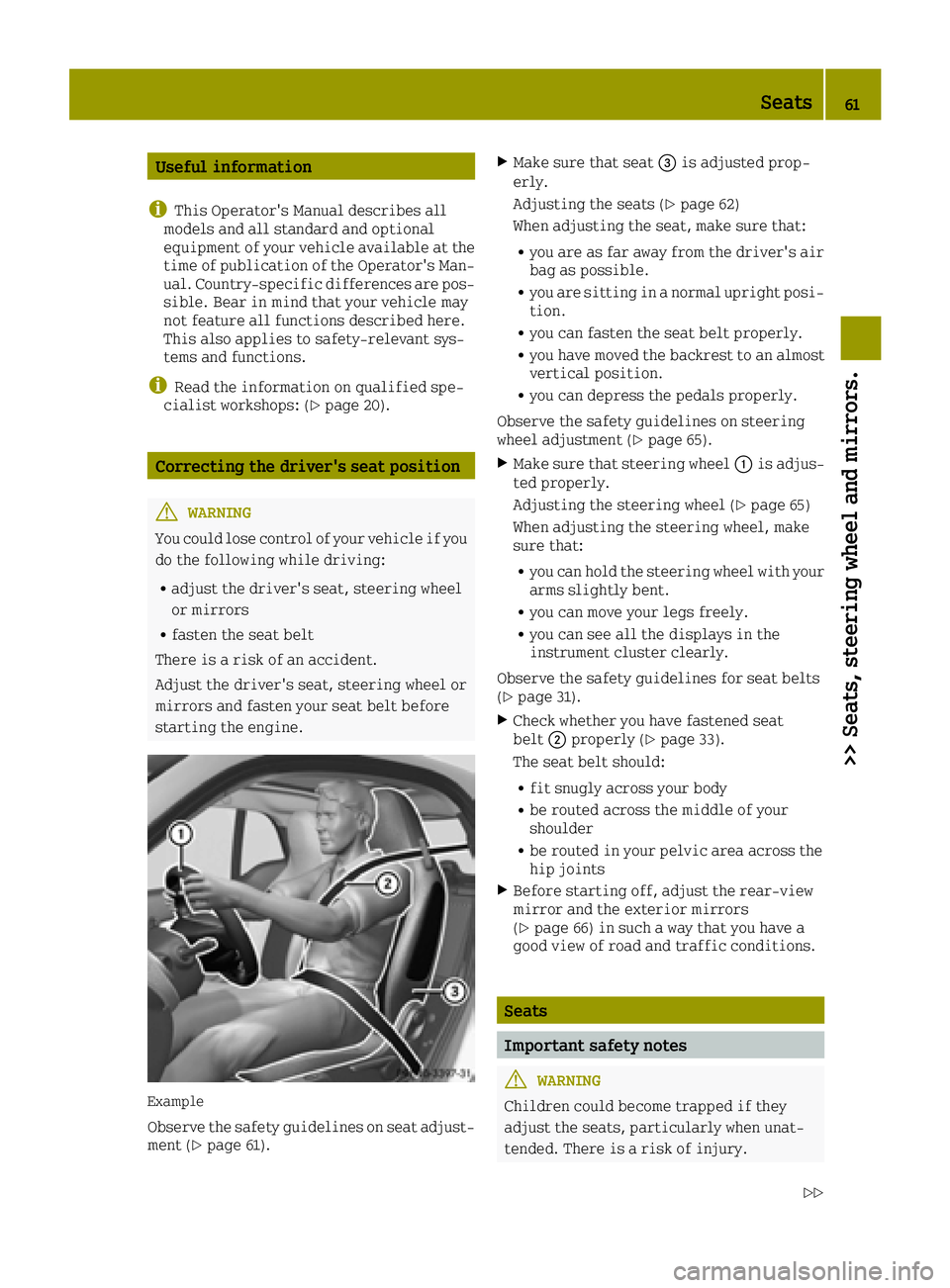
Example
Observe the safety guidelines on seat adjust-
ment (Ypage 61).
XMake sure that seat 0087is adjusted prop-
erly.
Adjusting the seats (
Ypage 62)
When adjusting the seat, make sure that:
Ryou are as far away from the driver's air
bag as possible.
Ryou are sitting in a normal upright posi-
tion.
Ryou can fasten the seat belt properly.
Ryou have moved the backrest to an almost
vertical position.
Ryou can depress the pedals properly.
Observe the safety guidelines on steering
wheel adjustment (
Ypage 65).
XMake sure that steering wheel 0043is adjus-
ted properly.
Adjusting the steering wheel (
Ypage 65)
When adjusting the steering wheel, make
sure that:
Ryou can hold the steering wheel with your
arms slightly bent.
Ryou can move your legs freely.
Ryou can see all the displays in the
instrument cluster clearly.
Observe the safety guidelines for seat belts
(
Ypage 31).
XCheck whether you have fastened seat
belt 0044properly (Ypage 33).
The seat belt should:
Rfit snugly across your body
Rbe routed across the middle of your
shoulder
Rbe routed in your pelvic area across the
hip joints
XBefore starting off, adjust the rear-view
mirror and the exterior mirrors
(
Ypage 66) in such a way that you have a
good view of road and traffic conditions.
Seats
Important safety notes
GWARNING
Children could become trapped if they
adjust the seats, particularly when unat-
tended. There is a risk of injury.
Seats61
>> Seats, steering wheel and mirrors.
Z
Page 64 of 214

When leaving the vehicle, always take the
SmartKey with you and lock the vehicle.
Never leave children unsupervised in the
vehicle.
GWARNING
If the driver's seat is not engaged, it could move unexpectedly while the vehicle is in
motion. This could cause you to lose control
of the vehicle. There is a risk of an acci-
dent.
Always make sure that the driver's seat is
engaged before starting the vehicle.
GWARNING
You could lose control of your vehicle if you
do the following while driving:
Radjust the driver's seat, steering wheel
or mirrors
Rfasten the seat belt
There is a risk of an accident.
Adjust the driver's seat, steering wheel or
mirrors and fasten your seat belt before
starting the engine.
GWARNING
When you adjust a seat, you or other vehicle occupants could become trapped, e.g. on the
seat guide rail. There is a risk of injury.
Make sure when adjusting a seat that no one
has any body parts in the sweep of the seat.
GWARNING
The seat belt does not offer the intended
level of protection if you have not moved
the backrest to an almost vertical position.
When braking or in the event of an accident,
you could slide underneath the seat belt and
sustain abdomen or neck injuries, for
example. This poses an increased risk of
injury or even fatal injury.
Adjust the seat properly before beginning
your journey. Always ensure that the back-
rest is in an almost vertical position and
that the shoulder section of your seat belt
is routed across the center of your shoul-
der.
Observe the safety notes on "Airbags"
(
Ypage 34) and "Children in the vehicle"
(Ypage 42).
!To avoid damage to the seats and the seat
heating, observe the following informa-
tion:
Rkeep liquids from spilling on the seats.
If liquid is spilled on the seats, dry them
as soon as possible.
Rif the seat covers are damp or wet, do not
switch on the seat heating. The seat heat- ing should also not be used to dry the
seats.
Rclean the seat covers as recommended;
see the "Interior care" section.
Rdo not transport heavy loads on the seats.
Do not place sharp objects on the seat
cushions, e.g. knives, nails or tools. The seats should only be occupied by passen-
gers, if possible.
Rwhen the seat heating is in operation, do
not cover the seats with insulating mate-
rials, e.g. blankets, coats, bags, seat
covers, child seats or booster seats.
!Make sure that there are no objects in the
footwell under or behind the seats when
moving the seats back. There is a risk that
the seats and/or the objects could be dam-
aged.
Adjusting the seats
Illustration of variant 1
62Seats
>> Seats, steering wheel and mirrors.