2016 SKODA OCTAVIA lock
[x] Cancel search: lockPage 60 of 324

Description of operationFig. 39
Lid operation
Read and observe
and on page 57 first.
Ways to open the lid
▶ By pressing the handle
A
» Fig. 39 .
▶ By holding the button
C
.
▶ By holding the button
D
on the key.
Ways to close the lid ▶ Press pressing the button
B
» Fig. 39 .
▶ By pressing the handle
A
.
Ways to stop the lid movement ▶ Press pressing the button
B
» Fig. 39 .
▶ By pressing the button
C
.
▶ By holding the button
D
on the key.
▶ By pressing the handle
A
.
Audible signals
An acoustic signal is sounded when opening/closing the lid by means of the
button
C
or
D
.
NoteIf you rapidly enter the vehicle during the opening or closing process of the lid,
the whole vehicle may jerk and, as a result, the movement of the lid can be in-
terrupted.
Set the top position of the lid
Read and observe
and on page 57 first.
The top position of the lid can be adjusted (e.g. in a limited space to open thelid due to the garage height or for a more comfortable operation, depending on
the height of the person).
Adjusting the top position of the lid
›
Stop the lid in the desired position.
›
Press and hold button
B
» Fig. 39 on page 58 until you hear an acoustic sig-
nal.
Adjusting the top starting position of the lid
›
Carefully raise the flap manually to the limit.
›
Press and hold button
B
» Fig. 39 on page 58 until you hear an acoustic sig-
nal.
Note
The top position which is reached when the lid opens automatically, is always
lower than the maximum top position which can be reached when the lid is
opened manually.
Malfunctions
Read and observe
and on page 57 first.
Examples of operational malfunctions
Description of the malfunc-
tionPossible solutionsThe lid cannot be openedUnlocking the lid » page 276
The lid does not react to an
opening signal
Removing a possible obstacle (e.g. snow), re-
opening the lid » page 58
Press the handle A
» Fig. 39 on page 58 and
pull the lid upwards
58Using the system
Page 61 of 324

Description of the malfunc-
tionPossible solutionsThe lid remains in the top
position
Manual closing of the lid
The lid is open and the bat-
tery was disconnected
Close manually
Close the door slowly, push down the lid, push in the lock on the centre of the
edge, above the ŠKODA logo.
Window operation
Introduction
This chapter contains information on the following subjects:
Mechanical windows
59
Electric Windows
60
Opening/closing the windows in the front passenger door and in the rear
doors
60
Force limiter
60
Window convenience operation
61
Malfunctions
61
The windows can be operated mechanically by means of the handle attached
to the respective door panel.
The windows can be operated electrically from the following locations; all win-
dows from the driver's seat and also via the buttons for the windows in the
passenger door or the rear doors.
WARNING■ Always close the window carefully and in a controlled manner. Otherwise,
you may cause considerable crushing injuries to yourself or fellow passen-
gers.■
The system is fitted with a force limiter » page 60. If there is an obstacle
(e.g. If a body part gets trapped), the closing process is stopped and the
window goes down by several centimetres. The windows should neverthe-
less be closed carefully – risk of injury!
CAUTION■ Keep the windows clean (free of ice and similar) to ensure the correct func-
tionality of the electric windows.■
Always close the electric windows before disconnecting the battery.
Note
If the windows are opened, dust as well as other dirt can get into the vehicle
and in addition the wind noise is more at certain speeds.
Mechanical windows
Fig. 40
Window operation: left/right
Read and observe
and on page 59 first.
›
To open , turn the crank in the direction of arrow
A
» Fig. 40 .
›
To close , turn the crank in the direction of arrow
B
.
59Unlocking and opening
Page 63 of 324

If the obstacle prevents the window from being closed during the next 10 sec-
onds, the closing process is interrupted once again and the window goes down
by several centimetres.
If you attempt to close the window again within 10 seconds of the window be-
ing moved down for the second time, even though the obstacle was not yet
been removed, the closing process is only stopped. During this time it is not
possible to automatically close the window. The force limiter is still switched
on.
The force limiter is only not operational if you attempt to close the window
again within the next 10 seconds – the window will now close with full force!
If you wait longer than 10 seconds, the force limiter is switched on again.
Window convenience operation
Read and observe
and on page 59 first.
The convenience operation for the window offers the option to open/close all
the windows at once (or only the window in the driver's door). The function of
convenience operation can be individually adjusted in the Infotainment menu
→
→
Opening and closing
.
Opening
›
Press and hold the button on the key.
›
Or
Switch off the ignition, open the driver's door and hold the key
A
until it
stops in the open position » Fig. 41 on page 60 .
›
orKeep the key in the locking cylinder of the driver's door in the unlock posi-
tion until all electrically operated windows are open.
Closing
›
Press and hold the button on the key.
›
Or
Switch off the ignition, open the driver's door and hold the key
A
until it
stops in the closed position » Fig. 41 on page 60 .
›
orKeep the key in the locking cylinder of the driver's door in the lock position
until all the electrically operated windows are closed.
›
In the KESSY system, hold your finger on the sensor on the outside of the
door handle of the front door » Fig. 33 on page 52 .
The convenience operation will only function correctly if all the windows auto- matically open/close properly.
Convenience opening or closing the window using the key in the driver's door
locking cylinder is only possible within 45 seconds of locking the vehicle.
The movement of the window is stopped immediately when the respective
button is released.
Malfunctions
Read and observe
and on page 59 first.
Repeatedly opening and closing the window can cause the window mecha-
nism to overheat and become temporarily blocked. You will be able to operate
the window again as soon as the operating mechanism has cooled down.
After disconnecting the vehicle battery, automatic opening / closing of the
window can be deactivated. In this case, the system must be activated as fol-
lows.
Window in the driver door
›
Switch on the ignition.
›
Pull the top edge of the button and close the window.
›
Release the button.
›
Pull up the respective button and hold for 1 second.
Windows in the other doors
›
Switch on the ignition.
›
Press the respective key above and close the window.
›
Release the button.
›
Pull up the respective button above and hold for 1 second.
Panoramic tilt / slide sunroof
Introduction
This chapter contains information on the following subjects:
Operation
62
Force limiter
62
Convenience operation of the sliding / tilting roof
62
Activate operation of the tilt / slide sunroof
62
Manually operated sunblind
63
Electrically operated sunblind
63
Activating operation of the sunshade
63
The panoramic tilt / slide sunroof (hereinafter referred to as tilt / slide sunroof)
can only be operated when the ignition is turned on and when the outdoor
temperature is above -20 °C.
61Unlocking and opening
Page 64 of 324
The sliding/tilting roof can still be operated for approx. 10 minutes after
switching the ignition off. After opening the driver or front passenger door, it
is no longer possible to operate the sliding/tilting roof.WARNINGWhen operating the tilt/slide sunroof and the sunshade, proceed with cau-
tion to avoid causing crushing injuries – risk of injury!
CAUTION
■ During the winter it may be necessary to remove any ice and snow in the vi-
cinity of the sliding/tilting roof before opening it to prevent any damage to the
opening mechanism.■
Always close the sliding/tilting roof before disconnecting the battery.
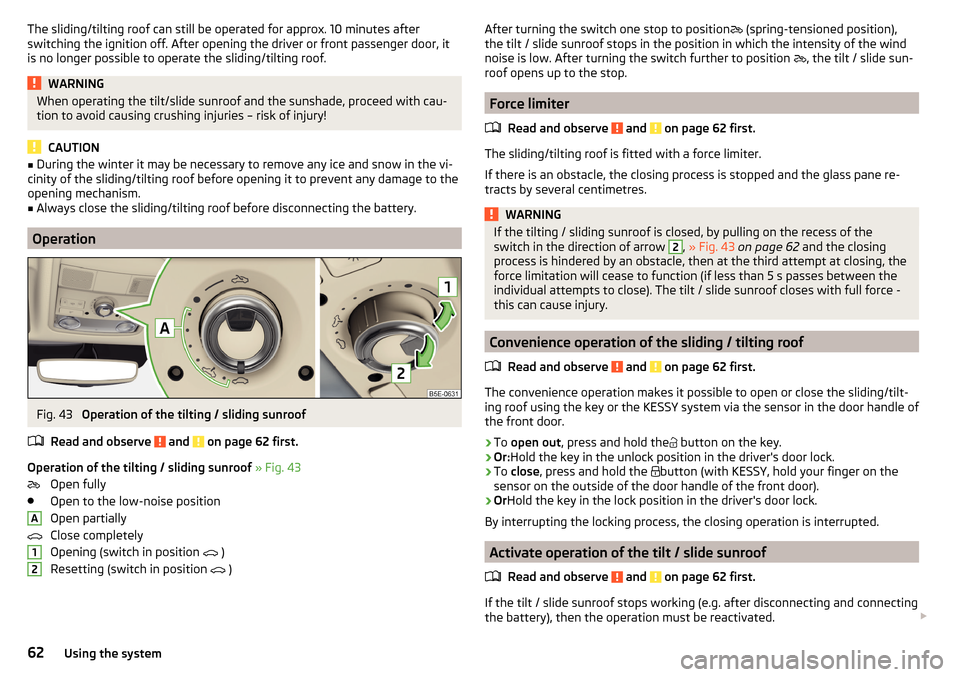
Operation
Fig. 43
Operation of the tilting / sliding sunroof
Read and observe
and on page 62 first.
Operation of the tilting / sliding sunroof » Fig. 43
Open fully
Open to the low-noise position
Open partially
Close completely
Opening (switch in position
)
Resetting (switch in position
)
A12After turning the switch one stop to position (spring-tensioned position),
the tilt / slide sunroof stops in the position in which the intensity of the wind
noise is low. After turning the switch further to position
, the tilt / slide sun-
roof opens up to the stop.
Force limiter
Read and observe
and on page 62 first.
The sliding/tilting roof is fitted with a force limiter.
If there is an obstacle, the closing process is stopped and the glass pane re-
tracts by several centimetres.
WARNINGIf the tilting / sliding sunroof is closed, by pulling on the recess of the
switch in the direction of arrow 2, » Fig. 43 on page 62 and the closing
process is hindered by an obstacle, then at the third attempt at closing, the
force limitation will cease to function (if less than 5 s passes between the
individual attempts to close). The tilt / slide sunroof closes with full force -
this can cause injury.
Convenience operation of the sliding / tilting roof
Read and observe
and on page 62 first.
The convenience operation makes it possible to open or close the sliding/tilt-
ing roof using the key or the KESSY system via the sensor in the door handle of
the front door.
›
To open out , press and hold the
button on the key.
›
Or:
Hold the key in the unlock position in the driver's door lock.
›
To close , press and hold the
button (with KESSY, hold your finger on the
sensor on the outside of the door handle of the front door).
›
Or Hold the key in the lock position in the driver's door lock.
By interrupting the locking process, the closing operation is interrupted.
Activate operation of the tilt / slide sunroof
Read and observe
and on page 62 first.
If the tilt / slide sunroof stops working (e.g. after disconnecting and connecting
the battery), then the operation must be reactivated.
62Using the system
Page 65 of 324

›Turn on the ignition and set the switch to position
» Fig. 43 on page 62 .›Press the switch on the recess E down and pull forwards.
The sliding/tilting roof opens/closes again after around 10 seconds.›
Release the lever.
Manually operated sunblind
Fig. 44
Operation of the sun blind
Read and observe and on page 62 first.
›
To open , pull the handle in the direction of arrow
A
» Fig. 44 .
›
To close , pull the handle in the direction of arrow
B
.
Electrically operated sunblind
Fig. 45
Button for operating the sun-
shade
Read and observe and on page 62 first.
Operation of the sunshade » Fig. 45
Open - by pressing (press again - sunshade stops moving)
Close - by pressing (press again - sunshade stops moving)
The sunshade can also be operated by pressing and holding the appropriate
button (starts movement of the sunshade) and releasing it when the sunshade
reaches the desired position.
Activating operation of the sunshade
Read and observe
and on page 62 first.
If the operation of sunshade is deactivated (e.g. after disconnecting and con-
necting the battery), then the operation will have to be activated.
›
Turn on the ignition and set the switch to position
» Fig. 45 on page 63 .
›
Press the button
and hold down.
The sunshade opens and closes again after around 10 seconds.
›
Release the button.
63Unlocking and opening
Page 70 of 324

NoteWhile driving with an accessory connected to the trailer socket (e.g. trailer,
bike carrier) only the equipment is illuminated by the fog light. The towing de-
vice must be installed at the factory or from the ŠKODA original accessories.
Fog lights with CORNER function
Read and observe
on page 64 first.
The CORNER function automatically switches on the fog lights on the respec-tive side of the vehicle (e.g. when cornering), if the following conditions are
met.
The turn signal is switched on or the front wheels are turned sharply 1)
.
The vehicle speed is below 40 km/h.
The low beam is switched on.
The fog lights are not switched on.
The two fog lights are switched on when you shift into the reverse gear.
COMING HOME / LEAVING HOME
Read and observe
on page 64 first.
The function COMING HOME ensures that the vehicle's environment is illumi-
nated after switching off the ignition and opening the driver's door.
The function LEAVING HOME ensures that the vehicle's environment is illumi-
nated after unlocking the vehicle with the radio remote control unit.
The function switches the light on only if there is poorer visibility and the light
switch is in the position .
The two functions can be activated/deactivated and set in the Infotainment
menu
→
→
Light
.
CAUTION
■
Poorer visibility is evaluated by a sensor mounted below the windscreen in
the holder of the rear-view mirror. Do not cover the sensor - the system can be
affected.■
If this option is always enabled, then the battery is heavily loaded.
Hazard warning light systemFig. 51
Button for hazard warning light
system
Read and observe on page 64 first.
›
To switch on/off , press the
button
» Fig. 51 .
When first switched on, the turn signal lights and the warning light buttons
all flash at the same time as the warning lights
in the instrument cluster.
The hazard warning light system can also be operated if the ignition is switch-
ed off.
If one of the airbags is deployed, the hazard warning light system will switch
on automatically.
The automatic activation of hazard warning lights can take place during a
heavy braking. After starting or accelerating the hazard warning system is au-
tomatically switched off.
When the hazard warning system is on and the indicator light is switched on
(e.g. when turning), the hazard warning lights are switched off temporarily and
only the turn signal flashes on the relevant side of the vehicle.
Parking light
Read and observe
on page 64 first.
The side light is provided for lighting of the parked vehicle.
Switching on the side light on one side
›
Switch off the ignition.
1)
If the two switch-on variants are conflicting (e.g. if the front wheels are turned to the left and the right
turn signal light is switched on), the turn signal light has the higher priority.
68Using the system
Page 71 of 324

›Press the control lever all the way into position
or until it stops » Fig. 47
on page 65 .
The parking light is illuminated on the relevant side of the vehicle.
Switching on the side light on both sides ›
Switch on the ignition and turn the light switch into position
» page 64 ,
the parking lights are turned on.
›
Switch off the ignition and lock the vehicle.
After pulling out the ignition key and opening the driver's door, an audible
warning sounds. After a few seconds or after closing the driver's door, the au-
dible warning is turned off.
CAUTION
■ Turning on the parking light means the battery is heavily loaded.■The parking lights may switch off automatically due to a low battery charge.
If the two-sided parking lights are switched on when the ignition is off, the
parking lights will not switch on automatically!
Entry space lighting
Read and observe
on page 64 first.
The lighting is positioned on the lower edge of the exterior mirror and illumi-nates the entry area of the front door.
The lighting switches on after unlocking or opening the vehicle door (depend-
ing on the lighting conditions).
The lighting switches off after around 30 seconds after closing the front door
or switching on the ignition.
Driving abroad
Read and observe
on page 64 first.
When driving in countries with opposing traffic system (traffic on the
left/right), your headlights may dazzle oncoming traffic. Therefore, it is neces-
sary to have the headlights adapted by a specialist garage.
You can set the xenon headlights yourself by activating travel mode in the In-
fotainment menu
→
→
Light
. In this mode, no automatic beam adjust-
ment is made ahead of the vehicle.
Interior lighting
Introduction
This chapter contains information on the following subjects:
interior light, front
69
Interior light, rear
70
The inner lighting also works if the ignition is switched off. With the ignition
switched off, the lights will automatically switch off after approximately after
10 minutes.
interior light, front
Fig. 52
Operation of the front light: Version 1 / version 2
Positions of the rocker switch
A
» Fig. 52
Switching on
Automatic operation (centre position)
Switching off
There is no icon available for the centre position (automatic operation) in Ver-
sion 2.
Switch on / off (by pressing the relevant switch
B
) » Fig. 52
Reading lamp left
Reading lamp right
69Lights and visibility
Page 72 of 324
Automatic operation - position
The system is turned on when any of the following is present.
▶ The vehicle is unlocked.
▶ One of the doors is opened.
▶ The ignition key is removed.
The system is turned off when any of the following is present.
▶ The vehicle is locked.
▶ The ignition is switched on.
▶ About 30 seconds after all the doors have been closed.
Interior light, rear
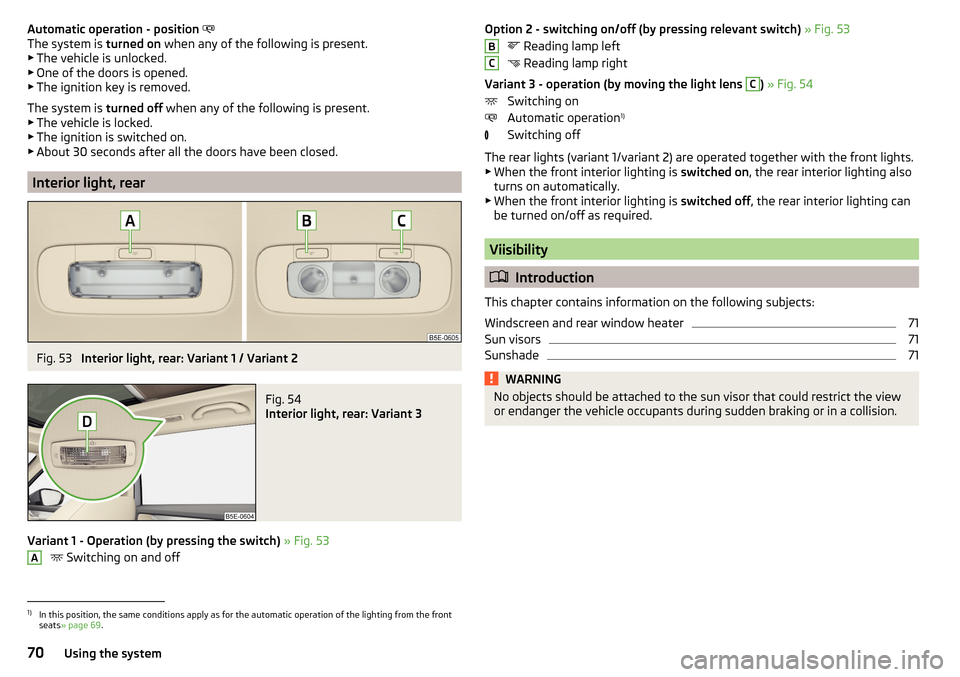
Fig. 53
Interior light, rear: Variant 1 / Variant 2
Fig. 54
Interior light, rear: Variant 3
Variant 1 - Operation (by pressing the switch) » Fig. 53
Switching on and off
AOption 2 - switching on/off (by pressing relevant switch)
» Fig. 53
Reading lamp left
Reading lamp right
Variant 3 - operation (by moving the light lens C
) » Fig. 54
Switching on
Automatic operation 1)
Switching off
The rear lights (variant 1/variant 2) are operated together with the front lights.
▶ When the front interior lighting is switched on, the rear interior lighting also
turns on automatically.
▶ When the front interior lighting is switched off, the rear interior lighting can
be turned on/off as required.
Viisibility
Introduction
This chapter contains information on the following subjects:
Windscreen and rear window heater
71
Sun visors
71
Sunshade
71WARNINGNo objects should be attached to the sun visor that could restrict the view
or endanger the vehicle occupants during sudden braking or in a collision.BC1)
In this position, the same conditions apply as for the automatic operation of the lighting from the front
seats » page 69 .
70Using the system