2016 SKODA OCTAVIA tow
[x] Cancel search: towPage 99 of 324
CAUTIONThe double sided floor covering can only be used in vehicles without the varia-
ble loading floor » page 100 - There is a risk of damage to the variable loading
floor.
Net on the luggage compartment cover
Fig. 110
Net on the luggage compartment
cover
Read and observe and on page 94 first.
The net at the bottom of the luggage compartment cover » Fig. 110 is provided
for transporting light and soft items.
The maximum permissible load of the net is 1.5 kg.
Luggage compartment cover
Fig. 111
Remove the luggage compartment cover
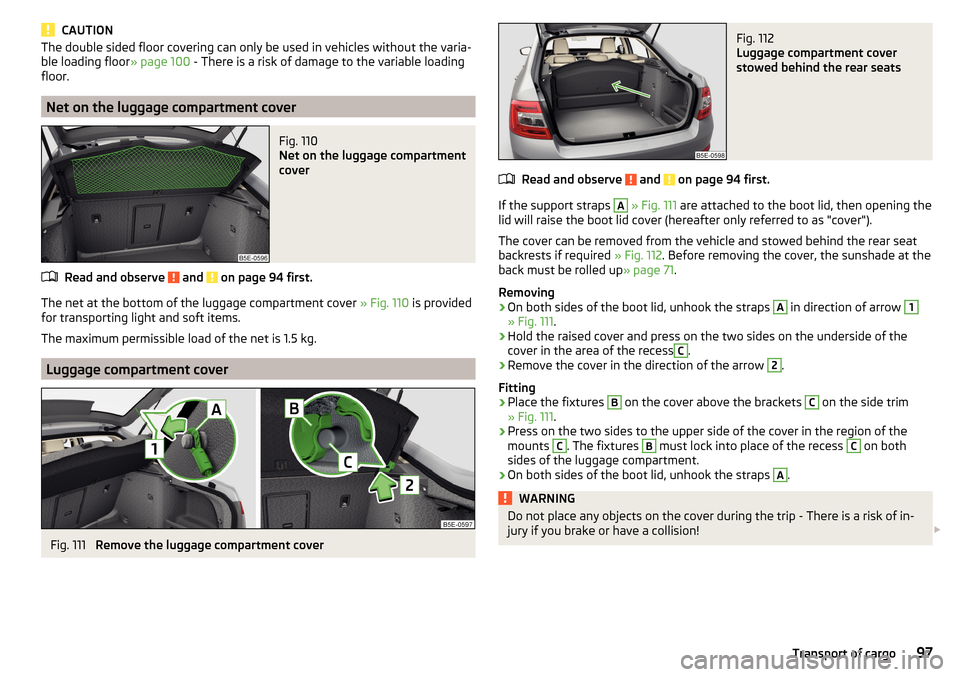
Fig. 112
Luggage compartment cover
stowed behind the rear seats
Read and observe and on page 94 first.
If the support straps
A
» Fig. 111 are attached to the boot lid, then opening the
lid will raise the boot lid cover (hereafter only referred to as "cover").
The cover can be removed from the vehicle and stowed behind the rear seat
backrests if required » Fig. 112. Before removing the cover, the sunshade at the
back must be rolled up » page 71.
Removing
›
On both sides of the boot lid, unhook the straps
A
in direction of arrow
1
» Fig. 111 .
›
Hold the raised cover and press on the two sides on the underside of the
cover in the area of the recess
C
.
›
Remove the cover in the direction of the arrow
2
.
Fitting
›
Place the fixtures
B
on the cover above the brackets
C
on the side trim
» Fig. 111 .
›
Press on the two sides to the upper side of the cover in the region of the
mounts
C
. The fixtures
B
must lock into place of the recess
C
on both
sides of the luggage compartment.
›
On both sides of the boot lid, unhook the straps
A
.
WARNINGDo not place any objects on the cover during the trip - There is a risk of in-
jury if you brake or have a collision! 97Transport of cargo
Page 100 of 324

CAUTION■Observe the following instructions to avoid canting and the subsequent
damage to the cover or the side trim. ■ The cover must be inserted properly and the load must not exceed the
height of the cover.
■ The cover must not be jammed in the surrounding seal of the luggage com-
partment lid when it is in the raised position. ■ There must be no object in the gap between the cover in the raise position
and the rear backrest.
Roll-up cover
Fig. 113
Roll-up cover: Pull out / roll up / remove
Fig. 114
Removing side covers / stowing foldable luggage compartment
cover
Read and observe and on page 94 first.
Extending
›
Grasp the cover on the handle
A
and pull it out in the direction of the arrow
1
until it clicks » Fig. 113.
Retracting
›
Push the cover in the area of handle
A
in the direction of the arrow
2
» Fig. 113 . The cover rolls up automatically. The rolled-up cover can now be
removed.
Removing/inserting
›
Press on the side of the cross bar in the direction of arrow
3
and remove
the cover in the arrow direction
4
» Fig. 113 .
Insertion takes place in reverse order.
Stowage
If the vehicle is equipped with the variable loading floor, then the removable
roll-up luggage compartment cover can be stowed in the recesses of the lug-
gage compartment side trim.
›
Fold the variable loading floor into the upper position » page 101.
›
Remove the side covers in the direction of arrows
1
» Fig. 114 .
›
Insert the front part of the roll-up luggage compartment cover under a por-
tion of the side trim
D
on the left.
›
Fold the rear part of the roll-up luggage compartment cover in the direction
of the arrow
2
.
›
Reinsert the lamp in the opposite direction to the arrow
1
.
›
Fold out the variable loading floor to the upper position.
WARNINGNo objects should be placed on the roll-up cover - there is a risk of damage
to the cover and a risk of injury in the event of a sudden stop or a vehicle
collision!
Note
If you want to stow the roll-up luggage compartment cover and the roof rack
at the same time , then it is necessary that the rear part of the roll-up luggage
compartment is covering the rear roof rack.98Using the system
Page 101 of 324

Storage compartment with cargo elementFig. 115
Remove storage compartment
Fig. 116
Remove cargo element / Load fastening example
Read and observe
and on page 94 first.
The storage compartment with cargo element may be located on either of the
two sides of the luggage compartment, depending on the equipment variant.
The space behind the storage compartment is designed for storing small ob-
jects with a maximum total weight of 2.5 kg.
The cargo element is designed for attaching and securing objects with a maxi-
mum total weight of 8 kg.
Storage compartment
›
Remove the storage compartment cover in the direction of the ar-
row » Fig. 115 . Insertion takes place in reverse order.
Cargoelement
›
Before use, remove theCargoelement in the direction of arrow » Fig. 116 -
.
›
Use thecargoelements to secure the load as close as possible to the rear
seats » Fig. 116
.
›After use, stow the cargoelements in their original position.
Storage compartments under the floor covering
Fig. 117
Lift floor covering/storage compartments under the floor cover-
ing
Read and observe
and on page 94 first.
For vehicles that are not equipped with an emergency wheel located under theflooring of the luggage compartment
B
» Fig. 117 .
Every storage compartment
B
is designed for storing small objects of up to 15
kg. in weight in total.
Use of the storage compartments
›
Dividing the luggage compartment with variable loading floor » page 102.
›
Lift the floor covering in the direction of arrow » Fig. 117 and hook into hook
A
on the upper edge of the variable loading floor.
›
Stow the cargo in the storage compartments.
›
Unhook hook
A
and fold back the flooring against the direction of the arrow
(fold back the variable loading floor to the initial position if necessary).
When transporting tall objects in the compartments, the hook
A
must be
hooked onto the upper edge of the variable loading floor.
CAUTION
Before closing the boot lid, check that the cargo transported in the storage
compartments does not strike against the luggage compartment cover - there
is a risk of damage to the lid.99Transport of cargo
Page 103 of 324

Positions of the variable loading floorFig. 119
Set variable loading floor to the upper position / variable loading
floor in the upper position
Fig. 120
Set variable loading floor to the lower position / variable loading
floor in the lower position
The variable loading floor can be set to the upper or lower position.
Set to the upper position
›
Lift the variable loading floor by the handle
A
» Fig. 119 about 20 cm high and
pull towards you.
›
Lift the loading floor to the height of the roll-up luggage compartment cover
in the direction of arrow
1
until you hear the clicking sound and press for-
ward.
The space below the variable loading floor can be used for stowing objects
such as the removed roll-up luggage compartment cover » page 98, the roof
cross bars » page 103 etc.
The maximum permissible load of the variable loading floor is 75 kg. For the
transport of heavy loads, adjust the variable loading floor in the lower position
» Fig. 120 .
Set into the lower position›
Check that the area below the variable loading floor is empty.
›
Lift the variable loading floor by the handle
A
» Fig. 120 over the loading edge
in the direction of arrow
2
.
›
Pull the loading floor towards you in the direction of arrow
3
until it sinks to
the bottom position, and push forward.
Fold together / fold out the variable loading floor
Fig. 121
Fold up variable loading floor / folded variable cargo floor in the
upper position
›
To fold together , hold the variable loading floor on the handle
A
and lift in
the direction of arrow
1
» Fig. 121 .
›
Fold up the variable loading floor by moving it in the direction of the arrow
2
.
Folding out takes place in reverse order.
The variable loading floor is folded together / out in the same way in the upper
and lower position.
101Transport of cargo
Page 105 of 324

›On the other side, press on the crossbar in the direction of the arrow and
hook it into the appropriate receptacle D.›
Make sure that the crossbar is firmly seated in the two mountings
D
.
›
Fold back part
A
of the roll-up luggage compartment cover in the opposite
direction of the arrow » Fig. 123.
Using the net partition behind the rear seats
›
Fold out part
A
of the roll-up luggage compartment cover in the direction of
arrow » Fig. 123 .
›
Press on the crossbar and remove it from the receptacles
D
» Fig. 124 , first
on one side, then on the other side.
›
The crossbar
C
Hold in such a way that the net partition can slowly roll up
without being damaged.
›
Fold back part
A
of the roll-up luggage compartment cover in the opposite
direction of the arrow » Fig. 123.
Pull out and secure the net partition behind the front seats
The process is analogous to that for behind the rear seats. Before pulling out
the net partition, the rear seat backs are to be folded forwards. After rolling up
the net partition into the housing, the rear seat backs are folded back
» page 79 .
CAUTION
If the net partition blocks when pulling it out, push the release lever B in the
direction of the arrow » Fig. 123.
Removing and installing the net partition housing
Fig. 125
Removing the net partition
housing
›
To remove , fold forwarded the rear seat backrests and open the rear right
door.
›
Push the housing
A
in the direction of the arrow
1
and remove it from the
mountings in the direction of the arrow
2
» Fig. 125 .
›To
install , insert the recesses on the housing A into the mountings on the
rear seat backrests and push the housing against the arrow 1 up to the
stop.›
Fold the rear seat backrests to their original position.
Transport on the roof rack
Fig. 126
Attachment points
Fig. 127
Remove the side panels of the luggage compartment/stow the
roof rack
The attachment points
A
and
B
are located on both sides of the vehicle
» Fig. 126 .
The mounting and dismounting of the basic carrier is carried out according to
the instructions provided.
Roof load
The maximum permitted weight of the load incl. carriers is 75 kg.
103Transport of cargo
Page 106 of 324

Stowing the roof racks
With vehicles have the variable loading floor, then the roof racks can be stow-
ed in the recesses of the luggage compartment side trim.›
Fold the variable loading floor into the upper position » page 101.
›
Remove the side panels of the luggage compartment in the direction of ar-
rows
1
» Fig. 127 .
›
Remove the key from the roof rack » and stow in the recess
C
.
›
Insert the front roof rack
A
into the front recesses of the side panel and the
rear roof rack
B
into the back recesses of the side trim.
›
Replace the side trims of the luggage compartment in the opposite direction
of the arrow
1
.
›
Fold out the variable loading floor to the upper position » page 101.
WARNINGThe following instructions must be observed to aid road safety when trans-
porting cargo on the roof rack.■
Always distribute the load on the roof rack evenly and secure properly
with suitable lashing straps or tensioning straps.
■
When transporting heavy objects or objects which take up a large area on
the roof rack system, the handling of the car may change as a result of the
displacement of the centre of gravity. The style of driving and speed must
therefore be adapted to the current circumstances.
■
The permissible roof load, permissible axle loads and gross permissible
weight of the vehicle must not be exceeded under any circumstances – risk
of accident!
CAUTION
■ Before stowing the roof rack, the key must be removed from the carrier -
otherwise there is a risk of key corruption.■
If you want to stow the roof rack and the roll-up luggage compartment cover
at the same time , then it is necessary that the rear part of the roll-up luggage
compartment is covering the rear roof rack.
CAUTION
■
Make sure that the sliding / tilting roof or the boot lid does not collide with
the roof load when opened.■
Ensure the roof aerial is not impaired by the load being transported.
Note
We recommend that you use a roof rack from ŠKODA Original Accessories.Heating and ventilation
Heating, manual air conditioning system, Climatronic
Introduction
This chapter contains information on the following subjects:
Heating and manual air conditioning
105
Climatronic (automatic air conditioning)
105
Operate Climatronic in Infotainment
106
Climatronic - automatic operation
107
Air distribution control
107
Air outlet vents
108
The heater heats and ventilates the vehicle interior. The air conditioning sys-
tem also cools and dehumidifies the vehicle interior.
The heating effect is dependent upon the coolant temperature, thus full heat
output only occurs when the engine has reached its operating temperature.
The cooling system works under the following conditions. The cooling system is switched on.
The engine is running.
The outside temperature is above 2 °C.
The blower is switched on.
When the cooling system is switched on, it prevents misting of the windscreen
and windows.
It is possible to boost the effectiveness of the cooling system by briefly acti-
vating the air recirculation system » page 107.
Health protection
To reduce health risks (e.g. common colds), the following instructions for the
use of the cooling system are to be observed. ▶ The difference between the outside temperature and the inside temperature
should not be greater than 5 °C.
▶ The cooling system should be turned off about 10 minutes before the end of
the journey.
▶ Once a year, a disinfection of the air conditioner must be carried out by a
specialist company.
104Using the system
Page 125 of 324

■Touchscreen tone - Switch on/off audible tone when touching the screen
■No navigation sound during call
- Switching on / off the nav. announcements dur-
ing a telephone call (not applicable to Infotainment Bolero)
Display settings
›
Press the button, then tap on the function surface
Tap →
Screen
.
■
Switch off screen (in 10 seconds)
- Enable / disable the automatic power off func-
tion
■
Brightness:
- Adjusts the brightness of the screen
■
Touchscreen tone
- Switch on/off audible tone when touching the screen
■
Animation when finger near screen
- Turn the proximity sensors on/off (When the
function is on, e.g. Navigation will be shown in the main menu when moving a
finger towards the bottom bar with the function surfaces on the screen)
■
Show clock in standby mode
- Time and date displayed on the screen when the
ignition is switched on and Infotainment is switched off
Time and date settings
›
Press the button, then tap on the function surface
→
Time and date
.
■
Clock time source:
- Setting the time source: Manual / GPS (applies to Infotain-
ment Columbus, Amundsen)
■
Time:
- Time settings
■
Summer time
- Switches the summer time setting on/off (applies to Infotain-
ment Columbus, Amundsen)
■
Automatic summertime
- Turn on / off the automatic switch to daylight saving
time
■
Time zone:
- Choice of time zone
■
Time format:
- Specify the time format
■
Date:
- Date settings
■
Date format:
- Setting the date format
Setting the Infotainment language
›
Press the button, then tap on the function surface
→
Language
.
›
Select the Infotainment language.
In some languages, after selecting the function surface
Female
and
Male
are dis-
played for the choice of voice prompts for Infotainment.
Note■ When a language is selected which does not support voice control, Infotain-
ment will indicate this with a message on the screen.■
The messages are generated by Infotainment. Flawless clarity (e.g. road or
city name) cannot always be guaranteed.
Additional keypad language settings
›
Press the button, then tap on the function surface
→
Additional keypadlanguages
.
In this menu, a keyboard language set can be added to allow the entering of
characters other than those in the currently selected language (function sur-
face ).
Unit settings
›
Press the button, then tap on the function surface
→
Units
.
■
Distance:
- Distance units
■
Speed:
- Speed units
■
Temperature:
- Temperature units
■
Volume:
- Volume units
■
Consumption:
- Consumption units
■
CNG consump.:
- CNG consumption units
■
Pressure:
- Pressure units for tire pressure
Setting data transfer
An active data transfer allows data transfer between Infotainment and the ex-
ternal device (e.g. MirrorLink ®
application) or the operation of some Infotain-
ment functions using the application of the external device (e.g. ŠKODA Media
Command).
›
Press the button, then tap on the function surface
→
Mobile device datatransfer
.
■
Activate data transfer for ŠKODA apps
- Turning data transfer on and off
■
Use apps to operate::
- Setting Infotainment operation via the applications of the
external device (applies to Infotainment Columbus)
■
Deactivate
- Deactivation of Infotainment operation via an external device
■
Confirm
- Infotainment operation with required confirmation
■
Allow
- Infotainment operation without required confirmation
123Infotainment settings - Columbus, Amundsen, Bolero
Page 179 of 324

Switching on / off of the split screen display » page 171
Switching on/ off of the selected POI categories display » page 176, Tap
map point
If the map scale of the 2D Map or 3D Map is greater than 10 km (5 miles), then
the map is automatically displayed as 2D and aligned in the direction of north.
If the scale is increased beyond this value, then the map is switched back to
the original representation.
Map scale
Fig. 213
Function surfaces for the map
scale change
It is possible to change the map scale manually or to turn on the automatic
change of scale.
Symbols of the scale function surfaces
In the map area
A
» Fig. 213 the following context-dependent function surfa-
ces and information is displayed.
Current elevationMap view in reduced scaleSize of the manually set map scaleSize of the automatically set map scaleSwitch on/off the automatic change of scale
Manual change of scale
Map scale can be changed in the following ways.
▶ Turning the control knob Turn.
▶ Touching the screen with two fingers and pulling them apart or closing them
together.
Enabling automatic scaling
▶ In the Navigation main menu, tap on the function surface
→
.
DETap on the function surface
is highlighted in green.
The automatic scale is only active as long as the map is centred on the vehicle position (the function surface
or. is hidden).
If the automatic scale is active, the map scale will change automatically de-
pending on the type of roads travelled (motorway - smaller map scale / town larger map scale) and from the manoeuvre to be carried out.
Turn off the automatic change of scale
▶ In the Navigation main menu, tap on the function surface
→
.
Tap on the function surface
is highlighted in white.
The turning off occurs likewise when the map is moved or the map scale is
changed manually.
Map view in reduced scale ▶ In the Navigation main menu, tap on the function surface
→
or.
→
.
The map scale is reduced for a few seconds and then restored.
Change map orientation
Fig. 214
Change the map orientation
Changing map orientation is possible under the following conditions. The map is in the 2D display.
The map is centred (the function surface /
is hidden).
The map scale is max. 10 km away.
With a larger map scale than 10 km, the map is automatically oriented towards
north.
A change of map orientation is only possible in the 2D display when the map is
centred on the vehicle position (the function surface or.
is hidden
» page 178 , Map alignment ).
177Navigation