2016 SKODA KODIAQ sport mode
[x] Cancel search: sport modePage 44 of 344

Display of a low temperatureRead and observe
on page 34 first.
illuminates – the outside temperature is below +4 °C.
WARNINGEven at temperatures around +4 °C, black ice may still be on the road sur-
face! Do not only rely upon the information given on the outside tempera-
ture display that there is no ice on the road.
Water in the fuel filter (diesel engine)
Read and observe
on page 34 first.
The fuel filter with water separator, filters out dirt and water from the fuel.
If too much water is present in the separator, the following information ap-
pears on the instrument cluster display.
The warning light is only shown in the MAXI DOTdisplay.
Illumi-
nates
Water in fuel filter. Log book!WATER IN FUEL FILTER
▶ You can drive on, exercising appropriate caution. Seek assistance from a spe-
cialist garage immediately.
Adaptive Cruise Control (ACC)
Read and observe
on page 34 first.
The warning lights
indicate the condition of the ACC system
» page 243 .
Front Assist
Read and observe
on page 34 first.
The warning light is only shown in the MAXI DOTdisplay.
illuminates – the safe distance to the vehicle in front is below the mini-
mum.
Information on the Front Assist system » page 248.
Front assist
Read and observe
on page 34 first.
Illuminates
▶ Front Assist has recognised the risk of a collision or automatically triggered
an emergency braking manoeuvre » page 248.
▶ An automatic deactivation of Front Assist took place with ESC Sport activa-
ted » page 216 and with ASR activated » page 217.
▶ Front Assist is currently not available » page 251.
with the lettering
illuminates- Front Assist is deactivated. » page 250
Economy mode
Read and observe
on page 34 first.
illuminates - the vehicle is in economy mode due to the intervention of the
active cylinder management or due to the neutral position of the automatic
gearbox.
OFF ROAD mode
Read and observe
on page 34 first.
illuminates - the OFF ROAD mode is enabled.
illuminates - the hill descent assistant is activated.
flashes (stronger) – the hill descent assistant is engaged at the moment.
Adaptive Chassis Control (DCC)
Read and observe
on page 34 first.
The warning light is only shown in the MAXI DOTdisplay.
illuminates – there is a DCC fault.
▶ You can drive on, exercising appropriate caution. Seek assistance from a spe-
cialist garage immediately.
42Operation
Page 111 of 344

WARNINGFor road safety when transporting cargo on the roof rack, observe the fol-
lowing instructions.■
Always distribute the load on the roof rack evenly and secure properly us-
ing suitable lashing straps or tensioning straps.
■
When transporting heavy objects or objects which take up a large area on
the roof rack system, the handling of the car may change as a result of the
displacement of the centre of gravity. The style of driving and speed must
therefore be adapted to the current circumstances.
■
The permissible roof load, permissible axle loads and permissible total ve-
hicle weight must not be exceeded under any circumstances – risk of acci-
dent!
CAUTION
■ Make sure that the sliding / tilting roof or the boot lid does not collide with
the roof load when opened.■
Ensure the roof aerial is not impaired by the load being transported.
Note
We recommend that you use a roof rack from ŠKODA Original Accessories.Heating and ventilation
Heating, manual air conditioning system, Climatronic
Introduction
This chapter contains information on the following subjects:
Heating and manual air conditioning
110
Climatronic (automatic air conditioning)
110
Operate Climatronic in Infotainment
112
Climatronic - automatic operation
112
Air distribution control
113
Air outlet vents
113
The heating heats and ventilates the vehicle interior. The air conditioning sys-
tem also cools and dehumidifies the vehicle interior.
The heating effect is dependent upon the coolant temperature, thus full heat
output only occurs when the engine has reached its operating temperature.
The cooling system works under the following conditions. The cooling system is switched on.
The engine is running.
The outside temperature is below 2 ° C.
The blower is switched on.
Fogging is prevented when the cooling system is switched on.
To increase the efficiency of the cooling system, recirculation mode can be
swtiched on briefly » page 113.
Health protection
To reduce health risks (e.g. common colds), the following instructions for the
use of the cooling system are to be observed. ▶ The difference between the indoor temperature and the outdoor air temper-
ature should not be greater than about 5 ° C.
▶ The cooling system should be turned off about 10 minutes before the end of
the journey.
▶ Once a year, the air conditioning should be disinfected by a specialist garage.
109Heating and ventilation
Page 139 of 344

■Show POIs - Switch on/off the display of POIs
■Select categories for POIs
- Selection of the displayed category POIs
■
Show brands for POIs
- Switch on/off the company logos available for the POIs
shown
■
Traffic flow settings
- Setting the display of a traffic obstruction received from
online traffic ■
Display free-moving traffic
- Enable / disable the display of routes with free-
moving transport
■
See jam
- Enable / disable the display of routes with heavy traffic
■
Display traffic disruptions
- Enable / disable the display of routes with a traffic
incident
Manage memory
›
In the Navigation main menu, tap the function surface
→
Manage memory
.
■
Sort Contacts:
- Setting the arrangement of the phonebook
■
By surname
- Sorting by the contact surname
■
By first name
- Sorting by the contact first name
■
Define home address
- Enter the home address
■
Delete My POIs
- Deleting own POI categories (Personal POI)
■
Update "My POIs" (SD/USB)
- Import / update your own POI categories (Personal
POI)
■
Retrieve "My POIs" (online)
- Online import / update of the user profile on the
website ŠKODA Connect Portal started own POI categories
■
Import destinations (SD/USB)
- Import destinations in vCard format
■
Delete user data
- Delete user data (by pressing the function surface
Delete
and
confirm the deletion) ■
Last destinations
- Delete the last destinations
■
Dest. memory
- Delete the stored destinations
■
Online dests
- Delete the stored online dests
■
Routes
- Delete saved routes
■
My points of interest (Personal POI)
- Delete the custom POIs
■
Entered cities
- Delete the history of places already entered via the address
■
Home address
- Delete the stored home address
■
Flagged destination
- Delete the flagged destination
■
Waypoints
- Delete item in the Waypoint mode menu (applies to Infotain-
ment Columbus)
■
Most frequent routes
- Delete the most travelled routes
nav. announcements›
In the Navigation main menu, tap the function surface
→
Nav. announce-ments
.
■
Volume
- Volume control of the nav. announcements
■
Entertainment fading (nav. announce.)
- Setting the fading of the audio volume (e.g.
radio volume.) with nav. announcements
■
Nav. announcements:
- Setting the playback method of nav. announcements
■
Comprehensive
- All nav. announcements
■
Brief
- Short nav. announcements
■
Congestion only
- Only nav. announcements when a route is changed
■
No navigation sound during call
- Activate/ deactivate non-playback of nav. an-
nouncements during a telephone call
■
Note: “My POIs”
- Turn on/off an audible indication when approaching a custom
POI (if supported by the imported custom POI) (applies to Infotainment Co-
lumbus)
Top speeds
›
In the Navigation main menu, tap the function surface
→
Top speeds
.
The maximum speed limits for the current country are displayed.
When
Note: national border crossed
» page 138 , Advanced settings function is
turned on, the country-specific speed limits are displayed when crossing inter-
national borders.
Fuel options
›
In the Navigation main menu, tap the function surface
→
Fuel options
.
■
Select preferred fuel station
- Select your preferred fuel station brand (the selec-
ted station brand will be displayed in the first three positions of the list)
■
Fuel warning
-Turn on- / Off the display of a warning message with the option
to visit the nearest petrol station when the fuel level reaches the reserve
area
Version information
›
In the Navigation main menu, tap the function surface
Tap
→
Version infor-mation
.
137Infotainment settings - Columbus, Amundsen, Bolero
Page 212 of 344

WARNING (Continued)■If the vehicle stalls, with engine running, in the D, S , R or Tiptronic mode,
then the vehicle must be prevented from rolling away by means of the
brake pedal, parking brake or using the Auto Hold function. Even when the
engine is idling, the power transmission is never completely interrupted –
the vehicle creeps.■
When leaving the vehicle, the selector lever must always be set to P .
Otherwise, the vehicle could start to move - risk of accident.
CAUTION
■ If you want to move the selector lever from position N to position D / S whilst
driving, the engine must be running at idling speed.■
When stopping on a slope, never try to hold the vehicle using the accelerator
pedal – this may lead to gear damage.
Select selector lever position
Fig. 259
Selector lever settings / display
Read and observe and on page 209 first.
Move the selector lever to change to the following positions » Fig. 259. In
some positions you have to push the locking button » page 210, Selector lever
lock .
When the ignition is switched on, the gearbox mode and the currently selected
gear are indicated in the display » Fig. 259.
Park - the position can be set only when the vehicle is at a standstill.
The drive wheels are mechanically locked.
Reverse gear - the position can be set only when the vehicle is at a stand-
still and the engine is at idling speed.
Neutral (idle position) - the power transmission to the drive wheels is in-
terrupted.
PRNForward mode / sports programme - the gear change takes place in the
position S at higher engine speeds than in mode D
(Sprung position) - choice between positions D and S
If the Sport driving mode is selected with the engine running » page 251, Se-
lect the driving mode (Driving Mode Selection) , the transmission is automati-
cally set in the S mode.
E – Economical driving mode
If the driving mode Eco or Individual (engine - Eco) » page 251 is selected and
the selection lever is in the setting D/S, the transmission is automatically set
to mode E. This mode cannot be selected with the selector lever.
The forwards mode is switched up or down automatically in mode E at lower
engine speeds than in mode D.
Selector lever lock
Fig. 260
Shift lock button
Read and observe
and on page 209 first.
The selector lever is locked in mode P and N to prevent that the forward driv-
ing is selected accidentally, thereby setting the vehicle in motion.
The selector lever is locked only when the vehicle is stationary and at speeds
up to 5 km/h.
The selector lever lock is indicated by the illumination of the warning light.
Disengage selector lever from P mode or N
›
Press the brake pedal and the lock button at the same time in the direction
of
1
» Fig. 260
-
.
D/S210Driving
Page 253 of 344

MalfunctionsRead and observe
and on page 248 first.
If, for some unknown reason, the system is not available, an appropriate mes-
sage appears in the display of the instrument cluster.
Sensor covered / dirty
If the sensor cover or the sensor is dirty or covered, a message appears on the
instrument cluster display stating there is no sensor view. Clean the sensor
cover or remove the obstacles » Fig. 264 on page 215 .
If there is no sensor view in the winter, the snow on the sensor under the cov-
er could be the reason. The system is functional again after the snow melts
away from the sensor.
System unavailable
If the system is currently unavailable, a message concerning the unavailability
appears. Stop the vehicle, switch off the engine and then start it again. If the
system still is not available, seek the assistance of a specialist garage.
Select the driving mode (Driving Mode Selection)
Introduction
This chapter contains information on the following subjects:
Adaptive Chassis Control (DCC)
251
Mode
Eco251
Mode
Comfort252
Mode
normal252
Mode
Sports252
mode
individual252
Mode
Snow252
Mode selection and Infotainment display
252
Individual mode
settings253
By selecting the driving mode, the driving behaviour can be adapted to the de-
sired mode of operation.
The following modes
Eco
,
Comfort
,
Normal
,
Sport
,
Individual
and
Snow
are available.
The mode
Comfort
is only available on vehicles with adaptive chassis control
(DCC).
WARNINGPlease take note of the general points relating to the use of assistance
systems » page 215, in section Introduction .
Adaptive Chassis Control (DCC)
Read and observe
on page 251 first.
The adaptive chassis control (following known as DCC) provides the ability toadjust the shock characteristics for the sporty, normal or comfortable driving
when the corresponding control mode is selected.
The DCC evaluates steering response and road conditions while driving contin-
uously and adjusts the suspension behaviour within the selected driving mode
accordingly.
Mode
Eco
Read and observe on page 251 first.
This mode is suitable for a relaxed style of driving and helps to save fuel.
Selecting this mode primarily affects the function of the following systems.
Drive
Vehicle acceleration is more relaxed than in
Normal
mode.
The recommended gear is controlled such to achieve the lowest possible fuel
consumption » page 44.
If the START-STOP system is deactivated manually » page 205, this will be au-
tomatically activated.
The automatic gearbox is set automatically to mode E » page 210 .
Adaptive Cruise Control (ACC)
Acceleration occurs more relaxed than in
Normal
» page 243 mode with distance
control.
Headlights with LED lamps
The system is in economy mode » page 68. The headlamps are in basic setting
and do not adapt to the direction of travel.
251Assist systems
Page 254 of 344

Air conditioning (Climatronic)
The air conditioning is controlled so as to save energy. For this reason, for ex-
ample, it may take longer to reach the desired interior temperature in modeNormal
.
Note
■ If a trailer or other accessory is to be connected to the trailer socket, driving
mode Eco
is not available.■
The maximum vehicle acceleration (kick down function) is possible also in
driving mode
Eco
.
Mode
Comfort
Read and observe on page 251 first.
This mode is suitable for driving on roads with poorer surface or for long mo- torway journeys.
Mode
normal
Read and observe on page 251 first.
This mode is suitable for a conventional driving.
Mode
Sports
Read and observe on page 251 first.
This mode is suitable for a sporty driving.
Selecting this mode primarily affects the function of the following systems.
DCC
The DCC adjusts the chassis for the sporty driving style.
Steering
The power steering is reduced slightly, i.e., the driver needs to exert more
force for steering .
Drive
The vehicle acceleration is more dynamic than in
Normal
mode.
Adaptive Cruise Control (ACC)
The acceleration is quicker than in
Normal
mode with distance control
» page 243 .
Headlights with LED lamps
The headlamps adapt to the driving style more dynamically than in mode Nor-mal
» page 68 .
ProActive passenger protection
The first level of protection is deactivated » page 253.
mode
individual
Read and observe on page 251 first.
In the mode
Individual
each system can be set independently » page 253, Indi-
vidual mode
settings
.
Mode
Snow
Read and observe on page 251 first.
The mode is suitable for driving on slippery or snow-covered roads.
The driving profile
Snow
does not allow the automatic transmission to be set to
S mode.
Mode selection and Infotainment display
Fig. 312
Button for selecting the driving mode / Display in Infotainment
screen
Read and observe
on page 251 first.
Procedure for the selection of the driving mode
›
Press the
» Fig. 312 button.
In Infotainment screen, a running mode menu » Fig. 312 appears.
252Driving
Page 255 of 344
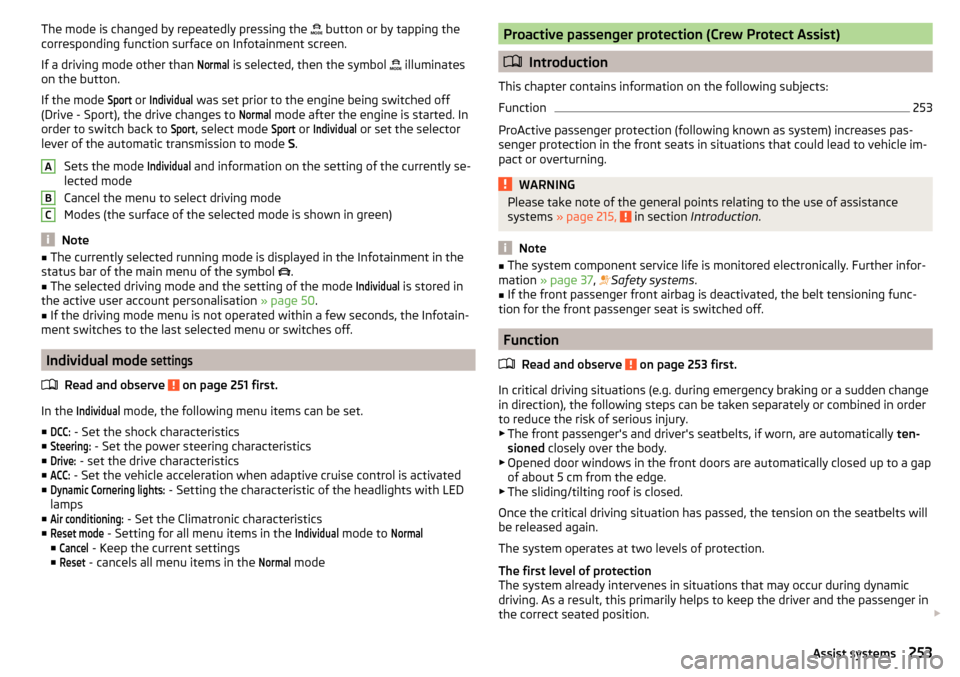
The mode is changed by repeatedly pressing the button or by tapping the
corresponding function surface on Infotainment screen.
If a driving mode other than Normal
is selected, then the symbol
illuminates
on the button.
If the mode
Sport
or
Individual
was set prior to the engine being switched off
(Drive - Sport), the drive changes to
Normal
mode after the engine is started. In
order to switch back to
Sport
, select mode
Sport
or
Individual
or set the selector
lever of the automatic transmission to mode S.
Sets the mode
Individual
and information on the setting of the currently se-
lected mode
Cancel the menu to select driving mode
Modes (the surface of the selected mode is shown in green)
Note
■ The currently selected running mode is displayed in the Infotainment in the
status bar of the main menu of the symbol .■
The selected driving mode and the setting of the mode
Individual
is stored in
the active user account personalisation » page 50.
■
If the driving mode menu is not operated within a few seconds, the Infotain-
ment switches to the last selected menu or switches off.
Individual mode
settings
Read and observe on page 251 first.
In the
Individual
mode, the following menu items can be set.
■
DCC:
- Set the shock characteristics
■
Steering:
- Set the power steering characteristics
■
Drive:
- set the drive characteristics
■
ACC:
- Set the vehicle acceleration when adaptive cruise control is activated
■
Dynamic Cornering lights:
- Setting the characteristic of the headlights with LED
lamps
■
Air conditioning:
- Set the Climatronic characteristics
■
Reset mode
- Setting for all menu items in the
Individual
mode to
Normal
■
Cancel
- Keep the current settings
■
Reset
- cancels all menu items in the
Normal
mode
ABCProactive passenger protection (Crew Protect Assist)
Introduction
This chapter contains information on the following subjects:
Function
253
ProActive passenger protection (following known as system) increases pas-
senger protection in the front seats in situations that could lead to vehicle im-
pact or overturning.
WARNINGPlease take note of the general points relating to the use of assistance
systems » page 215, in section Introduction .
Note
■
The system component service life is monitored electronically. Further infor-
mation » page 37 , Safety systems .■
If the front passenger front airbag is deactivated, the belt tensioning func-
tion for the front passenger seat is switched off.
Function
Read and observe
on page 253 first.
In critical driving situations (e.g. during emergency braking or a sudden changein direction), the following steps can be taken separately or combined in order
to reduce the risk of serious injury.
▶ The front passenger's and driver's seatbelts, if worn, are automatically ten-
sioned closely over the body.
▶ Opened door windows in the front doors are automatically closed up to a gap
of about 5 cm from the edge.
▶ The sliding/tilting roof is closed.
Once the critical driving situation has passed, the tension on the seatbelts will
be released again.
The system operates at two levels of protection.
The first level of protection
The system already intervenes in situations that may occur during dynamic
driving. As a result, this primarily helps to keep the driver and the passenger in
the correct seated position.
253Assist systems
Page 256 of 344

The first protection level can be deactivated in one of the following ways.
▶ in the menu Infotainment
→ →
Driver assistance
.
▶ Deactivating the TCS » page 217.
▶ By selecting the driving mode
Sport
» page 252 .
Provided that the driving mode
Sport
is not selected, the system is activated
over the two levels of protection after switching the ignition off and on again.
The second level of protection
The system intervenes only if the situation is evaluated as critical, such as
when panic braking at high speeds.
This level of protection cannot be deactivated.
Vehicles with the Front Assist system
Using this information, a system intervention may also occur when there is the danger of a collision with an obstacle detected in front of the vehicle.
Spurhalteassistent (Lane Assist)
Introduction
Fig. 313
Sensor for Lane Assist
This chapter contains information on the following subjects:
Settings in Infotainment
254
Operation
255
Activation / deactivation
256
Malfunctions
256
The lane departure warning (following known as system) helps to keep the ve-
hicle between the boundary lines of a lane.
The system recognises the boundary lines of the lane using a sensor » Fig. 313.
When the vehicle approaches a detected line between lanes, the system
makes a light movement of the steering wheel in the opposite direction to the
boundary line. This corrective steering intervention can be manually overrid-
den at any time.WARNING■ Please take note of the general points relating to the use of assistance
systems » page 215, in section Introduction .■
Lane Assist can help you keep the vehicle within the lane. However, it
does not steer the vehicle for you. The driver retains full responsibility for
steering at all times.
■
Some objects or markings on the road can be recognised as the boundary
lines - an erroneous steering intervention may be the result.
WARNINGThe system may not be able to recognise the boundary line, or recognise it
incorrectly, for example, in the following situations.■
When visibility is poor, (e.g. fog, heavy rain, thick snowfall).
■
When driving in “sharp” bends.
■
The sensor is blinded by the sun or oncoming traffic.
■
The field of view of the sensor is limited by an obstacle or a preceding ve-
hicle.
CAUTION
Do not attach any stickers or similar objects in front of the sensor on the wind-
screen to avoid impairing the functions of the system.
Note
■ The system is designed for driving on motorways and roads with adequate
longitudinal markings.■
The system can detect both continuous and broken lines.
Settings in Infotainment
Read and observe
and on page 254 first.
›
Press the button, then tap on the function surface
→
Driver assistance
.
■ Lane Assist (lane departure warning sys.) - Settings for Lane Assist
■
Active
- Activate/deactivate the assistant
■
Adaptive lane guidance
- Activate/deactivate adaptive lane guidance
254Driving